
BM900AL - BM900BKC - Microwave Oven GORENJE - Free user manual and instructions
Find the device manual for free BM900AL - BM900BKC GORENJE in PDF.



| Product type | Bread maker |
| Model | BM900AL / BM900BKC |
| Brand | Gorenje |
| Power supply | 230 V ~ 50 Hz |
| Programs | 12 programs (Basic, Whole Wheat, French, Quick, Sweet, Cake, Jam, Dough, Ultra fast, Bake, Dessert, Homemade) |
| Bread capacity | 750 g or 1 kg (depending on selected size) |
| Crust options | Light, Medium, Dark |
| Delayed timer | Up to 13 hours |
| Keep warm | Automatic for 1 hour after baking |
| Power outage memory | Resumes program after 10 minutes |
| Child safety | Control panel lock |
| Interior light | Yes, with automatic shut-off |
| Weight (approx.) | Approximately 5 kg |
| Dimensions (approx.) | 30 x 25 x 35 cm |
| Included accessories | Measuring spoon, measuring cup, hook, kneading blade, two baking pans (square and round) |
| Care and cleaning | Clean with a damp cloth, do not immerse in water. The pans have a non-stick coating. |
| Spare parts | Contact Gorenje authorized after-sales service. |
| Repairability | Do not repair yourself, contact an authorized professional. |
| Compliance | CE, low voltage safety, radio interference suppression. |
Frequently Asked Questions - BM900AL - BM900BKC GORENJE
User questions about BM900AL - BM900BKC GORENJE
0 question about this device. Answer the ones you know or ask your own.
Ask a new question about this device
Download the instructions for your Microwave Oven in PDF format for free! Find your manual BM900AL - BM900BKC - GORENJE and take your electronic device back in hand. On this page are published all the documents necessary for the use of your device. BM900AL - BM900BKC by GORENJE.
USER MANUAL BM900AL - BM900BKC GORENJE
natural_image
Modern silver-colored bread loaf with digital control panel (no visible text or symbols)BM 900 AL
natural_image
Simple line drawing of a container with liquid and a small object inside, no text or symbols presentVoda ali druga tekočina
Suhe sestavine (moka, sladkor...)
Kvas ali pecilni prašek
natural_image
Simple line drawing of a container with liquid and a small object inside, no text or symbols presentkvasac ili prašak (soda)
suhi sastojci
natural_image
Simple line drawing of a container with liquid and a small object inside, no text or symbols presentkvasac ili prašak (soda)
suvi sastojci
Important safeguards:
Before commission this machine, please read the instruction manual carefully.
- Before using the electrical appliance, the following basic precautions should always be followed:
- Please keep these instructions, the guaranty certificate, the sales receipt and, if possible, the carton with the inner packaging!
- The machine is intended exclusively for private and not for commercial use!
- Before use, check that the voltage of wall outlet corresponds to the one shown on the rating plate.
- Always remove the plug from the socket whenever the machine is not in use, when attaching accessory parts, cleaning the machine or whenever a disturbance occurs. Switch off the machine beforehand. Pull on the plug, not on the cable.
- In order to protect children from the dangers of electrical appliances, never leave them unsupervised with the machine. Consequently, when selecting the location for your machine, do so in such a way that children do not have access to the machine. take care to ensure that the cable does not hang down.
- Check the machine and the cable regularly for damage. If there is damage of any kind, the machine should not be used.
- Do not repair the machine by yourself, but rather consult an authorized expert.
- In order to ensure you safe, a broken or damaged plug must be replaced with an equivalent plug from the manufacturer, our customer service department or a similar qualified person.
- Keep the machine and the cable away from heat, direct sunlight, moisture, sharp edges and suchlike.
- Never use the machine unsupervised! Switch the machine off power whenever you do not use it, even if this is only for a moment.
- Use only original accessories.
- Do not use the machine outdoors.
- Under no circumstances must the machine be placed in water or other liquid, or come into contact with such. Do not use the machine with wet or moist hands.
- Should the machine become moist or wet, remove the plug off the socket immediately. Do not reach into the water.
- Use the machine only for the intended purpose, on the rating label of the machine.
- Do not use the machine with a damaged outlet.
- Do not touch any of the moving or spinning parts of the machine.
- Do not touch hot surfaces. Use handles or knobs.
- This appliance is not intended for use by persons (including children) with reduced physical, sensory or mental capabilities, or lack of experience and knowledge, unless they have been given supervision or instruction concerning use of the appliances by a person responsible for their safety.
- Children should be supervised to ensure that they do not play with the appliance.
- Never beat the bread pan on the top or edge to remove the pan, this may damage the bread pan.
- Metal foils or other materials must not be inserted into the appliance as this can give rise to the risk of a fire or short circuit.
- Never cover the appliance with a towel or any other material, heat and steam must be able to escape freely. A fire can be caused if it is covered by, or comes into contact with combustible material.
This appliance is marked according to the European directive 2002/96/EC on Waste Electrical and Electronic Equipment (WEEE). This guideline is the frame of a European-wide validity of return and recycling on Waste Electrical and Electronic Equipment.
Using the machine for the first time:
Check the bread pan and clean the rest of the baking chamber. Do not use sharp objects and do not scour! The bread pan is non-stick coated. Grease the bread pan and baking empty for about 10 minutes. Clean once more. Place the kneading bar on the axle in the baking area. Air the room if any unwanted smell.
Electrical connection:
The machine must only be connected to a correctly installed 230V, 50Hz safety socket.
When the machine is connected power a beep is now heard and “3:30” appears in the display after a short time. The two dots between the “3” and “30” aren’t constantly lit.
The machine is now ready to operate and is automatically set to program “1” (normal position), but has not yet started.
FUNCTIONS & OPERATION
Know your bread maker
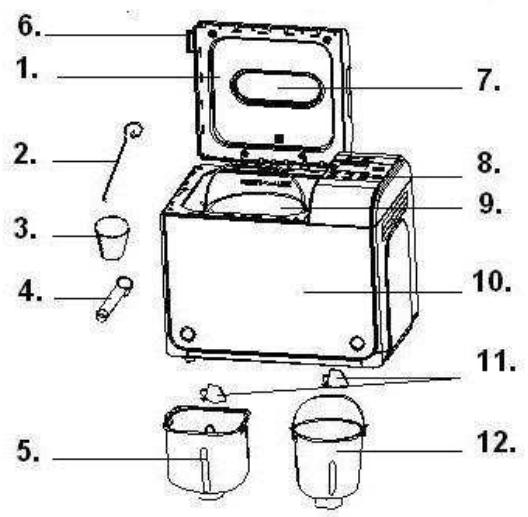
- Lid
- Hook
- Measuring cup
- Measuring spoon
- Square bread pan
- Handle
- View window
- Control panel
- Bread pan
- Housing
- Kneading blade
- Round bread pan
INTRODUCTION OF CONTROL PANEL
(The silkscreen is subject to change without prior notice.)
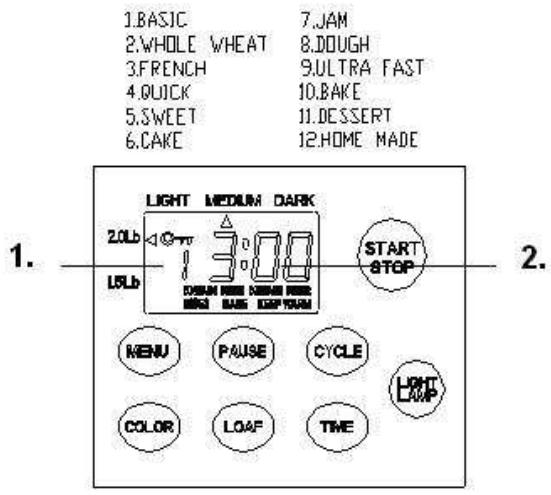
- This indicates the program you have chosen
- The operation time for each program
Start/stop
For starting and stopping the selected baking program.
To start a program, touch the “START/STOP” button for approx. 1.5 seconds. A short beep will be heard and the two dots in the time display begin to flash and the program starts. Any other button is inactivated except the START/STOP, LIGHT LAMP, PAUSE and CYCLE+COLOR buttons after a program has begun.
To stop the program, touch the “START/STOP” button for approx. 1.5 seconds, then a beep will be heard, it means that the program has been switched off.
Menu
It is used to set different programs. Each time it is touched (accompanied by a short beep) the program will vary. Touch the button discontinuously, the 12 menus will be cycled to show on the LCD display. Select your desired program. The functions of 12 menus will be explained below.
- Basic: kneading, rise and baking normal bread. You may also add ingredients to increase flavor.
- Whole wheat: kneading, rise and baking of whole wheat bread. It is not advised to use the delay function as this can produce poor results.
- French: kneading, rise and baking with a longer rise time. The bread baked in this menu will have a crisper crust and loose texture.
- Quick: kneading, rise and baking loaf within the time less than Basic bread. But the bread baked on this setting is usually smaller with a dense texture.
- Sweet: kneading, rise and baking sweet bread. You may also add ingredients to add flavor.
- Cake: kneading, rise and baking, but rise with soda or baking powder.
- Jam: boiling jams and marmalades. Fruit or vegetables must be chopped before putting it into the bread pan.
- Dough: kneading and rise, but without baking. Remove the dough and use for making bread rolls, pizza, steamed bread, etc.
- Ultra fast: kneading, rise and baking loaf in a short time, bread with a dense texture.
- Bake: only baking, no kneading and rise. Also used for increasing the baking time on selected settings.
- Dessert: kneading, rise and baking dessert.
- Home made: Can self-program by customer, to reset kneading, rise, baking, keep warm every step time.
The time range of each program as following:
KNEAD1: 6-14 minutes
RISE1: 20-60 minutes
KNEAD2: 5-20 minutes
RISE2: 5-120 minutes
RISE3: 0-120 minutes
BAKE: 0-80 minutes
KEEP WARM: 0-60 minutes
Under the menu of Home Made,
a) Touch CYCLE button once, KNEAD1 will appear on LCD, then touch TIME botton to adjust the minutes, and touch CYCLE to confirm the time for this step;
b) Touch CYCLE to enter the next step, RISE1 will appear on LCD, then touch TIME button to adjust the minutes, the number will increase rapidly if TIME button is holding. Further touch CYCLE to confirm.
c) In this way set the remaining steps. Upon finishing setting for all steps, touch Start/stop button to exit the setting.
d) Touch Start/stop button further to activate the operation.
Note: the setting can be memorized and is effective in next use.
Color
With the button you can select LIGHT, MEDIUM or DARK color for the crust.
Loaf
Touch this button to select the size of the bread. Please note the total operation time may vary with the different loaf size.
Time
If you want the appliance do not start working immediately, you can use the button to set the delay time.
The step of set delay function is as follows:
1) Select your menu, color, loaf size.
2) Set the delay time by touching TIME button. The delay time should include the operation time of chose menu. Suppose it is 8:30PM now and you want the bread is ready to serve at 7:00Am of next day, so the delay time should be 10 hours and 30 minutes. Touch TIME button continuously until 10:30 appear on the display. The increment of each touch is 10 minutes.
3) Touch the STOP/START button to activate this delay program. You can see the dot flashed and LCD will count down to show the remaining time.
Please be noted the maximum delay time is 13 hours. And do not use any perishable ingredients such as eggs, fresh milk, fruits, onions in the delayed menu.
Pause
After procedure starts up, you can touch PAUSE button to interrupt at any time, the operation will be paused but the setting will be memorized, the outstanding time will be flashed on the LCD. Touch PAUSE button again, the program will continue.
Note: in the lock mode, you must cancel lock before operating the PAUSE key.
Light lamp
Touch the button once, the lighting lamp will be illuminated to expediently view the operation. Within 1 minutes, if you touch the button again, the lighting lamp will be extinguished. After 1 minute, don't need touch the button, the lamp will be extinguished automatically.
CONTROL PANEL LOCK FUNCTION
You can lock the control panel by touching CYCLE key firstly and then touching COLOR key. Once the control panel is locked, all the control keys except CYCLE and COLOR keys are un-activated. This feature will help to prevent any unintentional disruption to the operation of program or children use the bread maker unsupervised. You can cancel the lock by touching CYCLE key firstly and then touching COLOR key. If you do not set the control keys lock function, the control keys will be locked when the program has been worked for five minutes. You must cancel lock firstly if you want to operation the bread maker.
KEEP WARM
Bread can be automatically kept warm for 1 hour after baking. During keeping warm, if you would like to take the bread out, switch the program off by touching the START/STOP button.
MEMORY
If the power supply has been interrupted during the course of making bread, the process of making bread will be continued automatically within 10 minutes, even without touching “START/STOP” button. If the interruption time exceeds 10 minutes, the memory cannot be kept, you must discard the ingredients in the bread pan and add the ingredients into bread pan again, and the bread maker must be restarted. But if the dough has not entered the rising phase when the power supply breaks off, you can touch the “START/STOP” directly to continue the program from the beginning.
ENVIRONMENT
The machine may work well in a wide range of temperature, but there may be any difference in loaf size between a very warm room and a very cold room. We suggest that the room temperature should be within the temperature of 15 °C to 34 °C .
WARNING DISPLAY:
- If the display shows "H HH" after you have pressed START/STOP button, the temperature inside is still too high. Then the program has to be stopped. Open the lid and let the machine cool down for 10 to 20 minutes.
- If the display shows "E E0" or "E E1" after you have touched START/STOP button, the temperature sensor is malfunction please check the sensor carefully by Authorized expert.
HOW TO MAKE BREAD
- Place the bread pan in position, then turning it in clockwise until they click in correct position. Fix the kneading blade onto the drive shaft. It is recommended to fill hole with heat-resisting margarine prior to place the kneading blade to avoid the dough sticking the kneading blade, also this would make the kneading blade be removed from bread easily.
- Place ingredients into the bread pan. Please keep to the order mentioned in the recipe. Usually the water or liquid substance should be put firstly, then add sugar, salt and flour, always add yeast or baking powder as the last ingredient.
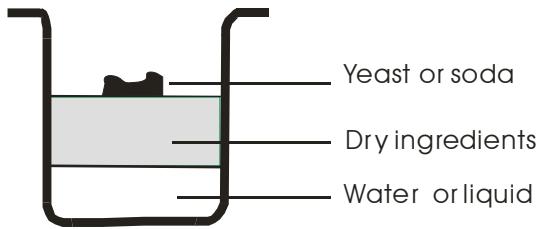
Note: the maximum quantities of the flour and yeast which may be used refer to the recipe.
- Make a small indentation on the top of flour with finger, add yeast into the indentation, make sure it does not come into contact with the liquid or salt.
- Close the lid gently and plug the power cord into a wall outlet.
- Touch the Menu button until your desired program is selected.
- Touch the COLOR button to select the desired crust color.
- Touch the LOAF button to select the desired size. (750 or 900g)
- Set the delay time by touching Time button. This step may be skipped if you want the bread maker to start working immediately.
- Touch the START/STOP button for approx. 1.5 seconds to start working.
- For the program of BASIC, WHOLE WHEAT, FRENCH, QUICK, SWEET, CAKE, ULTRA-FAST and HOME-MADE beeps sound will be heard during operation. This is to prompt you to add ingredients. Open the Lid and put in some ingredients. It is possible that steam will escape through the vent in the lid during baking. This is normal.
- Once the process has been completed, one beep will be heard. You can touch START/STOP button for approx. 1.5 seconds to stop the process and take out the bread. Open the Lid and
while using oven mitts, turn the bread pan in anti-clockwise and take out the bread pan.
Caution: the Bread pan and bread may be very hot! Always handle with care.
- Let the bread pan cool down before removing the bread. Then use non-stick spatula to gently loosen the sides of the bread from the pan.
- Turn bread pan upside down onto a wire cooling rack or clean cooking surface and gently shake until bread falls out.
- Let the bread cool for about 20 minutes before slicing. It is recommended slicing bread with electric cutter or dentate cutter, had better not with fruit knife or kitchen knife, otherwise the bread may be subject to deformation.
- If you are out of the room or have not touched START/STOP button at the end of operation, the bread will be kept warm automatically for 1 hour, when keep warm is finished, 10 beeps will be heard.
- When do not use or complete operation, unplug the power cord.
Note: Before slicing the loaf, use the hook to remove out the Kneading blade hidden on the bottom of loaf. The loaf is hot, never use the hand to remove the kneading blade.
Note: If bread has not been completely eaten up, advise you to store the remained bread in sealed plastic bag or vessel. Bread can be stored for about three days during room temperature, if you need more days storage, pack it with sealed plastic bag or vessel and then place it in the refrigerator, storage time is at most ten days. As bread made by ourselves does not add preservative, generally storage time is no longer than that for bread in market.
Quick breads are made with baking powder or baking soda that is activated by moisture and heat. For perfect quick breads, it is suggested that all liquid should be placed in the bottom of the bread pan, and dry ingredients should be placed on top. During the initial mixing of quick bread, dry ingredients may collect in the corners of the pan. It is necessary to help machine mixing to avoid flour clumps.
2. About Ultra fast program
The bread maker can bake loaf within 1 hour 38 minutes with rapid program. Please note that it should be hot water of 48 °C - 50 °C , you must use a cooking thermometer to measure the temperature. The influence of temperature is very critical to the performance of baking. If the water temperature is too low, the bread will not be rise to expected size, if the water temperature is too high. The fungus in the yeast will be killed before rising, which also will affect the baking performance.
CLEANING AND MAINTENNANCE
Disconnect the machine from the power and let it cool down before you start to clean it.
- bread pan: Rub inside and outside with a damp cloth. Do not use any sharp or abrasive agents.
- kneading bar If the kneading bar is difficult to remove from the axle, soak the bread pan in water beforehand.
- lid and window: The lid can be removed for cleaning. Clean the lid and machine inside and outside with a slightly damp cloth.
This appliance conforms the CE directives for radio interference suppression and low-voltage safety and has been built to meet current safety requirements.