
TN-180BT - Turntable TEAC - Free user manual and instructions
Find the device manual for free TN-180BT TEAC in PDF.



| Product Type | Analog turntable with Bluetooth transmission |
| Drive System | Belt drive |
| Motor | DC motor |
| Rotation speeds | 33 1/3 rpm, 45 rpm, 78 rpm |
| Platter | Plastic, diameter 29 cm |
| Wow and flutter | 0.25% |
| Signal-to-noise ratio | 64 dB or more (A-weighted, 20 kHz low-pass filter) |
| Tonearm type | Straight tubular tonearm, static balancing |
| Effective tonearm length | 200 mm |
| Cartridge | MM (moving magnet) |
| Output voltage (PHONO EQ THRU) | 2.4 mV ± 3 dB |
| Output voltage (PHONO EQ ON) | 149 mV (-16.5 dBV) |
| Bluetooth | Version 4.0, Class 2, A2DP profile |
| Power supply | AC adapter input 100-240 V AC, 50/60 Hz, output 12 V, 500 mA |
| Power consumption (in use) | 2 W or less |
| Power consumption (standby) | 0.3 W or less |
| Weight | 3.5 kg |
| Dimensions (lid closed) | 420 x 105 x 356 mm |
| Dimensions (lid open) | 420 x 356 x 386 mm |
| Supplied accessories | Rubber mat, 45 rpm adapter, dust cover, hinges, RCA audio cable, AC adapter, instruction manual |
| Maintenance | Clean with a soft cloth; for records, use a specific cleaning solution; replace the stylus after about 500 hours of use |
| Safety | Do not expose to moisture; unplug during thunderstorms; use on a stable surface; do not open the device |
Frequently Asked Questions - TN-180BT TEAC
User questions about TN-180BT TEAC
0 question about this device. Answer the ones you know or ask your own.
Ask a new question about this device
Download the instructions for your Turntable in PDF format for free! Find your manual TN-180BT - TEAC and take your electronic device back in hand. On this page are published all the documents necessary for the use of your device. TN-180BT by TEAC.
USER MANUAL TN-180BT TEAC
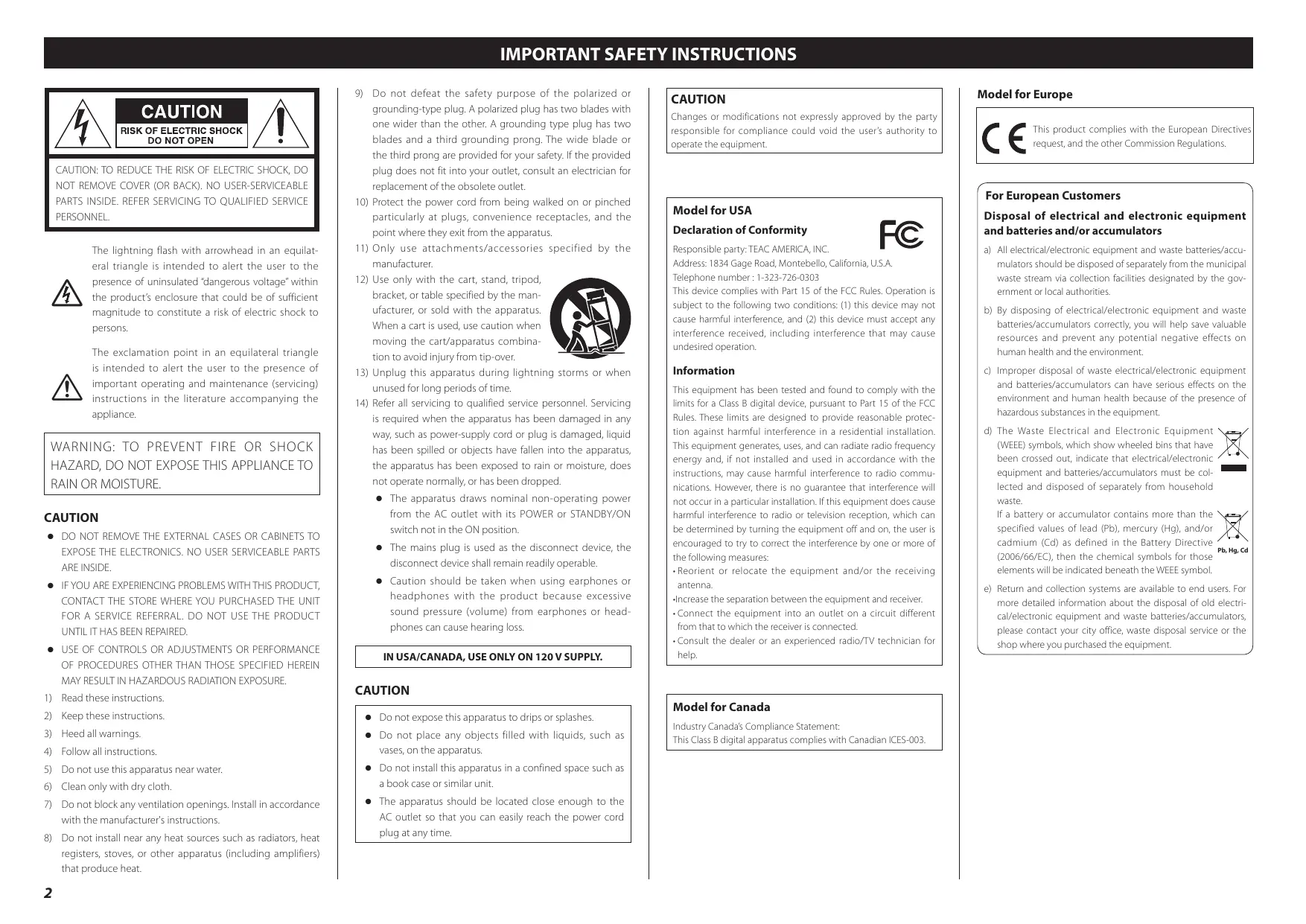
The lightning flash with arrowhead in an equilateral triangle is intended to alert the user to the presence of uninsulated "dangerous voltage" within the product's enclosure that could be of sufficient magnitude to constitute a risk of electric shock to persons.

The exclamation point in an equilateral triangle is intended to alert the user to the presence of important operating and maintenance (servicing) instructions in the literature accompanying the appliance.
WARNING: TO PREVENT FIRE OR SHOCK HAZARD,DO NOT EXPOSE THIS APPLIANCE TO RAIN OR MOISTURE.
CAUTION
DO NOT REMOVE THE EXTERNAL CASES OR CABINETS TO EXPOSE THE ELECTRONICS. NO USER SERVICEABLE PARTS ARE INSIDE.
- IF YOU ARE EXPERIENCING PROBLEMS WITH THIS PRODUCT, CONTACT THE STORE WHERE YOU PURCHASED THE UNIT FOR A SERVICE REFERRAL. DO NOT USE THE PRODUCT UNTIL IT HAS BEEN REPAIRED.
- USE OF CONTROLS OR ADJUSTMENTS OR PERFORMANCE OF PROCEDURES OTHER THAN THOSE SPECIFIED HEREIN MAY RESULT IN HAZARDOUS RADIATION EXPOSURE.
1) Read these instructions.
2) Keep these instructions.
3) Heed all warnings.
4) Follow all instructions.
5) Do not use this apparatus near water.
6) Clean only with dry cloth.
7) Do not block any ventilation openings. Install in accordance with the manufacturer's instructions.
8) Do not install near any heat sources such as radiators, heat registers, stoves, or other apparatus (including amplifiers) that produce heat.
9) Do not defeat the safety purpose of the polarized or grounding-type plug. A polarized plug has two blades with one wider than the other. A grounding type plug has two blades and a third grounding prong. The wide blade or the third prong are provided for your safety. If the provided plug does not fit into your outlet, consult an electrician for replacement of the obsolete outlet.
10) Protect the power cord from being walked on or pinched particularly at plugs, convenience receptacles, and the point where they exit from the apparatus.
11) Only use attachments/accessories specified by the manufacturer.
12) Use only with the cart, stand, tripod, bracket, or table specified by the manufacturer, or sold with the apparatus. When a cart is used, use caution when moving the cart/apparatus combination to avoid injury from tip-over.
13) Unplug this apparatus during lightning storms or when unused for long periods of time.
14) Refer all servicing to qualified service personnel. Servicing is required when the apparatus has been damaged in any way, such as power-supply cord or plug is damaged, liquid has been spilled or objects have fallen into the apparatus, the apparatus has been exposed to rain or moisture, does not operate normally, or has been dropped.
The apparatus draws nominal non-operating power from the AC outlet with its POWER or STANDBY/ON switch not in the ON position.
- The mains plug is used as the disconnect device, the disconnect device shall remain readily operable.
- Caution should be taken when using earphones or headphones with the product because excessive sound pressure (volume) from earphones or headphones can cause hearing loss.
IN USA/CANADA, USE ONLY ON 120 V SUPPLY.
CAUTION
- Do not expose this apparatus to drips or splashes.
- Do not place any objects filled with liquids, such as vases, on the apparatus.
- Do not install this apparatus in a confined space such as a book case or similar unit.
- The apparatus should be located close enough to the AC outlet so that you can easily reach the power cord plug at any time.

CAUTION
Changes or modifications not expressly approved by the party responsible for compliance could void the user's authority to operate the equipment.
Model for USA
Declaration of Conformity
Responsible party: TEAC AMERICA, INC.
Address: 1834 Gage Road, Montebello, California, U.S.A.
Telephone number: 1-323-726-0303
This device complies with Part 15 of the FCC Rules. Operation is subject to the following two conditions: (1) this device may not cause harmful interference, and (2) this device must accept any interference received, including interference that may cause undesired operation.
Information
This equipment has been tested and found to comply with the limits for a Class B digital device, pursuant to Part 15 of the FCC Rules. These limits are designed to provide reasonable protection against harmful interference in a residential installation. This equipment generates, uses, and can radiate radio frequency energy and, if not installed and used in accordance with the instructions, may cause harmful interference to radio communications. However, there is no guarantee that interference will not occur in a particular installation. If this equipment does cause harmful interference to radio or television reception, which can be determined by turning the equipment off and on, the user is encouraged to try to correct the interference by one or more of the following measures:
- Reorient or relocate the equipment and/or the receiving antenna.
- Increase the separation between the equipment and receiver.
- Connect the equipment into an outlet on a circuit different from that to which the receiver is connected.
- Consult the dealer or an experienced radio/TV technician for help.
Model for Canada
Industry Canada's Compliance Statement:
This Class B digital apparatus complies with Canadian ICES-003.
Model for Europe

This product complies with the European Directives request, and the other Commission Regulations.
For European Customers
Disposal of electrical and electronic equipment and batteries and/or accumulators
a) All electrical/electronic equipment and waste batteries/accumulators should be disposed of separately from the municipal waste stream via collection facilities designated by the government or local authorities.
b) By disposing of electrical/electronic equipment and waste batteries/accumulators correctly, you will help save valuable resources and prevent any potential negative effects on human health and the environment.
c) Improper disposal of waste electrical/electronic equipment and batteries/accumulators can have serious effects on the environment and human health because of the presence of hazardous substances in the equipment.
d) The Waste Electrical and Electronic Equipment (WEEE) symbols, which show wheeled bins that have been crossed out, indicate that electrical/electronic equipment and batteries/accumulators must be collected and disposed of separately from household waste.
If a battery or accumulator contains more than the specified values of lead (Pb), mercury (Hg), and/or cadmium (Cd) as defined in the Battery Directive (2006/66/EC), then the chemical symbols for those elements will be indicated beneath the WEEE symbol.
e) Return and collection systems are available to end users. For more detailed information about the disposal of old electrical/electronic equipment and waste batteries/accumulators, please contact your city office, waste disposal service or the shop where you purchased the equipment.


Wireless equipment precautions (TN-180BT only)
Compliance of radio transmitter and interference
This product has the function of broadband transmitter using 2.4GHz Band.
Use frequency range: 2400 MHz - 2480 MHz
Maximum output power: Bluetooth® Class 2 (less than 2.5mW )
Please use only in the country where you purchased the product. Depending on the country, restrictions on the use of Bluetooth wireless technology might exist.
Model for USA
Declaration of Conformity
Responsible party: TEAC AMERICA, INC.
Address: 1834 Gage Road, Montebello,
California, U.S.A.
Telephone number: 1-323-726-0303
This device complies with Part.15 of FCC Rules. Operation is subject to the following two conditions: (1) this device may not cause harmful interference, and (2) this device must accept any interference received, including interference that may cause undesired operation.

Labeling of authorization
FCC ID: XEG-TN180BT
Model for Canada
Compliance of radio transmitter
This device complies with Industry Canada's licence-exempt RSSs. Operation is subject to the following two conditions:
1) This device may not cause interference; and
2) This device must accept any interference, including interference that may cause undesired operation of the device.
Labeling of authorization
IC:1559C-TN180BT
Compliance of interference
This Class B digital apparatus complies with Canadian ICES-003.
Model for EEA (European Economic Area)

Hereby, TEAC Corporation declares that the radio equipment type is in compliance with Directive 2014/53/EU, and the other Directives, and Commission Regulations.
The full text of the EU declaration of conformity is available at the following internet address. Please contact us by e-mail. http://www.teac-audio.eu/en/
TEAC Corporation
1-47 Ochiai, Tama-shi, Tokyo, 206-8530, Japan
Radiation Exposure requirements
This equipment meets the regulation, which is recognized internationally, for the case of human exposure to radio waves generated by the transmitter.
Statement of compliance
Model for USA
This equipment complies with FCC radiation exposure limits set forth for an uncontrolled environment and meets the FCC radio frequency Exposure Guidelines.
Model for Canada
This equipment complies with IC RSS-102 radiation exposure limits set forth for an uncontrolled environment.
Model for EEA (European Economic Area)
This equipment complies with EN.62311; Assessment of electronic and electrical equipment related to human exposure restrictions for electromagnetic fields; the harmonised standard of DIRECTIVE 2014/53/EU.
CAUTION
Changes or modifications not expressly approved by the party responsible for compliance could void the user's authority to operate the equipment.
Information for interference
This equipment has been tested and found to comply with the limits for a Class B digital device, pursuant to Part 15 of the FCC Rules. These limits are designed to provide reasonable protection against harmful interference in a residential installation.
This equipment generates, uses, and can radiate radio frequency energy and, if not installed and used in accordance with the instructions, may cause harmful interference to radio communications.
However, there is no guarantee that interference will not occur in a particular installation.
If this equipment does cause harmful interference to radio or television reception, which can be determined by turning the equipment off and on, the user is encouraged to try to correct the interference by one or more of the following measures.
- Reorient or relocate the equipment and/or the receiving antenna.
- Increase the separation between the equipment and receiver.
- Connect the equipment into an outlet on a circuit different from that to which the receiver is connected.
- Consult the dealer or an experienced radio/TV technician for help.
Trademarks and copyrights
The Bluetooth® word mark and logos are registered trademarks owned by Bluetooth SIG, Inc. and any use of such marks by TEAC CORPORATION is under license.
Apple, Mac, OS X and macOS are trademarks of Apple Inc., registered in the U.S. and other countries.
Microsoft and Windows are either registered trademarks or trademarks of Microsoft Corporation in the United States and/or other countries.
Other company names, product names and logos in this document are the trademarks or registered trademarks of their respective owners.
Contents
Thank you for choosing TEAC. Read this manual carefully to get the best performance from this unit.
IMPORTANT SAFETY INSTRUCTIONS 2
Wireless equipment precautions (TN-180BT only). 3
Trademarks and copyrights. 3
Before use. 4
Connections 5
Names and functions of parts 5
Handling records. 6
Dust cover 6
Basic operation. 7
Notes about record styluses 8
Recording with a computer (TN-100 only) 8
Listening with Bluetooth® speakers (TN-180BT only) 9
Troubleshooting 10
Specifications 11
Before use
Included items
Check to be sure the box includes all the supplied accessories shown below. Please contact the store where you purchased this unit if any of these accessories are missing or have been damaged during transportation.
Rubber mat × 1
45 RPM record (EP) adapter × 1
Dust cover × 1
Hinges × 2
RCA audio cable × 1
AC adapter (GPE053A-V120050) × 1
Owner's manual (this document) × 1
- Keep this manual in a safe place for future reference.
Warranty card × 1 (for customers in the USA and Canada only)
See the back of this document for information about the warranty in Europe and other countries or areas.
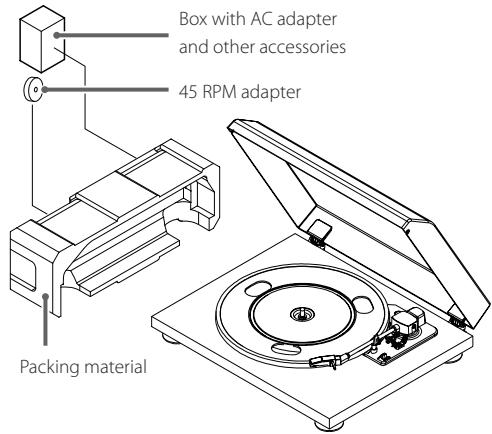
- The 45 RPM adapter and the box that contains the AC adapter and other included accessories are inside the packing material as shown in the illustration below.
Precautions for use
- Place the unit on a flat surface.
- Do not place anything on the dust cover. Objects on the cover might cause noise due to vibrations or fall off, especially during playback.
- Avoid placing the unit in direct sunlight, close to a source of heat or in other similar conditions. Do not place the unit on top of an amplifier or other equipment that might generate heat that exceeds the operating temperature range of this unit. Doing so could cause discoloration, deformation or malfunction.
- As the unit could become warm during operation, always leave sufficient space around it for ventilation. When installing this unit, leave a little space (at least 20cm ( 8^ ) between it and other devices and walls to allow good heat dissipation.
When placing it in a rack, for example, leave at least 35 cm (13 3/4'' ) open above it and 10 cm ( 4'' ) open behind it. Failure to provide these gaps could cause heat to build up inside and result in fire.
DO NOT MOVE THE UNIT DURING PLAYBACK. During playback, the record rotates. Do not lift or move the unit during playback. Doing so may damage the record, the stylus, the cartridge or the unit.
Always remove the record before relocating or moving this unit. Moving the unit with a record on the turntable could damage the record, the stylus and the cartridge or could cause a malfunction.
- The voltage supplied to the unit should match the voltage as printed on the rear panel. If you are in any doubt regarding this matter, consult an electrician.
Maintenance
If the surface of the unit gets dirty, wipe it with a soft cloth or use diluted mild liquid soap. Allow the surface of the unit to dry completely before using.
- Do not use chemical cleaning cloths, thinner or similar substances as they could damage the surface of the unit.
CAUTION
For safety, disconnect the power cord from the socket before cleaning.
Product registration
Customers in the USA, please visit the following TEAC website to register your TEAC product online.
http://audio.teac.com/support/registration/
Using the TEAC Global Site
You can download updates for this unit from the TEAC Global Site:
http://teac-global.com/
1) Open the TEAC Global Site.
2) In the TEAC Downloads section, click the desired language to open the Downloads website page for that language.
NOTE
If the desired language does not appear, click Other Languages.
3) Click the "Search by Model Name" section to open the Downloads page for that product. (Users in Europe should click the product name in the "Products" section instead.)
4) Select and download any updates that are needed.
Connections

This illustration is of the TN-100.
A Analog audio output connectors (L/R)
These output analog audio signals.
The PHONO EQ switch setting changes the type of output signal.
Use the included audio cables (or commercially-available ones) to connect to analog audio input connectors (LINE, PHONO, etc.) on other equipment.
RCA audio cable

B PHONO EQ (audio output setting) switch
ON
Audio signals that have been amplified by the built-in phono equalizer amp are output from the analog audio output connectors (L/R).
THRU
The signal from the stylus is output directly through the analog audio output connectors (L/R).
Use this when connecting to equipment that has PHONO inputs.
- When shipped new from the factory, this is set to ON.
ATTENTION
When set to ON, if connected to the PHONO inputs of an amplifier, for example, the output from speakers and headphones will be very loud, which could damage equipment or harm hearing.
USB port (USB B type) (TN-100 only)
Analog audio from the record is converted to PCM digital signals (up to 48kHz / 16 -bit) and output through this. Recording on a computer is possible by connecting this to a USB port on the computer using a USB cable (type A to type B) (page 8).
DC input connector
After completing audio cable connections, connect the included AC adapter here.
Confirm that the power plug of the AC adapter is plugged into a power outlet.
- Do not use any AC adapter other than the one included.
Be sure to connect the power cord to an AC outlet that supplies the correct voltage. Connection to an outlet that supplies incorrect voltage could cause fire or electric shock.
Hold the power plug when plugging it into an outlet or unplugging it. Never pull or yank on the power cord.
Unplug the power cord from the outlet when you are not planning to use the unit for an extended period of time.
E STANDBY/ON button
Press the STANDBY/ON button to turn the unit on or put it in standby.
Names and functions of parts
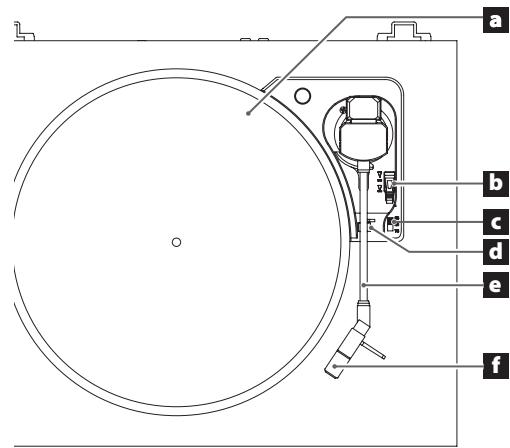
This illustration is of the TN-100.
a Turntable (platter)
Place records centered on the turntable (platter).
- Place the included rubber mat on the turntable (platter) before using it.
b Arm lifter lever
Use this to raise and lower the tip of the stylus.
We recommend using the arm lifter lever to avoid damaging records and styluses, because it is safer and more certain than using a finger to do so.
Rotation speed setting knob
Select the rotation speed indicated on the record to be played.
d Tone arm holder
This is a rest for the tone arm.
e Tone arm
f Headshell
ATTENTION
Always remove the protective cover (white) before use.
Keep this protective cover to protect the tip of the stylus during transportation.
Handling records
Holding records
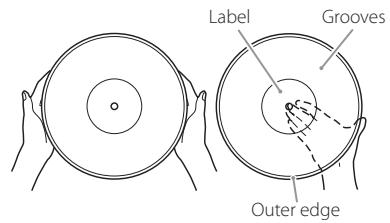
When holding a record or removing it from its sleeve, avoid touching the grooves by holding the record by its label and edge with one hand or by holding it by its edge with both hands.
Cleaning
- Fingersprints and dust on a record can cause noise and the sound to skip, as well as damage the record itself and the stylus. Use a commercially available record cleaner to clean records. Do not use thinner or anything other than a record cleaner. Such chemicals could harm the surface of the record.
- When using a record cleaner, wipe the surface of the record in a circular motion, following the grooves.
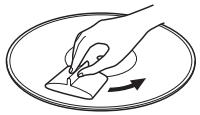
Precautions
- Do not leave records in places that are exposed to direct sunlight or are very hot or very humid. Leaving a record in such a condition for a long time could result in warping, mold growth or other damage.
- Do not stack multiple records or place heavy objects on top of them. Do not leave records at an angle for long amounts of time, either. Doing so could result in warping or other damage.
- Do not allow hard objects to directly touch the audio grooves. Doing so could cause scratches.
- After you finish playing a record, always put it back into its sleeve for storage. Leaving a record unprotected could result in warping or scratching.
- Do not use cracked records.
Attaching the dust cover
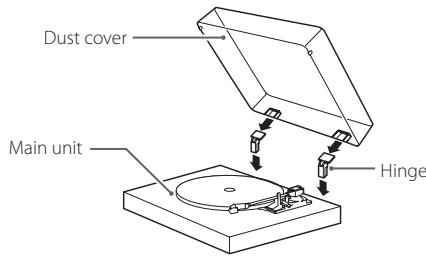
1 Insert the hinges completely into the hinge holders at the left and right ends of the back of the main unit.
Align the tops of the hinges with the dust cover hinge holders and insert them.
- Close the dust cover during playback. Doing so prevents stylus skipping caused by unintended contact and protects the stylus tip from outside sound pressure.
- Do not open or close it when a record is playing. Doing so could, for example, cause the stylus to skip.
- Keep it closed whenever possible to keep dust out.
Removing the dust cover
Hold both edges of the dust cover and lift it slowly to remove it along with the hinges from the unit. Then, remove the hinges from the dust cover.
Dust cover
Opening and closing the dust cover
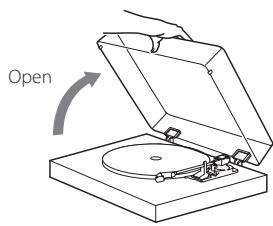
Opening
Hold the front edge of the dust cover and gently lift it open completely until it stops.
The dust cover will stay open in this position.
Closing
Gently lower the dust cover until it is closed.
Be careful not to pinch your fingers, for example, when opening and closing the dust cover.
Playing records
ATTENTION
Do not vibrate the unit during playback. Doing so could cause the sound to skip and damage the record and stylus.
Press the STANDBY/ON button on the back of the unit to turn it on.
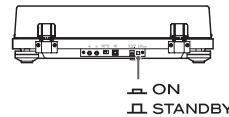

2 Open the dust cover slowly.
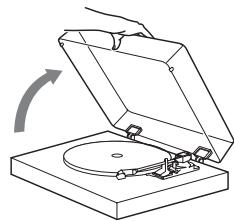
Be careful not to pinch your fingers, for example, when opening and closing the dust cover.
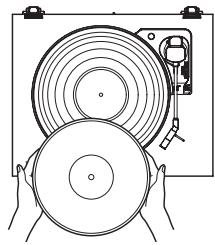
3 Place a record on the turntable (platter).
When playing a 45 RPM large-hole single record, use the included adapter.
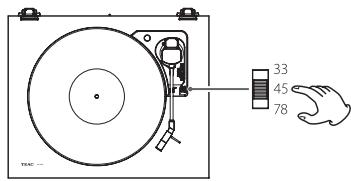
4 Select the rotation speed indicated on the record.
The rotation speed can be set to 33 1/3, 45 or 78 RPM.
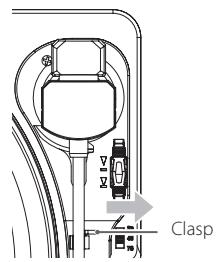
5 Move the tone arm clasp to the right to release the tone arm.
6 Use the arm lifter lever to raise the tone arm.
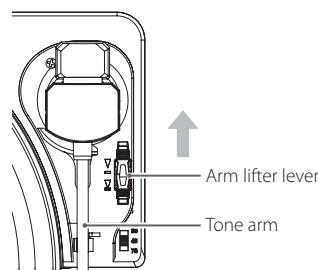
- You can also move the tone arm above the record with the arm lifter lever forward and then slowly lower the tone arm to start playback.
Move the tone arm to the track where you want to start playback.
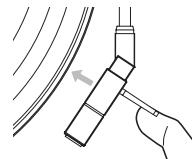
ATTENTION
Always remove the protective cover (white) before use. Keep this protective cover to protect the tip of the stylus during transportation.
- The first song starts at the outer edge of the record. Lower the stylus to the outer edge of the record if you want to listen to the first song.
Use the arm lifter lever to lower the tone arm.
The tone arm lowers slowly until the stylus touches the record and playback begins.
- Close the dust cover during playback. Since doing this prevents skipping caused by unintended contact and blocks external sound pressure, it makes noise less likely to occur.
Do not place anything on the dust cover.
ATTENTION
- During playback, do not touch the tone arm or the rotating record. Doing so could damage the stylus tip and cause scratches on the record.
- Do not forcibly stop turntable rotation during playback. Since this product is not a turntable designed for DJs (direct drive), doing something like this could cause malfunction.
If the volume is too loud during record playback, vibration from speakers could be transmitted to the stylus, causing loud feedback. If this happens, lower the volume of the amplifier.
When playback finishes
When playback finishes, the tone arm automatically returns to the tone arm holder and the rotation stops.
To manually interrupt playback, use the arm lifter lever to raise the tone arm and then return the tone arm to its resting position.
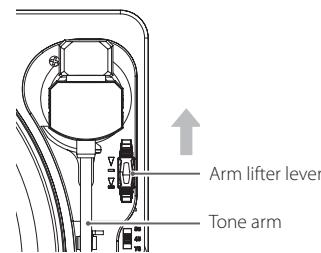
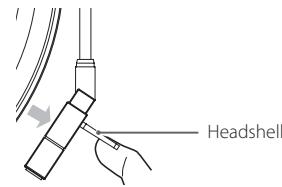
- The tone arm may not return to the tone arm holder automatically depending on the record. In that case, move the tone arm back to the tone arm holder manually.
Notes about record styluses
- Record styluses are precision parts, so handle them carefully to avoid bending or damaging their tips. If a stylus becomes bent or damaged, it might not be able to follow the audio groove precisely and could damage records or cause other malfunction.
- If a stylus becomes dirty, use a commercially available stylus cleaner or similar product to clean it.
Replacing the stylus
A record stylus will become worn down after it has been used for about 500 hours. This will worsen the sound quality and could damage records. Replace the stylus with one that we recommend before this occurs.
ATTENTION
- Before replacing the stylus, turn this unit and the amplifier off. Failure to do so could cause sudden loud noises that might damage speakers.
- Be careful not to hurt your hand or the equipment.
- Be careful not to allow small children to accidentally swallow styluses.
- Be aware that bent styluses, for example, that result from insufficient customer caution or an outside cause are not covered by the warranty.
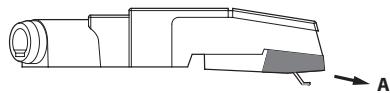
When detaching a record stylus (the orange part), hold the cartridge and pull the record stylus in the A direction to remove it.
When installing a new stylus, insert it in the B direction, pushing it in so that its clasp is aligned with the cartridge.
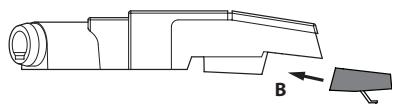
Replacement stylus (sold separately): STL-122 diamond stylus (includes 2)
For stylus replacements, contact your dealer.
Recording with a computer (TN-100 only)
The sound of a record can be digitally recorded on a computer by using a commercially-available USB cable to connect this unit to a USB port on the computer.
Supported operating systems
Computers running the following operating systems can be connected by USB to this unit (as of April 2018).
Windows
Windows 7 (32-bit, 64-bit)
Windows 8 (32-bit, 64-bit)
Windows 8.1 (32-bit, 64-bit)
Windows 10 (32-bit, 64-bit)
Mac
OS X Lion (10.7)
OS X Mountain Lion (10.8)
OS X Mavericks (10.9)
OS X Yosemite (10.10)
OS X El Capitan (10.11)
macOS Sierra (10.12)
macOS High Sierra (10.13)
Use with operating systems other than these is not guaranteed.
- This unit will run with the standard OS driver, so there is no need to install a special driver.
Connecting with a computer

Turn the computer on.
Confirm that the operating system is working correctly.

Use the USB cable to connect the computer and this unit.
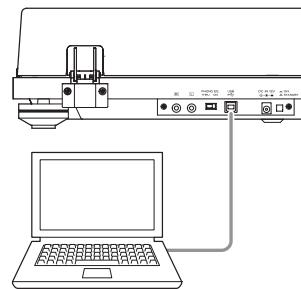
- Use a commercially-available USB cable with a ferrite core when connecting the unit to a computer.

Press this unit's STANDBY/ON button to turn it on.
When they are connected, the computer will automatically detect this unit's USB port and identify it as "USB Audio CODEC".
- To record audio from this record player using a computer, you must first install software that can be used for audio recording on the computer. You may purchase the audio recording software that you prefer separately or download free software, such as Audacity (http://www.audacityteam.org/), from the Internet. As free software, Audacity is not supported by TEAC.
- When connected to a computer by USB and recording audio, do not do any of the following. Doing so could cause the computer to malfunction. Always quit the computer recording software before doing the following.
- Disconnect the USB cable
- Put the unit into standby
Listening with Bluetooth® speakers (TN-180BT only)
Computer settings
The following example explains the settings to make using Windows 7.
1 From the Start menu, select Control Panel.
2 Click "Sound".
3 Click the "Recording" tab, and confirm that "USB Audio CODEC" is set as the "Default Device".
4 Select "Microphone USB Audio CODEC", and click the Properties button.
5 Click the "Advanced" tab.
6 From the "Default Format" pull-down menu, select the audio quality (format) that you want to use for recording.
NOTE
"2 channel, 16 bit, 48000Hz (DVD quality)" provides high audio quality but also requires more file space. Recording with a lower sampling frequency reduces the audio quality but also uses less file space.
7 Click "OK".
This unit has a Bluetooth transmitter that can send sound to Bluetooth speakers wirelessly.
Press the STANDBY/ON button on the back of the unit to turn it on.
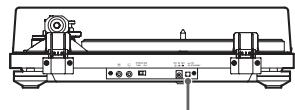
ON
STANDBY
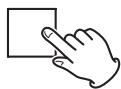
Pair and connect the Bluetooth speakers.
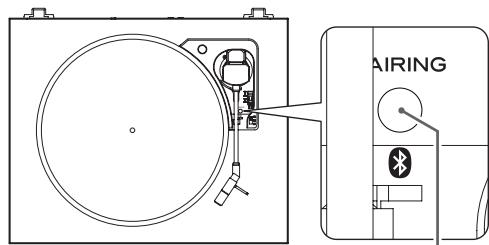
PAIRING button/ Pairing lamp
Pairing Bluetooth speakers
Pairing this unit with another Bluetooth speaker is necessary the first time you connect with that Bluetooth speaker.
1) Press the PAIRING button on this unit to start connection mode.
The pairing lamp will blink slowly.
2) Press the PAIRING button again for at least two seconds to start pairing mode.
The pairing lamp (white) will blink rapidly.
3) After this unit enters pairing mode, put the Bluetooth speaker into pairing mode.
When this unit and the Bluetooth speaker are connected, the pairing lamp will stay lit without blinking.
Refer to the operation manual of the Bluetooth speaker for information about how to use it.
- Pairing might take some time depending on the connected Bluetooth speaker.
- This unit will connect to the closest Bluetooth speaker. If no Bluetooth speaker is found for about five minutes, Bluetooth standby mode will begin and the pairing lamp will become unlit.
Connecting already paired Bluetooth speakers
Press the PAIRING button on this unit to start connection mode.
The pairing lamp will blink slowly.
When this unit and the Bluetooth speaker are connected, the pairing lamp will stay lit without blinking.
- When connecting to a Bluetooth speaker, move other Bluetooth speakers and receiving devices at least 10 meters (33 ft.) away from this unit or turn them off.
3 Play a record.
- Bluetooth connection is also possible while a record is playing.
- Adjust the Bluetooth speaker volume if necessary.
- This unit cannot be used to adjust the volume.
- To end a connection, press the PAIRING button on this unit for at least six seconds to enter Bluetooth standby mode or turn this unit off.
- Pressing the PAIRING button for ten or more seconds will cause the pairing lamp to blink and clear all existing pairings with other devices.
ATTENTION
When you will not use this unit, end the Bluetooth connection by pressing this unit's PAIRING button for at least six seconds. Then, confirm that the pairing lamp has turned off.
Troubleshooting
If you experience a problem with this unit, please check the following items before requesting service. Something other than this unit could also be the cause of the problem. Please also check that the connected devices are also being used properly. If it still does not operate correctly, contact the retailer where you purchased the unit.
TN-100/TN-180BT
No power.
Confirm that the AC adapter is plugged into an outlet. Then, press the STANDBY/ON button to turn the unit on (page 5).
There is no sound.
When connecting this unit's analog audio output connectors to the audio input connectors of an amplifier or other equipment, set the PHONO EQ (audio output setting) switch to ON (page 5).
Playback is not possible; there is noise.
Confirm that the stylus cover (made of white plastic) has been removed.
Fingerprints and dust on a record can cause noise and the sound to skip. Use a commercially-available record cleaner to clean records (page 6).
Clean the stylus (page 8).
If the stylus is worn-out, replace it (page 8).
Place the unit as far away as possible from TVs, microwave ovens and other devices that emit electromagnetic waves.
The pitch is wrong.
Select the rotation speed indicated on the record (page 7).
The sound is skipping.
Vibrations will cause skipping. Place this unit in a stable location.
If the record is dirty, wipe it clean.
Do not use scratched records.
A record does not play to its end.
Initialize the automatic return function.
Manually move the tone arm to the innermost groove of the record. Initialization is complete when the tone arm returns automatically and the turntable stops.
TN-180BT only
Connection is not possible with the Bluetooth speaker I want to connect.
Turn both this unit and the Bluetooth device off once.
Turn them both on and try pairing again.
Turn off the power of other Bluetooth speakers within 10 meters (33 ft). The closest Bluetooth speaker will be paired.
Connection with the Bluetooth speaker succeeded, but I cannot hear any playback sound or the sound breaks up during playback.
Check the volume of the Bluetooth speaker.
Press the PAIRING button on this unit for at least six seconds to disconnect the Bluetooth speaker once. Then, try pairing again.
Turn this unit off and then on again. Then, press the PAIRING button to try pairing again.
Connection with the smartphone is not possible.
This unit functions as a Bluetooth transmitter, and it can send sound to Bluetooth speakers. Since it does not function as a Bluetooth receiver, it cannot be connected to a smartphone.
Specifications
Turntable (platter)
Drive system. Belt drive
Motor . DC motor
Rotation speed 33 1/3 rpm, 45 rpm, 78 rpm
Rotation speed variation. ± 2%
Wow and flutter . 0.25%
SN ratio. 64 dB or higher (A-weighted, 20kHz LPF)
Turntable (platter) Plastic
29cm (11 1/2") diameter
Tone arm
Arm type....... Static-balanced straight-pipe tone arm
Effective arm length 200 mm
Cartridge
Type. MM
Output voltage. 2.4 mV ±3 dB
(10 kHz, 3.54 cm/s)
Replacement stylus (sold separately):
STL-122 diamond stylus (includes 2)
For stylus replacements, contact your dealer.
Output voltage
PHONO EQ THRU. 2.4 mV ±3 dB
PHONO EQ ON 149 mV (-16.5 dBV)
Output connectors RCA
USB port (TN-100 only)
USB port that can receive power from computer USB buses (Full
Speed) USB connector type B
USB bus power support 5V,500mA
- Use a commercially-available USB cable to connect the unit to a computer to receive power from it.
Sampling frequency
8 kHz, 11.025 kHz, 16 kHz, 22.05 kHz, 32 kHz,
44.1 kHz, 48 kHz
Quantization bit depth 16-bit
Bluetooth function (TN-180BT only)
Bluetooth version. 4.0 (DUAL MODE)
Supported profile. A2DP
SBC
General
AC adapter power
Input. AC 100V - AC 240V, 50-60 Hz
Output. 12V,500mA
Power consumption
Standby
TN-100 0.2 W or less
TN-180BT. 0.3 W or less
On
TN-100 1.5 W or less
TN-180BT. 2W or less
Weight 3.5 kg (7 3/4 lb)
Operating temperature range 5°C to 35°C
Dimensions (W× H× D) (including protrusions)
When the dust cover is closed
420× 105× 356mm (165 / 8^ × 41 / 4^ × 141 / 8^ )
When the dust cover is open
420 × 356 × 386 ~mm (165/8" × 141/8" × 151/4")
When the dust cover is removed
420× 92× 356mm (165 / 8^ × 35 / 8^ × 141 / 8^ )
Performance data is specified at 20^
Included accessories
Rubber mat × 1
45 RPM record (EP) adapter × 1
Dust cover × 1
Hinges × 2
RCA Audio cable × 1
AC adapter (GPE053A-V120050) × 1
Owner's manual (this document) × 1
Warranty card × 1 (for customers in the USA and Canada only)
- Specifications and appearance are subject to change without notice.
Weight and dimensions are approximate.
- Illustrations in this owner's manual might differ slightly from production models.
INSTRUCTIONS DE SECURITE IMPORTANTES

ATTENTION: POUR RÉDUIRE LE RISQUE D'ÉLECTROCUTION, NE RETIREZ PAS LE CAPOT (OU L'ARRÊRIÈ). AUCUNE PIECE INTERNE N'EST RÉPARABLE PAR L'UTILISATEUR. CONFIEZ TOUTE RÉPARATION À UN SERVICE APRES-VENTE QUALIFIÉ.

The Bluetooth® word mark and logos are registered trademarks owned by Bluetooth SIG, Inc. and any use of such marks by TEAC CORPORATION is under license.
Apple, Mac, OS X and macOS are trademarks of Apple Inc., registered in the U.S. and other countries.
Microsoft and Windows are either registered trademarks or trademarks of Microsoft Corporation in the United States and/or other countries.
Windows 7 (32 bits, 64 bits)
Windows 8 (32 bits, 64 bits)
Windows 8.1 (32 bits, 64 bits)
Windows 10 (32 bits, 64 bits)
Mac
OS X Lion (10.7)
OS X Mountain Lion (10.8)
OS X Mavericks (10.9)
OS X Yosemite (10.10)
OS X El Capitan (10.11)
macOS Sierra (10.12)
macOS High Sierra (10.13)
Parte responsible: TEAC AMERICA, INC.
Parte responsible: TEAC AMERICA, INC.
The Bluetooth® word mark and logos are registered trademarks owned by Bluetooth SIG, Inc. and any use of such marks by TEAC CORPORATION is under license.
Apple, Mac, OS X and macOS are trademarks of Apple Inc., registered in the U.S. and other countries.
Microsoft and Windows are either registered trademarks or trademarks of Microsoft Corporation in the United States and/or other countries.
http://audio.teac.com/support/registration/
Web global de TEAC
Windows 7 (32 bits, 64 bits)
Windows 8 (32 bits, 64 bits)
Windows 8.1 (32 bits, 64 bits)
Windows 10 (32 bits, 64 bits)
Mac
OS X Lion (10.7)
OS X Mountain Lion (10.8)
OS X Mavericks (10.9)
OS X Yosemite (10.10)
OS X El Capitan (10.11)
macOS Sierra (10.12)
macOS High Slerra (10.13)
Puerto USB (solo TN-100)
8 kHz, 11.025 kHz, 16 kHz, 22.05 kHz, 32 kHz,
44.1 kHz, 48 kHz
The Bluetooth® word mark and logos are registered trademarks owned by Bluetooth SIG, Inc. and any use of such marks by TEAC CORPORATION is under license.
Apple, Mac, OS X and macOS are trademarks of Apple Inc., registered in the U.S. and other countries.
Microsoft and Windows are either registered trademarks or trademarks of Microsoft Corporation in the United States and/or other countries.
RCA (Cinch) Audiokabel

Abstrate. 8 kHz, 11,025 kHz, 16 kHz, 22,05 kHz,
32 kHz, 44,1 kHz, 48 kHz
TN-180BT 2 Woder wereniger
Gewicht. 3,5 kg
The Bluetooth® word mark and logos are registered trademarks owned by Bluetooth SIG, Inc. and any use of such marks by TEAC CORPORATION is under license.
Apple, Mac, OS X and macOS are trademarks of Apple Inc., registered in the U.S. and other countries.
Microsoft and Windows are either registered trademarks or trademarks of Microsoft Corporation in the United States and/or other countries.
Usage:
- Use this to assign a color to a text.
- Use this to assign a color to a font.
The Bluetooth® word mark and logos are registered trademarks owned by Bluetooth SIG, Inc. and any use of such marks by TEAC CORPORATION is under license.
Apple, Mac, OS X and macOS are trademarks of Apple Inc., registered in the U.S. and other countries.
Microsoft and Windows are either registered trademarks or trademarks of Microsoft Corporation in the United States and/or other countries.
Windows 7 (32-bit, 64-bit)
Windows 8 (32-bit, 64-bit)
Windows 8.1 (32-bit, 64-bit)
Windows 10 (32-bit, 64-bit)
Mac
OS X Lion (10.7)
OS X Mountain Lion (10.8)
OS X Mavericks (10.9)
OS X Yosemite (10.10)
OS X El Capitan (10.11)
macOS Sierra (10.12)
macOS High Sierra (10.13)
Schakel de computer in.
Toerental. 33 1/3 rpm, 45 rpm, 78 rpm
8 kHz, 11,025 kHz, 16 kHz, 22,05 kHz, 32 kHz,
44,1 kHz, 48 kHz
TN-100. 1,5 W of minder
TN-180BT 2Wofminder
Gewicht. 3,5 kg
The Bluetooth® word mark and logos are registered trademarks owned by Bluetooth SIG, Inc. and any use of such marks by TEAC CORPORATION is under license.
Apple, Mac, OS X and macOS are trademarks of Apple Inc., registered in the U.S. and other countries.
Microsoft and Windows are either registered trademarks or trademarks of Microsoft Corporation in the United States and/or other countries.
Windows 7 (32 bits, 64 bits)
Windows 8 (32 bits, 64 bits)
Windows 8.1 (32 bits, 64 bits)
Windows 10 (32 bits, 64 bits)
Mac
OS X Lion (10.7)
OS X Mountain Lion (10.8)
OS X Mavericks (10.9)
OS X Yosemite (10.10)
OS X El Capitan (10.11)
macOS Sierra (10.12)
macOS High Sierra (10.13)
Rotationshastighet. 33 1/3 rpm, 45, 78 rpm
Variation i rotationshestigkeit. ± 2%
Svaj 0,25%
8 kHz, 11,025 kHz, 16 kHz, 22,05 kHz, 32 kHz,
44.1 kHz, 48 kHz
Kvantisering bitdjup. 16 bitars
Bluetooth-funktion (endast TN-180BT)
Bluetooth version 4.0 (DUAL MODE)
This product is subject to the legal warranty regulations of the country of purchase. In case of a defect or a problem, please contact the dealer where you bought the product.
In other countries/regions
This warranty gives you specific legal rights, and you may also have other rights that vary by country, state or province.
If you have a warranty claim or request, please contact the dealer where you bought the product.
This product has a serial number located on the rear panel. Please write it here and retain this for your records.
Model name: TN-100/TN-180BT Serial number
- CAUTION
- IN USA/CANADA, USE ONLY ON 120 V SUPPLY.
- Model for USA
- Declaration of Conformity
- Information
- Model for Canada
- Model for Europe
- For European Customers
- Disposal of electrical and electronic equipment and batteries and/or accumulators
- Wireless equipment precautions (TN-180BT only)
- Compliance of radio transmitter and interference
- Model for EEA (European Economic Area)
- Radiation Exposure requirements
- Statement of compliance
- Information for interference
- Trademarks and copyrights
- Contents
- Before use
- Included items
- Precautions for use
- Maintenance
- Product registration
- Using the TEAC Global Site
- http://teac-global.com/
- NOTE
- Connections
- A Analog audio output connectors (L/R)
- B PHONO EQ (audio output setting) switch
- ON
- THRU
- ATTENTION
- USB port (USB B type) (TN-100 only)
- DC input connector
- Be sure to connect the power cord to an AC outlet that supplies the correct voltage. Connection to an outlet that supplies incorrect voltage could cause fire or electric shock.
- Hold the power plug when plugging it into an outlet or unplugging it. Never pull or yank on the power cord.
- Unplug the power cord from the outlet when you are not planning to use the unit for an extended period of time.
- E STANDBY/ON button
- Names and functions of parts
- a Turntable (platter)
- b Arm lifter lever
- Rotation speed setting knob
- d Tone arm holder
- e Tone arm
- f Headshell
- Handling records
- Holding records
- Cleaning
- Precautions
- Attaching the dust cover
- Removing the dust cover
- Dust cover
- Opening and closing the dust cover
- Opening
- Closing
- Playing records
- Press the STANDBY/ON button on the back of the unit to turn it on.
- Open the dust cover slowly.
- Be careful not to pinch your fingers, for example, when opening and closing the dust cover.
- Place a record on the turntable (platter).
- Select the rotation speed indicated on the record.
- Move the tone arm clasp to the right to release the tone arm.
- Use the arm lifter lever to raise the tone arm.
- Move the tone arm to the track where you want to start playback.
- Use the arm lifter lever to lower the tone arm.
- Do not place anything on the dust cover.
- When playback finishes
- Notes about record styluses
- Replacing the stylus
- Replacement stylus (sold separately): STL-122 diamond stylus (includes 2)
- Recording with a computer (TN-100 only)
- Supported operating systems
- Windows
- Mac
- Connecting with a computer
- Turn the computer on.
- Use the USB cable to connect the computer and this unit.
- Press this unit's STANDBY/ON button to turn it on.
- Listening with Bluetooth® speakers (TN-180BT only)
- Computer settings
- Pairing Bluetooth speakers
- Connecting already paired Bluetooth speakers
- Play a record.
- Troubleshooting
- TN-100/TN-180BT
- No power.
- There is no sound.
- Playback is not possible; there is noise.
- The pitch is wrong.
- The sound is skipping.
- A record does not play to its end.
- TN-180BT only
- Connection is not possible with the Bluetooth speaker I want to connect.
- Connection with the Bluetooth speaker succeeded, but I cannot hear any playback sound or the sound breaks up during playback.
- Connection with the smartphone is not possible.
- Specifications
- Turntable (platter)
- Tone arm
- Cartridge
- Output voltage
- USB port (TN-100 only)
- Bluetooth function (TN-180BT only)
- General
- Included accessories
- INSTRUCTIONS DE SECURITE IMPORTANTES
- Web global de TEAC
- Puerto USB (solo TN-100)
- Schakel de computer in.
- Bluetooth-funktion (endast TN-180BT)
- In other countries/regions
Brand : TEAC
Model : TN-180BT
Category : Turntable