USER MANUAL ZDT21006FA - ZDT22003FA ZANUSSI
natural_image
Simple line drawing of a kitchen appliance icon (no text or symbols)
ZDF26020XA
natural_image
Technical line drawing of a mechanical assembly with no visible text or symbols
i
natural_image
Line drawing of a mechanical device with a circular inset showing a cylindrical component (no text or symbols)
natural_image
Diagram showing a mechanical component being rotated by an arrow, with no visible text or symbols.
text_image
ZOUT
SAZ
SEL
natural_image
Illustration of a hand pouring liquid from a container into a tank, with no text or symbols present.
natural_image
Line drawing of a mechanical assembly with a component inside (no text or symbols)
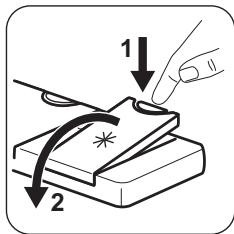
text_image
Diagram showing a hand pressing down on a stack of papers with arrows labeled 1 and 2 indicating steps or actions.
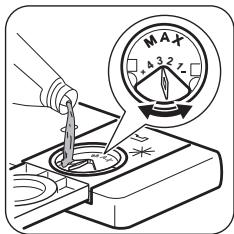
text_image
Diagram illustrating a tool tip pressing into a component with a magnified view showing maximum torque values.
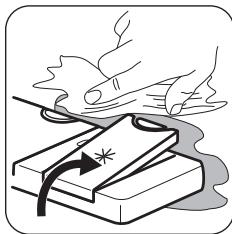
natural_image
Illustration of hands using a steaming cup to lift a stack of books (no text or symbols present)
natural_image
Line drawing of a 3D printer or scanner with an open lid and base, showing no text or symbols.
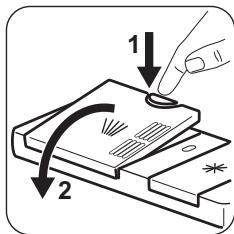
text_image
1
2
text_image
A
B
natural_image
Illustration of a device with an arrow indicating rotation or change, no text or symbols present
natural_image
Line drawing of a device with a magnified inset showing a small object inside (no text or symbols)
text_image
1
2
natural_image
Illustration of a hand placing a small object into a tray with items, no text or symbols present
natural_image
Illustration of a closed book with an arrow indicating rotation, no text or symbols present
DE DEUR OPENEN ALS HET APPARAAT IN WERKING IS
natural_image
Line drawing of a refrigerator interior with an open door and a magnified inset showing food inside (no text or symbols)
natural_image
Diagram of a hand holding a small mechanical component, possibly a gear or valve (no text or symbols present)
natural_image
Illustration of a hand pressing down on a bowl with a rolling pin (no text or symbols)
text_image
B
A
natural_image
Illustration of a hand holding a small object with a label 'C' on the surface (no text or symbols on the object itself)
natural_image
Illustration of a hand cleaning a kitchen sink with a funnel and cleaning tool (no text or symbols)
natural_image
Illustration of a hand holding a curved object with a checkmark and arrow, no text or symbols present
text_image
Diagram showing a mechanical component with directional arrows and a dial indicator below, likely illustrating a motion or positioning system.
Before the installation and use of the appliance, carefully read the supplied instructions. The manufacturer is not responsible for any injuries or damage that are the result of incorrect installation or usage. Always keep the instructions in a safe and accessible location for future reference.
CHILDREN AND VULNERABLE PEOPLE SAFETY
- This appliance can be used by children aged from 8 years and above and persons with reduced physical, sensory or mental capabilities or lack of experience and knowledge if they have been given supervision or instruction concerning the use of the appliance in a safe way and understand the hazards involved.
- Children between 3 and 8 years of age and persons with very extensive and complex disabilities shall be kept away from the appliance unless continuously supervised.
- Children of less than 3 years of age should be kept away from the appliance unless continuously supervised.
- Do not let children play with the appliance.
- Keep detergents away from children.
- Keep children and pets away from the appliance when the door is open.
- Children shall not carry out cleaning and user maintenance of the appliance without supervision.
GENERAL SAFETY
- This appliance is intended to be used in household and similar applications such as:
- farm houses; staff kitchen areas in shops, offices and other working environments;
- by clients in hotels, motels, bed & breakfast and other residential type environments.
- Do not change the specification of this appliance.
- The operating water pressure (minimum and maximum) must be between 0.5 (0.05) / 8 (0.8) bar (MPa)
- Follow the maximum number of 13 place settings.
- If the supply cord is damaged, it must be replaced by the manufacturer, its Authorised Service Centre or similarly qualified persons in order to avoid a hazard.
- Put the cutlery in the cutlery basket with the sharp ends pointing down or put them in the cutlery drawer in a horizontal position with the sharp edges down.
- Do not leave the appliance with the open door unattended to avoid stepping accidentally onto it.
- Before any maintenance operation, deactivate the appliance and disconnect the mains plug from the socket.
- Do not use high pressure water sprays and/or steam to clean the appliance.
- If the appliance has ventilation openings in the base, they must not be covered e.g. by a carpet.
- The appliance is to be connected to the water mains using the new supplied hose-sets. Old hose sets must not be reused.
SAFETY INSTRUCTIONS
INSTALLATION

WARNING! Only a qualified person must install this appliance.
- Remove all the packaging.
- Do not install or use a damaged appliance.
- Follow the installation instructions supplied with the appliance.
- Always take care when moving the appliance as it is heavy. Always use safety gloves and enclosed footwear.
- Do not install or use the appliance where the temperature is less than 0 °C.
- Install the appliance in a safe and suitable place that meets installation requirements.
ELECTRICAL CONNECTION

WARNING! Risk of fire and electric shock.
WATER CONNECTION
- Do not cause damage to the water hoses.
- Before connection to new pipes, pipes not used for a long time, where repair work has been carried out or new devices fitted (water meters, etc.), let the water flow until it is clean and clear.
- Ensure that there are no visible water leaks during and after the first use of the appliance.
- If the water inlet hose is damaged, immediately close the water tap and disconnect the mains plug from the mains socket. Contact the
Authorised Service Centre to replace the water inlet hose.
USE
- Do not put flammable products or items that are wet with flammable products in, near or on the appliance.
- Dishwasher detergents are dangerous. Follow the safety instructions on the detergent packaging.
- Do not drink and play with the water in the appliance.
- Do not remove the dishes from the appliance until the programme is complete. Some detergent may remain on the dishes.
- Do not sit or stand on the open door of the appliance.
- The appliance can release hot steam if you open the door while a programme operates.
SERVICE
- To repair the appliance contact the Authorised Service Centre.
- Use original spare parts only.
DISPOSAL

WARNING! Risk of injury or suffocation.
- Disconnect the appliance from the mains supply.
- Cut off the mains cable and discard it.
- Remove the door catch to prevent children and pets to get closed in the appliance.
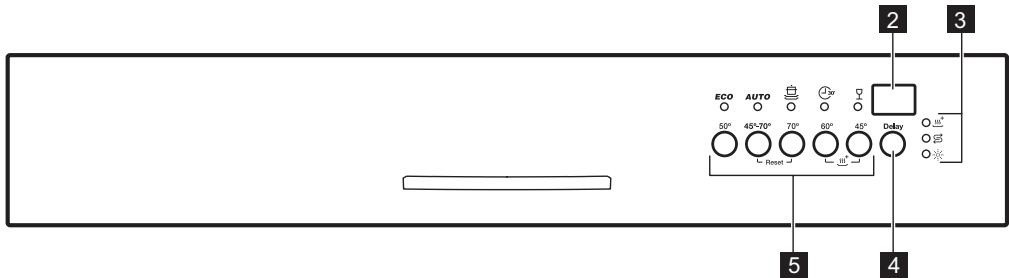
CONTROL PANEL

text_image
1
① Auto OFF
text_image
ECO AUTO 50° 45°-70° 70° 60° 45° DSBY
Reset
1 On/off button
2 Display
3 Indicators
4 Delay button
5 Programme buttons
INDICATORS
| Indicator | Description |
| ^+ | XtraDry indicator. |
| Rinse aid indicator. It is always off while the programme operates. |
| Salt indicator. It is always off while the programme operates. |
PROGRAMMES
The order of the programmes in the table may not reflect their sequence on the control panel.
| Programme | Degree of soil Type of load | Programme phases | Consumption values1) |
| Duration (min) | Energy (kWh) | Water (l) |
| ECO^2) | Normal soil Crockery and cutlery | PrewashWash 50 °CRinsesDry | 237 | 0.920 | 9.9 |
| AUTO^3) | All Crockery, cutlery, pots and pans | PrewashWash from 45 °C to 70 °CRinsesDry | 44 - 160 | 0.6 - 1.5 | 6 - 12 |
| Heavy soil Crockery, cutlery, pots and pans | PrewashWash 70 °CRinsesDry | 155 - 171 | 1.5 - 1.7 | 14 - 15 |
| ^30'4) | Fresh soil Crockery and cutlery | Wash 60 °Cor 65 °CRinses | 30 | 0.8 | 10 |
| Normal or light soil Delicate crockery and glass-ware | Wash 45 °CRinsesDry | 75 - 85 | 1.0 - 1.1 | 13 - 14 |
1) The pressure and the temperature of the water, the variations of the mains supply, the options and the quantity of dishes can change the values.
2) This programme offers the most efficient use of water and energy consumption for crockery and cutlery with normal soil. This is the standard programme for test institutes.
3) The appliance senses the degree of soil and the quantity of items in the baskets. It automatically adjusts the temperature and quantity of water, energy consumption and programme duration.
4) This programme is suitable for washing a load or a half load with fresh or light soil in a short time.
SETTINGS
PROGRAMME SELECTION MODE
In the programme selection mode it is possible to set a washing programme and to enter the user mode to change the appliance settings.
To enter the programme selection mode, press on/off.
The appliance is in programme selection mode
when ECO programme indicator is on and the display shows the programme duration.
If the control panel does not indicate that the appliance is in programme selection mode, implement the Reset procedure.
RESET FUNCTION
Use Reset to:
- Reset the currently running programme.
- Stop the countdown of the Delay option.
- Bring the appliance back to the programme selection mode.
To Reset, press and hold AUTO and 📄 until the appliance is in programme selection mode.
USER MODE
User mode allows to change the following settings:
- Adjust the level of the water softener according to the water hardness.
- Activate or deactivate the rinse aid empty notification.
■ Activate or deactivate AirDry.
Before entering user mode, make sure the appliance is in programme selection mode:
- Press and hold AUTO and ☑.
- The indicators ECO, AUTO and flash.
As the appliance stores the saved settings, there is no need to configure it before every cycle.
ADJUSTING THE WATER SOFTENER
Make sure that the appliance is in user mode:
-
Press ECO.
-
The indicators AUTO and are off.
- The indicator ECO still flashes.
-
The display shows the current setting: e.g. S L = level 5 .
-
Press ECO to change the setting. Each pressing increases the level number by one. After reaching level 10, the countdown starts again from level 1.
-
Press on/off to confirm the setting.

If you use multi-tabs containing salt and the hardness of your water is lower than 21^ dH, you can set the lowest water softener level. It deactivates the salt refill indicator. If you use standard detergent or multi-tabs without salt, set the proper water hardness level to keep the salt refill indicator active.
THE WATER HARDNESS TABLE
| German degrees (°dH) | French degrees (°fH) | mmol/l | Clarke degrees | Water softener level |
| 47 - 50 | 84 - 90 | 8.4 - 9.0 | 58 - 63 | 10 |
| 43 - 46 | 76 - 83 | 7.6 - 8.3 | 53 - 57 | 9 |
| 37 - 42 | 65 - 75 | 6.5 - 7.5 | 46 - 52 | 8 |
| 29 - 36 | 51 - 64 | 5.1 - 6.4 | 36 - 45 | 7 |
| 23 - 28 | 40 - 50 | 4.0 - 5.0 | 28 - 35 | 6 |
| 19 - 22 | 33 - 39 | 3.3 - 3.9 | 23 - 27 | 5 1) |
| 15 - 18 | 26 - 32 | 2.6 - 3.2 | 18 - 22 | 4 |
| 11 - 14 | 19 - 25 | 1.9 - 2.5 | 13 - 17 | 3 |
| 4 - 10 | 7 - 18 | 0.7 - 1.8 | 5 - 12 | 2 |
| <4 | <7 | <0.7 | < 5 | 1 2) |
1) Factory setting
2) Do not use salt at this level.
DEACTIVATING THE RINSE AID EMPTY NOTIFICATION
Make sure that the appliance is in user mode:
- Press AUTO.
- The indicators ECO and ≡ are off.
- The indicator AUTO flashes.
- The display shows the current setting:
- / d = rinse aid empty notification activated.
- 0d = rinse aid empty notification deactivated.
-
Press AUTO to change the setting.
-
Press on/off to confirm the setting.

When rinse aid chamber is empty, the rinse aid indicator is on prompting to refill the rinse aid. If you are using multi-tabs containing rinse aid and you are satisfied with the drying result, you can deactivate the notification.
However, we recommend that you always use rinse aid for best drying performance.
If you use standard detergent or multi-tabs without rinse aid, activate the notification to keep the rinse aid refill indicator active.
DEACTIVATING AIRDRY
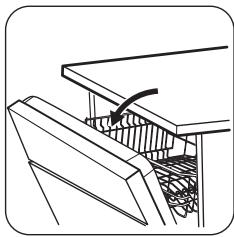
AirDry improves the drying results with less energy consumption.
natural_image
Technical line drawing of a mechanical assembly with no visible text or symbols
BEFORE FIRST USE
- Make sure that the current level of the water softener agrees with the hardness of the water supply. If not, adjust the level of the water softener. Contact your local water authority to know the water hardness in your area.
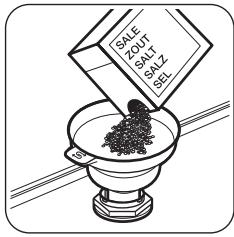
- Fill the salt container with special salt for dishwasher.
While the drying phase operates, the device opens the appliance door. The door is then kept ajar.
By default, AirDry is activated with all programmes excluding ⚪ (if applicable), but it is possible to deactivate it.
Make sure the appliance is in user mode.
-
Press
-
The indicators ECO and AUTO are off.
The indicator 🔊 flashes.
- The display shows the current setting:
$$
- I \square = \text { AirDry activated. }
$$
$$
- \square \square = \text { AirDry deactivated. }
$$
- Press ☐ to change the setting.
- Press on/off to confirm the setting.

CAUTION! If children have access to the appliance, it is advised to deactivate AirDry as opening the door may pose a danger.
- Fill the rinse aid dispenser with special rinse aid for dishwasher.
- Open the water tap.
- Start a programme to remove any processing residuals that can still be inside the appliance. Do not use detergent and do not load the baskets.
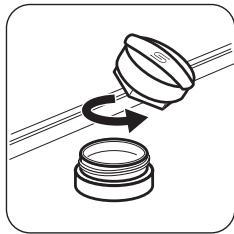
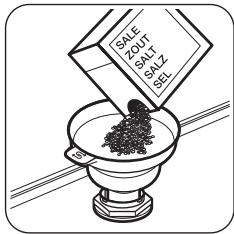
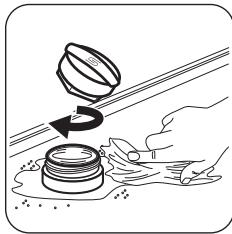
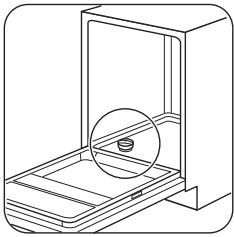
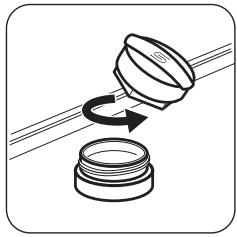
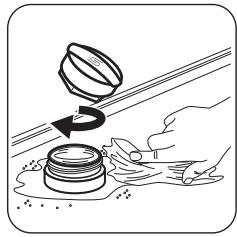
ADDING SALT
natural_image
Line drawing of a mechanical device with a circular inset showing a cylindrical component (no text or symbols)
natural_image
Diagram showing a mechanical component being rotated by an arrow, with no visible text or symbols.
text_image
ZOUT
SAL
SEL
natural_image
Illustration of a hand pouring liquid from a container onto a surface, with no text or symbols present.
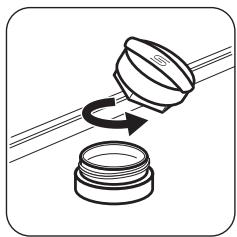
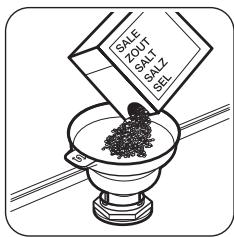
Before the first use, put one litre of water in the salt container.

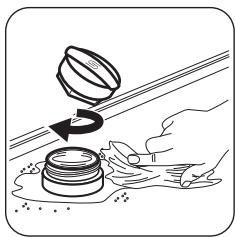
CAUTION! Water and salt can come out of the salt container during filling. To prevent corrosion, start a programme immediately after filling the salt container.
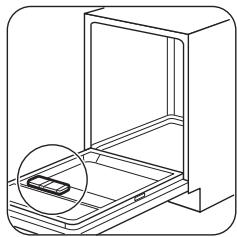
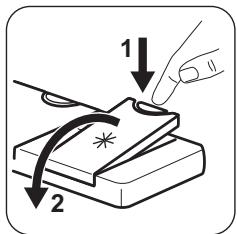
ADDING RINSE AID
natural_image
Line drawing of a 3D printer or scanner with an open lid and base, showing no text or symbols.
text_image
Diagram showing a hand pressing down on a piece of paper with labeled arrows indicating steps 1 and 2.
text_image
Diagram illustrating a tool tip interacting with a device, showing magnified view of the 'MAX' scale.
natural_image
Illustration of hands using a tool to lift a stack of books with a star symbol (no text or symbols present)
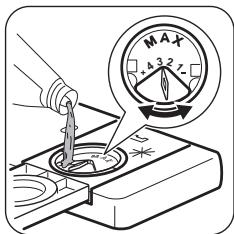
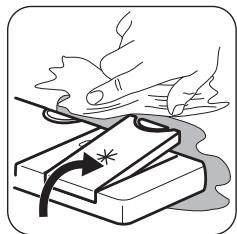
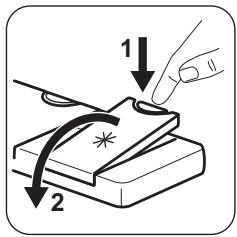
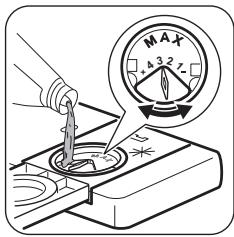
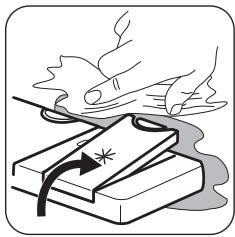
The rinse aid helps to dry the dishes without streaks and stains. It is automatically released during the hot rinse phase.
DAILY USE
- Open the water tap.
- Press the on/off button to activate the appliance.
Make sure that the appliance is in programme selection mode.
- If the salt indicator is on, fill the salt container.
- If the rinse aid indicator is on, fill the rinse aid dispenser.
- Load the baskets.
- Add the detergent.
- Set and start the correct programme for the type of load and the degree of soil.
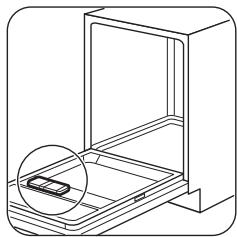
ADDING DETERGENT
natural_image
Line drawing of a 3D printer or scanner device with a magnified inset showing the internal structure (no text or symbols)
text_image
1
2
text_image
A
B
natural_image
Illustration of a device with an arrow indicating rotation or change, no text or symbols present
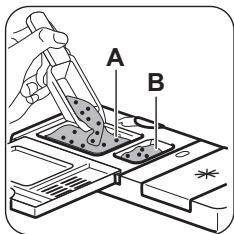
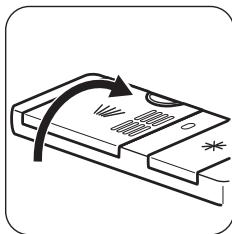
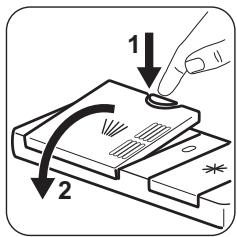
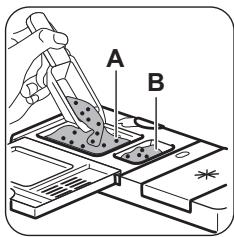
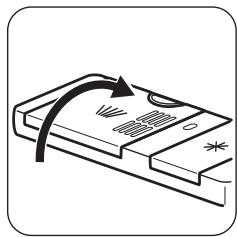
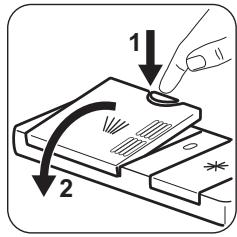
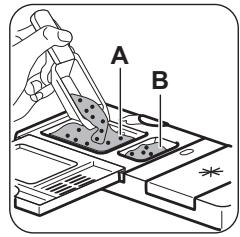
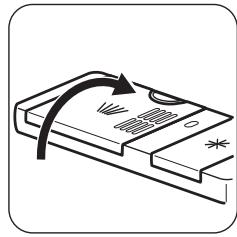
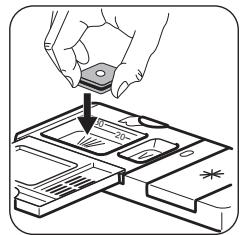
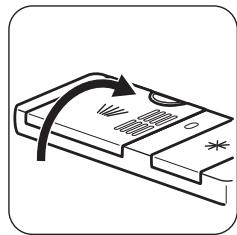
If the programme has a prewash phase, put a small quantity of detergent also in compartment B.
ADDING MULTI-TABLETS
natural_image
Line drawing of a device with a magnified inset showing a small object inside (no text or symbols)
text_image
1
2
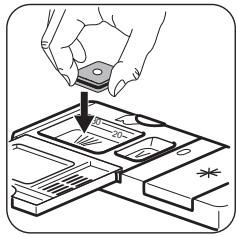
natural_image
Illustration of a hand placing a small object into a device on a tray (no text or symbols visible)
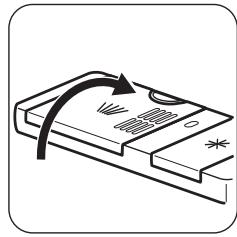
natural_image
Illustration of a device with an arrow indicating rotation or change, no text or symbols present
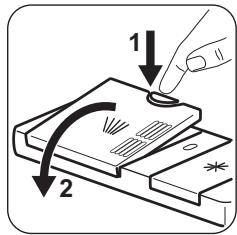
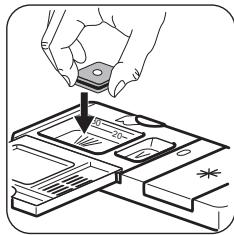
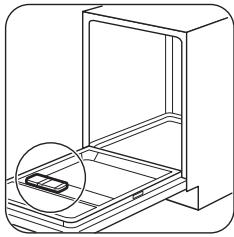
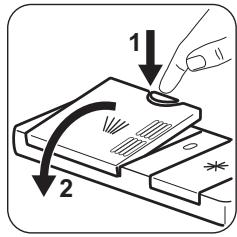
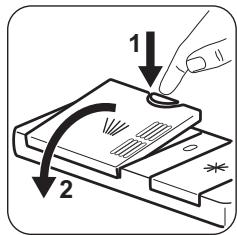
- Adjust the water softener to the lowest level.
THE AUTO OFF FUNCTION
This function decreases energy consumption by deactivating automatically the appliance when it is not operating.
The function comes into operation:
- 5 minutes after the completion of the programme.
- After 5 minutes if the programme has not started.
STARTING A PROGRAMME
- Keep the appliance door ajar.
- Press on/off to activate the appliance. Make sure that the appliance is in programme selection mode.
- Press the button related to the programme you want to start. The related programme indicator flashes and the display shows the programme duration.
- Set the applicable options.
- Close the appliance door to start the programme.
XTRADRY OPTION
Activate this option when you want to boost the drying performance. With the use of this option, the duration of some programmes, water consumption and the last rinse temperature can be affected.
The XtraDry option is a permanent option for all
programmes other than ECO and need not to be selected at every cycle.
ACTIVATING XTRADRY
Make sure the appliance is in programme selection mode.
To activate XtraDry:
- Press simultaneously ( \textcircled{J}_{30'} ) and ( \Box ) and hold until the indicator ( \underline{\underline{\underline{\underline{\underline{\underline{\underline{\underline{\underline{\underline{\underline{\underline{\underline{\underline{\underline{\underline{\underline{\underline{\underline{\underline{\underline{\underline{\underline{\underline{\underline{\underline{\underline{\underline{\underline{\underline{\underline{\underline{\underline{\underline{\underline{\underline{\underline{\underline{\underline{\underline{\underline{\underline{\underline{\underline{\underline{\underline{\underline{\underline{\underline{\underline{\underline{30^{\prime}}}}}}}}}}}}}}}}}}}}}}}}}}}}
- Select a programme.
-
Set Delay option.
-
Close the appliance door to start the programme.

Once the programme starts running, XtraDry cannot be activated.
DELAY OPTION
- Set a programme.
- Press Delay until the display shows the delay time you want to set (1-24h).
The delay time flashes in the display.
- Close the appliance door. The countdown starts to decrease by 1 hour.
When the countdown is complete the programme starts.
OPENING THE DOOR WHILE THE APPLIANCE OPERATES
Opening the door while a programme is running stops the appliance. It may affect the energy consumption and the programme duration. After closing the door, the appliance continues from the point of interruption.

If the door is opened during the drying phase, before AirDry automatically opens it, the programme ends after 30 seconds.

If the door is closed after it is opened automatically by AirDry in the drying phase, the programme ends after 3 minutes.

Do not try to close the appliance door within 2 minutes after AirDry automatically opens it, as this may cause damage to the appliance.
END OF THE PROGRAMME
When the programme is complete, the display shows: 0:00.
- Press on/off or wait 5 minutes for the Auto OFF function to automatically deactivate the appliance.
HINTS AND TIPS
GENERAL
Follow the hints below to ensure optimal cleaning and drying results in daily use and to help you protect the environment.
- Remove larger residues of food from the dishes into the waste bin.
- Do not pre-rinse dishes by hand. When needed, select a programme with a prewash phase.
- Always use the whole space of the baskets.
- Make sure that items in the baskets do not touch or cover each other. Only then can the water completely reach and wash the dishes.
- You can use dishwasher detergent, rinse aid and salt separately or you can use the multi-tablets (e.g. "All in 1"). Follow the instructions on the packaging.
- Select a programme according to the type of load and the degree of soil. ECO offers the most efficient use of water and energy consumption.
THE WATER SOFTENER
The water softener removes minerals from the water supply, which would have a detrimental effect on the washing results and on the appliance.
The higher the content of these minerals, the harder your water is. Water hardness is measured in equivalent scales.
The water softener should be adjusted according to the hardness of the water in your area. Your local water authority can advise you on the hardness of the water in your area. It is important to set the right level of the water softener to assure good washing results.
USING SALT, RINSE AID AND DETERGENT
- Only use salt, rinse aid and detergent for dishwasher. Other products can cause damage to the appliance.
- In areas with hard and very hard water we recommend to use plain dishwasher detergent (powder, gel, tablets containing no additional agents), rinse aid and salt separately for optimal cleaning and drying results.
- Close the water tap.

If you open the door before the activation of Auto OFF, the appliance is automatically deactivated.
- At least once a month run the appliance with the use of appliance cleaner which is particularly suitable for this purpose.
- Detergent tablets do not fully dissolve with short programmes. To prevent detergent residues on the tableware, we recommend that you use the tablets with long programmes.
- Do not use more than the correct quantity of detergent. Refer to the instructions on the detergent packaging.
WHAT TO DO IF YOU WANT TO STOP USING MULTI-TABLETS
Before you start to use separately detergent, salt and rinse aid do the following procedure.
- Set the highest level of the water softener.
- Make sure that the salt and rinse aid containers are full.
- Start the shortest programme with a rinsing phase. Do not add detergent and do not load the baskets.
- When the programme is completed, adjust the water softener according to the water hardness in your area.
- Adjust the released quantity of rinse aid.
- Activate the rinse aid empty notification.
LOADING THE BASKETS
- Only use the appliance to wash items that are dishwasher-safe.
- Do not put in the appliance items made of wood, horn, aluminium, pewter and copper.
- Do not put in the appliance items that can absorb water (sponges, household cloths).
- Remove remaining food from the items.
- Make soft the remaining burned food on the items.
- Put hollow items (cups, glasses and pans) with the opening down.
- Make sure that cutlery and dishes do not bond together. Mix spoons with other cutlery.
- Make sure that glasses do not touch other glasses.
- Put light items in the upper basket. Make sure that the items do not move.
- Make sure that the spray arm can move freely before you start a programme.
BEFORE STARTING A PROGRAMME
Before you start the selected programme, make sure that:
- The filters are clean and correctly installed.
- The cap of the salt container is tight.
- The spray arms are not clogged.
- There is enough salt and rinse aid (unless you use multi-tablets).
- The arrangement of the items in the baskets is correct.
- The programme is suitable to the type of load and the degree of soil.
- The correct quantity of detergent is used.
UNLOADING THE BASKETS
- Let the tableware cool down before you remove it from the appliance. Hot items can be easily damaged.
- First remove items from the lower basket, then from the upper basket.

After the programme is completed, water can still remain on the inside surfaces of the appliance.
CARE AND CLEANING

WARNING! Before maintenance, deactivate the appliance and disconnect the mains plug from the main socket.

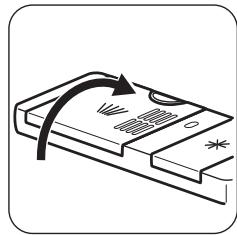
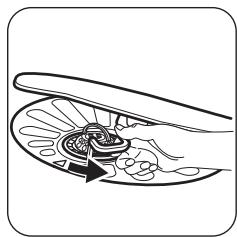
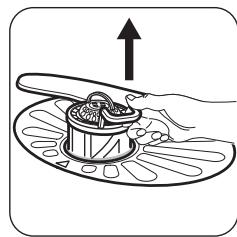
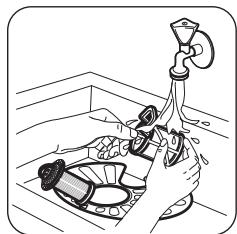
Dirty filters and clogged spray arms decrease the washing results. Make a check regularly and, if necessary, clean them.
CLEANING THE FILTERS
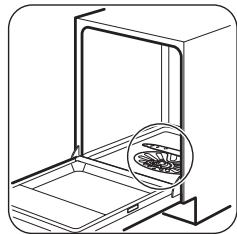
natural_image
Line drawing of a kitchen appliance with an open door and a magnified inset showing internal contents (no text or symbols)
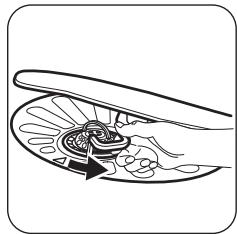
natural_image
Illustration of a hand holding a small, segmented object with a central knob (no text or symbols)
natural_image
Illustration of a hand using a rolling pin to press food into a bowl (no text or symbols)
text_image
B
A
natural_image
Illustration of a hand holding a small object with a label 'C' on the surface, no text or symbols present.
natural_image
Illustration of a hand washing dishes with a funnel, no text or symbols present
natural_image
Illustration of a hand holding a pen or ruler with a circular dial and checkmark (no text or symbols)
text_image
Diagram showing a mechanical component with directional arrows and a close-up view of the dial indicator.
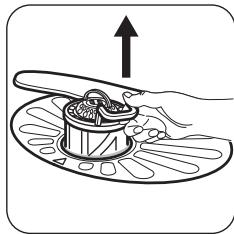
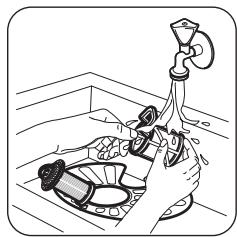
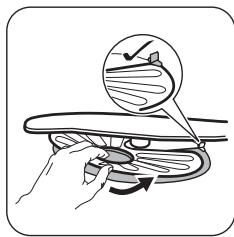
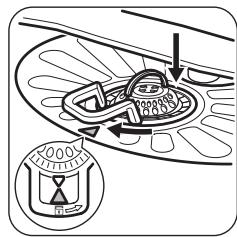
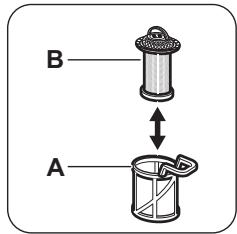
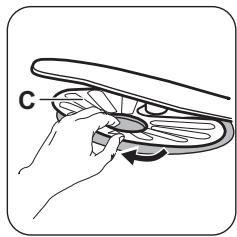
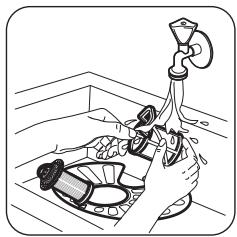
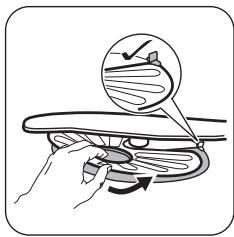
- Make sure that there are no residues of food or soil in or around the edge of the sump.
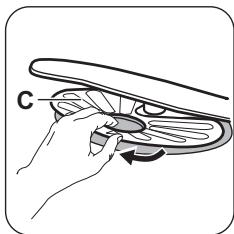
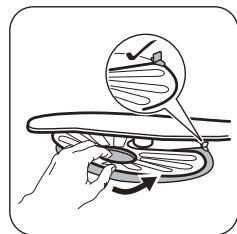
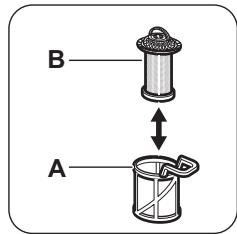
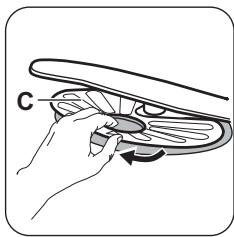
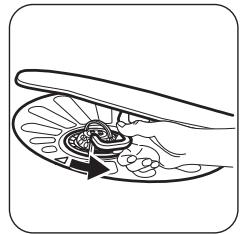
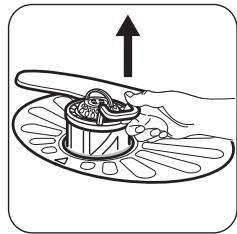
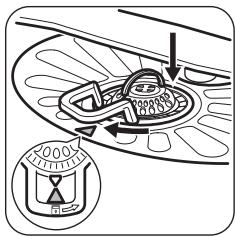
- Put back in place the flat filter (C). Make sure that it is correctly positioned under the 2 guides.
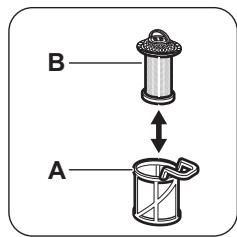
▪ Reassemble the filters (A) and (B).
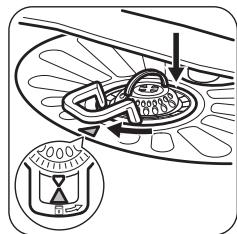
- Put back the filter (A) in the flat filter (C). Turn it clockwise until it locks.

An incorrect position of the filters can cause bad washing results and damage to the appliance
CLEANING THE SPRAY ARMS
Do not remove the spray arms. If the holes in the spray arms are clogged, remove remaining parts of soil with a thin pointed object.
EXTERNAL CLEANING
- Clean the appliance with a moist soft cloth.
- Only use neutral detergents.
- Do not use abrasive products, abrasive cleaning pads or solvents.
INTERNAL CLEANING
- Carefully clean the appliance, including the rubber gasket of the door, with a soft damp cloth.
- If you regularly use short duration programmes, these can leave deposits of grease and limescale inside the appliance. To prevent this, we recommend to run long duration programmes at least 2 times per month.
- To maintain the performance of your appliance at its best, we recommend to use monthly a specific cleaning product for dishwashers. Follow carefully the instructions on the packaging of the product.
TROUBLESHOOTING
If the appliance does not start or it stops during operation, first check if you can solve the problem by yourself with the help of the information in the table or contact an Authorised Service Centre.

WARNING! Repairs not properly done may result in serious risk to the safety of the user. Any repairs must be performed by qualified personnel.
With some problems, the display shows an alarm code.
The majority of problems that can occur can be solved without the need to contact an Authorised Service Centre.
| Problem and alarm code | Possible cause and solution |
| You cannot activate the appliance. | Make sure that the mains plug is connected to the mains socket.Make sure that there is no damaged fuse in the fuse box. |
| The program does not start. | Make sure that the appliance door is closed.If the delay start is set, cancel the setting or wait for the end of the countdown.The appliance has started the procedure to recharge the resin inside the water softener. The duration of the procedure is approximately 5 minutes. |
| The appliance does not fill with water.The display shows ,10 or ,11 . | Make sure that the water tap is open.Make sure that the pressure of the water supply is not too low.For this information, contact your local water authority.Make sure that the water tap is not clogged.Make sure that the filter in the inlet hose is not clogged.Make sure that the inlet hose has no kinks or bends. |
| The appliance does not drain the water.The display shows ,20 . | Make sure that the sink spigot is not clogged.Make sure that the filter in the outlet hose is not clogged.Make sure that the interior filter system is not clogged.Make sure that the drain hose has no kinks or bends. |
| The anti-flood device is on.The display shows ,30 . | Close the water tap and contact an Authorised Service Centre. |
| The appliance stops and starts more times during operation. | It is normal. It provides optimal cleaning results and energy savings. |
| The program lasts too long. | If the delayed start option is set, cancel the delay setting or wait for the end of the countdown. |
| The remaining time in the display increases and skips nearly to the end of program time. | This is not a defect. The appliance is working correctly. |
| Small leak from the appliance door. | The appliance is not levelled. Loosen or tighten the adjustable feet (if applicable).The appliance door is not centred on the tub. Adjust the rear foot (if applicable). |
| The appliance door is difficult to close. | The appliance is not levelled. Loosen or tighten the adjustable feet (if applicable).Parts of the tableware are protruding from the baskets. |
| Rattling/knocking sounds from inside the appliance. | The tableware is not properly arranged in the baskets. Refer to basket loading leaflet.Make sure that the spray arms can rotate freely. |
| The appliance trips the circuit-beaker. | The amperage is insufficient to supply simultaneously all the appliances in use. Check the socket amperage and the capacity of the meter or turn off one of the appliances in use.Internal electrical fault of the appliance. Contact an Authorised Service Centre. |

Refer to "Before first use", "Daily use", or "Hints and tips" for other possible causes.
For alarm codes not described in the table, contact an Authorised Service Centre.
Once you have checked the appliance, deactivate and activate the appliance. If the problem occurs again, contact an Authorised Service Centre.
THE WASHING AND DRYING RESULTS ARE NOT SATISFACTORY
| Problem | Possible cause and solution |
| Poor washing results. | Refer to "Daily use", "Hints and tips" and basket loading leaflet.Use more intensive washing programmes.Clean spray arm jets and filter. Refer to "Care and Cleaning". |
| Poor drying results. | Tableware has been left for too long inside a closed appli-ance.There is no rinse aid or the dosage of rinse aid is not enough. Set the rinse aid dispenser to a higher level.Plastic items may need to be towel dried.For the best drying performance activate the option XtraDry and set AirDry.We recommend to always use rinse aid, even in combination with multi-tablets. |
| There are whitish streaks or bluish layers on glasses and dishes. | The release quantity of rinse aid is too much. Adjust the rinse aid level to a lower level.The quantity of detergent is too much. |
| There are stains and dry water drops on glasses and dishes. | The released quantity of rinse aid is not sufficient. Adjust the rinse aid level to a higher level.The quality of the rinse aid can be the cause. |
| The dishes are wet. | For the best drying performance activate the option XtraDry and set AirDry.The programme does not have a drying phase or has a drying phase with low temperature.The rinse aid dispenser is empty.The quality of the rinse aid can be the cause.The quality of the multi-tablets can be the cause. Try a different brand or activate the rinse aid dispenser and use rinse aid and multi-tablets together. |
| The interior of the appliance is wet. | This is not a defect of the appliance. it is caused by the humidity in the air that condenses on the walls. |
| Unusual foam during washing. | Use the detergent for dishwashers only.There is a leak in the rinse aid dispenser. Contact an Authorised Service Centre. |
| Traces of rust on cutlery. | There is too much salt in the water used for washing. Refer to "The water softener".Silver and stainless steel cutlery were placed together. Avoid to put silver and stainless steel items close together. |
| There are residues of detergent in the dispenser at the end of the programme. | The detergent tablet got stuck in the dispenser and therefore was not completely washed away by water.Water cannot wash away the detergent from the dispenser.Make sure that the spray arm is not blocked or clogged.Make sure that items in the baskets do not impede the lid of the detergent dispenser from opening. |
| Odours inside the appliance. | Refer to "Internal cleaning". |
| Limescale deposits on the table-ware, on the tub and on the in-side of the door. | The level of salt is low, check the refill indicator.The cap of the salt container is loose.Your tap water is hard. Refer to "The water softener".Even using multi-functional tabs use salt and set regeneration of the water softener. Refer to "The water softener".If lime scale deposits still remain, clean the appliance with appliance cleaners which are particularly suitable for this purpose.Try different detergent.Contact the detergent manufacturer. |
| Dull, discoloured or chipped tableware. | Make sure that only dishwasher-safe items are washed in the appliance.Load and unload the basket carefully. Refer to basket loading leaflet.Place delicate items in the upper basket. |

Refer to "Before first use", "Daily use" or "Hints and tips" for other possible causes.
PRODUCT INFORMATION SHEET
| Trade Mark | Zanussi |
| Model | ZDF26020XA 911516309 |
| Rated capacity (standard place settings) | 13 |
| Energy efficiency class | A++ |
| Energy consumption in kWh per year, based on 280 standard cleaning cycles using cold water fill and the consumption of the low power modes. The actual energy consumption will depend on how the appliance is used. | 262 |
| Energy consumption of standard cleaning cycle (kWh) | 0.920 |
| Power consumption in off mode (W) | 0.50 |
| Power consumption in left-on mode (W) | 5.0 |
| Water consumption in litres per year, based on 280 standard cleaning cycles. The actual water consumption will depend on how the appliance is used | 2775 |
| Drying efficiency class on a scale from G (least efficient) to A (most efficient) | A |
| The ‘standard programme’ is the standard cleaning cycle to which the information in the label and the fiche relates. This programme is suitable to clean normally soiled tableware and is the most efficient programme in terms of combined energy and water consumption. It is indicated as "Eco" programme.Programme time of standard cleaning cycle (min) | ECO237 |
| Duration of the left-on mode (min) | 5 |
| Sound power level (db(A) re 1pW) | 47 |
| Built in appliance Y/N | No |
ADDITIONAL TECHNICAL INFORMATION
| Dimensions | Width / height / depth (mm) | 600 / 850 / 625 |
| Electrical connection1) | Voltage (V) | 220 - 240 |
| Frequency (Hz) | 50 |
| Water supply pressure | Min. / max. bar (MPa) | 0.5 (0.05) / 8 (0.8) |
| Water supply | Cold water or hot water2) | max 60 °C |
1) Refer to the rating plate for other values.
2) If the hot water comes from alternative source of energy (e.g. solar panels), use the hot water supply to decrease energy consumption.
ENVIRONMENTAL CONCERNS
Recycle materials with the symbol 📊. Put the packaging in relevant containers to recycle it. Help protect the environment and human health by recycling waste of electrical and electronic appliances. Do not dispose of appliances marked
with the symbol 📋 with the household waste.
Return the product to your local recycling facility or contact your municipal office.
natural_image
Technical line drawing of a mechanical assembly with no visible text or symbols

natural_image
Line drawing of a mechanical device with a circular component inserted into a housing (no text or symbols)
natural_image
Diagram showing a funnel pouring liquid into a jar, with an arrow indicating rotation (no text or symbols)
text_image
RAL
ZOUT
SALT
BALT
SIL
natural_image
Illustration of a hand pouring liquid from a container into a tank, with no text or symbols present.
natural_image
Line drawing of a 3D printer or scanner device with a magnified inset showing the internal structure (no text or symbols)
text_image
Diagram illustrating a step-by-step process of folding or cutting a piece, labeled with arrows 1 and 2.
text_image
Diagram illustrating a tool tip pressing into a component with a magnified view showing MAX scale readings.
natural_image
Illustration of a hand pressing down on stacked books with motion arrows indicating compression (no text or symbols)
natural_image
Line drawing of a door with an open lid and a small object inside (no text or symbols)
text_image
1
2
text_image
A
B
natural_image
Illustration of a document being transferred with an arrow indicating rotation (no text or symbols present)
natural_image
Line drawing of a device inside a transparent enclosure with a magnified inset showing a small object (no text or symbols)
text_image
1
2
text_image
Diagram showing a hand holding a small object above a tray with labeled items, indicating a process or operation.
natural_image
Illustration of a device with an arrow indicating rotation or change, no text or symbols present
natural_image
Line drawing of a kitchen appliance with an open door and a magnified inset showing internal components (no text or symbols)
natural_image
Line drawing of a hand holding an open shell, showing internal components (no text or symbols)
natural_image
Illustration of a hand holding a bowl with food, placed on a patterned plate with an upward arrow (no text or symbols)
text_image
B
A
natural_image
Illustration of a hand holding a small object with a label 'C' on the surface (no text or symbols on the object itself)
natural_image
Line drawing of a kitchen sink with hand washing dishes and a funnel (no text or symbols)
natural_image
Illustration of a hand holding a pen with a magnified circular detail showing a checkmark (no text or symbols present)
text_image
Diagram showing a mechanical component with an inset dial indicator showing 1000Ω measurement.
natural_image
White shopping cart icon on black background (no text or symbols)

natural_image
Icon of two hands holding a washing machine, symbolizing digital washing (no text or symbols)

natural_image
Icon depicting a kitchen appliance with gears, symbolizing home appliances (no text or symbols)

natural_image
Simple line icon of a shopping cart with a lightbulb and leaf symbol (no text or numbers)

natural_image
White shopping cart icon with tools (no text or symbols)