50600 - Digital Camera VIVITAR - Free user manual and instructions
Find the device manual for free 50600 VIVITAR in PDF.


| Brand | Vivitar |
| Model | 50600 |
| Product type | Refractor telescope |
| Lens focal length | 600 mm |
| Eyepiece magnifications | 50x (12 mm eyepiece) and 100x (6 mm eyepiece) |
| Finder magnification | 3x |
| Tube material | Aluminum |
| Optics | Glass |
| Tripod | Aluminum, height adjustable |
| Included accessories | 2 eyepieces (6 mm and 12 mm), 3x finder, periscope diagonal, tripod |
| Care and cleaning | Clean lenses with optical paper after each use. Store in a cool, dry place away from direct sunlight. |
| Safety | Never look directly at the sun with the telescope, risk of permanent eye damage. |
| Warranty | Limited one-year warranty from date of purchase |
| After-sales service | Contact Vivitar Technical Support, 195 Carter Drive, Edison NJ 08817 |
| Repairability | Do not disassemble, repair, or modify yourself. Confide to a professional. |
| Precautions | Avoid shocks, humidity, chemicals, and extreme temperatures. |
Frequently Asked Questions - 50600 VIVITAR
User questions about 50600 VIVITAR
0 question about this device. Answer the ones you know or ask your own.
Ask a new question about this device
Download the instructions for your Digital Camera in PDF format for free! Find your manual 50600 - VIVITAR and take your electronic device back in hand. On this page are published all the documents necessary for the use of your device. 50600 by VIVITAR.
USER MANUAL 50600 VIVITAR
Limited One Year Warranty
Vivitar warrants this quality product to be free of defects in material and workmanship for a period of one year from the date of purchase. During the period, Vivitar will repair or replace the product at no charge for parts or labor.
TIME PERIOD OF THIS WARRANTY
The time period of this warranty starts from the date of the original purchase and expires on the first anniversary date of purchase.
WHAT IS NOT COVERED BY THIS WARRANTY
No express or implied warranty is made for any defects in this product which result from accident, abuse, misuse, failure to operate the product in accordance with relevant instructions, neglect, immersion in or exposure to chemicals or liquids, extremes of climate, fungus, excessive wear and tear/cosmetic damage and defects resulting from other extraneous causes such as unauthorised disassembly, repair or modification.
This warranty shall not extend to any incidental or consequential damages arising from the purchase, use or inability to use this product even if Vivitar has been advised of such damages.
The laws of some countries and some States thereof do not allow the limitation of incidental or consequential damages, so the above limitation or exclusion may apply to you.
WHAT TO DO WHEN SERVICE IS NEEDED
STEP 1. Package the product and relevant accessories carefully, using ample padding materials and a sturdy mailing container to prevent damage in transit.
STEP 2. Include in package:
a) Evidence of date and place of original purchase (for example, a copy of your sales receipt).
b) Detailed description of your problem.
c) When possible, a sample evidencing the problem.
STEP 3. Return item (insured) to: Vivitar
Attn:Technical Support
195 Carter Drive
Edison NJ 08817
When service is complete, the product will be returned to you shipping prepaid. In the event the product is deemed to be not faulty or the defect is a result in wear and tear, Vivitar may levy a handling charge for the return of the product.
This warranty gives you specific legal rights. You may also have other rights which vary from country and State to State thereof.
For more information visit our website www.vivitar.com
Introduction
Thank you for purchasing your 60x/120x Refractor Telescope. Your telescope uses glass optics for great clarity. It is housed in an aluminum body and designed for easy operation and to provide sharp and clear viewing of distant objects.
WARNING
-NEVER look directly at the sun with this telescope. Looking directly at the sun can cause permanent eye damage.
Specifications
Objective Focal Length:600mm
Finder Scope Magnification: 3x
Eye-Piece Magnifications: F = 6 mm for 100x magnification and F = 12 mm for 50x magnification
Maintenance
This telescope is a precision instrument and should be carefully stored in a cool and dry environment. Do not store near direct sunlight. Both eye-piece lenses must be stored in the supplied plastic containers when not in use. It is recommended to clean the glass lens after every use with lens paper to prevent damage or scratches.
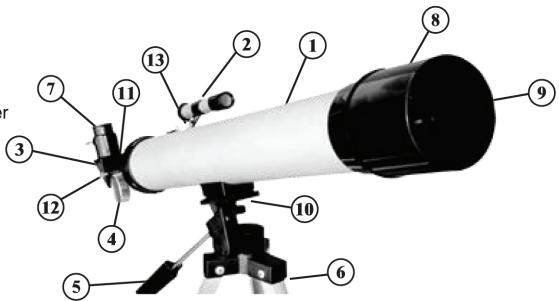
A Quick Look at Your Device
① Main Body
② Finder Scope
③ Diagonal Periscope Viewer
(4) Focus Knob
Angle and Bearing Adjustment Lever
⑥ Aluminum Tripod
⑦ Eye-Piece (2 Lenses included)
⑧ Objective Lens
9 Objective Lens Cover
10 Main Body Connecting Screw
1 Focus Tube
Eye-Piece Attachment Screw
⑬ Finder Scope Bracket
Installation
Remove the tripod from the box and extend the legs by unlatching the lock and pulling each of the legs out to full extension. Lock the latch back in place to secure the legs, then spread apart the tripod on a flat and stable surface. Take the main body of the telescope and attach it to the top of the Main Body Connecting Screw, aligning the threaded hole with the screw. Tighten the knob on the underside of the attaching bracket. Then, unscrew and remove the two bolts on the top of the telescope. Place the Finder Scope over the screws. Make sure the Finder Scope bracket fits over the two screws on the telescope securely, then tighten. Make sure that the Finder Scope is facing the foward direction as shown on the previous page.
Install one of the two lenses included (F=6mm and F=12mm) into the focus tube and secure it by tightening the screw. Make sure not to over tighten it. For easy viewing, you can first install the Diagonal Periscope Viewer into the Focus Tube. Then insert one of the lenses into the Diagonal Periscope Viewer and tighten it. Make sure the end on the Diagonal Periscope Viewer without the screw is inserted into the focus tube of the telescope.
Using Your Telescope
-Make sure the tripod is placed on a flat, stable surface. -Apply small and slow adjustments for focusing.
-Use the Finder Scope first to acquire the target object, then use the Focus Knob to obtain a clear image.