 ManualGo.com
 ES-RT37 - Rasoir électrique PANASONIC - Free user manual and instructions
Find the device manual for free ES-RT37 PANASONIC in PDF.


Download the instructions for your Rasoir électrique in PDF format for free! Find your manual ES-RT37 - PANASONIC and take your electronic device back in hand. On this page are published all the documents necessary for the use of your device. ES-RT37 by PANASONIC.
USER MANUAL ES-RT37 PANASONIC
Operating Instructions Rechargeable Shaver Model No. ES‑LV95
Operating Instructions
Rechargeable Shaver Model No. ES‑LV95
Safety precautions 4
Parts identification10
Removing the built-in rechargeable battery22
Thank you for purchasing this Panasonic product.
Before operating this unit, please read these instructions completely and save them for future use.
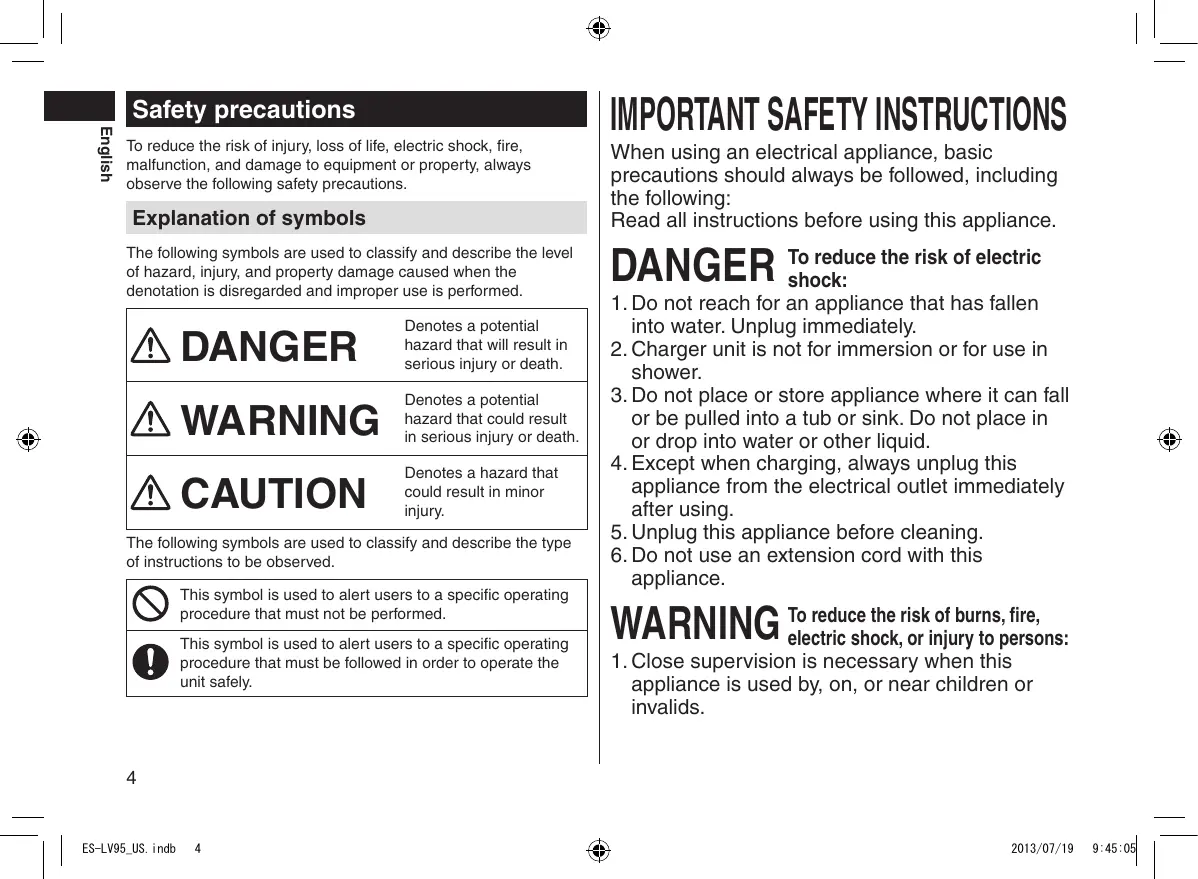
To reduce the risk of injury, loss of life, electric shock, fire, malfunction, and damage to equipment or property, always observe the following safety precautions.
Explanation of symbols
The following symbols are used to classify and describe the level of hazard, injury, and property damage caused when the denotation is disregarded and improper use is performed.
DANGER Denotes a potential hazard that will result in serious injury or death.
WARNING Denotes a potential hazard that could result in serious injury or death.
CAUTION Denotes a hazard that could result in minor injury.
The following symbols are used to classify and describe the type of instructions to be observed.
This symbol is used to alert users to a specific operating procedure that must not be performed. This symbol is used to alert users to a specific operating procedure that must be followed in order to operate the unit safely.
IMPORTANT SAFETY INSTRUCTIONS When using an electrical appliance, basic precautions should always be followed, including the following:
Read all instructions before using this appliance. reduce the risk of electric DANGER Toshock:
1. Do not reach for an appliance that has fallen into water. Unplug immediately.
2. Charger unit is not for immersion or for use in shower. 3. Do not place or store appliance where it can fall or be pulled into a tub or sink. Do not place in or drop into water or other liquid. 4. Except when charging, always unplug this appliance from the electrical outlet immediately after using. 5. Unplug this appliance before cleaning. 6. Do not use an extension cord with this appliance. reduce the risk of burns, fire, WARNING Toelectric shock, or injury to persons: 1. Close supervision is necessary when this appliance is used by, on, or near children or invalids.
SAVE THESE INSTRUCTIONS English
WARNING Always ensure the appliance is operated on an electric power source matched to the rated voltage indicated on the AC adaptor.
Fully insert the power plug.
2. Use this appliance only for its intended use as described in this manual. Do not use attachments not recommended by the manufacturer.
3. Never operate this appliance if it has a damaged cord or plug, if it is not working properly, if it has been dropped or damaged, or dropped into water. Return the appliance to a service center for examination and repair. 4. Keep the cord away from heated surfaces. 5. Never drop or insert any object into any opening. 6. Do not use outdoors or operate where aerosol (spray) products are being used or where oxygen is being administered. 7. Do not use this appliance with damaged shaving blades and/or foil, as it has the potential to result in facial injury. 8. Always attach plug to appliance first, then to outlet. To disconnect, turn all controls to “off” then remove plug from outlet.
- Failure to do so may cause fire or electric shock.
Regularly clean the power plug and the appliance plug to prevent dust from accumulating.
- Failure to do so may cause fire due to insulation failure caused by humidity. Disconnect the adaptor and wipe with a dry cloth.
Immediately stop using and remove the adaptor if there is an abnormality or failure.
- Using it in such conditions may cause fire, electric shock, or injury.
<Abnormality or failure cases>
••The main unit, self-cleaning recharger, adaptor or cord is deformed or abnormally hot. ••The main unit, self-cleaning recharger, adaptor or cord smells of burning. ••There is abnormal sound during use or charging of the main unit, self-cleaning recharger, adaptor or cord. - Immediately request inspection or repair at an authorized service center.
WARNING If detergent contacts skin, wash immediately and thoroughly with soap.
If you experience skin irritation anywhere on the body, stop using immediately and contact a physician.
This shaver has a built-in rechargeable battery. Do not throw into fire, apply heat, or charge, use, or leave in a high temperature environment.
- Doing so may cause overheating, ignition, or explosion.
Do not connect or disconnect the adaptor to a household outlet with a wet hand.
- Doing so may cause electric shock or injury.
- Failure to follow these instructions may result in physical injury or injury to the skin.
Never disassemble except when disposing of the product.
If detergent is consumed accidentally, do not induce vomiting, drink a large amount of water and contact a physician.
If detergent comes into contact with eyes, wash immediately and thoroughly with running water and contact a physician.
Do not use anything other than the supplied AC adaptor and the self-cleaning recharger. Also, do not charge any other product with the supplied AC adaptor and the self-cleaning recharger.
- Doing so may cause fire, electric shock, or injury.
- Doing so may cause burn or fire due to a short circuit.
- Failure to follow these instructions may result in physical problems.
Do not modify or repair.
This appliance is not intended for use by persons
(including children) with reduced physical, sensory or mental capabilities, or lack of experience and knowledge, unless they have been given supervision or instruction concerning use of the appliance by a person responsible for their safety. Children should be supervised to ensure that they do not play with the appliance.
Persons using an implanted medical electronic device, such as a pacemaker, should not allow this unit to touch the skin where the medical electronic device is implanted.
- Failure to do so may cause an accident or injury.
The supply cord cannot be replaced. If the cord is damaged, the AC adaptor should be scrapped.
- Failure to do so may cause an accident or injury.
- Doing so may cause fire, electric shock, or injury.
Contact an authorized service center for repair (battery change etc).
- Doing so may cause an accident or illness.
Do not store within reach of children or infants. Do not let them use it.
- Putting the inner blades in the mouth or drinking the detergent may cause accidents and injury.
- Doing so may cause electric shock or fire due to a short circuit.
Do not damage, modify, or forcibly bend, pull, or twist the cord.
Also, do not place anything heavy on or pinch the cord.
- Doing so may cause electric shock or fire due to a short circuit.
Do not use in a way exceeding the rating of the household outlet or the wiring.
- Exceeding the rating by connecting too many plugs to one household outlet may cause fire due to overheating.
CAUTION Check the system outer foil for cracks or deformations before use.
- Failure to do so may cause injury to the skin.
Be sure to place the protective cap on the shaver when carrying around or storing.
- Failure to do so may cause injury to skin or reduce the life of the system outer foil.
Disconnect the adaptor or the appliance plug by holding onto the adaptor or the appliance plug instead of the cord.
- Failure to do so may cause electric shock or injury.
Never use the appliance if the AC adaptor is damaged or if the power plug fits loosely in a household outlet.
Use caution when opening detergent as spout is sharp.
- Failure to do so may cause injury.
Do not allow pins or trash to adhere to the power plug or the appliance plug.
- Doing so may cause electric shock or fire due to a short circuit.
WARNING Do not use excessive pressure to apply the system outer foil to your lip or other part of your face. Do not apply the system outer foil directly to blemishes or injured skin.
- Doing so may cause injury to the skin.
Do not forcefully press the system outer foil. Also, do not touch the system outer foil with fingers or nails when in use.
- Doing so may cause injury to skin or reduce the life of the system outer foil.
Do not touch the blade section (metallic section) of the inner blade.
- Doing so may cause injury to your hands.
Do not use this product for hair on head or any other part of the body.
- Doing so may cause injury to skin or reduce the life of the system outer foil.
Do not share your shaver with your family or other people.
- Doing so may result in infection or inflammation.
Do not remove the shaver from the self-cleaning recharger while using the “Clean/Dry/Charge” mode or “Dry/Charge” mode.
- Doing so may cause burn due to high temperatures around the blades.
CAUTION Do not drop or subject to shock.
- Doing so may cause injury.
Do not wrap the cord around the adaptor when storing.
- Doing so may cause the wire in the cord to break with the load, and may cause fire due to a short circuit.
Do not use detergent for any purpose other than washing the shaver blades.
- Using it with other products may cause discoloration or cracking.
► of the rechargeable battery
DANGER The rechargeable battery is exclusively for use with this shaver. Do not use the battery with other products.
Do not charge the battery after it has been removed from the product. ••Do not throw into fire or apply heat. ••Do not hit, disassemble, modify, or puncture with a nail. ••Do not let the positive and negative terminals of the battery get in contact with each other through metallic objects. ••Do not carry or store the battery together with metallic jewelry such as necklaces and hairpins. ••Do not charge, use, or leave the battery where it will be exposed to high temperatures, such as under direct sunlight or near other sources of heat. ••Never peel off the tube. - Doing so may cause overheating, ignition, or explosion.
WARNING After removing the rechargeable battery, do not keep it within reach of children and infants.
- The battery will harm the body if accidentally swallowed.
If this happens, consult a physician immediately.
- The battery fluid may cause blindness if it comes in contact with your eyes.
Do not rub your eyes. Wash immediately with clean water and consult a physician. - The battery fluid may cause inflammation or injury if it comes in contact with the skin or clothes. Wash it off thoroughly with clean water and consult a physician.
WARNING If the battery fluid leaks out, take the following procedures. Do not touch the battery with your bare hands.
•• Clean the housing only with a soft cloth slightly dampened with tap water or soapy tap water. Do not use thinner, benzine, alcohol or other chemicals.
•• Store the shaver in a place with low humidity after use. •• Do not store the shaver or detergent where it will be exposed to direct sunlight or other heat sources. •• The self-cleaning recharger cleans the inner blades and the system outer foil. Wash with water to remove beard trimmings in other areas. •• Depending on the environment, the shaver may not dry even if you select a mode that includes the “Dry” function. In this case, wipe off any drops of water with a dry cloth.
•• This WET/DRY shaver can be used for wet shaving using shaving lather or for dry shaving. You can use this watertight shaver in the shower and clean with water. The following symbol means suitable for use in a bath or shower.
•• Treat yourself to wet lather shaves for at least three weeks and notice the difference. Your Panasonic WET/DRY shaver requires a little time to get used to because your skin and beard need about a month to adjust to any new shaving method.
•• Keep both the inner blades inserted. If only one of the inner blades is inserted, the shaver may be damaged. •• If you clean the shaver with water, do not use salt water or hot water. Do not soak the shaver in water for a long period of time.
Parts identification
1 Protective cap 2 System outer foil 3 Foil frame 4 Foil frame release buttons 5 Finger rest 6 Power switch 7 Lock ring 8 Lamp display a. Used time lamp b. Battery capacity lamp c. Shaving sensor lamp ( ) d. Clean lamp e. Foil/blade check lamp f. Charge status lamp ( )
Outer foil section System outer foil release buttons Inner blades Trimmer Trimmer handle Main body rear terminals B Self-cleaning recharger Charging terminals Cleaning liquid unit removal button Intake port Self-cleaning recharger socket Lock release lever Cleaning liquid filter Water maximum line Cleaning liquid unit
LOW lamp CLEAN lamp DRY lamp SELECT button C AC adaptor (RE7‑59) Adaptor Power plug Cord Appliance plug Accessories D Travel case E Special detergent (Detergent)
Rotate the lock ring to “ ” to lock the power switch:
Used when carrying the shaver.
Charging using the self-cleaning recharger Thoroughly wipe off any drops of water on or around the selfcleaning recharger so that it is dry before charging the shaver.
the appliance plug into
1 Insert the self-cleaning recharger. the protective cap 2 Remove and then attach the shaver.
The charge status lamp ( ) glows.
The number of the battery capacity lamp will increase as charging progresses.
The battery capacity lamp and the charge status lamp will light up and then turn off after
•• Turn the shaver off before attaching.
1 •• Wipe off any water droplets on the main body rear terminals. •• Check that the outer foil is not deformed or damaged when you are attaching the shaver.
3 Plug in the adaptor into a household outlet.
•• The “Charge” mode starts when attaching the shaver. •• Check that the charge status lamp ( ) glows.
Rotate the lock ring to “ ” to unlock the power switch:
Used when shaving, washing the shaver, lubricating the shaver.
•• Charging is completed after approx. 1 hour.
The charging time may decrease depending on the charging capacity. •• If the shape of the plug does not fit the power outlet, use an attachment plug adaptor of the proper configuration. While charging After charging is completed
Use the lock ring to lock or unlock the power switch. Rotate the lock ring until it clicks.
The charge status lamp (
) will blink twice every second.
•• After charging is completed, turning the power switch ON with the shaver plugged in will cause the battery capacity lamp and the charge status lamp to light up and then turn off after 5 seconds.
This shows that the shaver is fully charged. •• Recommended ambient temperature for charging is 10 – 35 °C (50 – 95 °F). It may take longer to charge or the battery may fail to charge properly in extremely high or low temperatures. Charge the shaver within the recommended ambient temperature range.
•• When charging the shaver for the first time or when it has not been in use for more than 6 months, the charge status lamp ( may not glow. It will eventually glow if kept connected.
the adaptor after charging is
4 Disconnect completed.
•• You can charge even with the STATUS lamp of the self-cleaning recharger glowing.
•• The appliance can be charged even with the cleaning liquid unit removed.
Charging without the self-cleaning recharger
You can also charge without the self-cleaning recharger.
the appliance plug into
1 Insert the shaver.
•• Turn the shaver off before inserting.
in the adaptor into a
2 Plug household outlet.
•• Wipe off any water droplets on the appliance socket.
the adaptor after charging is
3 Disconnect completed.
Using the shaver the lock ring to unlock the power switch.
1 Rotate (See page 11.) the power switch to select the desired 2 Press shaving mode. •• Each time you press the power switch, the shaving mode changes from “Shaving sensor mode” “Normal mode” “OFF”. Shaving Shaving sensor Normal mode OFF mode mode Beard thickness is automatically The power level sensed and the is constantly Description power is — maintained automatically while shaving. adjusted when shaving.
You cannot operate the shaver while charging. —
The shaving sensor lamp turns off.
The shaving sensor lamp turns off.
The shaving sensor lamp blinks.
► the trimmer Slide the trimmer handle up to the “ ” position so that the trimmer stands upright.
•• The shaving sensor may not respond depending on the thickness of the beard or the type of the shaving gel and shaving foam, but this is normal.
•• The shaving sensor may not respond when the remaining battery capacity is low. If this happens, recharge the shaver.
•• Start shaving by applying gentle pressure to your face. Stretch your skin with your free hand and move the shaver back and forth in the direction of your beard. You may gently increase the amount of pressure as your skin becomes accustomed to this shaver.
Applying excessive pressure does not provide a closer shave.
► the shaver head You can change the pivot action. FREE You can move the shaver head.
the shaver as illustrated
Press and hold the lock release button (a) and slide the trimmer handle down to lower the trimmer.
Slide the trimmer handle up. Turn the shaver on and place at a right angle to your skin and move downwards to trim your sideburns. Pre-shave The trimmer can be used for a pre-shave of long beards.
LOCK You can lock the shaver head.
•• If you press the power switch for more than 2 seconds, the sonic vibration cleaning mode is activated. (See page 16.)
You cannot shave in this mode. •• Do not place your fingers on the power switch while using the shaver. This may cause the shaver to switch the mode or turn off. Place your fingers on the finger rest while using the shaver. •• We recommend using the shaver in an ambient temperature range of 5 – 35 °C (41 – 95 °F). If used outside this range, the appliance may stop operating.
Reading lamps when using
Cleaning using the self-cleaning recharger ►Preparing ► the self-cleaning recharger
Remove the shaver and the appliance plug from the self-cleaning recharger.
the self-cleaning recharger on a hard, flat
1 Place surface. •• When the self-cleaning recharger is lifted, or on the soft surface such as carpets, the lock release lever will not fit in the recharger properly. In that case, the cleaning liquid unit cannot be removed.
2 Press liquid unit removal The used time and remaining battery capacity are shown and then turn off after 5 seconds. •• The shown time returns to [0’00”] after 10 minutes.
The lamps will light up and then turn off after 8 seconds.
When the battery capacity is low
button and remove the cleaning liquid 1 unit.
away the old cleaning liquid and beard
3 Wash trimmings and then rinse the cleaning liquid unit.
•• After washing, be sure to attach the cleaning liquid filter.
•• You can shave 1 to 2 times after “10%” appears. (This will differ depending on usage.)
•• A full charge will supply enough power for approx. 14 shaves of 3 minutes each. (This will differ depending on usage.)
cleaning liquid unit.
•• Do not let the water rise above the maximum water line. This may cause the cleaning liquid to spill.
5 Attach the cleaning liquid unit.
•• Immediately wipe up any cleaning liquid that has been spilt.
Be careful not to drop cleaning liquid onto leather products or wooden floors as it may cause discoloration.
Press the top of the selfcleaning recharger down and securely attach until it clicks.
•• The water and detergent will mix after cleaning begins, making cleaning liquid.
•• When the cleaning liquid level has dropped, the LOW lamp will glow to indicate the cleaning liquid should be replaced. •• After the LOW lamp glows, you can clean the shaver with the self-cleaning recharger for approximately 7 days. •• Replace the cleaning liquid when the STATUS lamp glows. •• When replaced, the cleaning liquid will last for approximately 30 days if used once per day. (This will differ depending on beard thickness and the ambient temperature.)
•• Use the detergent within approximately 6 months after opening the package. When 6 months have passed, discard the cleaning liquid, and then pour new water and detergent into the cleaning liquid unit.
•• Replace the water and detergent at the same time. Otherwise the cleaning function may deteriorate. •• Only use self-cleaning recharger detergent for Panasonic shavers.
4 Pour detergent into the
Remove any soap or water on the shaver if it has been washed with hand soap or any other detergent.
1 Insert into the self-cleaning recharger.
2 Remove and then attach the shaver. in the adaptor into a 3 Plug household outlet.
•• Turn the shaver off before attaching.
•• Wipe off any water droplets on the main body rear terminals. •• Check that the outer foil is not deformed or damaged when you are attaching the shaver.
4 Press the SELECT button to select the mode.
•• The “Charge” mode starts when attaching the shaver.
•• Each time you press the SELECT button, the mode changes from “Clean/Dry/Charge” “Dry/Charge” “Charge”. •• The modes start approximately 6 seconds after they are selected. •• The mode will be aborted if the power is cut off. In this case, perform the mode again from the beginning. •• Do not press the cleaning liquid unit removal button as the cleaning liquid may spill causing a malfunction.
Time required (guide)
Cleaning the shaver without the self‑cleaning recharger
•• It is not possible to change the mode after the
“Clean/Dry/Charge” mode has started. Dry Charge 3 Dry/Charge 180 min 0 to 60 min •• It is possible to change to the “Clean/Dry/ Charge” mode even after the “Dry/Charge” mode has started. * When the ambient temperature of the self-cleaning recharger is low (approx. 15 °C (59 °F) or lower), the time it takes to dry the shaver increases. •• Use the self-cleaning recharger in temperatures between 15 °C (59 °F) and 35 °C (95 °F). •• The Clean or Dry function may stop under extreme low temperatures (approx. 0 °C (32 °F) or lower). In such a case, the STATUS lamp will glow for approximately 5 seconds and the mode will switch to the “Charge” mode without allowing you to select the “Clean/Dry/Charge” mode or the “Dry/Charge” mode.
We recommend that you clean your shaver with the self-cleaning recharger or the sonic vibration cleaning mode when the faucet symbol appears on the lamp display.
1. Disconnect the cord from the shaver. 4 2. Apply some hand soap and some water to the system outer foil. 3. Rotate the lock ring to unlock the power switch. 4. Press the power switch for more than 2 seconds to activate the sonic vibration cleaning mode. •• The battery capacity lamps blink in 5 order. •• After about 20 seconds, it will be automatically turned off, or you can turn it off by pressing the power switch. 5. Remove the outer foil section and press the power switch for more than 2 seconds to activate the sonic vibration cleaning mode and clean it with running water. 6. Wipe off any drops of water with a dry 7 cloth. 7. Dry the outer foil section and the shaver completely. 8. Attach the outer foil section to the shaver.
► the shaver with the self-cleaning recharger 1. Attach the outer foil section to the shaver. 2. Dry the shaver with self-cleaning recharger using “Dry/Charge” mode.
1. Remove the inner blades one at a time.
•• Do not touch the edges (metal parts) of the inner blades to prevent injury to your hand. 2. Insert the inner blades one at a time until they click.
appears on the lamp display once a year. (This will differ depending on usage.) We recommend checking the system outer foil and the inner blades when it appears.
Press the power switch for more than 30 seconds to turn off .
Replacing the system outer foil and the inner blades
once every two years
► the outer foil section
Replacement parts are available at your dealer or Service Center.
Press the foil frame release buttons and lift the outer foil section upwards.
Replacement parts for
► the outer foil section
System outer foil and inner
WES9032 blades System outer foil
Special Detergent for Shaver Cleaning & Charging
After turning the foil frame mark (
) to the front, securely attach the outer foil section to the shaver until it clicks.
► the system outer foil
1. Press the system outer foil release buttons and pull down the system outer foil.
2. Align the foil frame mark ( ) and the system outer foil mark ( ) and securely attach together. •• The system outer foil cannot be reversely attached. •• Always insert the system outer foil to the foil frame when attaching to the shaver.
Cleaning the self-cleaning recharger
Beard trimmings may become attached to the cleaning tray of the self-cleaning recharger. Follow the steps below to remove them.
We recommend doing this each time you change the cleaning liquid. 1. Be sure to remove the cleaning liquid unit and the appliance plug from the selfcleaning recharger. •• Be careful not to spill the cleaning liquid. •• Some cleaning liquid components and skin oil may separate and adhere to the cleaning liquid unit and cleaning liquid filter. This does not indicate a problem. 2. Pour water as illustrated while tilting the cleaning liquid unit and shaking it gently. •• You can clean with the cleaning liquid filter removed. •• After washing, be sure to attach the cleaning liquid filter. 3. Gently wipe off any beard trimmings attached to the inside of the cleaning tray with a cloth or tissue paper dampened with water. •• Clean the corners and uneven parts of the cleaning tray with a cotton swab dampened with water.
► the water does not drain from the cleaning tray Beard trimmings may clog the drain at the bottom of the cleaning tray. In this case, you cannot clean or dry the shaver. Push the beard trimmings down through the drain with a toothpick etc.
►Self-cleaning ► recharger Problem
If the shaver is not cleaned for more than 2 weeks, first clean to remove beard trimmings.
The blade has not been thoroughly washed.
The STATUS lamp glows.
Do not add detergent and water except when replacing the cleaning liquid.
Doing so may deteriorate the cleaning function. (See page 15.) After cleaning, oil-like droplets may remain on the outside of the foil frame. This is the lubricating component of the cleaning liquid and does not indicate a problem. You may wipe it off with a soft cloth. See page 21.
The mode does not start.
Confirm that the shaver is properly attached to the selfcleaning recharger.
The shaver cannot be charged.
Gently wipe the main body rear terminals and the charging terminals of the self-cleaning recharger with a cloth or tissue dampened with water.
The blades are not dry or are sticky.
The blades may not dry quickly due to temperature conditions.
Run the “Dry/Charge” mode again or wipe with a soft cloth before shaving.
The Clean or Dry operation may not function under extreme low temperatures (approx. 0 °C
(32 °F) or lower). Check if the STATUS lamp glows. (See page 21.)
Cleaning liquid has accumulated in the cleaning tray.
The cleaning liquid unit cannot be removed.
Remove any waste, etc. that has accumulated in the drain at the bottom of the cleaning tray.
(See page 18.) If you use the self-cleaning recharger when the shaver is wet or when soap or shaving gel is on the shaver, cleaning liquid may accumulate in the cleaning tray. Place the self-cleaning recharger on a hard, flat surface. When the self-cleaning recharger is lifted, or on the soft surface such as carpets, the lock release lever will not fit in the recharger properly. In that case, the cleaning liquid unit cannot be removed.
During cleaning: The self-cleaning recharger makes a loud sound due to the cleaning of the blades. After cleaning: The self-cleaning recharger makes a loud sound due to the removal of water droplets in order to speed drying. The sound after cleaning is different from the sound during cleaning. The water level has dropped and it is removing water droplets from the blades after cleaning. This does not indicate a problem.
The blades crack or deform during cleaning.
Check that the AC adaptor is connected to the self-cleaning recharger, and that the recharger is plugged in to a household outlet. (See page 11.)
Do not insert any foreign objects into the recharger.
Replace the system outer foil and/ or inner blades. (See page 17.)
The cleaning liquid has foamed.
If you mix soapy water or hand soap with the detergent or use another detergent, the cleaning liquid will foam. Use the selfcleaning recharger after thoroughly washing and drying the shaver. Replace the cleaning liquid.
Operating time is short even after charging.
Confirm that the blades are properly attached.
Do not press the cleaning liquid unit removal button during the mode.
Cleaning liquid leaked from the cleaning liquid unit.
Place the self-cleaning recharger horizontally.
If you use the self-cleaning recharger when the shaver is wet or when soap or shaving gel is on the shaver, cleaning liquid may leak.
Trimmed hairs fly all over.
This can be improved by cleaning every time after shaving.
When the number of operations per charge starts to decrease, the battery is nearing the end of its life.
The shaver makes a high-pitched sound due to the linear motor drive. This does not indicate a problem.
Clean the system outer foil.
The odor is getting stronger.
This can be improved by cleaning every time after shaving.
This can be improved by cleaning every time after shaving.
You do not get as close a shave as before.
Replace the system outer foil and/ or inner blades.
Expected life of system outer foil and inner blades: System outer foil: Approximately 1 year Inner blades: Approximately 2 years
Clean the inner blades.
System outer foil gets hot.
Replace the system outer foil if it is damaged or deformed.
The power switch cannot be pressed.
Unlock the power switch.
The shaving sensor does not respond.
Depending on the beard thickness, the shaving sensor may not react and the driving sound may not change. This is not abnormal.
The shaving sensor may not respond depending on the thickness of the beard or the type of the shaving gel and shaving foam, but this is normal.
The shaving sensor responds even though the shaver is not in contact with the skin.
The shaver cannot be charged with the selfcleaning recharger.
Clean the beard trimmings from the shaver.
When the shaver is extremely dirty, remove the foil frame and wash with water. (See page 16.) Replace the system outer foil and/ or inner blades. Expected life of system outer foil and inner blades: System outer foil: Approximately 1 year Inner blades: Approximately 2 years Gently wipe the main body rear terminals and the charging terminals of the self-cleaning recharger with a cloth or tissue dampened with water.
Shaver stopped functioning.
Recommended ambient temperature for operation is 5 – 35 °C (41 – 95 °F). The shaver may stop functioning when out of recommended ambient temperature range.
The shaving sensor may not respond when the remaining battery capacity is low. If this happens, recharge the shaver.
The battery has reached the end of its life.
The driving sound changes while shaving.
While the shaving sensor lamp glows, the shaving sensor is operating. The sound changes depending on the beard thickness.
The power will not switch to OFF.
Press the power switch twice while using in the shaving sensor mode.
► the STATUS lamp glows Problem
It is time to replace the cleaning liquid.
Pour new water and detergent into the cleaning liquid unit.
The cleaning liquid unit is not properly attached.
Properly attach the cleaning liquid unit.
The self-cleaning recharger is tilted.
Place the self-cleaning recharger on a horizontal surface.
Use the self-cleaning recharger outside the range of the recommended usage temperature.
Use within the recommended temperature range of 15 – 35 °C
After performing the above operation, press the SELECT button and select a mode.
► all self-cleaning recharger’s lamps blink English
•• Perform steps 1 to 4 and lift the battery, and then remove it.
•• Please take care not to short-circuit the battery.
Contact an authorized service center.
If the problems still cannot be solved, contact the store where you purchased the unit or a service center authorised by Panasonic for repair.
The life of the battery is 3 years if charged approximately once every two weeks. The battery in this shaver is not intended to be replaced by consumers.
Removing the built-in rechargeable battery
A lithium ion battery that is recyclable powers the product you have purchased. Please call 1-800-8-BATTERY for information on how to recycle this battery.
Remove the built-in rechargeable battery before disposing of the shaver.
This figure must only be used when disposing of the shaver, and must not be used to repair it. If you dismantle the shaver yourself, it will no longer be waterproof, which may cause it to malfunction. •• Remove the shaver from the AC adaptor. •• Press the power switch to turn on the power and then keep the power on until the battery is completely discharged.
See the name plate on the AC adaptor.
(Automatic voltage conversion)
This product is intended for household use only.
Federal Communication Commission Interference Statement
This equipment has been tested and found to comply with the limits for a Class B digital device, pursuant to Part 15 of the FCC Rules. These limits are designed to provide reasonable protection against harmful interference in a residential installation. This equipment generates, uses and can radiate radio frequency energy and, if not installed and used in accordance with the instructions, may cause harmful interference to radio communications. However, there is no guarantee that interference will not occur in a particular installation. If this equipment does cause harmful interference to radio or television reception, which can be determined by turning the equipment off and on, the user is encouraged to try to correct the interference by one of the following measures: •• Reorient or relocate the receiving antenna. •• Increase the separation between the equipment and receiver. •• Connect the equipment into an outlet on a circuit different from that to which the receiver is connected. •• Consult the dealer or an experienced radio/TV technician for help. FCC Caution: To assure continued compliance, install and use in accordance with provided instructions. Any changes or modifications not expressly approved by the party responsible for compliance could void the user’s authority to operate this equipment. This device complies with part 15 of the FCC Rules. Operation is subject to the following two conditions: (1) This device may not cause harmful interference, and (2) this device must accept any interference received, including interference that may cause undesired operation. FOR YOUR CONVENIENCE, WE HAVE ESTABLISHED A TOLL‑FREE (IN USA ONLY) NATIONAL ACCESSORY PURCHASE HOT LINE AT 1-800-332-5368. IN CANADA, CONTACT PANASONIC CANADA INC. AT THE ADDRESS OR TELEPHONE NUMBER ON THE BACK PAGE.
Panasonic Corporation of North America Two Riverfront Plaza, Newark, NJ 07102-5490 IN CANADA CONTACT: AU CANADA, COMMUNIQUEZ AVEC: Panasonic Canada Inc. 5770 Ambler Drive, Mississauga, Ontario L4W 2T3 (905) 624-5010 EN MEXICO CONTACTE CON: Panasonic de México S.A. de C.V. Félix Cuevas No. 6 Piso 2 y 3 Col. Tlacoquemecatl Del Valle Del. Benito Juárez México, D.F. C.P.03200 01 (55) 5488-1000 EN PANAMA CONTACTE CON: Panasonic Latin America. S.A. P.O. Box 0816-03164 Panama, Republic of Panama (507) 229-2955 Service • Assistance • Accessories Dépannage • Assistance • Accessoires Call 1-800-338-0552 (In USA) http://www.panasonic.com/shavers/ http://www.panasonic.com/consumersupport/ Call 1-800-561-5505 (In Canada) Composer le 1-800-561-5505 (Au Canada) http://www.panasonic.ca/