USER MANUAL MS-100TER CASIO
1/General Guide 2 2/ Correcting Input Errors 3 3/Power Supply 4 4/Important Precautions 5 5/ Specifications 6 6/Euro Currency Conversion 7 7/Tax Calculations 9 8/Example Calculations 137 9/Currency Conversion Examples 165 10/Tax Calculation Examples (Tax Rate = 5% 181
IMPORTANT!
- Please keep your manual and all information handy for future reference.
- The switches and keys available on your calculator depend on its model number. Be sure to check the calculator itself to see if explanations in this User's Guide apply to your calculator model.
-1-



1/General Guide
About the Selectors
fCUTS4 Rounding Selector (D-20TER/DF-120TER/JF-120TER)
Specifies the rounding system.
F: Floating decimal point system, which displays the value without rounding.
CUT: Cuts off the decimal to the specified* number of places.
5/4: Rounds off the decimal to the specified* number of places.
- Use the Decimal Place Selector to specify the number of decimal places.
43219 ADO Decmal Place Selector D-20TER/DF-120TER/JF-120TER)
Specifies the number of decimal places for rounding. Note that the Decimal Place Selector is valid whenever the Rounding Selector is in any position other than F.
4, 3, 2, 1, 0: Number of decimal places for the CUT and 5/4 settings of the Rounding Selector.
ADD2: The "Add Mode" automatically adds a decimal point and two decimal places to all values, even if you don't input a decimal point. This mode is very useful when performing calculations in dollars or other monetary systems that require two decimal places. Two decimal places are not added in this mode if you press the [STAR] key while inputting a value, or for any operation other than addition and subtraction.
-2-




About the Display
:3-digit separator (apostrophe) - : Negative value indicator GT: Grand total memory indicator (D-20TER/DF-120TER/JF-120TER) M : Independent memory indicator E : Error indicator K : Constant calculation indicator
Euro : Euro currency indicator Local : Local currency indicator RATE : Conversion rate indicator TAX : Tax amount indicator TAX+ : Price-plus-tax indicator TAX- : Price-less-tax indicator + - × ÷ : Arithmetic operation indicators

To completely clear a value you have just input, press C. - To shift a displayed value digit-by-digit to the right, press [RIGHT] until you get to the digit you want to re-input from. (MS-88TER) - If you press the wrong arithmetic operation key (+, -, ×, ÷), simply press the correct key before inputting anything else.
Clearing Calculations
- To clear the calculator except for the independent memory, press AC.
- To clear the independent memory only, press MRC twice.
-3-



■ Error Indicator
If the error indicator "E" appears on the display, press C to clear the error and continue with the calculation, or AC to clear the entire calculation.
3/Power Supply
The Two-Way Power System of this calculator uses a solar cell, in addition to one LR44 or LR54 (LR1130) button type battery. Unlike calculators equipped with a solar cell only, you can use this calculator under virtually any lighting conditions, as long as there is enough light for you to read the display.
Battery Replacement
Do not try to replace the battery yourself. Have it replaced by an authorized CASIO dealer or service center.
If the display becomes dim and difficult to read, or if nothing appears on the display when you press AC (especially when lighting is dim), you probably need to have the battery replaced.
- A dead battery can leak and damage the calculator if left in the battery compartment for long periods.




- The battery that comes with this unit discharges slightly during shipment and storage. Because of this, it may require replacement sooner than the normal expected battery life.
Auto Power Off Function
This calculator is not equipped with an OFF switch. Instead, it switches power off automatically about six minutes after the last key operation is performed. To restore power, press AC. - When you press AC, the independent memory contents are not cleared.
4/Important Precautions

- Avoid dropping the calculator and otherwise subjecting it to severe impact.
- Never try to take the calculator apart.
- Wipe the unit with a soft, dry cloth to clean it.
- The contents of these instructions are subject to change without notice.
- CASIO COMPUTER CO., LTD. assumes no responsibility for any loss or claims by third parties which may arise from the use of this product.




5/Specifications
Power Supply:
D-20TER/DF-120TER/JF-120TER:
Two-Way Power System, with solar cell and one button type battery (LR44)
MS-88TER/MS-100TER/MS-120TER/SL-310TER/SL-320TER:
Two-Way Power System, with solar cell and one button type battery (LR54 (LR1130))
Battery Life: Approximately 3 years (1 hour operation per day)
Operating Temperature: 0°C to 40°C (32°F to 104°F)
Dimensions:
D-20TER: 32(H) × 151(W) × 158(D) mm (1 1/4"H × 5 15/16"W × 6 1/4"D)
DF-120TER: 36(H) × 126(W) × 175(D) mm (1 7/16"H × 4 15/16"W × 6 7/8"D)
JF-120TER: 29.3(H) × 107(W) × 175.5(D) mm (1 1/8"H × 4 3/16"W × 6 15/16"D)
MS-88TER/MS-100TER/MS-120TER:
30.7(H) × 103(W) × 145(D) mm (1 3/16"H × 4 1/16"W × 5 11/16"D)
SL-310TER/SL-320TER:
7.5 (H) × 70 (W) × 118.5 (D) mm (5/16" H × 2 3/4" W × 4 11/16" D)




Weight:
D-20TER/DF-120TER:
Approximately 195 g (6.9 oz) (including the battery)
JF-120TER: Approximately 165 g (5.8 oz) (including the battery)
MS-88TER/MS-100TER/MS-120TER:
Approximately 120 g (4.2 oz) (including the battery)
SL-310TER/SL-320TER:
Approximately 55 g (1.9 oz) (including the battery)

6/Euro Currency Conversion
- Pressing AC to clear the calculation memory does not clear the conversion rate setting.
Setting a Conversion Rate
Example: To set the conversion rate for your local currency as 1 euro = 1.95583 DM (Deutsche marks).
- Press AC
- Hold down Euro rate set for about two seconds and the currently set rate appears on the display.




- Input the conversion rate (1.95583) and then press EURO RATE SET to store it in memory.*
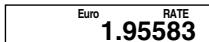
- For rates of 1 or greater, you can input up to six digits. For rates less than 1 you can input up to 8, 10 or 12 digits, including 0 for the integer digit and leading zeros (though only six significant digits, counted from the left and starting with the first non-zero digit, can be specified).
Examples: 0.123456, 0.0123456, 0.0012345 (MS-88TER)
- You can check the currently set rate at any time by pressing AC and then EURO.
- The rate is retained in memory even when calculator power is turned off by operation of Auto Power Off.




7/Tax Calculations
- Pressing AC to clear the calculation memory does not clear independent memory or the tax rate setting.
Setting a Tax Rate
Example: Tax rate = 5%
(about two seconds) Current rate setting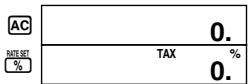

(You can input a value up to 6 digits long.)
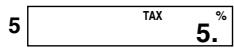

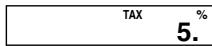
(Stores rate and completes operation.)
- You can check the currently set rate at any time by pressing AC and then the RATE key.

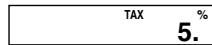
- The rate is retained in memory even when calculator power is turned off by operation of Auto Power Off.




Input the number you want to use as a constant, and then press one of the arithmetic keys twice. This causes the "K" indicator to appear on the display, indicating constant calculations.
Constant calculations
M+ Adds the displayed value to independent memory. M- Subtracts the displayed value from independent memory. MRC Recalls and clears independent memory.
- Add the calculated result to grand total memory. Recalls the value stored (accumulated) in grand total memory. AC Clears the grand total memory.
- Grand total memory contents are cleared when power is switched off by the Auto Power Off function.
■ Grand total memory (D-20TER/DF-120TER/JF-120TER)
| 7.8 × 89 = 694.2 | “F” | MRC | MRC | AC 7.8 M+ X 89 | GT M | 694.2 |
| 4.56 × 23 = 104.88 | | | | | | |
| 12.36 | 799.08 | | | | | |
| | | | | | |
| | | | | | |
| | | | | | |
| | | | | | |
| | | | | | |
| | | | | | |
| | | | | | |
| | | | | | |
| | | | | | |
| | | | | | |
| | | | | | |
| | | | | | |






Complies with (CE) Rule No. 1103/97
The number of significant digits of this product is 11. - Errors may be generated in currency conversion calculations that produce results greater than the values shown below.
| €1.00 = | € → Local* | Local* → € |
| DEM | 1.95583 | 511,291,881.19 → 999,999,999.99 | 1,955,830,000.00 → 1,000,000,000.00 |
| FRF | 6.55957 | 152,449,017.23 → 999,999,999.95 | 6,559,570,000.00 → 1,000,000,000.00 |
| ITL | 1936.27 | 51,645,689.90 → 99,999,999.983 | 999,999,999.99 → 516,456,899.09 |
| ESP | 166.386 | 601,012,104.38 → 99,999,999.99 | 166,386,000,000 → 1,000,000,000.00 |
| NLG | 2.20371 | 453,780,216.08 → 999,999,999.98 | 2,203,710,000.00 → 1,000,000,000.00 |
| BEF | 40.3399 | 2,478,935,247.71 → 99,999,999.99 | 40,339,900,000 → 1,000,000,000.00 |
| PTE | 200.482 | 498,797,897.06 → 99,999,999.998 | 200,482,000,000 → 1,000,000,000.00 |
| ATS | 13.7603 | 72,672,834.16 → 999,999,999.89 | 13,760,300,000.00 → 1,000,000,000.00 |
| FIM | 5.94573 | 168,187,926.46 → 999,999,999.99 | 5,945,730,000.00 → 1,000,000,000.00 |
| IEP | 0.787564 | 1,269,738,078.42 → 999,999,999.99 | 787,564,000.00 → 1,000,000,000.00 |
| LUF | 40.3399 | 2,478,935,247.71 → 99,999,999.99 | 40,339,900,000 → 1,000,000,000.00 |
- Local Currency/Divisa local/Devise locale/Örtliche Währung/Valuta locale/Lokal valuta/ Plaatselijke valuta/Lokal valuta/Paikallinen valutta/Lokal valuta/Moeda local/Mecthar baniota/Helyi valuta/Mistni mèna/Valuta krajowa



MS-100TER/MS-120TER/SL-310TER/SL-320TER
- Original costs = 3.00,5.00, $8.00
Calculate the total cost, price-plus-tax, and tax amount.
- Original costs = 3.00,5.00, $8.00
- Original costs = 3.00,5.00, $8.00
- Original costs = 3.00,5.00, $8.00
- Original costs = 3.00,5.00, $8.00
- Price-plus-tax = $100
Calculate price-less-tax and tax amount.
- Price including tax = $100
4. Taxable item = 30.00 Non-taxable item =2
Calculate price-plus-tax for taxable item and total of taxable and non-taxable items.
4. Taxable item = $30.00
Non-taxable item = $20.00
4. Taxable item = $30.00
Tax-exempt item = $20.00
(Total of taxable item + non-taxable item)
First, calculate the price-plus-tax value of the taxable item, and then add the non-taxable item.
(Total of taxable item + non-taxable item)