ManualGo.com
HUGHES & KETTNER TRILOGY 1.1 - Guitar amplifier HUGHES & KETTNER - Free user manual and instructions
Find the device manual for free HUGHES & KETTNER TRILOGY 1.1 HUGHES & KETTNER in PDF.



Download the instructions for your Guitar amplifier in PDF format for free! Find your manual HUGHES & KETTNER TRILOGY 1.1 - HUGHES & KETTNER and take your electronic device back in hand. On this page are published all the documents necessary for the use of your device. HUGHES & KETTNER TRILOGY 1.1 by HUGHES & KETTNER.
USER MANUAL HUGHES & KETTNER TRILOGY 1.1 HUGHES & KETTNER
This is to certify that complies with the provisions of the Directive of the Council of the European Communities on the approximation of the laws of the Member States relating to electromagnetic compatibility (EMC Directive 89/336/EEC) and the low voltage Directive (73/23/EEC). This declaration of conformity of the European Communities is the result of an examination carried out by the Quality Assurance Department of STAMER GmbH in accordance with European Standards EN 50081-1, EN 50082-1and EN 60065 for low voltage, as laid down in Article 10 of the EMC Directive. Lothar Stamer Dipl.Ing. Managing Director St.Wendel, 02/17/2005
- Stamer Musikanlagen manufactures exclusively for Hughes & Kettner®. abgegeben durch Important: Before powering up please read the Important Safety Instructions on page 53 - 55! Even in the new millennium, classic rock, blues and metal sounds of last century’s great guitarists continue to shape musicians and audiences’ tastes in tone. Back in the day, flexibility wasn’t top on the list of amp attributes: Two channels were standard, three a luxury, and four MIDI switchable channels a dream at best. And now monster nu metal sounds, detuned guitars, blistering bare-knuckle riffs and clean yet heavily effected sounds have gained currency in the repertoires of countless rock bands. Yesteryear’s tube amps are no match for today’s sonic diversity challenge. Enter Trilogy™. You have chosen a tube amp offering a rich feature set. Its mighty arsenal of sound-sculpting features that makes the dream of total mastery over tone come true. It boasts four independent channels tweaked to deliver markedly different slices of the tonal pie, a further variation on the fundamental sound in the CLEAN and CRUNCH channels each, and a whopping 128 effect combinations that can be stored via MIDI in combination with these six sounds. In a nutshell, you get plenty of sonic firepower to make every gig pure playing pleasure. Things to do before operating the Amp A word of warning before you fire up your new amp: It’s loud! High volume levels can cause hearing damage. Always twist the MASTER VOLUME knob to the far left-hand position before turning on the amp, and then slowly rotate the knob clockwise until you dial in a level that is comfortable for your ears and suitable for the venue. Keep those levels well under the pain threshold! Check the voltage rating displayed next to Trilogy™'s MAINS INPUT to make sure it matches your local mains current before you plug the amp in. Ensure plenty of air can circulate around your amp's ventilation ducts. Place the amp on a sturdy, secure base and avoid exposing it to mechanical shocks and extreme temperatures that could endanger the device or your and others' safety. The manufacturer disclaims any liability or responsibility whatsoever for any damage or defect to this and other devices resulting from misuse. Powering up First plug the speaker cord into appropriate Speaker Out on the head’s rear panel. Your choices are a 4-ohm output, a pair of 16-ohm outputs, an 8-ohm output and a 16-ohm output. More on this in chapter 2 – Rear Panel Connections and Control Features. Plug the other end of the cord into the speaker cabinet’s input. This amp-to-speaker connection and impedance matching are vital to every all-tube amp’s life! Tube amps operated without the load of a connected speaker or at an insufficient impedance level die! Plug the head’s mains cord into a wall outlet and power the amp up by engaging the MAINS switch. Allow the tubes to warm up before you begin playing. First plug one end of the guitar cord into the guitar, and then the other end into the amp. Flip the STANDBY switch to bring those glowing tubes to life. english Foreword
Front Panel Connections and Control Features . . . . . . . . . . . . . . . 5 Rear Panel Connections and Control Features . . . . . . . . . . . . . . . 7 Trilogy™ and MIDI
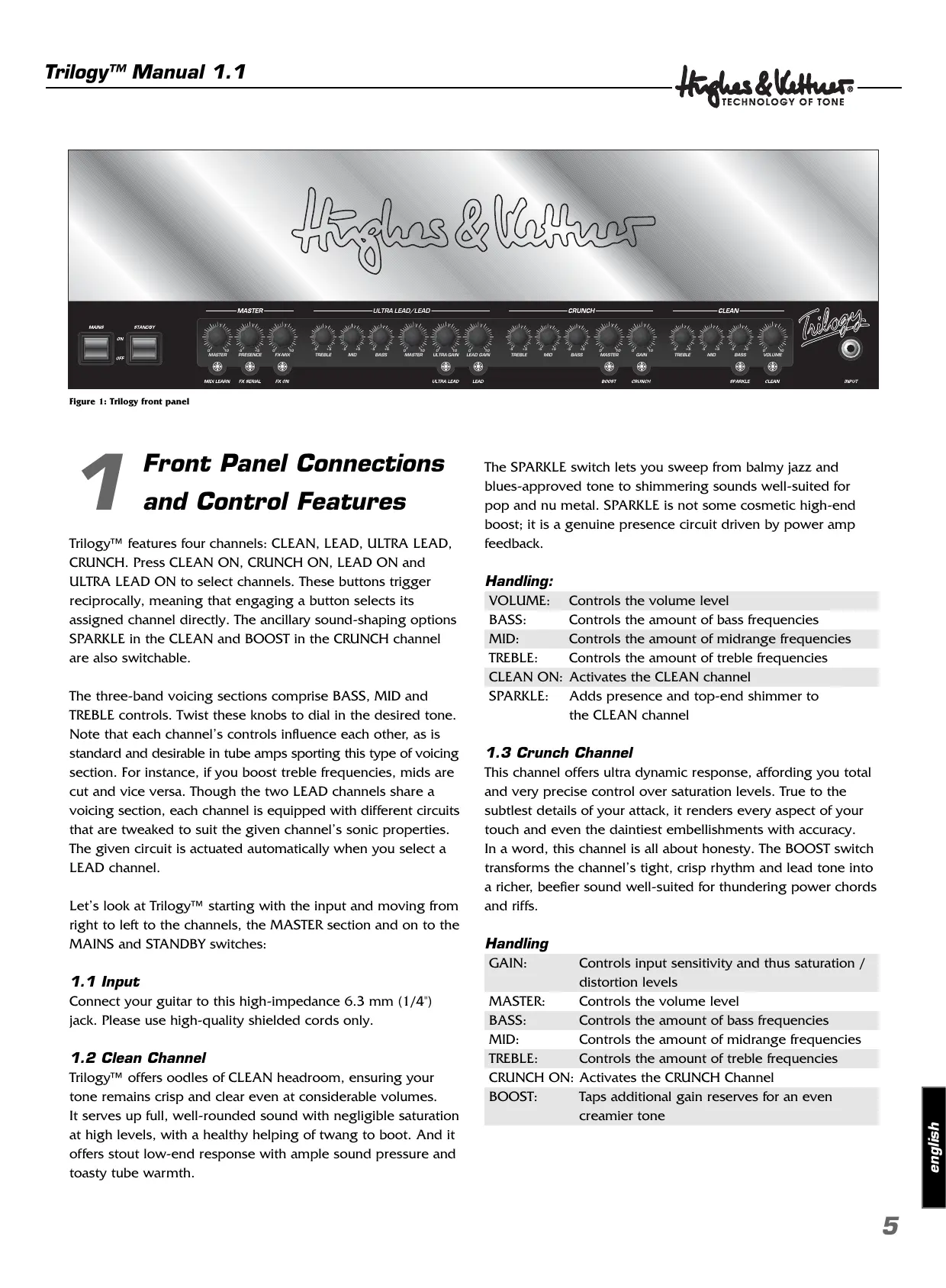
Figure 1: Trilogy front panel and Control Features Trilogy™ features four channels: CLEAN, LEAD, ULTRA LEAD, CRUNCH. Press CLEAN ON, CRUNCH ON, LEAD ON and ULTRA LEAD ON to select channels. These buttons trigger reciprocally, meaning that engaging a button selects its assigned channel directly. The ancillary sound-shaping options SPARKLE in the CLEAN and BOOST in the CRUNCH channel are also switchable. The three-band voicing sections comprise BASS, MID and TREBLE controls. Twist these knobs to dial in the desired tone. Note that each channel’s controls influence each other, as is standard and desirable in tube amps sporting this type of voicing section. For instance, if you boost treble frequencies, mids are cut and vice versa. Though the two LEAD channels share a voicing section, each channel is equipped with different circuits that are tweaked to suit the given channel’s sonic properties. The given circuit is actuated automatically when you select a LEAD channel. Let’s look at Trilogy™ starting with the input and moving from right to left to the channels, the MASTER section and on to the MAINS and STANDBY switches:
1.1 Input
Connect your guitar to this high-impedance 6.3 mm (1/4") jack. Please use high-quality shielded cords only.
1.2 Clean Channel
Trilogy™ offers oodles of CLEAN headroom, ensuring your tone remains crisp and clear even at considerable volumes. It serves up full, well-rounded sound with negligible saturation at high levels, with a healthy helping of twang to boot. And it offers stout low-end response with ample sound pressure and toasty tube warmth. The SPARKLE switch lets you sweep from balmy jazz and blues-approved tone to shimmering sounds well-suited for pop and nu metal. SPARKLE is not some cosmetic high-end boost; it is a genuine presence circuit driven by power amp feedback. Handling: VOLUME: BASS: MID: TREBLE: CLEAN ON: SPARKLE: Controls the volume level Controls the amount of bass frequencies Controls the amount of midrange frequencies Controls the amount of treble frequencies Activates the CLEAN channel Adds presence and top-end shimmer to the CLEAN channel
1.3 Crunch Channel
This channel offers ultra dynamic response, affording you total and very precise control over saturation levels. True to the subtlest details of your attack, it renders every aspect of your touch and even the daintiest embellishments with accuracy. In a word, this channel is all about honesty. The BOOST switch transforms the channel’s tight, crisp rhythm and lead tone into a richer, beefier sound well-suited for thundering power chords and riffs. Handling GAIN: Controls input sensitivity and thus saturation / distortion levels MASTER: Controls the volume level BASS: Controls the amount of bass frequencies MID: Controls the amount of midrange frequencies TREBLE: Controls the amount of treble frequencies CRUNCH ON: Activates the CRUNCH Channel BOOST: Taps additional gain reserves for an even creamier tone english
Front Panel Connections
1.4 Lead Channel
Articulate distorted tone plays a pivotal role in most players’ decision to buy an amp. A chief criterion for a top-notch guitar amp is its ability to retain the guitar’s character and deliver defined tone even with the GAIN knob cranked. Trilogy™ does this; what’s more, its LEAD sound is an excellent vehicle for classic rock leads and crashing power chords.
1.5 Ultra Lead Channel
Dive into a deep reservoir of distortion and let powerful sonic waves wash over you with every head-banging riff. The ULTRA GAIN channel delivers American-style high-gain tone with trouser leg-flapping low end and plenty of top-end slice. Hot and bad, this channel’s distorted tone is what the good doctor ordered for nu-metal and drop-D styles. It also serves up sumo-sized lead tone for all other genres. Handling: LEAD-GAIN: Controls the amount distortion in the LEAD channel ULTRA-LEAD-GAIN: Controls the amount distortion in the ULTRA LEAD channel MASTER: Controls the volume level BASS: Controls the amount of bass frequencies in both channels MID: Controls the amount of midrange frequencies in both channels TREBLE: Controls the amount of treble frequencies in both channels LEAD ON: Activates the LEAD channel (for a lean, mean classic British tone) ULTRA LEAD ON: Activates the ULTRA LEAD channel (for chunky American sounds)
1.6 Master Section
The master section lets you dial in Trilogy™’s overall output level, control presence, route effects and adjust the dry/wet balance, as well as “teach” the amp to respond to MIDI program change messages. Handling: FX-MIX, FX ON and SERIAL SmartLoop™ is a special effects routing circuit offering a switchable parallel/serial effects loop. In parallel mode, (SERIAL is deactivated) the processed signal is added to the original signal of the preamp. Twist the FX-MIX knob to adjust the dry/wet balance, that is, the ratio of unprocessed to processed signal. Generally the best results are achieved by programming or setting the signal processor’s output to 100% so that only the wet effected signal and no dry signal is patched out of the effect device.
In serial mode (SERIAL is activated), SmartLoop™ works like a conventional serial effects loop. This means you must adjust the wet/dry balance on the signal processor. Tip: If you have not inserted an effect device into the FX loop, you can use this circuit for a variety of other purposes:
- In parallel mode, you can use the RETURN jack to connect a second instrument or any other audio source, and then blend its signal with the guitar signal using the FX MIX knob. You can also route the amp’s signal to a second power amp or through a RED BOX® to a mixing console.
- When in serial mode and bridged (SEND and RETURN jacks are connected using a cord equipped with 1/4" jack plugs), the effects loop can serve as a second master preset that may be activated for each channel via a footswitch. Use the FX-MIX knob to adjust the volume level. x Note: Be sure to connect a signal processor when the effects loop is configured in serial mode. Otherwise, the signal chain is interrupted and you will not hear your guitar’s signal! PRESENCE This knob determines the overtone content for all channels. MASTER As its name would indicate, this knob puts you in charge of the EL-34 power amp tubes and the100 watts of power they put out. Though this knob promises tons of tweaking fun, please exercise restraint and caution. MIDI LEARN Assigns the given amp settings to a MIDI program number and serves to determine the amp’s basic MIDI configuration. For more on this, see section 4 – MIDI.
1.7 Mains and Standby Switches
MAINS ON/OFF
This button switches the main power supply on and tubes the opportunity to warm up for the work ahead. STANDBY This switch controls the high voltage power supply to the tubes. When engaged, anode voltage is applied to the tubes' filaments only so that the tubes remain warm and ready to rock. When taking a short break from playing, please use STANDBY rather than ON/OFF so the tubes remain at operating temperature. Figure 2: Rear panel
Rear Panel Connections and Control Features
2.1 Mains Socket
Trilogy™ ships in two versions rated for 110/120V and 220-240V, respectively. The rating stamped on the mains socket (figure 3) indicates the version type. Both models offer two operating voltages that are selected using the voltage selector integrated in the mains socket. Before connecting Trilogy™ to the mains power supply, ensure that the mains voltage matches the voltage rating appearing in the voltage selector window. This value is legible when the amp is in the standard operating position, that is, placed right side up. The upright number indicates the currently selected voltage, and the inverted number indicates the alternative voltage. Check also the fuse ratings to ensure they match the ratings indicated on the rear panel (Figure 2). x Note: Voltage selection and fuse replacement may be performed by experienced service technicians only. Accordingly, the following notes are addressed exclusively to service technicians!
- Use a small flat screwdriver to remove the voltage selector from the mains socket.
- If the fuse is defective, replace it with a fuse bearing the specified rating.
- Turn the voltage selector and insert it back into the port so that the desired mains voltage rating is legible and appears at the top left (next to the "Voltage Setting" arrow).
2.2 Anode Fuse
This anode fuse is designed to cut the high-voltage power supply to the tubes. If it trips, the cause is usually a defective tube. A sure sign of a blown fuse is that the amp does not render a signal even though it is connected and set up properly. Before replacing the blown fuse with a 250 volt/T 630 mA replacement fuse, ensure the power amp tubes are checked for defects!
2.3 FX Loop On/Off
Connect the optional Hughes & Kettner® FS-1 one-way footswitch to this jack. A connected footswitch disables the FX ON button on the front panel. x Note: A connected footswitch always has priority. The same goes for channel switching: The current status of the footswitch prevails regardless of front panel channel selector settings! The switch on the front panel is disabled and its LED indicates the status of the footswitch.
2.4 Channel Select Stageboard
This port accepts the included Hughes & Kettner® FS-4 Stageboard. The switches on this board select directly the CLEAN, CRUNCH, LEAD and ULTRA LEAD channels for added on-stage handling convenience.
2.5 FX SEND, LEVEL and RETURN
FX Send If you wish to use an outboard signal processor, connect this jack to your effects processor's input jack. FX Level This switch cuts the FX SEND’s output level by 10 dB and boosts the FX RETURN’s input sensitivity by 10 dB to match the FX loop to the effect device’s input level. Press this button when using processors designed to handle instrument levels. english FX Return Connect this jack to your effects processor's output.
2.6 MIDI
This port accepts a MIDI footswitch or another MIDI control used for switching channels. Switching options are the CLEAN, LEAD, ULTRA-LEAD and CRUNCH channels, effects loop on/off and serial/parallel, as well as the sound-shaping functions SPARKLE for the CLEAN and BOOST for the CRUNCH channel. For more on this, refer to chapter 4 – TRILOGY AND MIDI.
2.7 Speakers
You have one 4-ohm output, a pair of 16-ohm outputs or one 8-ohm output, and a 16-ohm output available for connecting speaker cabinets of various impedances. Always ensure cabinets are connect properly. Operating a tube amp with the wrong impedance or without a connected speaker can damage it. For more on this, see also the section in chapter 5 entitled How to Prolong Tube Life.
Standard Setup and Cable Connections
Trilogy™ and MIDI For utmost handling ease, use SmartLoop™ in combination with a MIDI-enabled multi effector. This lets you control all switchable functions of Trilogy™ via MIDI, specifically
- the 4 channels CLEAN, LEAD, ULTRA LEAD, CRUNCH
- the sound-shaping features SPARKLE in the CLEAN channel and BOOST in the crunch channel
- FX ON and the loop’s SERIAL mode
4.1 Programming
Programming couldn’t be any easier. If you want to save a configuration such as CRUNCH with BOOST, FX and SERIAL activated, simply arm Trilogy™ by briefly pressing the MIDI LEARN button (MIDI LEARN lights up), and then pressing the desired program number on your MIDI board (or other MIDI send control). The MIDI LEARN light extinguishes to indicate Trilogy™ has assigned this configuration to the program number selected on your foot board. Now when Trilogy™ receives a program change message via the selected MIDI channel (more on this below), the MIDI LEARN LED flashes briefly and Trilogy™ is configured accordingly. To discontinue programming without saving settings once MIDI LEARN is armed, simply press the button again.
ULTRA LEAD/LEAD
4.2 Setting the MIDI Channel and Switching
OMNI On/Off If you press and hold the MIDI LEARN button for more than two seconds when Trilogy™ is in normal operating mode, its LED animates. The flashing light indicates special programming functions are now assigned to the amp’s buttons and LEDs: CLEAN Now serves as an up button. Use it to select the MIDI channel one-step increments (+1). The factory default is MIDI channel 1. SPARKLE Now serves as a down button with one-step increments (-1). FX ON Switches OMNI on/off. x Note: OMNI enables reception on all channels. This option is a good choice if you’re unsure which channel your foot board uses to send messages.
MIDI LEARN Stores your settings, quits the MIDI setup menu and returns the amp to normal operating mode. SERIAL: Press this button to check if all LEDs are working properly. All LEDs on Trilogy™’s front panel must light up for as long as you press and hold SERIAL. When configuring MIDI setups, BOOST, CRUNCH, SPARKLE and CLEAN serve to indicate the MIDI channel in binary code. Channel BOOST CRUNCH SPARKLE CLEAN-LED
4.3 Factory Settings and How to Restore Them
(Factory Reset) Press and hold the MIDI LEARN and FX ON buttons simultaneously to reset the amp to the factory default settings. These are:
- All channels are set to FX ON
- SERIAL is deactivated
- All MIDI presets are reset. The amp ships with the following MIDI channel navigation and sound-shaping settings: Program change command
Channel Clean Clean Crunch Crunch Lead Clean Clean Crunch Ultra Lead FX ON lights up to indicate Trilogy™ is configured to receive incoming program changes via all MIDI channels (default). If the LED is not illuminated the amp receives messages via the selected channel only.
Replacing Tubes, Service and preventive Maintenance TRILOGY™ is factory-loaded with EL34 and 12AX7 tubes. Once they’ve been burned in – that is, operated continuously under a load – they are subjected to a rigorous selection process. Their electrical specs and mechanical status (microphonics) are checked, and then they are installed in an amp and soundchecked. One of the most important steps in this process is tube matching, whereby tubes with the same characteristics are teamed up in matched sets of power tubes.
5.1 When to Replace Tubes
The tubes in TRILOGY™ are exemplary in terms of quality, workmanship and long service life. In the unlikely event that you encounter a problem, please run down the following checklist before you swap your old tubes for a new set: Was the fault or failure of the power tube caused by the tube itself or by a flawed peripheral device or component, perhaps a defective speaker cable? (If you don’t get to the bottom of the problem and remedy it, it may crop up again even after you replace the tubes.) Did the mains voltage fluctuate or spike while the amp was on? In all-tube amps, over-voltage surges in the mains net can certainly cause drop-outs. Over-voltages are often caused by generators and faulty high-current power circuits. Perhaps a fuse blew even though none of the tubes is actually defective? An old fuse, tube de-ionization or mains voltage power surges may have triggered the fuse. In this case, replacing tubes is a waste of money, time and effort. Tubes show definite signs of wear when their service life is nearing its end. Telltale signs are increased microphonics, noise and hiss, muddier tone through loss of high-end frequencies, degraded performance, etc. Take these indications seriously and replace old tubes. Not only do these side effects take their toll on sound quality, they also indicate the aging tube will soon fail! x Note: Replacing tubes for experimentation purposes is not recommended. Installing the wrong tubes will damage the amp and cost you a lot more than you bargained for in repair costs.
5.2 Things to Bear in Mind When Replacing Tubes
The golden rule is that replacing tubes is a job best left to qualified professionals. Accordingly, the following guidelines are addressed and apply to qualified service technicians only: Pull TRILOGY™’s mains plug and allow for a discharge time of at least two minutes before removing the chassis from the rear of the amp. Once the chassis has been removed, carefully ease the tubes out of their sockets. A single power tube may only be replaced if the replacement tube precisely matches the original, that is, the old and new tubes’ characteristics are identical. As a rule, use matched sets only when replacing power tubes. When a new set of power tubes with characteristics identical to the old set is installed, it is not absolutely necessary to re-bias the amp. However, the amp must be biased when a replacements set’s characteristics do not match the original set’s. This requires experience and extensive working knowledge in measuring techniques, which is why this is a job for qualified technicians with tube amp tuning experience.
5.3 How to Prolong Tube Life
- Never operate Trilogy™ without connecting a load (loudspeaker)! To this end, always use high-quality, heavy-duty speaker cords that won’t crimp.
- Use the STANDBY switch! Heating up tubes frequently shortens tube life. Cut anode voltage using the STANDBY function to decrease operating hours and extend tube life.
- Avoid exposing the amp to vibrations, especially when it’s powered up. Switch the amp off well before transporting it to allow tubes to cool off completely.
- Make sure all peripheral devices and connecting cords are in a state of good repair! Ensure air can circulate freely around the amp’s ventilation slots at all timesæyour Trilogy™’s life depends on it.
- Never expose the amp to extreme heat, heavy dust and, particularly, moisture.
- Always check peripheral gear’s specs to ensure these accessories are suitable for the amp. Never connect speaker cabinets with an impedance (ohm) rating lower than Trilogy™ is designed to handle.
- Never connect devices with high output signal levels (e.g. power amps) to Trilogy™’s input.
- Check the mains power rating before plugging the amp in. When in doubt ask the venue’s sound technician or facility engineer.
- Refrain from DIY repairs! Also have a qualified technician replace internal fuses. Trilogy™ won’t power up when you switch it on.
- It‘s not getting AC power. Check the mains cord to see if it is connected and firmly seated.
- The mains fuse is defective. Ensure it is replaced with another fuse of the same rating. Trilogy™ is connected properly, but no sound is audible.
- The amp is set to STANDBY.
- The GAIN or MASTER knob is turned all the way down.
- The effects loop is active.
- The anode fuse has blown. Before having it replaced with a fuse of the same rating, have the power amp tubes checked for defects.
- The fuse for the tube heating tripped (the tubes don’t glow). Ensure that it is replaced with a fuse bearing the same rating. Always have a service technician replace fuses. The sound is washed out or muddy when you switch an effects processor on.
- The signal processor provides a wet signal that is blended with the dry or original signal. Depending on the type of effect, the processor may be returning a dry signal back along with wet signal, which causes phase cancellations when mixed to the dry signal in Trilogy™’s parallel loop. To prevent phase cancellations, switch the effects loop to SERIAL or turn the dry signal all the way down on the signal processor. The amp starts making ringing or hissing noises.
- One or several tubes are microphonic. Replace the defective tube with another of the same type. english Signs of tube wear such as increased microphonics and noise, treble loss, weak power output or muddy sound begin reappearing just a few hours after replacing tubes.
- The wrong tubes were installed when old tubes were replaced or the amp was not biased properly. Take the amp to a professional to correct the problem.
All level indications relate to 0 dBV (1V RMS).
7.1 Inputs
INPUT Port: 6.3 mm (1/4") Type: unbalanced Input impedance: 1 MΩ Sensitivity: - 35 dB Max. input level: +8 dB FX RETURN Port: 6.3 mm (1/4") Type: unbalanced Input impedance: 48 kΩ Max. sensitivity: -10dB button engaged: -18 dB -10dB button unengaged: -8 dB
7.3 General Electrical Data:
Max. current consumption: 1.35 A @ 230 V AC, 4-8-16 Ω
2.55 A @ 120 V AC, 4-8-16 Ω
2.85 A @ 100 V AC, 4-8-16 Ω
Max. power consumption: 383 VA @ 253 V AC, 4-8-16 Ω Mains voltage tolerance range: +/- 10 % Operation temperature range: - 10 °C to +35 °C External fuses: 1 x T 630 mA (anode) Internal fuses: 1 x TT 10 A Slo Blo, 2 x T 630 mA Mains fuses: Europe: (variable: 220 V-230 V or 240 V) 2 x 250 V / T 1.6 A (5 x 20mm) USA/Canada/Asia: (variable: 100 V or 120 V) 2 x 250 V / T 4 A (5 x 20mm) Anode fuse: 1 x T 630 mA Max. input level: -10dB button engaged: + 5 dB -10dB button unengaged: +15dB
7.2 Outputs:
FX LOOP Send L/R: Port: 6.3 mm (1/4") Type: unbalanced Output impedance: 2.2 kΩ Output level: - 6 dB Max. output level: -10dB button engaged: + 2 dB -10dB button unengaged: +12 dB Speaker outputs: Quantity: 4 Port: 6.3 mm (1/4") Type: unbalanced Impedance: 1 X 4 Ω ; 1 X 8 Ω or 2 X 16 Ω ; 1 X 16 Ω
7.4 General Mechanical Data:
Dimensions: Width: 744 mm (incl. corners ) Height: 280 mm (incl. handles and feet) Depth: 258 mm (incl. corners) Weight: 20.5 kg Kanal Clean Clean Crunch Crunch Lead Clean Clean Crunch Ultra Lead Clean Clean Crunch Crunch Lead Clean Clean Crunch Ultra Lead Canale Clean Clean Crunch Crunch Lead Clean Clean Crunch Ultra Lead Impostazione FX ON Sparkle + FX ON FX ON Boost + FX ON FX ON Sparkle FX ON
Comando cambio de programa Canal Clean Clean Crunch Crunch Lead Clean Clean Crunch Ultra Lead
IMPORTANT SAFETY INSTRUCTIONS
BEFORE CONNECTING, READ INSTRUCTIONS
Read all of these instructions! Save these instructions for later use! Follow all warnings and instructions marked on the product! Do not use this product near water, i.e. bathtub, sink, swimming pool, wet basement, etc. Do not place this product on an unstable cart, stand or table. The product may fall, causing serious damage to the product or to persons!
- Slots and openings in the cabinet and the back or bottom are provided for ventilation; to ensure reliable operation of the product and to protect it from overheating, these openings must not be blocked or covered. This product should not be placed in a built-in installation unless proper ventilation is provided.
- This product should not be placed near a source of heat such as a stove, radiator, or another heat producing amplifier.
- Use only the supplied power supply or power cord. If you are not sure of the type of power available, consult your dealer or local power company.
- Do not allow anything to rest on the power cord. Do not locate this product where persons will walk on the cord.
- Never break off the ground pin on the power supply cord.
- Power supply cords should always be handled carefully. Periodically check cords for cuts or sign of stress, especially at the plug and the point where the cord exits the unit.
- The power supply cord should be unplugged when the unit is to be unused for long periods of time.
- If this product is to be mounted in an equipment rack, rear support should be provided.
- This product should be used only with a cart or stand that is recommended by Hughes & Kettner.
- Never push objects of any kind into this product through cabinet slots as they may touch dangerous voltage points or short out parts that could result in risk of fire or electric shock. Never spill liquid of any kind on the product.
- Do not attempt to service this product yourself, as opening or removing covers may expose you to dangerous voltage points or other risks. Refer all servicing to qualified service personnel.
- Clean only with dry cloth.
- Do not defeat the safety purpose of the polarized or grounding-type plug. A polarized plug has two blades with one wider than the other. A grounding type plug has two blades and a third grounding prong. The wide blade or the third prong are -provided for the safety. If the provided plug does not fit into your outlet, consult an electrician for replacement of the obsolete outlet.
- Unplug this product from the wall outlet and refer servicing to qualified service personnel under the following conditions:
- When the power cord or plug is damaged or frayed.
- If liquid has been spilled into the product.
- If the product has been exposed to rain or water.
- If the product does not operate normally when the operating instructions are followed.
- If the product has been dropped or the cabinet has been damaged.
- If the product exhibits a distinct change in performance, indicating a need of service!
- Adjust only these controls that are covered by the operating instructions since improper adjustment of other controls may result in damage and will often require exten-sive work by a qualified technician to restore the product to normal operation.
- Exposure to extremely high noise levels may cause a permanent hearing loss.
- Individuals vary considerably in susceptibility to noise induced hearing loss, but nearly everyone will lose some hearing if exposed to sufficiently intense noise for a sufficient time. The U.S. Government´s Occupational Safety and Health Administration (OSHA) has specified the following permissible noise level exposures: Version 1.0 10/2004 Duration Per Day In Hours
1 1/2 1/2 1/4 or less Sound Level dBA, Slow Response
- According to OSHA, any exposure in excess of the above permissible limits could result in some hearing loss.
- Ear plug protectors in the ear canals or over the ears must be worn when operating this amplification system in order to prevent a permanent hearing loss if exposure is in excess of the limits as set forth above. To ensure against potentially dangerous exposure to high sound pressure levels, it is recommended that all persons exposed to equipment capable of producing high sound pressure levels such as this amplification system be protected by hearing protectors while this unit is in operation.
- Fuses: Replace with IEC 127 (5 x 20 mms) type and rated fuse for best performance only TO PREVENT THE RISK OF FIRE AND SHOCK HAZARD, DO NOT EXPOSE THIS APPLIANCE TO MOISTURE OR RAIN. DO NOT OPEN CASE; NO USER SERVICE-ABLE PARTS INSIDE. REFER SERVICING TO QUALIFIED SERVICE PERSONNEL. IMPORTANT ADVICE ON SAFETY! PLEASE READ BEFORE USE AND KEEP FOR LATER USE!
- The unit has been built by Hughes & Kettner in accordance with IEC 60065 and left the factory in safe working order. To maintain this condition and ensure non-risk operation, the user must follow the advice and warning comments found in the operating instructions. The unit conforms to Protection Class 1 (protectively earthed).
- HUGHES & KETTNER ONLY GUARANTEE THE SAFETY, RELIABILITY AND EFFICIENCY OF THE UNIT IF:
- Assembly, extension, re-adjustment, modifications or repairs are carried out by Hughes & Kettner or by persons authorized to do so.
- The electrical installation of the relevant area complies with the requirements of IEC (ANSI) specifications.
- The unit is used in accordance with the operating instructions.
- The unit is regularly checked and tested for electrical safety by a competent technician.
WARNING:
- If covers are opened or sections of casing are removed, except where this can be done manually, live parts can become exposed.
- If it is necessary to open the unit this must be isolated from all power sources. Please take this into account before carrying out adjustments, maintenance, repairs and before replacing parts.
- The appliance can only be insulated from all power sources if the mains connection is unplugged.
- Adjustment, maintenance and repairs carried out when the unit has been opened and is still live may only be performed by specialist personnel who are authorized by the manufacturer (in accordance with VBG 4) and who are aware of the associated hazards.
- Loudspeaker outputs which have the IEC 417/5036 symbol (Diagram 1, below) can carry voltages which are hazardous if they are made contact with. Before the unit is switched on, the loudspeaker should therefore only be connected using the lead recommended by the manufacturer.
- Where possible, all plugs on connection cables must be screwed or locked onto the casing.
- Replace fuses only with IEC 127 type and specified rating.
- It is not permitted to use repaired fuses or to short-circuit the fuse holder.
- Never interrupt the protective conductor connection.
- Surfaces which are equipped with the „HOT“ mark (Diagram 2, below), rear panels or covers with cooling slits, cooling bodies and their covers, as well as tubes and their covers are purposely designed to dissipate high temperatures and should therefore not be touched.
- High loudspeaker levels can cause permanent hearing damage. You should therefore avoid the direct vicinity of loudspeakers operating at high levels. Wear hearing protection if continuously exposed to high levels. MAINS CONNECTION:
- The unit is designed for continuous operation.
- The set operating voltage must match the local mains supply voltage.
- Caution: The unit mains switch must be in position OFF before the mains cable is connected.
- The unit is connected to the mains via the supplied power unit or power cable.
- Power unit: Never use a damaged connection lead. Any damage must be rectified by a competent technician.
- Avoid connection to the mains supply in distributor boxes together with several other power consumers.
- The plug socket for the power supply must be positioned near the unit and must be easily accessible.
PLACE OF INSTALLATION:
- The unit should stand only on a clean, horizontal working surface.
- The unit must not be exposed to vibrations during operation.
- Keep away from moisture and dust where possible.
- Do not place the unit near water, baths, wash basins, kitchen sinks, wet areas, swimming pools or damp rooms. Do not place objects containing liquid on the unit - vases, glasses, bottles etc.
- Ensure that the unit is well ventilated.
- Any ventilation openings must never be blocked or covered. The unit must be positioned at least 20 cm away from walls. The unit may only be fitted in a rack if adequate ventilation is ensured and if the manufacturer’s installation instructions are followed.
- Keep away from direct sunlight and the immediate vicinity of heating elements and radiant heaters or similar devices.
- If the unit is suddenly moved from a cold to a warm location, condensation can form inside it. This must be taken into account particularly in the case of tube units. Before switching on, wait until the unit has reached room temperature.
- Accessories: Do not place the unit on an unsteady trolley, stand, tripod, base or table. If the unit falls down, it can cause personal injury and itself become damaged. Use the unit only with the trolley, rack stand, tripod or base recommended by the manufacturer or purchased together with the unit. When setting the unit up, all the manufacturer’s instructions must be followed and the setup accessories recommended by the manufacturer must be used. Any combination of unit and stand must be moved carefully. A sudden stop, excessive use of force and uneven floors can cause the combination of unit and stand to tip over.
- Additional equipment: Never use additional equipment which has not been recommended by the manufacturer as this can cause accidents.
- To protect the unit during bad weather or when left unattended for prolonged periods, the mains plug should be disconnected. This prevents the unit being damaged by lightning and power surges in the AC mains supply. To find a local distributor please visit: MS D-1371 06/2005 www.hughes-and-kettner.com