 ManualGo.com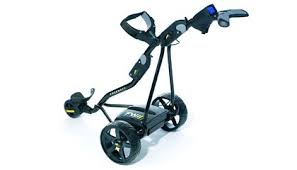
FWII - Electric golf trolley POWAKADDY - Free user manual and instructions
Find the device manual for free FWII POWAKADDY in PDF.



Download the instructions for your Electric golf trolley in PDF format for free! Find your manual FWII - POWAKADDY and take your electronic device back in hand. On this page are published all the documents necessary for the use of your device. FWII by POWAKADDY.
USER MANUAL FWII POWAKADDY
Freeway2 instructions 10 ver8.qxp 30/1/09 18:16 Page 2 Freeway2 instructions 10 ver8.qxp 30/1/09 18:16 Page 3 Freeway2 instructions 10 ver8.qxp 30/1/09 18:16
Page 4 ISTRUZIONI ESP I N S T R U C C I O N E S
F R E E WAY
Freeway2 instructions 10 ver8.qxp 30/1/09 18:16 Page 5
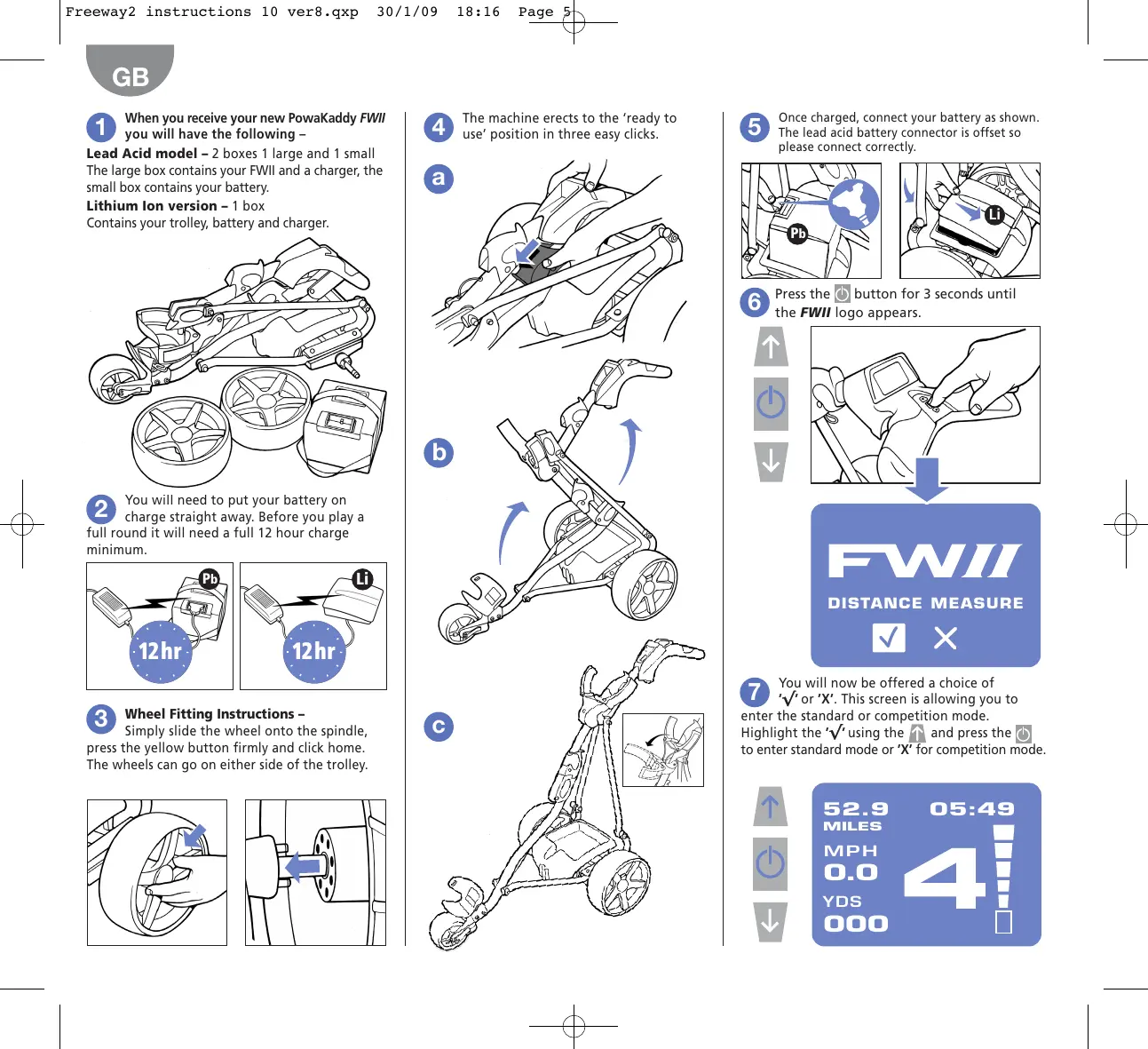
When you receive your new PowaKaddy FWII you will have the following – Lead Acid model – 2 boxes 1 large and 1 small The large box contains your FWII and a charger, the small box contains your battery. Lithium Ion version – 1 box Contains your trolley, battery and charger.
The machine erects to the ‘ready to use’ position in three easy clicks.
Once charged, connect your battery as shown. The lead acid battery connector is offset so please connect correctly.
Press the button for 3 seconds until the FWII logo appears.
You will need to put your battery on charge straight away. Before you play a full round it will need a full 12 hour charge minimum.
DISTANCE MEASURE 12hr 12hr You will now be offered a choice of ’ √’ or ’X’. This screen is allowing you to enter the standard or competition mode. Highlight the ’ √’ using the and press the to enter standard mode or ’X’ for competition mode.
Wheel Fitting Instructions – Simply slide the wheel onto the spindle, press the yellow button firmly and click home. The wheels can go on either side of the trolley.
05:49 Freeway2 instructions 10 ver8.qxp 30/1/09 18:17 Page 6
You are now presented with the primary screen Top left – when first switched on, the distance that the trolley has covered since new will be displayed. This cannot be reset. When the trolley motor starts, the display will automatically zero and count the yards/metres for that round. When the battery has been disconnected, the total for that round is added to the grand total.
MILES MPH MPH/KPH indicates the approximate speed of travel in the chosen mode
Competition Mode Top right – the clock can be set as explained later in ‘Programming Mode’ screen. Central large number indicates the speed selected. This is adjusted from ’0’–’9’ by pressing the appropriate and arrow. The 05:49 display will flash when the machine is stopped. When you press the display will stop flashing and power will be applied to the motor at the requested speed, then the machine will move off. Side right – the battery indicator gives an indication of the battery condition. When fully charged, 5 bars will be shown and a full 18 hole round can be expected, or 36 holes if using a 36 hole battery. It is normal for the display bars to reduce through the round. Please note that the lithium battery is designed for 18 hole use. Bottom left – Yards/metres indicates the total distance travelled for the current shot. This can be returned to zero by holding arrows together. WHEEL DISCLAIMER If alternative wheels are used this will affect the speed and distance readings. NOTE – as a power saving feature, if no button is pressed for 5 minutes, the screen will power down. Touch any button and the screen will return to view. Your new FWII is fitted with a Digital Distance Function (DDF). This will allow your machine to proceed ahead of you for a pre-determined distance and then stop. Hold down the button for 4 seconds and the DDF screen will be displayed, offering you a choice of 10, 20 or 30 yards/metres approximately. Select your chosen distance using the and arrows and then select using the button. 0001 Y 05:49
YDS Your FWII is equipped to comply with competition rules in all countries and the distance function can be disabled. To put your FWII into competition mode, start with the battery unplugged and then attach it. Press the for at least 3 seconds until the FWII logo appears.
The first screen will be displayed with the FWII logo and you will be offered ’√’ + ’X’. Highlight the ’X’ using the then press
arrows and DISTANCE MEASURE Your screen will now turn white as a clear indication that you are in competition mode and you will not have any measurements shown on the screen except actual speed of travel. The speed setting and the time will still be displayed in the normal way. Although the total distance covered is not shown, it will be added to the total distance covered recorded in the trolley memory. 05:49
Your machine will then move off and stop after the selected distance has been covered. Ensure that the route is flat, safe and clear. DDF will not function when the machine is in competition mode. Freeway2 instructions 10 ver8.qxp 30/1/09 18:19 Page 7
There are several features that you can programme as ‘user preferences’ within the on board computer of the FWII. To enter the programming mode, disconnect the battery and then reconnect it whilst simultaneously holding down the button, after 5 seconds a programming screen will be displayed. Clock Battery Replacement – A lithium cell battery is fitted in the handset. The battery is removable and should be disposed of in an appropriate recycling facility. We strongly recommend that removal or replacement should be done by a PowaKaddy Service Agent. Metres/Yards – highlight category and press . Use to select your preferred measure and press . Please note that if you select Yards you will also have selected MPH and if you choose Metres, KPH. The Digital Brake System is activated by pressing the until you go below zero, the display will then show either -1, -2 or -3 dependant on the amount of braking required. To return to normal speed just press the arrow until the desired speed is reached This is not a 100% brake and should not be used as a parking brake on a steep hill.
05:49 MILES YDS Remote Ctrl – Not available Battery type – use the arrows to select the type of battery. Select ’PB’ for Lead Acid battery and ‘Li’ for Lithium Ion battery. The wrong setting will not damage your FWII but the battery indicator will not work properly. Use the arrows to move between the categories displayed and the button to select. 1 : Li 2 : PB Time – highlight the word time, press the button. Now use the to move along the digits of the digital display and the adjust the highlighted field, once the time is set, press
Time Set 05 : 46 Once you have programmed your desired settings, unplug the battery and the settings will be saved. FWII Brake If you have purchased the FWII Lithium brake model you will have the added advantage of a Digital Braking System (DBS). If, during use, the trolley will not run in a straight line, the small front wheel angle can be adjusted by unlocking the overcentre lock and turning the knurled screw to change the steering angle of the wheel. Re-adjust until the trolley runs straight. Never: Use your trolley if any of the cables and connections are damaged or frayed. Never: Use a damaged battery. Never: Use Digital Distance Function (DDF) on a slope. Do: Remove the battery from the battery tray before storing or transporting the trolley. Do: Ensure that whilst in transit (car boot for example) the battery cannot move around and that the terminals of the battery cannot come into contact with other metal objects/surfaces. Do: Regularly check your trolley for signs of damage or wear, all repairs must be carried out by an authorised Powakaddy Service Centre. Do: Follow the instructions provided with your battery and charger. For information on servicing, lubrication and clock battery change please go to the website below. www.powakaddy.com/FW2/support Freeway2 instructions 10 ver8.qxp 30/1/09 18:20 Page 8 Freeway2 instructions 10 ver8.qxp 30/1/09 18:21 Page 9 Freeway2 instructions 10 ver8.qxp 30/1/09 18:23 Page 10 Freeway2 instructions 10 ver8.qxp 30/1/09 18:24 Page 11 Freeway2 instructions 10 ver8.qxp 30/1/09 18:25 Page 12 Freeway2 instructions 10 ver8.qxp 30/1/09 18:26 Page 13 Freeway2 instructions 10 ver8.qxp 30/1/09 18:27 Page 14 Freeway2 instructions 10 ver8.qxp 30/1/09 18:28 Page 15 Freeway2 instructions 10 ver8.qxp 30/1/09 18:30 Page 16 Freeway2 instructions 10 ver8.qxp 30/1/09 18:31 Page 17 Freeway2 instructions 10 ver8.qxp 30/1/09 18:32 Page 18 Freeway2 instructions 10 ver8.qxp 30/1/09 18:35 Page 19 Freeway2 instructions 10 ver8.qxp 30/1/09 18:35 Page 20 Freeway2 instructions 10 ver8.qxp 30/1/09 18:15 Page 1