
KH 5518 BODY FAT - Body Composition Scale BALANCE - Free user manual and instructions
Find the device manual for free KH 5518 BODY FAT BALANCE in PDF.


User questions about KH 5518 BODY FAT BALANCE
0 question about this device. Answer the ones you know or ask your own.
Ask a new question about this device
Download the instructions for your Body Composition Scale in PDF format for free! Find your manual KH 5518 BODY FAT - BALANCE and take your electronic device back in hand. On this page are published all the documents necessary for the use of your device. KH 5518 BODY FAT by BALANCE.
USER MANUAL KH 5518 BODY FAT BALANCE
Body fat, muscle mass and water analysis scales
Instructions for use
Index
- Safety instructions 4
- Usage 5
- Technical data 5
- Scope of delivery 6
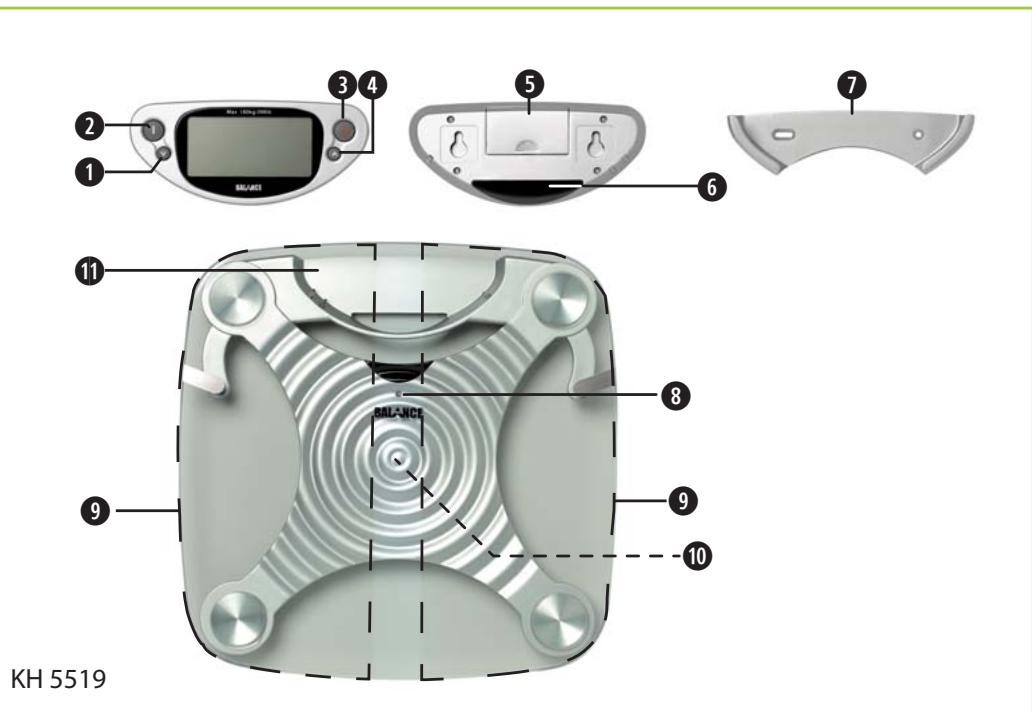
- Components and operating elements 6
5.1. Display remote control unit 6
5.2. Scales 6
6.Preparing the scales for use. 7
6.1.Unpacking the components 7
6.2.Inserting the batteries in the scales 7
6.3. Inserting batteries in the display remote control unit 7
- Selecting a suitable location 7
- Prior to initial use 8
- Using the scales 9
9.1.Measuring body weight only 9
9.2. Measuring body weight, body fat, muscle mass and body water percentages as well as caloric requirement 10
9.2.1. Important notes on measuring 10
9.3. Comparison of current and previous measurements 13
9.4. Display previous measurement results 13
9.5. Using the guest mode (GUES). 14
10.Maintaining the scales. 15
10.1. Replacing the batteries in the scales 15
10.2. Replacing the batteries of the display remote control unit 15
- Troubleshooting/ error messages 15
11.1. The scales can not be turned on 15
11.2. The display remote control unit can not be turned on 16
11.3. The display screen is not functioning properly 16
11.4. Error messages appear on the display screen 16
11.4.1. "0-Ld" 16
11.4.2. "Err" 16
11.4.3. “---” 17
11.5.Measurement results seem unrealistic.. 17
11.6. Other malfunctions 18
- Cleaning the scales 18
13.Storing the scales 18 - Disposing of the scales 19
15.Warranty & Customer Service. 19
16.Importer. 19
For the sake of simplicity, the body fat, muscle mass and water analysis scales will be called "scales" throughout these instructions for use.
1. Safety instructions

Danger!
Under no circumstances should you use the scales if you use a pacemaker, a respirator, an electrocardiograph or similar medical device! Use of the scales could prevent proper functioning of these devices! This could cause risk of death! If you are not sure whether or not you are allowed to use the scales: please consult your physician prior to use! Do not use the scales if you are pregnant.
If you desire to reduce your body weight due to overweight or increase it due to underweight, you should always consult a doctor. Every treatment and diet should be only in reference to a doctor. Recommendations for diets or fitness programmes on the basis of the determined values should be given by a doctor or other qualified person. Do not attempt to interpret the data yourself.
Please make sure no water or moisture can enter the scales or display remote control unit. Otherwise the scales and display remote control unit can be damaged beyond repair. This could also cause danger of electric shock! This appliance is not intended for use by children or other persons without assistance or supervision if their physical, sensory or mental capabilities prevent them from using it safely. Children should be supervised to ensure that they do not play with the appliance.

Warning!
Do not place the scales and display remote control unit in the immediate vicinity of heat sources such as ovens, heaters and other similar devices. Otherwise the scales and display remote control unit can be damaged beyond repair. The scales and display remote control unit can only be operated at temperatures between 10^ and 40^ Celsius. The scales should be kept within this temperature range even while not being used. Temperatures outside of this range can result in malfunctioning or long-term damages.
Do not place a load of more than 180 kilograms on the scales! Otherwise the scales could be damaged beyond repair!
The scales and the display remote control unit contain no user-serviceable parts. The warranty is void if the casings of the scales and/or display remote control unit are opened! For repairs, please contact our service partner nearest you. You will find the addresses of our service partners on the warranty card. You will find the warranty card with the scales.

Careful!
Battery acid could leak out, especially if the batteries are old. Therefore you should remove all batteries if you do not plan to use the scales and remote control unit for long periods of time. This protects the scales and display remote control unit from damages resulting from battery acid leakage.
The remote control corresponds to the LED Class 1.

Note:
Avoid static charge or discharge because this could result in display errors or sudden switching off of the scales.
No liability will be taken and no guarantee will be made for damages ...
resulting from opening the casings of scales and/or display remote control unit
resulting from repair attempts not made by qualified experts
resulting from using the scales and/or display remote control unit for purposes other than intended.
2. Usage
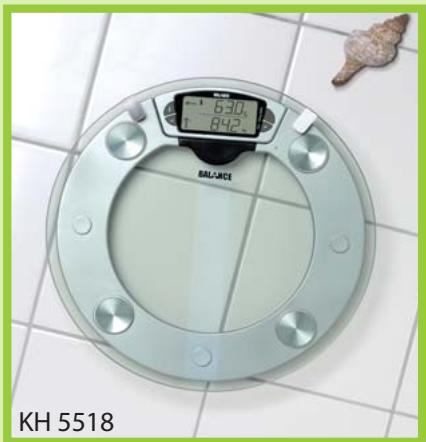
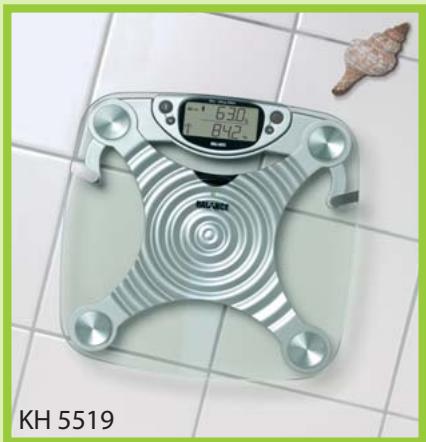
The body fat, muscle mass and water analysis scales Balance KH 5518/KH 5519 are intended exclusively for ...
measuring body weight, body fat, muscle mass and body water of people from seven years of age and a height of at least 100 centimeters
measuring the approximate daily caloric requirements
non-commercial use in private households.
The body fat, muscle mass and water analysis scales Balance KH 5518/KH 5519 are not intended for use by those using medical devices including but not limited to ...
pacemakers
respirators or
electrocardiographs.
The body fat, muscle mass and water analysis scales Balance KH5518/KH5519 are not construed for professional use in hospitals or other medical facilities.
Note:
No liability will be assumed and no warranty granted for damages resulting from use of the scales and/or display remote control unit for purposes other than intended!
3. Technical data
Power supply, scales: 4 × 1.5 VAA
Power supply, display remote control unit: 2 × 1.5 VAAA
Maximum load/maximum measurable weight: 180kg / 396lb
Minimum measurable weight: 3kg / 6.6lb
Tolerance < 30~kg : max. 300g Tolerance >30~kg .. 1% + / - 0,1~kg
Measuring procedure: bioelectrical impedance analysis
Increments for weight measurement: 0.1kg / 0.2lb
Fat percentage measurement: 5 - 65%
Increments for fat percentage measurement: 0,1%
Water percentage measurement: 25 - 80%
Increments for water percentage measurement: 0,1%
Muscle mass percentage measurement: 20-70%
Increments for muscle mass percentage measurement: 0,1%
Caloric requirements display: in kcal
Increments for caloric requirements display: 100 kcal
Height entry range: 100 - 240cm / 3'03'' - 7'10''
Age entry range: 7-99 years
10 memory locations for personal data
Functions: Weight measurement only/weight, body fat percentage, muscle mass percentage and body water percentage measurement/measurement of approximate daily caloric requirement/display of approximate fitness level
Measuring units adjustable: kg/lb, cm/inches
Battery status indicator
Overload indicator
Error indicator
Automatic shutoff of scales: after 30 seconds
Automatic shutoff of display remote control unit: after 30 seconds
Operating temperature: 10^ - 40^
4. Scope of delivery
Body fat, muscle mass and water analysis scales
Display remote control unit
4 AA/LR6/Mignon type batteries for scales
2 AAA/LR03/Micro type batteries for display remote control unit
double-sided adhesive tape, 2 screws and rawl plugs for wall mounting of display remote control unit
Wall Holder for the Display remote control unit
Accompanying informational material
These instructions for use
Warranty card
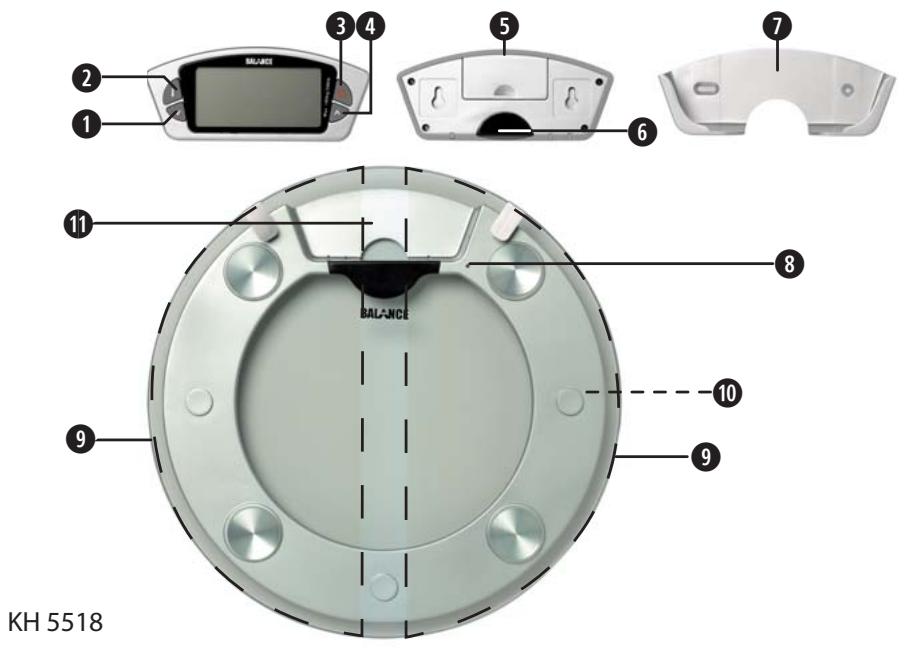
5. Components and operating elements
5.1. Display remote control unit
Button V (Down)
2 Button
3 Button (On/Off)
4 Button A (Up)
5 Battery compartment
6 Infrared receiver
Wall Holder for the Display remote control unit
5.2. Scales
8 Scales on/off indicator
9 Sensor areas (dashed fields)
10 Battery compartment
11 Holder for display remote control unit
6. Preparing the scales for use
6.1. Unpacking the components
1 Carefully remove the scales from the packaging. Please make sure that the display remote control unit does not fall out of its holder on the scales. Do not drop the scale and display remote control unit! Otherwise they could be damaged beyond repair.
6.2. Inserting the batteries in the scales
2 Remove the protective plastic from the four included type AA/ Mignon batteries.
3 Carefully place the scales with the top facing down. Use a towel or other soft material between the scales and the floor to pad the scales and prevent the device from being scratched. The bottom of the scales with the battery compartment should now be facing you.
4 Take the cover off the battery compartment. Insert the four batteries in the battery compartment. Make sure that the batteries are facing the right direction with regards to polarity (+ / - ) in the battery compartment. The right polarity is depicted on the inside of the battery compartment.
5 Place the cover back on the battery compartment and close it. Leave the scales lying upside down.
6.3. Inserting batteries in the display remote control unit
Push the display remote control unit out of its holder on the back of the scales. Be careful not to drop the display remote control unit.
7 Remove the protective plastic from the two included batteries of type AAA/Micro.
8 Place the display remote control unit face down. The back of the display remote control unit with the battery compartment should now be facing you.
9 Take the cover off the battery compartment. Insert the two AAA/Micro type batteries in the battery compartment. Make sure that the batteries are facing the right direction with regards to polarity (+ / - ) in the battery compartment. The right polarity is depicted on the inside of the battery compartment.
10 Place the cover back on the battery compartment and close it.
11 Turn the scales over so that the top is facing you.
The scales and the display remote control unit are now operational.
7. Selecting a suitable location
Only place the scales on a level, flat, scratchproof, non-slip surface.
The display remote control can be assembled on a wall above the scales with or without a wall holder. This is an alternative should the scales only be used exclusively at one location. For the assembly of the wall holder / display remote control use either the double-sided adhesive tape or both of the supplied plugs and screws. Take note that there should be no impediments between the scales and the infrared receiver of the display remote control. Otherwise it could malfunctions with the display remote control.
If you wish to secure the wall holder with the plugs and screws, with the assistance of the wall holder transfer the correct distance between the boreholes to the wall. Small drilling mistakes can be evened out with the help of the slotted holes.

Danger!
Please make sure no water or moisture can enter the scales or display remote control unit. Otherwise the scales and display remote control unit can be damaged beyond repair. This could also cause danger of electric shock!

Warning!
Do not place the scales and display remote control unit in the immediate vicinity of heat sources such as ovens, heaters and other similar devices. Otherwise the scales and display remote control unit can be damaged beyond repair.
The scales and display remote control unit can only be operated at temperatures between 10^ and 40^ Celsius. The scales should be kept within this temperature range even while not being used. Temperatures outside of this range can result in malfunctioning or long-term damages.
8. Prior to initial use
Before using the scales for the first time, you should enter your personal data. Ten memory locations are available for storing your personal data. To store your personal data:
1 Take the display remote control unit in your hand and press the on/off button once. "Balance" will be displayed moving across the screen.
2 Press and hold the i button until 1-10 is displayed on the screen. As soon as you release the i button, the number of one of the ten memory locations will be displayed on the screen.
3 You can choose one of the other ten memory locations by pressing the up and down buttons.
4 Press the i button as soon as the desired memory location is displayed on the screen. Now either lb or kg will blink on the display screen.
5 Press the up and down buttons to switch between ...
weight display in kg and height display in cm according to the metric system and
weight display in lb (pounds) and height display in feet and inches according to the British measurement system.
Once the desired display mode (lb or kg) is displayed, press the i button.
6 Now the symbol for woman or the symbol for man will appear on the display screen. You can switch between the two symbols by pressing the up and down buttons. Select appropriate symbol by pressing the i button.
7 "Age" will be displayed and a number between 7 and 99 will blink on the screen. Choose the number corresponding to your age by pressing the up or down buttons. Upon entering an age ...
between 7 and 17, the child symbol will be displayed on the lower right edge of the screen
between 18 and 99, the adult symbol will be displayed on the lower right edge of the screen
Once the number corresponding to your age appears in the display, press the i button.
8 The symbol for everyday physical strain will blink on the right side of the display screen. The symbol ...
stands for people who primarily carry out their daily activities seated. This includes people who work sitting in an office or occupational drivers.
stands for people who primarily carry out their daily activities standing or walking. This includes groups such as sales people or restaurant personnel.
for people exposed to excessive physical strain. This includes many occupations with high physical exertion.
for people exposed to extreme physical strain. In addition to serious athletes, this could include other occupations with extreme physical strain such as miners.
Switch between the symbols by briefly pressing the up and down buttons. Select the symbol corresponding to the category which most accurately fits your everyday physical strain. Press the i button as soon as the appropriate symbol is displayed on the screen.

Note:
Most people tend to overestimate their actual daily physical strain. If you are having trouble deciding between two categories: select the category with lower amount of physical strain.

9 The height indicator blinks on the display screen. Press the up or down button to select a value corresponding to your height. Press the i button as soon as the appropriate value is displayed.
10 The number of the memory location, in which you stored your personal data, blinks on the screen. Now you can ...
enter the personal data of other people in other memory locations. To do this select another memory location by pressing the up or down buttons. Subsequently repeat steps 4 to 10.
end the process of entering personal data. Briefly press the on/off button once to turn off the display remote control unit.
9. Using the scales
9.1. Measuring body weight only
To simply measure your current body weight:
1 Press the on/off button to turn on the display remote control unit. "Balance" and "----" will appear on the display screen.
2 Lightly touch the top of the scales with your foot. The on/off indicator on the scales should be illuminated in red. After a few seconds the on/off indicator will turn green and 0.0kg will appear in the display screen.
To switch between display of the body weight in kg and lb (pounds/English measurement system): Briefly press the i button.

Danger!
Never stand on only one side of the scales. Always stand in the middle of the scales with both feet. First of all you stand on the right and left sensor areas. Otherwise the scales can tilt to the side and be damaged beyond repair. You could also fall!
Please make sure that the surface of the scales is dry before you stand on it. Otherwise you could slip down!

Warning!
Do not place a load of more than 180 kilograms on the scales! Otherwise the scales could be damaged beyond repair!

Note:
Use the scales without clothes on if possible. This results in the most accurate measurements. Stand on the scales without shoes and socks on. Otherwise the measurements may be incorrect.
3 Stand on the scales.
4 Your body weight appears in the display screen. The body weight display can fluctuate while measurements are being taken. Therefore you should stand as still as possible. After a few seconds a blinking H will appear to the left of the weight display on the screen. The measuring proc
ess is complete when the H stops blinking. The weight displayed is your current body weight.
5 If you remain standing on the scales, the device will automatically shut off after 30 seconds.
If you step down from the scales, 0.0kg will appear again on the display screen after a few seconds. The scales are now ready for further body weight measurement.
If no new body weight measurement is carried out within 30 seconds, then the scales will turn off automatically. The display remote control unit will turn off automatically after 30 seconds if no buttons are pressed.
9.2. Measuring body weight, body fat, muscle mass and body water percentages as well as caloric requirement
9.2.1. Important notes on measuring
Use the scales without clothes on if possible. This results in the most accurate measurements. Always stand on the scales without shoes and socks on. Otherwise it is not possible to measure body fat, body water, muscle mass and caloric requirement. Furthermore the displayed body weight will be higher than your actual body weight.
Body weight, body fat and body water percentages are not subject to considerable fluctuation within a single day. These natural fluctuations can result in considerable differences between measurements taken at different times of the day. Therefore you should make sure to carry out measurements ...
under the same conditions and
at the same time of day.
Otherwise the measurements can not be compared. Differing measurement values could be related to differing conditions for measurement and not to actual changes. The most accurate and realistic measurement values can be obtained in the early evening. Furthermore you should always carry out measurement before mealtimes.
Large discrepancies between the measured values and the actual values can be more likely for the following groups of people:
children under seven years of age and with a height of less than 100~cm
Women going through menopause
High-performance/professional athletes
People suffering a flu or fever
People with swelling in their legs
People with osteoporosis
Dialysis patients
Measurement of body fat, muscle mass and body water percentages as well as caloric requirement is not recommended for these groups of people due to expected false results. However, use of the scales does not represent a health risk for any of the above mentioned groups of people.
To measure ...
the body weight,
the percentage of body fat,
the percentage of muscle mass and
the percentage of body water as well as
your personal daily caloric requirement:
1 Press the on/off button to turn on the display remote control unit. "Balance" and "-----" will appear on the display screen.
2 Lightly touch the top of the scales with your foot. The on/off indicator on the scales should be illuminated in red. After a few seconds the on/off indicator will turn green and 0.0kg will appear in the display screen.
3 Press the up button once. 1-10 appears on the display screen. Subsequently the number of one of the memory locations for personal data will blink on the screen.
4 Select the memory location of your own personal data by pressing the up or down button. Press the i button when the memory location number corresponding to your personal data is displayed on the screen.

Danger!
Never stand on only one side of the scales. Always stand in the middle of the scales with both feet. First of all you stand on the right and left sensor areas. Otherwise the scales can tilt to the side and be damaged beyond repair. You could also fall!
Please make sure that the surface of the scales is dry before you stand on it. Otherwise you could slip down!

Warning!
Do not place a load of more than 180 kilograms on the scales! Otherwise the scales could be damaged beyond repair!
5 Stand on the scales. Make sure that your feet are on the scales sensor areas. All measurements will be carried out.
The body weight appears in the lower part of the display screen. The body weight display can fluctuate while measurements are being taken. Therefore you should stand as still as possible. After a few seconds a blinking H will appear to the left of the weight display on the screen. The measuring process is complete when the H stops blinking. The weight displayed is your current body weight.
Remain standing calmly on the scales. Four rotating zeros are displayed in the upper section of the display screen. This indicates that the measurement process for body fat, muscle mass and body water percentages as well as caloric requirement is being carried out. As soon as the measurement process is complete, the following information will appear in sequence in the upper section of the display screen:
FAT and the percentage of your body weight which is body fat
WATER and the percentage of your body weight which is body water
WUsCLE and the percentage of your body weight which is muscle mass
and your daily caloric requirement in kilocalories (kcal)
Your body weight will continue to be displayed in the lower section of the display screen. The four values will continue to be displayed until the scales are automatically shut off.
Your general health condition is depicted by a symbol in the lower left corner of the display screen.
The following displays are possible:
Under fat
Healthy
Over fat
Obese
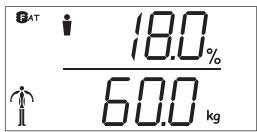
Fig.1a: Display of body fat percentage and body weight
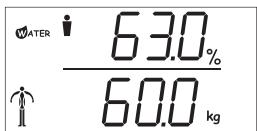
Fig. 1b: Display of body water percentage and body weight
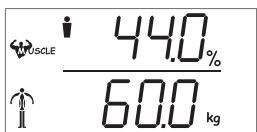
Fig. 1c: Display of muscle mass percentage and body weight
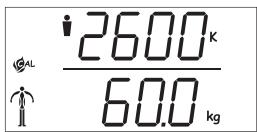
Fig. 1d: Display of daily caloric requirement and body weight
The percentual displays of body fat, body water and muscle mass elements must be considered individually. The sum of the measured results can exceed 100% as the muscle and fat tissue elements also contain a water element.
If you would like to track the development of your body fat, muscle mass and body water percentages over a period of time: Write down the displayed measurement results in a table after each measurement.
We recommend comparing your measurement results with the tables in the accompanying informational material to gain a better understanding of the values. This informational material includes average values for body fat, body water and muscle mass percentages according to age and gender.
6 If you remain standing on the scales, the device will automatically shut off after 30 seconds. If you step down from the scales, 0.0kg will appear again on the display screen after a few seconds. The scales are now ready for further body weight measurement.
9.3. Comparison of current and previous measurements
You can compare all currently displayed measurements with the most recently measured results.

Note:
The comparison display does not function in guest mode, because no measurement values are stored in this mode.
To compare the current measurement results with previous results:
1 Remain standing on the scales while the current measurement results are being displayed.
2 Press the i button once. The previous measurement result will blink on the display screen for comparison with the current result.
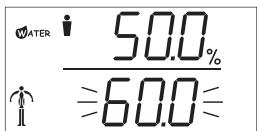
Fig. 2: Current and previous body water percentage measurement in comparison
3 In order to display comparisons of current and previous measurement values for other measurement areas: Press the up or down button briefly. Each time you press one of these buttons, one of the measurement areas (body fat percentage, muscle mass percentage, body water percentage and caloric requirement) are displayed. The current measurement result is displayed for each measurement area and the previous measurement result blinks in the display screen.
9.4. Display previous measurement results
To display your most recently measured results for ...
weight
body fat percentage
muscle mass percentage
body water percentage
1 Press the on/off button to turn on the display remote control unit. "Balance" and "----" will appear on the display screen.
2 Press the down button once. 1-10 appears on the display screen. Subsequently the number of one of the memory locations for personal data will blink on the screen.
3 Select the memory location of your own personal data by pressing the up or down button. Press the i button when the memory location number corresponding to your personal data is displayed on the screen.
4 Your personal data will appear on the display screen. After a few seconds ...
The body weight appears in the lower part of the display screen.
and the percentage of body weight represented by body fat appears in the upper part of the display screen.
5 Press the up or down buttons to switch to the display of measurement results for ...
the percentage of your body weight which is body water
the percentage of your body weight which is muscle mass
your daily caloric requirement in kilocalories (kcal)
Your body weight will continue to be displayed in the lower section of the display screen.
Your general health condition is depicted by a symbol in the lower left corner of the display screen.

Note:
Details pertaining to the display element are found in chapter 9.2. "Measuring body weight, body fat, muscle mass and body water percentages as well as caloric requirement".
9.5. Using the guest mode (GUES)
If ...
all ten memory locations for personal data are already full
or if you want to measure body weight, body fat percentage, muscle mass percentage and body water percentage as well as caloric requirement without storing personal data.
To do this:
1 Press the on/off button to turn on the display remote control unit. "Balance" and "-----" will appear on the display screen.
2 Press the up button once. 1-10 appears on the display screen. Subsequently the number of one of the memory locations for personal data will blink on the screen.
3 Press the up or down button several times until "GUES" appears on the display screen. Subsequently press the i button. Either lb or kg should now be blinking in the display.
4 Carry out steps 5 to 9 from chapter 8. "Prior to initial use".
5 Lightly touch the top of the scales with your foot. The on/off indicator on the scales should be illuminated in red. After a few seconds the on/off indicator will turn green and 0.0kg will appear in the display screen.

Danger!
Never stand on only one side of the scales. Always stand in the middle of the scales with both feet. Then you stand on the right and left sensor areas. Otherwise the scales can tilt to the side and be damaged beyond repair. You could also fall!
Warning!
Do not place a load of more than 180 kilograms on the scales! Otherwise the scales could be damaged beyond repair!
6 Stand on the scales. Make sure that your feet are on the scales sensor areas. All measurements will be carried out.
For a detailed explanation of the measurement processes, refer to chapter 9.2. "Measuring body weight, body fat, muscle mass and body water percentages as well as caloric requirement".
7 If you remain standing on the scales, the device will automatically shut off after 30 seconds. If you step down from the scales, 0.0kg will appear again on the display screen after a few seconds. The scales are now ready for further body weight measurement.
If no new measurement is carried out within 30 seconds, then the scales will turn off automatically. The display remote control unit will turn off automatically after 30 seconds if no buttons are pressed.
10. Maintaining the scales
10.1. Replacing the batteries in the scales
If this symbol appears on the display screen:
The batteries of the scales are almost empty. In this case, replace all four batteries with new AA/Mignon type batteries.
Inserting the batteries is described in chapter 6.2. "Inserting batteries in the scales".
10.2. Replacing the batteries of the display remote control unit
If this symbol appears on the display screen:

The batteries of the display remote control unit are almost empty. In this case, replace both batteries with new AAA/Micro type batteries.
Inserting the batteries is described in chapter 6.3. "Inserting batteries in the display remote control unit".
11. Troubleshooting/errorm messages
11.1. The scales can not be turned on
If you can not turn on the scales by placing light pressure on the top:
A Check to make sure that the batteries have been properly inserted in the compartment on the bottom of the scales. Make sure that the batteries are facing the right direction with regards to polarity (+ / - ) in the battery compartment. The right polarity is depicted on the inside of the battery compartment.
B Check to see if the batteries in the scales are empty. A warning symbol will appear on the display screen before the batteries are completely empty. This is also explained in chapter 10. "Maintenance of the scales". Replace all four batteries with new AA/Mignon type batteries.
11.2. The display remote control unit can not be turned on
If you can not turn on the display remote control unit by press the on/off button:
A Check to make sure that the batteries have been properly inserted in the compartment on the back of the display remote control unit. Make sure that the batteries are facing the right direction with regards to polarity (+/-) in the battery compartment. The right polarity is depicted on the inside of the battery compartment.
B Check to see if the batteries in the display remote control unit are empty. A warning symbol will appear on the display screen before the batteries are completely empty. This is also explained in chapter 10. "Maintenance of the scales". Replace the batteries with two new AAA/Micro type batteries.
11.3. The display screen is not functioning properly
The scales contain sensitive electronic components. Therefore it is possible that the scales will not function properly if there are radio transmission devices in the immediate vicinity. This could include mobile phones, walkietalkies, CB devices, radio remote control units, other remote control units and microwave devices. If the display screen is not functioning properly, you should remove this type of device from the immediate vicinity of the scales. In most cases it should suffice to switch off the devices while the scales are being used. In cases of interference proceed as detailed in Section C of the following chapter.

Note:
Avoid static charge or discharge because this could result in display errors or sudden switching off of the scales.
11.4. Error messages appear on the display screen
11.4.1. "0-Ld"
If this error message is displayed, then the weight on the scales exceeds 180kg . The scales are not intended for weight exceeding 180kg .
Warning!
Do not place a load of more than 180 kilograms on the scales! Otherwise the scales could be damaged beyond repair!
11.4.2. "Err"
If this error message is displayed, then the scales can not measure body fat, muscle mass and body water percentages.
A Measurement will not function properly if you are wearing shoes or socks. Always take your shoes and socks off before standing on the scales.
B Make sure that you have both feet on the sensor areas of the scales top surface.
If measurement is still not possible:
C Step off the scales and wait until it automatically shuts off. Subsequently turn the scales on again and start the measurement process again.
If measurement is still not possible:
D You should always carry out measurements with clean dry feet. In some rare cases however your feet could be too dry for the measurement functions to function properly. In order to exclude the possibility that this is the cause of the error message: Moisten your feet using a damp cloth. Subsequently carry out the measurement again.
11.4.3."----"
This error message indicates that the display remote control unit can not establish a connection to the scales. Possible causes for this could be:
A The scales are turned off. Turn the scales on by gently touching the top of the scales with your foot.
B The display remote control unit is too far away from the scales. In this case, move closer to the scales with the display remote control unit.
C There is an obstacle between the infrared receiver on the display remote control unit and the scales. In this case, remove the obstacle.
D The display remote control unit is being held at an angle which hinders connection between the infrared receiver and the scales. In this case, hold the display remote control unit with the infrared receiver facing the scales.
11.5. Measurement results seem unrealistic
If you doubt the correctness of the displayed measurement results:
A Make sure you are carrying out the measurements correctly:
Are you carrying out the measurement without clothes on and especially without shoes and socks on?
Do you have both feet on the scales sensor areas whilst weighing?
Are your feet dry and clean?
Do you remain still on the scales until the measurement results are displayed?
If you have carried out the measurements correctly:
B Make sure that the stored personal data is correct. If errors were made when making the entries, it could result in false results. To do this:
1 Turn the display remote control unit on by pressing the on/off button.
2 Subsequently press the up or down button once briefly. 1-10 appears on the display screen. Subsequently the number of one of the memory locations for personal data will blink on the screen.
3 Select the memory location of your own personal data by pressing the up or down button. Press the i button when the memory location number corresponding to your personal data is displayed on the screen.
4 Make sure that the displayed data correctly corresponds to your personal data. If the displayed data contains errors, then you have to store your personal data again. The process of storing personal data is explained in chapter 8. "Prior to initial use".
If the entered personal data contains no errors:
C Carry out measurements daily over a period of one week. If these measurement return similar results: Compare your measurement results with the average values in the tables in the accompanying informational material. Use the average values to determine whether there are large differences between these values and your own measurement results. If this is the case, please consult your physician to have the measurement results checked.
11.6. Other malfunctions
Please refer to one of our service partners in your area if ...
the malfunctions described in sections 11.1. to 11.5. can not be rectified as described or
other malfunctions occur while using the scales and/or display remote control unit.
You will find the addresses of our service partners on the warranty card. You will find the warranty card with the scales.
12. Cleaning the scales
Clean the scales only using a mild cleanser and a damp cloth.
If different people use the scales, then the top of the scales should be cleaned after each usage. You should use a disinfectant with fungicide to prevent the spread of athlete's foot.
Clean the display remote control unit only using a slightly damp cloth.
Please make sure no water or moisture can enter the scales or display remote control unit.

Danger!
If water or moisture seeps into the scales or the display remote control unit, they can be damaged beyond repair. This could also cause danger of electric shock!
13. Storing the scales
If you are planning not to use the scales for a long period of time:
1 Remove all batteries from the battery compartments of the scales and the display remote control unit.

Careful!
Battery acid could leak out, especially if the batteries are old. Therefore you should remove all batteries if you do not plan to use the scales and remote control unit for long periods of time. This protects the scales and display remote control unit from damages resulting from battery acid leakage.
2 Place the display remote control unit in the holder on the scales.
3 Store the scales in a clean, dry place. Make sure that the scales can not fall from the storage place. Do not place any heavy or sharp objects on the scales. We suggest using the original packaging to store the scales.
Warning!
The scales and display remote control unit can only be operated at temperatures between 10^ and 40^ Celsius. The scales should be kept within this temperature range even while not being used. Temperatures outside of this range can result in malfunctioning or long-term damages.
14. Disposing of the scales
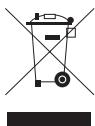
Do not dispose of the scales and the display remote control unit in the household waste. Please contact those responsible for waste management in your city or community and ask how
to properly dispose of electronic devices.

Note:
Remove the batteries before disposing of the scales or the display remote control unit. Do not dispose of the batteries in the household waste! Return the used batteries to an appropriate recycling collection center. Used batteries can usually be returned to the store in which they were bought.

Dispose of the packaging materials in an environmentally responsible manner.
15. Warranty & Customer Service
The warranty conditions and service address can be found on the enclosed warranty sheet.
16. Importer
KOMPERNASS GMBH
BURGSTRASSE 21
D-44867 BOCHUM
www.kompernass.com