
ZENFONE 3 ZE520KL - Cellphone ASUS - Free user manual and instructions
Find the device manual for free ZENFONE 3 ZE520KL ASUS in PDF.


| Product Type | Smartphone |
| Brand | ASUS |
| Model | ZENFONE 3 ZE520KL |
| Dimensions (H x W x D) | 146.9 x 74.1 x 7.7 mm |
| Weight | 144 g |
| Screen size | 5.2 inches |
| Screen resolution | 1920 x 1080 pixels |
| Processor | Qualcomm Snapdragon 625 octa-core 2.0 GHz |
| RAM | 3 GB |
| Storage capacity | 32 GB (expandable by microSD up to 256 GB) |
| Rear camera | 16 MP with optical stabilizer |
| Front camera | 8 MP |
| Battery | 2650 mAh non-removable |
| Operating system | Android 6.0 Marshmallow (upgradable to Android 8.0) |
| Sensors | Fingerprint, accelerometer, gyroscope, proximity, light |
| Connectivity | Wi-Fi 802.11 a/b/g/n/ac, Bluetooth 4.2, USB Type-C, NFC |
| Maintenance and cleaning | Clean with a soft, dry cloth; avoid liquids |
| Security | Fingerprint reader and facial unlock |
| Spare parts and repairability | Screen, battery, USB connector repairable; repairability score 7.5/10 |
| General information | Manufacturer warranty 2 years; CE declaration of conformity |
Frequently Asked Questions - ZENFONE 3 ZE520KL ASUS
User questions about ZENFONE 3 ZE520KL ASUS
0 question about this device. Answer the ones you know or ask your own.
Ask a new question about this device
Download the instructions for your Cellphone in PDF format for free! Find your manual ZENFONE 3 ZE520KL - ASUS and take your electronic device back in hand. On this page are published all the documents necessary for the use of your device. ZENFONE 3 ZE520KL by ASUS.
USER MANUAL ZENFONE 3 ZE520KL ASUS
IN SEARCH OF INCREDIBLE /
User Guide
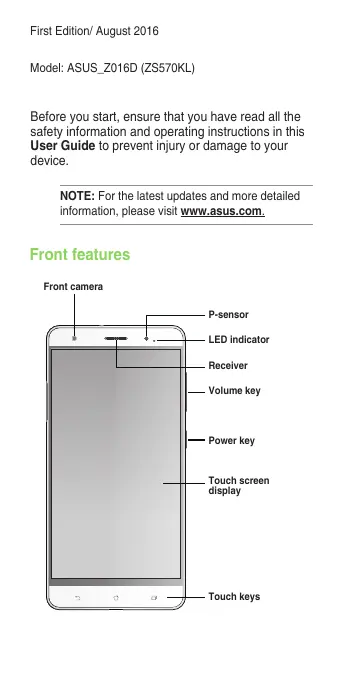
Before you start, ensure that you have read all the safety information and operating instructions in this User Guide to prevent injury or damage to your device.
NOTE: For the latest updates and more detailed information, please visit www.asus.com.
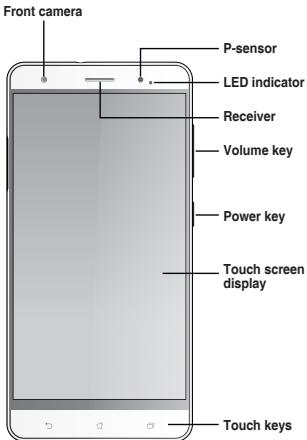
Front features
Side features
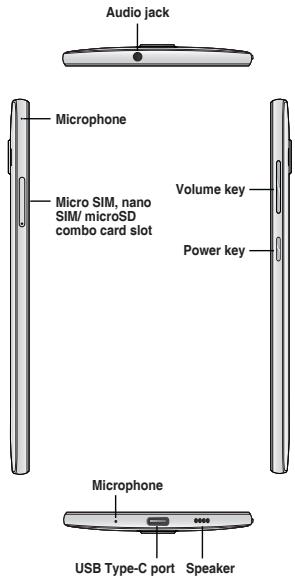
NOTES:
- The micro SIM card slot supports GSM/GPRS/EDGE, WCDMA/HSPA+/DC-HSPA+, TD-SCDMA, CDMA2000, FDD-LTE, and TD-LTE DSDS network bands.
- The microSD card slot supports microSD and microSDHC card formats.
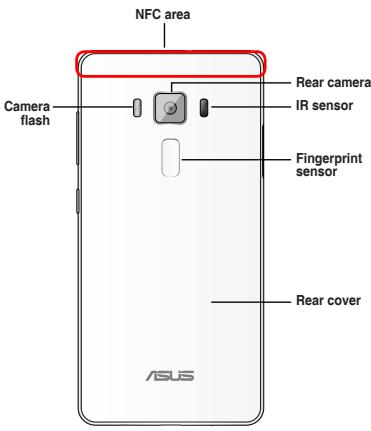
Rear features
Charging your ASUS Phone
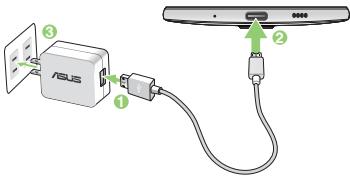
To charge your ASUS Phone:
- Connect the USB connector into the power adapter's USB port.
- Connect the other end of the USB Type-C cable to your ASUS Phone.
- Plug the power adapter into a wall socket.
IMPORTANT!
- When using your ASUS Phone while it is plugged to a power outlet, the grounded power outlet must be near to the unit and easily accessible.
- When charging your ASUS Phone through your computer, ensure that you plug the USB Type-C cable to your computer's USB 2.0 / USB 3.0 port.
- Avoid charging your ASUS Phone in an environment with ambient temperature of above 35°C (95°F).
NOTES:
- Use only the power adapter that came with your device. Using a different power adapter may damage your device.
- Using the bundled power adapter and ASUS Phone signal cable to connect your ASUS Phone to a power outlet is the best way to charge your ASUS Phone.
- The input voltage range between the wall outlet and this adapter is AC 100V - 240V. The output voltage of the USB Type-C cable is +9V==2A, 18W / +5V==2A, 10W.
Installing a micro SIM/ nano SIM/ microSD card
To install a micro SIM/ nano SIM/ microSD card:
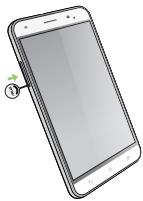
- Push a pin into the hole on the micro SIM/ nano SIM/ microSD card slot to eject the tray out.
natural_image
Illustration of a smartphone with a screen and a small circular icon on the screen (no text or symbols)- Insert the micro SIM / nano SIM or microSD card(s) into the card slot(s).
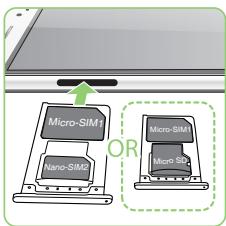
IMPORTANT! You can only use the nano SIM card or the microSD card at a time.
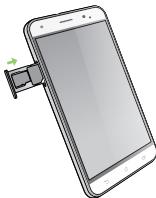
3. Push the tray to close it.
natural_image
Illustration of a smartphone with an attached cable, showing no text or symbols on the device itself.CAUTION!
- Do not use sharp tools or solvent on your device to avoid scratches on it.
- Use only a standard micro SIM card on your ASUS Phone. A nano to micro SIM adapter or a trimmed SIM card may not properly fit into and may not be detected by your ASUS Phone.
• DO NOT install an empty nano to micro SIM adapter into the micro SIM card slot to avoid irreversible damage.
Using NFC
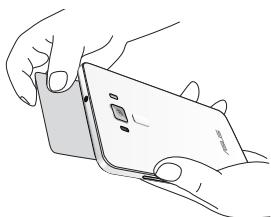
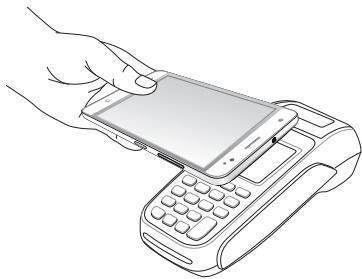
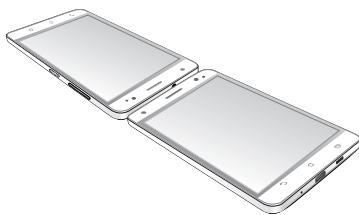
You can use NFC in the following three scenarios:
Reader mode: Your phone reads information from a contactless card, NFC tag, or other NFC devices.
Place the NFC area of your phone on the contactless card, NFC tag, or NFC device.
natural_image
Line drawing of hands holding a smartphone with a cable (no text or symbols)Card Emulation mode: Your phone can be used like a contactless card.
Place the NFC area of your phone on the NFC area of the NFC reader.
natural_image
Line drawing of a hand inserting a smartphone into a payment terminal (no text or symbols)Peer-to-Peer mode: Transfers photos, contacts, or other data between your phone and an NFC-enabled smartphone.
Bring the NFC areas of both smartphones together, without any space between them.
natural_image
Illustration of two smartphone screens showing front and back views (no text or symbols)CE RF Exposure Compliance
This device meets the EU requirements (1999/519/EC) on the limitation of exposure of the general public to electromagnetic fields by way of health protection.
For body-worn operation, this device has been tested and meets the ICNIRP guidelines and the European Standard EN 62209-2, for use with dedicated accessories. SAR is measured with this device at a separation of 0.5 cm to the body, while transmitting at the highest certified output power level in all frequency bands of this device. Use of other accessories which contain metals may not ensure compliance with ICNIRP exposure guidelines.
CE Mark Warning
C € 0682 Ⓖ
CE marking for devices with wireless LAN/Bluetooth
This equipment complies with the requirements of Directive 1999/5/EC of the European Parliament and Commission from 9 March, 1999 governing Radio and Telecommunications Equipment and mutual recognition of conformity. The highest CE SAR values for the device are as follows:
• 0.663 W/Kg (Head) @10g
• 0.970 W/Kg (Body) @10g
This device is restricted for indoor use only when operating under 5150 MHz to 5350 MHz of frequency range.
| For 5GHz WLAN: This equipment may be operated in: | |||||||
| AT | BE | BG | CH | CY | CZ | DE | DK |
| EE | ES | FI | FR | GB | GR | HU | IE |
| IT | IS | LI | LT | LU | LV | MT | NL |
| NO | PL | PT | RO | SE | SI | SK | TR |
Using GPS (Global Positioning System) on your ASUS Phone
To use the GPS positioning feature on your ASUS Phone:
- Ensure that your device is connected to the Internet before using Google Map or any GPS-enabled apps.
- For first-time use of a GPS-enabled app on your device, ensure that you are outdoors to get the best positioning data.
- When using a GPS-enabled app on your device inside a vehicle, the metallic component of the car window and other electronic devices might affect the GPS performance.
Prevention of Hearing Loss
To prevent possible hearing damage, do not listen at high volume levels for long periods.

Laser safety information
CLASS 1 LASER PRODUCT
Safety information
ASUS Phone care
- Use your ASUS Phone in an environment with ambient temperatures between 0 °C (32 °F) and 35 °C (95 °F).
The battery
Your ASUS Phone is equipped with a high performance non-detachable Li-polymer battery. Observe the maintenance guidelines for a longer battery life.
- Do not remove the non-detachable Li-polymer battery as this will void the warranty.
- Avoid charging in extremely high or low temperature. The battery performs optimally in an ambient temperature of +5 °C to +35 °C.
- Do not remove and replace the battery with a non-approved battery.
- Do not remove and soak the battery in water or any other liquid.
- Never try to open the battery as it contains substances that might be harmful if swallowed or allowed to come into contact with unprotected skin.
- Do not remove and short-circuit the battery, as it may overheat and cause a fire. Keep it away from jewelry or metal objects.
- Do not remove and dispose of the battery in fire. It could explode and release harmful substances into the environment.
- Do not remove and dispose of the battery with your regular household waste. Take it to a hazardous material collection point.
• Do not touch the battery terminals.
NOTES:
- Risk of explosion if battery is replaced by an incorrect type.
- Dispose of used battery according to the instructions.
The charger
- Use only the charger supplied with your ASUS Phone.
- Never pull the charger cord to disconnect it from the power socket. Pull the charger itself.
Caution
Your ASUS Phone is a high quality piece of equipment. Before operating, read all instructions and cautionary markings on the (1) AC Adapter.
- Do not use the ASUS Phone in an extreme environment where high temperature or high humidity exists. The ASUS Phone performs optimally in an ambient temperature between 0 °C (32 °F) and 35 °C (95 °F).
- Do not disassemble the ASUS Phone or its accessories. If service or repair is required, return the unit to an authorized service center. If the unit is disassembled, a risk of electric shock or fire may result.
- Do not short-circuit the battery terminals with metal items.
Operator access with a tool
If a TOOL is necessary to gain access to an OPERATOR ACCESS AREA, either all other compartments within that area containing a hazard shall be inaccessible to the OPERATOR by the use of the same TOOL, or such compartments shall be marked to discourage OPERATOR access.
ASUS Recycling/Takeback
Services
ASUS recycling and takeback programs come from our commitment to the highest standards for protecting our environment. We believe in providing solutions for you to be able to responsibly recycle our products, batteries, other components as well as the packaging materials. Please go to http://csr.asus.com/english/Takeback.htm for detailed recycling information in different regions.
Regional notice for Singapore
This ASUS Phone complies with IDA Standards.
Complies with IDA Standards DB103778
Proper disposal

Risk of explosion if battery is replaced by an incorrect type. Dispose of used batteries according to the instructions.

natural_image
Symbol of a trash bin with red X marks (no text or numbers present)DO NOT throw the battery in municipal waste. The symbol of the crossed out wheeled bin indicates that the battery should not be placed in municipal waste.

DO NOT throw this product in municipal waste. This product has been designed to enable proper reuse of parts and recycling. The symbol of the crossed out wheeled bin indicates that the product (electrical, electronic equipment and mercury-containing button cell battery) should not be placed in municipal waste. Check local regulations for disposal of electronic products.

natural_image
Illustration of a smartphone with a red X mark and three flame icons below (no text or symbols)DO NOT throw this product in fire. DO NOT short circuit the contacts. DO NOT disassemble this product.
WARNING! This product may contain chemicals known to the State of California to cause cancer, birth defects, or other reproductive harm. Wash hands after handling.
NOTE: For more regulatory information and FCC/IC/MIC/VCCI compliance marks (E-labels), check on your device from Settings > About > Regulatory Information.
We, the undersigned,
| Manufacturer: | ASUSTIK COMPUTER INC. |
| Address: | 4F, No. 150, LI-TE Rd., PSITOU, TAPEI 112, TAIWAN |
| Authorized representative in Europe: | ASUS COMPUTER GmbH |
| Address, City: | HARKORT STR. 21-23, 40880 RATINGEN |
| Country: | GERMANY |
declare the following apparatus:
| Product name : | ASUS Phone |
| Model name : | ASUS_Z016D |
The object of the declaration described above is in conformity with the relevant Union harmonisation legislation:
EMC – Directive 2004/108/IDC (until April 19th, 2016) and Directive 2014/10/EU (from April 20th, 2016).
| EN 59032:2012/AC:2013EN 61000-3-2:2014EN 59013:2001+A1:2003+A2:2006 | EN 59024:2010EN 61000-3-2:2013EN 59020:2007+A11:2011 |
RATTE - Directive 1999/5/EC
| SN 300 328 V1.8 (1/2015-02) | SN 301 489-V 1.V.9.2(2011-09) |
| SN 300 460-V1.1.6 (2/2010-08) | SN 301 489-V 1.V.6.(2012-12) |
| SN 300 460-V2.1.6 (2/2010-08) | SN 301 489-V 2.V.1.(2012-12) |
| SN 301 511 V9.0 (2/2003-03) | SN 301 489-V 7.1.(2005-11) |
| SN 301 608-V7.1 (1/2015-02) | SN 301 489-V 7.(2005-11) |
| SN 301 608-V6.2 (2/2013-10) | SN 301 489-V7 (2.V.2.(2012-09) |
| SN 301 908-13 V6.2 (1/2014-02) | SN 301 489-V4 (1.V.5.(2010-09) |
| SN 301 860 V1.8 (1/2015-03) | SN 301 357-V 1.4.(2008-11) |
| SN 300 330-V1.5 (1/2015-02) | SN 302 291-V 2.1.(1/2005-07) |
| SN 608 200 (2014-2012) | SN 302 623 V1.1.9.(2009-11) |
| SN 62479:2010 | SN 50366:2013(AC:2014) |
| SN 62471:2008 | SN 50365:2009 |
LVD – Directive 2006/95/EC (until April 19th, 2016) and Directive 2014/35/EU (from April 20th, 2016)
| EN 60860-1:2006 / A12: 2011EN 60860-1:2006 / A2: 2013 | EN 608652002 / A12: 2011 |
Ecodesion - Directive 2009/125/EC
| Regulation (G/C) No. 1275/2008Regulation (G/C) No. 642/2009 | Regulation (G/C) No. 279/2009Regulation (G/U) No. 617/2013 |
(1) RoHS – Directive 2011/65/EU
| CE marking |
| Equipment Class 2 |
Tel. 160217
CE0682①
(EU conformity marking)

Signature
Jerry Shen
Printed Name
CEO
Position
Taipei, Taiwan
Place of issue
5/8/2016
Date of issue
2016
Year CE marking was first affixed
| Regulation (EC) No. 1275/2008Regulation (EC) No. 642/2009 | Regulation (EC) No. 278/2009Regulation (EU) No. 617/2013 |
RoHS – Richtlinie 2011/65/EU
| ☐ Regulation (EC) No. 12752008☐ Regulation (EC) No. 642/2009 | ☒ Regulation (EC) No. 279/2009☐ Regulation (EU) No. 617/2013 |
RoHS - Directiva 2011/65/UE
51 Marcado CE
IN SEARCH OF INCREDIBLE
Nous, sousignés
| Fabricant: | AGUSTEK COMPUTER INC. |
| Adresse: | 4F, No. 150, LI-TE Rd., PEITO2, TAIPSI 112, TAIWAN |
| Représentant autorisé en l'Europe: | ASUS COMPUTER GmbH |
| Adresse, ville: | HARKORT STR. 21-23. 40880 RATINGEN |
| Pays: | GERMANY |
× Directive BATTE 1999/5/CE
| EN 302 328 V1.9.1(2015-02) | EN 301 489-V1.9.2(2011-09) |
| EN 303 440-1 V1.6.1(2010-08) | EN 301 489-V1.6.(2013-12) |
| EN 303 440-2 V1.4.1(2010-08) | EN 301 489-V2.1.1(2013-12) |
| EN 301 511 V9.0.2(2003-03) | EN 301 489-V7.1.3.(2005-11) |
| EN 303 489-3 V8.7.1(2015-03) | EN 301 489-V7.1(2007-01) |
| EN 301 908-2 V8.2.1(2013-11) | EN 301 489-17 V2.2.1(2012-09) |
| EN 301 908-13 V6.2.1(2014-02) | EN 301 489-24 V1.5.1(2010-09) |
| EN 301 893 V1.8.1(2015-03) | EN 301 357-V1.4.1(2008-11) |
| EN 303 330-2 V1.5.1(2010-02) | EN 303 291-V1.1.1(2005-07) |
| EN 50360 2019A12013 | EN 303 622 V1.1.1(2008-01) |
| EN 62479 2010 | EN 50568/2013/AC 2014 |
| EN 62311 2008 | EN 50385 2022 |
| ☐ Regulation (EC) No. 1275/2008☐ Regulation (EC) No. 642/2009 | ☐ Regulation (EC) No. 279/2009☐ Regulation (EU) No. 617/2013 |
Directive RoHS 2011/65/UE
Marquarie CE
Equivement de classe 2
TEL: 760217
CE0682①

Signature
Jerry Shen
| Regulation (G/C) No. 1275/2008Regulation (G/C) No. 643/2009 | Regulation (G/C) No. 278/2009Regulation (GU) No. 617/2013 |
RoHS – Diretiva 2011/65/UE

IN SEARCH OF INCREDIBLE
Subsemnatul.
| Produktor : | AGUSTİK COMPUTER INC. |
| Adreuk: | 4F, No. 198, L0-TE Rd., PSITOU, TAIPSI 112, TAIWAN |
| Reprezentant autorizat In Europa: | AGUS COMPUTER GmbH |
| Adreuk, Orap: | HARKORT STR. 21-23, 40880 RATINGEN |
| Tank: | GERMANIA |
| ☐ Regulation (EC) No. 1275/2008☐ Regulation (EC) No. 643/2009 | ☒ Regulation (EC) No. 278/2009☐ Regulation (EU) No. 617/2013 |
BolHS - Directiva 2011/65/UE
| ☒ | Marcajul CE |
| ☒ | Echipament Class 2 |
CE0682①
(Marcaj de conformitate UE )
| ☐ Regulation (iC) No. 12752038☐ Regulation (iC) No. 6422009 | ☒ Regulation (iC) No. 2782009☐ Regulation (iU) No. 6172013 |
10 BoHS - Direktif 2011/65/EU
CE isareti
Ekipman Sindi 2
Tel. 160217
CE0682①
Address: 4F, 150 Li-Te Road, Peitou, Taipei, Taiwan
Tel: 886228943447
Fax: 886228907698
Declaration
We declare that the IMEI codes for this product, ASUS Phone, are unique to each unit and only assigned to this model. The IMEI of each unit is factory set and cannot be altered by the user and that it complies with the relevant IMEI integrity related requirements expressed in the GSM standards.
Should you have any questions or comments regarding this matter, please contact us.
Sincerely yours,
ASUSTeK COMPUTER INC.
Tel: 886228943447
Fax: 886228907698
Support: http://vip.asus.com/eservice/techserv.aspx
Support for United States:
http://www.asus.com/US/Phones
Copyright © 2016 ASUSTeK COMPUTER INC.
All Rights Reserved.
You acknowledge that all rights of this Manual remain with ASUS. Any and all rights, including without limitation, in the Manual or website, and shall remain the exclusive property of ASUS and/or its licensors. Nothing in this Manual intends to transfer any such rights, or to vest any such rights to you.
ASUS PROVIDES THIS MANUAL "AS IS" WITHOUT WARRANTY OF ANY KIND. SPECIFICATIONS AND INFORMATION CONTAINED IN THIS MANUAL ARE FURNISHED FOR INFORMATIONAL USE ONLY, AND ARE SUBJECT TO CHANGE AT ANY TIME WITHOUT NOTICE, AND SHOULD NOT BE CONSTRUED AS A COMMITMENT BY ASUS.
ZenTalk Fans Forum
(http://www.asus.com/zentalk/global_forward.php)

- IN SEARCH OF INCREDIBLE /
- Front features
- Side features
- NOTES:
- Charging your ASUS Phone
- To charge your ASUS Phone:
- IMPORTANT!
- Installing a micro SIM/ nano SIM/ microSD card
- To install a micro SIM/ nano SIM/ microSD card:
- Push the tray to close it.
- CAUTION!
- Using NFC
- CE RF Exposure Compliance
- CE Mark Warning
- C € 0682 Ⓖ
- CE marking for devices with wireless LAN/Bluetooth
- Using GPS (Global Positioning System) on your ASUS Phone
- Prevention of Hearing Loss
- Safety information
- ASUS Phone care
- The battery
- The charger
- Caution
- Operator access with a tool
- ASUS Recycling/Takeback
- Services
- Regional notice for Singapore
- Proper disposal
- CE0682①
- Jerry Shen
- Address: 4F, 150 Li-Te Road, Peitou, Taipei, Taiwan
- Declaration
- ASUSTeK COMPUTER INC.
Brand : ASUS
Model : ZENFONE 3 ZE520KL
Category : Cellphone