WS-9080U-IT - Weather Station LA CROSS TECHNOLOGY - Free user manual and instructions
Find the device manual for free WS-9080U-IT LA CROSS TECHNOLOGY in PDF.



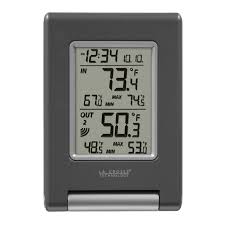
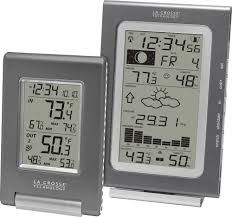
| Product Type | Wireless Weather Station |
| Brand | LA CROSS TECHNOLOGY |
| Model | WS-9080U-IT |
| Dimensions (station) | 3.74 x 0.74 x 5.35 inches (95 x 19 x 136 mm) |
| Dimensions (outdoor sensor) | 1.50 x 0.83 x 5.05 inches (38 x 21 x 128 mm) |
| Power supply (station) | 2 AAA 1.5V batteries (LR3) |
| Power supply (outdoor sensor) | 2 AA 1.5V batteries (LR6) |
| Main functions | WWVB radio-controlled time, indoor and outdoor temperature, daily min/max display, up to 3 outdoor sensors, 915 MHz transmission, adjustable LCD contrast, 12/24 h display, adjustable time zone |
| Display modes | Temperature in °C or °F, date, seconds, outdoor channels |
| Indoor measurement range | 0 °C to +59.9 °C (32 °F to +139.8 °F) |
| Outdoor measurement range | -39.9 °C to +69.9 °C (-39.8 °F to +157.8 °F) |
| Transmission frequency | 915 MHz (range 100 m in open space) |
| Outdoor update interval | Every 4 seconds |
| Indoor update interval | Every 15 seconds |
| Care and cleaning | Clean with a soft, damp cloth. Do not use solvents or abrasive products. |
| Safety | Do not open the device. Keep out of reach of children. Do not expose to extreme temperatures or humidity. |
| Spare parts and repairability | Batteries only. Return to after-sales service for any repair. |
| Warranty | 1 year limited (North America) |
| General information | Manual available in PDF. Technical support via email and website. |
Frequently Asked Questions - WS-9080U-IT LA CROSS TECHNOLOGY
User questions about WS-9080U-IT LA CROSS TECHNOLOGY
0 question about this device. Answer the ones you know or ask your own.
Ask a new question about this device
Download the instructions for your Weather Station in PDF format for free! Find your manual WS-9080U-IT - LA CROSS TECHNOLOGY and take your electronic device back in hand. On this page are published all the documents necessary for the use of your device. WS-9080U-IT by LA CROSS TECHNOLOGY.
USER MANUAL WS-9080U-IT LA CROSS TECHNOLOGY
Tomorrow's Weather Today
Contents
Language
English
1
French
41
Spanish
79
TABLE OF CONTENTS
| Topic | Page |
| Inventory of Contents | 3 |
| Features | 4 |
| Setting Up | 6 |
| Battery Installation | 10 |
| Function Keys | 12 |
| LCD Screen and Settings | 14 |
| Atomic Time -WWVB Radio Controlled Time | 16 |
| Manual Settings | 17 |
| Display of Indoor Temperature Reading | 25 |
| Display of Outdoor Temperature Reading | 26 |
| Display of Indoor Minimum and Maximum records | 26 |
| Display of Outdoor Minimum and Maximum records | 28 |
| Daily Indoor Minimum and Maximum Temperature display | 29 |
| Daily Outdoor Minimum and Maximum Temperature display | 30 |
| 915 MHz Reception | 31 |
| Mounting | 32 |
| Care and Maintenance | 34 |
| Specifications | 35 |
| Warranty | 36 |
This product offers:

INSTANT TRANSMISSION is the state-of-the-art new wireless transmission technology, exclusively designed and developed by LA CROSSE TECHNOLOGY. INSTANT TRANSMISSION offers you an immediate update (every 4 seconds!) of all your outdoor data measured from the sensors: follow your climatic variations in real-time!
INVENTORY OF CONTENTS
- Wireless Temperature Station
- Wireless Temperature Sensor (TX29U) and mounting bracket.
- Instruction Manual and Warranty Card.
FEATURES:
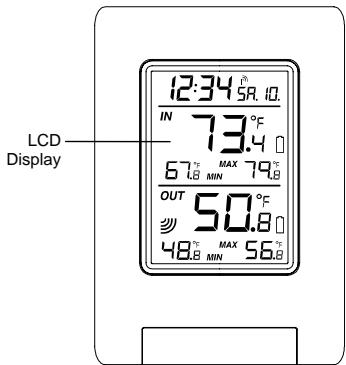
The Temperature Station
Atomic Time function (WWVB Radio controlled time) or manual time setting options
Atomic Time reception On/Off
Daylight Saving Time ON/OFF
12/24 hour display
Hour and minute display
Calendar display
Time zone option ± 12 hours
Wireless transmission at 915 MHz
- Outdoor signal reception intervals at 4-second
Temperature display in degrees Fahrenheit (^) or Celsius (^) selectable
- Indoor and Outdoor temperature display with MIN/MAX recording (records can be reset)
Can receive up to 3 outdoor sensors
Daily minimum and maximum indoor temperature display
Daily minimum and maximum outdoor temperature display
Low battery indicator
LCD contrast adjustable
Table standing/ Wall mounting
The Outdoor Temperature Sensor
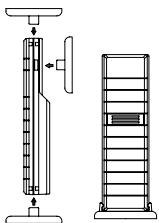
Remote transmission of outdoor temperature to Temperature Station by 915 MHz
Water-resistant casing
- Wall mounting case (Mount in a sheltered place. Avoid direct rain and sunshine)
SETTING UP:
When one Sensor is used
- First, insert the batteries into the temperature sensor. (see "Install and replace batteries in the temperature sensor").
- Immediately after and within 30 seconds, insert the batteries into Temperature Station (see "Install and replace batteries in the Temperature Station"). Once the batteries are in place, all segments of the LCD will light up briefly. Following the
time as 12:00 and the indoor temperature will be displayed. If these are not displayed after 60 seconds, remove the batteries and wait for at least 10 seconds before reinserting them.
- After inserting the batteries into the sensor, the Temperature Station will start receiving data from the sensor. The outdoor temperature and the signal reception icon should then be displayed on the Temperature Station. If this does not happen after 5 minutes, the batteries will need to be removed from both units and reset from step 1.
- In order to ensure sufficient 915 MHz transmission however, there should be no more than 330 feet (100 meters) between the final position of the Temperature Station and the sensor (see notes on "Mounting" and "915 MHz Reception").
- Once the remote temperature has been received and displayed on the Temperature Station, the WWVB time code reception is automatically started. This takes typically between 3-5 minutes in good conditions—but may take up to 4 nights.
When more than one sensor is to be used
- User shall remove all the batteries from the Temperature Station and sensors and wait 60 seconds if setting has been done with one sensor before.
- Insert the batteries to the first sensor.
- Within 30 seconds of powering up the first sensor, insert the batteries into to the Temperature Station. Once the batteries are in place, all segments of the LCD will
light up briefly. Following time as 12:00 and the indoor temperature will be displayed. If they are not shown in LCD after 60 seconds, remove the batteries and wait for at least 60 seconds before reinserting them.
- The outdoor temperature from the first sensor (channel 1) should then be displayed on the Temperature Station. Also, the signal reception icon will be displayed. If this does not happen after 2 minutes, the batteries will need to be removed from both units and reset from step 1.
- Insert the battery into the second sensor immediately after (within 10 seconds after) the reading form the first sensor is shown on LCD.
- The outdoor temperature from the second sensor and the "channel 2" icon should then be displayed on the Temperature Station. If this does not happen after 2 minute, the batteries will need to be removed from all the units and reset from step 1.
- Insert the batteries into the third sensor immediately after (within 10 seconds after) the reading from the second sensor is shown on LCD.
- Then within 2 minutes, the channel 3 outdoor data from the third sensor will be displayed and the channel icon will shift back to "1" once the third sensor is successfully received. If this is not happen, user shall restart the setting up from step 1.
- In order to ensure sufficient 915 MHz transmission there should be a distance of no more than 330 feet (100 meters) between the final position of the Temperature Station and the sensor (see notes on "Mounting" and "915 MHz Reception").
Note:
- Transmission problems will arise if the setting for additional sensors is not followed as described above. Should transmission problems occur, it is necessary to remove the batteries from all units and follow the set-up from step 1.
- If the signal reception is not successful on the first frequency (915MHz) for 45 seconds, the frequency is changed to 920MHz and the learning is tried for another 45 seconds. If still not successful the reception is tried for 45 seconds on 910MHz. This will also be done for re-synchronization.
- Once the remote temperature has been received and displayed on the Temperature Station, the WWVB time code reception is automatically started. This takes typically between 3-5 minutes in good conditions.
IMPORTANT:
- Transmission problems will arise if the setting for additional sensors is not followed as described above. Should transmission problems occur, it is necessary to remove the batteries from all units and follow the set-up from step 1.
If after 10 minutes, the Atomic auto-set time (WWVB time) has not been received, press the SET key to manually enter a time initially.
Daily WWVB reception is attempted at full hour between 12:00 am to 6:00 am. If the
reception is successful, there will no reception attempt until the following day. When this is successful, the received time will override the manually set time. The date is also updated with the received time. (Please refer also to notes on "Atomic auto-set time - WWVB Radio controlled Time" and "Manual Time Setting").
BATTERY INSTALLATION
INSTALL AND REPLACE BATTERIES IN THE TEMPERATURE STATION
The Temperature Station uses 2 x AAA, IEC LR3, 1.5V batteries. To install and replace the batteries, please follow the steps below:
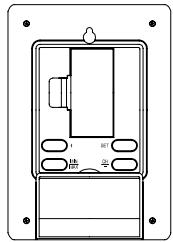
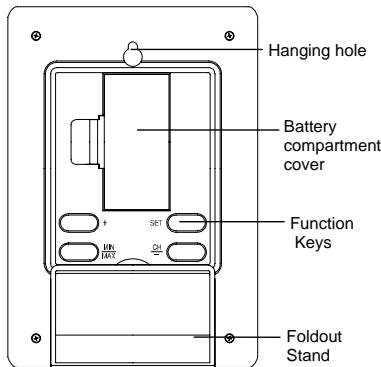
- Remove the cover at the back of the Temperature Station.
- Insert batteries observing the correct polarity (see marking).
- Replace compartment cover.
INSTALL AND REPLACE BATTERIES IN THE TEMPERATURE SENSOR
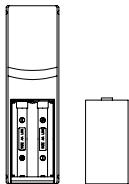
The temperature sensor uses 2 × AA , IEC LR6, 1.5V battery. To install and replace the batteries, please follow the steps below:
- Remove the battery compartment cover.
- Insert the batteries, observing the correct polarity (see marking).
- Replace the battery cover on the unit.
Note:
In the event of changing batteries in any of the units, all units need to be reset by following the setting up procedures. This is because a random security code is assigned by the sensor at start-up and this code must be received and stored by the Temperature Station in the first 3 minutes of power being supplied to it
BATTERY CHANGE:
It is recommended to replace the batteries in all units regularly to ensure optimum accuracy of these units (Battery life see Specifications below).

Please participate in the preservation of the environment. Return used batteries to an authorized depot.
FUNCTION KEYS:
Temperature Station:
The Temperature Station has four easy to use function keys.
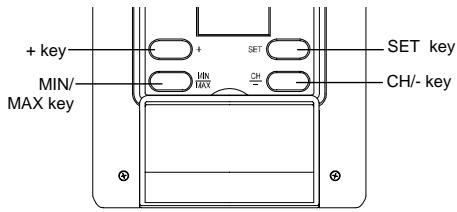
SET key (Manual Setting):
Press and hold to enter the setting mode for the following settings: LCD contrast, Time zone, Daylight saving time ON/OFF, Atomic Time Reception (RCC) ON/OFF, 12/24 hr format, Manual time, Year, Month, Day and ^ C / 广 settings.
MIN/ MAX key
To toggle between the minimum/ maximum indoor and outdoor temperature records
Press to exit the setting mode
Press to reset the minimum and maximum or temperature records of the indoor and the outdoor channel (will reset all records to current level)
+key
To make a "positive" adjustment for various settings
- In normal display, press to toggle between the display of the calendar data and second of time in the time display of LCD
CH- key
To make a "negative" adjustment for various settings
- To toggle between different outdoor channel display (when more than 1 outdoor sensor is adopted)
LCD SCREEN AND SETTINGS:
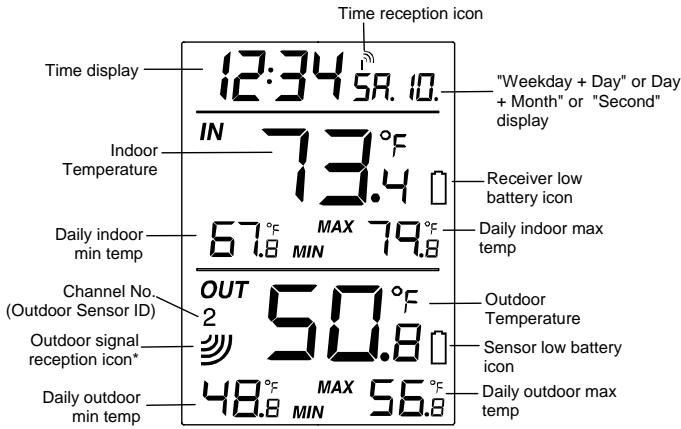
*When the outdoor signal is successfully received by the temperature station, this icon will be switched on. (If not successful, the icon will not be shown in LCD) So user can easily see whether the last reception was successful (icon on) or not (icon off). On the other hand, the short blinking of the icon shows that a reception is currently taking place.
Note:
The Channel No. (Outdoor Sensor No.) will be shown when more than one outdoor sensor is adopted.
For better distinctness the LCD screen is split into 3 sections displaying the information for time and date, Indoor data and outdoor data.
Section 1 - TIME AND CALENDAR
In normal mode, display the time and "weekday + day". Press the + key once to display the "day + month"; twice to display the second of time.
A signal reception symbol is shown indicating that Atomic auto-set time (WWVB time) signal is received.
Section 2 -INDOOR TEMPERATURE
- Display current indoor temperature
- Display daily minimum and maximum indoor temperature
Section 3 - OUTDOOR TEMPERATURE
Display current outdoor temp
Display daily maximum and minimum outdoor temperature
ATOMIC TIME - WWVB RADIO CONTROLLED TIME
The NIST (National Institute of Standards and Technology—Time and Frequency Division) WWVB radio station is located in Ft. Collins, Colorado, and transmits the exact time signal continuously throughout the United States at 60kHz . The signal can be received up to 2,000 miles away through the internal antenna in the Temperature Station. However, due to the nature of the Earth's Ionosphere, reception is very limited during daylight hours. The wireless weather station will search for a signal every night when reception is best.
The WWVB radio station receives the time data from the NIST Atomic clock in Boulder, Colorado. A team of atomic physicists is continually measuring every second, of every day, to an accuracy of ten billionths of a second per day. These physicists have created an international standard, measuring a second as 9,192,631,770 vibrations of a Cesium-133 atom in a vacuum. For more detail, visit http://www.boulder.nist.gov/timefreq.htm. To listen to the NIST time, call (303)499-7111. This number will connect you to an automated time, announced at the top of the minute in "Coordinated Universal Time", which is also known as Greenwich Mean Time (GMT). This time does not follow Daylight Saving Time changes. After the top of the minute, a tone will sound for every second. It is possible that your
Wireless Temperature Station may not be exactly on the second due to the variance in the quartz. However, the clock will adjust the quartz timing over the course of several days to be very accurate; under 0.10 seconds per day.
MANUAL SETTINGS:
The following manual settings can be done in the setting mode:
LCD Contrast setting
Time zone setting
Daylight Saving Time ON/OFF setting (DST)
Atomic Time reception ON/OFF setting (RCC)
12/24 hour time format setting
- Manual time setting
Calendar setting (Year, Month, Date)
F/°C temperature unit setting
Press and hold the SET key for about 3 seconds to advance to the setting mode:
LCD CONTRAST SETTING
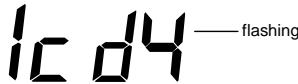
The LCD contrast can be set to 8 different levels (0 to 7) to suit the user's needs (default LCD contrast setting is LCD 4). To set the desired contrast level:
- The above display will be seen. Press the + key or CH/- key to select the level of contrast desired.
- Press the SET key to confirm and enter the "Time Zone setting" or exit the setting mode by pressing the MIN/MAX key
TIME ZONE SETTING:
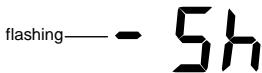
The time zone default of the Temperature Station is -5 hr. To change to another time zone:
- Using the + key or CH/ key, set the time zone. The range runs between -12 to +12 hour.
- Press the SET key to confirm and enter the "Daylight Saving time ON/OFF setting" or exit the setting mode by pressing the MIN/MAX key.
DAYLIGHT SAVING TIME ON/OFF SETTING

- The digit "ON DST" will start flashing on the LCD.
- Use the + key or CH/- key to turn On or OFF the daylight saving time function.
- Confirm with the SET key and enter the "Time reception On/Off setting" or exit the setting mode by pressing the MIN/MAX key.
TIME RECEPTION ON/OFF SETTING
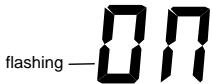

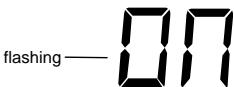
In area where reception of the WWVB time is not possible, the time reception function can be turned OFF. The clock will then work as a normal Quartz clock. (Default setting is ON).
- The digit "ON" and the time reception icon will start flashing on the LCD.
- Use the ^+ key or CH/-key to turn OFF the time reception function.
- Confirm with the SET key and enter the "12/24-Hour Display setting" or exit the setting mode by pressing the MIN/MAX key.
Note:
If the Time Reception function is turned OFF manually, the clock will not attempt any reception of the WWVB time as long as the Time Reception OFF function is activated. The Time Reception icon will not be displayed on the LCD.
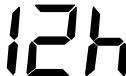
12/24 HOUR TIME DISPLAY SETTING
— flashing
- After setting time reception ON/OFF, press the SET key, "12 h" or "24 h" flashes in the LCD. (default 12 h)
- Press the + key or CH/- to select the "12 h" or "24 h" display mode.
- Press the SET again to confirm and to enter the "Manual Time setting" or exit the setting mode by pressing the MIN/MAX key.
Note: When 24 h mode display is selected, the calendar format will be "date and month" display. When 12 h mode display is selected, the calendar format will be "month and date" display.
MANUAL TIME SETTING
In case the Temperature Station is not able to detect the Atomic time (WWVB) signal (disturbances, transmitting distance, etc.), the time can be manually set. The clock will then work as a normal Quartz clock.

To set the clock:
- The hour digits start flashing in the time display section.
- Use the + key or CH/- key to adjust the hours and then press SET key to go to the minute setting.
- The minute will be flashing. Press the + key or CH/- key to just the minutes.
- Confirm with the SET key and enter the "Calendar Setting" or exit the setting mode by pressing the MIN/MAX key
CALENDAR SETTING
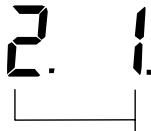
"Date. Month." (for 24h time display)
"Month. Date." (for 12h time display)
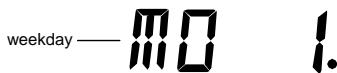
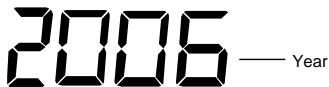
The date default of the temperature station is 1. 1. of the year 2006 after initial set-up. Once the radio-controlled time signals are received, the date is automatically updated. However, if the signals are not received, the date can also be set manually. To do this:
-
The year is flashing. Using the + key or CH/ key, set the year required. The range runs from 2006 to 2029 (default is 2006).
-
Press the SET key to enter the month setting mode.
- The month digit will be flashing. Press the + key or CH/- key to set the month and then press the SET key to go to the day setting.
- The day digit will be flashing. Press the + key or CH/- key to set the day.
- Confirm with SET key and enter the "F/C TEMPERATURE UNIT SETTING" or exit the setting mode by pressing the MIN/MAX key.
Note: The weekday of calendar will be automatically set after the month and day value is input.
^ / C TEMPERATURE UNIT SETTING
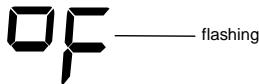
The default temperature reading is set to ^ F (degree Fahrenheit). To select ^ C (degree Celsius):
-
The "oF/ °C" will be flashing, use the + key or CH/- key to toggle between "oF" and "oC".
-
Once the desired temperature unit has been chosen, confirm with the SET key to exit the setting mode.
DISPLAY OF INDOOR TEMPERATURE READING:
The indoor temperature is measured and displayed on the second section of the LCD.
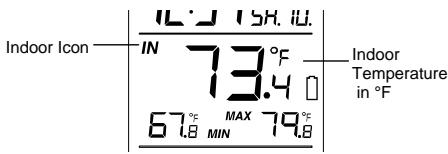
DISPLAY OF OUTDOOR TEMPERATURE READING:
The bottom LCD section shows the outdoor temperature.
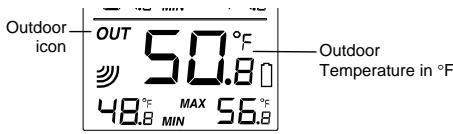
DISPLAY OF INDOOR MINIMUM AND MAXIMUM RECORDS:
- In normal display mode, press the MIN/MAX key once, the minimum indoor temperature will be shown in LCD. Also the time and date of recording this temperature will be displayed.


- Then press the MIN/MAX button one more time, the maximum indoor temperature will be shown in LCD. Also the time and date of recording this temperature will be displayed.
- Press three more time the MIN/ MAX button to go back to the normal display.
DISPLAY OF OUTDOOR MINIMUM AND MAXIMUM RECORDS:
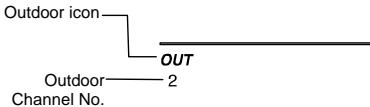
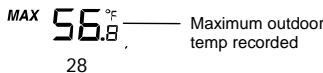
- In normal display mode, Press the MIN/MAX button three times, the outdoor minimum temperature and the time and date of recording this temperature will be displayed.
- Press the MIN/MAX button once more, the outdoor maximum temperature and the time and date of recording this temperature will be displayed.

RESETTING THE INDOOR AND OUTDOOR MINIMUM/MAXIMUM RECORDS
- In normal display mode, press the MIN/MAX button once to advance to the indoor MIN temp display.
- Press and hold the MIN/MAX key for about 3 seconds, this will reset the currently shown indoor and outdoor minimum and maximum data to the current time, date and temperature.
- Then press the MIN/MAX button three more times to return to the normal display.
Note:
The indoor minimum and maximum record, as well as the minimum and maximum records of all outdoor channels, will be reset at the same time.
DAILY INDOOR MIN AND MAX TEMPERATURE DISPLAY
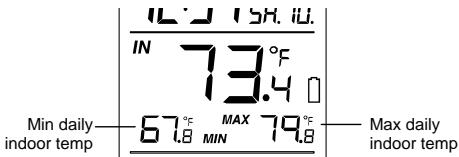
This temperature station shows the daily minimum and maximum indoor temperature in normal display.
Note:
The daily minimum temperature record is reset automatically at 8:00 pm and the daily maximum temperature is reset automatically at 8:00 am every day.
DAILY OUTDOOR MIN AND MAX TEMPERATURE DISPLAY
This temperature station also displays the daily minimum and maximum outdoor temperature for each outdoor channel in normal display.
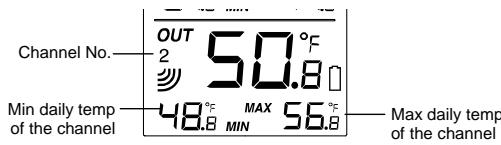
To view the daily MIN and MAX temperature of another channel, user shall press the CH key to shift to various channel display.
Note:
The daily minimum temperature record is reset automatically at 8:00 pm and the daily
maximum temperature is reset automatically at 8:00 am every day.
915 MHz RECEPTION
The Temperature Station should receive the temperature data within 5 minutes after set-up. If the temperature data is not received 5 minutes after setting up (not successfully continuously, the outdoor display shows "---"), please check the following points:
- The distance of the Temperature Station or sensor should be at least 5 to 6.5 feet (1.5 to 2 meters) away from any interfering sources such as computer monitors or TV sets.
- Avoid positioning the Temperature Station onto or in the immediate proximity of metal window frames.
- Using other electrical products such as headphones or speakers operating on the same signal frequency (915MHz) may prevent correct signal transmission and reception.
- Neighbors using electrical devices operating on the 915MHz signal frequency can also cause interference.
Note:
When the 915MHz signal is received correctly, do not re-open the battery cover of either the sensor or Temperature Station, as the batteries may spring free from the contacts and force a false reset. Should this happen accidentally then reset all units (see Setting up
above) otherwise transmission problems may occur.
The transmission range is about 330 feet (100 m) from the sensor to the Temperature Station (in open space). However, this depends on the surrounding environment and interference levels. If no reception is possible despite the observation of these factors, all system units have to be reset (see Setting up).
MOUNTING
POSITIONING THE TEMPERATURE STATION:
The Temperature Station has been designed to be hung onto wall or free standing.
To wall mount
Choose a sheltered place. Avoid direct rain and sunshine. Before wall mounting, please check that the outdoor temperature values can be received from the desired locations.
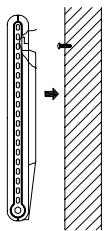
- Fix a screw (not supplied) into the desired wall, leaving the head extended out the by about 5mm.
- Remove the stand from the Temperature Station by pulling it away from the base and hang the station onto the screw. Remember to ensure that it locks into place before releasing.
Free standing
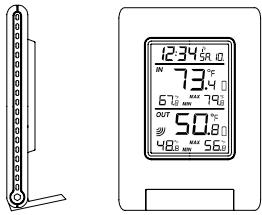
With the stand, the Temperature Station can be placed onto any flat surface.
POSITIONING THE TEMPERATURE SENSOR:
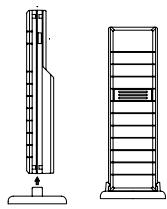
The sensor is supplied with a holder that may be attached to a wall with the two screws supplied. The sensor can also be position on a flat surface by securing the stand to the bottom to the sensor.
To wall mount:
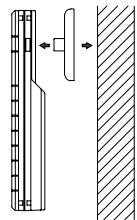
- Secure the bracket onto a desired wall using the screws and plastic anchors.
- Clip the sensor onto the bracket.
Note:
Before permanently fixing the sensor wall base, place all units in the desired locations to check that the outdoor temperature reading is receivable. In event that the signal is not received, relocate the sensors or move them slightly as this may help the signal reception.
CARE AND MAINTENANCE:
Extreme temperatures, vibration and shock should be avoided as these may cause damage to the unit and give inaccurate forecasts and readings.
- When cleaning the display and casings, use a soft damp cloth only. Do not use solvents or scouring agents as they may mark the LCD and casings.
- Do not submerge the unit in water.
- Immediately remove all low powered batteries to avoid leakage and damage. Replace only with new batteries of the recommended type.
- Do not make any repair attempts to the unit. Return them to their original point of purchase for repair by a qualified engineer. Opening and tampering with the unit may invalidate their guarantee.
- Do not expose the units to extreme and sudden temperature changes, this may lead to rapid changes in forecasts and readings and thereby reduce their accuracy.
SPECIFICATIONS:
Temperature measuring range:
Indoor : 32^ to +139.8^ with 0.2^ resolution (0^ to +59.9^ with 0.1^ resolution, "OF.L" displayed if outside this range)
Outdoor : -39.8°F to +157.8°F with 0.2°F resolution (-39.9°C to +69.9°C with 0.1°C resolution, “OF.L” displayed if outside this range)
Indoor temperature checking interval : every 15 seconds
Outdoor data reception : approximately every 4 seconds
Power supply:
Temperature Station 2xAAA,IEC,LR3,1.5V
Temperature Sensor 2xAA,IEC,LR61.5V
Battery life (Alkaline batteries recommended)
Temperature Station : Approximately 12 months
Temperature Sensor : Approximately 24 months
Dimensions (L x W x H)
Temperature Station : 3.74'' × 0.74'' × 5.35'' (95 x 18.8 x 136 mm)
Temperature Sensor : 1.50'' × 0.83'' × 5.05'' (38.2 x 21.2 x 128.3 mm)
WARRANTY
La Crosse Technology, Ltd provides a 1-year limited warranty on this product against manufacturing defects in materials and workmanship.
This limited warranty begins on the original date of purchase, is valid only on products purchased and used in North America and only to the original purchaser of this product. To receive warranty service, the purchaser must contact La Crosse Technology, Ltd for problem determination and service procedures. Warranty service can only be performed by a La Crosse Technology, Ltd authorized service center. The original dated bill of sale must be presented upon request as proof of purchase to La Crosse Technology, Ltd or La Crosse Technology, Ltd's authorized service center.
La Crosse Technology, Ltd will repair or replace this product, at our option and at no charge as stipulated herein, with new or reconditioned parts or products if found to be defective during the limited warranty period specified above. All replaced parts and products become the property of La Crosse Technology, Ltd and must be returned to La Crosse Technology, Ltd. Replacement parts and products assume the remaining original warranty, or ninety (90) days, whichever is longer. La Crosse Technology, Ltd will pay all expenses for labor and materials for all repairs covered by this warranty. If necessary repairs are not covered by this warranty, or if a product is examined which is not in need or repair, you will be charged for the repairs or examination. The owner must pay any shipping charges incurred in getting your La Crosse Technology, Ltd product to a La Crosse Technology, Ltd authorized service center. La Crosse Technology, Ltd will pay ground return shipping charges to the owner of the product to a USA address only.
Your La Crosse Technology, Ltd warranty covers all defects in material and workmanship with the following specified exceptions: (1) damage caused by accident, unreasonable use or neglect (including the lack of reasonable and necessary maintenance); (2) damage occurring during shipment (claims must be presented to the carrier); (3) damage to, or deterioration of, any accessory or decorative surface; (4) damage resulting from failure to follow instructions contained in your owner's manual; (5) damage resulting from the performance of repairs or alterations by someone other than an authorized La Crosse Technology, Ltd authorized service center; (6) units used for other than home use (7)
applications and uses that this product was not intended or (8) the products inability to receive a signal due to any source of interference.. This warranty covers only actual defects within the product itself, and does not cover the cost of installation or removal from a fixed installation, normal set-up or adjustments, claims based on misrepresentation by the seller or performance variations resulting from installation-related circumstances.
LA CROSSE TECHNOLOGY, LTD WILL NOT ASSUME LIABILITY FOR INCIDENTAL, CONSEQUENTIAL, PUNITIVE, OR OTHER SIMILAR DAMAGES ASSOCIATED WITH THE OPERATION OR MALFUNCTION OF THIS PRODUCT. THIS PRODUCT IS NOT TO BE USED FOR MEDICAL PURPOSES OR FOR PUBLIC INFORMATION. THIS PRODUCT IS NOT A TOY. KEEP OUT OF CHILDREN'S REACH.
This warranty gives you specific legal rights. You may also have other rights specific to your State. Some States do no allow the exclusion of consequential or incidental damages therefore the above exclusion of limitation may not apply to you.
For warranty work, technical support, or information contact:
La Crosse Technology, Ltd
2809 Losey Blvd. S.
La Crosse, WI 54601
Phone: 608.782.1610
Fax: 608.796.1020
e-mail:
support@lacrossetechnology.com
(warranty work)
sales@lacrossetechnology.com
(information on other products)
web:
www.lacrossetechnology.com
Question? Instructions? Please visit:
www.lacrossetechnology.com/9080
All rights reserved. This handbook must not be reproduced in any form, even in excerpts, or duplicated or processed using electronic, mechanical or chemical procedures without written permission of the publisher.
This handbook may contain mistakes and printing errors. The information in this handbook is regularly checked and corrections made in the next issue. We accept no liability for technical mistakes or printing errors, or their consequences.
All trademarks and patents are acknowledged.
TABLA DE CONTENIDO
La Crosse Technology, Ltd
2809 Losey Blvd. S.
La Crosse, WI 54601
Phone: 608.782.1610
Fax: 608.796.1020
e-mail:
support@lacrossetechnology.com
FCC ID: OMO-TX29U (transmitter) FCC DISCLAIMER
RF Exposure mobil:
The internal / external antennas used for this mobile transmitter must provide a separation distance of at least 20 cm (8 inches) from all persons and must not be co-located or operating in conjunction with any other antenna or transmitter."
Statement according to FCC part 15.19:
This device complies with Part 15 of the FCC Rules. Operation is subject to the following two conditions: (1) this device may not cause harmful interference, and (2) this device must accept any interference received, including interference that may cause undesired operation.
Statement according to FCC part 15.21:
Modifications not expressly approved by this company could void the user's authority to operate the equipment.
Statement according to FCC part 15.105:
NOTE: This equipment has been tested and found to comply with the limits for a Class B digital device, pursuant to Part 15 of the FCC Rules. These limits are designed to provide reasonable protection against harmful interference in a residential installation. This equipment generates, uses and can radiate radio frequency energy and, if not installed and used in accordance with the instructions, may cause harmful interference to radio communications.
However, there is no guarantee that interference will not occur in a particular installation. If this equipment does cause harmful interference to radio or television reception, which can be determined by turning the equipment off and on, the user is encouraged to try to correct the interference by one or more of the following measures:
Reorient or relocate the receiving antenna.
- Increase the separation between the equipment and receiver.
- Connect the equipment into an outlet on a circuit different from that to which the receiver is connected.
Consult the dealer or an experienced radio/TV technician for help
TABLE DES MATIERES
REEMPLACEMENT DES PILES:
Dimensions (L x I x H)
La Crosse Technology, Ltd
2809 Losey Blvd. S.
La Crosse, WI 54601
Phone: 608.782.1610
Fax: 608.796.1020
courriel:
support@lacrossetechnology.com
Questions? Instructions? Visitez:
www.lacrossetechnology.com/9080

- Contents
- Language
- INVENTORY OF CONTENTS
- FEATURES:
- The Outdoor Temperature Sensor
- SETTING UP:
- When one Sensor is used
- When more than one sensor is to be used
- Note:
- IMPORTANT:
- BATTERY INSTALLATION
- INSTALL AND REPLACE BATTERIES IN THE TEMPERATURE STATION
- INSTALL AND REPLACE BATTERIES IN THE TEMPERATURE SENSOR
- BATTERY CHANGE:
- FUNCTION KEYS:
- Temperature Station:
- SET key (Manual Setting):
- MIN/ MAX key
- +key
- CH- key
- Section 1 - TIME AND CALENDAR
- Section 2 -INDOOR TEMPERATURE
- Section 3 - OUTDOOR TEMPERATURE
- ATOMIC TIME - WWVB RADIO CONTROLLED TIME
- MANUAL SETTINGS:
- LCD CONTRAST SETTING
- TIME ZONE SETTING:
- DAYLIGHT SAVING TIME ON/OFF SETTING
- TIME RECEPTION ON/OFF SETTING
- 12/24 HOUR TIME DISPLAY SETTING
- MANUAL TIME SETTING
- To set the clock:
- CALENDAR SETTING
- °F / ° C TEMPERATURE UNIT SETTING
- DISPLAY OF INDOOR TEMPERATURE READING:
- DISPLAY OF OUTDOOR TEMPERATURE READING:
- DISPLAY OF INDOOR MINIMUM AND MAXIMUM RECORDS:
- DISPLAY OF OUTDOOR MINIMUM AND MAXIMUM RECORDS:
- RESETTING THE INDOOR AND OUTDOOR MINIMUM/MAXIMUM RECORDS
- DAILY INDOOR MIN AND MAX TEMPERATURE DISPLAY
- DAILY OUTDOOR MIN AND MAX TEMPERATURE DISPLAY
- MHz RECEPTION
- MOUNTING
- POSITIONING THE TEMPERATURE STATION:
- To wall mount
- Free standing
- POSITIONING THE TEMPERATURE SENSOR:
- To wall mount:
- CARE AND MAINTENANCE:
- SPECIFICATIONS:
- WARRANTY
- FCC ID: OMO-TX29U (transmitter) FCC DISCLAIMER
- RF Exposure mobil:
- Statement according to FCC part 15.19:
- Statement according to FCC part 15.21:
- Statement according to FCC part 15.105:
- REEMPLACEMENT DES PILES:
Brand : LA CROSS TECHNOLOGY
Model : WS-9080U-IT
Category : Weather Station