
TVEE 20 - Soundbar BOSTON ACOUSTICS - Free user manual and instructions
Find the device manual for free TVEE 20 BOSTON ACOUSTICS in PDF.


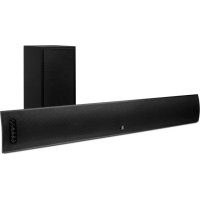
| Product Type | Soundbar with wireless subwoofer |
| Brand | BOSTON ACOUSTICS |
| Model | TVEE 20 |
| Dimensions (soundbar) | 95 x 788 x 102 mm (H x W x D) |
| Dimensions (subwoofer) | 241 x 266 x 280 mm (H x W x D) |
| Weight (soundbar) | 3.9 kg |
| Weight (subwoofer) | 5 kg |
| Power | 100 watts peak |
| Power supply | AC adapter (100-240 V, 50/60 Hz) |
| Connectivity | Audio input (cable included), wireless link between bar and subwoofer |
| Main features | Learning IR commands from an external remote, automatic standby, volume and bass adjustment, mute |
| Care and cleaning | Clean with a dry, soft cloth. Do not use liquid or abrasive products. |
| Safety | Do not expose to water, rain or moisture. Maintain a distance of 50 mm around the device for ventilation. Do not block ventilation openings. Disconnect during thunderstorms or prolonged non-use. |
| Spare parts and repairability | Contact an authorized Boston Acoustics service center. Do not open the device. The warranty covers 5 years on mechanical components and 1 year on electrical components. |
| General information | Manufactured by Boston Acoustics, Inc., 300 Jubilee Drive, Peabody, MA 01960, USA. Declaration of conformity available. |
Frequently Asked Questions - TVEE 20 BOSTON ACOUSTICS
User questions about TVEE 20 BOSTON ACOUSTICS
0 question about this device. Answer the ones you know or ask your own.
Ask a new question about this device
Download the instructions for your Soundbar in PDF format for free! Find your manual TVEE 20 - BOSTON ACOUSTICS and take your electronic device back in hand. On this page are published all the documents necessary for the use of your device. TVEE 20 by BOSTON ACOUSTICS.
USER MANUAL TVEE 20 BOSTON ACOUSTICS
IMPORTANT SAFETY INSTRUCTIONS

This symbol found on the apparatus indicates hazards arising from dangerous voltages.

This symbol found on the apparatus indicates the user should read all safety statements found in the user manual.

This symbol found on the apparatus indicates double insulation.

Warning!
To reduce the risk of fire or electrical shock, do not expose this apparatus to rain or moisture.
- Read these instructions.
- Keep these instructions.
- Heed all warnings.
- Follow all instructions.
- Do not use this apparatus near water.
- Clean only with dry cloth.
- Do not block any ventilation openings. Install in accordance with the manufacturer's instructions.
- Do not install near any heat sources such as radiators, heat registers, stoves, or other apparatus (including amplifiers) that produce heat.
- Do not defeat the safety purpose of the polarized or grounding-type plug. A polarized plug has two blades with one wider than the other. A grounding-type plug has two blades and a third grounding prong. The wide blade or the third prong is provided for your safety. If the provided plug does not fit into your outlet, consult an electrician for replacement of the obsolete outlet.
- Protect the power cord from being walked on or pinched particularly at plugs, convenience receptacles, and the point where they exit from the apparatus.
- Only use attachments/accessories specified by the manufacturer.
- Unplug this apparatus during lightning storms or when unused for long periods of time.
- Refer all servicing to qualified service personnel. Servicing is required when the apparatus has been damaged in any way, such as power-supply cord or plug is damaged, liquid has been spilled or objects have fallen into the apparatus, the apparatus has been exposed to rain or moisture, does not operate normally, or has been dropped.
- Maintain a minimum distance of 2^ (50mm) around the front, rear, and sides of the apparatus for sufficient ventilation. The ventilation should not be impeded by covering the ventilation openings or placing on or around the apparatus items such as newspapers, table-cloths, curtains, etc.
- No open flame sources, such as lighted candles, should be placed on the apparatus.
- The apparatus shall not be exposed to dripping or splashing. No objects filled with liquids, such as vases, shall be placed on the apparatus.
- Either the power inlet connector on the rear of the apparatus or the power plug at the wall must remain accessible, to be able to disconnect power from the apparatus.
- To completely disconnect this apparatus from the AC Mains, disconnect the power supply cord plug from the AC receptacle.

American Users:
Note: This equipment has been tested and found to comply with the limits for a Class B digital device, pursuant to part 15 of the FCC Rules. These limits are designed to provide reasonable protection against harmful interference in a residential installation. This equipment generates, uses, and can radiate radio frequency energy and, if not installed and used in accordance with the instructions, may cause harmful interference to radio communications. However, there is no guarantee that interference will not occur in a particular installation. If this equipment does cause harmful interference to radio or television reception, which can be determined by turning the equipment off and on, the user is encouraged to try to correct the interference by one or more of the following measures:
Reorient or relocate the receiving antenna.
- Increase the separation between the equipment and receiver.
- Connect the equipment into an outlet on a circuit different from that to which the receiver is connected.
- Consult the dealer or an experienced radio/TV technician for help.
Caution: Unauthorized changes or modifications to the receiver could void the user's authority to operate the equipment.

Canadian Users:
RLAN - Radio Local Area Network Equipment
| AT | CZ | FI | IS | LT | PT | SE | FR |
| BE | DK | DE | IE | MT | SK | CH | IT |
| EE | GR | LV | NL | SI | TR | LU | CY |
| HU | PL | ES | GB | NO |
This equipment may only be used indoors in FR.
This equipment may only be used in one's own premises in IT.
This equipment is for private use only in LU
Operation is not allowed within a radius of 20km from the centre of Ny-Alesund in NO.
Hereby, Boston Acoustics, Inc. 300 Jubilee Drive, Peabody, MA 01960 USA, declares that this TVee Model 20 is in compliance with the essential requirements and other relevant provisions of Directive 1999/5/EC. A copy of the Declaration of Conformity (DOC) may be obtained from:
Oliver Kriete
Boston Acoustics, Division of D&M Europe B.V.
Beemdstraat 11
5653 MA Eindhoven
The Netherlands
The Parts of TVee
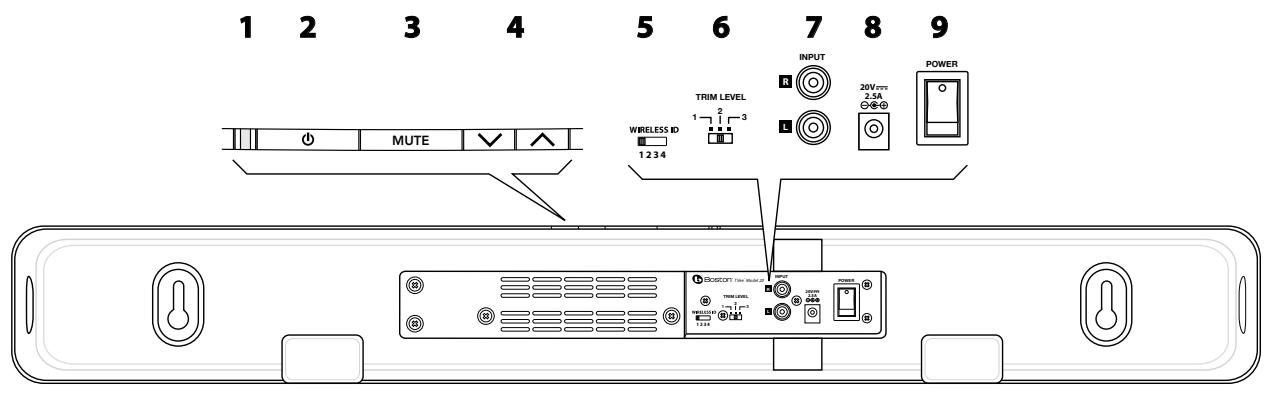

1 Status Indicator - Lights in various colors to indicate operating status. See the table below.
2 Power Button - Lets you manually activate TVee or put it in standby mode.
3 Mute Button - Lets you temporarily mute TVee.
4 Volume Up and Down Buttons - Let you manually adjust the volume of the TVee.
5 Wireless ID Switch - Selects the "channel" for the wireless subwoofer signal. Set 11 in the same position.
6 Trim Level Switch - Adjusts the input sensitivity of TVee.
7 Inputs - Receives the input signal for the TVee. See the "Connect TVee" section for more information.
8 Power Input - Connect the power supply 10 here.
9 Power On/Off Switch - Turns the TVee soundbar on or off. Normally it is left on all the time.
10 Power Supply - Provides power to the soundbar. Plug it into the wall and connect it to the power input 8.

Soundbar Status Indicator
| Green Steady | Normal power-on mode. |
| Green Blinks Once | Shows a remote control signal is being received. |
| Orange Flashing | TVee is ready to learn a remote control command. |
| Orange Steady | The control button that's learning a control command is selected; TVee waiting for an IR command to learn. |
| Flashing Green | TVee has successfully learned a remote control command. |
| Flashing Red | TVee has failed to learn a remote control command. |
Flashing Red and Orange
Indicates learned IR codes successfully erased.
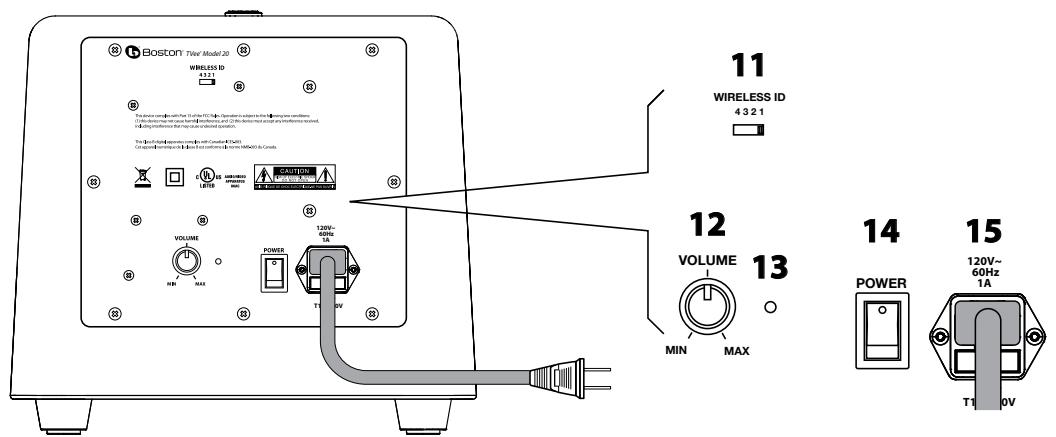
11 Wireless ID Switch - Selects the "channel" for the wireless subwoofer signal. Set in the same position as 5.
12 Volume - Adjusts the volume of the subwoofer to balance with the soundbar.
13 Status Indicator - Lights green when the subwoofer is active and red when it is in standby mode.
14 Power On/Off Switch - Turns the TVee subwoofer on or off. Normally it is left on all the time.
15 Power Cord - Plug it into an AC outlet.
Specifications
| System Power | 100 watts peak | |
| Dimensions (H x W x D) | Soundbar | 3¾ x 31 x 4" (95 x 788 x 102mm) |
| Subwoofer | 9½ x 10½ x 11" (241 x 266 x 280mm) | |
| Weight | Soundbar | 8.4 lbs (3.9kg) |
| Subwoofer | 11 lbs (5kg) |
About TVee
Congratulations on selecting TVee for your home entertainment system. TVee combines the famous Boston sound with unprecedented ease of use. From two compact components, TVee delivers sound that will add an entirely new dimension to your television entertainment experience. Powerful amplifiers and 3D sound processing circuitry ensure exciting performance. Wireless connection between the soundbar and subwoofer makes TVee easy to setup—the ideal combination of performance and convenience. If necessary, TVee can even learn the control signals from your remote control for maximum ease of use and totally transparent operation.
Placing TVee
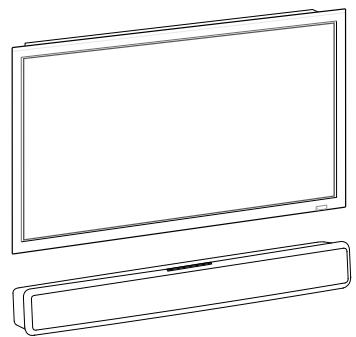
You're probably anxious to start using your TVee so let's get started. First you should position the TVee components. The soundbar should be placed so it is centered with the TV screen. It can be in front of the television. Or if your television is housed in furniture that has a shelf right above the screen the soundbar can go there. But avoid places that are semi-enclosed. That can upset the natural sound balance of TVee. There are keyholes in the back of the soundbar cabinet to facilitate hanging it on a wall.
The subwoofer is easy. It can go just about anywhere in the room. Since it gets its signal wirelessly you don't need to worry about connections. Just plug it into an AC outlet. Corner placement can help reinforce bass output.
Connect TVee
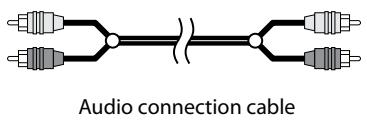
Next you need to get an input signal into the TVee soundbar. All it takes is the audio connection cable that is supplied. There are two likely sources for a signal—your television or a cable television connection box. (The control box for a satellite system is for this purpose the same as a cable box. For simplicity we'll call it a cable box, but it could be either one.)
The main advantage of getting the signal from the cable box is that it is easier to set up. But if you have multiple signal sources in addition to the cable signal, such as a DVD player, you might need to get the signal from the TV directly so you can enjoy the TVee sound with all of your media.
The subwoofer receives a wireless audio signal from the soundbar--you just need to plug it into your AC outlet.
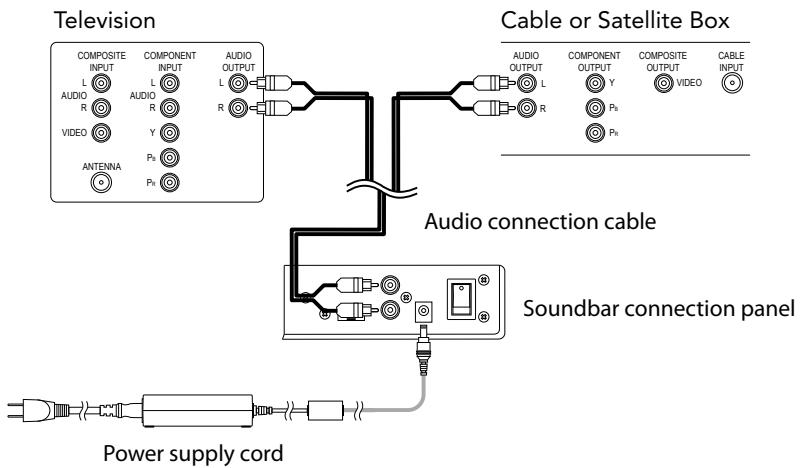
Fire Up TVee!
Now the fun starts. Connect the power supply to the soundbar, turn on its power switch and the one on the subwoofer. Turn on the other components in your system and tune in to a familiar channel. You should hear sound from TVee. If you don't, try turning up the volume of TVee using its volume control buttons.
If TVee is connected to the television try adjusting the volume using the television remote control. If the volume level changes it shows that TVee is connected to a "variable" output. The mute control of the television remote should also work. That makes things easy. You can ignore the "Control TVee" section on the following page.
If the TVee is connected to the television it is likely that the television speakers are also playing. Most modern televisions have a way of turning off the internal speakers. There are hundred of models of televisions from dozens of manufacturers, so it is impossible to give specific instructions on how to do that. But most use a similar procedure.
Look on the remote control for your television for a "menu" or "setup" button. Press it and you'll see an on-screen menu. Look for an option to control audio functions and select it. This is where you'll probably find the setting to turn off the internal speakers.
If you cannot turn off the internal speakers it is not a problem. TVee will tremendously enhance the sound of the television speakers with extended response and improved definition. However, to get the most from TVee you'll want it to be louder than the television. Use the following steps to adjust the volume balance:
1 Teach TVee to respond to the volume up and down control commands of your television remote. (See the "Control TVee" section for information on how to do that.)
2 Turn down the volume of the television all the way using the control buttons on the set.
3 Use the volume control buttons on soundbar to set the volume of TVee to a normal listening level.
After this adjustment TVee should always be louder than the television speakers. Then you can use the television remote control to adjust the volume as you normally do.
Fine Tune TVee
Now that things are up and running, it's time to adjust the subwoofer to blend with the soundbar speakers so the system produces the balanced, natural Boston sound. Start with the subwoofer volume control at the middle of its rotation range. Play a variety of source material—some music, a movie sound track with dynamic special effects, some spoken dialog. Adjust the volume up and down a bit from the starting point until you have a setting that produces a natural sound with all the various types of program material.
Control TVee
If you have TVee connected to a television, cable, or satellite box and changing the volume with your system remote does not change the volume of the TVee system, then the output TVee is connected to is a "constant level" output. With a constant level output you will want to program TVee to respond to the remote control codes of your television remote, or any other remote control you want to use. The goal is to be able to use one remote control. Here's how to do it.
Say you want TVee to learn the "mute" command of your remote control.
1 Press and hold the Power and "Volume Up" buttons until the status indicator flashes orange.
2 Press the button you want to program to respond to your remote control—in this example the mute button.
3 Point your remote control at the front of the TVee soundbar from about 12 inches away. Press and hold the mute button for a full second then release the button for a full second. Repeat the press and release sequence until the status indicator turns green. TIP: Hold the remote steady and press/release the button slowly to be sure TVee can pick up the remote signal.
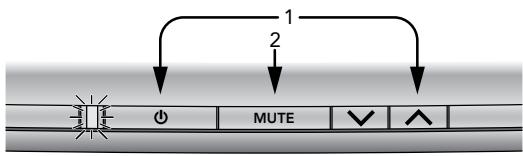
If TVee is not able to pick up the remote control signal within 20 seconds the status indicator will flash red for 20 more seconds and then return to green. Repeat steps 1 - 3, being careful to hold the remote steady and press the button slowly. Repeat the process for the other buttons on your remote control that you want TVee to learn.
Remember - TVee can learn to respond to almost any button on almost any remote. You decide what remote you want to use - television, satellite receiver, cable control box, etc. - and teach TVee to respond to the buttons you want to use.
If you make a mistake, or want to remove the remote control programming of TVee for any reason, press and hold the Mute and Volume Down buttons until the status indicator alternately flashes red and orange for 3 seconds. NOTE: This removes ALL of the TVee remote control programming. If you only need to change the programming for some of the TVee buttons, follow the three steps above to overwrite previous programming of specific buttons only.
Details About TVee
In most systems after you do any needed remote control programming you can just sit back and enjoy the sound. But you might find the following details useful or interesting.
Power – The power switches on the back of the soundbar and subwoofer can be left on. TVee has an automatic power standby system. After about 15 minutes of inactivity the amplifiers shut down. As soon as a signal is applied to the inputs of TVee the amplifiers automatically turn on again.
Wireless ID Switches - Both the soundbar and subwoofer have Wireless ID switches. The various switch settings change frequency of the wireless signal the soundbar sends to the subwoofer. The two switches must be set to the same position.
Typically you'll never need to adjust these switches. What are they for? If you have more than one TVee system in your house you can use different Wireless ID Switch settings so the systems won't interfere with each other.
Trim Level Switch – This changes the input sensitivity of TVee. If the output of your television is too low, you may need to change the trim level switch to "1" to make it louder. Conversely, if you hear distortion in the audio signal, try the "3" setting to make the input quieter. Generally "1" is the most common setting.
Troubleshooting TVee
Soundbar does not power on.
Is the power supply plugged into a live wall outlet?
Is the power supply properly connected to the soundbar power input?
Is the rear panel power switch in the "on" position?
Subwoofer does not power on.
Is the subwoofer plugged into a live wall outlet?
Is the rear panel power switch in the "on" position?
Is the fuse blown? Replace it with the same type. If it quickly blows again the unit may need service.
No sound from TVee.
Is the signal input connected to an output that is providing a signal?
Are the soundbar and subwoofer receiving power and turned on?
Turn up the volume of the TVee soundbar.
Turn up the volume of the television or cable box TVee is connected to.
Check Mute status – is the status indicator blinking green? Press the Mute button on the soundbar.
No Sound from the Subwoofer.
Check the points in the "subwoofer does not power on," section above.
Turn up the volume control.
Check that the wireless ID setting is the same on the bar.
Distorted sound from the Soundbar.
Change the Trim Level switch setting to a higher number.
Check the signal source to be sure the distortion is not originating there.
Bass not loud enough.
Turn up the subwoofer Volume control.
Place the subwoofer closer to a corner of the room.
Check that the wireless ID setting is the same on the bar.
TVee won't learn my remote control commands.
Carefully follow the programming instructions.
Hold the remote steady and 12 inches from the front of the soundbar.
Press and release the remote control button s l o w l y!
Note: TVee learns almost all IR commands, but some IR protocols cannot be programmed.
There is a "pop" noise when I turn off my television.
Program TVee to be turned on and off with the power button on your television remote control.
Volume of my television speakers gets louder than my TVee system over time.
When the remote control volume button is held down your television may change volume levels faster than TVee.
Use the buttons on the soundbar to adjust the volume of the TVee to the correct balance with the television speakers.
The woofer seems to have interference with its wireless signal.
Try changing settings of the Wireless ID switches on both the soundbar and subwoofer.
The subwoofer could be too far from the soundbar to get a good signal. Try moving it closer.
Limited Warranty
Boston Acoustics warrants to the original purchaser of our TVee system that it will be free of defects in materials and workmanship in its mechanical parts for a period of 5 years from the date of purchase. The warranty period for the electrical components of TVee is 1 year.
Your responsibilities are to install and use them according to the instructions supplied, to provide safe and secure transportation to an authorized Boston Acoustics service representative, and to present proof of purchase in the form of your sales slip when requesting service.
Excluded from this warranty is damage that results from abuse, misuse, improper installation, accidents, shipping, or repairs/ modifications by anyone other than an authorized Boston Acoustics service representative.
This warranty is limited to the Boston Acoustics product and does not cover damage to any associated equipment. This warranty does not cover the cost of removal or reinstallation. This warranty is void if the serial number has been removed or defaced. This warranty gives you specific legal rights, and you may also have other rights which vary from state to state.
If Service Seems Necessary
First, contact the dealer from whom you purchased the product. If that is not possible, write to:
Boston Acoustics, Inc.
100 Corporate Drive
Mahwah, NJ 07430 USA
Or contact us via e-mail at:
support@bostona.com
We will promptly advise you of what action to take. If it is necessary to return your TVee to the factory, please ship it prepaid. After it has been repaired, we will return it freight prepaid in the United States and Canada.
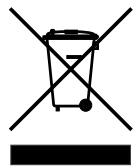
This symbol found on the product indicates that the product must not be disposed of with household waste. Instead, it may be placed in a separate collection facility for electronic waste or returned to a retailer when purchasing similar product. The producer paid to recycle this product. Doing this contributes to reuse and recycling, minimizes adverse effects on the environment and human health and avoids any fines for incorrect disposal.
RLAN - Radio Local Area Network Equipment
| AT | CZ | FI | IS | LT | PT | SE | FR |
| BE | DK | DE | IE | MT | SK | CH | IT |
| EE | GR | LV | NL | SI | TR | LU | CY |
| HU | PL | ES | GB | NO |
Boston Acoustics, Inc.
100 Corporate Drive
Mahwah, NJ 07430 USA
Boston Acoustics, Division of D&M Europe B.V.
Beemdstraat 11
5653 MA Eindhoven
Pays-Bas
Boston Acoustics, Inc.
100 Corporate Drive
Mahwah, NJ 07430 Etas-Unis
- IMPORTANT SAFETY INSTRUCTIONS
- Warning!
- The Parts of TVee
- Soundbar Status Indicator
- About TVee
- Placing TVee
- Connect TVee
- Fire Up TVee!
- Fine Tune TVee
- Control TVee
- Details About TVee
- Troubleshooting TVee
- Soundbar does not power on.
- Subwoofer does not power on.
- No sound from TVee.
- No Sound from the Subwoofer.
- Distorted sound from the Soundbar.
- Bass not loud enough.
- TVee won't learn my remote control commands.
- There is a "pop" noise when I turn off my television.
- Volume of my television speakers gets louder than my TVee system over time.
- The woofer seems to have interference with its wireless signal.
- Limited Warranty
- If Service Seems Necessary
Brand : BOSTON ACOUSTICS
Model : TVEE 20
Category : Soundbar