
1500 - Unknown T-FAL - Free user manual and instructions
Find the device manual for free 1500 T-FAL in PDF.



| Product Type | Steam Iron |
| Brand | T-FAL |
| Model | 1500 |
| Power | Not specified in manual |
| Power Supply | 120 V |
| Tank Capacity | Up to MAX mark (exact capacity not specified) |
| Soleplate | Metal soleplate (material not specified) |
| Main Functions | Steam, powerful steam burst (depending on model), dry ironing, vertical ironing (depending on model), auto shut-off (depending on model) |
| Temperature Setting | Thermostat with settings for linen, cotton, wool, silk, synthetic |
| Steam Setting | Steam control with DRY, MIN, MAX positions |
| Anti-scale System | Removable anti-scale rod, to be cleaned once a month |
| Self-Clean | Self-cleaning function to be performed once a month |
| Auto Shut-Off | 8 minutes in vertical position, 30 seconds flat (depending on model) |
| Recommended Water Type | Tap water, possible mix with demineralized water (50/50) if water is very hard |
| Maintenance | Clean anti-scale rod with white vinegar or lemon juice; self-clean; clean warm soleplate with a damp non-metallic pad |
| Safety | Do not immerse, unplug before filling, do not leave unattended, do not disassemble yourself |
| Spare Parts and Repairability | Authorized Service Center recommended for cord replacement or repair |
| Approximate Weight | About 1.2 kg (estimate) |
| Approximate Dimensions | About 30 x 12 x 15 cm (estimate) |
| Package Contents | Iron, measuring cup, instruction manual |
Frequently Asked Questions - 1500 T-FAL
User questions about 1500 T-FAL
0 question about this device. Answer the ones you know or ask your own.
Ask a new question about this device
Download the instructions for your Unknown in PDF format for free! Find your manual 1500 - T-FAL and take your electronic device back in hand. On this page are published all the documents necessary for the use of your device. 1500 by T-FAL.
USER MANUAL 1500 T-FAL
A. Spray Button To moisten fabric
B. Burst of Steam Button (depending on model) To remove wrinkles
C. Auto Shut off indicator light (depending on model)
D. Electric power cord
E. Thermostat indicator light Goes out when the correct temperature has been reached.
F. Thermostat control For choosing the ironing temperature
G. Water reservoir maximum fill line Do not exceed this limit
H. Sole plate
I. Spray nozzle
J. Anti-scale valve
To be cleaned once per month
K. Steam control
L. Express refilling drawer
ESPANOL
When using your clothes iron, basic safety precautions should always be followed, including the following :
- Use iron only for its intended use.
- To protect against a risk of electric shock, do not immerse the iron or the base of the iron in water or other liquids.
- When fitted with an on/off switch the iron should always be turned OFF before plugging or unplugging from outlet. Never yank cord to disconnect from outlet ; instead, grasp plug and pull to disconnect.
- Do not allow cord to touch hot surfaces. Let iron cool completely before putting away. Wrap cord loosely around iron when storing.
- Always disconnect iron from electrical outlet when filling with water or emptying and when not in use.
- Do not operate iron with a damaged cord or if the iron has been dropped or damaged. To avoid the risk of electric shock, do not disassemble the iron. Contact our Consumer Service Department for examination, repair or adjustment. Incorrect reassembly can cause a risk of electric shock when the iron is in use.
- Close supervision is necessary for any appliance being used by or near children. Do not leave iron unattended while connected or on an ironing board.
- Burns can occur from touching hot metal parts, hot water or steam. Use caution when you turn a steam iron upside down - there may be hot water in the reservoir.
- This appliance is only for domestic and personal use.
SPECIAL INSTRUCTIONS
- To avoid a circuit overload, do not operate another high-wattage appliance on the same circuit.
- If an extension cord is absolutely necessary, a 13 ampere cord should be used. Cords rated for less amperage may overheat. Care should be taken to arrange the cord so that it cannot be pulled or tripped over.
SAVE THESE INSTRUCTIONS
Warning! Remove the sole plate protector before heating up the iron (depending on the model).
ENG
Warning!
Prior to first use of your iron using steam on fabric, we recommend that you turn it on for a few seconds in the horizontal position, and press the Burst of Steam button several times.
During the first few uses, the iron may give off an odor and smoke; both are harmless. This will not affect the use of the iron and will quickly disappear.

What water to use?
Your appliance has been designed to function with tap water. However, it is necessary to use the Auto-Cleaning feature to clean the steam chamber regularly in order to eliminate hard water deposits. If your water is very hard you may mix tap water with demineralized water in the following proportions: 50% tap water, 50% demineralized water.

What water not to use :
Heat concentrates the elements contained in water during evaporation. The types of water listed below contain organic waste or mineral elements that can cause spitting, brown staining, or premature wear of the appliance: water from clothes dryers, scented or softened water, water from refrigerators, batteries, or air conditioners, pure distilled water, or rain water. Do not use any de-scaling agents in your iron, you may do permanent damage to the unit.
I- STEAM IRONING

Filling the water reservoir
- Unplug your iron before filling it.
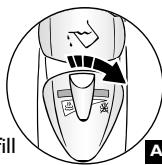
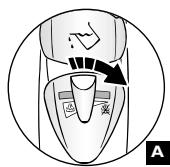
- Set the steam control on DRY (A).
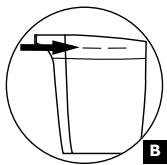
- Fill the beaker up to the line indicated (B).
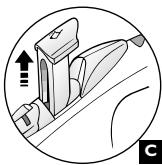
- Open the water tank filling inlet completely (C), set the iron on a table according to diagram (D) and fill the reservoir.
- Do not exceed the MAX line indicated on the water reservoir (with the iron set on its heel).
- Close the Express refilling drawer.
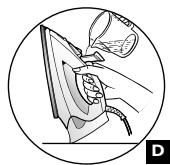
Setting the temperature
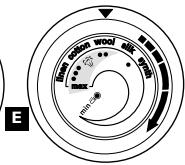
- Set the temperature control according to diagrams (E) depending on model, and refer to the table on the next page.
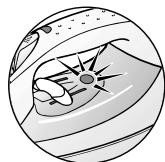
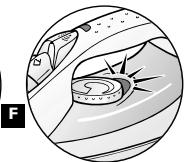
- Once plugged in, the indicator light will turn on (F). It automatically turns off when the sole plate is sufficiently hot
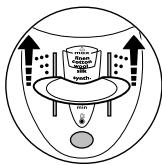
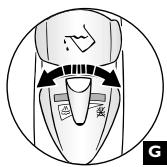
Setting the steam (G)
- In order to avoid dripping on fabrics:
- Turn off the steam when ironing silk or synthetic fabrics.
- Set it at the minimum position for wool.
What temperature and which steam setting to use?
| FABRIC | POSITION OF THERMOSTAT CURSOR | STEAM SETTING POSITION |
| LINEN | MAX | MAX |
| COTTON | ●●● | |
| WOOL | ●● | MIN |
| SILK | ● | |
| SYNTHETIC Polyester, Acetate, Acrylic, Nylon | ● | DRY |
= STEAM ZONE
Moistening the fabric (Spray)
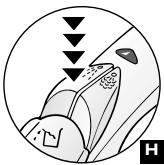
- When steam or dry ironing, press several times on the Spray Button to moisten fabrics (H) and to remove stubborn creases.
- Make sure that there is water in the reservoir before using this feature.
Recommendations:
Fabrics and ironing temperatures:
- Your iron heats up quickly: begin by ironing fabrics that require a low temperature, then go on to those requiring a higher temperature;
- If you reduce the temperature, wait until the indicator light comes back on before ironing again.
- When ironing fabrics with mixed fibres, set the temperature to the most delicate of the fibers.
Obtaining more steam for removing wrinkles (depending on the model)
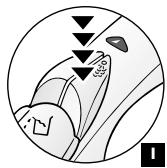
- Press the Burst of Steam button () from time to time (I).
- Wait a few seconds before pressing the button again.
Vertical steam ironing (depending on the model)
- Hang the garment on a hanger and hold the fabric slightly taut with one hand.
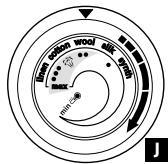
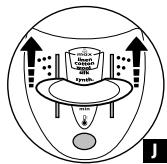
- Set the thermostat control on MAX (J).
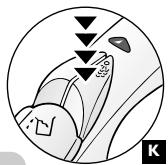
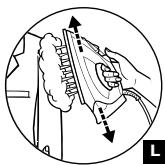
- Press the Burst of Steam button () repeatedly (K), moving the iron from top to bottom (L).
- Hold the iron a few inches from the fabric to avoid burning delicate fabrics.
Auto Shut off security feature (depending on the model)
- The electronic system automatically cuts off the electric power and the Auto Shut off indicator light blinks if the iron remains immobile on its heel for more than 8 minutes, or in a horizontal position for more than 30 seconds.
- To restart the iron, just shake it gently until the indicator light stops blinking.

Note: When the Auto Shut off security feature is on, it is normal that the thermostat indicator light to be off.
2- DRY IRONING

ENG
- Set the temperature.
- Set the steam control on DRY (see diagram A).
- You may start ironing when the indicator light goes out.
3- MAINTAINING YOUR IRON
BE CAREFUL!
Unplug your iron and let it cool off before cleaning.
CLEANING THE ANTI-SCALE VALVE
(Once per month):
- Unplug your iron and empty the water reservoir through open filling drawer.
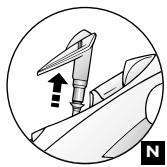
- To remove the anti-scale valve, pull it up using the handles located on each side (N).
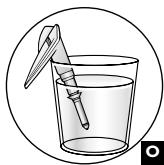
- Soak the valve in a cup of white vinegar or plain lemon juice for 4 hours (O).
- Rinse with tap water.
- Place the steam control on dry.
- Replace the anti-scale valve.
THE IRON WILL NOT FUNCTION WITHOUT THE ANTI-SCALE VALVE.
- USING THE SELF-CLEANING METHOD
In order to reduce scale build-up and extend the life of your iron, use the Self-Cleaning method once per month.
- Unplug your iron and set the steam control on DRY
- Pull filling tank drawer open and fill the water reservoir up to the max limit (see recommendations for the types of water to use).
You shall leave the drawer open until you have finished the cleaning process. - Place your iron on its heel and set the thermostat control on MAX.
- Plug in your iron and wait until the indicator light goes out.
- Unplug the iron and hold it over a sink in the horizontal position.
- Raise the anti-scale valve up to the hard point without removing it.
- Shake the iron gently, over the sink, until all of the water in the water reservoir (with the impurities) has flowed out via the soleplate.
- At the end of the process, push the anti-scale valve back into position as well as the filling drawer.
- Turn the iron back on for 2 minutes, setting it on its heel, to dry the soleplate.
- Unplug the iron, and when the soleplate is lukewarm, wipe it with a soft cloth.
Recommendation :
The self-cleaning function helps to delay scale build-up in your iron
and will aid in prolonging the iron's life.
- CLEANING THE SOLE PLATE
- While the sole plate is still lukewarm, clean it by rubbing it with a moist, non-metallic pad.
4- STORING YOUR IRON
- Unplug it and wait until the sole plate has cooled.
- Empty the water reservoir and set the steam control to DRY
- Store the iron on its heel.
FOR YOUR SECURITY
- Warning! The voltage of your electrical installation must correspond to that of the iron (120V a.c). Connecting to the wrong voltage may cause irreparable damage to the iron and will invalidate the guarantee.
- If an extension cord is absolutely necessary, a I3 ampere cord should be used. Cords rated for less amperage may overheat.
- If the electrical cord becomes damaged, it must be immediately replaced. Please contact T-Fal's Consumer Service Department to avoid any danger.
- Never immerse your iron in water!
- The appliance must be unplugged before filling or emptying the water reservoir.
- If the appliance falls, have it checked by a professional before using it again; unseen damages may be dangerous.
-
The sole plate may be very hot:
-
Never touch it.
- Always let it cool off before putting it away.
- Never leave your iron unattended when it is plugged in or while the sole plate is still hot.
-
Always keep your iron out of the reach of children.
-
NEVER DISASSEMBLE YOUR IRON ON YOUR OWN ; PLEASE REFER ALL SERVICE AND TECHNICAL QUESTIONS TO T-FAL'S CONSUMER SERVICE DEPARTMENT.
5-TROUBLESHOOTING
Problems
- Water drips from the holes in the sole plate.
Possible Causes
- The chosen temperature does not allow for the formation of steam.
- You are using steam while the iron is not hot enough.
- You are using the burst of steam button too often.
- The steam flow is too high.
-
You have stored the iron horizontally, without emptying it and without setting it to DRY.
-
Brown streaks come through the holes in the sole plate and stain the fabrics.
-
You are using chemical descaling agents.
- You are using pure distilled water.
-
Fabric fibers have accumulated in the holes of the soleplate and are burning.
-
The sole plate is dirty or brown and and is staining the fabric.
-
You are using too high a temperature.
-
Your fabric is not rinsed sufficiently or you are using starch.
-
There is little or no steam.
-
The water reservoir is empty.
- The anti-scale valve is dirty.
- Your iron has a build-up of scale.
- You iron has been used dry for too long.
- You have placed your iron flat on a metallic rest-plate.
Solutions
- Set the thermostat in the coloured zone (from ●● to MAX).
- Wait until the indicator light goes out.
- Wait a few seconds between each use of the button.
-
Reduce the steam flow.
See the section "Storing your iron". -
Do not add any descaling agents to the water in the water reservoir.
- Do a self-cleaning and use tap water.
- Do a self-cleaning.
- Clean the soleplate with a nonmetallic sponge.
Vacuum the holes of the sole plate from time to time. - Clean the soleplate as indicated above. See the temperature table to correctly set the thermostat.
-
Clean the soleplate as indicated above. Always spray starch onto the reverse side of the fabric to be ironed.
-
Fill it with tap water.
- Clean the anti-scale valve.
- Clean the anti-scale valve and do a self-cleaning.
- Do a self-cleaning.
Always set your iron on its heel.
For all other problems or queries, please contact
our Consumer Service Department or an approved Service Centre
Phone number available on International Guarantee Card
ENG
ESPANOL
RECOMMANDATIONS IMPORTANTES
- ESPANOL
- SPECIAL INSTRUCTIONS
- SAVE THESE INSTRUCTIONS
- Warning! Remove the sole plate protector before heating up the iron (depending on the model).
- What water to use?
- What water not to use :
- I- STEAM IRONING
- Filling the water reservoir
- Setting the temperature
- Setting the steam (G)
- Moistening the fabric (Spray)
- Recommendations:
- Obtaining more steam for removing wrinkles (depending on the model)
- Vertical steam ironing (depending on the model)
- Auto Shut off security feature (depending on the model)
- 2- DRY IRONING
- 3- MAINTAINING YOUR IRON
- BE CAREFUL!
- CLEANING THE ANTI-SCALE VALVE
- (Once per month):
- - USING THE SELF-CLEANING METHOD
- Recommendation :
- - CLEANING THE SOLE PLATE
- 4- STORING YOUR IRON
- FOR YOUR SECURITY
- 5-TROUBLESHOOTING
- Problems
- Possible Causes
- Solutions
- ENG
- RECOMMANDATIONS IMPORTANTES
Brand : T-FAL
Model : 1500
Category : Unknown