
INSTANT TV PCI+FM PTV-351 - TV Card ADS TECH - Free user manual and instructions
Find the device manual for free INSTANT TV PCI+FM PTV-351 ADS TECH in PDF.


User questions about INSTANT TV PCI+FM PTV-351 ADS TECH
0 question about this device. Answer the ones you know or ask your own.
Ask a new question about this device
Download the instructions for your TV Card in PDF format for free! Find your manual INSTANT TV PCI+FM PTV-351 - ADS TECH and take your electronic device back in hand. On this page are published all the documents necessary for the use of your device. INSTANT TV PCI+FM PTV-351 by ADS TECH.
USER MANUAL INSTANT TV PCI+FM PTV-351 ADS TECH
Watch and Record TV Shows
User's Guide: First Edition
Package Contents:
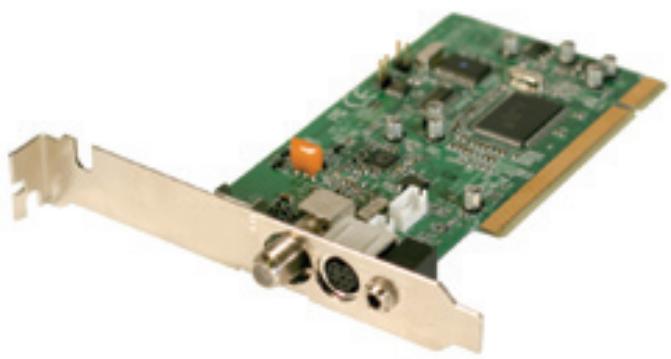
- Instant TV PCI card
Audio Patch Cable
Remote Control - IR Receiver
FM Antenna (PTV-351 ONLY) - CD containing:
- Instant TV software
- Windows Media Encoder 9
- User's Manual
System Requirements:
- One available PCI Slot
Intel Pentium III - 1G MMX or faster CPU
128 MB of RAM - Windows XP/2000/ME/98SE
- CD-ROM drive for software installation
- 16 MB VGA card with 800 × 600 16-bit resolution (DirectX 8.1 supported)
- AC 97 compatible sound card for audio play
Features:
125 Channel Cable Ready Tuner
- RCA and S-Video inputs to allow capture from analog video sources
- 3.5mm stereo audio input
Support for 4:3 or 16:9 aspect ratio
- Watch TV on your PC
- Capture TV and video images as MPEG-1, MPEG-2, or MPEG-4 formats
- Time-shifting to record & playback TV programs at the same time
- Listen to Live Radio on your PC (PTV-351 ONLY)
- Capture still images in BMP and JPEG file formats
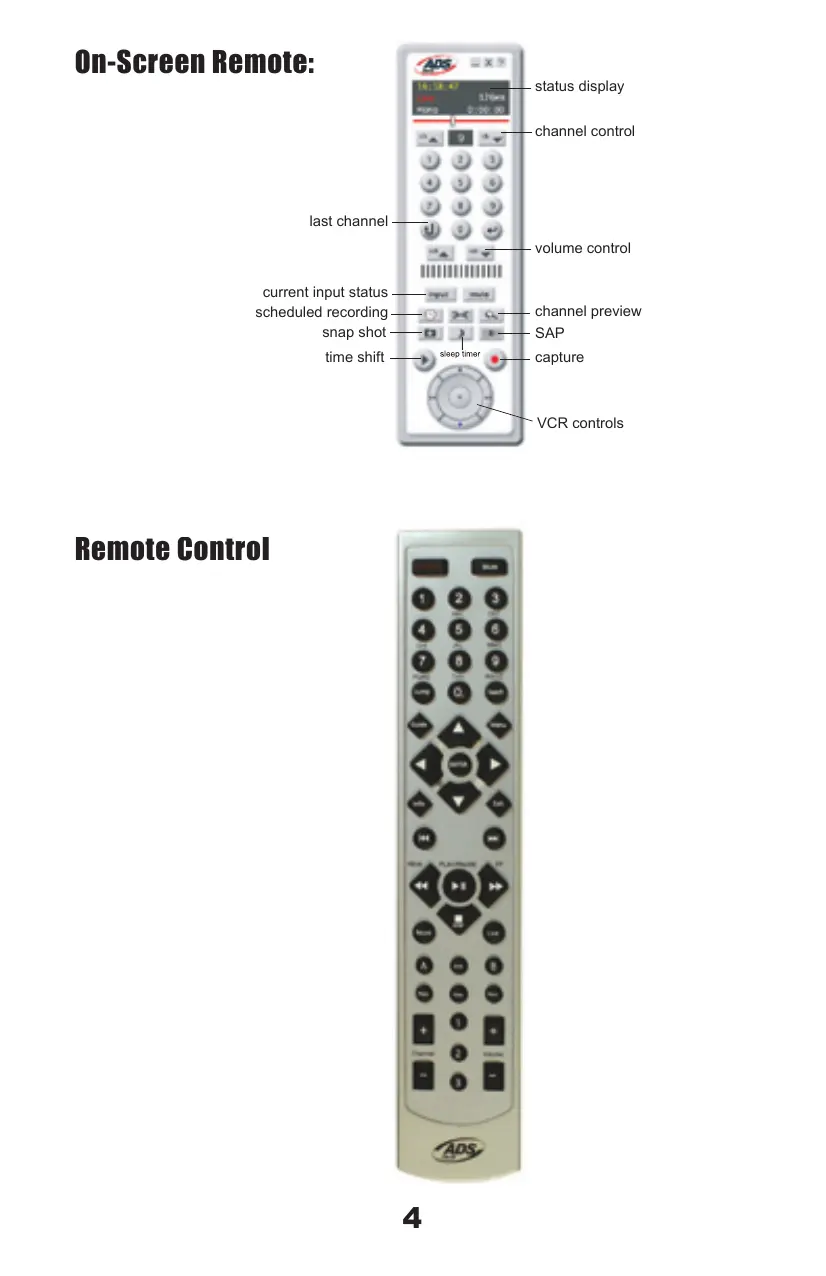
Full function remote control
- PIP Playback
© 2004 ADS Technologies. All Rights Reserved
First Edition: July 2004
Microsoft, MS-DOS, Windows, Windows 95, Windows 98SE, Windows 2000, Windows ME and Windows XP are
registered trademarks of Microsoft Corporation.
IBM is a registered trademark of the International Business Machines, Inc.
ADS is a registered trademark of ADS Technologies Inc.
ADS Technologies (ADS) makes no warranty of any kind with regard to this material,
including but not limited to, the implied warranties of merchantability and fitness for a particular purpose. The information furnished within this written document is for
information purposes only and is subject to change without notice. ADS Technologies assumes no responsibility or liability for any errors or inaccuracies that may appear herein. ADS makes no commitment to update or to keep current information contained within this document. (rtt)
- Remove the Instant TV PCI Hardware from the packing Material
- Open your computer and locate an available PCI Slot,Make sure your computer is OFF!
- Seat the Instant TV PCI card and screw it in tightly into the PCI Slot
- Close your Computer Case
- Connect the Supplied Audio Patch Cable to the Audio Input Jack of your Sound Card
- Connect the TV antenna or cable TV to the TV-IN connector on the Instant TV PCI.
- To Connect other devices, connect the included breakout cable to the 8 pin connector in the back of the Instant TV PCI. This allows you to connect VCR's and DVD Players and display Video and even capture Video from these sources
- Plug the FM antenna to the FM port (PTV-351 ONLY)
- Connect the IR Receiver to the Remote port
- Please turn on your Computer - Your Instant TV PCI Hardware is now installed.
The Instant TV PCI Drivers:
- Make sure the Instant TV PCI/Instant TV PCI+FM CD is in your CD ROM Drive when you turn your Computer On.
- Windows XP or earlier versions of the Windows OS will not attempt to load drivers for the Instant TV PCI Card automatically.
- If the drivers fail to load, the ADS Tech Autorun screen will RUN and you can manually click the Driver_install Button and install the Driver Manually
- Once the Drivers are Installed, your PC needs to be restarted.
The Instant TV PVR Application:
- The Instant TV PVR Application can be installed by clicking on the PVR PLUS button from the ADS Tech Autorun screen.
- The Instant TV PVR is the application you will use to Watch TV, Change Channels, Capture Video or Images, and Listen to Radio
- Once the Instant TV PVR Application is installed, please run the Application, you can find it under START ->ADS TECH ->INSTANT TV PVR and follow the on screen instructions for programming your TV Channel List.
- You have now installed your Instant TV PVR Application.
Service and Warranty:
Service:
If you require assistance with the installation, operation, or application of your ADS Technologies, Inc. product there are several options available to you as described in the technical support section of this manual. Your primary source for information and assistance is always your computer store or computer parts dealer. If your ADS product needs repair or replacement, contact your dealer for on-site repair service.
The ADS Technologies technical support and customer service staff can aid in solving many problems. Our technical support department is available to repair any ADS Technologies product. You or your dealer must return products to our factory for repair or warranty replacement.
Return/Replacement:
If you need to return your ADS Technologies product you should return the product directly to the dealer or store where you purchased the product. Each individual computer store or dealer sets product returns policies for their customers. ADS Technologies, Inc. cannot be responsible for the actions or policies set by our dealers. If you desire to return the product for a refund, you must get the refund from the dealer or store you purchased the product from. If you purchased the product directly from ADS please see the "Terms and Conditions of Sale" on the reverse side of your sales invoice.
Returns to ADS Technologies, Inc. are for repair or warranty replacement only. If you need to return product to ADS Technologies, Inc. for repair or replacement you must follow these steps:
- Call our Technical Support department at (562) 926-4338 to obtain a Return Merchandise Authorization (RMA) number.
- The RMA number is valid for 30 days.
- Ship the product to the ADS factory with the RMA number marked on the inside and outside of the package. If there is no RMA number on the package or the RMA number has expired, the shipment will be refused. ADS will not be liable for lost or mis-shipped products.
- Replacement product cannot be shipped to you until the defective product has been received by ADS.
- Once the product is received at the factory it will be tested and then repaired or replaced.
- Turn around time is approximately one week. A repaired or replacement product will be shipped back to you.
Warranty:
This ADS Technologies, Inc. product comes with a One (1) year hardware warranty. ADS Technologies, Inc. (ADS) warrants this product against defects in material and workmanship for a period of One (1) year from the date of original purchase from ADS or an authorized ADS dealer. This warranty applies only to the original purchase of the product and is not transferable. This warranty does not cover any incompatibilities due to the user's computer, hardware, software or other related system configuration in which the product interfaces. Proof of
purchase will be required before any warranty consideration by ADS occurs.
This warranty does not cover any damage caused by negligence, non-authorized modifications, or parts installed without prior written permission from ADS.
This warranty does not apply if the product has been damaged by accident, abuse, or misapplication, nor as a result of service to the product by anyone other than ADS.
If your ADS product is not in working order, your only recourse is repair or warranty replacement, as described above. UNDER NO CIRCUMSTANCES will ADS Technologies, Inc. be liable for consequential damages, including but not limited to any lost savings, lost profits, or any other damages, caused by the use of any ADS Technologies, Inc. product or inability to use the product, even if the dealer or ADS Technologies, Inc. has been advised of such liability or other claims. This includes damage to property and, to the extent permitted by law, damages for personal injury. This warranty is in lieu of all other warranties including implied warranties of merchantability and fitness for a particular purpose.
FCC Information:
Federal communications Commission Radio Frequency Interference Statement
Note: This equipment has been tested and found to comply with the limits for a class B digital device, pursuant to Part 15 of the FCC Rules. These limits are designed to provide reasonable protection against harmful interference when the equipment is operated in a residential installation. This equipment generates, uses and can radiate radio frequency energy and if not installed and used in accordance with the instruction manual may cause harmful interference to radio communications. However, there is no guarantee that interference will not occur in a particular installation. If this equipment does cause harmful interference to radio or television reception, which can be determined by turning the equipment off and on, the user is encouraged to try to correct the interference by one or more of the following measures:
- Reorient or relocate the receiving antenna
- Increase the separation between the equipment and receiver.
- Connect the equipment into an outlet on a circuit different from that to which the receiver is connected.
- Consult the dealer or an experienced radio TV technician for help.
Notice:
(1) The changes or modifications not expressly approved by the party responsible for compliance could void the user's authority to operate the equipment.
(2) Shielded interface cables and AC power cord, if any, must be used in order comply with the emission limits.
If you have any problems or questions on this product, please call :
Technical Support - 562.926.4338
North America Support Hours:
Mon-Fri: 8am - 5pm, PST
Support: www.adstech.com/support/support.asp
www.adstech.com

European Technical Support: +353.61.702042
North American Support Hours
Phone: 562-926-4338
M-F: 8:00 am - 5:00 pm, PST
www.adstech.com
Support: www.adstech.com/support/support.asp
ADS TECH
NORTH AMERICAN OFFICE
Cerritos, CA 90703
Phone: 562.926.1928
Support. 562.926.4338
EUROPE OFFICE
Unit 1b, Shannon Industrial Estate,
Shannon, County Clare, Ireland
Phone. +353.61.702042
Support. +353.61.702001
SOUTHERN EUROPE OFFICE
51-55 rue Hoche
94200 Ivry sur Sein
Phone. 33 + (0) 1.43.90.19.20
Fax. 33+(0) 1.46.58.67.06
Part No. 350-885

www.adstech.com