
NOTEBOOK SECURITY DEFCON SCL - Laptop Security TARGUS - Free user manual and instructions
Find the device manual for free NOTEBOOK SECURITY DEFCON SCL TARGUS in PDF.



| Product Type | Combination Cable Lock for Laptop |
| Brand | TARGUS |
| Model | NOTEBOOK SECURITY DEFCON SCL |
| Category | Laptop Security |
| Lock Dimensions | 31 x 54 x 24 mm |
| Total Weight | 184.3 g |
| Cable Diameter | 4 mm |
| Cable Material | Vinyl-coated Steel |
| Color | Black Nickel |
| Combination Type | 4-digit Code (preset at factory) |
| Locking Mechanism | Push-button with tooth alignment |
| Power Source | None (mechanical) |
| Main Function | Anti-theft Protection |
| Security | Unique non-resettable combination |
| Included Accessories | Cable, lock, 3 security spacers (1.6, 0.8, 0.4 mm), adhesive mounting plate with screws |
| Maintenance | Clean with a dry cloth; do not use solvents |
| Usage | Attach to a fixed object and to the computer's security slot |
| Compatibility | Standard security slot (Kensington) |
| Repairability | Not user-repairable; contact Targus |
Frequently Asked Questions - NOTEBOOK SECURITY DEFCON SCL TARGUS
User questions about NOTEBOOK SECURITY DEFCON SCL TARGUS
0 question about this device. Answer the ones you know or ask your own.
Ask a new question about this device
Download the instructions for your Laptop Security in PDF format for free! Find your manual NOTEBOOK SECURITY DEFCON SCL - TARGUS and take your electronic device back in hand. On this page are published all the documents necessary for the use of your device. NOTEBOOK SECURITY DEFCON SCL by TARGUS.
USER MANUAL NOTEBOOK SECURITY DEFCON SCL TARGUS
notebook security
DEFCON® SCL
serialised
combination
cable lock

USERGUIDE
TABLE OF CONTENTS
GB - English
TARGUS NOTEBOOK SECURITY DEFCON® SCL SERIALISED COMBINATION CABLE LOCK 5
BG -Блгарский (e3nk)
TAPYUC 3AUNTHO YCTPOINCTBO 3A HOYTEVK DEFCON® SCL 3AKIIOUBAUIO YCTPOINCTBO CbC CEPIHAKOMBINA
CZ - Ceitina
SERIOVY KOMBINAÇNIZÁMEK DEFCON® SCLPROBEZPECNOST NOTEBOOKU TARGUS 23
DE - Deutsch
TARGUS NOTEBOOK SECURITY DEFCON® SCL SERIENMÄSSIGES KOMBINATIONSKABELSCHLOSS 31
DK-Dansk
TARGUS SIKKERHEDS DEFCON® SCL SERIAL KOMBINATIONSK-ABELLÁS TIL BÆRBAR COMPUTER 40
EE - Eesti
TARGUS SULEARVUTI TURVALISUSE DEFCON® SCL SEERIAKOMBINATSIOONIGA KAABELLUKK 49
ES - Espanol
CERRADURA CON CABLE TARGUS NOTEBOOK SECURITY DEFCON® SCL COMBINACION 57
FI - Suomi
TARGUS DEFCON® SCL KANNETTAVAN TIEKONEEN SARJALLISTUVA YHDISTELMATURVAAJIERI 66
FR - Français
CABLE ANTIVOL À COMBINAISON DEFCON® SCL DE TARGUS POUR ORDINATEUR PORTABLE 75
GR - Eληνικα
Thank you for purchasing the Targus Notebook Security DEFCON® SCL Serialised Combination Cable Lock. The DEFCON SCL helps protect your valuable notebook computer from theft using a serialised four-digit combination lock. The preset combination lock eliminates the need for keys and makes it impossible to reset your combination.
In addition to this user's guide, this package contains:
- DEFCON SCL Serialised Combination Cable Lock
- DEFCON SecureSpacers
- DEFCON Security Base Plate

WARNING: TO USE THE DEFCON SCL YOU MUST RECORD THE
PRESET COMBINATION PRIOR USE.
Serialised combination
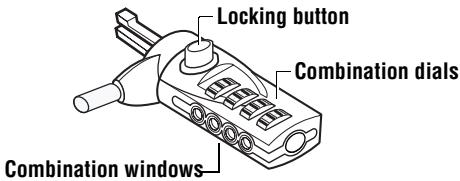
- Locate the combination dials and windows on the lock.
DEFCON SCL
2 The preset combination appears on a sticker that is attached at the back of this user guide.

NOTE: ALTERNATIVELY, YOU MAY RECORD THE COMBINATION IN ANOTHER SECURE, EASY-TO-FIND PLACE, AND KEEP IT AWAY FROM THE NOTEBOOK COMPUTER.
3 Turn the dials to disguise the combination.
Testing the Combination
Before attaching the lock to your notebook computer:
1 Turn the dials to return to the serialised combination.
2 Check that the locking button depresses completely.
Securing the DEFCON SCL
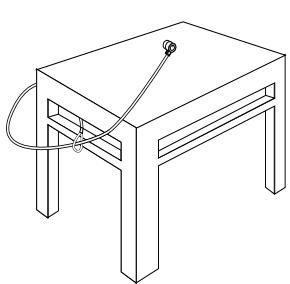
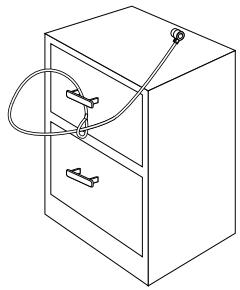
Select an object in the room to which you will secure your notebook computer with the DEFCON SCL. Choose a large, heavy piece of furniture such as a table or desk.
1 Take the looped end of the cable and wrap it around the selected object.

NOTE: WRAP THE CABLE AROUND A PART OF THE OBJECT THAT WILL DETER AN INTRUDER FROM SLIPPING THE CABLE OFF (FOR EXAMPLE, A TABLE OR DESK LEG WITH A CROSS BAR OR A DRAWER HANDLE).
2 Feed the lock through the looped end of the cable as shown.
Securing the DEFCON SCL to an object
Locking the DEFCON SCL to your Notebook Computer

NOTE: HOLD THE DEFCON SCL WITH BOTH HANDS FOR ADDITIONAL STABILITY WHILE INSERTING OR REMOVING THE LOCK.
1 Using the dials, enter the correct combination. The combination appears in the windows.
DEFCON SCL
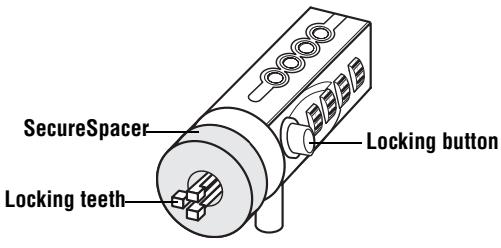
2 Press and hold the locking button to align the locking teeth.

NOTE: FOR THE LOCKING BUTTON TO DEPRESS COMPLETELY YOU MUST ENTER THE CORRECT COMBINATION.
3 Insert the DEFCON SCL into your notebook computer's lock slot and release the locking button.

NOTE: DUE TO THE VARIATION IN THE SIZE OF THE SECURITY SLOTS ON VARIOUS NOTEBOOK MODELS, YOU MAY FIND THAT THERE IS SOME SLACK
BETWEEN THE LOCK AND THE COMPUTER. THE SUPPLIED DEFCON SECURESPACERS ARE THE BEST SOLUTION FOR OPTIMAL FIT AND SECURITY.
4 Turn the dials to conceal your combination.
Due to differences in the size of the security slots on various notebook computers, you may find that there is some slack between the DEFCON locking device and the computer. The DEFCON SecureSpacers provide optimal fit and security.
Using the DEFCON SecureSpacers
1 Insert your DEFCON locking device into the computer's lock slot.
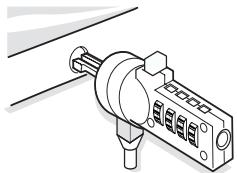
2 Pull the DEFCON locking device away from the computer and check whether the gap is excessive.
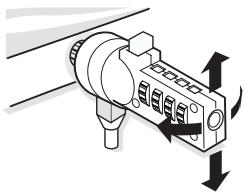
3 If so, try each of the SecureSpacers to determine which one fits the gap. The SecureSpacers come in three sizes: 1.6 ~mm , 0.8 ~mm , and 0.4 ~mm .

NOTE: DO NOT REMOVE THE ADHESIVE STRIP FROM ANY OF THE SECURESPACERS UNTIL YOU DECIDE WHICH ONE TO USE.
4 Once you know which SecureSpacer you are going to use, remove the locking device from the computer. Then remove the adhesive strip from the back of the SecureSpacer and attach the spacer to the DEFCON lock.
Unlocking the DEFCNSCL

WARNING: DO NOT ATTEMPT TO REMOVE THE DEFCON SCL WITHOUT USING THE COMBINATION. TO DO SO WILL PHYSICALLY DAMAGE YOUR NOTEBOOK COMPUTER.
1 Using the dials, enter the correct combination.
2 The combination appears in the windows.
3 Press and hold the locking button to realign the locking teeth.
4 Remove the DEFCON SCL from your notebook computer's lock slot.
DEFCON Security Base Plate
Included with your DEFCON SCL Combo Cable Lock is the Security Base Plate for the security of desktop computers.
Using the DEFCON Security Base Plate
1 Choose a solid location to attach the DEFCON Security Base Plate: a piece of furniture, or metal cabinet. If you plan to use the two screws, you can use the base plate as a template to pre-drill the holes.
2 Use the abrasive pad, then the alcohol wipe to prepare the area when you will attach the DEFCON Security Base Plate.
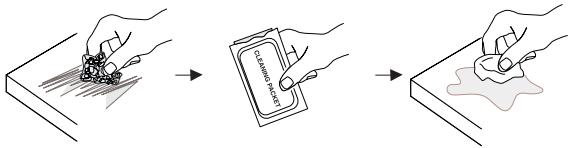
3 After the alcohol dries, remove the backing on the base plate to expose the adhesive and place it on the prepared location. If desired, secure the base with the two screws.
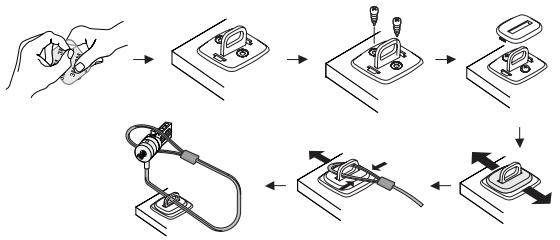

NOTE: WHEN USING THE ADHESIVE BACKING, APPLY AT ROOM TEMPERATURE -60^ (16^) , AND ALLOW IT TO BOND FOR MORE THAN 24 HOURS. NOT RECOMMENDED FOR USE OUTDOORS OR IN A HIGH HUMIDITY ENVIRONMENT. BONDING TO GLASS, CERAMIC TILE, WATER-ABSORBENT MATERIALS, COPPER, BRASS, OR PLASTICIZED VINYL WITHOUT PRIMER SURFACE ARE NOT RECOMMENDED. TARGUS RECOMMENDS USING BOTH ADHESIVE AND SCREWS TO PROVIDE MAXIMUM SECURITY. USING ONLY THE ADHESIVE PROVIDES MARGINAL SECURITY.
4 Place the DEFCON Security Base Plate cover as shown and slide it to the left or right to secure it in place.
5 Insert your DEFCON cable lock.
Specifications
General
Weight: 184.3 g
Locking device
Dimensions:31 x 54 x 24 mm
Colour: Black Nickel
Cable
Length: 2 m
Diameter: 4 mm
Material: Vinyl coated steel
DEFCON is a trademark of Targus Group International. All other trademarks are the property of their respective owners.
TAPГYC 3AПИTHO YCTPOИCTBO 3A HOYTEУК DEFCON® SCL 3AKЛЮЧВАЦО YCTPOИCTBO CBС CEPИHA KOMBИHAЦЯ
BbVeDeneHne
Блары в, ue 3akunxte Tapryc 3auntho yctpoictBO 3a hoyt6yK DEFCON SCL 3aknoubaoo yctpoictBO cbc cepinHa kombuauia. DEFCON SCL bni nomara da 3aunite Baunie zhen Hoyt6yK OT KpaXb noceDCTBOM cepinHa kIouaIka C YeTnpuizppeha kombuauia. IpeBaupTeHNO 3aadaeHata Kombuauia eJIMmHnpa Hxkdata OT KIOUOBE n BN p03BOJRA nepnoDnueckn da CmehrTe KombuauiaTa 3aNo-tolma CNpyhocT.
OcbeH To3n HapbUHmK 3a NOTpeBnteY, KOMnIeKTbT CbIbPka:
DEFCON SCL 3aKJIIOUBaIoo yCTpoIcTBO cIc cepnHa KOMBInHaIe
- YnltbThnteN DEFCON SecureSpacers
DEFCON Security 6a30Ba nlaactnHa

BHIMAHINE:3A DA I3IIOJI3BATE DEFCON SCL TPRIBBA ITbPBO DA 3AINIJETE INPEIDBAPINTENHO 3AIADEHATA KOMBINAHLJY.
CepniHa KombinaZna
1 HaMepeTe uΦpOBuTe DnCKObe n npO3OpUeTata Ha KJIouaJIkata.
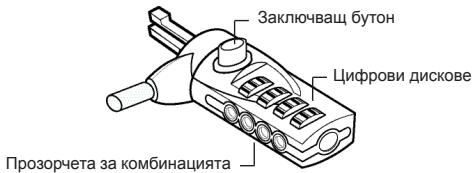
DEFCON SCL
2口 PnpBapntenH 3aJaHeHata KOMbHaIe 3aIncHa Ha IepeHka, npKpeHha Ha Tbp6a Ha To3n HapbYnK 3a NotpeHteIa.

BEJIEXKKA:OCBEH TOBA,MOKETE DA 3ANIIUETE KOMBUNAHUHTA HA IpyTO HADEXJHO,IOCTbIHHO MRCTO IA DpBXTE HA PA3NIUYHO MRCTO OT HOYTBYKA.
3□ 3aBbPteTe DnCKOBeTe, 3a Da npKpneTe KOMbHaunraTa.
TecBaHe Ha KOM6HauZyTa
Ipei Da npKpEnite KnHouaNkata KbM BaWnHa HOYToyK:
1□3aBbPTeTe DnCKOBeTe, 3a Da ce BbPHeTe KbM cepuHaTakOMbuHaun.
2□Проверетe Дади 3akJIOUBaIuIaT 6yToH XJIbTBA HAnbJIHO.
Прикpenbaне на DEFCON SCL
I36epe Te pEmet B cTaTa, KbM KOTo Da npKpeHnTe CBOH HOYt6yK c NOMoUta Ha DEFCON SCL. I36epeTe COINHa TeKka act OT Me6eInpObKaTa, KaTo HApPmEp Maca INI 6IoPo.
1 B3eMeTe KpaHa Ka6ena C npMkata n ro yBnTe OKoJo N36paHnI ppeMTe.

BEJIEXKKA: YBNIIE KABEJIA OKOJO YACT OT INPEJMETA, KOYTO HRAMA DA IO3BOJIN HA KPAIENEJA DA IN3XJU3N KABEJIA (HANPIMEP, KPAH KA BIPOO JINM MACA C HAPNEUHA IPREDA INJIN DIPbXKKATA HA YEKMEDKETO).
2□Ппекаар Te KIчалкata пe3 прмкata Na KaBeNa, KaKTo e POKa3aHO Ha NlIOCTpaunraTa.
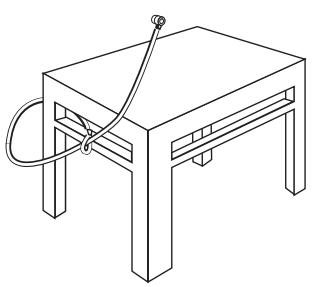
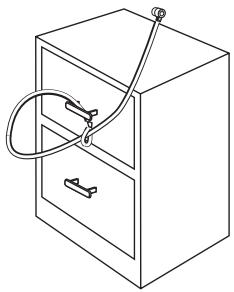
3aKpeneme DEFCON SCL KbM HKaKbe npedMem
3aKJIoueTe DEFCON SCL KbM Baшся HOуT6yK

BJELEKKA: JPBJXTE DEFCON SCL C JBE PbIe 3A IIO-TOJIrMA CTABNJHOCT IOKATO IOCTABTRE INI CBAJIYRA KJIIOUHAIJKATA.
1 KaTo n3NoJ3BaTe the dials, BbBeTe npaBnHaTa KOM6uHaCuIy.
Kombunaeta Ce noBBA B npO3OpyeTa.
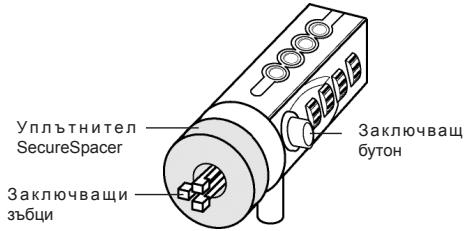
DEFCON SCL
2□HaTncheteN3aDpBxTe 3aKJIIOUyBaUuIg6yTOH,3a da n3paBnHTe 3aKJIIOUyBaUHte 3b5U.

BEJIEXKA: 3A DA XJbTHE HANTbHIO 3AKJIHOUBAUINBAYTOH TPREBBA DA BBeDETE IPABUNIHATA KOMBUNHAUIN.
3口ПрмушeteDEFCONCLВOTbopa3aKlquyakhaBaшян HOYt6yкиOCBO6oDeTe 3akIIOvBaшяn6byToH.

BEJIEXKA: NOPADI PA3NIKITE B PA3MEPHTE HA OTBOPNTE 3A KJIOAHIKI HA PA3NIUHNTE MODEIIN HOYTBUYN,MOXE DA3ABEJENKTE IN3BECTHA XIA5HNA
MEXKJY KJIIOUHAIKAI N KOMNIOTbPA.IPEIOCTABEHITE DEFCON YIJIbTHEHENCA HAI-IOBPOTO PEUEHNE 3A ONTIMAJHO CbOTBETCTBNE IN CnIFPHOCT.
4□3aBbptete the dials, 3a da npnKpneTe cBoTa KOMbHaun.
IopaДn pa3Nknte B pa3Mepnte Ha OTbOpnte 3a KlnouaKn Ha pa3NUnHNTe MoJeN HoYt6yU, MOKe Ja 3a6BeJnxTe n3BeCTHa XnaBHa Mekdy DEFCON KlnouaKaTaN KOMnOtbpa. IpeJoctabeHnte DEFCON ynIbThHeHnca Hn-Do6pTo peSeHne 3a ONTImaHNO CbOTBETCTBNE nCnryPhOCT.
OTKJIIOUbaHe Ha DEFCON SCL

BEJIEXKKA: HE CE ONIITBAIte DA OTCTPAHInTE DEFCON SCL BE3 DA IN3PON3BATE KOMBINHALJRA. IIOIOEHH OINT Bn MOBJI DA IOBPEIN BAISHYHOYTBYK.
1 KaTo 3nOJ3BaTe DnCKOBTe, BbBeJeTe BApHaTa KOMBnHaCnIa.
2KoMbHaacnraTcneBRABaBpO3OpYeTa.
3HaTnchTeH 3aDpBxTe 6yToHa 3a3akIIOUBaHe 3a da ce NOppeJr 3akIIOuBaUe 3b6u.
4. OTCTpaHete DEFCON SCL oT OTbopa 3a 3akJIIOUbaHe Ha BaIINr HOYToK.
Базова Пл actина DEFCON Security
KOMNJIeKbT DEFCON SCL Combo Cable Lock BkIIOUBa 6a3Oba pIaCTnHa 3a NOBIIaBaHe CnrypHocTtA Ha HAcTOJIHIne KOMNIOTpn.
DEFCON® SCL DETARGUS POUR
ORDINATEUR
PORTABLE
Introduction
Dokiún tou ouvδuaσoú
PpOToI pPoapTnOeTe Tnv KkEiδaipia OTOv φoŋtó oac UToLoyoiTn:
1 Tupiote ta kavtpav yia va ETIOPTpeyete OTOV 6ipaiKoToinmuvo uovuaa.
2 ELeVTe av to koupti KkEioWmuToC eivai TnEvO p i KATU.
Preender o DEFCON SCL
DEFCON Security Base Plate
KOMPAHIN TARGUS C KOIOBbIM
3AMKOM C 3AДАнHBIM KOДOM
BVeIeHne
БлардамВасяпкуЗштог�ТорскаДЯнНоубков DEFCON®SCL komпани TargusC КODыIM 3AMKOM C 3aДаньIM KODOM.CИСТЕмADEFCON SCLnomoraet 3aцNTNb ZeHNBI Hoyt6yKOTКражи c nOMOьу chebipexuФровOrO KoDOBORO3AMKa C 3aДаньIM KODOM.KODOBII 3aMOK C 3aДаньIMKODOM yCTpaHЯг Heo6xOДIMOCbB KJIQUax I He JaetBO3MOKHOCTHnI3MeHЯrTB KODOBYU KOMBHaUNHO.
Kpome INHCTpykCIN PONb3OBaTeTn B DaHHbIK KOMPJIeKT BXOJAT:
3aunTHbI TpOcNk DEFCON SCL c KOIObIM 3aMKOM C 3aDaHHbIM KOIDOM
3aunThbIe BCTabKn DEFCON
3auntnaonopaDEFCON

ПЕДУПЕЖДЕНЕ: ПЕPEDИHAUALOMИСПОЛБОВАЙ
KOJOBOI0 3AMKA DEFCON SCL HEOBXOIMO
3AINCATb 3ADAHHYIO KOMBUNHALIIO LINΦP.
3aandaHna 1nΦp
KOM6nHaζη
1 PaCnoJoxnTe ⅢKaJIbI N OKHa KOJa Ha 3aMKe.
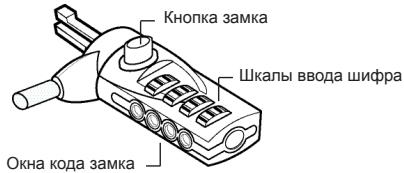
Cucmema DEFCON SCL
2□3aHaHnKaM6uHaZnUzIppyka3HaHaHaKneKe Ha nocpeHne cTpaHnCe daHHo INHCTpyKUn.

ПРИМЕЧАНЕ: Вbl MOЖETE TAKOKE 3APINICATb KOMБИHAЦИ N UБРТБ EE OT HOΥТБУКВ ДPyгО B63ОПACHОЕ ЛIGКODUCTYПНОЕ MECTO.
3口 NOBepHnTe 申KaIbI, YTO6bI c6pocHTb KOMBnHaUHO uΦp.
PpOBepka KOMbHaCn
Ipeje yctaHOBko 3AMKa B HooTyke:
1口ПовернITEшкалыВпложене 3аданно komбиначицфр.
2□ Y6eHNTecb, yTO KHOIIKa 3aMka NOJIHOCTbIO OTKaTa.
3aKenJeHne cncTeMbI DEFCNSCL
BbIepnte obbekt B KOMHaTe, K KOtOpMy MoXHO npnKpeiHTb HoTyk C NOMOsbH CnCTembl DEFCON SCL. BbIpaIte npedMeT Me6eIN 6oJIbWoOro pa3Mepa n Beca, TAKOH KAK CTOn IIN NapTa.
1 O6eRnTe KOHeU TpOca C neTne BOKpyr BbIbpaHOro oBeKta.

PIMMEYAHHE: OBEPHNTE TPOC BOKPYI PIEDMETA MEBEJI, KOTOPBII HE IACT IPAIITEJIO CHRTB ETO (HANPRIMEK, BOKPYI CTOJCA NPEEKJADINHOI INI INI PYUKI SHKAΦΑ).
2□ПютянITEЗAMOKЧере3 KOHeц KaбелЯспетлй КAK nOKa3aHOHa pUCyHKe.
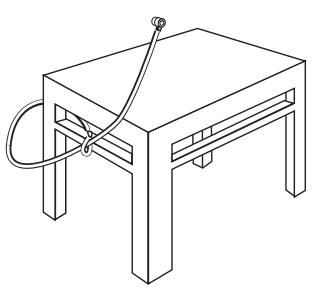
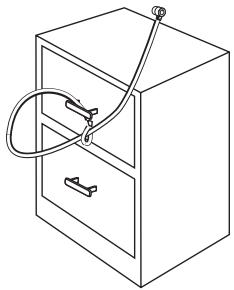
3aKpennHeue cucmembI DEFCON SCL Ha oBekme
YcTaHOBka CnCTeMbI DEFCON SCL B HoyToyK

PIMMEUHANE:ДПЯДОПЛНЕЛьНОУСТОУВОCTNIPIN YCTAHOBKE NIN CHTYN 3AMKA DEPRKNTCNUCTEMY DEFCON SCL OEBMNI PYKAMI.
1 BVeDInTe npaBnIbHyIO KOMbHaCNIIO C NOMOuBIO shkAIN BVOda WnΦpa.
BOKHAX NOBHTcKOMbHaCmU cHp.
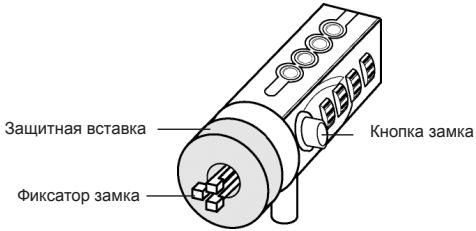
Cucmema DEFCON SCL
2□Haxmnte uyepeKnBaTe KhONkY 3Amka, YTo6blΦNKcATOp BCTan B NpOJKeHne 6NOKIpOBKn.

PIMMEUHHE: YTObI KHOIIKA 3AMKA BbIa IIOJIHOCTbO OTKATA, HEOBXOJIMO BBECTI PABINbHYo KOMBENHALIO.
3BCTaBbTe 3aMOK DEFCON SCL BФИКСИРУЮПИΝΙΝΑЗ KMЛБЮТЕРИ NGYCTNTE KHOПКΥ 3aMka.

PIMMEAHHE: TAK KAK PA3MEP OTBEPCTIINQD 3AMOK MEHRETcB BA3HbIX PA3MEPAX HOYTEKOB, BBI MOXETE 06HAPYKITb HEBOJIshO 3A3OP
MEXJY 3AMKOM KOPITYCOM KOMTbOTEPA. JIJI Y OBJCEPENH HAJEXKHO TO CBMEUHIN I B3OJNACCHOIT ONTIMAIJIbHbIM PEUHEHEM JBJIOTC3AUHTbIE BCTABKN DEFCON.
4口ПовернITEшкалы,чтобсckрьтБTekушeeЗауне KOMинани.
Tak Ka Ka pa3Mep OTBepCTnI NOd 3AMOK MeHReTcB Pa3hIx pa3Mepax HOY6yKOB, Bbl MoKeTe 0bHapyKnTb He6oNbIwo 3a3Op MExky 3aMKOM n Kopnycom KOMNbHTepa. 3aUHTbIe BCTaBKN DEFCON o6ecneuBAIoT ONTMaJIbHOe COBMeIeHne n 6e3OpaCHOCTb.
DEFCONЯIJIETcTO TROBOMAPKO KOMNHN Targus Group International. JIObIe DpyrE ToTROBbIe MAPKIN RAJIANTcO6CTBeHHoCTbIO COOTBETCTBYUOxH BnadeJIbueB.
TARGUS SÄKERHET FÖR BÄRBARA
DATORER DEFCON® SCL
SERIEKOMBINATIONS LÅS MED KABEL
Introduction
Visit our Website at www.targus.com Features and specifications subject to change without notice. ©2008 Targus Group International, Inc. and Targus (UK), Inc.
- TABLE OF CONTENTS
- GB - English
- BG -Блгарский (e3nk)
- CZ - Ceitina
- DE - Deutsch
- DK-Dansk
- EE - Eesti
- ES - Espanol
- FI - Suomi
- FR - Français
- GR - Eληνικα
- Serialised combination
- Testing the Combination
- Securing the DEFCON SCL
- Locking the DEFCON SCL to your Notebook Computer
- Using the DEFCON SecureSpacers
- Unlocking the DEFCNSCL
- DEFCON Security Base Plate
- Using the DEFCON Security Base Plate
- Specifications
- General
- Locking device
- Cable
- TAPГYC 3AПИTHO YCTPOИCTBO 3A HOYTEУК DEFCON® SCL 3AKЛЮЧВАЦО YCTPOИCTBO CBС CEPИHA KOMBИHAЦЯ
- BbVeDeneHne
- CepniHa KombinaZna
- DEFCON SCL
- TecBaHe Ha KOM6HauZyTa
- Прикpenbaне на DEFCON SCL
- 3aKJIoueTe DEFCON SCL KbM Baшся HOуT6yK
- OTKJIIOUbaHe Ha DEFCON SCL
- Базова Пл actина DEFCON Security
- DEFCON® SCL DETARGUS POUR
- ORDINATEUR
- PORTABLE
- Introduction
- Dokiún tou ouvδuaσoú
- Preender o DEFCON SCL
- KOMPAHIN TARGUS C KOIOBbIM
- 3AMKOM C 3AДАнHBIM KOДOM
- BVeIeHne
- 3aandaHna 1nΦp
- KOM6nHaζη
- Cucmema DEFCON SCL
- PpOBepka KOMbHaCn
- 3aKenJeHne cncTeMbI DEFCNSCL
- YcTaHOBka CnCTeMbI DEFCON SCL B HoyToyK
- TARGUS SÄKERHET FÖR BÄRBARA
- DATORER DEFCON® SCL
- SERIEKOMBINATIONS LÅS MED KABEL
Brand : TARGUS
Model : NOTEBOOK SECURITY DEFCON SCL
Category : Laptop Security