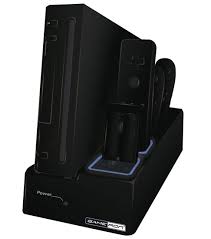
POWER DOCK STATION II WII - Game Console Charging Station GAMERON - Free user manual and instructions
Find the device manual for free POWER DOCK STATION II WII GAMERON in PDF.


| Product Type | Charging Station and Vertical Stand for Wii Console |
| Brand | GAMERON |
| Model | POWER DOCK STATION II WII |
| Power Supply | DC 12V via original Wii power cable |
| Included Battery Type | Ni-MH 2.4V 850 mAh |
| Battery Charging Time | Approximately 4 hours |
| Battery Life | Up to 30 hours |
| Charging Capacity | 2 batteries simultaneously (in the remote or alone) |
| Storage Slots | 4 Wii remotes or 2 remotes + 2 Nunchuks |
| LED Indicator | Flashing blue = charging, solid blue = charged |
| Operation Without Console | Batteries can be charged even when the console is off |
| Material | ABS Plastic |
| Dimensions | Approximately 25 x 15 x 10 cm |
| Weight | Approximately 500 g (without battery) |
| Warranty | 3 years |
| Maintenance and Cleaning | Clean with a dry, soft cloth. Do not use harsh detergents. |
| Safety | Do not expose to water, excessive heat, or shocks. Do not disassemble. |
| Spare Parts and Repairability | Contact GAMERON support (support@awg-france.com) for spare parts. |
| General Information | Multi-function charging station with vertical stand for Wii console. |
Frequently Asked Questions - POWER DOCK STATION II WII GAMERON
User questions about POWER DOCK STATION II WII GAMERON
0 question about this device. Answer the ones you know or ask your own.
Ask a new question about this device
Download the instructions for your Game Console Charging Station in PDF format for free! Find your manual POWER DOCK STATION II WII - GAMERON and take your electronic device back in hand. On this page are published all the documents necessary for the use of your device. POWER DOCK STATION II WII by GAMERON.
USER MANUAL POWER DOCK STATION II WII GAMERON
PRODUCTCODE 21145, 21146
艺
First of all, we would like to thank you for purchasing this GAMERON™ accessory.
In order to ensure the best performance from your product, please save this instruction manual for future reference.
Warranty
This product is guaranteed for three (3) years from the date of purchase. During this period, in the event of product failure resulting from material or manufacturing defects, the retailer will replace this product for an identical or similar model upon presentation of the cash register receipt or valid proof of purchase. This warranty does not cover product failure resulting from accidental damage, improper use, or normal wear, and pertains exclusively to the initial purchaser. The purchaser's statutory rights are not affected by this warranty.
CONTENTS
A. 1 × charging station
B. 2 × rechargeable batteries
C. 2 × sockets for batteries
D. 2 × sockets for NunchukTM
E.2x sockets for Wii RemoteTM
SPECIFICATIONS
A) Charging station - Input: 12V DC
B) Batteries: Ni-MH 2.4 V 850 mAh
C) Battery charging time: +/-4 hours, Battery life: 30 hours
The 2 batteries should be completely discharged during their first use in order to receive a complete charge cycle.
FUNCTIONS
- Vertical stand for the console
- Designed to store 4 Wii Remote™ or 2 Wii Remote™ and 2 Nunchuk™
- 2 slots for charging
- The batteries can be charged independently of the Wii Remote™
- The Nunchuk™ cables can be stored inside the station
- The station is powered by the original Wii cable
- The batteries can be charged while the console is off.
DIRECTIONS FOR USE
- Insert your console in the Power Dock Station II.
- Connect the WiiTM power cable into the back of the Power Dock Station II.
- Push the on/off button on the back of the station to turn it on. A blue LED on the front of the station illuminates, indicating that power is on.
- Charging a battery: Place a battery socket provided with the station into the 1st or 2nd slot, and then insert a battery.
To charge the Wii Remote™ directly, insert a battery in its compartment and then insert the Wii Remote™ into slot 1 or 2 in the station without using the sockets.
- Battery charge indicator: Batteries are charging when the blue light blinks on and off. The blue light stops blinking when the batteries are fully charged.
艺
- Thanks to the interchangeable sockets, the 3rd and 4th sockets can be used to store either 2 additional Wii Remote™ or 2 Nunchuk™ depending on your needs.
To store the Nunchuks in their slots, you must complete these steps first:
Place the Nunchuks in the sockets designed for this purpose.
Pull the cable through the bottom hole until the connector butts up against the socket.
Finally, place the cable inside the station and place the socket into its slot.
IMPORTANT
- It is recommended that you turn off the station after use or remove the batteries if they are fully charged.
- Only use the charging station to charge batteries provided with or intended for the station.
Important instructions and precautions
- Children should always be supervised by an adult during the use of this product.
- Never expose the station to direct sunlight, bad weather, high humidity, high temperatures, or physical shocks.
- Do not immerse the station in liquid.
- Use indoors exclusively.
- Do not use the station if it is damaged.
- Do not disassemble the station. Doing so will void this warranty.
- Use a slightly damp, soft, clean cloth to clean the product. The use of detergents can damage the product.
Battery care and maintenance
- Only use batteries that are supplied with, or intended for, this station.
- Make sure you insert the batteries correctly.
- Remove the batteries from the Wii Remote during long periods of non-use.
- Never dispose of batteries in a fire as they may explode.
- Do not put used batteries in the trash; dispose of them at a collection location for used batteries or hazardous waste.
- Children should be supervised whenever they replace or charge batteries.
Recycling
Do not discard with common household rubbish. This product must be disposed of at a Waste Electrical and Electronic Equipment (WEEE) collection site for recycling. The recycling and transformation of waste electrical and electronic equipment will contribute significantly to the environment's protection by reducing the volume of waste in dumps and landfills.
Batteries must be discarded at specifically designated collection points for used-battery or dangerous-waste recycling purposes.
For further recycling information, please contact your local waste disposal services. This product is not recommended for children under the age of 8 years.

GAMERON
Batteries must be discarded at specifically designated collection points for used-battery or dangerous-waste recycling purposes.
For further recycling information, please contact your local waste disposal services. This product is not recommended for children under the age of 8 years.

GAMERON
Designed, Distributed and Manufactured by AWG.
AWG
17 Rue Louis Armand
77330 Ozoir La Ferriere
France