
MXI2080 - Power amplifier MYRYAD - Free user manual and instructions
Find the device manual for free MXI2080 MYRYAD in PDF.


User questions about MXI2080 MYRYAD
0 question about this device. Answer the ones you know or ask your own.
Ask a new question about this device
Download the instructions for your Power amplifier in PDF format for free! Find your manual MXI2080 - MYRYAD and take your electronic device back in hand. On this page are published all the documents necessary for the use of your device. MXI2080 by MYRYAD.
USER MANUAL MXI2080 MYRYAD
Introduction 2
Installation and Safety 2
- Accessories 2
- Setting up your system 3
Rear panel connections 3
Using your MXI 2180/2150 5
- Front panel controls 5
- System operation with Smart MyLink® 7
RemoteHandsetOperation 7
Using the menu to customise your amplifier 7
- Installing and replacing batteries in the remote control 9
- Trouble-shooting guide 9
Specifications 10
INTRODUCTION
The Myryad MXI2080 and MXI2150 Stereo Integrated Amplifiers have been designed to deliver a combination of high quality sound reproduction and elegant styling. This Owner's Manual applies to both models as they operate in exactly the same way. Where relevant in the following text the term "MXI" is used to refer to both models.
Both MXI amplifiers can accept up to eight line-level input sources, including two tape recorders. Outputs are provided for one pair of loudspeakers. All functions can be operated using the infra-red remote control handset supplied. This remote can also control Myryad CD players, Tuners and DVD players.
The MXI2080 and 2150 offer a range of expansion possibilities:
- A low-level "Bi-amp" output is provided to feed a Myryad Power Amplifier, allowing bi-amplified drive of suitable loudspeakers (MXA2080 is most suited to the MXI2080, while MXA2150 is most suited to the MXI2150).
- Preamplifier and Power Amplifier sections can be split, allowing a variety of systems to be implemented. Either the preamplifier, or the power amplifiers may be used separately – or an audio processor may be connected between them.
- The My-Link input/output can be coupled to other Myryad products which can then be remote-controlled via the MXI's infra-red receiver or vice-versa.
- When linked via the Smart My-Link® to other compatible Myryad M-Series, MX-Series, Z-Series or Cameo products a number of other features become available which make the system as a whole easier and quicker to operate.
INSTALLATION AND SAFETY
This amplifier generates a modest amount of heat and thus requires ventilation. Do not place it on a rug or other soft surface into which it could sink, obstructing the air inlets in its underside. Do not allow papers or cloth to obstruct the ventilation grille in the top cover. The amplifier should not be installed in a built-in situation such as a bookcase or rack unless proper ventilation is provided
CAUTION: TO PREVENT A FIRE OR SHOCK HAZARD, DO NOT PERMIT THIS PRODUCT TO BECOME WET. IF LIQUID IS ACCIDENTALLY SPILLED ON IT, IMMEDIATELY SHUT OFF ITS POWER AT THE WALL SOCKET AND UNPLUG THE AC POWER CORD. ALLOW SUFFICIENT TIME FOR COMPLETE EVAPORATION TO OCCUR BEFORE OPERATING THE UNIT AGAIN. IF THE LIQUID IS ANYTHING BUT WATER AND/OR ALCOHOL, A QUALIFIED SERVICE TECHNICIAN SHOULD EXAMINE THE UNIT BEFORE IT IS USED AGAIN
Do not remove the cover, or attempt to modify or repair the amplifier yourself. Refer all servicing to a qualified technician.
ACCESSORIES
Your MXI is supplied complete with the following accessories:
- Separate mains power cord to suit country of sale.
- Two very short RCA-RCA (phONO) interconnect cables to link preamp outputs to power amp inputs.
Myryad Slim System Remote.
Two AAA batteries for handset. - Slim System Remote Owner's Manual.
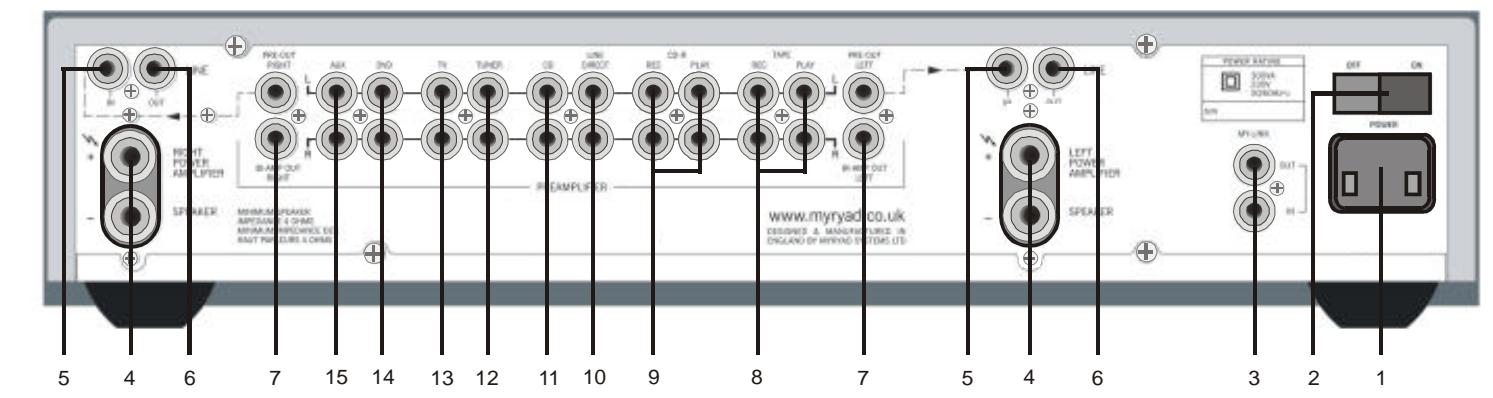
REAR PANEL CONNECTIONS
Note: rear panel shown is for the MXI2080. MXI2150 rear panel has a similar layout but in a taller chassis.
1. Power Inlet
Before making any connection, check that the mains voltage setting printed on the rear panel is the same as your local mains supply.
Plug the female (socket) end of the power cord into the power inlet on the rear of the amplifier. Plug the male (plug) end of the cord into a "live" wall socket or a suitable heavy duty extension cable.
UK version: The mains plug is supplied fitted with a 5A fuse. It should only be replaced with a fuse of the same rating (5A) which complies with BS1362.
2. Power Switch
Press one side of this rocker switch (the side nearer the edge of the rear panel) to switch the amplifier ON and the other side (towards the speaker terminals) to switch it
OFF. When the POWER switch is in the OFF position all power is disconnected from the amplifier. In this condition the amplifier cannot be powered up from the front panel or the remote control. When the POWER switch is in the ON position (and the power cord correctly inserted and plugged into a live wall socket) the amplifier will power up in standby mode (see Front Panel Controls, STANDBY, below).
IMPORTANT: Make sure the POWER switch is turned OFF before making or changing any connections to the amplifier.
3. My-Link input/output
When the MXI is used in a system with other Myryad products (e.g. MX-Series, M-Series, Cameo or Z-Series), all may be joined together via the My-Link. The MyLink is a communications bus that allows all the linked components to operate together as a system and distributes the remote commands received by any one to each of the others. The simplest function provided by the My-Link bus is that all linked units will switch into or out of standby mode when the MXI is switched into or out of standby - either from the front panel or the remote control.
Use a short RCA-to-RCA (phono-to-phon) interconnect cable to connect from the MYLINK OUT socket on the MXI to the MYLINK IN socket on the next unit (e.g. CD player). A second cable may then be run from the MY-LINK OUT socket of that unit to the MY-LINK IN socket on the next and so on in "daisy-chain" fashion. Further compatible Myryad products can be linked in the same way. Inexpensive interconnects may be used as the My-Link bus carries only control signals, not audio, so these cables have no effect on sound quality. Suitable interconnects are supplied with Myryad CD players, Tuners, DVD players and Power Amplifiers.
When Myryad products equipped with Smart My-Link® are connected to the MXI via the My-Link, many more powerful system features are available (see SYSTEM OPERATION WITH SMART MY-LINK®, page 7).
4. Loudspeaker outputs
The loudspeaker outputs are capable of driving all loudspeakers with rated impedances in the range 4 Ohms to 16 Ohms. The loudspeaker terminals are high-current binding-posts, coded red or black. The terminals on the left side of the amplifier (viewed from the front) and marked "LEFT POWER AMPLIFIER" should be wired to the left hand loudspeaker. Those on the right, marked "RIGHT POWER AMPLIFIER", should be
wired to the right hand loudspeaker.
CAUTION: THE RED TERMINALS ARE MARKED WITH A HAZARD SYMBOL TO INDICATE THAT THEY CAN BE LIVE. READ ALL THE LOUDSPEAKER WIRING INSTRUCTIONS CAREFULLY. IT IS RECOMMENDED THAT READY-MADE LEADS BE USED WHERE POSSIBLE.
For correct stereo imaging it is important that the two loudspeakers are wired "in phase". To ensure correct phasing wire the black (-) terminal on the amplifier to the black or "-" terminal on the loudspeaker. The red (+) terminal on the amplifier should be wired to the red or "+" terminal on the loudspeaker. The loudspeakers should be positioned as recommended by the loudspeaker manufacturer. The two loudspeakers should always be placed at equal distances from the main listening position and usually spaced a similar distance apart. It is generally best to keep the loudspeakers away from room corners and many loudspeakers work best away from all walls.
5. Power Amp Line inputs
For normal operation as an integrated amplifier the MXI must have its preamplifier connected though to its power amplifiers. Using one of the short RCA-RCA (phonophono) interconnect cables supplied, connect the Left Power Amplifier's LINE IN to the socket marked PRE-OUT LEFT. Use the second interconnect between the Right Power Amplifier LINE IN and PRE-OUT RIGHT.
The MXI's preamplifier and power amplifier sections may be used separately by removing these two interconnects.
6. Power Amp Line outputs
Each Power Amplifier's line output is directly connected to its line input - without buffering. The line output allows power amplifiers to be "daisy-chained" so that more complex systems may be built.
7. Bi-amp outputs
Many loudspeakers today are made so that the bass and treble sections can be separated and fed from two sets of speaker cables. This is known as "bi-wiring" and can yield a significant improvement in sound quality. A further sound quality gain may be made by "bi-amplifying" the loudspeaker - using two separate power amplifiers to drive the bass and treble sections.
The MXI makes provision for this with its "BI-AMP" output, which can be used to feed a separate Myryad Power Amplifier (MXA2080 is most suited to the MXI2080, while MXA2150 is most suited to the MXI2150). The MXI loudspeaker outputs would be connected, for example, to the bass sections of the loudspeakers (left and right) while the separate Power Amplifier drives the treble. Further information on bi-amplifier and tri-amplifier system wiring can be found on the Myryad website www.myryad.co.uk.
8. Tape input/output
The Tape inputs and outputs are suited to any type of tape recorder, including high-quality "3-head" types which allow you to monitor the signal off the tape whilst it is being recorded. Connect a stereo cable from the TAPE REC output sockets of the amplifier to the LINE IN or RECORD IN sockets on your tape deck. Connect a second stereo cable from the TAPE PLAY input sockets of the amplifier to the LINE OUT or PLAY OUT sockets on your tape deck.
Any source selected for listening on the MXI (apart from LINE DIRECT) will automatically be fed to the TAPE REC output sockets for recording. If the CD-R input is selected then tape copies may be made from CD-R to TAPE. It is NOT possible to copy from TAPE to CD-R.
9. CD-R input/output
The CD-R inputs and outputs are suited to the analogue outputs/inputs of a digital recorder (e.g. CD-R or Mini-Disc) or any type of analogue tape recorder, but "off-tape" monitoring is not possible using the CD-R input. The wiring from CD-R to your tape deck is identical to the TAPE wiring described above.
Any source selected for listening (except TAPE or LINE DIRECT) will automatically be fed to the CD-R REC output sockets for recording. It is NOT possible to record from TAPE to CD-R.
10. Line Direct input
The LINE DIRECT input provides the shortest, cleanest signal path through the amplifier and will deliver the best sound quality of all of the MXI's line inputs. The audio output from any high quality line level source may be connected to this input. It is not possible to make a recording from a source connected to the LINE DIRECT input using the MXI's TAPE or CD-R REC outputs.
11. CD input
Connect the audio output cables from a CD player to these sockets. NOTE: this input is for an audio signal, not for the digital output from your player. If you do not have a CD player then any other line level source may be connected to this input.
12. Tuner input
Connect the audio output cables from a radio tuner to these sockets. If you do not have a tuner then any other line level source may be connected to this input.
13. TV input
Connect the audio signal output cables from a video-related source such as a TV set or VCR to these sockets. Alternatively any other line level source may be connected to this input.
14. DVD input
Connect the stereo audio signal output cables from a DVD player to these sockets. Use the outputs marked L and R or LF and RF (if the player has a built-in 5.1 channel decoder). NOTE: this input is for an audio signal, not for the digital output from your player. If you do not have a DVD player then any other line level source may be connected to this input.
15. AUX input
The audio output from any line level source may be connected to this input.
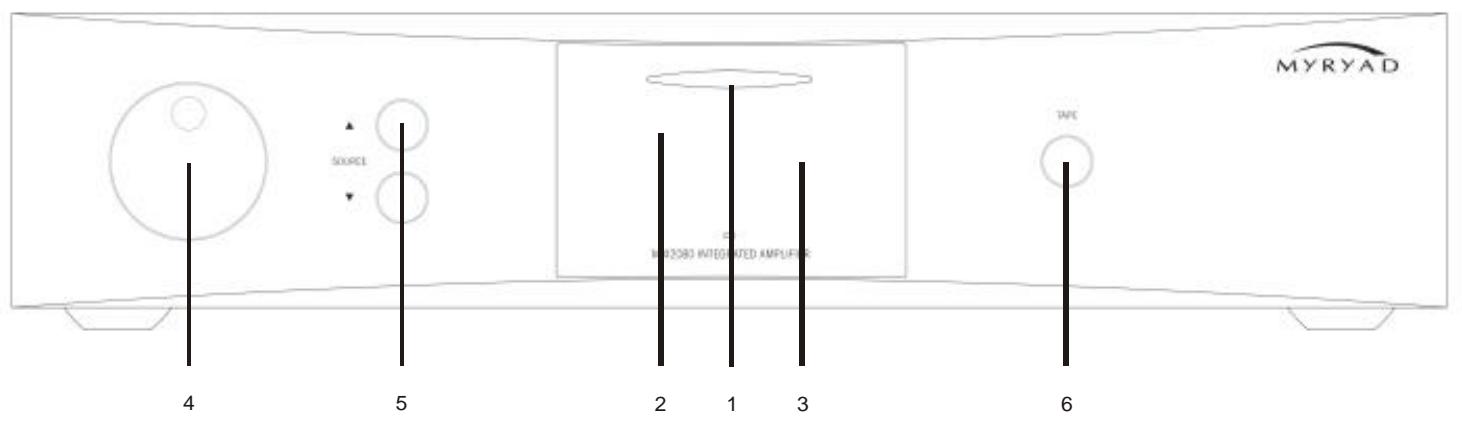
FRONT PANEL CONTROLS
Note: front panel shown is for the MXI2080. MXI2150 front panel has a similar layout but in a taller chassis.
1. Standby
When the amplifier is plugged into a live wall socket and the POWER switch is turned ON, it will power up in "standby" mode and the LED (Light Emitting Diode) in the display will glow red. In this mode only a small part of the internal circuitry of the MXI is powered up, so it consumes very little power and its inputs and outputs are isolated by relays.
When the STANDBY ellipse is touched the MXI's circuitry will be activated, but the outputs will remain muted for a short period to allow the internal voltages to stabilise. During this delay period the LED in the display will flash blue and the display will indicate "MYRYAD MX". Following the delay the standby LED will glow blue continuously, the outputs will be de-muted and the display will show the last selected input and the volume setting.
When the STANDBY ellipse is touched again the amplifier will be returned to standby mode. The standby LED will glow red again and the display will be extinguished.
CAUTION: WHEN IN STANDBY MODE SOME INTERNAL CIRCUITRY OF THE MXI IS STILL LIVE, SO ALL SAFETY PRECAUTIONS MUST BE FOLLOWED.
2. Infra-red receiver
The infra-red (IR) remote control receiver is mounted behind the window, just to the left
of the standby ellipse. It must not be obscured when the amplifier is to be operated using the remote control handset. Where possible it is best to
arrange that the IR window is in "line-of-sight" of the remote handset.
3. Display
The operation of the MXI is indicated on a high quality blue Vacuum Fluorescent Display (VFD). During normal operation the selected input will be shown to the left of the display and the volume setting to the right - e.g. "TUNER -23.5dB".
4. Volume control
The volume control adjusts the sound level for both loudspeakers (via the Preamp outputs) and the signal fed to the BI-AMP outputs. It does not affect the signals fed to the TAPE and CD-R REC sockets so it can safely be adjusted whilst making a recording.
The volume is adjustable in fine 0.5dB steps and the setting is indicated to the right of the VF display, for example "23.5dB". When first switched on the volume sets automatically to -20dB , which is a typical listening level. If the volume is set below -20 then this will be remembered when the MXI is switched into STANDBY and re INSTATED when it is switched on again. However, if the unit is switched to STANDBY with a volume setting higher than -20 , it will be reset to -20 when switched on again to protect against excessive sound levels.
If the volume is reduced below -80dB the outputs (loudspeaker, preamp and bi-amp) will be muted. The outputs will be de-muted as soon as the volume control is advanced, or volume or MUTE pressed on the remote control.
5. Source select and
These buttons scroll up or down through the inputs to select the source you wish to listen to. The display shows which input has been selected. The SOURCE and buttons scroll through all the sources
except TAPE. The TAPE input may is selected using the TAPE button - see below.
Whichever source is selected will be sent both to the loudspeakers and to the TAPE REC and CD-R REC output sockets for recording. The only exceptions are CD-R which will not be fed to the CD-R REC output sockets as this could cause dangerous oscillation and LINE DIRECT which bypasses both record outputs. Recordings may be made from CD-R to TAPE, but not from TAPE to CD-R.
6. Tape
When you press the TAPE button you can hear the output signal from a tape deck connected to the TAPE PLAY sockets on the rear panel. This is a "toggle" function switch: you press it once to engage and press again to disengage and return to the previously selected source. The Tape monitor function may also be disengaged by pressing either of the SOURCE buttons or any input select key on the remote control.
Pressing the TAPE button has no effect on any other input selected. The signal source already selected will continue to be fed to the TAPE REC (and CD-R REC) output sockets, irrespective of whether the TAPE button is engaged or not. If you have a "three-head" tape deck that permits off-tape monitoring you can use the TAPE button to switch back and forth between the source signal and the off-tape signal, to check its quality, whilst the recording is in progress.
NOTE: If the TAPE button is engaged with no signal source connected to the TAPE PLAY sockets, or with no tape running, then you will hear only silence, regardless of the settings of any of the other controls.
LOUDSPEAKER OUTPUT PROTECTION AND MUTING
When the amplifier is in standby mode all the input connectors, the preamp and bi- amp outputs and the loudspeaker output terminals are isolated from the amplifier by high quality relays. When the amplifier is first switched on from standby mode all the outputs remain disconnected for a few seconds to allow the internal voltage levels to stabilise. The outputs are disconnected again when the amplifier is switched back into standby mode.
The loudspeaker mute relays are also used to protect both the amplifier and your
loudspeakers against possible damage. If any one of a number of fault modes is detected (loudspeaker outputs short circuit, amplifier overheating, amplifier DC fault) the relevant loudspeaker (or loudspeakers) will be disconnected from the amplifier to protect both. In the case of a short circuit the loudspeaker will be re-connected after a few seconds, but will be disconnected again if the fault persists. If overheating has caused the protection system to operate, then it will take some time for the heatsink to cool sufficiently to allow the loudspeaker to be re-connected (probably between five and fifteen minutes depending upon the room temperature and ventilation). The amplifier will cool more quickly if it is switched to standby mode.
FAULT CONDITION INDICATION
The power amplifiers in the MXI2080 and MXI2150 have intelligent loudspeaker protection systems. If a fault occurs in either power amplifier channel it will report the nature of the fault to the amplifier's display - as shown in the table below. The channel reporting the fault will be indicated at the right of the display (LCH or RCH). The examples are shown in the table with left channel faults.
The table also indicates what action you should take. "Overheat" and "Short(circuit)" faults can usually be cured by checking your amplifier setup and wiring. The other faults indicate a failure within the amplifier so the unit must be returned for service.
| Fault Display | Description of Fault | Action required |
| OVERHEAT LCH | Amplifier channel has overheated | Make sure that ventilation grilles in MXI's top cover and bottom chassis are not obstructed. Allow amplifier channel to cool - typically 5 - 15 minutes depending upon the room temperature and ventilation - after which the channel's loudspeaker will be re-connected. The amplifier will cool more quickly if switched to standby. When the loudspeaker is re-connected, make sure that the volume is not set too high - i.e. that the sound is clean and undistorted. If the sound is distorted on loud passages, reduce the volume setting. If the problem persists return unit to approved Service Agent. |
| SHORT LCH | Loudspeaker wiring short-circuited, or very low impedance loudspeaker connected, or too many loudspeakers wired In parallel to one amplifier channel | Switch amplifier POWER off at rear. Check that load on each channel is no less than 4Ω (one 4Ω speaker or two 8Ω speakers to each channel). Check loudspeaker wiring - at both amplifier and speaker ends. Make sure there are no small strands of wire that might be causing a short circuit. Re-wire if necessary. If the problem persists return unit to approved Service Agent. |
| DC OUT + LCH | Excessive positive DC output | Return unit to approved Service Agent. |
| DC OUT - LCH | Excessive negative DC output | Return unit to approved Service Agent. |
| AC FAIL LCH | AC power failure to power amplifier channel | Return unit to approved Service Agent. |
SYSTEM OPERATION WITH SMART MY-LINK®
When used as a linked system (e.g. with CD player, DVD player and Tuner), Myryad products with Smart My-Link®, have a number of extra features that make the system as a whole easier and quicker to use than a normal hi-fi. These include:
Start-on-Play (CD/DVD)
Press play on the CD/DVD player (or its remote control) and both the CD/DVD player and amplifier will switch out of standby (if necessary) and play the disc. The amplifier will automatically select the CD or DVD source as necessary.
Start-on-Open (CD/DVD)
With the units in standby, press open/close on the CD/DVD player and both the CD/DVD player and amplifier will switch out of standby and the disc drawer will open. The amplifier will automatically select the CD or DVD source as necessary.
Intelligent Input Selection (Amplifier)
Press a source select button on the remote control and the system will awaken (if in standby) only the amplifier and the selected source.
Mute/Pause Control
(Amplifier/CD/DVD)
When using the CD/DVD player, selecting mute from the remote control will mute the amplifier and pause the disc. When the amplifier mute is cancelled, the disc will continue playing.
Power-Saving Mode (Amplifier)
The amplifier will switch the CD, DVD player or Tuner into standby if either source remains unselected for more than ten minutes.
Automatic Switch-On (CD/DVD/Tuner) If the standby button on the Tuner, CD or DVD player is pressed, the amplifier will also awaken and select the correct source.
The handset supplied with the MXI2080/2150 has been ergonomically designed to be easy and comfortable to use. It will also control Myryad's Preamplifiers, CD Players, Tuners and DVD Players.
See the separate System Remote Owner's manual for details of its use with these products.
To control all of the MXI's functions the remote control should be set to "Tuner/Amplifier" mode, by pressing the "TUN" key at the bottom right corner of the handset.
In the other remote modes (CD/Amplifier and DVD/Amplifier) the amplifier functions available are: Standby, Volume Up/Down, Mute and input selection
REMOTE OPERATION OF MXI INTEGRATED AMPLIFIERS
The keys which control MXI integrated amplifiers in Tuner/Amplifier mode are described below. The System Remote Owner's manual shows the location of each key, together with a brief description of its function.
Standby
This key operates in exactly the same way as the STANDBY ellipse on the front panel. It sends the command to switch the MXI, or any other Myryad preamplifier or integrated amplifier, into or out of standby mode.
Menu
When this key is pressed the amplifier goes into setup mode. The , , 1 , and SEL keys are used to navigate the Control Menu (see page 7). MENU can also be used to exit setup mode.
Sel
This key is used to "Select" (confirm) information in setup mode.
△,▼,I◁,▷▶
These keys are used to navigate in the menu. In general the up and down keys are used to select which parameter is to be adjusted while the left / right keys adjust the parameter which has been selected.
Vol ▲ and ▼
Pressing one of the VOLUME or keys will increase or decrease the volume setting - in exactly the same way as rotating the front panel volume control. If the amplifier is in mute mode (after pressing MUTE on the R/C handset) then pressing the VOLUME key will automatically disengage mute mode and re-connect the signal to the loudspeakers. This prevents an excessively high volume level from being set by mistake.
Mute
Pressing the MUTE key on the handset will engage mute mode, the display will read "MUTE" in place of the volume setting and all the MXI's outputs (except the TAPE and CD-R record outputs) will be muted. MUTE is a "toggle" function, so pressing the key again will disengage the mute mode. The mute is also disengaged if the volume setting is increased, either by using VOL on the remote control or by rotating the volume knob clockwise. If the volume setting is decreased whilst in mute mode, the display will briefly indicate the volume
setting while it is being adjusted and then revert to the "MUTE" display after a few seconds.
DIR, TP1, TP2, AUX, TV, CD, DVD, TUN
These keys allow direct access to input sources. The inputs selected are as follows:
DIR selects Line Direct
TP1 selects Tape
TP2 selects CD-R
AUX selects Aux
TV selects TV
CD selects CD
DVD selects DVD
TUN selects Tuner
When a new source is selected, the previous source is automatically cancelled, with the exception of TP1 (Tape) - see below.
TP1 (Tape)
When you press the TP1 key you can hear the output signal from a recording device connected to the TAPE PLAY sockets on the rear panel. It operates in exactly the same way as the TAPE button on the front panel. Tape is a "toggle" function; you press the key once to engage and press again to disengage. The TAPE input also disengages if a new source is selected either from the remote or front panel.
USING THE MENU SYSTEM TO CUSTOMISE YOUR MXI
The MXI can be customised to suit your individual preferences and system using the Control Menu. The menu options comprise:
- Balance adjustment
- Display on/off
- Level trimming for each input
- Input renaming
- Power-Save-Mode on/off
- Reset to default settings
To access the Control Menu press the MENU key on the remote control. This will put the MXI into setup mode and the display will read "CONTROL MENU". The , , , and SEL keys are used to navigate the Control Menu. Use the and keys to scroll through the menu options in the order shown and the SEL key to select items from the menu. To exit from the menu at any stage press the MENU key again. If no remote command is received for about 15 seconds the MXI will drop out of menu mode automatically.
All the settings programmed using the menu system are stored in non-volatile memory and will be retained indefinitely in standby mode, or even if the power is disconnected or switched off at the rear. The MXI may be returned to its factory default settings using the Reset option.
Balance adjustment
This function is used to adjust the balance between the two channels in the MXI and can be useful for making small corrections for imbalances in signal sources or
loudspeaker sensitivities. If there is a balance problem caused by room acoustics or speaker placement this is best corrected by moving the speakers within the listening room.
When balance adjustment is chosen from the menu the display will read "BALANCE". Select balance adjustment mode by pressing the SEL key and the display will read "BAL 0.0dB". To offset the balance towards the right speaker press the "▶I" key and the display will read "BAL R 0.5dB". Further presses will increase the balance offset in 0.5dB steps up to a maximum of 6dB. Pressing the "I<4" key will offset the balance towards the left speaker in the same way. Balance mode may be exited by pressing MENU.
Display on/off.
The MXI is supplied set to "display-on" mode. This means that the display will be illuminated at all times.
When the display on/off function is chosen from the menu the display will read "DISPLAY MODE". If the SEL key is pressed the display will read "DISPLAY OFF". A further press of the SEL key will switch the amplifier into "display-off" mode and the display will briefly read "DONE" before automatically exiting the menu. (Alternatively the 144 and keys may be used to select the desired display mode before pressing the SEL key.) A similar process may be used to switch the MXI from the "display-off" back to the "display-on" mode.
When the "display-off" mode is activated the display will remain illuminated for about 5 seconds and then switch off. Operation of any of the amplifier's controls will cause the display to switch back on for about 3 seconds to indicate the current status, before it switches off once again.
Input level trims
The MXI is supplied with all of its inputs set to nominal sensitivity (see specifications). To balance the loudness of sources which have different output levels, each input (including TAPE and LINE DIRECT) can have its gain adjusted from nominal over the range +6dB to -6dB (equivalent to a doubling or halving of sensitivity).
First select the input to be trimmed (say, LINE DIRECT), enter the control menu and press or until the display reads "TRIM". Then press SEL and the display will read "DIR TRM +0dB" (only the first three characters of the selected input's name are displayed). Use the and keys to set the trim level desired from -6dB to +6dB in 1dB steps - positive settings will make the input louder, negative quieter. Finally exit the menu by pressing SEL or MENU or allow the MXI to exit automatically.
The same procedure can be used to set individual sensitivities for each of the eight inputs.
Input renaming
Each of the inputs may be renamed to suit individual requirements. Up to five characters can be used for each input, chosen from a full alphabet of capital letters, plus the numbers 0-9, spaces and a few symbols.
First choose "RENAME INPUT" from the control menu and press SEL. The display will indicate the currently selected input, followed by > _ - ", for example "DIRECT>_. Then use the or keys to scroll through the available characters (A will start the alphabet with A), then press the "▶I" key to choose this as the first character and move to the second. Choose the remaining four characters in the same way. A space may be entered by pressing "▶I" twice. The "I< ▲" key functions as a "back-space and delete" and may be used to make corrections.
Once the correct name has been entered, it may be stored by pressing the SEL key. Alternatively press the MENU key to leave the menu without renaming the selected input.
Please note - if the CD input is renamed as "FRED", the "FRED" input will be selected by pressing "CD" key on the remote control - and the "FRED" input will be selected via the Smart My-Link if a CD is played. For your convenience the table below has been provided to record the new input names
| Original input name | New input name | Remote Control key name |
| TAPE | TP1 | |
| CD-R | TP2 | |
| LINE DIRECT | DIR | |
| CD | CD | |
| TUNER | TUN | |
| TV | TV | |
| DVD | DVD | |
| AUX | AUX |
When the MXI is linked to other Myryad components using the Smart My-Link, one of the features available is the Power-Save-Mode (PSM). This has the effect of automatically switching a CD player (for example) into standby if the CD input on the amplifier has not been selected for the past 10 minutes (see System Operation with Smart My-Link). It is possible to switch this feature off, so that all linked units stay "awake" together if that is preferred.
The MXI is supplied with PSM enabled. To switch PSM off, first choose "POWER SAVE" from the menu and press SEL. The display will read "PSM OFF ?". Then press SEL again to switch PSM off. The display will briefly read "DONE", before automatically exiting the menu. (Alternatively the I<\triangleleft> and keys may be used to select the desired PSM mode before pressing the SEL key.) To exit the menu without changing the PSM status, simply press MENU, or let the MXI drop out of the menu automatically after a few seconds.
Reset to default settings
All of the menu settings, Balance, Display, Trim, Input renaming and Power-Save-Mode, may be reset to their original settings using the Reset function.
Choose "RESET" from the menu, press SEL and the display will read "RESET YES?" To activate the reset press SEL and the display will briefly read "DONE" before reverting to the default input (CD) and the default volume setting (-20dB). Alternatively, to leave the reset menu without making any change, press MENU, or let the MXI drop out of the menu automatically after a few seconds.
INSTALLING AND REPLACING BATTERIES
The remote handset uses two 1.5 V type AAA batteries. To fit new batteries first open the battery compartment in the rear of the handset and remove any existing batteries. Fit the new ones as directed by the symbols moulded inside the battery compartment, then replace the battery compartment cover.
The batteries should always be removed if they are discharged (indicated by no remote control operation or by operation only at very short range), or if the remote control is not going to be used for an extended period.
TROUBLESHOOTING GUIDE.
some of the most common problems
No sound:
Power turned off or system in standby mode. Check that the blue LED in the display window is illuminated.
An inoperative input has been selected (e.g. CD input with no CD playing or TUNER input with the tuner switched off).
An input has been selected with no source connected.
- TAPE has been selected with no tape playing.
UK version only: The fuse in the mains plug has failed. Check and replace if necessary.
Sound in one channel only:
- Loudspeaker cable pulled loose. Check all connections, both at the loudspeakers and amplifier.
Interconnect cable pulled loose or making poor contact. Check and, if necessary, un-plug and re-plug all relevant cables. - Protection relay has operated because of a short circuit loudspeaker wire or amplifier overheating (see Fault Condition Indication on page 6). Switch the amplifier POWER OFF to allow it to cool and carefully check all wiring.
Loud buzz or hum:
Interconnect cable pulled partially out of its socket.
Defective interconnect cable.
Hum in tape playback:
- Tape deck too close to the amplifier (e.g. directly above or below).
- Plugs making poor contact with sockets.
Display blanks a few seconds after any control is pressed:
- Amplifier is in DISPLAY OFF mode. Enter Control Menu and reset to DISPLAY ON mode (see page 8).
Standby ellipse does not respond:
- If standby ellipse is touched continuously for more than 10 seconds the standby operation will 'lock-out'. Leave ellipse untouched for a further 10 seconds, after which it will operate normally. Always operate the ellipse with a brief touch - no more than 2-3 seconds is recommended.
Incorrect operation - some functions not working:
Control processor latched. Switch off POWER on rear panel and wait for 5 minutes. Then switch POWER on and switch out of standby. Normal operation should resume.
For further help please visit www.myryad.co.uk/faqs.html
SPECIFICATIONS
| MXI2080 | MXI2150 | ||
| Continuous average power output | 8Ω: | 80 W | 150 W |
| 4Ω: | 120 W | 230 W | |
| THD (at 80% rated power, 8Ω, 20Hz-20kHz) | 0.02% | 0.02% | |
| Inputs: | Line Direct, Tape , CD-R, CD, Tuner, TV, DVD, Aux and power amp inputs | ||
| Outputs: | Tape, CD-R, Bi-Amp, Preamp, Power Amp Line output, Speakers | ||
| Input sensitivity (ref. rated power) | 320 mV 用户 trimmable 160-640mV) | 440 mV 用户 trimmable 220-880mV) | |
| Maximum input level | >8 Vrms | >8 Vrms | |
| Input impedance | 22 kΩ / 200 pF | 22 kΩ / 200 pF | |
| Frequency response (20Hz - 20kHz) | ±0.2 dB (-2dB @ 96kHz) | ±0.2 dB (-2dB @ 96kHz) | |
| Signal/Noise ratio (A-weighted, ref. rated power) | >107 dB | >110 dB | |
| Preamp only | |||
| Output impedance | 220 Ω | 220 Ω | |
| Maximum output level | >8 Vrms | >8 Vrms | |
| Power amp only | |||
| Input sensitivity (ref. rated power) | 900 mV | 1.23 V | |
| Input impedance | 60kΩ / 440pF | 20kΩ / 440pF | |
| Physical Specification | |||
| Dimensions (width x height x depth) | 436 x 95 x 355 mm | 436 x 190 x 479 mm | |
| Weight | Net: | 11.0 kg | 22.0 kg |
| Power requirements | |||
| Voltage (set internally) | 120 / 230 V | 120 / 230 V | |
Stock No: 0ST0012350
Revision: draft
Myryad Systems Ltd.
2 Pipers Wood, Waterberry Drive
Waterlooville, Hants, PO7 7XU
Tel: +44 (0) 23 9226 5508
Fax: +44 (0) 23 9223 1407
tech@myryad.co.uk
www.myryad.co.uk
For further information,
Please contact
Myryad direct or visit:
www.myryad.co.uk
Part Number: 0ST0012350 A