
SE425 - In-ear headphones SHURE - Free user manual and instructions
Find the device manual for free SE425 SHURE in PDF.


User questions about SE425 SHURE
0 question about this device. Answer the ones you know or ask your own.
Ask a new question about this device
Download the instructions for your In-ear headphones in PDF format for free! Find your manual SE425 - SHURE and take your electronic device back in hand. On this page are published all the documents necessary for the use of your device. SE425 by SHURE.
USER MANUAL SE425 SHURE
Shure Sound Isolating™ Earphones, built with balanced armature speakers, deliver a detailed soundstage free from outside noise. The powerful and stylish Shure SE earphones come with a detachable cable, adapters, a durable carrying case, and interchangeable Sound Isolating™ sleeves for a comfortable and personalized fit.
©2010 Shure Incorporated
27A13835 (Rev. 1)
Printed in China
Detachable Cable
You may need to detach the cable from the earphones to attach optional components or to replace the cable if it becomes damaged. The cable connection is not designed for everyday use, and to prevent accidental separation, the connector has a snug fit. Take special care to prevent damage to the microphone and connector.
- Do not use pliers or other tools.
- Grasp the connector and the earphone as close as possible to where they join.
Pull straight apart—do not twist. Cable is a snap fit, not threaded. - Do not pull on the cable or put any pressure on the earphone nozzle.
- Listen for a click when connecting.
- When reattaching the cable, match the "L" and "R" markings. For clear cables and earphones, match the color dots (Red = Right, Blue = Left).
Note: If you pull at an angle, the connector will not detach.
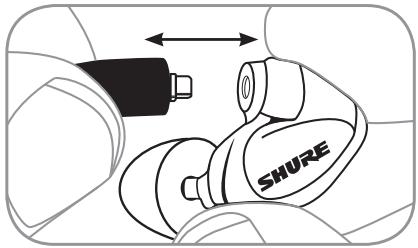
Audible click when properly seated
The following are some suggested ways of wearing the earphones.
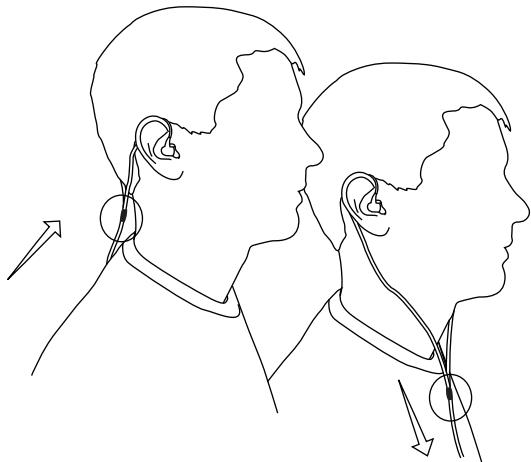
Wearing the cable over the ear and securing it behind the head can help keep the earphones in place during physical activity
Tighten the cable and take up slack by raising the cable cinch.
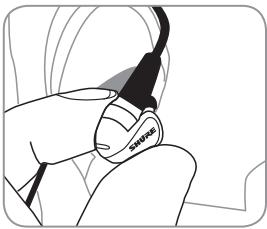
Insert the earphones so they form a tight seal. The fit of the microphone can greatly affect sound quality.
Important: If there seems to be a lack of low frequency response (bass), this means that the microphone sleeve is not forming a tight seal. Gently push the earphone deeper into the ear canal or try a different sleeve.
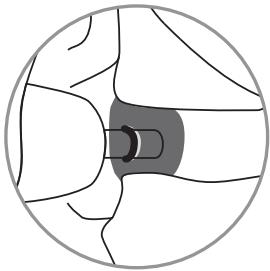
Warning: Do not push the earphone sleeve beyond the ear canal opening.
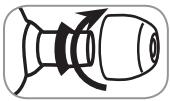
Twist and pull to remove the sleeve from the nozzle.
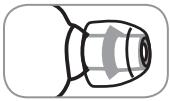
Slide on a new sleeve so that it completely covers the barb and the nozzle.
Caution: If the barb or any of the nozzle is exposed, the sleeve is not properly installed. Replace sleeves if they do not tightly grip the nozzle.
To ensure proper fit and performance, use only sleeves supplied by Shure (unless using custom molded sleeves).
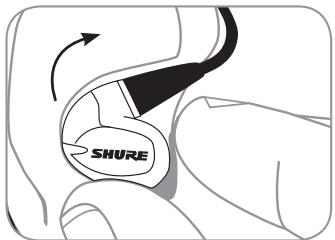
Grasp the body of earphone and gently twist to remove.
Note: Do not pull on cable to remove arophone.
Select an earphone sleeve that provides the best fit and sound isolation. It should be easy to insert, fit comfortably, and easy to remove.

Soft Flex Sleeves: In small, medium, and large sizes. Made from piable rubber.

Soft Foam Sleeves: Compress the foam sleeve between your fingers and insert into the ear canal. Hold in place for about ten seconds while the foam expands.

Triple-Flange Sleeves: If desired, use scissors to trim the stem on the sleeve.
Cleaning the Earphone Nozzle
If you notice a change in sound quality, remove the sleeve and check the nozzle of your earphone. If nozzle is blocked, clear obstruction by using wire loop end of cleaning tool.
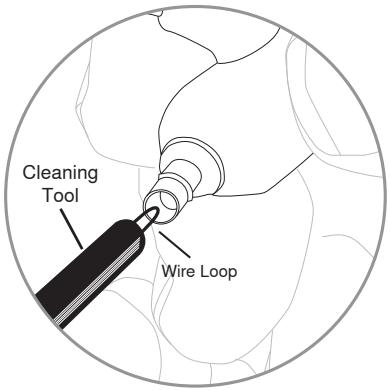
Caution: When cleaning, do not force any object through the earphone nozzle! This will damage the earphone sound filter.

Warning: The cleaning tool is only to be used to clean the earphones. Any other use, such as using the tool to clean ears, could result in injury.
Accessories
- Earphone Sleeves
- Replacement Cables
- Carrying Cases
Music Phone Accessory Cables
Volume Control
Adapters
For more information visit www.shure.com
Maintenance
- Careful maintenance ensures a tight seal between the sleeve and nozzle, improving sound quality and product safety.
- Keep the earphones and sleeves as clean and dry as possible.
- To clean sleeves, remove them from earphones, gently rinse in warm water and air dry. Foam sleeves require a longer drying time. Inspect for damage and replace if necessary. Ear sleeves must be completely dry before reusing.
- Wipe the earphones and sleeves with mild antiseptic to avoid infections. Do not use alcohol-based disinfectants.
- Do not expose earphones to extreme temperatures.
- Replace the sleeves if they do not fit properly.
- Do not attempt to modify this product. Doing so will void the warranty and could result in personal injury and/or product failure.
- Note: The cable connectors to the earphones may collect debris or other deposits that can affect audio quality. If this happens, disconnect the cables and clean them using a dry cotton swab.
WARNING: This product contains a chemical known to the State of California to cause cancer and birth defects or other reproductive harm.
Technical Specifications
| SE535 | SE425 | |
| Transducer type | Triple balanced-armature drivers | Dual balanced-armature drivers |
| Sensitivity (at 1kHz) | 119 dB SPL/mW | 109 dB SPL/mW |
| Impedance (at 1kHz) | 36 Ω | 22 Ω |
| Frequency Range | 18 Hz - 19 kHz | 20Hz - 19kHz |
| Input connector | 3.5mm (1/8 in.) gold-plated stereo plug | |
| Net weight | 30 g (1 oz.) | 29.5 g (1.04 oz) |
| Operational temperature | -18°C to 57°C (0°F to 135°F) | |
| Storage temperature | -29°C to 74°C (-20°F to 165°F) | |
CERTIFICATION
Eligible to bear CE Marking. Conforms to EMC Directive 2004/108/EC. Meets applicable tests and performance criteria in European Standard EN55103 (1996) parts 1 and 2, for residential (E1) and light industrial (E2) environments. The Declaration of Conformity can be obtained from the address below.
Shure Europe GmbH
Authorized European representative:
Shure Europe GmbH
Headquarters Europe, Middle East & Africa
Department: EMEA Approval
Wannenacker Str. 28
D-74078 Heilbronn, Germany
Phone: +49 7131 72 14 0
Fax: +49 7131 72 14 14
Email: EMEAsupport@shure.de

Authorized European representative:
Shure Europe GmbH
Headquarters Europe, Middle East & Africa
Department: EMEA Approval
Wannenacker Str. 28
D-74078 Heilbronn, Germany
Phone: +49 7131 72 14 0
Fax: +49 7131 72 14 14
Email: EMEAsupport@shure.de

Authorized European representative:
Shure Europe GmbH
Headquarters Europe, Middle East & Africa
Department: EMEA Approval
Wannenacker Str. 28
D-74078 Heilbronn, Germany
Phone: +49 7131 72 14 0
Fax: +49 7131 72 14 14
Email: EMEA support@shure.de

Authorized European representative:
Shure Europe GmbH
Headquarters Europe, Middle East & Africa
Department: EMEA Approval
Wannenacker Str. 28
D-74078 Heilbronn, Germany
Phone: +49 7131 72 14 0
Fax: +49 7131 72 14 14
Email: EMEAsupport@shure.de

Authorized European representative:
Shure Europe GmbH
Headquarters Europe, Middle East & Africa
Department: EMEA Approval
Wannenacker Str. 28
D-74078 Heilbronn, Germany
Phone: +49 7131 72 14 0
Fax: +49 7131 72 14 14
Email: EMEAsupport@shure.de
SHURE
SHURE Incorporated http://www.shure.com
United States, Canada, Latin America, Caribbean:
5800 W. Touhy Avenue, Niles, IL 60714-4608, U.S.A.
Phone: 847-600-2000 U.S. Fax: 847-600-1212 Int'l Fax: 847-600-6446
Europe, Middle East, Africa:
Shure Europe GmbH, Phone: 49-7131-72140 Fax: 49-7131-721414
Asia, Pacific:
Shure Asia Limited, Phone: 852-2893-4290 Fax: 852-2893-4055