
DUAL TRIGGER 2-IN-1 RUMBLE FORCE - Game controller TRUSTMASTER - Free user manual and instructions
Find the device manual for free DUAL TRIGGER 2-IN-1 RUMBLE FORCE TRUSTMASTER in PDF.


| Product type | Game controller |
| Brand | TRUSTMASTER |
| Model | DUAL TRIGGER 2-IN-1 RUMBLE FORCE |
| Compatibility | PC (Windows 98 SE, Me, 2000, XP) and PlayStation 2 |
| Connectivity | USB for PC, PS2 controller port |
| Action buttons | 8 buttons (analog on PS2, digital on PC), 2 analog sticks, directional pad, 2 programmable triggers |
| Special features | Programmable triggers, Turbo mode, Mapping mode, force feedback (2 independent built-in motors) |
| Power | Via USB port or console (5V DC) |
| Cable length | Approximately 2 meters |
| Dimensions (approx.) | 15 x 10 x 6 cm |
| Weight (approx.) | 300 g |
| Materials | ABS plastic, rubber coating |
| Maintenance | Clean with a soft dry cloth, avoid liquids |
| Safety | Do not twist the cable, avoid shocks, do not expose to moisture |
| Warranty | 2 years |
| Environmental information | Do not dispose of with household waste, recycle at WEEE collection point |
Frequently Asked Questions - DUAL TRIGGER 2-IN-1 RUMBLE FORCE TRUSTMASTER
User questions about DUAL TRIGGER 2-IN-1 RUMBLE FORCE TRUSTMASTER
0 question about this device. Answer the ones you know or ask your own.
Ask a new question about this device
Download the instructions for your Game controller in PDF format for free! Find your manual DUAL TRIGGER 2-IN-1 RUMBLE FORCE - TRUSTMASTER and take your electronic device back in hand. On this page are published all the documents necessary for the use of your device. DUAL TRIGGER 2-IN-1 RUMBLE FORCE by TRUSTMASTER.
USER MANUAL DUAL TRIGGER 2-IN-1 RUMBLE FORCE TRUSTMASTER
For use with /Fur/Pour
Playstation 2
PC
User Manual

TECHNICAL FEATURES
- Programmable and progressive triggers
- 8 action buttons (analog on PS2 / digital on PC)
- START + SELECT buttons on PS2 / Buttons 9 + 10 on PC
- 2 analog mini-sticks + 2 digital action buttons
- D-Pad (Point Of View)
-
MODE button (Analog / Digital)
-
MAPPING button (for programming trigger functions)
- TURBO button
- 2 built-in independent motors (only on PS2)
- PC cable
- PS2 cable
SAFETY NOTICE
- Do not twist or pull on the cable.
- Do not spill liquid on the cable and/or connectors.
- In the event of malfunction during use due to electrostatic emission, please exit the game and unplug the device from the computer or console. Resume normal game play by plugging the device back in and restarting the game.
INSTALLATION ON PC
System requirements: PC (Windows 98 SE, Me, 2000, XP) equipped with USB port.
The CD-ROM included with this product allows you to install the Force Feedback drivers.
- Insert the installation CD-ROM into your CD-ROM drive. Follow the on-screen instructions to install the Force Feedback drivers. Once the installation is complete, click Finish and restart your computer.
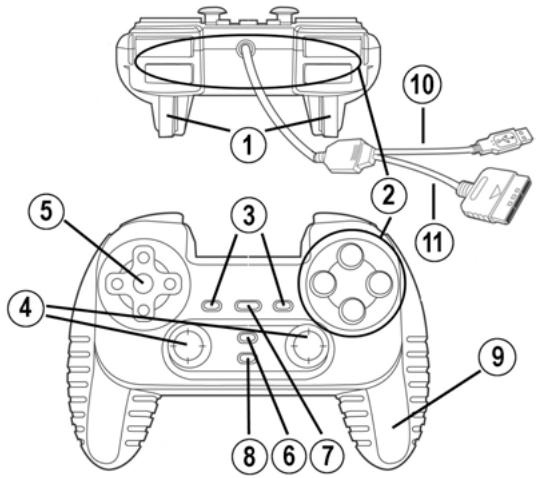
- Once your computer has restarted, connect the USB connector (10) to one of your computer's USB ports. Windows 98/Me/2000/XP will automatically detect the new device. (If you are connecting a USB device for the first time, Windows may ask you to insert the Windows CD-ROM during the installation procedure in order to install the required system files.)
- Driver installation:
Windows 98: the Add New Hardware Wizard will search for the appropriate drivers. Click Next.
Follow the on-screen instructions to complete the installation.
Windows Me/2000/XP: the drivers are installed automatically.
- Select Start/All Programs/Thrustmaster/Force Feedback driver/Control Panel. The Game Controllers dialog box displays the gamepad's name with OK status.
-
In the Control Panel, click Properties to configure your gamepad:
-
Test device: allows you to test and visualize the buttons, the D-Pad, and the axes of the 2 mini-sticks and the 2 triggers.
- Test forces: allows you to test 8 vibration effects and configure the vibration effect settings.
INSTALLATION ON PS2
- Plug the gameport connector on the PS2 cable (11) into a controller port on your console.
- Turn on your console and start up your game.
You are now ready to play!
ADVANCED FUNCTIONS
-
MODE button (6): press this button to switch between modes.
-
Analog mode (default on PS2 and PC): MODE button (6) lights up blue.
-
Digital mode: MODE button (6) is not lit up.
-
TURBO button (8): allows you to repeat an action continuously (does not work with mini-sticks or START + SELECT buttons).
-
Simultaneously press the TURBO button (8) + the button whose action you want to repeat. The MODE LED turns red. Turbo mode is now enabled.
- To disable Turbo mode, repeat this procedure. The MODE LED turns off. Turbo mode is now disabled.
TRIGGER MAPPING
All analog buttons (on PS2) or digital buttons (on PC) and mini-stick directions (axes) can be mapped to the left and right triggers (except D-Pad and START, SELECT, L3 and R3 buttons).
-
MAPPING button (7) (used to map left and right triggers):
-
Press and release the MAPPING button (LED flashes slowly).
- Press and release the button or direction you want to assign to the trigger (LED flashes quickly).
- Press and release the trigger assigned to this function (LED turns off).
- EEPROM:
Your gameplay includes an internal memory chip, which stores your last mapping configuration even if you turn your gameplay off.
- TRIGGER BEHAVIOR:
Triggers react differently according to whether you map 2 separate analog axes, one same analog axis or 2 separate analog/digital buttons to them. Below are 3 different examples (in this case, for racing games).
PS2 recommended
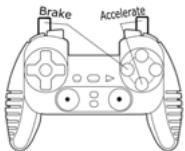
2 analog (PS2) or digital (PC) buttons are mapped to the 2 triggers.
- On PS2, this configuration is the most useful for racing games (because of the progressive analog buttons).
- You are in the same configuration as a PS2 Force Feedback racing wheel (i.e. in 3-axis mode).
- On PC, this configuration is possible but not the best (because of the digital buttons).
- This enables you to separately regulate analog (PS2) or digital (PC) control of the left and right triggers (there is no "master" trigger).
PC recommended
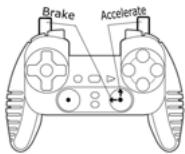
- 2 separate axes are mapped to the 2 triggers.
- On PC, this configuration is the most useful for lots of racing games (because of the progressive analog buttons).
- You are in the same configuration as a PC Force Feedback racing wheel (i.e. in 3-axis mode).
- This enables you to separately regulate analog control of the left and right triggers (there is no "master" trigger).
PC and PS2 alternative
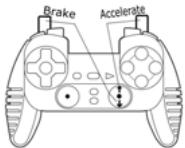
One same axis is mapped to the 2 triggers.
In this case the left trigger is the "master" trigger.
If you press the left and right triggers together, your car will brake.
- This allows you to use the right trigger to control your car's speed, and briefly use the left trigger for powerful braking control.
EXAMPLES OF OTHER POSSIBLE MAPPING
The triggers provide intuitive performance in all types of games: action and FPS (progressive zoom, view, lateral movement or fire), racing (progressive gas, brake, emergency brake, manual transmission), sports (progressive pass, shoot, punch or jump...) and more.
Thus, many mapping configurations are available, according to the possibilities offered by your game. If your game does not accept your current mapping configuration, the triggers will produce strange reactions; in this case, please try defining another mapping configuration (using other axes and buttons).
For a better understanding of all the possibilities available on PC, try them out in "Game Controllers" (Thrustmaster Control Panel).
TECHNICAL SUPPORT
If you encounter a problem with your product, please go to http://ts.thrustmaster.com and click Technical Support. From there you will be able to access various utilities (Frequently Asked Questions (FAQ), the latest versions of drivers and software) that may help to resolve your problem. If the problem persists, you can contact the Thrustmaster products technical support service ("Technical Support"):
By email:
In order to take advantage of technical support by email, you must first register online. The information you provide will help the agents to resolve your problem more quickly. Click Registration on the left-hand side of the Technical Support page and follow the on-screen instructions. If you have already registered, fill in theUsername and Password fields and then click Login.
By telephone:
| United Kingdom | 0207 216 0047 | price of a national phone call, Monday to Friday from 12PM to 4PM and from 5PM to 10PM |
| United States / Canada | 514-279-9911 | price of a long distance phone call, Monday to Friday from 7AM to 11AM and from 12PM to 5PM (Eastern time) |
| Denmark | 82 33 28 58 | price of a national phone call, Monday to Friday from 1PM to 5PM and from 6PM to 11PM |
| Finland | 09 81 71 01 54 | price of a national phone call, Monday to Friday from 2PM to 6PM and from 7PM to 12AM |
| Netherlands | 0900 2026765 | €0.30/min, Monday to Friday from 1PM to 5PM and from 6PM to 11PM |
| Norway | 23 50 01 16 | price of a national phone call, Monday to Friday from 1PM to 5PM and from 6PM to 11PM |
| Sweden | 08-51992032 | price of a national phone call, Monday to Friday from 1PM to 5PM and from 6PM to 11PM |
Warranty information
Worldwide, Guillemot Corporation S.A. ("Guillemot") warrants to the consumer that this Thrustmaster product will be free from material defects and manufacturing flaws for a period of two (2) years from the original date of purchase. Should the product appear to be defective during the warranty period, immediately contact Technical Support, who will indicate the procedure to follow. If the defect is confirmed, the product must be returned to its place of purchase (or any other location indicated by Technical Support).
Within the context of this warranty, the consumer's defective product will, at Technical Support's option, be either repaired or replaced. Where authorized by applicable law, the full liability of Guillemot and its subsidiaries (including for indirect damages) is limited to the repair or replacement of the Thrustmaster product. The consumer's legal rights with respect to legislation applicable to the sale of consumer goods are not affected by this warranty.
This warranty shall not apply: (1) if the product has been modified, opened, altered, or has suffered damage as a result of inappropriate or abusive use, negligence, an accident, normal wear, or any other cause not related to a material defect or manufacturing flaw; (2) in the event of failure to comply with the instructions provided by Technical Support; (3) to software not published by Guillemot, said software being subject to a specific warranty provided by its publisher.
Additional warranty provisions
In the United States of America and in Canada, this warranty is limited to the product's internal mechanism and external housing. Any applicable implied warranties, including warranties of merchantability and fitness for a particular purpose, are hereby limited to two (2) years from the date of purchase and are subject to the conditions set forth in this limited warranty. In no event shall Guillemot Corporation S.A. or its affiliates be liable for consequential or incidental damage resulting from the breach of any express or implied warranties. Some States/Provinces do not allow limitation on how long an implied warranty lasts or exclusion or limitation of incidental/consequential damages, so the above limitation may not apply to you. This warranty gives you specific legal rights, and you may also have other legal rights which vary from State to State or Province to Province.
COPYRIGHT
© 2005 Guillemot Corporation S.A. All rights reserved. Thrustmaster® is a registered trademark of Guillemot Corporation. PlayStation® is a registered trademark of Sony Computer Entertainment Inc. Microsoft® Windows® is a registered trademark of Microsoft Corporation in the United States and/or other countries. All other trademarks and brand names are hereby acknowledged and are property of their respective owners. Illustrations not binding. Contents, designs and specifications are subject to change without notice and may vary from one country to another.
ENVIRONMENTAL PROTECTION RECOMMENDATION

At the end of its working life, this product should not be disposed of with standard household waste, but rather dropped off at a collection point for the disposal of Waste Electrical and Electronic Equipment (WEEE) for recycling.
This is confirmed by the symbol found on the product, user manual or packaging.
Depending on their characteristics, the materials may be recycled. Through recycling and other forms of processing Waste Electrical and Electronic Equipment, you can make a significant contribution towards helping to protect the environment.
Please contact your local authorities for information on the collection point nearest you.
FAQs, tips and drivers available at www.thrustmaster.com
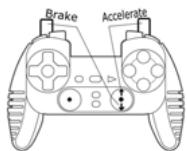
Alternative PC & PS2
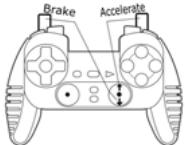
Alternative PC / PS2
FAQs, tips and drivers available at www.thrustmaster.com
Manual do utiliser
CHARACTERISTICAS TECNICAS
- User Manual
- TECHNICAL FEATURES
- SAFETY NOTICE
- INSTALLATION ON PC
- INSTALLATION ON PS2
- ADVANCED FUNCTIONS
- TRIGGER MAPPING
- - EEPROM:
- - TRIGGER BEHAVIOR:
- PS2 recommended
- PC recommended
- PC and PS2 alternative
- EXAMPLES OF OTHER POSSIBLE MAPPING
- TECHNICAL SUPPORT
- By email:
- Warranty information
- Additional warranty provisions
- COPYRIGHT
- ENVIRONMENTAL PROTECTION RECOMMENDATION
- CHARACTERISTICAS TECNICAS
Brand : TRUSTMASTER
Model : DUAL TRIGGER 2-IN-1 RUMBLE FORCE
Category : Game controller