
MICRO CASQUE BLUETOOTH POUR IPOD - Bluetooth audio accessory ACOMAX - Free user manual and instructions
Find the device manual for free MICRO CASQUE BLUETOOTH POUR IPOD ACOMAX in PDF.


| Product Type | Bluetooth headset with dongle for iPod |
| Brand | ACOMAX |
| Model | BLUETOOTH HEADSET FOR IPOD |
| Headset dimensions | Diameter 40 mm, 126 x 70 x 40 mm |
| Dongle dimensions | 50 x 36 x 9 mm |
| Headset weight | 47 g (battery included) |
| Dongle weight | 16 g (battery included) |
| Power supply | Rechargeable Li-Polymer battery: headset 3.7 V 300 mAh, dongle 3.7 V 200 mAh; charging via USB cable (AC input 100-240 V, DC output 5 V 500 mA-1 A) |
| Talk time | Headset: up to 6 h; dongle: up to 5 h |
| Standby time | Headset: up to 110 h; dongle: up to 80 h |
| Recommended charging time | Approximately 2 hours for initial charge |
| Bluetooth technology | Bluetooth V1.2, range up to 10 m, GFSK modulation, profiles AVRCP, Headset, Handsfree, A2DP |
| Frequency response | 20 Hz – 20 kHz |
| Main functions | Wireless music listening, iPod control (pause/play, next/previous track, volume), hands-free phone calls, simultaneous dual connection (iPod + phone) |
| Control buttons | Multifunction button (MFB): power on/off, answer/end call, reject call, redial last number, music pause; volume + and - buttons |
| LED indicator | Red: charging; blue: on/standby; alternate red and blue: pairing mode; flashing red: low battery |
| Package contents | Bluetooth headset, Bluetooth dongle for iPod, Y-shaped USB charging cable, 2 spare ear cushions, user manual, warranty card |
| Care and cleaning | Clean with a soft dry cloth. Do not immerse in water. Avoid extreme temperatures and humidity. |
| Safety | Do not open the product. Use only the supplied charger. Respect the temperature conditions (-10 °C to +55 °C). |
| Warranty | 12 months for the product, 3 months for cables. Warranty valid under normal use conditions. |
| Spare parts and repairability | Spare ear cushions included. For out-of-warranty repairs, contact after-sales service (www.acomax.fr). |
| Operating temperature | -10 °C to +55 °C |
Frequently Asked Questions - MICRO CASQUE BLUETOOTH POUR IPOD ACOMAX
User questions about MICRO CASQUE BLUETOOTH POUR IPOD ACOMAX
0 question about this device. Answer the ones you know or ask your own.
Ask a new question about this device
Download the instructions for your Bluetooth audio accessory in PDF format for free! Find your manual MICRO CASQUE BLUETOOTH POUR IPOD - ACOMAX and take your electronic device back in hand. On this page are published all the documents necessary for the use of your device. MICRO CASQUE BLUETOOTH POUR IPOD by ACOMAX.
USER MANUAL MICRO CASQUE BLUETOOTH POUR IPOD ACOMAX
Activer/Désactiver Bluetooth on/off
Bluetooth Stereo Headphone + Bluetooth Dock Dongle for iPod User Manual
The Dock Dongle enables your iPod series MP3 player (iPod, iPod Mini, Nano, iPod Video) to transfer stereo audio signal cordlessly to any Bluetooth Headphone. The only installation procedure you need to do is to plug it into the audio out jack of your iPod. Additionally, the innovative one-button pairing operation allows you to pair the audio dongle effortlessly with our Bluetooth headphone. The bundle simultaneously connects to your Bluetooth enabled mobile phone and a separate music source to remain in contact at all times. Additionally, its high technology enables you to control your iPod wirelessly!
Package Contents
In this package, you will find:
- One Headphone
- One Dongle
- One USB adaptor
- Two Ear Cushions
- One User Manual with warranty card
- One Y-cord AC adaptor (Optional)
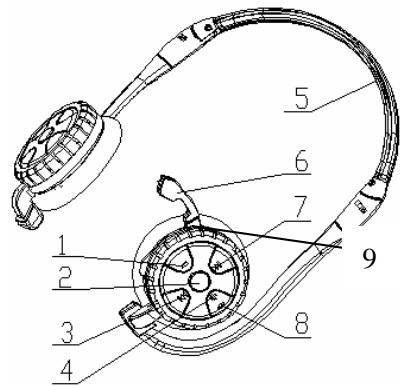
Headphone Structure
- Volume down button
- Multifunctional button: switches the headphone on/off, answers/ends a call, pairs the headphone, mute, accepts a call, hangs up a call, rejects a call, redials the last number, voice dialing.
3.
- Volume up button
- Folding headphone ear frame
- Microphone
7
8. LED
9. USB charging port
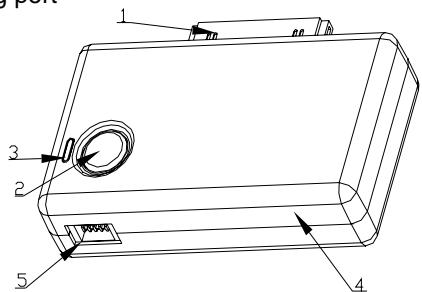
Dongle Structure
- 30 pin connector
- MFB button: turns on/off, pairing
2 hours to get a full charge. Headphone can provide up to 6 hours of working time and 110 hours of standby time. Dongle can provide up to 5 hours of working time and over 80 hours of standby time.
- Connect charging ports with power source. Red LED indicator is ON.
- When the battery is fully charged, the red LED indicator is OFF. Note: 1. Please turn off two units when charging; 2. Red LED flashes when battery is low.
Switching the headphone and dongle on/off
- Off mode, press the MFB button for about 3 seconds until the LED indicator flashes blue.
- Standby mode, Press the MFB button for about 3 seconds until the LED indicator off.
Pair the headphone and dongle
- Switch on Headphone pairing mode (Press the MFB button till the red LED and blue LED flash alternatively)
- Switch on dongle pairing mode (Press the MFB button till the LED flash rapidly)
- Headphone pairing with dongle automatically
- Plug the audio dongle to the audio source output. (Example: iPod and soon)
- Stereo sound will be transferred to the headphone.
- The dongle will enter pairing mode once you press the button only if the dongle failed to pair with any Bluetooth receiver in the last time.
- The headphone can control your iPod wirelessly such as forwards/backwards, pause/play. (please note, here means "next item", means "last item".)
Pairing the headphone with mobile phone
- Place the headphone and the mobile phone (A2DP supported) no more than 1 meter apart and ensure there is nothing between.
- Ensure the headphone is off.
- Press and hold the MFB until the headphone LED alternately flash blue and red.
- Search Bluetooth units through the mobile (different mobile has different sets, please refer to the user manual of the mobile).
- Choose the T905s when your mobile phone discovers the device (T905s).
- Enter the passkey "0000" and then "ok" to pair the headphones with the mobile phone.
- The voice of the phone will be transferred to the headphone in talking mode.
- Press the MFB once to receive a call, press one more time will end the conversation.
Pair Headphone with mobile phone and dongle simultaneously
Headphone can pair with two kinds of media, such as mp3 and bluetooth phone at the same time.
- Following the above step to pairing the headset and dongle firstly,
- Plug the dongle into iPod, you can hear music from the MP3 by the headset.
- Turn off the headset and dongle
- Following the above step to pairing the headphone with mobile phone.
- Turn on the dongle which have been paired with headphone in the last time.
- Based on above steps, you can enjoy music from MP3 or music player; click the button to have a call when a call coming, it'll return to music playing after you finished a call.
Headphone Technical Specification
Frequency: 2.402~2.480GHZ
- LED: indicates the status
- Dongle body
- General mini USB charging port
Charge the headphone and dongle
The headphone and dongle both has a rechargeable battery. Before using for the first time, you have to charge the battery for approximate
. Microphone to pickup a call
Frequency Response: 20Hz~20KHz
. Listening time : 6 hours
. Power consumption: 30-40 mAh
. Battery : 3.7V 300mA Rechargeable Li-Polymer
. Power: Class 2, input AC 100-240V, output DC 5v 500MA-1A, mini USB plug
Dimensions: dia. 40mm, folded: 126 mm x70 mm x40 mm
Weight: 47 gram (including battery)
Button function
When listening to stereo audio, press VOL+, voice will be increased; press VOL-, voice will be decreased; press the MFB button, voice will be paused; press MFB button again, it will resume stereo audio. Note: On completing pairing, listening to stereo audio should be within 5 meters indoors and 10 meters outdoors.
LED indicator
| Status | LED indicator |
| Charging in process | Red LED will on |
| Fully battery | Red LED will flashing stops |
| Low battery | Flashes red |
| Turning off | Red LED and blue LED will flashing stop |
| Turning on | Flashes blue |
| Pairing mode | LED of Headphone and dongle flash red and blue alternatively |
| Standby mode | Flashes blue |
Note: Pairing headphone and dongle will take 60 seconds. In pairing mode, the LED of headphone flashes red and blue alternatively, the LED of Audio Dongle flashes blue. The pairing mode will automatically quit when pairing time exceeded. If you like to repair, you should switch off both and then switch on again.
Headset profile
| Button | The Button (search function) | Standby mode |
| MFB (press) | X | Redialing last number |
| MFB(press long) | X | Voice dialing |
| Incoming call | Making a call | Dial call |
| Accepting a call | Turn off (ending a call) | Turn off (ending a call) |
| Rejecting a call | Transfer the linking way | Turn off |
Bluetooth V1.2, up to 10 meters
GFSK(Gaussian Frequency Shift Keying)
Support File:AVRCP,Headset,Handfree
. Sensitivity : < 0.1% BER at -80 dBm
. RF Output Power : -6dBm to 4dBm
. Operating temperature : - 10C to +55C
. Speaker: dia. 27mm stereo
Dongle Technical Specification
. Frequency : 2.402~2.480GHz
. Bluetooth 1.2, up to 10 meters
GFSK(Gaussian Frequency Shift Keying)
Audio/Video Remote Control Profile (AVRCP)
. Sensitivity: < 0.1% BER at -80 dBm
. RF Output Power : -6dBm to 4dBm
. Listening time: more than 5 hours
. Power consumption: around 30 mAh
. Battery: 3.7V 200mA Rechargeable Li-Polymer
. Power: input AC 100-240V, output DC 5v 500MA-1A, mini USB plug
. Operating temperature : -10C to +55C
. Dimensions: 52 mm x39 mm x14mm
Weight: 16gram (including battery)
Federal Communications Commission (FCC) Statement 15.21
You are cautioned that changes or modifications not expressly approved by the part responsible for compliance could void the user's authority to operate the equipment.
15.105(b)
This equipment has been tested and found to comply with the limits for a Class B digital device, pursuant to part 15 of the FCC rules. These limited are designed to provide reasonable protection against harmful interference in a residential installation. This equipment generates, user and can radiate radio communications. However, there is no guarantee that interference will not occur in a particular installation. If this equipment does cause harmful interference to radio or television reception, which can be determined by turning the equipment off and on, the user is encouraged to try to correct the interference by one or more of the following measures:
-Reorient or relocate the receiving antenna.
-Increase the separation between the equipment and receiver.
-Connect the equipment into an outlet on a circuit different from that to which the receiver is connected.
-Consult the dealer or an experienced radio/TV technician for help.
Operation subject to the following two conditions:
1) This device may not cause interference and
2) This device must accept any interference, including interference that may cause undesired operation of the device.
3) FCC RF Radiation Exposure Statement:
This equipment complies with FCC radiation exposure limits set fourth for an uncontrolled environment. End users must follow the specific operating instructions for satisfying RF exposure compliance. This transmitter must not be co-located or operating in conjunction with any other antenna or transmitter.
Hands-Free profile
| Button | The Button (search function) | Standby mode |
| MFB (press) | Link with the headset which be connected last time | Redialing last number |
| MFB (press long) | Link with the headset which be connected last time | Voice dialing |
| Incoming call | Making a call | Dial call |
| Accepting a call | Turn off (ending a call) | Turn off (ending a call) |
| Rejecting a call | Transfer the linking way | Turn off |
******************************************************************
Warranty Card
Please refer to the followings:
- 12 months warranty from the date of purchasing.
- Please show this warranty card and invoice when you bring the product to our service center.
- If following situation is happened within the period of warranty, you have to pay for the cost of repairing.
A. Irresistible cause that leads to product damage and broken down when product transportation and unloading.
B. Product damage caused by wrong operation, repairing by yourself or modification by yourself.
- Regarding the warranty provisions for our product, we will reserve the right to explain it.
| Product No. | Product No. |
| S/N. | S/N. |