ALIO CD-DAB - CD player radio TANGENT - Free user manual and instructions
Find the device manual for free ALIO CD-DAB TANGENT in PDF.


| Product type | CD radio receiver with DAB/DAB+ and FM reception |
| Brand | Tangent |
| Model | ALIO CD-DAB |
| Power supply | 12 V DC / 2 A (3 A for stereo version) |
| Radio bands | FM 87.5-108 MHz; DAB/DAB+ 174-240 MHz (bands I, II, III) |
| Compatible CD formats | Classic CD, WMA, MP3 (with ID3 tag) |
| Output power | 10 W RMS @ 1% THD (2x 10 W in stereo version) |
| Speaker | Full-range 3.5 inches (3 inches in stereo version) |
| Connectivity | AUX input 3.5 mm jack, iPhone/iPod docking station, telescopic antenna |
| Main functions | DAB/DAB+ and FM radio with 8 station presets, CD player, iPhone/iPod dock, AUX input, alarm, sleep timer, brightness adjustment |
| Maintenance | Clean with a soft, lint-free cloth slightly damp; unplug before cleaning |
| Safety | Do not open the device; do not expose to moisture, direct sunlight or extreme temperatures; unplug in case of fault |
| Included accessories | Remote control, power adapter, telescopic antenna (built-in) |
Frequently Asked Questions - ALIO CD-DAB TANGENT
User questions about ALIO CD-DAB TANGENT
0 question about this device. Answer the ones you know or ask your own.
Ask a new question about this device
Download the instructions for your CD player radio in PDF format for free! Find your manual ALIO CD-DAB - TANGENT and take your electronic device back in hand. On this page are published all the documents necessary for the use of your device. ALIO CD-DAB by TANGENT.
USER MANUAL ALIO CD-DAB TANGENT
DAB/DAB+, FM Radio, iPhone/iPod docking, CD player and AUX

USER MANUAL MODE D'EMPLOI BEDIENUNGSANLEITUNG INSTRUTIEHANDLEIDING BETJENINGSVEJLEDNING BRUKSANVISNING KAYTTOOHJE ISTRUZIONI PER L'USO MANUAL DEL USUARIO MANUAL DO UTILIZADOR
UK - USER MANUAL 2
FR-MANUEL D'UTILISATION 16
DE-BEDIENUNGSANLEITUNG 30
NL - GEBRUIKSAANWIJZING 44
DK-BRUGERMANUAL 58
SE - BRUKSANVISNING 72
FI-KAYTTOOHJEKIRJA 86
ITA-MANUALE UTENTE 100
ES-MANUAL DEL USUARIO 114
PT-MANUAL DO UTILIZADOR 128
Contents
UK - USER MANUAL 3
Front panel 5
Top panel 7
Rear panel. 8
Remote control 9
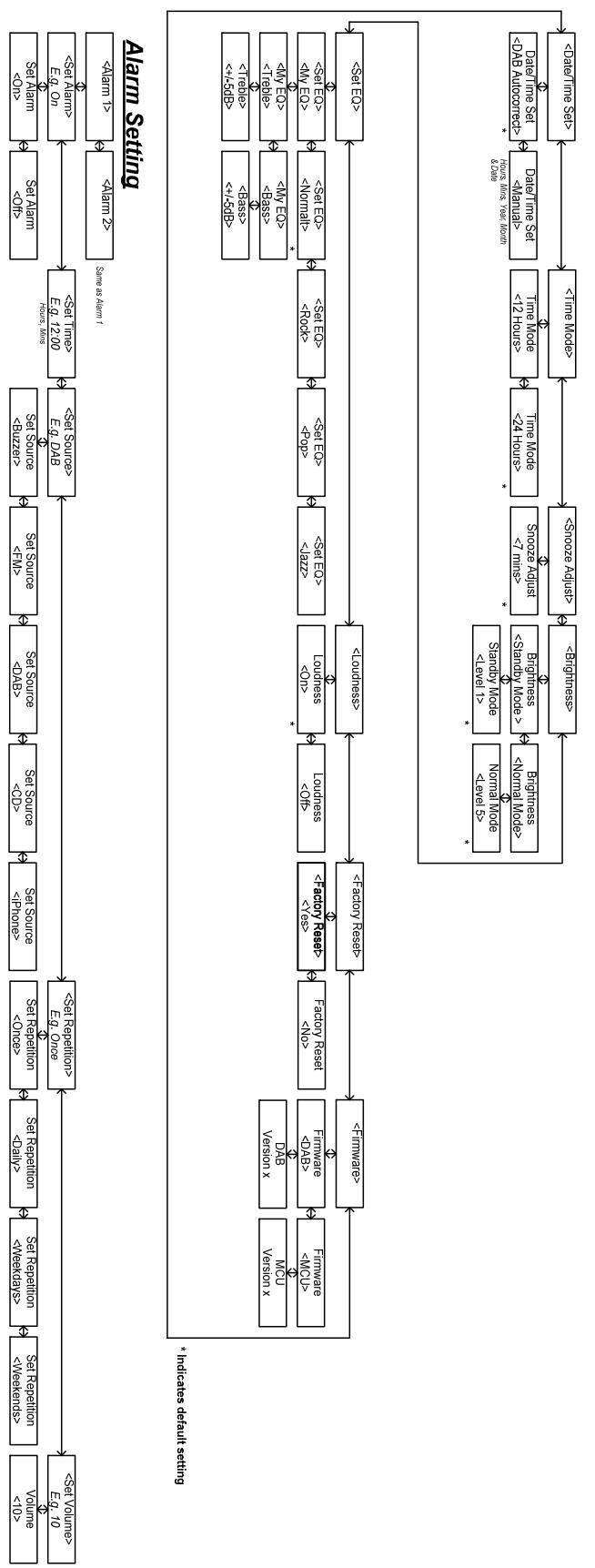
Menu Description in DAB Mode 11
Menu Description in FM Mode 12
Menu Description in iPhone/AUX Mode 13
Menu Description in CD Mode 14
Specifications 15
UK - USER MANUAL
Important information
Congratulations on your new radio.
Please read this manual carefully to avoid malfunction and damage to the radio and to ensure that the radio will be a source of great pleasure to you for a very long time.
- Do not expose the radio to direct sunlight, high humidity, dirt, heavy vibration or extreme temperatures.
- Place the unit on a solid and plane surface.
- Make sure that there is sufficient ventilation around the radio. Do not place the unit on a soft surface such as a carpet. Make sure that there is sufficient of clearance behind the unit.
- Do not open the cabinet. Only qualified technicians are allowed access to the internal parts.
- Make sure that liquid and foreign matter cannot enter the unit.
- If service or repair is required, this must be carried out by qualified technicians.
- Unplug the unit in the following cases:
A. The mains plug or the mains cable is defective.
B. Foreign matter or liquid has entered the radio.
C. The unit cannot be operated properly.
D. The unit has fallen down or the cabinet has been damaged.
- Store this instruction manual carefully for future reference.
- Use a duster or a slightly damp, soft and non-fluffy rag to clean the radio.
-
Do not use corrosive or strong cleaning agents. Make sure that no moisture penetrates the radio during cleaning. Unplug the unit before cleaning.
-
Check that the mains voltage indicated on the AC-adaptor corresponds to the mains voltage that the unit is connected to.
- Unplug the unit if the radio is not to be used for a long time.
- Tangent has found that in situations where the supplied antenna is not used with the product, strong signals can interfere with normal performance.
Disclaimer
Despite extensive efforts we cannot guarantee that the technical data indicated are correct, complete and updated. We reserve the right to make technical changes without notice.
Front panel
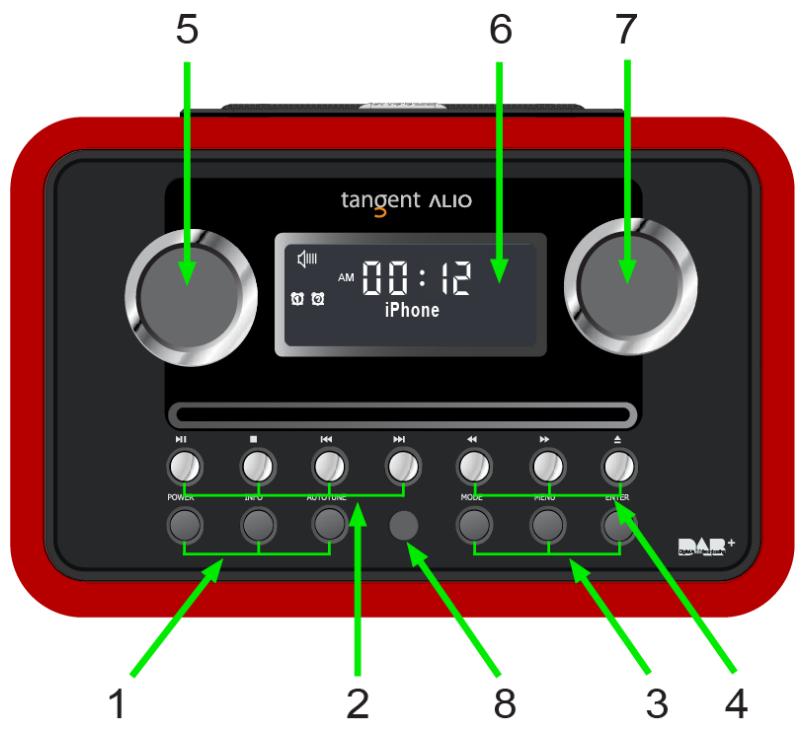
- POWER, INFO and AUTOTUNE:
A. POWER: Press this button to toggle the radio between ON and standby.
B. INFO: In DAB/DAB+, FM mode, while receiving a broadcast signal, press this button to display queue information.
C. AUTOTUNE: In DAB/DAB+ mode press this button to make a quick scan; In FM mode, press this button to autotune.
2.
iPhone/iPod and CD mode only:
A. Press or once to go to the previous or next track respectively.
B. Press▶to pause, press▶ again to continue enjoying.
C. Press to stop, press to exit stop.
- MODE, MENU and ENTER:
A. MODE: Press this button to shift between DAB/DAB+, FM, iPhone, CD and AUX.
CD and AUX are only featured when a plug or disc is present.
B. MENU: Press this button to access the menu.
C. ENTER: a. Press this button to confirm.
4.
CD mode only:
A. While playing a track, press and hold or to fast back- or forward.
B. Press to eject a CD from the CD slot.
- VOLUME:
Turn this knob CW to increase the volume or CCW to decrease the volume. - DISPLAY SCREEN: LCD featuring special icons.
- TUNE: Turn this knob to browse options.
- IR Receiver: Infrared receiver eye.
Top panel
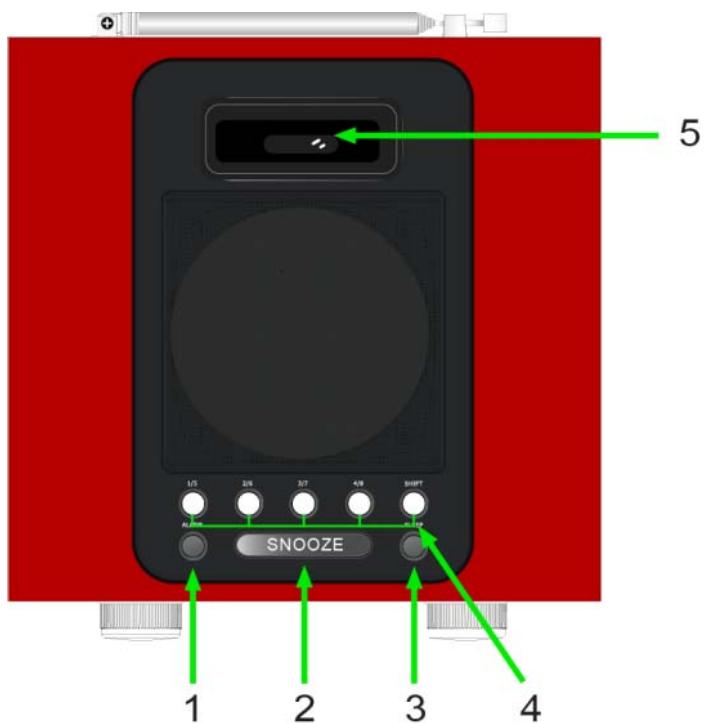
- ALARM: Press this button to set an alarm.
- SNOOZE: When an alarm is given, press this button to postpone it for 7 minutes (default). While under SNOOZE function, the display of the radio will indicate Snooze, during this time, if you press any another button, snooze will be canceled.
- SLEEP: Press this button to amend the sleep setting.
- Preset buttons 1/5 2/6 3/7 4/8 and SHIFT: DAB/DAB+ and FM mode use only:
A. To store a station in preset 1-4: press and hold the preferred preset button, until the display indicates 'Preset # stored'.
B. To store a station in preset 5-8: press the SHIFT button once, press and hold the preferred preset button, until the display indicates 'Preset # stored'.
C. To recall a stored in preset station 1-4: press the preferred preset button once.
D. To recall a stored in preset station 5-8: press the SHIFT button once, press the preferred preset button once.
- iPhone/iPod Docking: For playback and charging an iPhone/iPod.
Rear panel

- AUX: Connect any stereo or mono audio source to this stereo input.
- POWER SUPPLY: 12VDC = 2.0A (3A stereo version), use this input to connect the radio's DC power supply.
- EXTERNAL ANTENNA: The radio comes with a telescopic antenna. To improve FM reception, angle the antenna for best the reception.
Remote control
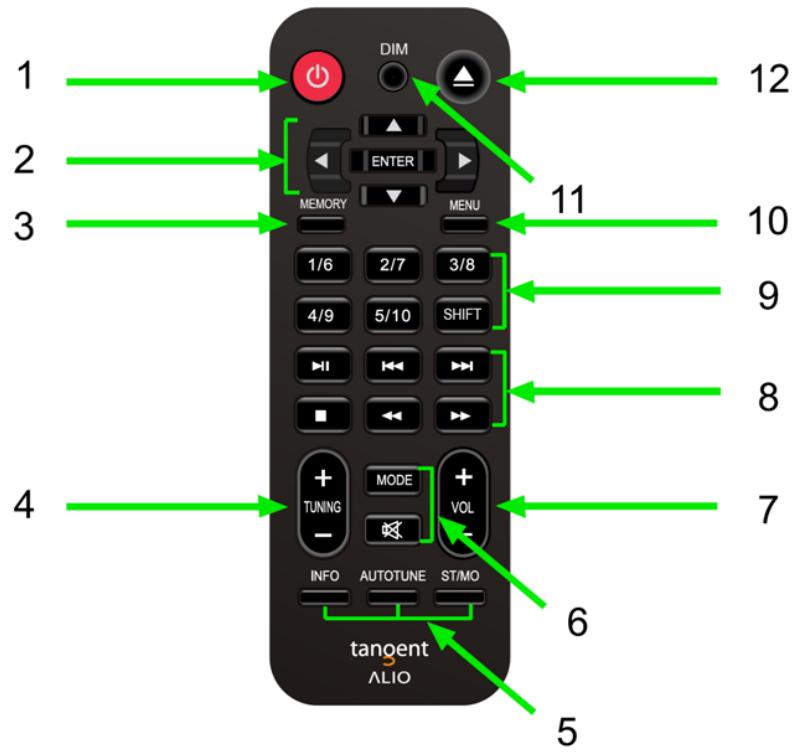
- POWER: Press this button to toggle the radio between ON and standby.
- A. For navigation of the menu, iPhone/iPod and CD.
B. ENTER: Press this button to confirm. - MEMORY: No function.
-
- TUNING -:
A. Stations can be tuned manually in 0.05MHz steps.
B. In DAB mode, press this button to toggle the station list.
- INFO, AUTOTUNE and ST/MO:
A. INFO: In DAB/DAB+, FM mode, while receiving a broadcast signal, press this button to display queue information.
B. AUTOTUNE: In DAB/DAB+ mode press this button to make a quick scan; In FM mode, press this button to autotune.
C. ST/MO: In DAB/DAB+ or FM mode, press this button to shift between stereo or mono.
- MODE and
A. MODE: Press this button to shift between DAB/DAB+, FM, iPhone, CD and AUX. CD and AUX are only featured when a plug or disc is present.
B. Press this button to mute or unmute.
-
- VOL -: Press this button to adjust the volume level.
8.
- VOL -: Press this button to adjust the volume level.
Same as front panel section.
- Preset buttons 1/6 2/7 3/8 4/9 5/10 and SHIFT:
Same as top panel section. - MENU: Press this button to access the menu.
- DIM: Press this button to adjust dimmer.
- : Press to eject a CD from the CD slot.
Menu Description in DAB Mode

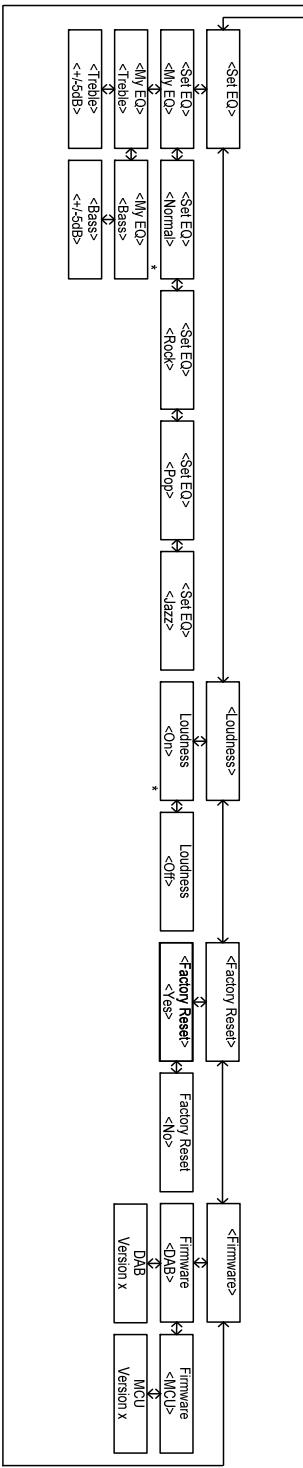
Menu Description in FM Mode


Bnssesineepseepieepie
Menu Description in iPhone/AUX Mode
| <0> | <1> | <2> | <3> | <4> | <5> | <6> | <7> | <8> | <9> | <10> | <11> | <12> |
| # | # | # | # | # | # | # | # | # | # | # | # | # |
| # | # | # | # | # | # | # | # | # | # | # | # | # |
| # | # | # | # | # | # | # | # | # | # | # | # | # |
| # | # | # | # | # | # | # | # | # | # | # | # | # |
| # | # | # | # | # | # |
| x x x x x x x x x x x x x x x x x x x x x x x x x x x x x x x x x x x x x x x x x x x x x x x x x x x |
| <§S> | <§L> | <§A> | <§P> | <§Q> | <§R> | <§S> | <§T> | <§U> |
| <§B> | <§C> | <§D> | <§E> | <§F> | <§G> | <§H> | <§I> | <§J> |
| <§K> | <§L> | <§M> | <§N> | <§O> | <§P> | <§Q> | <§R> | <§S> |
| <§T> | <§U> | <§V> | <§W> | <§X> | <§Y> | <§Z> | <§W> | <§X> |
| <§U> | <§V> | <§W> | <§X> | <§Y> | <§Z> | <§W> | <§X> | <§Y> |
Bnssesepesep
Menu Description in CD Mode

Specifications
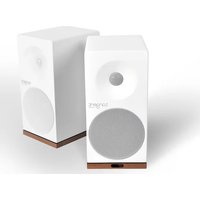
Speaker: 3.5" wide range speaker (3" stereo version)
Power Output: 10 Watt RMS@1% THD (2x 10W stereo version)
Connections: 3,5mm jack for stereo analog audio AUX input
12 V DC input
Power: DC 12V/2A (3A stereo version)
Tuner Band: FM (87.5 - 108MHz)
DAB/DAB+ (174 - 240MHz) same as Band I, II and III
CD Decoding: Regular CD, WMA and MP3 (ID3-tag)
Dimensions: 210 × 135 × 200 ~mm (W x H x D)
370 × 135 × 200 ~mm (stereo version)
All specifications are subject to change without notice.

Made for iPhone

Made for iPod
iPhone, iPod, iPod classic, iPod nano, iPod shuffle, and iPod touch are trademarks of Apple Inc., registered in the U.S. and other countries. iPad is a trademark of Apple Inc.
Sommaire
| X U S I O N T O N | X U S I O N B D | |||||||
| <§S> | <§E> | <§I> | <§J> | <§K> | <§L> | <§M> | <§N> | <§O> | <§P> | <§Q> | <§R> | <§S> | <§T> | <§U> | <§V> | <§W> | <§X> |
| <§P> | <§E> | <§I> | <§J> | <§K> | <§L> | <§M> | <§N> | <§O> | <§P> | <§Q> | <§R> | <§S> | <§T> | <§U> | <§V> | <§W> | <§X> |
| <§Q> | <§P> | <§I> | <§J> | <§K> | <§L> | <§M> | <§N> | <§O> | <§P> | <§Q> | <§R> | <§S> | <§T> | <§U> | <§V> | <§W> | <§X> |
| <§R> | <§P> | <§I> | <§J> | <§K> | <§L> | <§M> | <§N> | <§O> | <§P> | <§Q> | <§R> | <§S> | <§T> | <§U> | <§V> | <§W> | <§X> |
| <§S> | <§P> | <§I> | <§J> | <§K> | <§L> | <§M> | <§N> | <§O> | <§P> | <§Q> | <§R> | <§S> | <§T> | <§U> | <§V> | <§W> | <§X> |
Bunssnneepseaeip
Description du menu en mode iPhone/AUX
Dimensions : 210 x 135 x 200mm (I x H x P)
370 × 135 × 200 ~mm (en version stériso)
iPhone, iPod, iPod classic, iPod nano, iPod shuffle, and iPod touch are trademarks of Apple Inc., registered in the U.S. and other countries. iPad is a trademark of Apple Inc.
Inhaltsverzeichnis
iPhone, iPod, iPod classic, iPod nano, iPod shuffle, and iPod touch are trademarks of Apple Inc., registered in the U.S. and other countries. iPad is a trademark of Apple Inc.
Inhoudsopgave
iPhone, iPod, iPod classic, iPod nano, iPod shuffle, and iPod touch are trademarks of Apple Inc., registered in the U.S. and other countries. iPad is a trademark of Apple Inc.
Indhold
Indhold 58
DK-BRUGERMANUAL 59
Frontpanel 61
Toppanel 63
Bagpanel 64
Fjernbetjening 65
Beskrivelse af DAB-menuen 67
Beskrivelse af FM-menuen 68
Beskrivelse af menuerne for iPhone/AUX 69
Beskrivelse af CD-menuen. 70
Specificationer 71
DK - BRUGERMANUAL
Vigtig information

Bnssnnneepnnepepepepepepepepepepepepepepepepepepepepepepepepepepepepepepepepepepepepepepepepepepepepepepepepepepepepepepepepepepepepepepepepepepepepepepepepepepepepepepepepepepepepepepepepepepepepepepepepepepe
Beskrivelse af CD-menuen

Specificationer
Strømforsyning: DC 12V/2A (3A stereoversion)
Frekvensbänd: FM (87,5 - 108MHz)
iPhone, iPod, iPod classic, iPod nano, iPod shuffle, and iPod touch are trademarks of Apple Inc., registered in the U.S. and other countries. iPad is a trademark of Apple Inc.
Innehäll
Innehall 72
SE- BRUKSANVISNING. 73
Frampanel. 75
Övre panel. 77
Bakpanel. 78
Fjarrkontroll 79
Menybeskrivning i DAB mode. 81
Menybeskrivning i FM mode. 82
Menybeskrivning i iPhone/AUX mode. 83
Menybeskrivning i CD mode. 84
Specificationer 85
SE - BRUKSANVISNING
Viktig information
Grattis till dinnya radio.
Ström: DC 12V/2A (3A stereo version)
Frekvensband: FM (87.5 - 108MHz)
iPhone, iPod, iPod classic, iPod nano, iPod shuffle, and iPod touch are trademarks of Apple Inc., registered in the U.S. and other countries. iPad is a trademark of Apple Inc.
Sisallysluettelo
iPhone, iPod, iPod classic, iPod nano, iPod shuffle, and iPod touch are trademarks of Apple Inc., registered in the U.S. and other countries. iPad is a trademark of Apple Inc.
Indice
iPhone, iPod, iPod classic, iPod nano, iPod shuffle, and iPod touch are trademarks of Apple Inc., registered in the U.S. and other countries. iPad is a trademark of Apple Inc.
Conteudos
iPhone, iPod, iPod classic, iPod nano, iPod shuffle, and iPod touch are trademarks of Apple Inc., registered in the U.S. and other countries. iPad is a trademark of Apple Inc.

DESIGN - PERFORMANCE - AFFORDABILITY
THE OBJECTIVE OF EVERY TANGENT PRODUCT IS THAT FUNDAMENTALLY CORRECT DESIGN CAN PRODUCE A PRODUCT CAPABLE OF ACHIEVING EXCELLENT PERFORMANCE AND AFFORDABILITY.
www.tangent-audio.com
Item no.: 40632.01

- Contents
- UK - USER MANUAL
- Important information
- Disclaimer
- Front panel
- Top panel
- Rear panel
- Remote control
- Menu Description in DAB Mode
- Menu Description in FM Mode
- Menu Description in iPhone/AUX Mode
- Menu Description in CD Mode
- Specifications
- Made for iPhone
- Made for iPod
- Sommaire
- Description du menu en mode iPhone/AUX
- Inhaltsverzeichnis
- Inhoudsopgave
- Indhold
- DK - BRUGERMANUAL
- Vigtig information
- Beskrivelse af CD-menuen
- Specificationer
- Innehäll
- SE - BRUKSANVISNING
- Viktig information
- Sisallysluettelo
- Indice
- Conteudos
Brand : TANGENT
Model : ALIO CD-DAB
Category : CD player radio