SONOS PLAYBAR SUB 2 PLAY:1 - Wireless audio system

PLAYBAR SUB 2 PLAY:1 - Wireless audio system SONOS - Free user manual and instructions

Find the device manual for free PLAYBAR SUB 2 PLAY:1 SONOS in PDF.

📄 10 pages English EN Download 💬 AI Question 10 questions ⚙️ Specs
Notice SONOS PLAYBAR SUB 2 PLAY:1 - page 3
View the manual : Français FR English EN
Pick your language and provide your email: we'll send you a specifically translated version.
Product type Multi-channel wireless audio system
Brand SONOS
Model PLAYBAR SUB 2 PLAY:1 (Playbar + Sub + 2×Play:1 bundle)
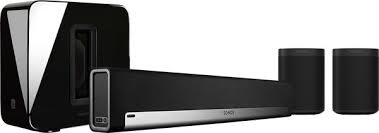
Components Playbar soundbar, Sub subwoofer, two Play:1 surround speakers
Power supply Mains (power cables provided for each component)
Network connection Wi-Fi (home network, Sonos app required)
Main features Multiroom, home cinema, Trueplay acoustic calibration, voice control via assistant
Compatibility AirPlay 2, Spotify Connect, Tidal, Deezer, internet radio
Dimensions (Playbar) 85.1 × 8.6 × 13.9 cm
Dimensions (Sub) 38.9 × 38.9 × 38.5 cm
Dimensions (Play:1) 16.1 × 12.0 × 12.0 cm (each)
Weight (Playbar) 4.1 kg
Weight (Sub) 11.8 kg
Weight (Play:1) 1.85 kg (each)
Care and cleaning Soft, dry cloth; avoid abrasive products and solvents
Safety Do not expose to moisture; unplug during storms; do not block the grilles
Warranty 2 years (manufacturer)

Frequently Asked Questions - PLAYBAR SUB 2 PLAY:1 SONOS

How to configure the Sonos PLAYBAR SUB 2 PLAY:1 system?
Download the Sonos app on your smartphone. Follow the instructions to add each component: plug in the Playbar, Sub and Play:1, then in the app, select Add a component. Make sure all devices are on the same Wi-Fi network.
Can I use the Sub without the Playbar?
Yes, the Sub can work with other Sonos speakers (Play:1, Five, etc.). In the app, associate the Sub with a room containing a compatible speaker via Settings > Add a Sub.
How to connect my Play:1 speakers as surround?
In the Sonos app, go to Settings > System > Products. Select the Playbar's room, then Set as surround. Follow the instructions to pair the Play:1 as rear speakers.
Does the system work with Alexa or Google Assistant?
Yes, the Playbar is compatible with Amazon Alexa and Google Assistant via a dedicated device (Echo Dot, Google Nest) or via the Sonos app. Enable the skill in the app.
What to do if the Sub does not connect?
Check that the Sub is powered on and its light is flashing. In the app, go to Settings > Add a component. If the problem persists, restart the router and the Sub, or perform a reset by holding the join button for 5 seconds.
How to update the Sonos software?
The Sonos app automatically checks for updates. To force an update, go to Settings > Software update. Make sure all components are on and connected to the network.
Can I add other Sonos speakers later?
Yes, the Sonos system is expandable. Use the app to Add a component and integrate any compatible Sonos speaker (Five, One, Move, etc.) into your existing setup.
How to clean the speakers?
Use a soft, dry cloth to dust the grilles and casing. Never use chemicals or wet wipes. For the grilles, a low-power vacuum cleaner can be used.
Is the system compatible with the TV?
Yes, the Playbar connects to the TV via an optical cable (included). Make sure the TV outputs audio in PCM or Dolby Digital format. In the app, adjust the audio delay if necessary.
What to do in case of Wi-Fi connection loss?
Check that your router is working and the speakers are within Wi-Fi range. Restart the router and the Sonos components. If the problem persists, use an Ethernet cable to connect a component directly to the router, which stabilizes the Sonos network.

User questions about PLAYBAR SUB 2 PLAY:1 SONOS

0 question about this device. Answer the ones you know or ask your own.

Ask a new question about this device

The email remains private: it is only used to notify you if someone responds to your question.

No questions yet. Be the first to ask one.

Download the instructions for your Wireless audio system in PDF format for free! Find your manual PLAYBAR SUB 2 PLAY:1 - SONOS and take your electronic device back in hand. On this page are published all the documents necessary for the use of your device. PLAYBAR SUB 2 PLAY:1 by SONOS.

USER MANUAL PLAYBAR SUB 2 PLAY:1 SONOS

If a software update is available, let Sonos update before adding the SUB.

SONOS PLAYBAR SUB 2 PLAY:1 - 1
ROUTER

SONOS PLAYBAR SUB 2 PLAY:1 - 2

SONOS PLAYBAR SUB 2 PLAY:1 - 3
BRIDGE

SONOS PLAYBAR SUB 2 PLAY:1 - 4
PLAY:5

SONOS PLAYBAR SUB 2 PLAY:1 - 5
PLAY:3

SONOS PLAYBAR SUB 2 PLAY:1 - 6
CONNECT:AMP

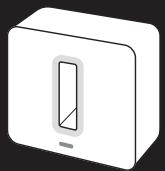
2 PLACE THE SUB ANYWHERE ON THE FLOOR

STANDING UP OR LYING FLAT, IN A CORNER, AGAINST A WALL, OR UNDER YOUR FURNITURE - WHEREVER IT BEST FITS YOUR ROOM.
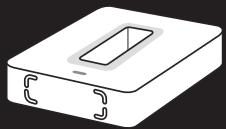
SONOS PLAYBAR SUB 2 PLAY:1 - PLACE THE SUB ANYWHERE ON THE FLOOR - 1

SONOS PLAYBAR SUB 2 PLAY:1 - PLACE THE SUB ANYWHERE ON THE FLOOR - 2

SONOS PLAYBAR SUB 2 PLAY:1 - PLACE THE SUB ANYWHERE ON THE FLOOR - 3

SONOS PLAYBAR SUB 2 PLAY:1 - PLACE THE SUB ANYWHERE ON THE FLOOR - 4

If placing the SUB lying flat on a smooth floor, attach the felt feet included with the SUB.

SONOS PLAYBAR SUB 2 PLAY:1 - PLACE THE SUB ANYWHERE ON THE FLOOR - 5

APPLY POWER

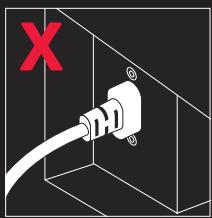
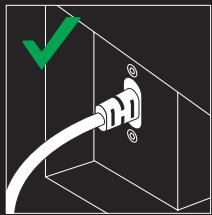
PUSH THE POWER CORD ALL THE WAY INTO THE SUB.
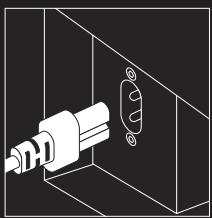
SONOS PLAYBAR SUB 2 PLAY:1 - APPLY POWER - 1

SONOS PLAYBAR SUB 2 PLAY:1 - APPLY POWER - 2

SONOS PLAYBAR SUB 2 PLAY:1 - APPLY POWER - 3

SONOS PLAYBAR SUB 2 PLAY:1 - APPLY POWER - 4

ADD THE SUB TO SONOS

CHOOSE A CONTROLLER AND SELECT "ADD A SONOS COMPONENT" FROM THE SETTINGS MENU.

SONOS PLAYBAR SUB 2 PLAY:1 - ADD THE SUB TO SONOS - 1
JOIN BUTTON

When prompted, press and release the JOIN button to add the SUB to your Sonos Wireless HiFi System.

FRANÇAIS

CONFIGUREZ-LE

No question is too big or too small.

Website

www.sonos.com/support

Email

support@sonos.com

Product User Guides

www.sonos.com/guides

Telephone

France 0800-910769

Germany 0800-0005339

Italy 0421-57141

Netherlands 0800-0234361

Spain 0917482942

Sweden 0207 93593

UK 08082346596

US and Canada 18006802345

SONOS®

© 2004-2012 Sonos Inc. All rights reserved. Sonos,

The Wireless HiFi System, SUB and all other Sonos

product names and slogans are trademarks or registered

trademarks of Sonos, Inc. Sonos Reg. U.S. Pat & TM Off.

The foam material used to package your SONOS SUB is fully recyclable.

SONOS PLAYBAR SUB 2 PLAY:1 - SONOS® - 1

SONOS PLAYBAR SUB 2 PLAY:1 - SONOS® - 2

Manual assistant
Powered by Anthropic
Waiting for your message
Product information

Brand : SONOS

Model : PLAYBAR SUB 2 PLAY:1

Category : Wireless audio system