
SL 1200 - Amplifier DYNACORD - Free user manual and instructions
Find the device manual for free SL 1200 DYNACORD in PDF.



| Product type | Professional power amplifier |
| Brand | DYNACORD |
| Model | SL 1200 |
| Amplification class | Class A |
| Output power | 2 x 600 W at 4 ohms |
| Load impedance | 4 ohms (compatible with 8 ohms) |
| Frequency response | 20 Hz - 20 kHz (±0.5 dB) |
| Total harmonic distortion | < 0.05% |
| Signal-to-noise ratio | > 100 dB |
| Inputs | Balanced XLR, 6.35 mm jack |
| Speaker outputs | Screw terminals |
| Power supply | 230 V AC, 50/60 Hz |
| Power consumption | 1200 W |
| Dimensions (W x H x D) | 483 x 88 x 350 mm (19", 2U) |
| Weight | 12 kg |
| Cooling | Forced ventilation |
| Protections | Short circuit, thermal, DC |
| Care and cleaning | Clean with a dry, soft cloth. Do not use solvents. Disconnect before any maintenance. |
| Safety | Do not open the device. Entrust any repairs to a qualified technician. Protect from moisture. |
| Spare parts and repairability | Parts available upon request. Repair by an authorized professional. |
| General information | Complies with Canadian standard NMB-003. |
Frequently Asked Questions - SL 1200 DYNACORD
User questions about SL 1200 DYNACORD
0 question about this device. Answer the ones you know or ask your own.
Ask a new question about this device
Download the instructions for your Amplifier in PDF format for free! Find your manual SL 1200 - DYNACORD and take your electronic device back in hand. On this page are published all the documents necessary for the use of your device. SL 1200 by DYNACORD.
USER MANUAL SL 1200 DYNACORD
Welcome 5
Unpacking and Inspection 5
Scope of Delivery and Warranty 5
Features and Description 5
Responsibility of the User 5
Installation 7
Controls, Indicators and Connections 7
Operating Voltage 8
Mains Switch 8
Mounting 8
Ventilation 8
Groundlift 9
LPN-Filter 9
Selecting the Mode Of Operation and Audio Output Cabling 9
Audio Input Cabeling 10
Operation 12
Volume Control 12
Indications 12
FAN Cooling 12
INHALT
Beschreibung 16
IMPORTANT SAFETY INSTRUCTIONS
| CAUTION RISK OF ELECTRIC SHOCK DO NOT OPEN | |
| WARNING: TO REDUCE THE RISK OF FIRE OR ELECTRIC SHOCK, DO NOT EXPOSE THIS APPLIANCE TO RAIN OR MOISTURE. AVIS: RISQUÉ DE CHOC ELECTRIQUE. NE PAS OUVIR. | |
| WARNING: CONNECT ONLY TO MAINS SOCKET WITH PROTECTIVE EARTHING CONNECTION. | |
The lightning flash with arrowhead symbol, within an equilateral triangle is intended to alert the user to the presence of uninsulated "dangerous voltage" within the product's enclosure that may be of sufficient magnitude to constitute a risk of electric shock to persons.

The exclamation point within an equilateral triangle is intended to alert the user to the presence of important operating and maintenance (servicing) instructions in the literature accompanying the appliance.
- Read these instructions.
- Keep these instructions.
- Heed all warnings.
- Follow all instructions.
- Do not use this apparatus near water.
- Clean only with a dry cloth.
- Do not cover any ventilation openings. Install in accordance with the manufacture's instructions.
- Do not install near heat sources such as radiators, heat registers, stoves, or other apparatus (including amplifiers) that produce heat.
- Do not defeat the safety purpose of the polarized or the grounding-type plug. A polarized plug has two blades with one wider than the other. A grounding type plug has two blades and a third grounding prong. The wide blade or the third prong are provided for your safety. I the provided plug does not fit into your outlet, consult an electrician for replacement of the obsolete outlet.
- Protect the power cord from being walked on or pinched particularly at plugs, convenience receptacles, and the point where they exit from the apparatus.
- Only use attachments/accessories specified by the manufacturer.
- Use only with the cart, tripod, bracket, or table specified by the manufacturer, or sold with the apparatus. When a cart is used, use caution when moving the cart/apparatus combination to avoid injury from tip-over.

- Unplug this apparatus during lightning storms or when unused for a long period of time.
- Refer all servicing to qualified service personnel. Servicing is required when the apparatus has been damaged in any way, such as power-supply cord or plug is damaged, liquid has been spilled or objects have fallen into the apparatus, the apparatus has been exposed to rain or moisture, does not operate normally, or has been dropped.
- Do not expose this equipment to dripping or splashing and ensure that no objects filled with liquids, such as vases, are placed on the equipment.
- To completely disconnect this equipment from the AC Mains, disconnect the power supply cord plug from the AC receptacle.
- The mains plug of the power supply cord shall remain readily operable.
IMPORTANT SERVICE INSTRUCTIONS
CAUTION: These servicing instructions are for use by qualified personnel only. To reduce the risk of electric shock, do not perform any servicing other than that contained in the Operating Instructions unless you are qualified to do so. Refer all servicing to qualified service personnel.
- Security regulations as stated in the EN 60065 (VDE 0860 / IEC 65) and the CSA E65 - 94 have to be obeyed when servicing the appliance.
- Use of a mains separator transformer is mandatory during maintenance while the appliance is opened, needs to be operated and is connected to the mains.
- Switch off the power before retrofitting any extensions, changing the mains voltage or the output voltage.
- The minimum distance between parts carrying mains voltage and any accessible metal piece (metal enclosure), respectively between the mains poles has to be 3mm and needs to be minded at all times. The minimum distance between parts carrying mains voltage and any switches or breakers that are not connected to the mains (secondary parts) has to be 6mm and needs to be minded at all times.
- Replacing special components that are marked in the circuit diagram using the security symbol (Note) is only permissible when using original parts.
- Altering the circuitry without prior consent or advice is not legitimate.
- Any work security regulations that are applicable at the locations where the appliance is being serviced have to be strictly obeyed. This applies also to any regulations about the work place itself.
- All instructions concerning the handling of MOS-circuits have to be observed.
NOTE:

SAFETY COMPONENT (MUST BE REPLACED BY ORIGINAL PART)

FOR RECYCLING INFORMATION CONTACT YOUR DISTRIBUTOR OR VISIT OUR WEBSITE
WWW.EVIAUDIO.COM
WEEE RECYCLING/DISPOSAL INSTRUCTIONS
The Wheelie Bin symbol found on the product or in the manual indicates that this product must not be disposed of with other waste. It is in our category the manufacturer's responsibility to properly dispose of their waste electrical and electronic equipment (WEEE) at the end of its life. Due to the differences in each EU country's management of WEEE, please contact your local distributor. We are committed to facilitate our own electronic-waste-management-system, for the free of charge return of all EVI Audio GmbH products: Telex, Dynacord, ElectroVoice, Midas Consoles, KlarkTeknik and RTS. Arrangements are made with the dealer where you purchased the equipment from, for the returning of all unusable equipment at no cost, to the factory in Straubing, for environmental protective disposal.
1 Introduction
1.1 Welcome
Thank you for choosing Dynacord SL series amplifier. Please take time to consult this manual so that you can understand all the features built into your Dynacord amplifier and fully utilize all its performance capabilities.
1.2 Unpacking and Inspection
Carefully open the packaging and take out the power amplifier. Inspect the power amp's enclosure for damages that might have happened during transportation. Each amplifier is examined and tested in detail before leaving the manufacturing site to ensure that it arrives in perfect condition at your place. Please inform the transport company immediately, if the power amplifier shows any damage. Being the addressee, you are the only person who can claim damages in transit. Keep the cardboard box and all packaging materials for inspection by the transport company.
Keeping the cardboard box including all packing materials is also recommended, if the power amplifier shows no external damages.
CAUTION:
Do not ship the power amp in any other but its original packaging.
When shipping the power amp, make sure to always use its original box and packaging materials. Packing the power amplifier like it was packed by the manufacturer guarantees optimum protection from transport damage.
1.3 Scope of Delivery and Warranty
1 Power Amplifier
1 Owner's Manual (this document)
1 Mains Cord
4 Foot Stands
1 Warranty Certificate
Keep the original invoice that states the purchase/delivery date together with the warranty certificate at a safe place.
1.4 Features and Description
Dynacord SL series amplifiers offer a package of reliable high output power, high efficiency and legendary pro audio performance. They are the premium choice as system drive for a variety of mobile and club sound systems. Their comprehensive protection system includes circuitry against overheating, overload, short circuit, HF and DC as well as back-EMF and inrush current. Loudspeakers are protected by turn-on-delay relays.
The build-in patented LPN (Low-Pass-Notch) filter compensates for transient distortion in dynamic signals (such as kickdrums) to achieve a higher acoustic output and more punch.
1.5 Responsibility of the User
Speaker System Damage
SL power amps provide extremely high power output that might be dangerous for human beings as well as for the connected speaker systems. High output voltages can damage or even destroy the connected speaker systems, especially, when the SL amplifier is operated in bridged mode. Prior to connecting any loudspeakers, make sure to check the speaker system's specifications for continuous and peak power handling capacities. Even if amplification has been reduced through lowering the input level controls on the amplifier's front panel, it is still possible to achieve full power output with a sufficiently high input signal.
Danger at the Loudspeaker/Power Outputs
SL amplifiers are capable of producing dangerously high voltage output that is present at the output connectors. To protect yourself from electric shock, do not touch any blank speaker cables during operation of the power amp.
WARNING:
The terminals marked with are hazardous live and the external wiring connected to these terminals requires installation by an instructed person or the use of ready-made leads of cords.
RF-Interference (FCC Information USA)
-
IMPORTANT: Do not modify this unit! Changes or modifications not expressly approved by the manufacturer could void the user's authority, granted by the FCC, to operate the equipment.
-
NOTE: This equipment has been tested and found to comply with the limits for a Class A digital device, pursuant to Part 15 of the FCC Rules. These limits are designed to provide reasonable protection against harmful interference in a residential installation. This equipment generates, uses and can radiate radio frequency energy and, if not installed and used in accordance with the instructions, may cause harmful interference to radio communications. However, there is no guarantee that interference will not occur in a particular installation. If this equipment does cause harmful interference to radio or television reception, which can be determined by turning the equipment off and on, the user is encouraged to try to correct the interference by one or more of the following measures:
Reorient or relocate the receiving antenna
- Increase the separation between the equipment and receiver
- Connect the equipment into an outlet on a circuit different from that to which the receiver is connected
- Consult the dealer or an experienced radio/TV technician for help
This is a Class A product. In a domestic environment this product may cause radio interferences in which case the user may be required to take adequate measures.
This Class A digital apparatus complies with Canadian ICES-003.
2.1 Controls, Indicators and Connections
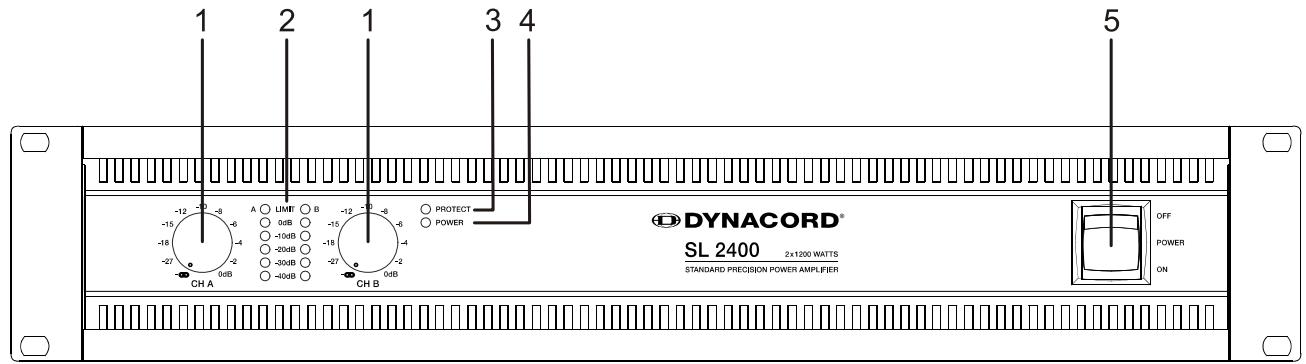
Front View
1 Input Level Control (CH A, CH B) for channels A and B
2 Level Indicators for channels A and B
3 Protections Indicator (PROTECT)
4 Power On/Off Indicator (POWER)
5 Mains Switch
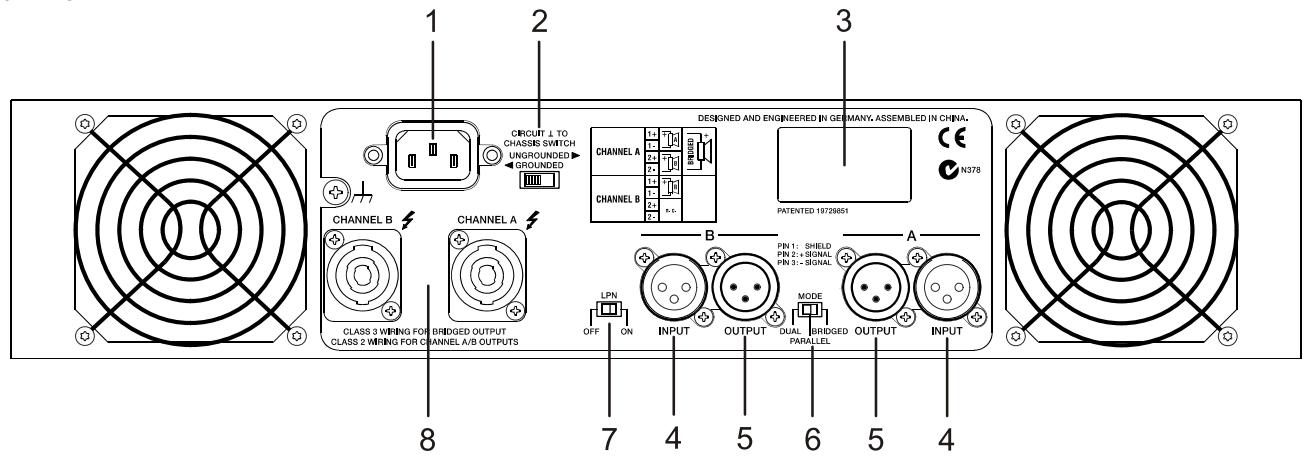
Rear View
1 Mains Input
2 Ground Lift Switch (CIRCUIT TO CHASSIS SWITCH)
3 Type Plate
4 Audio Inputs (INPUT A, INPUT B)
5 Audio Outputs (OUTPUT A, OUTPUT B)
6 Power Amp Mode Switch (MODE)
7 LPN Filter Switch (LPN)
8 Power Amp Outputs SpeakonTM (CHANNEL A, CHANNEL B)
2.2 Operating Voltage
The power amplifier receives its power supply via the Mains input. Only the provided power cord may be used. During installation, always separate the power amplifier from the mains. Connect the power amplifier only to a mains network, which corresponds to the requirements indicated on the type plate.
2.3 Mains Switch
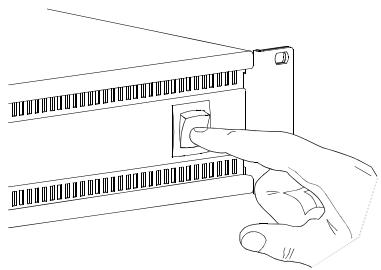
The Mains Switch on the front panel separates the power amp from the mains. Turning the Mains Switch to ON starts booting up the power amp. A soft start circuit compensates mains inrush current peaks and thus prevents the automatic cutout of the mains from reacting when switching on the power amplifier. Speaker system switch-on is delayed by approximately 2 seconds via output relays, effectively suppressing any possible power-on noise, which otherwise might be heard through the loudspeakers. PROTECT-LED lights up and fans are at high speed during this delay. This indicates all protections are working fine.
2.4 Mounting
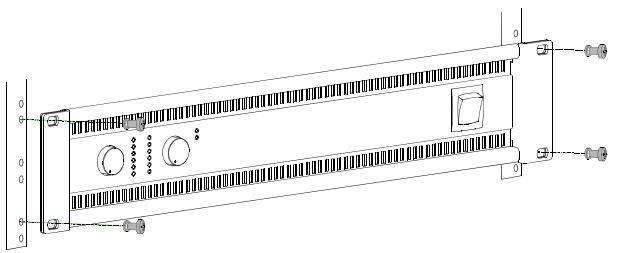
SL amplifiers have been designed for installation in a conventional 19-inch rack case. Attach the power amp with its frontal rack mount ears using 4 screws and washers as shown in following illustration.
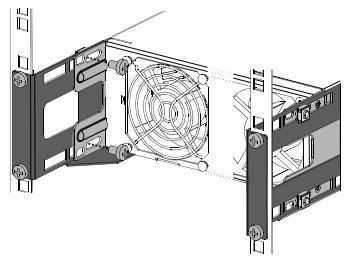
Additionally securing the amplifier at the rear becomes necessary, if the rack case in which the power amplifier has been installed will be transported. Failure to do so may result in damage to the power amplifier as well as to the rack case. Attach the power amp as shown in the illustration using 4 case nuts and screws. Brackets for securing the power amplifier are available as accessories.
2.5 Ventilation
As with all Dynacord power amps with fan cooling, the airflow direction is front-torear, obviously because there is more cold air outside of the rack case than inside. The power amplifier remains cooler and dissipating the developing waste heat in a specific direction gets easier. In general, setting up or mounting the power amplifier has to be done in a way that fresh air can enter unhindered at the front and exhausted air can exit at the rear. When installing the power amp in a case or rack system, attention should be paid to these details to provide sufficient ventilation. Allow for an air duct of at least 60mm× 330mm between the rear panel of the power amplifier and the inner wall of the cabinet/rack case. Make sure that the duct reaches up to the cabinet's or the rack case's top ventilation louvers. Leave room
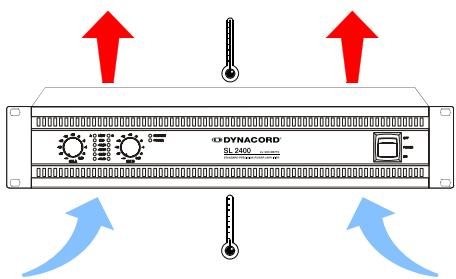
of at least 100mm above the cabinet/rack case for ventilation. Since temperatures inside of the cabinet/rack case can easily rise up to 40^ during operation of the power amp, it is mandatory to bear in mind the maximum allowable ambient temperature for all other appliances installed in the same cabinet/rack case.
CAUTION:
Blocking/closing the power amp's ventilation louvers is not permissible. Without sufficient cooling/ventilation, the power amplifier may automatically enter protect mode. Keep ventilation louvers free from dust to ensure unhindered airflow.
Do not use the power amplifier near heat sources, like heater blowers, stoves or any other heat radiating devices.
To ensure trouble-free operation, make certain that the maximum allowable ambient temperature of +40^ is not exceeded.
2.6 Groundlift
The ground lift switch allows for eliminating noise loops. When operating the power amplifier together with other equipment in a rack case, setting the switch to the GROUNDED position is recommended. Set the switch to UNGROUNDED, when the power amplifier is operated together with appliances with differing ground potentials.
2.7 LPN-Filter
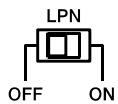
CIRCUIT TO CHASSIS SWITCH UNGROUNDED GROUNDED
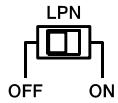
The patented LPN (Low-pass notch) filter corrects the frequency and phase response of the connected loudspeakers. This effect can not be reached using equalizers or „Bass-Boosters“, because the LPN filter mainly optimizes the rise time of the audio signal. Switch the filter ON or OFF for evaluation of the actual effect that the filter has on the sound. The sound is getting more powerful, especially when using fullrange speakers (e.g. 12/2, 15/2) or subwoofer. For large systems (e.g. controlled via DC's DSP 260) using the LPN filter is not recommended.
2.8 Selecting the Mode Of Operation and Audio Output Cabling
The MODE switch on the power amp's rear panel defines how the audio inputs handle the input signals. Possible settings are DUAL, PARALLEL or BRIDGED.
DUAL
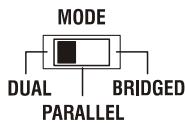
In DUAL mode, the two channels of the power amplifier work independent from each other. This mode of operation is being used for all 2-channel applications, like stereo operation. Using the input level controls on the power amp's front panel allows independently adjusting the channels' amplification.
PARALLEL
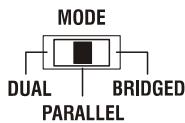
In PARALLEL mode, the inputs of channel A and channel B are directly electrically linked. The audio signal has to be applied to the input connectors of channel A. Using the input level controls to independently control the amplification of the two channels is still possible because only the channels' inputs are linked. PARALLEL operation is the mode of choice, whenever the same input signal drives multiple power amp channels of a large system installation.
CAUTION:
In PARALLEL mode, the input signal has to be fed to input channel A only.
Typical Speaker System Cabling
The first possibility in DUAL or PARALLEL mode is to use the two Speakon-type connectors, whereas speakers have to be connected to pins 1+ and 1- of the sockets. The correct connection is also indicated at the amplifiers rear panel.
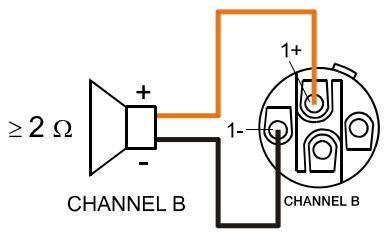
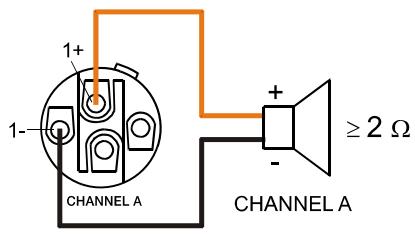
Bi-Amp Cabling
The second possibility for connecting the speakers when the power amplifier is operated in DUAL or PARALLEL mode is to only use the Speakon-type connector CHANNEL A and to connect one speaker cabinet to pins 1+ and 1-, as described above and the second cabinet to pins 2+ and 2- as shown in illustration. Only pins 2+ and 2- of the Speakon CHANNEL A connector are assigned. Proceeding like this facilitates the cabling of speaker systems that are used in active 2-way operation (Bi-Amp). The correct connection is also indicated at the amplifiers rear panel.
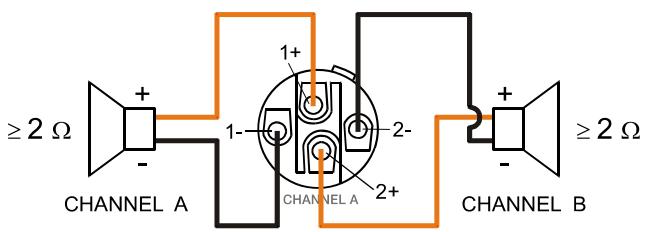
Table 2.1: Speaker connection using Speakon A and B connectors
| Speakon CHANNEL B | Speakon CHANNEL A | |||||
| 1+ | 1- | Connector | 1+ | 1- | 2+ | 2- |
| B+ | B- | Signal | A+ | A- | B+ | B- |
BRIDGED
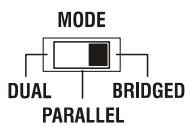
In BRIDGED mode both amp channels work in push-pull operation to provide doubled output voltage. The audio signal has to be applied to the input connectors of channel A, amplification is set via input level control of channel A only.
CAUTION:
In BRIDGED mode, the input signal has to be fed to input channel A only. Amplification is set via input level control of channel A only.
In bridged mode operation speaker connection has to be established using pins 1+ and 2- of the Speakon socket CHANNEL A, see illustration right. The correct connection is also indicated at the amplifiers rear panel.
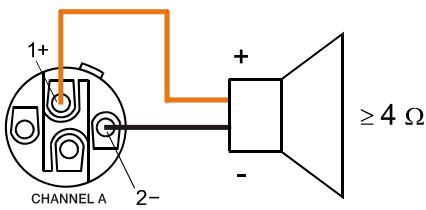
Table 2.2: Speaker connection using Speakon A
| Speakon CHANNEL A | ||
| Anschluss | 1+ | 2- |
| Belegung | Bridged+ | Bridged- |
CAUTION:
In BRIDGED mode operation, it is not allowable for the load connected to fall below a value of 4 ohms. Extremely high voltages can be present at the output. The connected speaker systems must be able to handle such voltages. Make sure to completely read and fully observe power rating specifications of the speaker systems to be used and to check them against the output power capacity of the power amp.
2.9 Audio Input Cabling
Inputs INPUT A and INPUT B are electronically balanced. The pin-assignment of XLRF-type connectors is in accordance with the IEC standard 268.
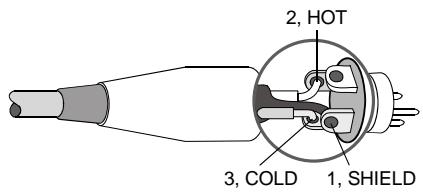
Illustration 2.1: Balanced connection of input
Whenever possible, using balanced audio signal feeds at the input of the power amplifier is always preferred. Unbalanced connections should only be used if the cables are very short and no interfering signals are to be expected in the vicinity of the power amplifier. In this case, bridging the screen (shielding) and the pin of the inverting input inside of the connector is
mandatory. Otherwise, a 6 dB drop in level could result. Please also see illustration 2.11. Due to their immunity against external interference sources, such as dimmers, mains connections, HF-control lines, etc., using balanced cabling and connections is always preferable.
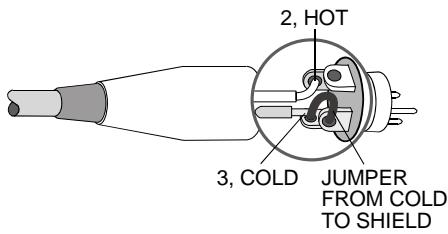
Illustration 2.2: Unbalanced connection of input
Next to its input connector, each channel provides an individual XLR-type connector (OUTPUT A or OUTPUT B), which is connected in parallel to allow for comfortably daisy-chaining the audio signal for the connection of additional audio equipment.
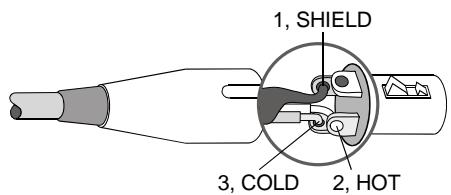
Illustration 2.3: Balanced connection of output (Daisy-Chain)
3 Operation
3.1 Volume Control
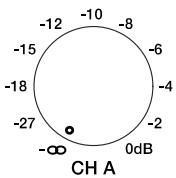
In DUAL and PARALLEL mode, the level controls CH A and CH B on the power amp's front panel are used to control the amplification of the corresponding channel. Turning the control to the right increases and turning it to the left decreases the volume. In BRIDGED mode operation, the output volume of the power amp is only controlled by the CH A level control. Any changes in the setting of the CH B level control are ignored.
3.2 Indications
PROTECT
PROTECT
The PROTECT LED lights indicating that one of the internal protection circuits against thermal overload, short-circuit, Back-EMF, HF-occurrence at the output, etc., has been activated. In that case, the output relays separate the power amps from the load connected to prevent the connected loudspeaker systems and the power amplifiers as well from being damaged. Whatever caused the fault - e.g. a short-circuited speaker cable - needs to be removed. In case of thermal overload you have to wait until the power amplifier cools down and automatically regains normal operation.
-40dB...LIMIT
A O LIMIT O B
0dB
-10dB
-20dB
-30dB
-40dB
Level indication is realized via vertical LED chains on the power amp's front panel that individually indicate the actual levels of each channel at -40dB, -30dB, -20dB and -10dB below full modulation and 0dB as soon as full modulation is reached. 0dB indication results from comparing the power amp's internal ratio of input to output voltage, which ensured precise indication of the full modulation limit, even before limiting becomes audible. The LIMIT LED lights as soon as the integrated dynamic audio limiter is activated and the power amplifier is driven at the clipping limit or generally at its maximum capacity. Short-term blinking is not a problem, because the internal limiter controls input levels of up to +21 dBu down to a THD of approximately 1% . If, on the other hand, the LIMIT LED light constantly, reducing the volume is recommended to prevent the loudspeaker systems connected from being damaged by probable overload.
POWER
POWER
The POWER LED lights green when the power amplifier is on. If the POWER-LED does not light, despite the fact that the amplifier has been switched on, this indicates that the power amp is not connected to the mains or the primary fuse has blown.
3.3 FAN Cooling
The power amplifier has two fans. The fans are switched in three performance-optimized levels, i.e. they are not running permanently but the speed of the fans is controlled depending on the ambient temperature. That in return ensures very silent running during idle state. The temperatures of the power amps's channels are registered and monitored separately.
INHALT
Beschreibung 16
SAFETY COMPONENT (MUST BE REPLACED BY ORIGINAL PART)

FOR RECYCLING INFORMATION CONTACT YOUR DISTRIBUTOR OR VISIT OUR WEBSITE
WWW.EVIAUDIO.COM
2.7 LPN-Filter (Low-Pass-Notch)
Amplifier at rated conditions, both channels driven, 8 load, unless otherwise specified.
| SL 900 | SL 1200 | SL 1800 | SL 2400 | |||||||||
| Load Impedance | 2 Ω | 4 Ω | 8 Ω | 2 Ω | 4 Ω | 8 Ω | 2 Ω | 4 Ω | 8 Ω | 2 Ω | 4 Ω | 8 Ω |
| Maximum Midband Output PowerTHD = 1%, 1 kHz, Dual Channel | 650 W | 450 W | 270 W | 900 W | 600 W | 380 W | 1250 W | 900 W | 550 W | 1800 W | 1200 W | 750 W |
| Rated Output PowerTHD < 0.1%, 20 Hz...20 kHz | - | 400 W | 200 W | - | 500 W | 250 W | - | 800 W | 400 W | - | 1100 W | 550 W |
| Maximum Single Channel Output PowerDynamic-Headroom, IHF-A | 1150 W | 660 W | 350 W | 1700 W | 950 W | 480 W | 2450 W | 1400 W | 700 W | 3400 W | 1800 W | 950 W |
| Maximum Single Channel Output PowerContinuous, 1 kHz | 850 W | 540 W | 310 W | 1200 W | 750 W | 420 W | 1700 W | 1100 W | 630 W | 2400 W | 1500 W | 850 W |
| Maximum Bridged Output PowerTHD = 1%, 1 kHz | - | 1300 W | 900 W | - | 1800 W | 1200 W | - | 2800 W | 1800 W | - | 3600 W | 2400 W |
| Maximum RMS Voltage SwingTHD = 1%, 1 kHz | 55.3 V | 65.1 V | 78.8 V | 90.6 V | ||||||||
| Power BandwidthTHD = 1%, ref. 1 kHz, half power @ 4 Ω | < 10 Hz...30 kHz | |||||||||||
| Voltage Gain, ref. 1 kHz | 32.0 dB | |||||||||||
| Input Sensitivityrated power @ 8 Ω, 1 kHz | +2.2 dBu (1.0 Vrms) | +3.1 dBu (1.11 Vrms) | +5.1 dBu (1.39 Vrms) | +6.6 dBu (1.66 Vrms) | ||||||||
| THD at rated output powerMBW = 80 kHz, 1 kHz | < 0.03% | |||||||||||
| IMD-SMPTE, 60 Hz, 7 kHz | < 0.1% | |||||||||||
| DIM30, 3.15 kHz, 15 kHz | < 0.05% | |||||||||||
| Maximum Input Level | +21 dBu (8.69 Vrms) | |||||||||||
| Crosstalkref. 1 kHz, at rated output power | < -80 dB | |||||||||||
| Frequency Response, ref. 1 kHz | 10 Hz...40 kHz (±1 dB) | |||||||||||
| Input Impedance, active balanced | 20 kΩ | |||||||||||
| Damping Factor, 1 kHz | >300 | |||||||||||
| Slew Rate | 25 V/μs | 26 V/μs | 27 V/μs | 30 V/μs | ||||||||
| Signal to Noise Ratio AmplifierA-weighted | >106 dB | >107 dB | >109 dB | >110 dB | ||||||||
| Output Noise, A-weighted | < -71 dBu | |||||||||||
| Output Stage Topology | Class AB | Class H | ||||||||||
| Power Requirements | 240 V, 230 V, 120 V or 100 V; 50 Hz...60 Hz (factory configured) | |||||||||||
| Power Consumption1/8 maximum output power @ 4 Ω | 550 W | 700 W | 700 W | 850 W | ||||||||
| Mains Fuse | 240 V / 230 V: T10AH;120 V / 100 V: T20AH | 240 V / 230 V: T12AH;120 V / 100 V: T25AH | 240 V / 230 V: T15AH;120 V / 100 V: T25AH | 240 V / 230 V: T15AH;120 V / 100 V: T30AH | ||||||||
| Protection | Audio limiters, High temperature, DC, HF, Back-EMF, Peak current limiters, Inrush current limiters, Turn-on delay | |||||||||||
| Cooling | Front-to-rear, 3-stage-fans | |||||||||||
| Ambient Temperatur Limits | +5 °C...+40 °C (40 °F...105 °F) | |||||||||||
| Safety Class | I | |||||||||||
| Dimensions (W x H x D), mm | 483 x 88.1 x 421.5 | |||||||||||
| Weight | 12.6 kg (27.8 lbs) | 14.8 kg (32.6 lbs) | 16.3 kg (35.9 lbs) | 17.7 kg (39.0 lbs) | ||||||||
| Signal Processing | LPN, switchable | |||||||||||
| Optional | 2-Way crossover, internal filter card, 24 dB, LRR330 Hz (NRS 90249), 500 Hz (NRS 90250),800 Hz (NRS 90251), 1200 Hz (NRS 90252) | |||||||||||
Depending on the ambient temperature, the unit might not operate continuously at 2 load in Dual Mode or 4 in Bridged Mode.
In addition input power exceeds 1.1 times rated power consumption with 2 load in Dual Mode or 4 load in Bridged Mode
Bosch Communications Systems
12000 Portland Ave South
Burnsville, MN 55337, USA
USA:
Phone:1-800-392-3497
Fax: 1-800-955-6831
Phone: 1-866-505-5551
Fax:1-866-336-8467
Canada:
Latin America:
Phone: 1-952-887-5532
Fax: 1-952-736-4212
Europe, Africa & Middle-East
Germany:
Bosch Communications Systems
EVI Audio GmbH
Hirschberger Ring 45
D-94315 Straubing, Germany
Phone: +49 9421 706-0
Fax: +49 9421 706-265
France:
EVI Audio France S.A.
Parc de Courcerin
Allée Lech Walesa
F 77185 Lognes, France
Phone: +33 1-6480-0090
Fax: +33 1-6006-5103
Asia & Pacific Rim
Japan: EVI Audio Japan Ltd.
5-3-8 Funabashi, Setagaya-Ku
Tokyo, Japan 156-0055
Phone: +81 3-5316-5020
Fax: +81 3-5316-5031
China: Bosch Communications Systems
Telex EVI Audio (Shanghai) Ltd.
Room 3105-3109, No. 1 Building
No. 218, Tian Mu West Road
Shanghai, China
PC: 200070
Phone: +86 21-6317-2155
Fax: +86 21-6317-3023
Hong Kong: Telex EVI Audio (HK) Ltd.
Unit 5, 1/F, Topsail Plaza
11 On Shum Street
Shek Mun, Shatin, HK
Phone: +852 2351-3628
Fax: +852 2351-3329
Singapore: Telex Pte. Ltd.
38C Jalan Pemimpin
Singapore 577180
Phone: (65) 6319 0621
Fax: (65) 6319 0620
- Installation 7
- Operation 12
- INHALT
- Beschreibung 16
- IMPORTANT SAFETY INSTRUCTIONS
- IMPORTANT SERVICE INSTRUCTIONS
- SAFETY COMPONENT (MUST BE REPLACED BY ORIGINAL PART)
- WEEE RECYCLING/DISPOSAL INSTRUCTIONS
- Introduction
- Welcome
- Unpacking and Inspection
- CAUTION:
- Scope of Delivery and Warranty
- Features and Description
- Responsibility of the User
- Speaker System Damage
- Danger at the Loudspeaker/Power Outputs
- WARNING:
- RF-Interference (FCC Information USA)
- Controls, Indicators and Connections
- Operating Voltage
- Mains Switch
- Mounting
- Ventilation
- Groundlift
- LPN-Filter
- Selecting the Mode Of Operation and Audio Output Cabling
- DUAL
- PARALLEL
- Typical Speaker System Cabling
- Bi-Amp Cabling
- BRIDGED
- Audio Input Cabling
- Operation
- Volume Control
- Indications
- PROTECT
- -40dB...LIMIT
- POWER
- FAN Cooling
- LPN-Filter (Low-Pass-Notch)
- Europe, Africa & Middle-East
- Asia & Pacific Rim
Brand : DYNACORD
Model : SL 1200
Category : Amplifier