
2642W - Memory Card SMC - Free user manual and instructions
Find the device manual for free 2642W SMC in PDF.


User questions about 2642W SMC
0 question about this device. Answer the ones you know or ask your own.
Ask a new question about this device
Download the instructions for your Memory Card in PDF format for free! Find your manual 2642W - SMC and take your electronic device back in hand. On this page are published all the documents necessary for the use of your device. 2642W by SMC.
USER MANUAL 2642W SMC
Features and Benefits 3
Applications 4
Product Kit. 5
System Requirement. 5
Chapter 2
Installing Wireless LAN Compact Flash Card
Install the Setup Utility. 6
Install the Wireless LAN Compact Flash Card............8
Chapter 3
Using Wireless LAN Compact Flash Card
Using the Wireless LAN Utility Under Pocket PC. 9
Using the Wireless LAN Utility Under Handheld. 16
Specifications 20
Chapter 1 Introduction
The SMC2642W EZ Connect 11Mbps Wireless Compact Flash Card is a standard CF interface adapter integrated with wireless LAN technology. It provides you an easy and fast way to access your wireless and wired network. The Wireless LAN Compact Flash Card, which utilizes the latest advancement of PC industry - Compact Flash technology, allows you to install and use the card on
Pocket/Handheld PC easier than ever before. With the ability to provide an 11Mbps connection, the SMC Wireless CF Card gives you the equivalent of a 10Mbps Ethernet connection to access corporate network or the Internet in a wireless environment. When installed, SMC2642W 11Mbps Wireless Compact Flash Card is able to
communicate with any 802.11 and 802.11b compliant products.
Features and Benefits
- Supports 1, 2, 5.5 and 11 Mbps data rate.
- Working range up to 700ft. in an open environment.
- Supports point-to-point and point-to-multipoint access.
- Seamless connectivity to wired Ethernet and PC network LAN's augments existing networks quickly and easily.
- Direct Sequence Spread Spectrum (DSSS) technology provides robust, interference-resistant and secure wireless connection.
- Wireless connection without the cost of expensive cabling.
- Supports Windows CE 3.0 or later Handheld/Pocket PC.
- Support high security WEP encryption (64-bit and 128-bit WEP)
- Supports Plug and Play.
- Easy installation.
Applications
11Mbps Wireless LAN products offer a fast, reliable, cost-effective solution for wireless client access to the network in applications like the following:
1. Remote access to corporate network information
E-mail, file transfer and terminal emulation.
2. Difficult-to-wire environments
Historical or old buildings, asbestos installations, and open area where wiring is difficult to deploy.
3. Frequently changing environments
Retailers, manufacturers and those who frequently rearrange the workplace and change location.
4. Temporary LANs for special projects or peak time
Trade shows, exhibitions and construction sites where a temporary network is practical.
5. Access to database for mobile workers
Doctors, nurses, retailers, accessing their database while being mobile in the hospital, retail store or office campus.
6. SOHO (Small Office and Home Office) users
SOHO users need easy and quick installation of a small computer network.
7. High security connection
The secure wireless network can be installed quickly and provide flexibility.
Product Kit
SMC2642W 11Mbps Wireless Compact Flash Card comes with the following items. Please go through each item below. If any listed item is not included or found damaged, please contact your local dealer.
11Mbps Wireless LAN Compact Flash Kit Includes:
1 x SMC2642W 11Mbps Wireless Compact Flash Card
1 x Driver/Utility Diskette
This User Guide
SMC2642W 11Mbps Wireless Compact Flash Card supports all Windows CE v3.0 Handheld/Pocket PC devices with Compact Flash Type II host interface.
Chapter 2
Installing SMC2642W Wireless Compact Flash Card
This chapter describes the installation of the SMC2642W 11Mbps Wireless Compact Flash Card driver for the CE 3.0 Handheld/ Pocket PC.
2-1 Install the Setup Utility
-
Establish a connection between host PC and PDA device by Microsoft Active Sync.
-
Execute SMC2642W.exe to install the driver and utility.
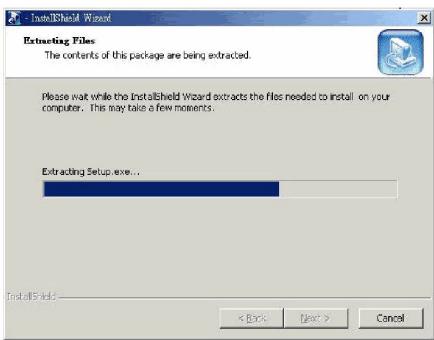
- An Install Shield Wizard window appears. Click Next to proceed.
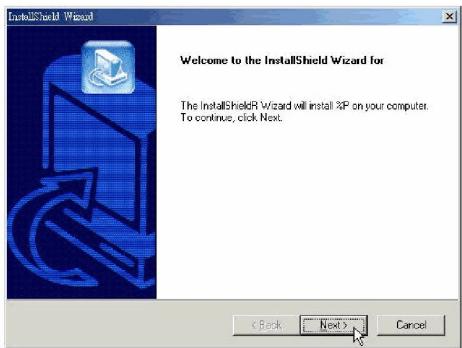
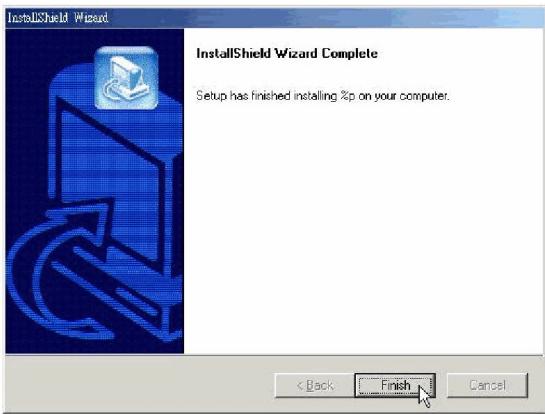
4. Follow on-screen instructions to install the Setup Utility. Click Finish to complete the installation.
Install the SMC2642W Wireless Compact Flash Card
- Connect the SMC2642W 11Mbps Wireless Compact Flash Card to your PDA. The PDA will auto-detect the Wireless LAN Compact Flash Card and automatically install the corresponding driver.
- Assign an IP address to your Wireless LAN Compact Flash Card. You may either set the Wireless LAN Compact Flash Card to obtain an IP address from your DHCP server, or to be assigned with a fixed IP address.
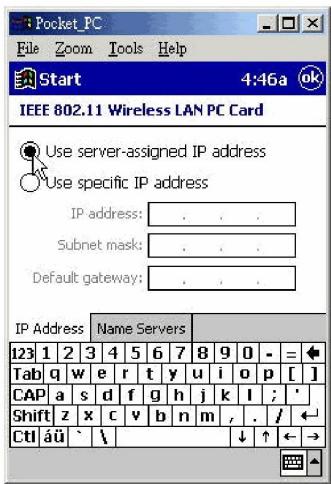
3. Reset your PDA.
Upon completion of installation, the Wireless LAN Compact Flash Card will start to look for an Access Point with Green LED blinking. The Green LED will stay steady once the Wireless LAN Compact Flash Card successfully associates with an Access Point. To configure the Wireless LAN Compact Flash Card, please proceed to the next chapter "Using SMC2642W Wireless Compact Flash Card".
Chapter 3
Using SMC2642W Wireless Compact Flash Card
This chapter gives you assistance with detailed description of setting the 11Mbps Wireless LAN Compact Flash Card with the Wireless LAN Utility under Pocket/Handheld PC.
Using the Wireless LAN Utility Under Pocket PC
The SMC2642W 11Mbps Wireless Compact Flash Card is a ready to use device. Its default settings perform for a typical Infrastructure Wireless LAN. Simply install the Wireless LAN Compact Flash Card onto your computer and it is ready to use. In special situations, however, you may adjust configuration settings depending on how you would like to manage your wireless network.
The Wireless LAN Utility provides you an easy interface to make configuration changes and perform user-level diagnostics on your Wireless LAN Compact Flash Card.
-
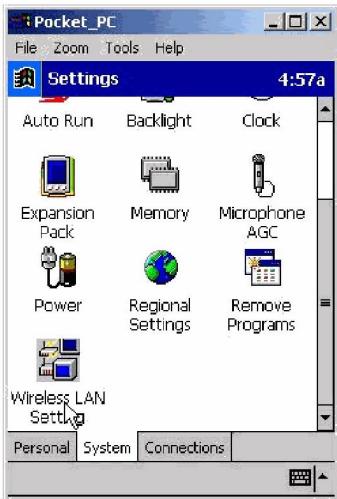
Go to Start Settings. Go to the System tab, and click the "Wireless LAN Setting" icon.
-
A configuration window appears. The Wireless LAN Utility provides the 5 following items for you to configure and monitor the 11Mbps Wireless LAN Compact Flash Card.
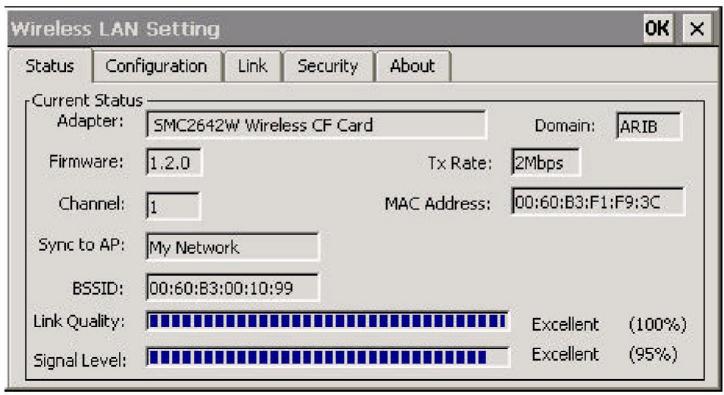
Status
- The Status tab displays the current status of the Wireless LAN Compact Flash Card.
Adapter - Displays name of the Wireless LAN Compact Flash Card.
Firmware - Displays the firmware version of your Wireless LAN Compact Flash Card.
Domain - The regulated operating frequency per country.
Channel - Displays the current channel that the Wireless LAN Compact Flash Card is using.
MAC Address - It is a hardware identification number that distinguishes the unit from others.
Sync to AP - Displays the ESSID of the Access Point that the Wireless LAN Compact Flash Card associates with.
BSSID - Shows MAC Address of the Access Point that the Wireless LAN Compact Flash Card associates with.
Link Quality - Link quality monitors the quality of the data transmission between the Wireless LAN Compact Flash Card and an Access Point.
Signal Level - This bar graph displays signal strength as reported by the radio, averaged over all frames that are received from the Access Point.
Configuration
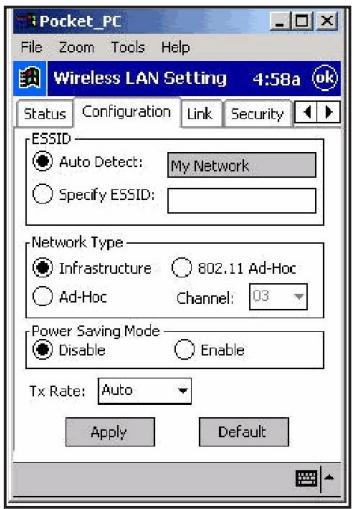
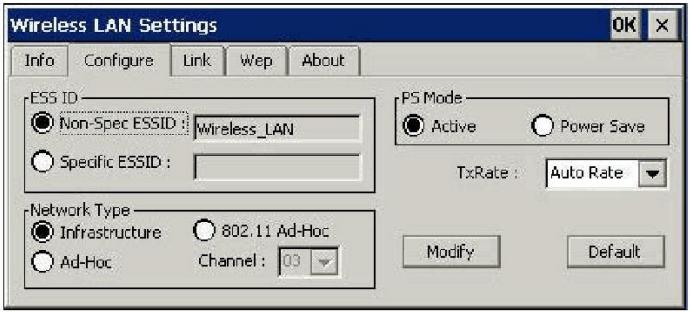
The Configuration tab contains several fields where the current parameters of the Wireless LAN Compact Flash Card can be viewed and changed. You will see current configuration information in terms of ESSID, Network Type, Power Saving Mode and Tx Rate. Upon modification of parameters for the Wireless LAN Compact Flash Card, click the Apply button to make the changes take effect.
ESSID
The ESSID is a unique ID given to the Access Point. Wireless clients associating to Access Points must have the same ESSID. The default value Auto Detect means when the Wireless LAN Compact Flash Card starts to work, it will associate with any Access Point that gives the fastest response. You may also enter a specific ESSID (Access Point) you desire to connect with. It is recommended you specify an ESSID for your Wireless LAN Compact Flash Card. This will prevent your computer from unintentionally connecting to a different wireless network.
Network Type
To connect your wireless station to a local network infrastructure set the station operation mode to Infrastructure (with Access Point, default setting). In case you do not wish to connect to a network infrastructure, but prefer to setup a small wireless workgroup (without Access Point) you can enable the Ad-Hoc (only compatible with the same series wireless PC Card) or 802.11 Ad-Hoc tick box. When the Ad-Hoc mode is selected, be sure to set your wireless stations with the same channel. To use the 802.11 Ad-Hoc mode, the same channel and ESSID among wireless stations are required.
Power Saving Mode
The Power Saving Mode option is designed to conserve battery life of you computer. Selecting the "Enable" button activates the Power Save mode and your SMC2642W 11Mbps Wireless Compact Flash Card will go into sleep mode to minimize power consumption.
NOTE: When power saving mode is enabled, the Access Points you use need to support power saving as well so that the communication can be established.
TX Rate
The 11Mbps Wireless Compact Flash Card provides various data rate options for you to select.
Data rates options include Fully Auto, Fixed 1Mb/s, Fixed 2Mb/s, Auto Select 1M or 2M, Fixed 5.5Mb/s, and Fixed 11Mb/s. In most networking scenarios, you will see that the factory-set default "Fully Auto" will prove the most efficient. This setting will allow your 11Mbps Wireless LAN Compact Flash Card to operate at the maximum data rate. When the communications quality drops below a certain level, the Wireless LAN Compact Flash Card will automatically switch to a lower data rate. Transmission at lower data speed is usually more reliable. However, when the communications quality improves again, the Wireless LAN Compact Flash Card will gradually increase the data rate again, until it has reached the highest available transmit rate.
Link
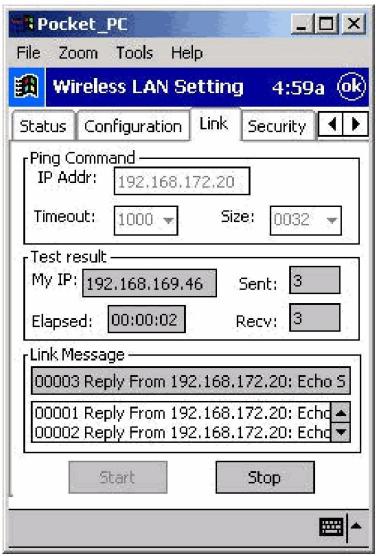
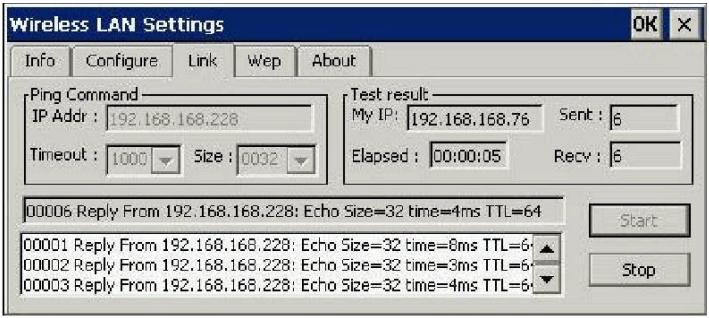
Similar to the TCP/IP Ping Command, this tool allows you to monitor point-to-point data transmission quality between two stations. By entering the IP address of another station and setting the timeout and packet size, you may check whether or not communication has been established successfully.
Security
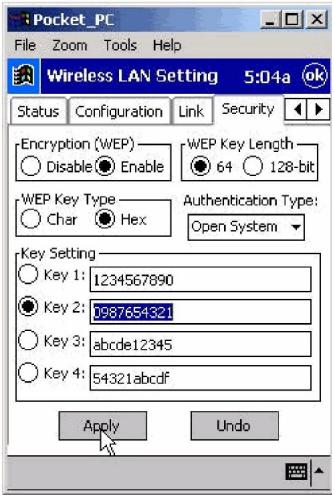
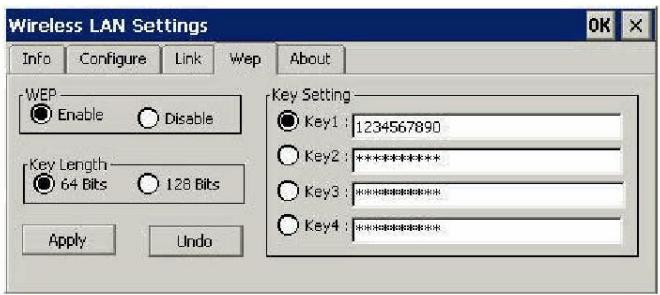
To prevent unauthorized wireless stations from accessing data transmitted over the network, the SMC2642W 11Mbps Wireless Compact Flash Card offers highly secure data encryption, known as WEP (Wired Equivalent Privacy). If you desire to use WEP encryption to secure your data, please select the Enable check box and set the following values.
There are two types of WEP Key Length described as follows:
64-Bit - Requires wireless stations to use data encryption with 64-Bit algorithm when communicating with the Access Point.
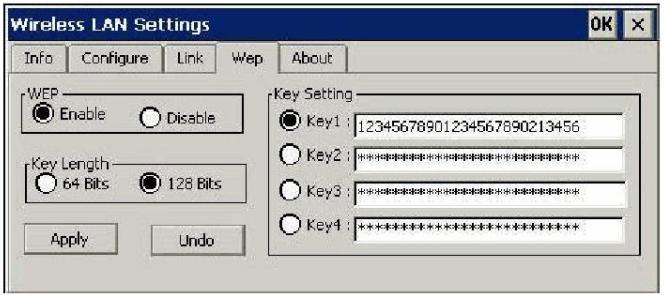
128-Bit - Requires wireless stations to use data encryption with 128-Bit algorithm when communicating with the Access Point
WEP Key Type offers two key value options: Character (Char.) and Hexadecimal numbers (Hex.). Moreover, you may choose the Authentication Type, either Open
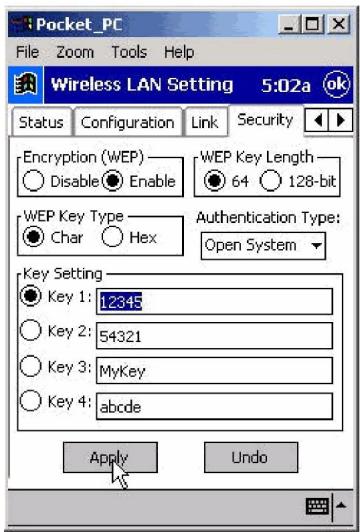
System or Shared Key for authentication among wireless devices. You may identify up to 4 different encryption keys and selectone of them to encrypt your transmission data. The key value of your choice may either be:
For 64-bit encryption:
- 5 characters in the range of "A-Z", "a-z" and "0-9" (e.g. MyKey, shown as above figure).
- 10 digit hexadecimal values in the range of “A-F”, “a-f” and “0-9” (e.g. 11AA22BB33).
For 128-bit encryption:
- 13 characters in the range of “A-Z”, “a-z” and “0-9”, preceded by the characters values (e.g.MyKey12345678)
- 26 digit hexadecimal values in the range of "A-F", "a-f" and "0-9", preceded by the characters values (e.g. 12345678901234567890123456, shown as below)
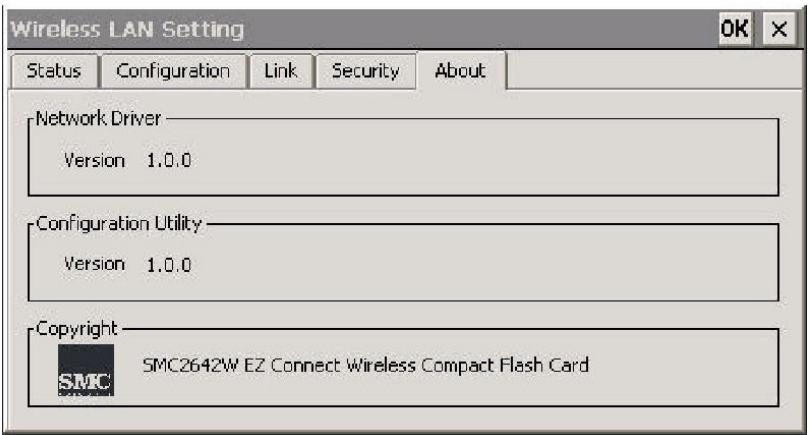
About
The "About" tab shows driver and utility version of the SMC2642W Wireless Compact Flash Card.

Using the Wireless LAN Utility Under Handheld PC
The usage of Wireless LAN Utility under Handheld PC is exactly the same with that under Pocket PC.
The only difference is the window size. The following is brief description on the Wireless LAN Utility.
- Go to Start -> Settings. Click the "Wireless LAN Settings" icon. A configuration window shows up. When you minimize the window by clicking the OK button on the upper right corner of the utility window, a system tray icon will be loaded on the toolbar. Clicking on the icon will open the configuration window again. The description of each item is as follows:
Status:
This item shows the current information on the SMC2642W 11Mbps Wireless Compact Flash Card such as Adapter Name, Firmware, Domain, Channel, Tx Rate, MAC Address, Sync to AP, BSSID, Link Quality and Signal Level.
Configuration:
This item allows you to modify the configuration parameters for the SMC2642W 11Mbps Wireless Compact Flash Card such as ESSID, Network Type, Channel, Power Saving mode, and Tx Rate. After making changes on the configuration, click on the Apply button to make the changes take effect.
Link:
Similar to Ping Command, this tool allows you to monitor point-to-point data transmission quality between two nodes. By entering the IP address of another node and setting the timeout and packet size you may know whether or not the communication has been established successfully.
Security
The encryption function enables you to encrypt and decrypt your wireless data, making your data more secure. To enable the WEP encryption, select the "Enable" check box, select the Key Length, either 64-bit or 128-bit, and enter the WEP Keys in the Key field. For 64-Bits encryption the key values are 5 characters in the range of "A-Z", "a-z" and "0-9" (e.g. MyKey); or 10 digit hexadecimal values in the range of "A-F", "a-f" and "0-9" (e.g. 11AA22BB33). For 128-Bits encryption the key values are 13 characters in the range of "A-Z", "a-z" and "0-9" (e.g. MyKey12345678); or 26 digit hexadecimal values in the range of "A-F", "a-f" and "0-9" (e.g. 11AA22BB33123456789ABCDEFF). After entering the WEP keys, choose a WEP Key to use and then click Apply to make the configuration take effect.
About
The About tab shows driver and utility version of the SMC2642W Wireless Compact Flash Card.
Caveat
-Due to WinCE's nature of the first application at power-on resuming to that at power-off, if you are stuck at the utility program, you may use the PDA's reset button to terminate it. And then activate it again when needed.
-Sometimes, your wireless connection to AP may disconnect for any reason. You can reset and force a connection request by going to utility program, then select "Configuration", check parameters, then select "Apply" to force a re-scan.
-If your device roams to a new AP which is in a different subnet, you may need to remove and re-insert the Wireless LAN Compact Flash Card to force an execution of "release and renew" of an re-assignment of IP address in a DHCP Access Point environment.
Product SMC2642W Wireless Compact Flash Card
Operating Channels
11 for N. America, 14 Japan,
13 Europe (ETSI), 2 Spain,
4 France
Operating Frequency
2.412-2.462 GHz (N. America)
2.412-2.484 GHz (Japan)
2.412-2.472 GHz (Europe ETSI)
2.457-2.462 GHz (Spain)
2.457-2.472 GHz (France)
Range
Fixed at 11Mbps: 495 ft
5.5Mbps: 595 ft
2Mbps: 630 ft
1Mbps: 700 ft
Antenna
One Built-In antenna
Modulation
CCK(11Mps, 5.5Mbps),
TX power consumption: <350mA
RX power consumption <250mA
Sleep Mode power consumption: 100mA
Output Power
14 dBm
Sensitivity
@PER < 0.08
11Mbps < -83 dBm
5.5Mbps < -86dBm
2Mbps < -89dBm
1Mbps < -91dBm
Data Rate
1,2,5.5,11 Mbps
Support OS
CE 3.0 and later,
Windows 98/Me/2000/NT
Copyright
Information furnished by SMC Networks, Inc. (SMC) is believed to be accurate and reliable.
However, no responsibility is assumed by SMC for its use, nor for any infringements of patents or other rights of third parties which may result from its use. No license is granted by implication or otherwise under any patent or patent rights of SMC. SMC reserves the right to change specifications at any time without notice. Complete warranty information for all SMC products is available on SMC's Web site at www.smc.com.
SMC is a registered trademark; and EZ Connect and EZ Hub are trademarks of SMC Networks, Inc. Other product and company names are trademarks or registered trademarks of their respective holders.