
H024 DUO DISPLAY - Watch SEIKO - Free user manual and instructions
Find the device manual for free H024 DUO DISPLAY SEIKO in PDF.


User questions about H024 DUO DISPLAY SEIKO
0 question about this device. Answer the ones you know or ask your own.
Ask a new question about this device
Download the instructions for your Watch in PDF format for free! Find your manual H024 DUO DISPLAY - SEIKO and take your electronic device back in hand. On this page are published all the documents necessary for the use of your device. H024 DUO DISPLAY by SEIKO.
USER MANUAL H024 DUO DISPLAY SEIKO
INSTRUCTIONS (P. 33)
You are now the proud owner of a SEIKO Duo-Display Watch Cal. H024. For best results, please read the instructions in this booklet carefully before using your SEIKO Duo-Display Watch. Please keep this manual handy for ready reference.
BUTTIONS & DISPLAY 5
MODE CHANGE 6
TIME/CALENDAR MODE 7
STOPWATCH MODE 11
MEMORY RECALL MODE 15
TIMER MODE 17
ALARM MODE 19
ALARM TEST AND DEMONSTRATION MODE 21
NOTES ON OPERATING THE WATCH 22
BATTERY LIFE INDICATOR 24
BATTERY CHANGE 24
TO PRESERVE THE QUALITY OF YOUR WATCH 27
SPECIFICATIONS 31
SEIKO DUO-DISPLAY QUARTZ
Cal. H024
FEATURES

TIME/CALENDAR
- Hour and minute hands
Fully automatic calendar from Jan. 1. 2006 to Dec. 31, 2055

ALARM
- Two daily alarms work independently.

TIMER
- Countdown timer
A time-up warning beep and time-up beep

STOPWATCH
Measures up to 23 hours, 59 minutes and 59.999 seconds in 1/1000-second increments
Lap time/split time measurement
Stores the first 100 lap and split times in memory.

MEMORY RECALL FUNCTION
The stored lap and split times can be recalled.
BUTTONS & DISPLAY
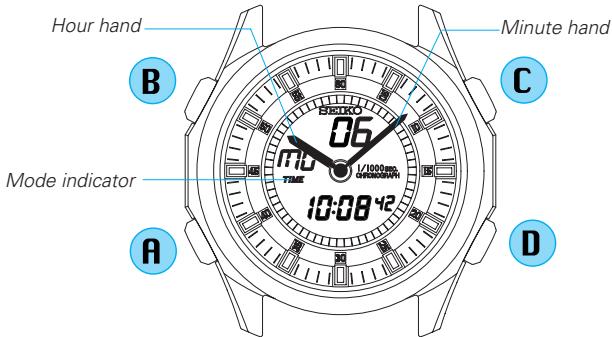
[TIME/CALENDAR mode]
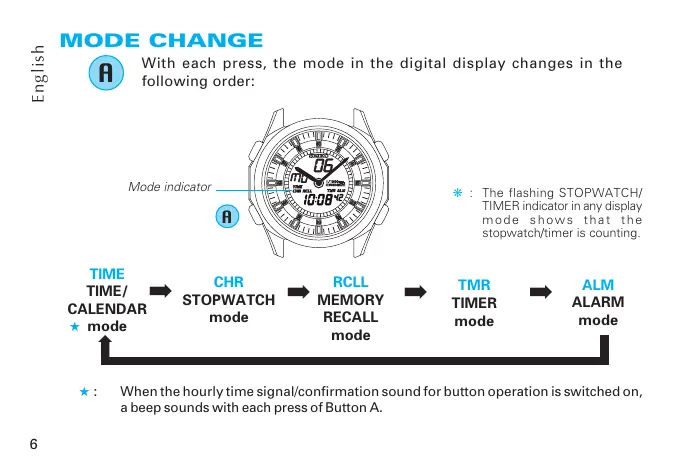
MODE CHANGE

With each press, the mode in the digital display changes in the following order:
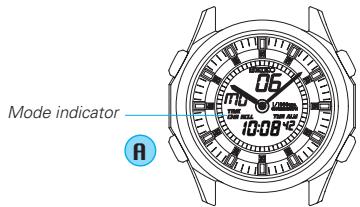
- : The flashing STOPWATCH/TIMER indicator in any display mode shows that the stopwatch/timer is counting.

: When the hourly time signal/confirmation sound for button operation is switched on, a beep sounds with each press of Button A.
TIME/CALENDAR MODE (TIME)
The calendar adjusts automatically for odd and even months including February of leap years from 2006 up to 2055.

Press to show TIME/CALENDAR mode.
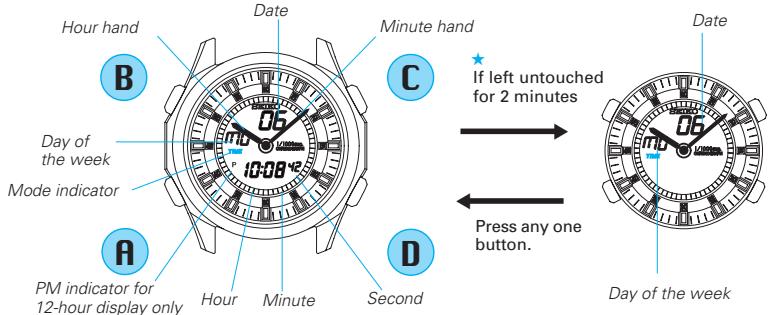
[FULL (Time & Calendar) Display]
[D&D(Day & Date) Display]
: If the watch is left untouched for 2 minutes when Day & Date Display is selected, the digital time disappears and only the day and date are shown. To show the digital time, press any one of the four buttons.
TIME/CALENDAR SETTING
- Set the digital time first before setting the analogue time, as the hour and minute hands move together with the digital time.
- If the digital time display cannot be seen because of positions of the hour and minute hands, advance them by pressing button D before setting the digital time.
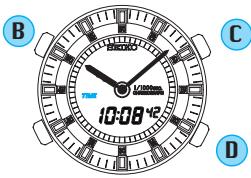
Digital time/calendar setting
B
Press for 2 to 3 seconds to show TIME/CALENDAR SETTING display.
- The second digits start flashing.
C
Press to select an item( flashing) to be adjusted.With each press of the button, a flashing item changes over in the following order
(See *1 on page 22)
Second
Minute
Hour
12-/24-hour display
Date
Seconds setting
By pressing the button, the seconds are reset to "00" and start counting immediately.
D
Press to adjust the selected item.
(See *2 on page 22)
Analogue time setting
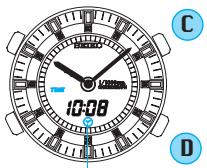
Analogue time setting display
Press to show analogue time setting display.
Press repeatedly to set Hour and Minute hands to match the digital time.
(See *3 on page 22)
Press for the display selection.
Press to select the desired display.
- [FULL(Time & Calendar) Display] or [D&D(Day & Date) Display] can be alternatively selected.
Press to return to TIME/CALENDAR mode. (See *4 on page 22)
ENGAGEMENT/DISENGAGEMENT OF HOURLY TIME SIGNAL AND TURNOING ON/OFF OF CONFIRMATION SOUND FOR BUTTON OPERATION
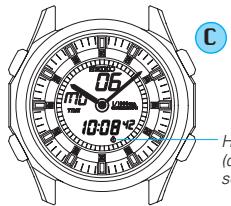

With each press in TIME/CALENDAR mode, the hourly time signal and confirmation sound for button operation are alternately switched on and off. (See *5 on page 22)
Hourly time signal indicator (displayed when hourly time signal and confirmation sound are switched on)
When all indicators light
If all indicators of the display light while in the TIME/CALENDAR mode, it is not a malfunction.
(See "ALARM TEST AND DEMONSTRATION MODE" on page 21)
This happens if Button C and D are pressed at the same time during time setting. In such a case, press any one of the four buttons to return to the TIME/CALENDAR mode.
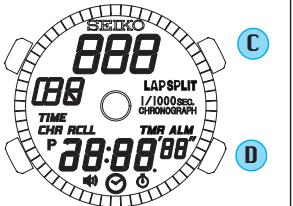
STOPWATCH MODE (CHR)
- Stopwatch measures up to 23 hours, 59 minutes and 59.999 seconds in 1/1000-second increments.
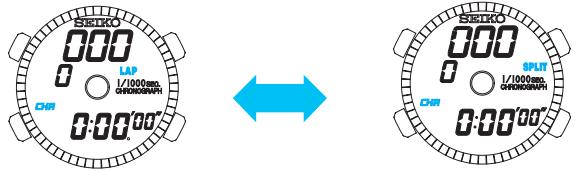
- The lap time display and split time display can be shown alternately. However, while the stopwatch is counting, the display cannot be changed to another.
(See *6 on page 23)

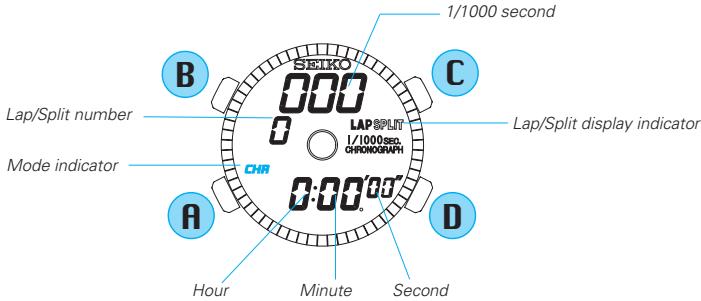
Press to show STOPWATCH mode.
STOPWATCH OPERATION
Before using the stopwatch, reset the digital counter to read "00:00'00" "000" by pressing Button D.
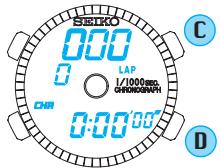
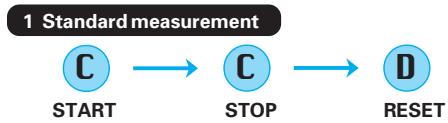

- Stop and restart of stopwatch can be repeated as many times as required by pressing Button C.

Press when the stopwatch is reset to select the lap time or split time display. With each press of button B, the display indicator "LAP" and "SPLIT" appear alternately.
3 Lap time measurement

- Timing and release of lap times can be repeated as many times as required by pressing Button D.
- The lap time measured remain displayed for 10 seconds together with the flashing lap indicator, and then, the display automatically returns to the measurement in progress.
- When Button C is pressed at the end of timing, the final lap time is displayed for 10 seconds with the flashing lap display indicator, and then the display automatically changes to show the final split time.
4 Split time measurement

- Timing and release of split times can be repeated as many times as required by pressing Button D.
- The split time measured remain displayed for 10 seconds together with the flashing split indicator, and then the display automatically returns to the measurement in progress.
- When Button C is pressed at the end of timing, the final split time is displayed for 10 seconds with the flashing split display indicator, and then the flashing stops.
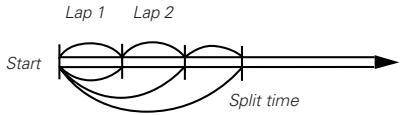
" Lap time " is the time that has elapsed from the start of one stage of an activity to that of the next stage. "Split time" is the time that has elapsed from the start of an activity to any given stage.
Ex.)
Lap No.1:30 sec. Split No.1:30 sec.
Lap No.2: 40 sec. Split No.2: 1 min., 10 sec.
Lap No.3: 45 sec. Split No.3: 1 min., 55 sec.
MEMORY RECALL MODE (RCLL)
- The first 100 lap and split times are automatically stored in memory and can be recalled either during or after the stopwatch measurement.
- Even if the digits are reset to "00" in the stopwatch measurement, the stored data is not erased and can be recalled unless a new measurement is started.
- In order to recall lap and split times while timing an event, press Button A to cycle through the 5 different modes. The stopwatch mode indicator (CHR) will continue to flash to indicate that the STOPWATCH mode is in use.

Press to show the MEMORY RECALL mode.
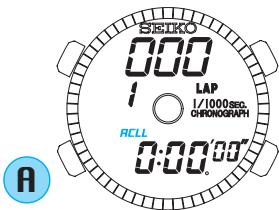

Press to select the data (lap time/split time) to be recalled. With each press of Button B, the lap time and split time are displayed alternately.
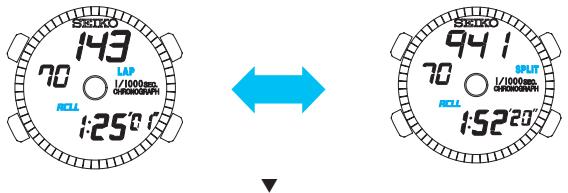

With each press, stored data are recalled from the newest to the oldest.
OR

With each press, stored data are recalled from the oldest to the newest. (See *7 on page 23)

Press to exit from the MEMORY RECALL mode.
TIMER MODE (TMR)
The timer can be set up to 23 hours and 59 minutes in minute increments. (See *8 on page 23)
A time-up warning beep sounds 3 seconds before the set time is up. When the set time is up, time-up beep sounds for 5 seconds.
TIMER SETTING
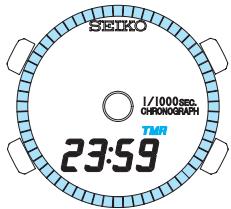

Press to show TIMER mode.
Press for 2 to 3 seconds to show TIMER SETTING display.
- The minute digits start flashing.
Press to select an item (flashing) to be adjusted.

Press to adjust the selected item. (See 2 on page 22 and 8 on page 23)
Press to return to TIMER mode.
TIMER OPERATION
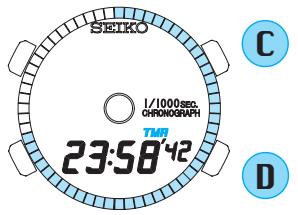

- Stop and restart of the timer can be repeated as many times as required by pressing Button C.
- A time-up warning beep sounds 3 seconds before the set time is up. When the set time is up, time-up beep sounds for 5 seconds.
-
If Button D is pressed when the timer is stopped, the display returns to show the set timer time.
-
The timer will continue to count down even if you move to one of the other 5 modes by pressing Button A. If the timer is counting down and the watch is displaying one of the other modes, the timer mode indicator (TMR) will flash.
ALARM MODE (ALM)
- Two daily alarms work independently.
The alarms can be set in minute increments.
The alarms can be engaged and disengaged independently of one another.

Press to show ALARM mode.
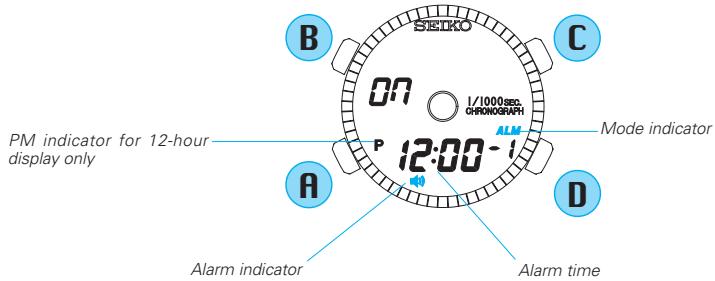
ALARM TIME SETTING
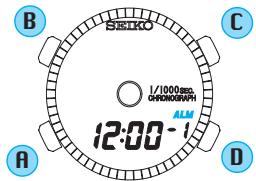

Press for 2 to 3 seconds to show ALARM SETTING display.
- The hour digits start flashing.
Press to select an item (flashing) to be adjusted.

Press to adjust the selected item. (See *9 on page 23)
Press to return to ALARM mode.
- The alarm mark is displayed and the alarm is automatically engaged.
- If you want to use the alarm channel 2, press Button D to select "ch" number, and follow the above procedures.
ALARM ENGAGEMENT/DISENGAGEMENT

Press to show ALARM mode.

With each press, alarm is alternately engaged and disengaged.
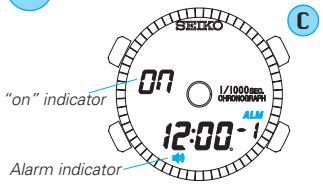
[Alarm engaged]
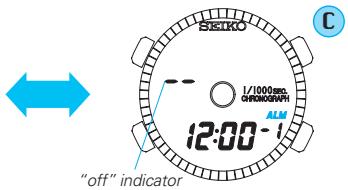
[Alarm disengaged]
- The alarm sounds at the designated time for 20 seconds. To stop it manually, press any one of the four buttons. If the alarm sounds while the stopwatch is operating, press button A or B to stop the alarm.
ALARM TEST AND DEMONSTRATION MODE
Press and hold Buttons C and D at the same time in the TIME/CALENDAR mode. The alarm sound can be heard, and then the DEMONSTRATION mode will start, showing the display of each mode repeatedly. To stop the demonstration, press any of the buttons.
NOTES ON OPERATING THE WATCH
1-5 Remarks on time/calendar function:
1 • The day of the week is automatically set once the year, month and date are set.
- When the time is set in the 24-hour display, the alarm time will also be shown in the 24-hour display.
2 • The digits, other than seconds and “12H”/“24H”, advance quickly if Button D is kept pressed.
- When the seconds read any number between "30" and "59" and Button D is pressed, one minute is added.
- When setting the hours in the 12-hour display, check that AM/PM is properly set. A PM indicator ("P" mark) from the afternoon is shown when the 12-hour display is selected. In the 24-hour display, there is no such indicator.
3 • The hands move clockwise by pressing Button D. They move quickly if the button is kept pressed.
- The hands keep advancing if Button D is released. Press Button D again to stop them.
- After the digital and analogue times are set, if you want to correct digital time to adjust second digits only, it is not necessary to adjust analogue time again
4 If the watch is left untouched in the TIME/CALENDAR SETTING display with an item flashing, it will automatically return to the TIME/CALENDAR mode in 2 to 3 minutes.
*5 The hourly time signal will not ring while alarm is sounding.
*6 Remarks on stopwatch function:
- The lap number counts up to "199". After "199", the number is displayed in two digits such as "00" for 200, "00" for 300, and so on.
- The split number counts up to "199". After "199", the number is displayed in two digits such as "00" for 200, "00" for 300, and so on.
*7 Remarks on memory recall function:
- In memory recall after measurement, the oldest measurement in memory is displayed. In memory recall during measurement, the newest measurement in memory is displayed.
*8 Remarks on timer function:
- The digits advance quickly if Button D is kept pressed.
- Pressing button A while the digits are flashing can reset the timer to "0:00," and the minute digits start flashing.
- If the watch is left untouched in the TIMER SETTING display with an item flashing, it will automatically return to the TIMER mode in 2 to 3 minutes.
*9 Remarks on alarm function:
- The digits advance quickly if Button D is kept pressed.
- When the time in the TIME/CALENDAR mode is set in the 24-hour display, the alarm time will also be shown in the 24-hour display.
- When setting the hours in the 12-hour display, check that AM/PM is properly set. "P" mark appears when the alarm time is set to PM.
- If the watch is left untouched in the ALARM SETTING display with an item flashing, it will automatically return to the ALARM mode in 2 to 3 minutes.
BATTERY LIFE INDICATOR
-
When the second digits start flashing in the TIME/CALENDAR mode, replace the battery with a new one as soon as possible. Otherwise, the watch will stop operating in a couple of days. We suggest that you have the battery replaced by an AUTHORIZED SEIKO DEALER.
-
Even after the battery life indicator appears, time accuracy is not affected.
BATTERY CHANGE

The miniature battery which powers your watch should last approximately 3 years. However, because the battery is inserted at the factory to check the function and performance of the watch, its actual life once in your possession may be less than the specified period. When the battery expires, be sure to replace it as soon as possible to prevent any malfunction. For battery replacement, we recommend that you contact an AUTHORIZED SEIKO DEALER and request SEIKO SR1130W battery.
- The battery life may be less than 3 years if:
the alarm is used for longer than 20 seconds a day, - the stopwatch is used for longer than 3 minutes a day,
the confirmation sound is used more than 10 times a day, and/or
the timer is used more than once a day.
NECESSARY PROCEDURES AFTER CHANGING THE BATTERY
- After the battery is replaced with a new one, or in case an abnormal display (broken numerals or letters etc.) appear, follow the procedures below to reset the IC.
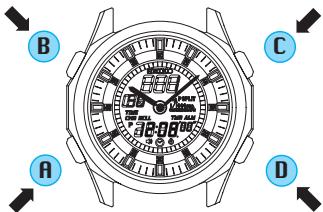
* All digital indicators are reset to show "1", "SUN" and "12:00 00" in the TIME/CALENDAR mode.
Press and hold the four buttons for 2 to 3 seconds at the same time.

All digital indicators disappear at once and the display shown at left appears when the buttons are released.

Set the digital time/calendar and analogue time.
(See "TIME/CALENDAR SETTING" on page 8)

WARNING
- Do not remove the battery from the watch.
- If it is necessary to take out the battery, keep it out of the reach of children. If a child swallows it, consult a doctor immediately.
- Never short-circuit, tamper with or heat the battery, and never expose it to fire. The battery may burst, become very hot or catch fire.

CAUTION
- The battery is not rechargeable. Never attempt to recharge it, as this may cause battery leakage or damage to the battery.
TO PRESERVE THE QUALITY OF YOUR WATCH
■ WATER RESISTANCE
| Indication on case back | Condition of use Degree of water resistance* | Accidental contact with water such as rain and splashes | Swimming, yachting and taking a shower | Taking a bath and shallow diving | Scuba diving** and saturation diving |
| No indication | Non-water resistant | No | No | No | No |
| WATER RESISTANT | 3 bar | Yes | No | No | No |
| WATER RESISTANT 5 BAR | 5 bar | Yes | Yes | No | No |
| WATER RESISTANT 10/15/20 BAR | 10/15/20 bar | Yes | Yes | Yes | No |
Non-water resistant

- If the watch becomes wet, have it checked by an AUTHORIZED SEIKO DEALER or SERVICE CENTER.
Water resistant 5/10/15/20 bar

- Do not operate the buttons when the watch is wet or in water. If used in sea water, rinse the watch in fresh water and dry it completely.

- When taking a shower with a water resistant 5 bar watch, or taking a bath with a water resistant 10, 15 or 20 bar watch, be sure to
observe the following:
- Do not operate the buttons when the watch is wet with soapy water or shampoo.
-
If the watch is left in warm water, a slight time loss or gain may be caused. This condition, however, will be corrected when the watch returns to normal temperature.
-
Pressure in bar is a test pressure and should not be considered as corresponding to actual diving depth since swimming movement tends to increase the pressure at a given depth. Care should also be taken on diving into water.
** We recommend that you wear a SEIKO Diver's Watch for scuba diving.
TEMPERATURES

Your watch works with stable accuracy within a temperature range of 5^ and 35^ (41°F and 95°F).
Temperatures over 60^ (140^) or below -10^(+14^) may cause a slight time loss or gain or battery leakage or shorten the battery life.
However, the above conditions will be corrected when the watch returns to normal temperature.
SHOCKS & VIBRATION

Be careful not to drop your watch or hit it against hard surfaces.
Magnetism

The analogue unit of your watch will be adversely affected by strong magnetism, though the digital unit will not be affected. Keep the
watch away from close contact with magnetic objects.
CHEMICALS

Be careful not to expose the watch to solvents, mercury, cosmetic spray, detergents, adhesives or paints. Otherwise,
the case, bracelet, etc. may become discolored, deteriorated or damaged.
CARE OF CASE AND BRACELET

To prevent possible rusting of the case and bracelet, wipe them periodically with a soft dry cloth.
PERIODIC CHECK

It is recommended that the watch be checked once every 2 to 3 years. Have your watch checked by an AUTHORIZED
SEIKO DEALER or SERVICE CENTER to ensure that the case, buttons, gasket and crystal seal remain intact.
PRECAUTION REGARDING CASE BACK PROTECTIVE FILM

If your watch has a protective film and/or a sticker on the case back, be sure to peel them off before using your watch.
STATIC ELECTRICITY

The IC (Integrated Circuit) used in your watch will be affected by static electricity which may disturb the display. Keep the watch away
from close contact with objects such as TV screens which emit strong static electricity.
LIQUID CRYSTAL PANEL

The normal life expectancy for a liquid crystal panel is approximately 7 years. After that it may decrease in con
trast, becoming difficult to read. Please contact your AUTHORIZED SEIKO DEALER or SERVICE CENTER if you wish to have a new panel fitted (guaranteed one year).
SPECIFICATIONS
1 Frequency of crystal oscillator. 32,768 Hz (Hz = Hertz ... Cycles per second)
2 Loss/gain (monthly rate) Less than 15 seconds at normal temperature range 5^ 35^ (41^ 95^)
3 Operational temperature range . -5^ +50^ 23^ 122^) Desirable temperature range of use. 0^ +50^ 32^ 122^)
4 Driving system . Step motor
5 Analogue display system
Time
Two hands (hour and minute)
6 Digital display system
TIME/CALENDAR mode
Hour, minute, second, date and day of the week PM indicator in the 12-hour display
STOPWATCH mode
Hour, minute, second, 1/1000 seconds and lap/split number
MEMORY RECALL mode
Lap time / Split time (hour, minute, second and 1/1000 seconds) and lap/split number
TIMER mode
Countdown timer (hour and minute)
ALARM mode
Alarm time (hour and minute)
PM indicator in the 12-hour display
7 Digital display medium
Nematic Liquid Crystal, FEM (Field Effect Mode)
8 Battery.
SEIKO SR1130W, 1 piece
9 Battery life
Approximately 3 years
10 IC (Integrated Circuit)
C-MOS-LSI, 1 piece
- The specifications may be subject to periodic changes without prior notice due to product improvements.