
7T86 ANALOG QUARTZ - Quartz Analog Watch SEIKO - Free user manual and instructions
Find the device manual for free 7T86 ANALOG QUARTZ SEIKO in PDF.


| Product type | Quartz analog watch |
| Brand | SEIKO |
| Model | 7T86 |
| Movement | Quartz analog |
| Caliber | 7T86 |
| Case diameter | Approximately 40 mm |
| Case thickness | Approximately 10 mm |
| Weight | Approximately 150 g (with bracelet) |
| Power source | Button cell battery (type SR927W or equivalent) |
| Battery life | Approximately 3 years |
| Water resistance | 10 bar (100 m) |
| Crystal | Mineral glass |
| Main functions | Hours, minutes, seconds, date, chronograph (measurements up to 60 minutes with 1/10th second counter) |
| Date adjustment | Quick correction by pulling the crown |
| Maintenance | Clean with a soft, dry cloth. Avoid chemicals. Do not immerse in water for setting operations. |
| Battery replacement | Have it replaced by an authorized watchmaker. Do not dispose of used batteries in nature. |
| Accuracy | ±15 seconds per month at normal temperature |
| Operating temperature | From -5°C to +45°C |
| Warranty | 2 years (according to retailer's conditions) |
Frequently Asked Questions - 7T86 ANALOG QUARTZ SEIKO
User questions about 7T86 ANALOG QUARTZ SEIKO
0 question about this device. Answer the ones you know or ask your own.
Ask a new question about this device
Download the instructions for your Quartz Analog Watch in PDF format for free! Find your manual 7T86 ANALOG QUARTZ - SEIKO and take your electronic device back in hand. On this page are published all the documents necessary for the use of your device. 7T86 ANALOG QUARTZ by SEIKO.
USER MANUAL 7T86 ANALOG QUARTZ SEIKO
INSTRUCTIONS (P. 3 )
INSTRUCTIONS (P. 67)
ISTRUZIONI (P. 99)
You are now the proud owner of a SEIKO Analogue Quartz Watch Cal. 7T86. To ensure its optimum performance, please read the instructions in this booklet carefully before using it. Please keep this manual handy for ready reference.
HOW TO USE THE ALARM 25
BATTERY CHANGE 29
NECESSARY PROCEDURE AFTER BATTERY CHANGE 31
SPECIFICATIONS 32
For the care of your watch, see "TO PRESERVE THE QUALITY OF YOUR WATCH" in the attached Worldwide Guarantee and Instruction Booklet.
FEATURES
TIME
- Hour, minute and small second hands.
STOPWATCH
24-hour stopwatch in 1/5-second increments.
- Split time measurement on demand.
- When the measurement reaches 24 hours, the stopwatch automatically stops and is reset.
SINGLE-TIME ALARM
The alarm can be set to sound only once at a designated time within 24 hours.
The sound demonstration function is available.
PERPETUALCALENDAR
- Date is indicated by the center hand in the CALENDAR/ALARM mode.
Day of the week is indicated by the day hand at the 12 o'clock position. - There is no need to adjust the date at the end of the month up to February 28, 2010.
- Month and year can be checked on demand.
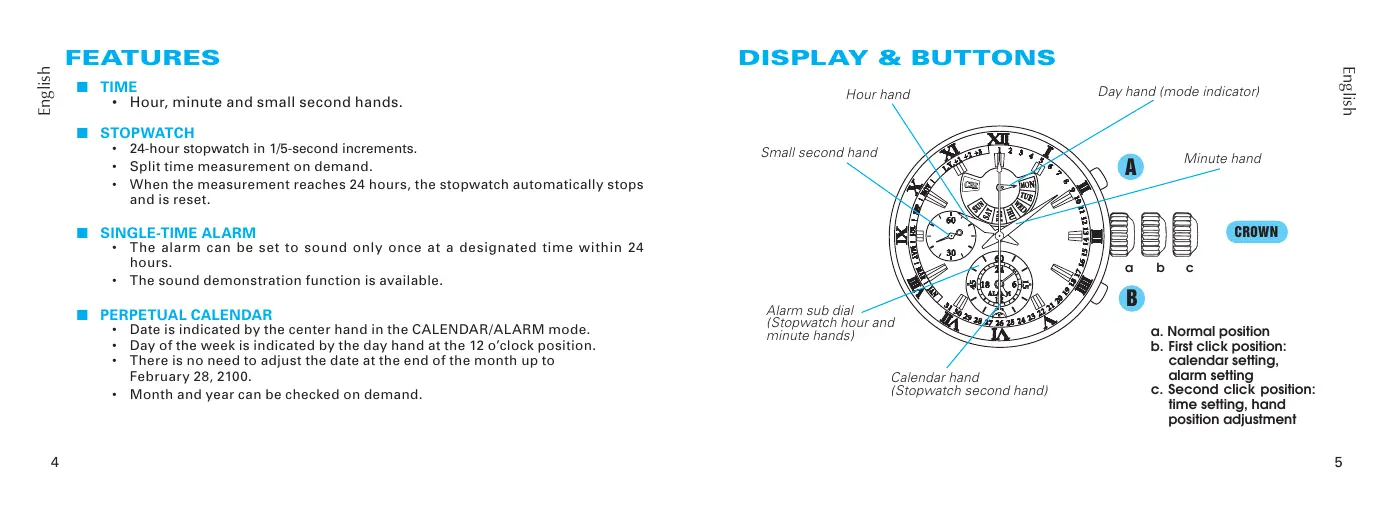
DISPLAY & BUTTONS
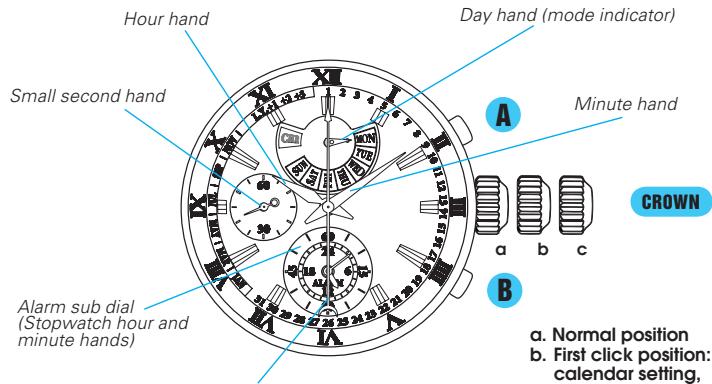
Calendar hand
(Stopwatch second hand)
a. Normal position
b. First click position: calendar setting, alarm setting
c. Second click position: time setting, hand position adjustment
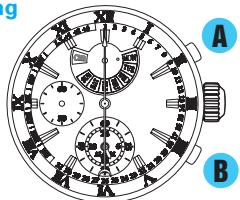
The center hand has dual functions:
- InCALENDAR/ALARM mode, it indicates the date, month and leap year by its base end (A) as a calendar hand.
-
In the STOPWATCH mode, it indicates the second by its tip end (12) as a stop watch second hand.
-
Some models may have a screw lock type crown. If your watch has a screw lock type crown, refer to "SCREW LOCK TYPE CROWN."
- Simplified illustrations may be used in the following sections of this manual.
The characters of mode indicator or date indicator and their orientation may differ depending on the model.
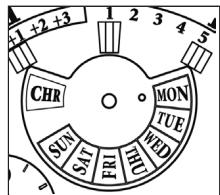
CHR model
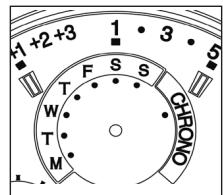
CHRONO model
- The model at the left will be used as an example in the following section of this manual.
Some models may have a screw-lock mechanism that can securely lock the crown by screw when they are not being operated.
Locking the crown will help to prevent any operational errors and enhance the water resistant quality of the watch.
It is necessary to unlock the screw lock type crown before operating it. Once you have finished operating the crown, make sure to relock it.
How to use the screw lock type crown
Keep the crown securely locked unless you need to operate it.
[How to unlock the screw lock type crown]
Turn the crown counterclockwise.
The crown is unlocked and can be operated.
[How to lock the screw lock type crown]
Once you have finished operating the crown, turn it clockwise while gently pressing it in toward the watch body until it stops.
![SEIKO 7T86 ANALOG QUARTZ - [How to lock the screw lock type crown] - 1](/content/2025/01/173197/images/ae66ff5c90bfad59d2513c75e8fba8e1d0485a860fade66ce6aebd2c44c34070.jpg)
![SEIKO 7T86 ANALOG QUARTZ - [How to lock the screw lock type crown] - 2](/content/2025/01/173197/images/2282f20f0a391813a24efea2def729b458ea2bb2331ae9c3dbdc427153d351e7.jpg)
- When locking the crown, turn it slowly with care, ensuring that the screw is properly engaged.
- Be careful not to forcibly push it in, as doing so may damage the screw hole in the case.
HOW TO CHANGE THE DISPLAY MODE
With each pressing of the button B, the display mode changes between theCALENDAR/ALARM mode and the STOPWATCH mode alternately.
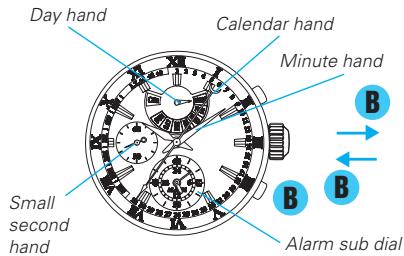
CALENDAR/ALARM MODE
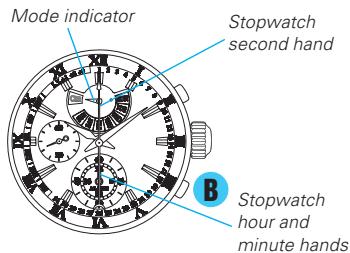
STOPWATCH MODE
- When the display mode is switched, the function of the hands will change accordingly.
- Before switching the display mode from the STOPWATCH mode to the CALENDAR/ALARM mode, make sure that the stopwatch has been reset.
- While the stopwatch is counting, the button B is used for "SPLIT," "SPLIT RELEASE," or "RESET" functions.
TIME SETTING AND HAND POSITION ADJUSTMENT
This watch is designed so that the following adjustments are made with the crown at the second click position.
1) Time settings for main dial and alarm sub dial.
2) Hand position adjustment for alarm hour and minute hands, day hand and calendar hand.
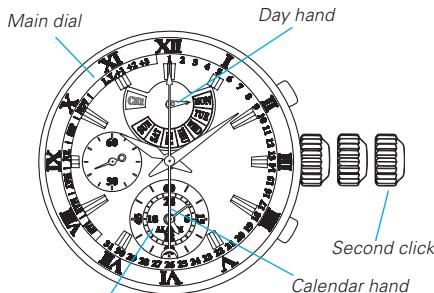
Alarm sub dial (Alarm hour and minute hands)
- When all the hands are correctly positioned, there is no need to adjust their positions.
- When any hand requires its position adjustment, complete the hand position adjustment procedure first, and then move on to the time setting procedure.
- How to check the position of the hands
In the STOPWATCH mode, after resetting the stopwatch, check the position of each hand, referring to the table below:
| Name of hand | Correct position |
| Stopwatch hour and minute hands (Alarm hour and minute hands) | 0:00 |
| Stopwatch second hand (Calendar hand) | 0 second position |
| Mode indicator hand (Day hand) | CHR position |
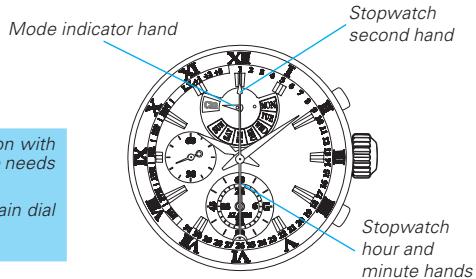
- When using the watch in a location with a different time zone, only the time needs to be set.
- It is necessary to set both the main dial time and the alarm sub-dial time.
Time settings for main dial and alarm sub dial
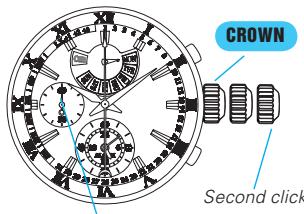
Small second hand
CROWN
Pull out to second click when the small second hand is at the 12 o'clock position.
The small second hand will stop immediately.
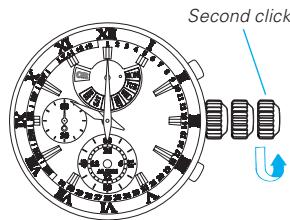
- If the crown is pulled out while the stopwatch is counting, the stopwatch will be automatically reset.
- If the crown is pulled out while the alarm is set, the alarm will be automatically canceled.
- This operation can be performed both in theCALENDAR/ALARM mode and STOPWATCH mode.
CROWN
Turn to set the main dial time.
- It is recommended that the hands be set to a time a few minutes ahead of the current time, taking into consideration the time required to complete the time setting for alarm sub dial, after which the crown is to be pushed in.
The main dial time should be set in the 12-hour format, regardless of whether it is AM or PM.
When setting the minute hand, first advance it 4 to 5 minutes ahead of the desired time, and then turn it back to the exact time.
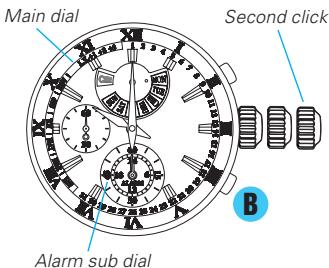
Press to set the alarm sub-dial time to the current time in the 24-hour format.
- With each pressing of the button B, the alarm sub-dial time is advanced by one minute.
- The hands move quickly if the button B is kept pressed.
-
Make sure that the alarm sub-dial time is set to exactly the same time as the main dial time, which has been previously set, in the 24-hour format.
-
At the moment when the alarm sub-dial time indicates 12 o'clock midnight, the date changes.
CROWN After time settings for main dial and alarm sub dial are completed, push in to normal position.
- Hand position adjustment for alarm hour and minute hands, day hand and calendar hand
If any hand is not correctly positioned, adjust it by carrying out the following procedure.
After completing the hand position adjustment procedure, it is necessary to set both the main dial time and the alarm sub-dial time.
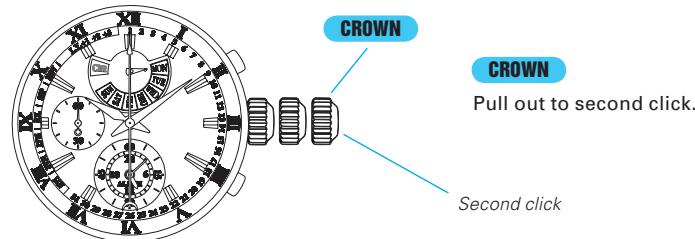
- If the crown is pulled out while the stopwatch is counting, the stopwatch will be automatically reset.
- If the crown is pulled out while the alarm is set, the alarm will be automatically canceled.
- This operation can be performed both in the CALENDAR/ALARM mode and STOPWATCH mode.
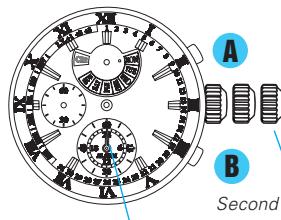
English
Stopwatch hour and minute hands
Stopwatch second hand
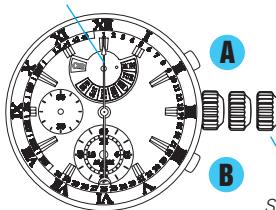
Press for 5 seconds.
The hands of the alarm sub dial at the 6 o'clock position move forward until they point at the 0 second position and stop. Now the hands of the alarm sub dial show the 0 positions of the stopwatch hour and minute hands.
Press to set the stopwatch hour and minute hands to the 0:00 position.
The hands move quickly if the button B is kept pressed.
- When adjusting the position of the hand, the hands can only be advanced in the clockwise direction.
Press once. The stopwatch second hand turns a full circle.
Press to set the stopwatch second hand to the 0 position.
The hand moves quickly if the button B is kept pressed.
Second click
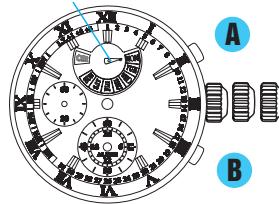
Day hand
A Press once. The day hand completes one revolution.
Press to set the day hand pointing at the Monday indicator.
The hands move quickly if the button B is kept pressed.
To adjust the position of the day hand, advance the day hand until it points at the dot "●" beside the Monday indicator passing through the blank area.
The position of each hand can be readjusted in the following order by pressing the button A.
STOPWATCH hour and minute hands
STOPWATCH second hand
Day hand
CROWN
After all the adjustments are completed, push in to normal position.
[IMPORTANT]
After the positions of the hands are adjusted, make sure that the main dial time and the alarm sub-dial time are both reset.
PERPETUALCALENDAR
The date is indicated by the calendar hand.
The day of the week is indicated by the day hand.
The calendar hand can also be used to check the year and month.
There is no need to adjust the date at the end of the month up to February 28, 2100.
How to read the calendar
In theCALENDAR/ALARM mode, the day hand indicates the day of the week and the calendar hand indicates the date.
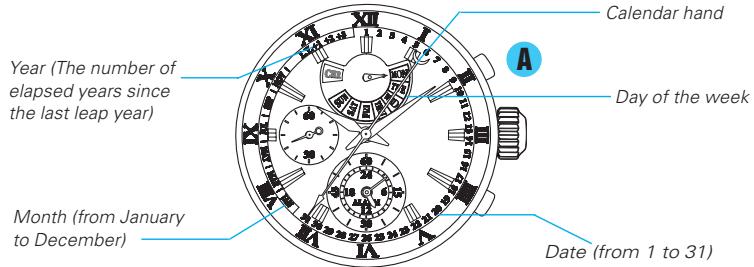
How to check the year and month
In theCALENDAR/ALARM mode, with each pressing of the button A, the calendar hand turns to indicate the date, month and year successively by its base end.

After indicating the month and year, if the button is left untouched for approximately 10 seconds, the calendar hand automatically returns to indicate the date.
How to adjust the calendar
CROWN Pull out to first click.
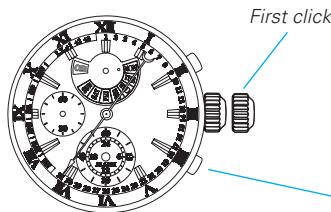
[IMPORTANT]
It is essential that all the hands are correctly positioned, otherwise the watch may not show the calendar correctly.
-
Do not press the button B at this point, as it will lead the watch to the alarm setting mode.
-
If the crown is pulled out while the stopwatch is counting, the stopwatch will be automatically reset.
- If the crown is pulled out while the alarm is set, the alarm will be automatically canceled.
- This operation can be performed both in the CALENDAR/ALARM mode and STOPWATCH mode.
![SEIKO 7T86 ANALOG QUARTZ - [IMPORTANT] - 1](/content/2025/01/173197/images/781c1444d787dde739f0c34231a885ecc4051f5771504d302ae3e79ba81a0bd6.jpg)
Press for 5 seconds.
The calendar hand turns a full circle.
Press to set the date.
- The hand moves quickly if the button B is kept pressed.
- The date can be set to any numeral between 1 and 31.
- If the button B is pressed after the calendar hand points to "31," the calendar hand is fast-forwarded and stops pointing to "1".
![SEIKO 7T86 ANALOG QUARTZ - [IMPORTANT] - 2](/content/2025/01/173197/images/f8c2dad759a777c3a4597fb427dd256b203ce48ee4cde0ca630e29654fe9285e.jpg)
A Press again.
The day hand swings between the day indicator and the "CHR" indicator.
Press to set the day of the week.
- The hand moves quickly if the button B is kept pressed.
- The day of the week can be set to any day of the week from Monday to Sunday.
- If the button B is pressed after the day hand points to Sunday, the day hand swings back and stops pointing to Monday.
A Press again.
The calendar hand is fast-forwarded and stops pointing to the month.
Press to set the month.
- The hand moves quickly if the button B is kept pressed.
- The month can be set to any month from January to December.
- If the button B is pressed after the calendar hand points to December, the calendar hand is fast-forwarded and stops pointing to January.
![SEIKO 7T86 ANALOG QUARTZ - [IMPORTANT] - 3](/content/2025/01/173197/images/62c00f1d796df2da9f903776435bfe51f7848d73058e7c3676903e1878ec77da.jpg)
English
A Press again.
The calendar hand is fast-forwarded and stops pointing to the year.
Press to set the year.
- The hand moves quickly if the button B is kept pressed.
- The year can be set to any year among "L.Y." "+1" "+2" and "+"
- If the button Bispresed after the calendar hand points to " +3 ", the calendar hand is fast-forwarded and stops pointing to "L.Y."
| Year Indication | L.Y. | +1 | +2 | +3 |
| The number of elapsed years since the last leap year | Leap Year | One year | Two Years | Three Years |
| Year | 2008 | 2009 | 2010 | 2011 |
| 2012 | 2013 | 2014 | 2015 | |
| 2096 | 2097 | 2098 | 2099 |
A Press again.
*If the button A is pressed again, the watch returns to the date setting mode.
With each pressing of the button A, the calendar can be readjusted in the following order.

CROWN After all the adjustments are completed, push in to normal position.
- When the date is set to a nonexistent day such as February 30 or November 31 etc., such date will be automatically advanced to the existent first date of the following month.
HOW TO USE THE STOPWATCH
The measured time can be read up to 24 hours in 1/5- second increments.
When the measurement reaches 24 hours, the stopwatch automatically stops and is reset.
Split time measurement is possible.
- If the stopwatch minute and hour hands do not return to the "0" position when the stopwatch is reset to "0," it will be necessary to adjust the positions of the stopwatch hands.
- Refer to " SETTING THE TIME AND HAND POSITION ADJUSTMENT."
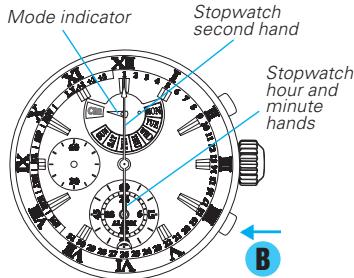
Press to enter the STOPWATCH mode.
- While the stopwatch is counting, pressing the button B cannot change the display mode.
- While the stopwatch is counting, if the crown is pulled out to the first or second click position, the stopwatch will be automatically cancelled.
- Refer to HOW TO CHANGE THE DISPLAY MODE.
How to reset the stopwatch
While the STOPWATCH hands are moving
- Press Button A to stop the stopwatch.
- Press Button B to reset the stopwatch.
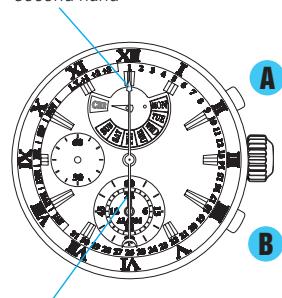
Stopwatch second hand
Stopwatch hour and minute hands
While the STOPWATCH hands are stopped
[When the stopwatch is stopped]
- Press Button B to reset the stopwatch.
[When the split time measurement is displayed while the stopwatch is measuring.]
-
Press Button B to release the split time display and return to the normal display.
-
Press Button A to stop the stopwatch.
-
Press Button B to reset the stopwatch.
[When the split time measurement is displayed and the stopwatch is stopped]
- Press Button B to release the split time display.
- Press Button B to reset the stopwatch.
STOPWATCH OPERATION


- Restart and stop of the stopwatch can be repeated by pressing button A.

-
Measurement and release of split time can be repeated by pressing button B.
-
If the time measured reaches 24 hours while the split time is being displayed, the stopwatch automatically stops counting and releases the split time display, showing "00" 00.

HOW TO USE THE ALARM
The alarm sounds only once at the designated alarm time and it is automatically disengaged.
The alarm time can be set within 24 hours from the current time in 1-minute increments.
The alarm sound can be previewed.
- How to set the alarm time
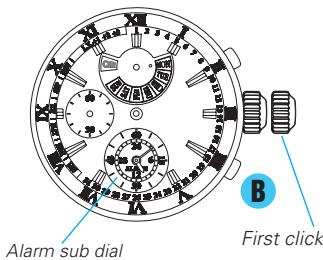
CROWN
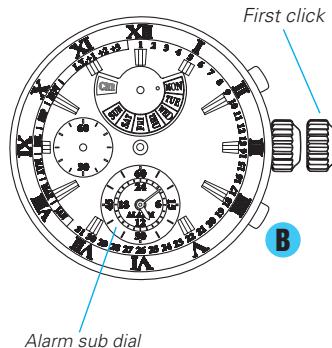
Pull out to first click in theCALENDAR/ALARM mode.
- If the crown is pulled out while the alarm is set, the alarm will be automatically canceled.
- If the watch is in the STOPWATCH mode, press the button B to change to the CALENDAR/ALARM mode.
- Refer to HOW TO CHANGE THE DISPLAY MODE.
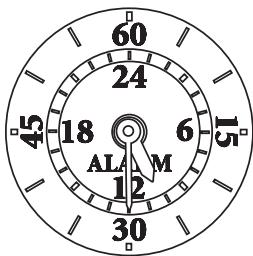

Press to set the alarm time.
- With each pressing of the button B, the alarm sub-dial time advances by one minute.
- The hands move quickly if the button B is kept pressed.
- The alarm hands stop when they indicate the current time.
- If the alarm time is set to the current time, the alarm cannot be set.
CROWN
After alarm time setting is completed, push in to normal position.
- How to stop the alarm manually while sounding
The alarm sounds for 20 seconds at the designated time.
To stop the alarm manually while sounding, press either button A or B.
* The alarm will be automatically canceled once it sounds at the designated time.
- How to change the alarm time, which has already been set
CROWN
Pull out to first click in the CALENDAR/ALARM mode.
- Upon doing this, the set alarm time is automatically canceled, and the alarm sub-dial time changes to indicate the current time.

Press to set a new alarm time.
- With each pressing of the button B, the alarm sub-dial time advances by one minute.
- The hands move quickly if the button B is kept pressed.
CROWN
After alarm time setting is completed, push in to normal position.
ennnn
- How to cancel the alarm time
CROWN
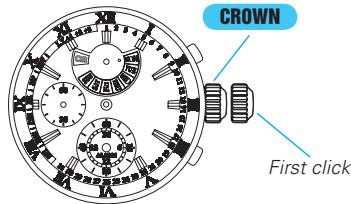
Pull out to first click in theCALENDAR/ALARM mode.
- Upon doing this, the set alarm time is automatically canceled, and the alarmsub-dial time changes to indicate the current time.
CROWN
Push back in to normal position.
Sound demonstration function
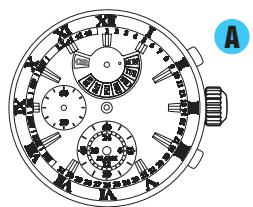
Press for 2 seconds in the CALENDAR /ALARM mode.
- The alarm sound can be heard while the button A is kept pressed.
BATTERY CHANGE
5 Years
The miniature battery which powers your watch should last approximately 5 years. However, because the battery is inserted at the factory to check the function and performance of the watch, its actual life once in your possession may be less than the specified period. When the battery expires, be sure to replace it as soon as possible to prevent any malfunction. For battery replacement, we recommend that you contact an AUTHORIZED SEIKO DEALER and request SEIKO SR927SW battery.
- If the display mode is changed more than once, the stopwatch is used for longer than 1 hour, and the alarm sounds for 20 seconds per day, the battery life may be less than the specified period.
Battery life indicator
When the battery nears its end, the small second hand moves at two-second intervals instead of normal one-second intervals. In that case, have the battery replaced with a newone as soon as possible.
- The watch remains accurate while the small second hand is moving at two-second intervals.
WARNING
- Do not remove the battery from the watch.
- If it is necessary to take out the battery, keep it out of the reach of children. If a child swallows it, consult a doctor immediately.
CAUTION
- Never short-circuit, tamper with or heat the battery, and never expose it to fire. The battery may burst, become very hot or catch fire.
- The battery is not rechargeable. Never attempt to recharge it, as this may cause battery leakage or damage to the battery.
NECESSARY PROCEDURE AFTER BATTERY CHANGE
After the battery is replaced with a new one, or when an abnormal display appears, follow the procedures below to reset the built-in IC. The watch will resume its normal operation.
- How to reset the IC
- Pull out the crown to the second click.
- Press button A and B at the same time for 2 seconds or longer.
- Push the crown back in to normal position and check if the small second hand moves as normal.
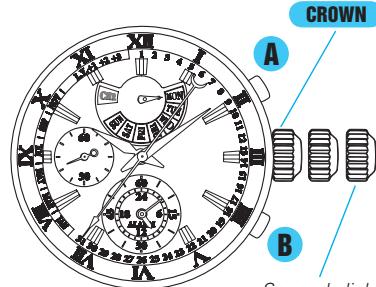
Second click
- Resetting the IC will initialize the watch. Before starting to use the watch, it will be necessary to set the time and adjust each hands to the 0 position. Refer to "TIME SETTING AND HAND POSITION ADJUSTMENT" section of this manual.
eannnnn
SPECIFICATIONS
1 Frequency of crystal oscillator 32,768 Hz (Hz = Hertz...Cycles per second)
2 Loss/gain (Monthly rate) Less than 15 seconds (worn on the wrist at normal temperature range between 5^ and 35^ )
3 Operational temperature range. Between -10^ and +60^
4 Driving system . Step motor 4 pieces
5 Display system
Time. Hour, minute and small second hands in 1-second increments
Stopwatch. Stopwatch second hand in 1/5-second increments (60 seconds/360 degrees)
Stopwatch minute hand in 1-minute increments (60 minutes/360 degrees)
Stopwatch hour hand synchronizes with the minute hand (24 hours/ 360 degrees)
Alarm Alarm minute hand in 1-minute increments (60 minutes/360 degrees)
Alarm hour hand synchronizes with the minute hand (24hours/ 360 degrees)
Calendar. Date indication by the calendar hand (month & year can be checked on demand) Day indication by the day hand
6 Battery SEIKO SR927SW, 1 piece
7 Battery life Approximately 5 years * If the display mode is changed only once, the stopwatch is used for less than 1 hour and the alarm sounds less than 20 seconds per day.
8 IC (Integrated Circuit) C-MOS-IC: 1 piece
- The specifications are subject to change without prior notice for product improvements.
- FEATURES
- TIME
- STOPWATCH
- SINGLE-TIME ALARM
- PERPETUALCALENDAR
- DISPLAY & BUTTONS
- How to use the screw lock type crown
- [How to lock the screw lock type crown]
- HOW TO CHANGE THE DISPLAY MODE
- TIME SETTING AND HAND POSITION ADJUSTMENT
- - How to check the position of the hands
- Time settings for main dial and alarm sub dial
- CROWN
- Press to set the alarm sub-dial time to the current time in the 24-hour format.
- CROWN After time settings for main dial and alarm sub dial are completed, push in to normal position.
- - Hand position adjustment for alarm hour and minute hands, day hand and calendar hand
- Press for 5 seconds.
- Press to set the stopwatch hour and minute hands to the 0:00 position.
- Press once. The stopwatch second hand turns a full circle.
- Press to set the stopwatch second hand to the 0 position.
- A Press once. The day hand completes one revolution.
- Press to set the day hand pointing at the Monday indicator.
- To adjust the position of the day hand, advance the day hand until it points at the dot "●" beside the Monday indicator passing through the blank area.
- [IMPORTANT]
- How to read the calendar
- How to check the year and month
- How to adjust the calendar
- A Press again.
- Press to set the year.
- CROWN After all the adjustments are completed, push in to normal position.
- HOW TO USE THE STOPWATCH
- Press to enter the STOPWATCH mode.
- How to reset the stopwatch
- While the STOPWATCH hands are moving
- While the STOPWATCH hands are stopped
- [When the stopwatch is stopped]
- STOPWATCH OPERATION
- HOW TO USE THE ALARM
- - How to set the alarm time
- Press to set the alarm time.
- - How to stop the alarm manually while sounding
- - How to change the alarm time, which has already been set
- - How to cancel the alarm time
- Sound demonstration function
- BATTERY CHANGE
- Years
- Battery life indicator
- WARNING
- CAUTION
- NECESSARY PROCEDURE AFTER BATTERY CHANGE
- - How to reset the IC
- SPECIFICATIONS
Brand : SEIKO
Model : 7T86 ANALOG QUARTZ
Category : Quartz Analog Watch