
5M65 KINETIC - Watch SEIKO - Free user manual and instructions
Find the device manual for free 5M65 KINETIC SEIKO in PDF.


User questions about 5M65 KINETIC SEIKO
0 question about this device. Answer the ones you know or ask your own.
Ask a new question about this device
Download the instructions for your Watch in PDF format for free! Find your manual 5M65 KINETIC - SEIKO and take your electronic device back in hand. On this page are published all the documents necessary for the use of your device. 5M65 KINETIC by SEIKO.
USER MANUAL 5M65 KINETIC SEIKO
INSTRUCTIONS (P. 63)
ISTRUZIONI (P. 93)
INSTRUCCIONES (P.123)
INSTRUÇOES (P.153)
用法說明 (183頁)
You are now the proud owner of a SEIKO KINETIC® Cal.5M65. For best results, please read the instructions in this booklet carefully before using your SEIKO KINETIC® Please keep this manual handy for ready reference.
HOW TO CHARGE AND START THE WATCH 6
POWER RESERVE INDICATOR 8
HOW TO SET THE TIME AND DATE, HOW TO USE THE TIME DIFFERENCE ADJUSTMENT FUNCTION. 10
WORLD TIME DISPLAY 21
24-HOUR DISPLAY 23
USING 24-HOUR HAND TO INDICATE DIRECTIONS 26
IF THE SECOND HAND STARTS MOVING AT TWO-SECOND INTERVALS 28
INSTANT-START FUNCTION 28
REMARKS ON THE KINETIC E.S.U. 29
NOTES FOR USING THE WATCH 30
SPECIFICATIONS 32
For the care of your watch, see "TO PRESERVE THE QUALITY OF YOUR WATCH" in the attached Worldwide Guarantee and Instruction Booklet.
FEATURES
Unlike the conventional quartz watch powered by the button-type battery, the KINETIC is an analog quartz watch equipped with an Automatic Generating System, the unique technology developed by SEIKO, which generates electrical energy to power the watch by utilizing the movement of the arm or wrist, and stores it in the KINETIC ELECTRICITY STORAGE UNIT (KINETIC E.S.U.) The watch is equipped with a 24-hour hand and features an hour-hand independent adjustment function (for time difference adjustment), offering several types of 24-hour hand usage. For instance, if you set the 24-hour hand to show your home time, you can independently set the hour hand to display the time of the place you are staying at as well as easily check your home time with the 24-hour hand. Alternatively, you can set the 24-hour hand to display the time in a different time zone.

CAUTION
- The movement of your arm while the watch is worn generates electrical energy to power the watch. Even when the watch is worn on your arm, it will not be charged if your arm is not in motion.
It is recommended that the watch be worn on your wrist daily for at least 10 hours.
THE KINETIC E.S.U. is an abbreviation for KINETIC ELECTRICITY STORAGE UNIT, which is the name of the power source employed in the KINETIC movements.
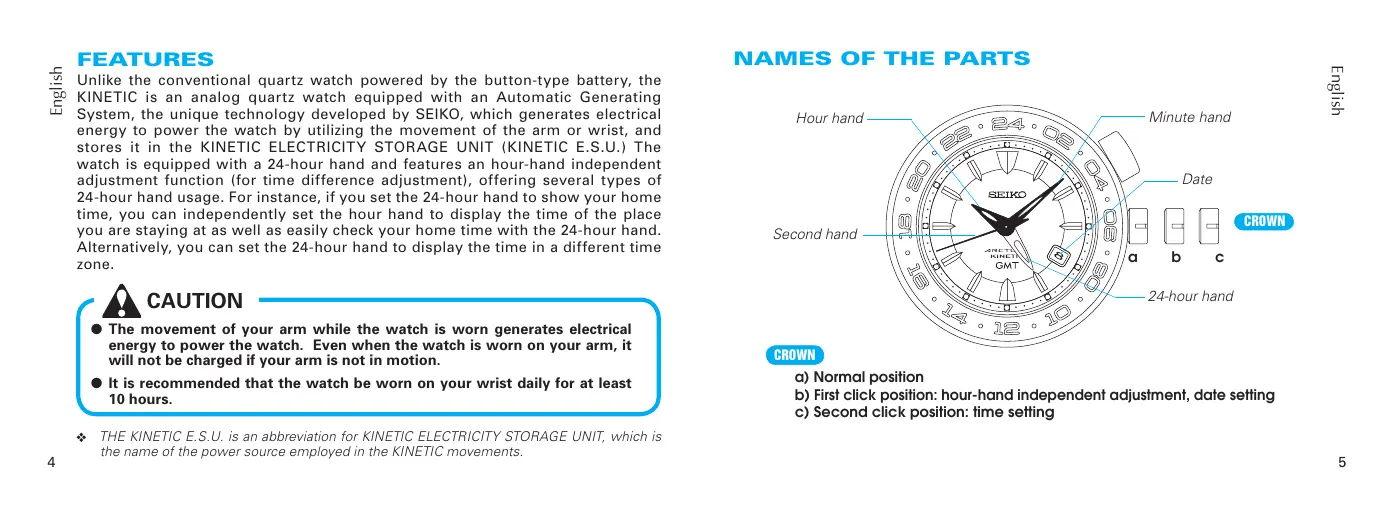
NAMES OF THE PARTS

CROWN
a) Normal position
b) First click position: hour-hand independent adjustment, date setting
c) Second click position: time setting
HOW TO CHARGE AND START THE WATCH
1 Swing the watch from side to side.
* Swing rhythmically at a rate of twice a second.
2 Charge the KINETIC E.S.U. sufficiently.
3 Set the time/calendar and put on the watch.


NUMBER OF SWINGS AND POWER RESERVE

- When the watch stops completely, or if you find the second hand moving at two-second intervals, swing the watch from side to side at a rate of twice a second.
-
250 swings will reserve up to 1 day of power. The second hand will start moving at one-second intervals.
-
It is recommended that the watch be swung further until 2 days of power is reserved. As a guideline for recharging, an additional 200 to 250 swings, about 450 to 500 swings in total will reserve 2 days of power.
-
Wear the watch on your wrist.
POWER RESERVE ACCUMULATED WHILE YOU ARE WALKING

The illustrations above provide only general guidelines of the relationship between the power reserve and the number of swings/the distance you walk. Actual amount of power reserve differs from person to person.
POWER RESERVE INDICATOR
Press the button at the 2 o'clock position.
- To allow easy reading of the second hand, press the button when the second hand is at the 12 o'clock position.
| QUICK MOVEMENT OF SECOND HAND | 5 seconds | 10 seconds | 20 seconds | 30 seconds |
| POWER RESERVE | Between 1 and 7 days | Between 7 days and 1 month | Approx. 1 month | Approx. between 4 and 6 months |
The second hand will resume normal movement after the indicated 5, 10, 20 or 30 seconds have elapsed.
- Some models have the screw lock type crown, which can be locked by the screw when it is not necessary to be operated.
Locking the crown will prevent operating errors. - Unscrew the crown before any crown operation. When the operation is over, screw the crown in to lock.
If your watch has a screw lock type crown, unscrew it before any crown operation.
Always keep the crown locked unless it is necessary for operating the crown.
[To unscrew the crown]
Turn the crown counterclockwise (downward) to unscrew it. The crown is unlocked and can be operated.
![SEIKO 5M65 KINETIC - [To unscrew the crown] - 1](/content/2025/01/173155/images/d6088709ca6fdea5a810234cd76a7e1e739d17f8551794346bf597eeb4ca3093.jpg)
The crown can be pulled out.
[To screw the crown in]
Upon completion of the crown operation, screw the crown in completely until it stops by turning it clockwise (upward) while gently pressing it back into the original position.
![SEIKO 5M65 KINETIC - [To screw the crown in] - 1](/content/2025/01/173155/images/4bdc05faf49ae9cf2e8d12b6408b603361daa76615a0a42fb0f4ee0ab389e51b.jpg)
Turn the crown while pressing it back in.
HOW TO SET THE TIME AND DATE, HOW TO USE THE TIME DIFFERENCE ADJUSTMENT FUNCTION
How to set the time
- When setting the time, ensure that the watch is working: the second hand is moving at one-second intervals.
- In a case that the watch is completely stopped due to a shortage of stored electrical energy, recharge the watch until the second hand resumes the normal one-second interval movement, and then reset the time and calendar. (Refer to "IF THE SECOND HAND STARTS MOVING AT TWO-SECOND INTERVALS" on page 28.)
- The 24-hour hand can be used in two ways. Since the time setting procedure differs according to the usage, please choose the method before setting the time.
This is the standard usage for the 24-hour hand.

in a different time zone.
- For instance, by setting the 24-hour hand to GMT while setting the hour and minute hands to indicate the time in your area, you can easily check GMT with the 24-hour hand at any time.

How to set the 24-hour hand as a regular 24-hour indicator

-
Pull out the crown to the second click.
-
Pull the crown out when the second hand is at the 12 o'clock position and the second hand will stop on the spot.
- When setting the time, ensure that the watch is working: the second hand is moving at one-second intervals.
Second click position

To set to 10:00 A.M., adjust the 24-hour hand to indicate "10" on the 24-hour scale (5 o'clock position), and the minute hand to the "0" minute position.
To set to 6:00 P.M., adjust the 24-hour hand to indicate "18" on the 24-hour scale (9 o'clock position), and the minute hand to the "0" minute position.
-
Turn the crown to set the 24-hour and minute hands to the current time.
-
Only the 24-hour and minute hands are to be set at this stage. The hour hand is to be set later so it is not necessary to adjust the hour hand yet, even if it is indicating the wrong time.
- The date may be altered depending on the position of the hour hand, however it should not cause any concern since it can also be adjusted later.
-
Set the minute hand ahead of the time and then slowly turn it back to the desired time.
-
Push the crown back in simultaneously with a time signal.
-
The setting of the 24-hour, minute and second hands to the current time is now completed.
-
Pull out the crown to the first click.

-
Turn the crown to set the hour hand to the current hour.
-
Also, adjust the date at this point if necessary.
- The moment the date changes is midnight. When setting the hour hand, be sure that AM/PM is set correctly.
- Turn the crown slowly, checking that the hour hand moves in one-hour increments.
-
When adjusting the hour hand, the other hands may move slightly. However, this is not a malfunction.
-
Push the crown back in upon completion of time setting.
How to set the 24-hour hand as a dual time indicator for a "different time zone area"

-
Pull out the crown to the second click.
-
Pull the crown out when the second hand is at the 12 o'clock position and the second hand will stop on the spot.
- When setting the time, ensure that the watch is working: the second hand is moving at one-second intervals.
Second click position

To set the 24-hour hand to the time in New York while setting the hour/minute hands to indicate the time in London.
When the time in London is 10:00 A.M., it is 5:00 A.M. in New York.
Set the 24-hour hand to indicate "5" on the 24-hour scale (the 2.5 o'clock position), while the minute hand is pointing at the "0" minute position.
-
The time difference adjustment function serves only for a time in a "different time zone area" where the time difference from the time in London is represented in one-hour increments.
-
Turn the crown to set the 24-hour and minute hands to the time in the "different time zone area" you wish to set.
-
Only the 24-hour and minute hands are to be set at this stage. The hour hand is to be set later so it is not necessary to adjust the hour hand yet, even if it is indicating the wrong time.
- The date may be altered depending on the position of the hour hand, however it should not cause any concern since it can also be adjusted later.
-
Set the minute hand ahead of the time and then slowly turn it back to the desired time.
-
Push the crown back in simultaneously with a time signal.
-
The setting of the 24-hour, minute and second hands to the time in the" different time zone area" is now completed.
- Pull out the crown to the first click.

-
Turn the crown to set the hour hand to the current hour. (In this example, the current hour in London.)
-
Also, adjust the date at this point if necessary.
- The moment the date changes is midnight. When setting the hour hand, be sure that AM/PM is set correctly.
- Turn the crown slowly, checking that the hour hand moves in one-hour increments.
-
When adjusting the hour hand, the other hands may move slightly. However, this is not a malfunction.
-
Push the crown back in upon completion of time setting.
- How to set the date
- This watch is designed so that the date changes one day by turning the hour hand two full rotations in the same way as in "the time difference adjustment function."
- The date advances one day by turning the hour hand two full rotations clockwise, while the date is set back one day by turning the hour hand two full rotations counterclockwise.
-
After setting the time, it is necessary to set the date. Manual date adjustment is required on the first day after a month that has less than 31 days.
-
Pull out the crown to the first click.
- Each time the hour hand makes two full rotations by turning the crown, the date is adjusted one day.

Clockwise: the hour hand turns counterclockwise. The date is set back one day when the hour hand makes two full rotations counterclockwise.
Counterclockwise: the hour hand turns clockwise. The date advances one day when the hour hand makes two full rotations clockwise.
First click position
- The date can be adjusted either by advancing it or by setting it back. Choose whichever requires fewer rotations.
- Turn the crown gently.
-
To adjust the date without changing the time, turn the hour hand in two full rotation increments.
-
When adjusting the hour hand, the other hands may move slightly. However, this is not a malfunction.
-
After completing the date setting, check the position of the hour hand once again and push the crown back in.
- How to adjust the time difference
While staying in a place in a different time zone area from where you live, you can conveniently set the watch to indicate the local time in the place where you are staying without stopping the watch.
- The time difference adjustment function is interrelated with the date display. If the time difference is correctly adjusted, the watch displays the correct date of the place where you are staying.
- Pull out the crown to the first click.
- Turn the crown to set the hour hand to indicate the time of the place where you are staying. The hour hand is independently set to the current hour.

Clockwise: Setting the time back (The hour hand turns counterclockwise.)
Counterclockwise: Advancing the time (The hour hand turns clockwise.)
First click position
-
Turn the crown slowly, checking that the hour hand moves in one-hour increments.
-
Refer to "Time difference table" for time differences from GMT (UTC).
- When adjusting the time difference, make sure that AM/PM and the date are correctly set.
- When adjusting the hour hand, the other hands may move slightly. However, this is not a malfunction.
-
When turning the crown clockwise to set the hour hand to indicate any time between 9:00 P.M. and midnight, keep turning until the hour hand points to 8:00 P.M., and then advance it to the desired time.
-
After completing the time difference adjustment, check the position of the hour hand once again and push the crown back in.
Time difference table
- Refer to the table below for time differences from GMT (UTC) in major cities in the world.
| Major cities in respective time zones | Time difference with GMT (UTC) |
| Midway Islands | -11 hours |
| Honolulu | -10 hours |
| Anchorage ★ | -9 hours |
| Los Angeles ★, San Francisco ★ | -8 hours |
| Denver ★, Edmonton ★ | -7 hours |
| Chicago ★, Mexico City ★ | -6 hours |
| New York ★, Washington ★, Montreal ★ | -5 hours |
| Caracas, Santiago ★ | -4 hours |
| Rio de Janeiro ★ | -3 hours |
| Azores ★ | -1 hour |
| London ★, Casablanca | 0 hour |
| Paris ★, Rome★, Amsterdam★ | +1 hour |
| Cairo ★, Athens★, Istanbul★ | +2 hours |
| Moscow ★, Mecca, Nairobi | +3 hours |
| Dubai | +4 hours |
| Karachi, Tashkent★ | +5 hours |
| Dacca | +6 hours |
| Bangkok, Jakarta | +7 hours |
| Hong Kong, Manila, Beijing, Singapore | +8 hours |
| Tokyo, Seoul, Pyongyang | +9 hours |
| Sydney ★, Guam, Khabarovsk★ | +10 hours |
| Nouméa, Solomon Islands | +11 hours |
| Wellington ★, Fiji islands, Auckland★ | +12 hours |
- Cities marked with "★" use daylight saving time.
- The time differences and use of daylight saving time in each city are subject to change according to the governments of the respective countries or regions.
WORLD TIME DISPLAY (only for models with the rotating bezel for world time display)
- By using the 24-hour hand and rotating bezel, the times of 22 cities in different time zones throughout the world can be read from the dial.

24-hour hand
Turn the rotating bezel so that the city mark corresponding to the area whose time has been set in the "How to set the time" aligns with the 24-hour hand.
Each city mark on the bezel indicates the time of the city or area it represents. Read the times in the various cities, referring to the 24-hour marks on the dial.
Examples of marks on the bezel and names of cities/areas
| Marks on the bezel | Name of city or area | Marks on the bezel | Name of city or area |
| G M T | Greenwich | N O U | Nouméa |
| R O M | Rome | W L G | Wellington |
| I S T | Istanbul | H N L | Honolulu |
| M O W | Moscow | A N C | Anchorage |
| D X B | Dubai | L A X | Los Angeles |
| K H I | Karachi | D E N | Denver |
| D A C | Dacca | C H I | Chicago |
| B K K | Bangkok | N Y C | New York |
| H K G | Hong Kong | C C S | Caracas |
| T Y O | Tokyo | B U E | Buenos Aires |
| S Y D | Sydney | P D L | Azores |
Example of use
If you are in Rome and wish to know the time in New York:
Set "ROM" on the bezel to the 24-hour hand.

Read the time that "NYC" on the bezel points to in the 24-hour indication.
Rome: 17:08 → 5:08 p.m.
New York: 11:08 11:08 a.m.

24-HOUR DISPLAY
(only for models with the rotating bezel for 24-hour display)
- By using the 24-hour hand and rotating bezel, the times of areas in different time zones throughout the world can be read from the dial.
Example of use
If you are in Rome and wish to know the time of New York: Check that "24" on the rotating bezel is at the 12 o'clock position.
Calculate the time difference between Rome and New York by referring to the example below:
Ex.) When you move from Rome to New York:
[A] Rome time : +1 hour from GMT
[B] New York time : -5 hours from GMT
So the time difference between Rome and New York is:
[B] - [A] = (-5) - (+1) = -6 (hours)
You should move the hour hand back 6 hours.

Turn the rotating bezel clockwise by 6 hours.
- When the time of your area is ahead of the time of the desired place, turn the bezel clockwise. When the time of your area is behind the time of the desired place, turn the bezel counterclockwise.
Read the 24-hour mark on the rotating bezel that the 24-hour hand points to.
- The time of your area can be known by reading the 24-hour mark on the dial that the 24-hour hand points to.

USING 24-HOUR HAND TO INDICATE DIRECTIONS (only for models with the rotating compass bezel or ring)
PRECAUTIONS ON USING THE COMPASS
- Please use the compass in places where the sun is visible or its location is known.
- Before using the compass, it is necessary to set the 24-hour hand to the current time of your area.
- The compass is so designed to provide only a rough indication of directions, and should not be used where accuracy is critical.
- If daylight saving time (summer time) is in effect in your area, be sure to set your watch one hour behind the current time before using the rotating compass.
How to use the compass bezel (ring)
[In the Northern Hemisphere]
1 Set "N (North)" on the rotating compass bezel (ring) to the 12 o'clock marker. The direction marks on the bezel (ring) are set as follows;
3 o'clock position: E (East)
6 o'clock position: S (South)
9 o'clock position: W (West)
2 While keeping the dial level, point the 24-hour hand in the direction of the sun. The direction marks indicate the corresponding directions.
[In the Southern Hemisphere]
1 Set "N (North)" on the rotating compass bezel (ring) to the 24-hour hand.
2 While keeping the dial level, point the 12 o'clock marker in the direction of the sun. The direction marks indicate the corresponding directions.
[In the Northern Hemisphere]
![SEIKO 5M65 KINETIC - [In the Northern Hemisphere] - 1](/content/2025/01/173155/images/39ff4261ec2582e945e1b464ec80046855ce617dd2897838504bcccb4beb9301.jpg)
12 o'clock marker North
[In the Southern Hemisphere]
![SEIKO 5M65 KINETIC - [In the Southern Hemisphere] - 1](/content/2025/01/173155/images/b793c319d8b6c26b2a71752b5e9c7fc04f7c81a5f88bd4407842e5c7c66ced66.jpg)
IF THE SECOND HAND STARTS MOVING AT TWO-SECOND INTERVALS (ENERGY DEPLETION FOREWARNING FUNCTION)
- When the second hand starts moving at two-second intervals whether it is worn or left untouched, the watch may run down within approximately 24 hours.
In such a case, swing the watch from side to side to sufficiently charge the KINETIC E.S.U. (refer to "HOW TO CHARGE AND START THE WATCH" on page 6), and then reset the time and calendar.
INSTANT-START FUNCTION
-
When a long time has passed since the watch stopped, you can get it started quickly with only a few swings.
This function is available as long as the watch has been stopped for less than a year. -
When this function is activated, the second hand will start moving at two-second intervals.
Swing the watch from side to side to charge the KINETIC E.S.U. by referring to "NUMBER OF SWINGS AND POWER RESERVE" on page 7. - After the second hand starts moving at one-second intervals, put the watch on your wrist so that it will be charged further.
- The watch remains accurate even while the second hand is moving at two-second intervals.
REMARKS ON THE KINETIC E.S.U.
The electric energy generated while the watch is worn on your wrist is stored in the KINETIC E.S.U. It is a power source completely different from conventional batteries for watches and does not require any periodic replacement.
- When the KINETIC E.S.U. is fully charged, the watch will keep operating for approximately 6 months without recharging the KINETIC E.S.U.
The duration of charge decreases gradually over time. The extent of decrease, however, varies depending on the environment and conditions of use.
The KINETIC E.S.U. is a clean and environmentally friendly power source.

CAUTION
Never install a silver oxide battery for conventional watches in place of the KINETIC E.S.U. The battery may burst, become very hot or catch fire.
NOTES FOR USING THE WATCH
HOW TO CHARGE AND START THE WATCH
To charge the KINETIC E.S.U. efficiently, swing the watch from side to side, making an arc of about 20 cm.
- No additional benefit is obtained by swinging the watch more quickly or with greater vigor.
- When the watch is swung, the oscillating weight in the generating system rotates to drive the mechanism. As it rotates, it gives out a sound, which is not a malfunction.
- When the watch has been left untouched for more than one year after it has completely stopped, the second hand may not start moving at normal one-second intervals even if the watch is swung the number of times indicated in "NUMBER OF SWINGS AND POWER RESERVE" on page 7. In this case, swing the watch further until the second hand starts moving at one-second intervals.
The watch is equipped with a system to prevent overcharge. Even if it is further swung after being fully charged, no malfunction will result.
- The watch is equipped with an instant-start function, and it may start operating after it is swung several times. For details, see "INSTANT-START FUNCTION".
It is not necessary to charge the watch fully, as it is charged automatically while it is worn on your wrist.
Wear the watch daily for at least 10 hours.
Even when the watch is worn on your arm, it will not be charged if your arm is not in motion.
POWER RESERVE INDICATOR
The power reserve indicator provides only a general guideline of the duration within which the watch keeps operating without needing to be charged.
- You can immediately press the button again to recheck the power reserve one more time. To do so a third time, however, wait until the second hand resumes normal movement before pressing the button again.
- When the second hand moves at two-second intervals, the power reserve is very low and the indicator does not function.
- Immediately after the watch is swung to charge the KINETIC E.S.U., the second hand may not properly indicate the power reserve. Please check again after 10 to 15 minutes have elapsed.
Precaution on see-through case-back models:
If your watch has a glass case back, do not expose the case back to strong light such as direct sunlight or an incandescent light at close range, as this may temporarily increase the power consumption of the watch circuit, thus reducing the power reserve in the KINETIC E.S.U. This condition, however, will be corrected when the case back is turned away from the light.
TIME/CALENDAR SETTING
To set the exact time, pull out the crown all the way when the second hand is at the 12 o'clock position and push it back in to the normal position in accordance with a time signal.
- When setting the hour hand, pull out the crown to the first click, turn it to set the hour hand to the current hour, and then check that AM/PM is correctly set. The watch is designed so that the calendar changes once in 24 hours. Turn the hand past the 12 o'clock marker to determine whether the watch is set for the A.M. or P.M. period. If the calendar changes, the time is set for the A.M. period. If the calendar does not change, the time is set for the P.M. period. Turn the crown slowly, checking that the hour hand moves at one-hour intervals.
- When setting the minute hand, pull out the crown all the way to turn the minute hand. Advance the hand 4 to 5 minutes ahead of the desired time and then turn it back to the exact minute.
- When setting the time, make sure that the second hand is moving at one-second intervals.
It is necessary to adjust the date at the end of February and 30-day months.
- When setting the date, pull out the crown to the first click and turn it to rotate the hour hand until the date changes. The date advances one day by turning the hour hand two full rotations clockwise, while the date is set back one day by turning the hour hand two full rotations counterclockwise.
English
SPECIFICATIONS
1 Frequency of crystal oscillator 32,768 Hz (Hz = Hertz...Cycles per second)
2 Loss/gain (Monthly rate) .Less than 15 seconds at normal temperature range (5^ 35^) (41^ 95^)
3 Operational temperature range -10°C ~ +60°C (14°F ~ 140°F)
4 Display system
Calendar indication. Date is displayed.
Time indication 4 hands (hour, minute, second, and 24-hour hands)
5 Driving system. Step motor
6 Power reserve
Full charge Approximately 6 months
7 Additional function. Power reserve indicator, energy depletion forewarning function and overcharge prevention function
8 IC (Integrated Circuit) C-MOS-IC, 1 piece
9 KINETIC ELECTRICITY STORAGE UNIT.... Button type, 1 piece
- The specifications are subject to change without prior notice for product improvement.