
AZUR 551P - Phono Preamplifier CAMBRIDGE AUDIO - Free user manual and instructions
Find the device manual for free AZUR 551P CAMBRIDGE AUDIO in PDF.


| Product Type | Phono Preamplifier |
| Brand | Cambridge Audio |
| Model | AZUR 551P |
| Dimensions (W x D x H) | 215 x 195 x 76 mm |
| Weight | 1.3 kg |
| Power supply | External 12 V DC power adapter |
| Inputs | 1 pair RCA (phono) |
| Outputs | 1 pair RCA (line) |
| Compatible cartridge type | MM (moving magnet) and MC (moving coil) |
| Gain | 40 dB (MM) / 60 dB (MC) |
| Input impedance | 47 kΩ (MM) / 100 Ω (MC) |
| Input capacitance | 100 pF (MM) / adjustable (MC) |
| Signal-to-noise ratio | > 80 dB (MM), > 70 dB (MC) |
| Total harmonic distortion | < 0.003% (MM) |
| Frequency response | 20 Hz – 20 kHz (±0.5 dB) |
| Subsonic filter | Yes, switchable |
| Power consumption | < 5 W |
| Chassis material | Brushed aluminum |
| Included accessories | Power adapter, RCA cable |
| Care and cleaning | Wipe with a soft, dry cloth. Do not use abrasive products. |
| Safety | Do not open the case. Risk of electric shock. |
| Warranty | 2 years (depending on country) |
| Country of manufacture | China |
Frequently Asked Questions - AZUR 551P CAMBRIDGE AUDIO
User questions about AZUR 551P CAMBRIDGE AUDIO
0 question about this device. Answer the ones you know or ask your own.
Ask a new question about this device
Download the instructions for your Phono Preamplifier in PDF format for free! Find your manual AZUR 551P - CAMBRIDGE AUDIO and take your electronic device back in hand. On this page are published all the documents necessary for the use of your device. AZUR 551P by CAMBRIDGE AUDIO.
USER MANUAL AZUR 551P CAMBRIDGE AUDIO
Your music + our passion
Cambridge Audio
Contents
Introduction 3
Important safety instructions 4
Limited warranty. 7
Rear panel controls. 8
Front panel controls. 8
Rear panel connections. 9
Technical specifications. 10
Troubleshooting 10
Make sure you register your purchase.
Visit: www.cambridge-audio.com/sts
By registering, you'll be the first to know about:
Future product releases
- Software upgrades
- News, events and exclusive offers plus competitions!
This guide is designed to make installing and using this product as easy as possible. Information in this document has been carefully checked for accuracy at the time of printing; however, Cambridge Audio's policy is one of continuous improvement, therefore design and specifications are subject to change without prior notice.
This document contains proprietary information protected by copyright. All rights are reserved. No part of this manual may be reproduced by any mechanical, electronic or other means, in any form, without prior written permission of the manufacturer. All trademarks and registered trademarks are the property of their respective owners.
Copyright Cambridge Audio Ltd 2012.
Cambridge Audio and the Cambridge Audio logo are trademarks of Cambridge Audio.
Other brands mentioned are trademarks of their respective owners and are used for reference purposes only.
Introduction
Thank you for purchasing this Cambridge Audio azur series phono pre-amplifier. Like all Cambridge Audio products these phono pre-amplifiers adhere to three core principles - stunning performance, ease of use and incredible value.
The design of a high quality but cost-effective phono pre-amplifier presents a major challenge. Providing first-class performance on an unlimited budget is one matter; achieving the same performance within tight price limits is quite another, and requires all the expertise and experience that Cambridge Audio brings to its product design process. We believe we have succeeded in our aim of creating a first-class affordable product.
The 551P features a moving magnet stage whilst the 651P offers both moving magnet and moving coil stages. Both use low noise discrete transistors for the all-important input stages instead of the more common integrated circuits.
Both are designed to produce high gain and linearity, without requiring massive amounts of negative feedback to achieve low distortion. Both models also employ a single-ended 'Class A' gain stage with audiophile passive RIAA equalisation.
High quality components are used throughout such as 1% metal film resistors and close tolerance polypropylene capacitors.
The 651P uses more exotic amplification circuitry to provide even lower distortion and noise plus a second higher gain stage for MC cartridges. In addition, the 651P employs multi-parallel capacitors to achieve exceptional RIAA accuracy of only 0.3dB up to 50kHz and features a defeatable subsonic filter.
Both units can be switched off from the front panel and feature a very high efficiency external transformer that consumes less than 0.5W when the main unit is switched off.
Thank you for taking the time to read this manual; we do recommend you keep it for future reference.

Matthew Bramble
Cambridge Audio Technical Director and the 551P/651P design team
Cambridge Audio
Important safety instructions
For your own safety please read the following important safety instructions carefully before attempting to connect this unit to the mains power supply. They will also enable you to get the best performance from and prolong the life of the unit:
- Read these instructions.
- Keep these instructions.
- Heed all warnings.
- Follow all instructions.
- Do not use this apparatus near water.
- Clean only with a dry cloth.
- Do not block any ventilation openings. Install in accordance with the manufacturer's instructions.
- Do not install near any heat sources such as radiators, heat registers, stoves, or other apparatus (including amplifiers) that produce heat.
- Do not defeat the safety purpose of the polarized or grounding-type plug. A polarized plug has two blades with one wider than the other. A grounding-type plug has two blades and a third grounding prong. The wide blade or the third prong are provided for your safety. If the provided plug does not fit into your outlet, consult an electrician for replacement of the obsolete outlet.
- Protect the power cord from being walked on or pinched, particularly at plugs, convenience receptacles and the point where they exit from the apparatus.
- Only use attachments/accessories specified by the manufacturer.
- Use with only the cart, stand, tripod, bracket, or table specified by the manufacturer, or sold with the apparatus. When a cart is used, use caution when moving the cart/ apparatus combination to avoid injury from tip-over.
-
Unplug this apparatus during lightning storms or when unused for long periods of time.
-
Refer all servicing to qualified service personnel. Servicing is required when the apparatus has been damaged in any way, such as the power-supply cord or plug having been damaged, liquid has been spilled or objects have fallen into the apparatus, the apparatus has been exposed to rain or moisture, does not operate normally, or has been dropped.
WARNING
- To reduce the risk of fire or electric shock, do not expose this unit to rain or moisture.
The unit must be installed in a manner that makes disconnection of the mains plug from the mains socket outlet (or appliance connector from the rear of the unit) possible. Where the mains plug is used as the disconnect device, the disconnect device shall remain readily operable. Only use the mains cord supplied with this unit.
Please ensure there is ample ventilation (at least 10cm clearance all round). Do not put any objects on top of this unit. Do not situate it on a rug or other soft surface and do not obstruct any air inlets or outlet grilles. Do not cover the ventilation grilles with items such as newspapers, tablecloths, curtains, etc.
This unit must not be used near water or exposed to dripping or splashing water or other liquids. No objects filled with liquid, such as vases, shall be placed on the unit.

CAUTION
Risk of electric shock. Do not open.
AVIS
The lightning flash with the arrowhead symbol within an equilateral triangle is intended to alert the user to the presence of un-insulated 'dangerous voltage' within the product's enclosure that may be of sufficient magnitude to constitute a risk of electric shock to persons.
The exclamation point within an equilateral triangle is intended to alert the user to the presence of important operating and maintenance instructions in the service literature relevant to this appliance.

WEEE symbol
The crossed-out wheeled bin is the European Union symbol for indicating separate collection for electrical and electronic equipment. This product contains electrical and electronic equipment which should be reused, recycled or recovered and should not be disposed of with unsorted regular waste. Please
return the unit or contact the authorised dealer from whom you purchased this product for more information.

CE mark
This product complies with European Low Voltage (2006/95/ EC), Electromagnetic Compatibility (2004/108/EC) and
Environmentally-friendly design of Energy-related Products (2009/125/EC) Directives when used and installed according to this instruction manual. For continued compliance only Cambridge Audio accessories should be used with this product and servicing must be referred to qualified service personnel.

C-Tick mark
This product meets the Australian Communications Authority's Radio communications and EMC requirements.

Gost-R Mark
This product meets Russian electronic safety approvals.
FCC regulations
NOTE: THE MANUFACTURER IS NOT RESPONSIBLE FOR ANY RADIO OR TV INTERFERENCE CAUSED BY UNAUTHORIZED MODIFICATIONS TO THIS EQUIPMENT. SUCH MODIFICATIONS COULD VOID THE USER AUTHORITY TO OPERATE THE EQUIPMENT.

This equipment has been tested and found to comply with the limits for a Class B digital device, pursuant to Part 15 of the FCC Rules. These limits are designed to provide reasonable protection
against harmful interference in a residential installation. This equipment generates, uses and can radiate radio frequency energy and, if not installed and used in accordance with the instructions, may cause harmful interference to radio communications. However, there is no guarantee that interference will not occur in a particular installation.
If this equipment does cause harmful interference to radio or television reception, which can be determined by turning the equipment off and on, the user is encouraged to try to correct the interference by one or more of the following measures:
- Re-orient or relocate the receiving antenna.
- Increase the separation between the equipment and receiver.
- Connect the equipment into an outlet on a circuit different from that to which the receiver is connected.
- Consult the dealer or an experienced radio/TV technician for help.
Cambridge Audio
Ventilation
IMPORTANT - The unit will become hot when in use. Do not stack multiple units on top of each other. Do not place in an enclosed area such as a bookcase or in a cabinet without sufficient ventilation.
Ensure that small objects do not fall through any ventilation grille. If this happens, switch off immediately, disconnect from the mains supply and contact your dealer for advice.
Positioning
Choose the installation location carefully. Avoid placing it in direct sunlight or close to a source of heat. No naked flame sources, such as lighted candles, should be placed on the unit. Also avoid locations subject to vibration and excessive dust, cold or moisture. The unit can be used in a moderate climate.
This unit must be installed on a sturdy, level surface. Do not place in a sealed area such as a bookcase or in a cabinet. Do not place the unit on an unstable surface or shelf. The unit may fall, causing serious injury to a child or adult as well as serious damage to the product. Do not place other equipment on top of the unit.
Due to stray magnetic fields, turntables or CRT TVs should not be located nearby due to possible interference.
Electronic audio components have a running in period of around a week (if used several hours per day). This will allow the new components to settle down and the sonic properties will improve over this time.
Power sources
The unit should be operated only from the type of power source indicated on the marking label. If you are not sure of the type of power-supply to your home, consult your product dealer or local power company.
To turn the unit off, switch off at the front panel. If you do not intend to use this unit for a long period of time, unplug it from the mains socket.
Overloading
Do not overload wall outlets or extension cords as this can result in a risk of fire or electric shock. Overloaded AC outlets, extension cords, frayed power cords, damaged or cracked wire insulation and broken plugs are dangerous. They may result in a shock or fire hazard.
Be sure to insert each power cord securely. To prevent hum and noise, do not bundle the interconnect leads with the power cord or speaker leads.
Cleaning
To clean the unit, wipe its case with a dry, lint-free cloth. Do not use any cleaning fluids containing alcohol, ammonia or abrasives. Do not spray an aerosol at or near the unit.
Battery disposal
Batteries may contain substances harmful to the environment. Please dispose of any discharged batteries with due consideration and in accordance with local environmental/electronic recycling guidelines.
Loudspeakers
Before making any connections to loudspeakers, make sure all power is turned off and only use suitable interconnects.
Servicing
These units are not user serviceable. Never attempt to repair, disassemble or reconstruct the unit if there seems to be a problem. A serious electric shock could result if this precautionary measure is ignored. In the event of a problem or failure, please contact your dealer.
Limited warranty
Cambridge Audio warrants this product to be free from defects in materials and workmanship (subject to the terms set forth below). Cambridge Audio will repair or replace (at Cambridge Audio's option) this product or any defective parts in this product. Warranty periods may vary from country to country. If in doubt consult your dealer and ensure that you retain proof of purchase.
To obtain warranty service, please contact the Cambridge Audio authorised dealer from which you purchased this product. If your dealer is not equipped to perform the repair of your Cambridge Audio product, it can be returned by your dealer to Cambridge Audio or an authorised Cambridge Audio service agent. You will need to ship this product in either its original packaging or packaging affording an equal degree of protection.
Proof of purchase in the form of a bill of sale or receipted invoice, which is evidence that this product is within the warranty period, must be presented to obtain warranty service.
This Warranty is invalid if (a) the factory-applied serial number has been altered or removed from this product or (b) this product was not purchased from a Cambridge Audio authorised dealer. You may call Cambridge Audio or your local country Cambridge Audio distributor to confirm that you have an unaltered serial number and/or you made a purchase from a Cambridge Audio authorised dealer.
This Warranty does not cover cosmetic damage or damage due to acts of God, accident, misuse, abuse, negligence, commercial use, or modification of, or to any part of, the product. This Warranty does not cover damage due to improper operation, maintenance or installation, or attempted repair by anyone other than Cambridge Audio or a Cambridge Audio dealer, or authorised service agent which is authorised to do Cambridge Audio warranty work. Any unauthorised repairs will void this Warranty. This Warranty does not cover products sold AS IS or WITH ALL FAULTS.
REPAIRS OR REPLACEMENTS AS PROVIDED UNDER THIS WARRANTY ARE THE EXCLUSIVE REMEDY OF THE CONSUMER. CAMBRIDGE AUDIO SHALL NOT BE LIABLE FOR ANY INCIDENTAL OR CONSEQUENTIAL DAMAGES FOR BREACH OF ANY EXPRESS OR IMPLIED WARRANTY IN THIS PRODUCT. EXCEPT TO THE EXTENT PROHIBITED BY LAW, THIS WARRANTY IS EXCLUSIVE AND IN LIEU OF ALL OTHER EXPRESS AND IMPLIED WARRANTYES WHATSOEVER INCLUDING, BUT NOT LIMITED TO, THE WARRANTY OF MERCHANTABILITY AND FITNESS FOR A PRACTICAL PURPOSE.
Some countries and US states do not allow the exclusion or limitation of incidental or consequential damages or implied warranties so the above exclusions may not apply to you. This Warranty gives you specific legal rights, and you may have other statutory rights, which vary from state to state or country to country.
For any service, in or out of warranty, please contact your dealer.
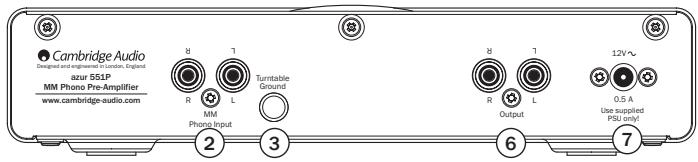
① MC input sockets (651P only)
If your turntable uses a moving coil cartridge, connect outputs here (0.5-1mV, with 100 ohm, 220pF loading).
② MM input sockets
If your turntable uses a moving magnet cartridge, connect outputs here (3-5mV, with 47k ohm, 220pF loading).
③ Turntable ground
If your turntable has a separate grounding lead then connect here. This provides shielding to the arm and the sensitive circuitry in the turntable.
④ Cartridge Type selector switch (651P only)
Match this switch to the cartridge type that your tuntable uses. MM for a moving magnet cartridge or MC for a moving coil cartridge.
⑤ Subsonic Filter (651P only)
The subsonic filter cuts out very low frequency 'rumble', caused by vinyl imperfections, which can affect your system's performance.
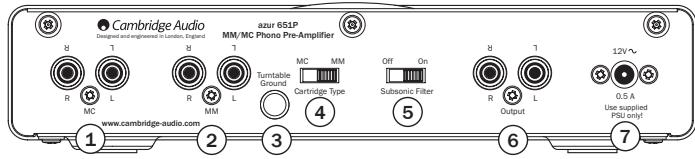
⑥ Output sockets
Use phono cables to connect to any line level input on your amplifier, such as Aux.
NB. Do not connect to a phono level input.
⑦ PSU socket
Once you have completed all connections to the amplifier and turntable, plug the PSU power cable into an appropriate mains socket and switch the unit on via its front panel On/Off button. The blue LED on the front panel will indicate that the power is on.
Please note the 651P has an output relay, which after power on takes 15 seconds to come out of mute.
NB. Only use supplied power supply.
Front panel controls
Cambridge Audio

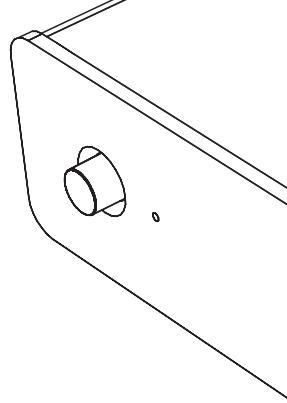
Power on/off
Switches the unit between on and off.
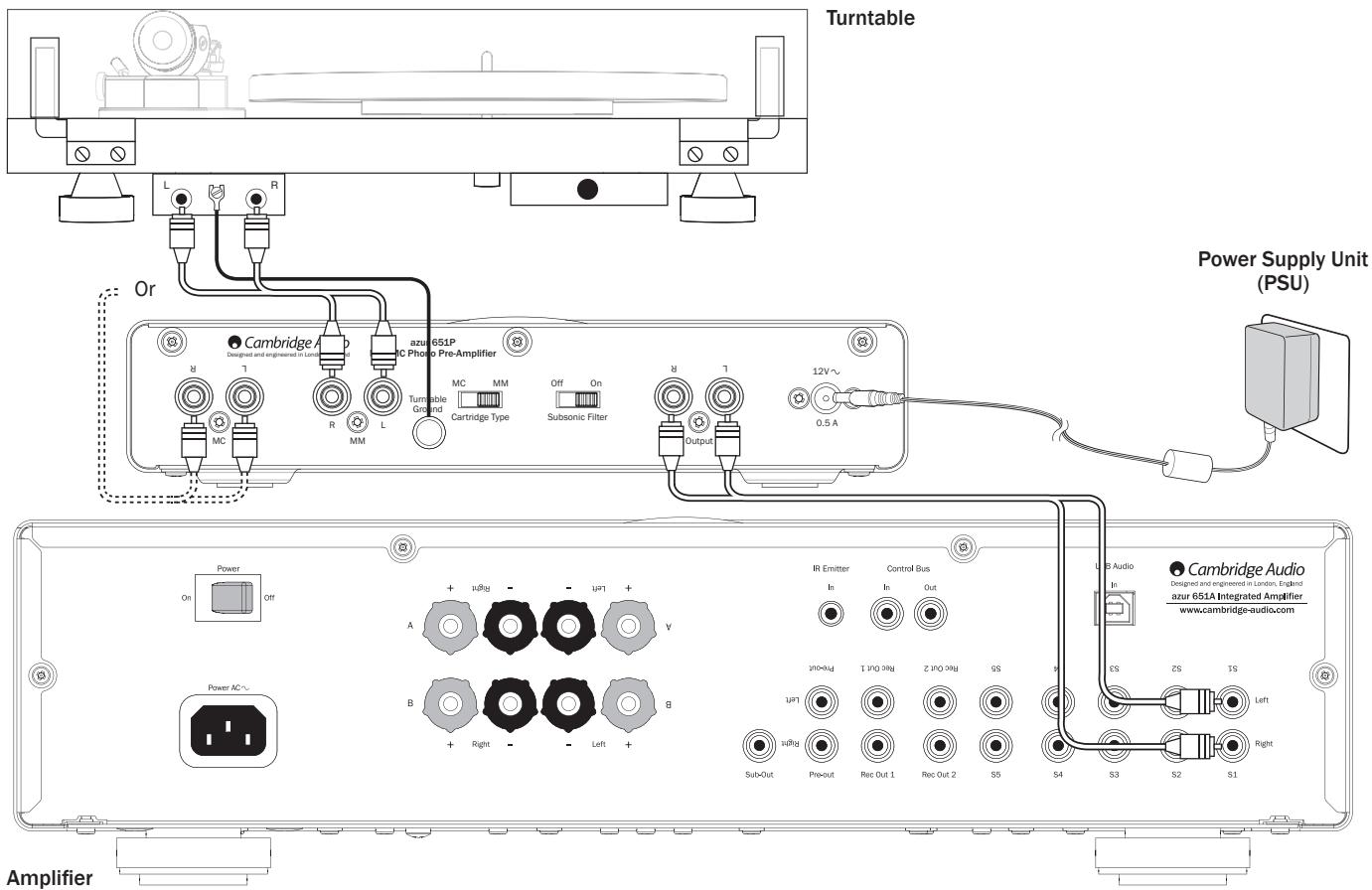
Connections
Technical specifications
| 551P | 651P | ||
| Max power consumption | 5W | 5W | |
| PSU consumption in Standby | <0.5W | <0.5W | |
| MM | MC | ||
| Gain @ 1kHz | 39dB | 39dB | 55dB |
| Nominal output | 300mV | 300mV | 300mV |
| Sensitivity for nominal output | 3.35mV | 3.35mV | 0.5mV |
| THD 20Hz-20kHz | <0.009% | <0.005% | <0.002% |
| RIAA curve accuracy | <+/-0.65dB | <+/-0.3dB | <+/-0.3dB |
| 25hz-20kHz | 20Hz-50kHz (subsonic filter off) | 20Hz-50kHz | |
| Signal to noise ratio using Audio Precision RIAA-1 with grounded inputs | >85dB | 86dB | >72dB |
| Input impedance | 47kOhm | 47kOhm | 1000hm |
| Input capacitance | 220pF | 220pF | 220pF |
| Overload margin | >30dB | >30dB | >30dB |
| Crosstalk @ 20kHz | >76dB | >83dB | >69dB |
| Dimensions (HxWxD) | |||
| mm | 46 x 215 x 133 | 46 x 215 x 133 | |
| inches | 1.8 x 8.5 x 5.2 | 1.8 x 8.5 x 5.2 | |
| Weight | |||
| kg | 0.8 | 0.9 | |
| lbs | 1.8 | 2 |
Troubleshooting
There is no power
Ensure the power supply is connected securely to the unit.
Ensure the power supply is fully inserted into the mains socket and it is switched on.
There is no sound
Make sure the unit is plugged in.
Check that your turntable is properly connected.
Check that your speakers are properly connected.
Check all connections are secure and correct amplifier input is selected.
Ensure correct cartridge type has been selected (MM or MC).
There is no sound on one channel
Check that your speakers are properly connected.
Check all connections are secure.
There is a loud buzz or hum
Check turntable or tone arm for ground and connection lead fault.
Ensure no connections are loose or defective.
Ensure that your turntable is not too close to the amplifier.
Volume is too loud/quiet
Check cartridge type matches input type. If a MC cartridge is connected through the MM inputs, volume will be very quiet (and vica versa). Note that it is possible to obtain high level MC cartridges which are designed for an MM input.
In the event that the above solutions do not remedy your problem, please consult our frequently asked questions (FAQ) section on our website: www.cambridge-audio.com/sts/faqs
For all servicing, in or out of warranty, please contact your dealer.
Cambridge Audio is a brand of Audio Partnership Plc
Registered Office: Gallery Court, Hankey Place
London SE1 4BB, United Kingdom
Registered in England No. 2953313
www.cambridge-audio.com
- Cambridge Audio
- Contents
- Introduction
- Important safety instructions
- WARNING
- CAUTION
- AVIS
- WEEE symbol
- CE mark
- C-Tick mark
- Gost-R Mark
- FCC regulations
- Ventilation
- Positioning
- Power sources
- Overloading
- Cleaning
- Battery disposal
- Loudspeakers
- Servicing
- Limited warranty
- ① MC input sockets (651P only)
- ② MM input sockets
- ③ Turntable ground
- ④ Cartridge Type selector switch (651P only)
- ⑤ Subsonic Filter (651P only)
- ⑥ Output sockets
- ⑦ PSU socket
- Front panel controls
- Technical specifications
- Troubleshooting
- There is no power
- There is no sound
- There is no sound on one channel
- There is a loud buzz or hum
- Volume is too loud/quiet
Brand : CAMBRIDGE AUDIO
Model : AZUR 551P
Category : Phono Preamplifier