
INCOGNITO KP10 EU - Remote control CAMBRIDGE AUDIO - Free user manual and instructions
Find the device manual for free INCOGNITO KP10 EU CAMBRIDGE AUDIO in PDF.


| Product Type | In-wall amplified A-BUS keypad |
| Brand | Cambridge Audio |
| Model | Incognito KP10 EU |
| Power supply | 24 V DC, 1 A (supplied by hub) |
| Input impedance | 45 kΩ |
| Frequency response | 20 Hz - 20 kHz ±1 dB |
| Total harmonic distortion | <0.2% at 1 W, 20 Hz - 20 kHz |
| Signal-to-noise ratio | >80 dB (A-weighted) |
| Volume adjustment range | -80 dB, 36 steps |
| Bass adjustment range | ±16 dB in 2 dB steps |
| Treble adjustment range | ±16 dB in 2 dB steps |
| Balance adjustment range | ±40 dB, 9 steps each side |
| Speaker impedance | 4-8 Ω |
| Preamp output | Variable level, follows volume |
| Supported IR modulation frequencies | 34-40 kHz and 54-58 kHz |
| Main functions | Volume, source selection, tone adjustments (bass, treble, balance, fade), standby, IR control, AH10 or Standard A-BUS mode |
| Connections | Cat-5/6 (punch down), speaker output, preamp output, LK10 input |
| Installation | Flush-mounted in standard UK 47 mm back box, secured with M3.5x20 screws |
| Temperature and humidity | Avoid strong sunlight, fluorescent tubes, high humidity; do not install in an enclosure containing mains voltage |
| Warranty | Limited warranty, covers defects in materials and workmanship. Keep proof of purchase. |
Frequently Asked Questions - INCOGNITO KP10 EU CAMBRIDGE AUDIO
User questions about INCOGNITO KP10 EU CAMBRIDGE AUDIO
0 question about this device. Answer the ones you know or ask your own.
Ask a new question about this device
Download the instructions for your Remote control in PDF format for free! Find your manual INCOGNITO KP10 EU - CAMBRIDGE AUDIO and take your electronic device back in hand. On this page are published all the documents necessary for the use of your device. INCOGNITO KP10 EU by CAMBRIDGE AUDIO.
USER MANUAL INCOGNITO KP10 EU CAMBRIDGE AUDIO
Introduction. 3
System options. 4
Installation notes. 8
Rear panel connections. 10
Keypad controls. 12
Operating instructions. 14
Local source selection. 16
Remote control. 17
Technical specifications. 18
Limited warranty. 19
INTRODUCTION
Thank you for purchasing this Cambridge Audio Incognito product. Incognito is a cost-effective, modular based system using standard Cat-5 or Cat-6 cable to distribute hi-fi quality sound and video around a home.
The KP10 is an in-wall, A-BUS™ compatible amplified keypad with buttons for control of speaker volume levels, Standby/On and source select (with compatible equipment), as well as having an IR window for receiving remote control signals. The KP10 can connect to A-BUS hubs, A-BUS Ready receivers, or to the Incognito Ready outputs of Cambridge Audio receivers and amplifiers using Cat-5 wiring. The KP10 then connects to speakers using conventional speaker cable.
The KP10 keypad fits into any wall and is available with different finishes to compliment various decorative schemes. The KP10 is fitted on the wall by fixing it into a standard single UK 47mm electrician's back-box. All knock-outs in the back-box should be removed to provide maximum ventilation. Care should be taken in choosing a site for the KP10, and always refer to the precautions in this guide. Bear in mind it is not always preferable to fit the KP10 next to a light switch, particularly if the faceplates will differ.
Thanks for taking the time to read this manual, we do recommend you keep it for future reference.
maths
Matthew Bramble
Technical Director
SYSTEM OPTIONS
The KP10 keypad can be used in two main configurations:
- As part of a full Incognito system, where it is plugged into an Incognito hub (AH10), perhaps with other Incognito accessories such as a video switching unit (VH10) or local input module (LM10) fitted.
- Where the keypad is plugged directly into an A-BUS Ready/Incognito Ready output of a compatible Cambridge Audio (or other brand) A/V Receiver or Amplifier, no other accessories are possible other than the required power supply and remote control/s.
The KP10 has two modes of operation to support these configurations, AH10 mode and Standard A-BUS/Incognito Ready mode. The modes are selected by setting the Mode switch, located on the rear of the KP10.
Note: Setting the Mode switch to the wrong setting can cause erroneous operation!
Full Incognito system
For use in a full Incognito system (see diagram opposite) the Mode Switch MUST be in the "AH10" position as shown below:
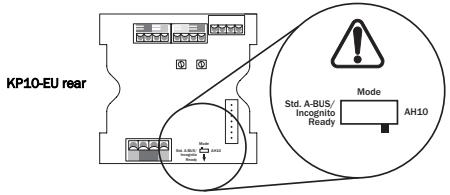
Please consult the AH10 Incognito Multi-Room Installation Guide for full details of the various options available for the full Incognito system.
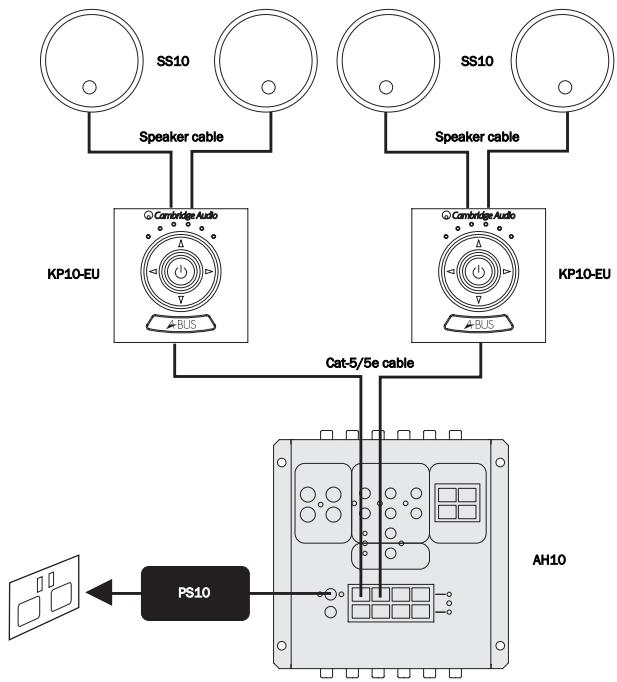
A-BUS Ready / Incognito Ready
For use with an A-BUS Ready/Incognito Ready unit (see diagram opposite) the Mode switch MUST be in the "Standard A-BUS/Incognito Ready" position as shown below:
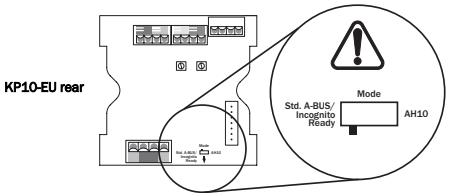
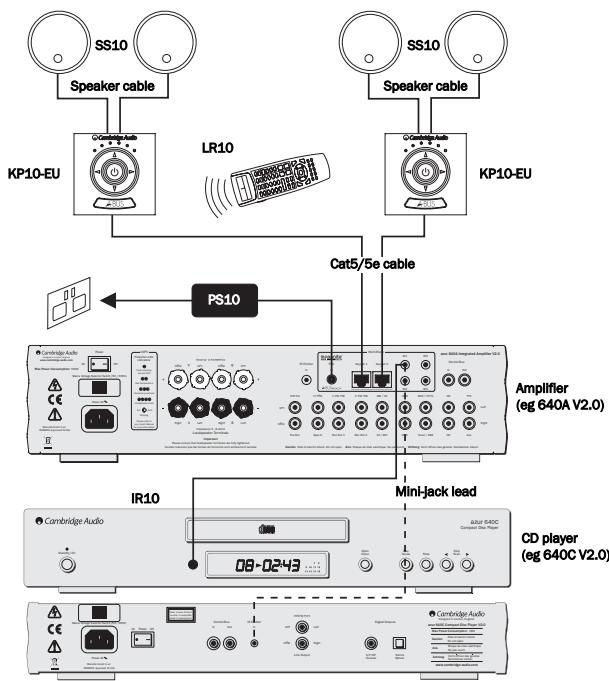
In this configuration the keypad is wired directly to the amplifier/receiver. A Power Supply Unit (PS10) is also required to power the one or two keypads as shown.
To allow control of your source equipment from the remote rooms an IR emitter (IR10) is plugged into one of the IR outputs on the rear of the unit and then attached over the IR window of the source unit. Alternatively, on our own products that feature IR emitter Inputs, a mini-jack to mini-jack lead can be used.
Commands received by the keypads can now be sent back to the source equipment via the amplifier. It is then possible to control the source equipment from the remote rooms by using the source equipment's own remote controls or through a learning remote. The Incognito LR10 Learning Remote can fully control the keypads, "learn" the source's remote controls and change source input on the amplifier etc.
INSTALLATION NOTES
The KP10 is fitted on the wall by fixing it into a standard UK 47mm depth single-gang electrician's back-box (pattress). All knock-outs in the back-box should be removed to provide maximum ventilation.
Where it is desired to fit a mains lighting switch etc next to a keypad, a barrier-box or two single back-boxes must be used (bear in mind it is not preferable to fit the keypad next to a light-switch particularly if the faceplate styles will differ). Only a qualified electrician should attempt such installations.
Avoid fitting the KP10 where there is line of sight to another KP10. In such situations both keypads may pick up the same commands from a remote control and it will be difficult to control each zone independently.
Avoid fitting the KP10 where there is line of sight to the source equipment for the system. In such situations the source equipment may pick up the same IR commands directly as are picked up by the keypad and sent to the source equipment. This can interfere with the remote operation of the source equipment.
Do not fit the keypad in areas directly lit by strong sunlight or where it will be strongly lit by fluorescent tubes. These can be sources of infra-red energy which can interfere with the remote control operation of the system. Some plasma televisions can radiate a lot of infra-red energy and care should be taken if fitting a KP10 near a plasma screen television. Avoid placing the KP10 near to dimmer switches or other items, which generate a lot of electrical noise.
Safety precautions
Care should be taken when choosing the site for a KP10, the keypad must never be installed in a back-box which also contains mains wiring or in areas of high humidity.
The KP10 runs on 24V DC supplied through the connecting cable. As such there is no mains voltage present in the KP10 and the unit is often safe to fit in areas where only extra low voltage (ELV) equipment is permitted. However, it is imperative that you always check the wiring regulations in force for your application and area.
Faceplates
The KP10 faceplate system is based on the 50 x 50 'easy-clip' module standard and is interchangeable with the wide range of faceplates made by manufacturers such as MK Electric, RPP etc that conform to this standard. If it is desired to fit another faceplate, it can be replaced by gently prising apart the KP10 faceplate and snapping on another in its place.
Fitting the keypad
Remove the supplied faceplate from the KP10 by gently prising apart. It will "pop" off. Connect each wire in the Cat-5 cable to its respective terminal in the screw-down connector on the back of the KP10 (refer to the Cat-5 to KP10 screw-down connectors diagram in the 'Rear panel connections' section of this guide). The recommended maximum length for use with standard Cat-5 cable is 30m from hub to keypad in total (screened Cat-5 cable can also be used). After making the wiring connections, fit the KP10 to the back-box with the two supplied M3.5x20 screws. Gently push the faceplate back on to the module.
Note: If in doubt about any aspect of installation or wiring, seek professional advice from a qualified installer.
REAR PANEL CONNECTIONS
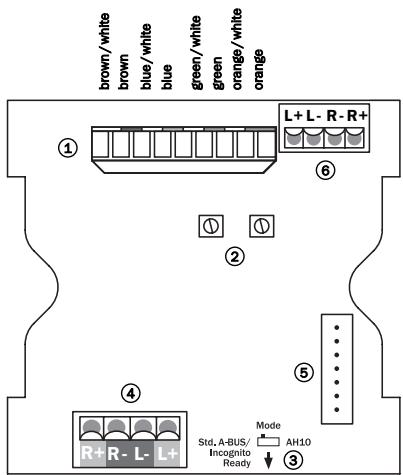
① Cat5 to KP10 punch down connectors
A Cat-5 cable (terminated with an RJ45 jack plug) is used to connect the KP10 to an AH10 hub or A-BUS Ready receiver. The KP10 has punch down connectors for the eight individual conductors of the Cat-5 cable (use a small flat-bladed screwdriver). See below for the EIA/TIA 568A wiring standard:
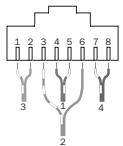
View from contact end
1 green/white
2 green
3 orange/white
4 blue
5 blue/white
6 orange
7 brown/white
8 brown


Gather pairs, trim and insert into RJ45 plug
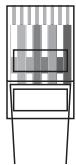
Crimp wires securely in place
② Gain adjust
The maximum output of the KP10 can be limited by turning these down. Alternatively, if the sound level is too quiet, the Gain can be turned up.
③ Mode switch
Selects between AH10 mode and Standard A-BUS Ready/Incognito Ready mode.
④ Speaker output
Connect to a pair of speakers with two runs of standard high-quality speaker cable. Speakers of at least 88 dB SPL for 1W @ 1 metre efficiency should be used with the KP10. Speakers from 4-8 ohms can be used. The Incognito SS10 speakers are an ideal match.
⑤ LK10 option
Allows control of source equipment via an LK10 Learning Keypad.
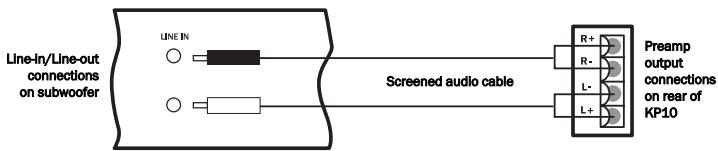
⑥ Preamp output
A preamp output is provided for optional use driving a powered subwoofer or auxiliary amplifier. Connection from the preamp output to other equipment should be by screened audio cable (see diagram below).
KEYPAD CONTROLS
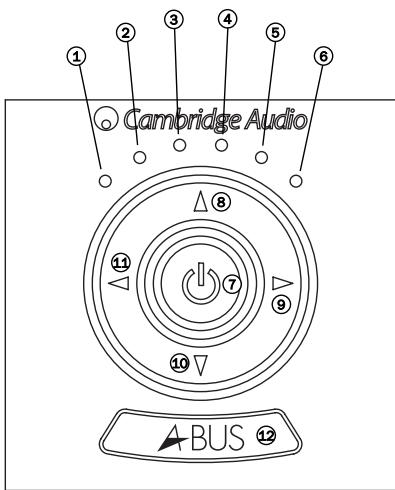
The six LEDs indicate the function status of the KP10. Listed below are each of the functions of the corresponding LEDs:
① Minimum volume / Source select
Volume / Source select / Bass adjust / Local Source Selection Mode
Volume / Source select / Treble adjust / Local Source Selection Mode
④ Volume / Source select / Balance adjust / Local Source Selection Mode
Volume / Source select / Fader adjust / Local Source Selection Mode
⑥ Maximum volume / Source select
For full instructions on volume adjustment, source selection, sound adjustment and local source selection modes, refer to the 'Operating instructions' section of this guide.
⑦ Standby/On
Press to switch the keypad between On and Standby mode. By pressing and holding the Standby button for about 2 seconds, all KP10s connected to the AH10 hub will be turned off. If the KP10 is connected to a Cambridge Audio Incognito Ready Amplifier rather than an AH10 hub, the amplifier will be turned off.
Volume up
Press to increase the volume or other sound adjustment.
⑨ Source select (right)
Use this key to select the current active source.
Volume down
Press to decrease the volume or other sound adjustment.
Source select (left)
Use this key to select the current active source.
IR window
Point the Incognito LR10 Learning Remote towards this window. A small flashing LED behind this window indicates operation.
OPERATING INSTRUCTIONS
Important!
As mentioned previously, the KP10 can be switched between two modes of operation; a standard A-BUS mode for compatibility with other manufacturers A-BUS Ready equipment (Standard A-BUS/Incognito Ready mode), and an Incognito A-BUS hub mode (AH10 mode). When used with other manufacturers A-BUS Ready equipment the keypad MUST be switched to "Standard A-BUS/Incognito Ready" mode or they will not work.
Volume adjustment
Volume is adjusted using the volume up and volume down buttons on the keypad or remote; this is indicated on the keypad by the intensity of the blue LED lights, there are four levels of intensity.
Source selection
The Source left and right buttons allow you to choose from multiple connected sources. The LED display will indicate which source is selected.
Sound adjustment modes
Pressing the Power/Standby button while holding the Volume down key activates the sound adjustment modes, the four central LEDs on the keypad will then light in sequence to indicate each of the four sound adjustment modes; Bass, Treble, Balance and Fader. These modes can also be activated using the 'Select' button on the remote control.
After holding both buttons down for a short period, the second LED on the keypad will light indicating that Bass adjust mode has been activated. In this mode pressing the Volume up/down keys will adjust the Bass (low frequencies) level.
Continuing to hold both keys down will light the third LED indicating that Treble adjust mode has been activated. In this mode pressing the Volume up/down keys will adjust the Treble (high frequencies) level.
Continuing to hold both buttons will light the fourth LED indicating that Balance adjust mode has been activated. In this mode pressing the Volume up/down keys will adjust the sound level between the left and right speakers.
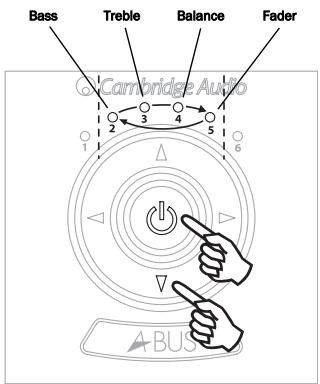
Continuing to hold both buttons will light the fifth LED indicating that Fader adjust mode has been activated. In this mode pressing the Volume up/down keys will adjust the balance between the main speakers and anything that is connected to the preamp output. This adjustment only being relevant if the preamp output is used. The volume up and down buttons on the remote control can also be used to adjust the sound in each mode.
Note: If no adjustment is made the system will automatically go back to volume adjustment after two seconds.
Note: This feature is only available if the KP10 is part of a full Incognito multi-room system with one or two Local Input Modules (LM10) fitted.
The local source selection mode will need to be activated to configure the KP10 correctly. This mode is only available when the Mode Switch is set to "AH10" mode. LM10s can only be used in this mode. Please refer to your LM10 Installation Guide for more information.
Pressing the Select left or right buttons on the keypad allows you to rotate through all six sources as default. However, it is possible to allow the addition of one or two local sources by accessing Local source selection mode. To enter this mode press the Volume up button
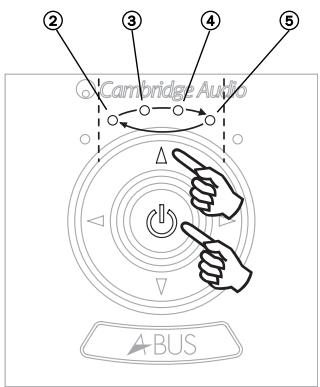
simultaneously with the Power button for four seconds; the LED display will then scroll through the sequence shown in the illustration right and described as follows:
After holding both buttons down for a short period, LED 2 will light indicating that Sources 1-6 (default) are available for selection.
Continuing to hold both keys down will light LED 3 indicating that Sources 1-6 + Local source 1 mode is available for selection.
Continuing to hold both buttons will light LED 4 indicating that Sources 1-6 + Local source 1 + Local source 2 mode is available for selection.
Continuing to hold Volume up and Power buttons will light LED 5, to indicate that Off mode is available for selection, and no source will be selected.
To select these modes, wait till the corresponding LED is lit and then release Power and Volume up buttons.
Note: If no adjustment is made the system will automatically go back to volume adjustment after two seconds. If "Standard A-BUS/Incognito Ready" mode is selected on the Mode switch, the KP10 will only rotate round the main 6 sources.
REMOTE CONTROL
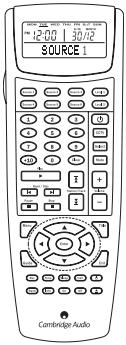
The KP10 can be used with the Incognito LR10 remote control, a sophisticated learning remote which is able to learn the codes of all the source equipment remotes. Once programmed the user can thus use the LR10 to perform all operations from one remote.
The LR10 is also suitable where the KP10 is to be connected to the A-BUS Ready outputs of AV receivers and amplifiers instead of one of our hubs as it can learn the relevant source change commands etc of the receiver or amplifier as well as the source equipment.
Note: Please refer to the Incognito LR10 manual for further information.
TECHNICAL SPECIFICATIONS
| Input impedance | 45 k ohms |
| Frequency response | 20Hz - 20kHz +/- 1dB |
| THD | <0.2% @ 1W, 20Hz - 20 kHz |
| S/N ratio | > 80 dB ‘A’ weighted |
| Volume control range | -80 dB, 36 steps |
| Bass control range | +/- 16 dB, 2 dB steps |
| Treble control range | +/- 16 dB, 2 dB steps |
| Balance control range | +/- 40 dB, 9 steps either way |
| Preamp output | Variable level, follows volume setting |
| IR pass through | 34 - 40 kHz and 54 - 58 kHz modulation frequencies supported |
| Speaker impedance | 4-8 ohms |
| Power requirement | 24V DC @ 1A max (supplied by hub) |
This guide is designed to make installing and using this product as easy as possible. Information in this document has been carefully checked for accuracy at the time of printing; however, Cambridge Audio's policy is one of continuous improvement, therefore design and specifications are subject to change without prior notice. If you notice any errors please feel free to email us at: support@cambridgeaudio.com
This document contains proprietary information protected by copyright. All rights are reserved. No part of this manual may be reproduced by any mechanical, electronic or other means, in any form, without prior written permission of the manufacturer. All trademarks and registered trademarks are the property of their respective owners.
Incognito and Incognito Ready are trademarks of Cambridge Audio Ltd. All rights reserved.
LIMITED WARRANTY
Cambridge Audio warrants this product to be free from defects in materials and workmanship (subject to the terms set forth below). Cambridge Audio will repair or replace (at Cambridge Audio's option) this product or any defective parts in this product. Warranty periods may vary from country to country. If in doubt consult your dealer and ensure that you retain proof of purchase.
To obtain warranty service, please contact the Cambridge Audio authorised dealer from which you purchased this product. If your dealer is not equipped to perform the repair of your Cambridge Audio product, it can be returned by your dealer to Cambridge Audio or an authorised Cambridge Audio service agent. You will need to ship this product in either its original packaging or packaging affording an equal degree of protection.
Proof of purchase in the form of a bill of sale or receipted invoice, which is evidence that this product is within the warranty period, must be presented to obtain warranty service.
This warranty is invalid if (a) the factory-applied serial number has been altered or removed from this product or (b) this product was not purchased from a Cambridge Audio authorised dealer. You may call Cambridge Audio or your local country Cambridge Audio distributor to confirm that you have an unaltered serial number and/or you purchased from a Cambridge Audio authorised dealer.
This warranty does not cover cosmetic damage or damage due to acts of God, accident, misuse, abuse, negligence, commercial use, or modification of, or to any part of, the product. This warranty does not cover damage due to improper operation, maintenance or installation, or attempted repair by anyone other than Cambridge Audio or a Cambridge Audio dealer, or authorised service agent which is authorised to do Cambridge Audio warranty work. Any unauthorised repairs will void this warranty. This warranty does not cover products sold AS IS or WITH ALL FAULTS.
REPAIRS OR REPLACEMENTS AS PROVIDED UNDER THIS WARRANTY ARE THE EXCLUSIVE REMEDY OF THE CONSUMER. CAMBRIDGE AUDIO SHALL NOT BE LIABLE FOR ANY INCIDENTAL OR CONSEQUENTIAL DAMAGES FOR BREACH OF ANY EXPRESS OR IMPLIED WARRANTY IN THIS PRODUCT. EXCEPT TO THE EXTENT PROHIBITED BY LAW, THIS WARRANTY IS EXCLUSIVE AND IN LIEU OF ALL OTHER EXPRESS AND IMPLIED WARRANTYES WHATSOEVER INCLUDING, BUT NOT LIMITED TO, THE WARRANTY OF MERCHANTABILITY AND FITNESS FOR A PRACTICAL PURPOSE.
Some countries and US states do not allow the exclusion or limitation of incidental or consequential damages or implied warranties so the above exclusions may not apply to you. This warranty gives you specific legal rights, and you may have other statutory rights, which vary from state to state or country to country.

- INTRODUCTION
- SYSTEM OPTIONS
- Full Incognito system
- A-BUS Ready / Incognito Ready
- INSTALLATION NOTES
- Safety precautions
- Faceplates
- Fitting the keypad
- REAR PANEL CONNECTIONS
- ① Cat5 to KP10 punch down connectors
- KEYPAD CONTROLS
- ⑦ Standby/On
- Volume up
- ⑨ Source select (right)
- Volume down
- Source select (left)
- IR window
- OPERATING INSTRUCTIONS
- Important!
- Volume adjustment
- Source selection
- Sound adjustment modes
- REMOTE CONTROL
- TECHNICAL SPECIFICATIONS
- LIMITED WARRANTY
Brand : CAMBRIDGE AUDIO
Model : INCOGNITO KP10 EU
Category : Remote control