
CE273212 - Electric cooktop GAGGENAU - Free user manual and instructions
Find the device manual for free CE273212 GAGGENAU in PDF.


| Product type | Built-in electric hob |
| Brand | GAGGENAU |
| Model | CE273212 |
| Number of cooking zones | 4 |
| Control type | Touch controls |
| Display | Digital |
| Automatic shut-off function | Yes (safety shutdown) |
| Residual heat indicator | Yes |
| Child lock function | Yes |
| Timer function | Yes (automatic shut-off and independent timer) |
| Quick boil function | Yes |
| Zone combination | Yes (dual zone) |
| Power supply | 230 V, 50/60 Hz |
| Surface material | Ceramic glass |
| Frame | Stainless steel |
| Cleaning | Ceramic glass cleaner and soft cloth |
| Safety | Safety shutdown, child lock, residual heat indicator |
| Repairability | Repair by GAGGENAU authorized after-sales service |
| Included accessories | Ceramic glass scraper |
Frequently Asked Questions - CE273212 GAGGENAU
User questions about CE273212 GAGGENAU
0 question about this device. Answer the ones you know or ask your own.
Ask a new question about this device
Download the instructions for your Electric cooktop in PDF format for free! Find your manual CE273212 - GAGGENAU and take your electronic device back in hand. On this page are published all the documents necessary for the use of your device. CE273212 by GAGGENAU.
USER MANUAL CE273212 GAGGENAU
Before use 4
Safety when cooking 4
Damage to the cooktop 4
Operating for the first time 5
Causes of damage 5
Pots and pans 5
Food spills 5
Scratches on the glass ceramic 5
Hard and pointed objects 5
Features of your new cooktop 6
Cooking zones 6
Control panel 7
Symbols 7
Operating principle 8
Main switch 8
8
Cooking zone combination 8
Quick boil timer 8
Operation 9
Switching on and off 9
Setting the cooking level 9
Changing the cooking level 9
Switching off a cooking zone 9
Main switch with memory function 10
Residual heat display 10
Safety deactivation 10
Tips on saving energy 11
Cooking zone combination 12
Combination of the dual size cooking zone 12
Deactivating combination 12
Settings table 13
Timer 14
Setting an automatic switch-off time 14
Changing a time value 15
Erasing a time value 15
Timer 15
Setting the timer 15
Changing a time value 15
Quick boil timer 16
Switching on the quick boil timer 16
Switching off the quick boil timer 16
Child lock 17
Activating the child lock 17
Deactivating the child lock 17
Options menu 18
Accessing the options menu 18
Settings of the options menu 19
Cleaning and care 21
Cleaning the glass ceramic 21
Cleaning the stainless steel frame 21
Useful hints 22
Maintenance 22
Trouble shooting 23
Before use
Read the instruction manual carefully before operating the cooktop. Only then will you be able to operate your cooktop safely and correctly. Keep the instruction and installation manual for future reference.
Do not connect the cooktop if it has been damaged.
This cooktop is intended only for domestic use. Only use the cooktop to prepare meals. Do not use the cooktop to heat up the room in which it is installed, the cooktop can overheat.
Do not let adults or children operate the appliance unsupervised:
- if they are mentally or physically unable to use the appliance safely and correctly
- if they don't have the knowledge and experience to use the appliance safely and correctly.
Never allow children to play with the appliance.
Do not operate this cooktop with an external timer or a separate telecontrol system.
Connecting cables from electrical appliances must not touch the hot cooking surface. This could cause damage to the cable insulation and the cooktop.
Caution, risk of fire! Never place inflammable items on the cooktop.
Caution, risk of fire! Do not store any combustible items, or substances that are sensitive to high temperatures, in drawers or cupboards under the cooktop (e.g. cleaning agents, aerosol cans).
Safety when cooking
Caution, risk of burns! Do not touch the hot cooking surface. Keep children away.
Caution, risk of burns! Cooking zones might still be hot even after being switched off. Only touch cooking zones after the residual heat display has gone off.
Caution, risk of fire! Overheated oil or fat can ignite very quickly. Never leave heating oil or fat unsupervised. Never pour water on burning oil. Cover pan with lid or plate, switch off the cooking zone. Leave the ovenware on the cooktop to cool down.
Always keep cooktop and pan base dry. Steam pressure can be generated from liquid between pan base and cooktop. The steam pressure could cause the pan to jump suddenly.
Damage to the cooktop
Caution! If there are fractures, breaks or cracks in the glass ceramic, there is a risk of electric shock. Switch off the corresponding household fuse. Call after-sales service.
Caution, risk of burns! Switch off the cooking zone if it heats up but the indicator is not working. Call after-sales service.
Caution, risk of fire! If the cooktop switches itself off and can no longer be operated, disconnect it from the electricity supply immediately. The cooktop could switch itself on later. Switch off the corresponding household fuse. Call after-sales service.
Incorrect repairs are dangerous. Repairs must be carried out by one of our experienced after-sales engineers.
Remove the packaging from the appliance and dispose of it according to local regulations. Be careful to remove all accessories from the packaging. Keep packaging elements and plastic bags away from children.
Check the cooktop for transport damage after unpacking it. Do not connect the cooktop if it has been damaged.
The cooktop must be installed and connected by an authorised specialist. No warranty claims can be lodged for any damage resulting from incorrect connection. Observe the installation instructions.
This appliance is labelled in accordance with the European Directive 2002/96/EG concerning used electrical and electronic appliances (waste electrical and electronic equipment - WEEE). The guideline
determines the framework for the return and recycling of used appliances as applicable.
Thoroughly clean the appliance before using it for the first time. This will eliminate any 'newness' smells and soiling.
Pots and pans
Rough pan bases scratch the glass ceramic.
Avoid cooking on the cooktop with an empty pan, especially with enamel or aluminium pans. This could cause damage to the pan base and the glass ceramic.
Do not place hot pots or pans on the control panel, display area or the frame. This could cause damage.
Never heat food in aluminium foil or plastic containers. The material can melt and damage your cooktop.
Iridiscent discoloration can be caused by the bases of some pans. These do not interfere with the operation of the glass ceramic cooktop. Remove the discoloration with glass ceramic cleaner.
Food spills
Milk, sugar and food with a high sugar content (e.g. jam) damage the glass ceramic surface. Remove food spills immediately with the glass scraper. Caution! The glass scraper has a sharp blade.
Scratches on the glass ceramic
Always keep the cooktop dry and clean. Salt, sugar and sand cause scratches on the glass ceramic. Do not use the cooktop as a work surface or storage space.
Hard and pointed objects
Damage can occur if hard or pointed objects fall on the cooktop. Do not store such objects above the cooktop.
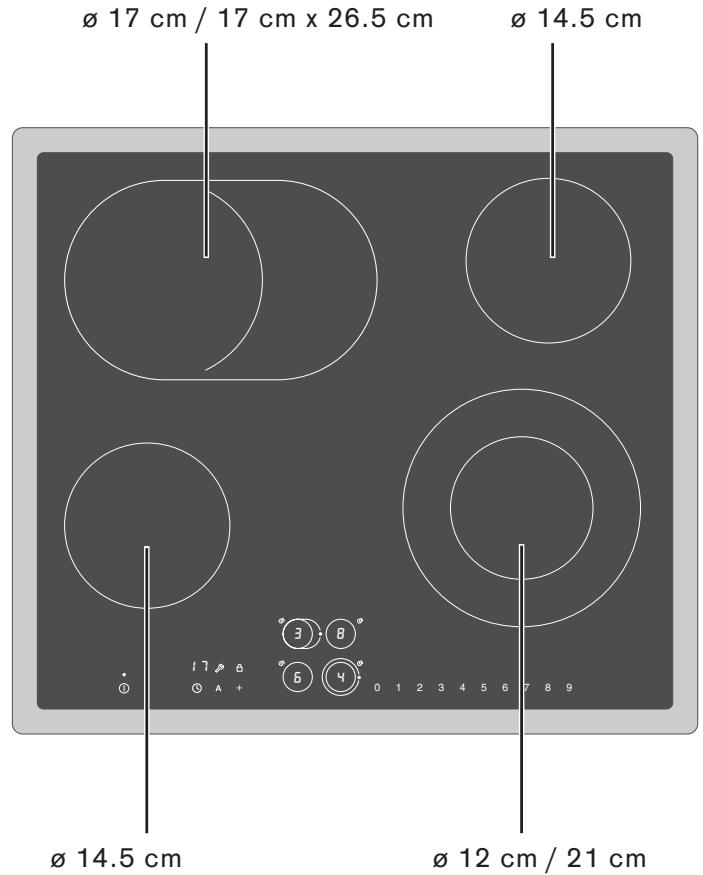
Cooking zones CE 261
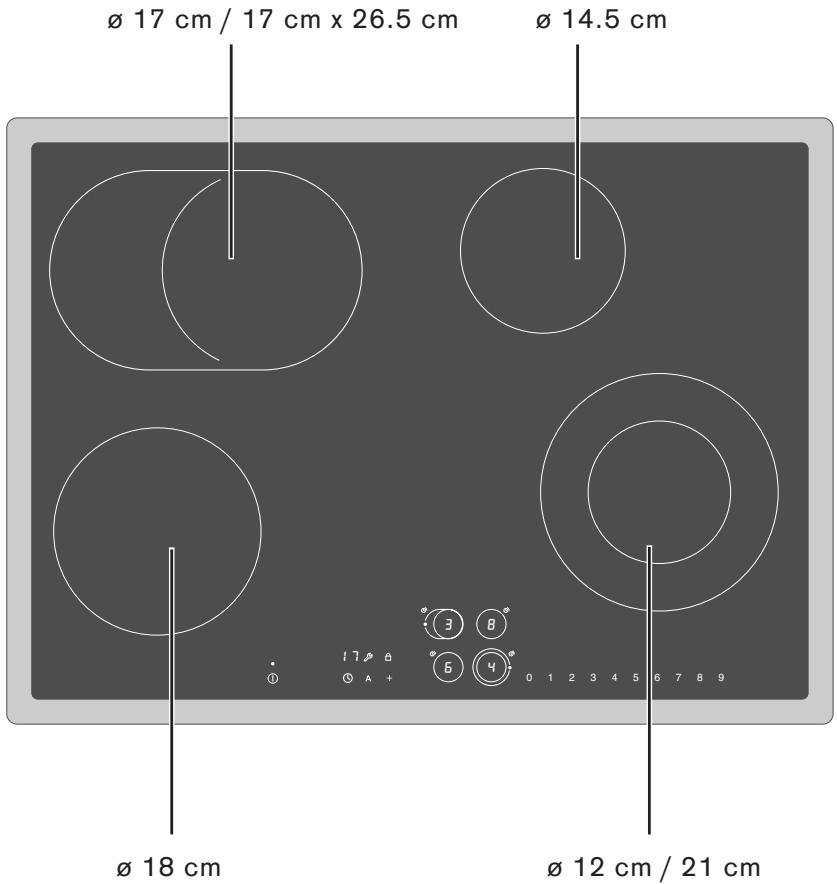
Cooking zones CE 273
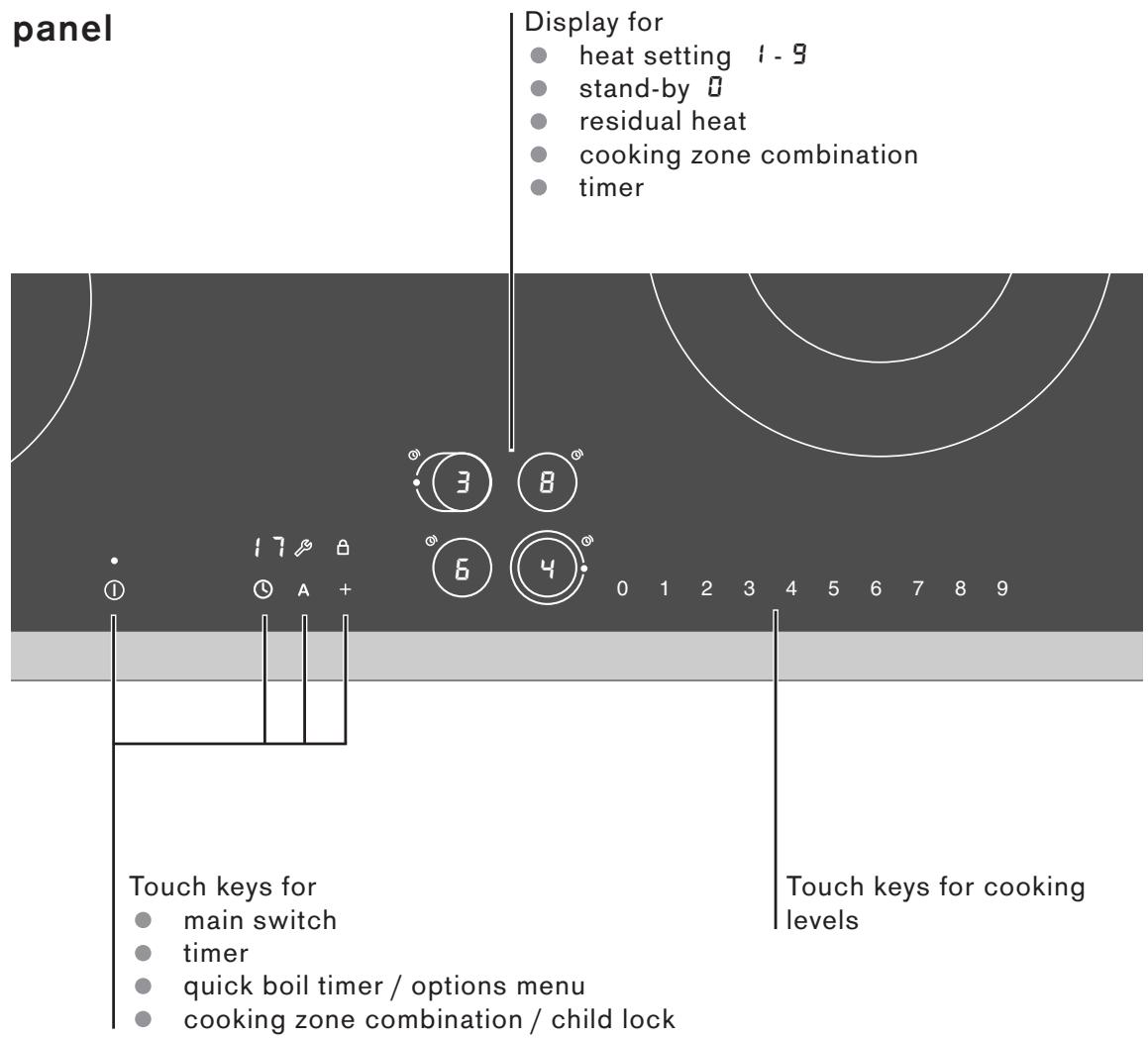
Control panel
Symbols
main switch
①
- quick boil timer
A
cooking zone combination
+
timer
0
child lock
options menu
Main switch
The electronics in the control panel are switched on using the main switch. Touch the ① symbol until the cooking zone displays show 0. Now the cooktop is ready for use.
Touch the ① symbol until the cooking zone displays go off. All the cooking zones are switched off. The residual heat indicator remains lit until the cooking zones have cooled sufficiently.
The cooktop cannot be switched on if an object lies on one of the sensor keys. The main switch flashes repeatedly when touched. Remove the object and switch on the cooktop as usual.
The cooktop switches off automatically if all the cooking zones have been switched off for more than 20 seconds.
Touch keys
When you touch a symbol, the respective function is activated. Every input is confirmed by an audible signal.
The settings remain unchanged if several symbols are touched briefly. You can therefore easily mop up spills on the control panel.
Note
Always keep the touch keys clean and dry. Moisture and dirt may impair function.
Cooking zone combination
Flexible cooking zones can be combined in different ways to create larger or smaller cooking surfaces as required.
Quick boil timer
When the quick boil timer is activated, the set cooking level is boosted for several minutes. This ensures that the continued cooking temperature of the food is reached faster.
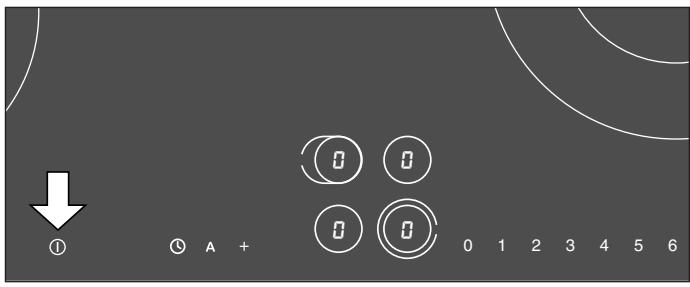
Switching on and off
Touch the ① main switch symbol. A signal is sounded. The cooking zone displays show ②. Now the cooktop is ready for use.
The cooktop switches off automatically if no further inputs are made within approximately 20 seconds.
By touching the ① main switch symbol at any time the cooktop can be quickly switched off.
Setting the cooking level
The cooktop must be switched on by the main switch. The switching on and off for all cooking zones is identical. Each cooking zone has 9 heat settings.
1 Select the required cooking zone by touching the symbol in the control panel.
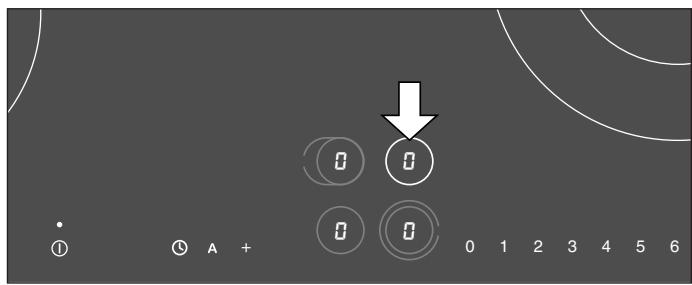
2 Within the next 5 seconds select the desired cooking level. The cooking zone display shows the selected cooking level. After a few seconds a confirmation signal is sounded.
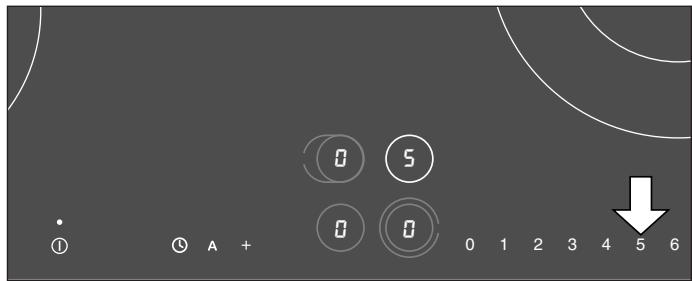
Changing the cooking level
Select the cooking zone. Select the desired cooking level.
Switching off a cooking zone
Select the cooking zone. Touch 0. The cooking zone is switched off, and the residual heat display appears after approximately 5 seconds.
Main switch with memory function
The heating and timer settings remain stored for 5 seconds after the cooktop has been switched off.
If you switch the cooktop off accidentally and would like to restore the previous settings:
1 Within 5 seconds, touch the ① symbol. The cooking zone display flashes the previous settings.
2 Within 5 seconds, select any cooking zone by touching the symbol in the control panel.
The previously stored settings are taken over. If you touch any other symbol instead, the previous settings are lost.
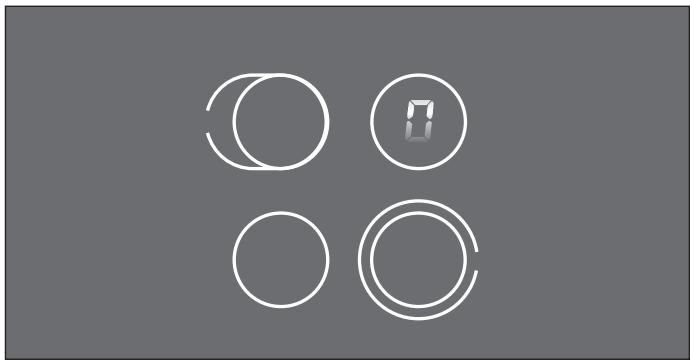
Residual heat display
The residual heat display appears on the display of the relevant cooking zone after switching off. The moving zero in the display indicates that, after switching off, a cooking zone has still not cooled down to such an extent that it can be safely touched.

Caution, risk of burns! Only touch cooking zones after the residual heat display has gone off.
Safety deactivation
If a cooking zone is in constant use for a long time without the setting being changed, it will automatically switch off. The time after which the holiday safeguard is activated depends on the heat setting (1 to 10 hours).
The cooking zone is switched off, the residual heat display appears on the display until the cooking zone has cooled down.
Now you can switch the cooking zone on again.
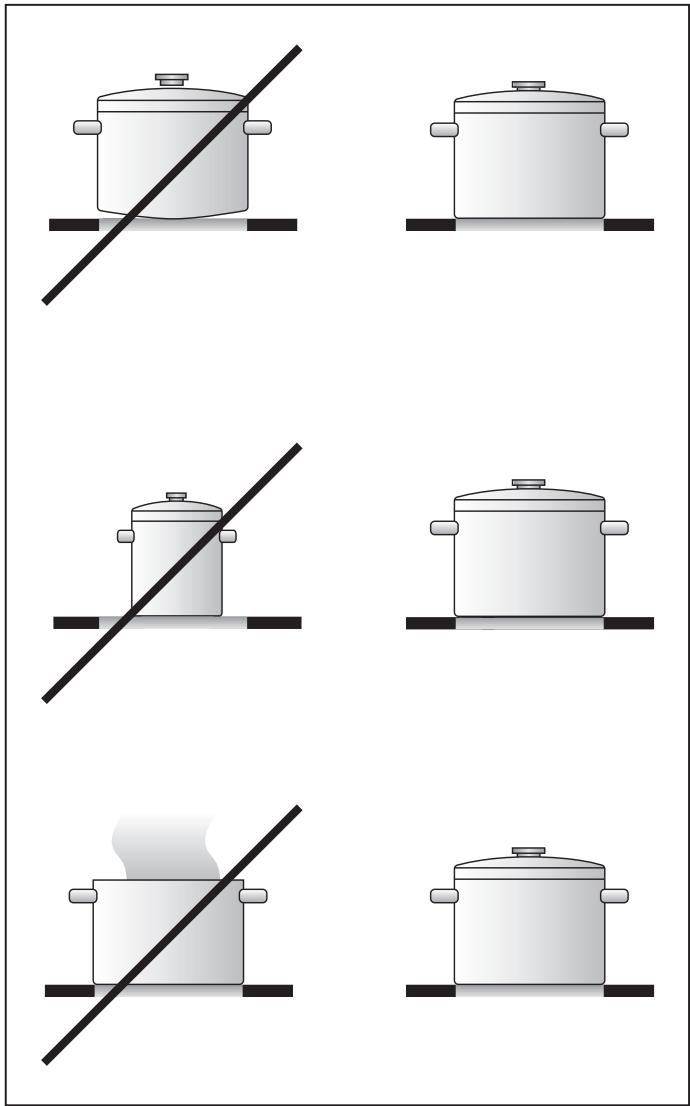
Tips on saving energy
Use good quality saucepans and pots with thick, even bases.
Select the correct saucepan size for each cooking zone. The diameter of the bases of the saucepans and pots should match the size of the cooking zone. Note: Ovenware manufacturers often give the diameter of the top of the saucepan. It is usually larger than the diameter of the base of the saucepan.
Use a small saucepan for small quantities. A larger, less full saucepan requires more energy.
Saucepans and pots should always be covered with a suitable lid to shorten cooking times. Cooking without a lid requires much more energy.
Cook with small quantities of water. This saves energy and helps vegetables to retain vitamins and minerals.
Switch down to a lower heat setting in good time.
For longer cooking times you can switch off the cooking zone before the end of the cooking time and then use the residual heat.
Combination of the dual size cooking zone
The cooktop must be switched on by the main switch.
1 Select the required cooking zone by touching the symbol in the control panel.
2 Within the next 5 seconds select the desired cooking level. The cooking zone display shows the selected cooking level.
3 Within the next 5 seconds, touch the symbol + combination. A spot appears on the cooking zone display. After a few seconds a confirmation signal is sounded.
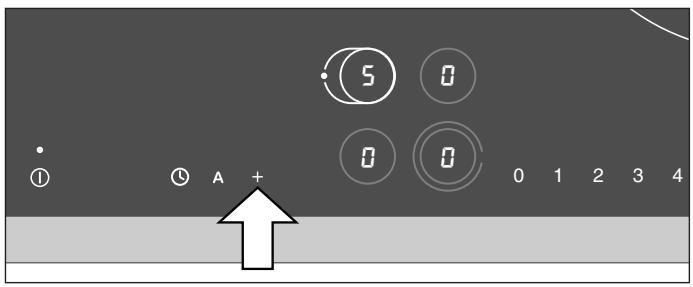
Deactivating combination
Select the cooking zone. Within 5 seconds, touch the symbol + combination. The spot on the cooking zone display disappears.
Note
In the options menu you can choose, if the cooking zone combination should be activated or deactivated when the cooktop is switched on. Alternatively, you can choose to restore the previous setting when the cooktop is switched on.
| Setting | Cooking method | Examples |
| 9 | Boiling | Water |
| Searing | Meat | |
| Heating | Fat, liquids | |
| Boiling | Soup, sauce | |
| Blanching | Vegetables | |
| 8 - 6 | Roasting | Meat, potatoes |
| 6 - 5 | Roasting | Fish |
| 7 - 6 | Baking | Pancakes, egg dishes |
| Boiling in open pot | Pasta, liquids | |
| 6 - 5 | Browning | Flour, onions |
| Roasting | Almonds, breadcrumbs | |
| Frying | Bacon | |
| Reducing | Stocks, sauscs | |
| 5 - 4 | Simmering in open pot | Dumplings, soup garnish, meat stock, poached eggs |
| 4 - 3 | Simmering in open pot | Sausages |
| 5 - 4 | Steaming | Vegetables, potatoes, fish |
| Stewing | Vegetables, fruit, fish | |
| Braising | Rolled beef steaks, roasts, vegetables | |
| 4 - 3 | Braising | Goulash |
| Boiling with closed lid | Soup, sauces | |
| 3 - 2 | Thawing | Frozen foods |
| Slow cooking | Rice, pulses | |
| Thickening | Egg dishes | |
| 2 - 1 | Reheating / keeping warm | Soup, casserole, vegetables in a sauce |
| Melting | Butter, chocolate |
Each cooking zone has 9 heat settings. Switch to the highest cooking level in order to reach the required temperature quickly. Then always switch back to the lower cooking level.
The cooking levels are identical for all cooking zones.
The values given above must be looked upon as recommended values. The heat required depends not only on the type and condition of the food, but also the size and contents of the pot.
With the timer you can program an automatic switch-off time between 1 and 90 minutes in 1-minute-steps for a cooking zone (automatic switch-off). You can set a time value for every cooking zone.
Setting an automatic switch-off time
The cooktop must be switched on by the main switch.
1 Select the cooking zone. Within 5 seconds, set the desired cooking level.
2 Within the next 5 seconds, touch the symbol ① 0 appears on the timer display. appears on the cooking zone display.
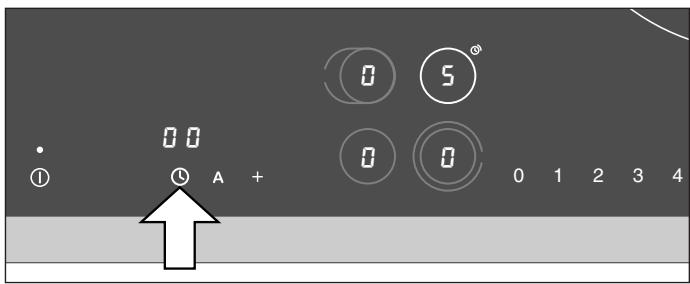
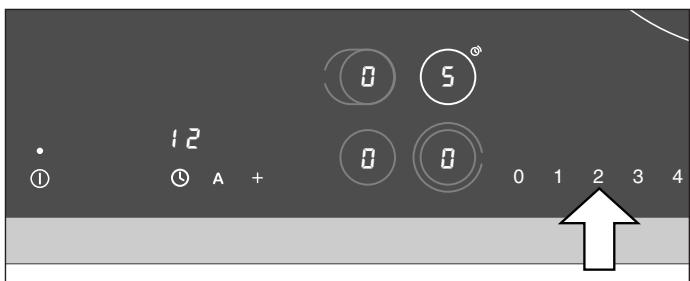
3 Use the number keys to set the required duration between 1 and 90 minutes.
When the duration has elapsed, the cooking zone switches off. flashes on the cooking zone display. A signal sounds for three minutes. flashes on the timer display. Touch any key. The displays will go out and the audible signal will stop.
If you would like to call up the remaining duration for a cooking zone: select the cooking zone. The duration is displayed for 5 seconds.
If you have set an automatic switch-off time for several cooking zones, the shortest time value will be shown on the timer display. A segment of a circle appears on the timer symbol of the relevant cooking zone.
Note
If you have set c5 k. in the options menu (unlimited selection time for cooking zones), touching the symbol once will call up the timer. Touch the symbol again to call up the automatic switch-off time function for the selected cooking zone.
Changing a time value
Select the cooking zone. Touch the ① symbol. Use the number keys to change the duration.
Erasing a time value
Select the cooking zone. Touch the ① symbol. Set the duration to 00. The display goes out after a few seconds. The cooking zone continues heating at the selected level.
Note
The timer function is no longer active after a power cut.
Timer
You can use the timer independently from the cooking zones and without switch-off function. The timer can also be used when all cooking zones are switched off.
Setting the timer
The cooktop must be switched on by the main switch. No cooking zone should be selected.
1 Touch the symbol. flashes on the timer display.
2 Use the number keys to set the required duration.
If all cooking zones are switched off, the cooktop will go on stand by mode. Only the timer display stays on.
When the duration has elapsed, 00 flashes on the timer display. A signal sounds for three minutes. Touch the ① symbol. The display will go out and the audible signal will stop.
Changing a time value
Touch the ① symbol. Change the duration.
Note
The timer is no longer active after a power cut.
All cooking zones feature a quick boil timer. When the quick boil timer is activated, the set cooking level is boosted for several minutes. This ensures that the continued cooking temperature of the food is reached faster.
The appliance switches automatically to the set cooking level after the quick boil time has elapsed. You can adjust the duration of the quick boil timer.
The quick boil timer cannot be activated when using cooking level 9.
Switching on the quick boil timer
The cooktop must be switched on by the main switch.
1 Select the required cooking zone by touching the symbol in the control panel. The cooking zone display shows .
2 Within the next 5 seconds select the desired cooking level. The cooking zone display shows the selected cooking level.
3 Within the next 5 seconds, touch the symbol A. The display shows alternatively the chosen cooking level and A.
4 You can change the quick boil duration within 5 seconds. The preset value is 3 minutes. Use the number keys to select a duration between 1 and 20 minutes.
You can set individual quick boil durations for different cooking zones. When you switch on the quick boil timer again, the last setting remains stored.
Switching off the quick boil timer
It is possible to switch off the quick boil timer prematurely (e.g. because the food is boiling over).
1 Select the cooking zone.
2 Within 5 seconds, touch the symbol A quick boil timer. The cooking zone switches back to the set cooking level.
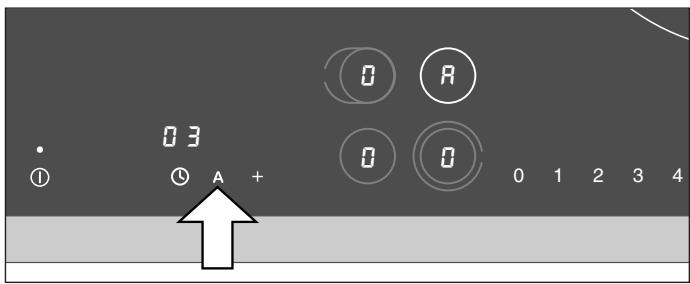
You can prevent the cooktop from being switched on unintentionally, i.e. children cannot switch on the cooking zones.
Note
To activate the child lock you have to make the child lock function available in the options menu first (see options menu).
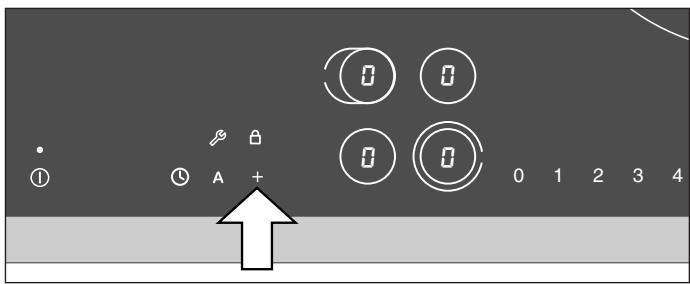
Activating the child lock
1 Switch on the cooktop using the main switch. Do not select a cooking zone or the timer. After approximately 10 seconds the symbol appears above the symbol +
2 Touch the ^+ symbol. A signal is sounded. Keep + pressed until a second signal is sounded.
The cooktop is switched off. The symbol θ flashes slowly for about 10 seconds. The child lock is activated.
Deactivating the child lock
You can deactivate the child lock again. Proceed in the same manner as for activating the child lock.
Using the options menu, you can customize the following functions of your cooktop:
cooking zone combination
key tones
child lock
reset all parameters
- selection time for cooking zones
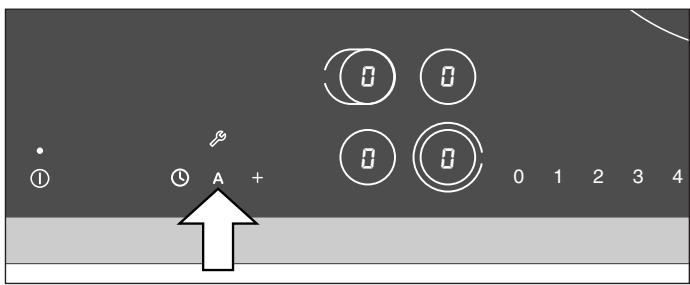
Accessing the options menu
1 Switch on the cooktop using the main switch. Do not select a cooking zone. The timer must be off. After approximately 10 seconds the symbol appears above the symbol A.
2 Touch the A symbol and keep it pressed. A signal is sounded. Keep A pressed until a second signal is sounded.
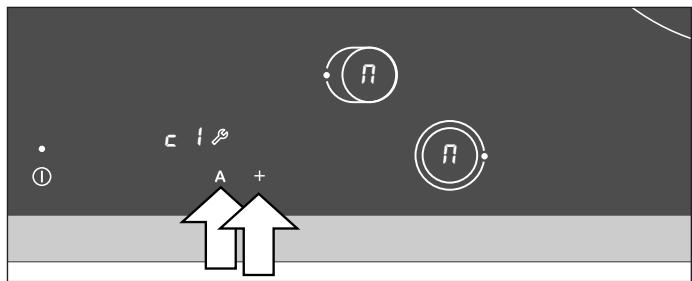
3 Now you can customize the settings:
- To move up or down the options menu: touch the A symbol until a signal is sounded.
- To select a setting: touch the ^+ symbol or select a setting using the number keys.
- To exit the options menu and store the settings: touch the A symbol and keep it pressed. A signal is sounded. Keep A pressed until a second signal is sounded. (Note: no signal is sounded if c - 0 . key tones off has been selected.)
- To exit the options menu without storing the settings: touch the ① main switch.
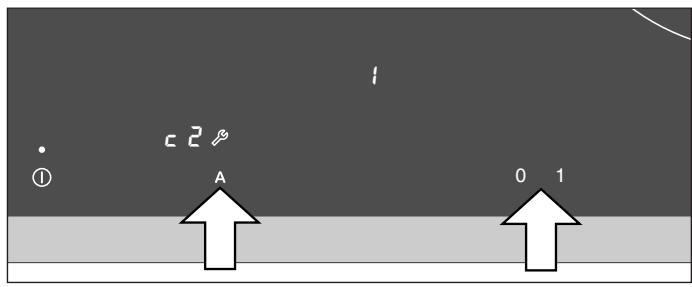
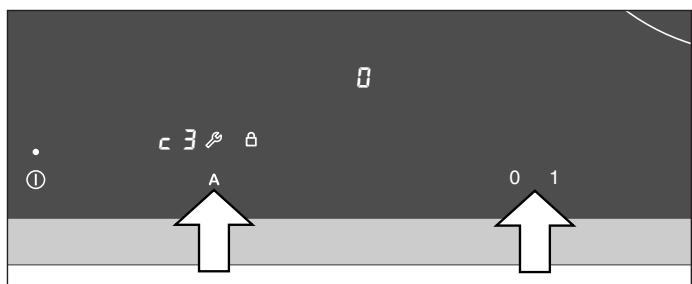
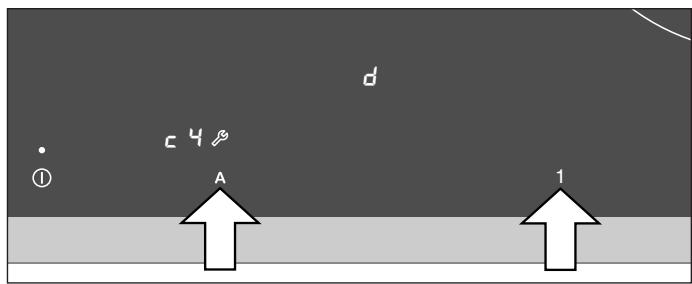
Settings of the options menu
- Cooking zone combination, individually adjustable for each cooking zone with combination feature. First select the desired cooking zone with combination feature. Then touch the + symbol to choose the setting:
C

every time the cooktop is switched on the combination feature has to be activated if desired.
C

every time the cooking range is switched on the combination feature is activated, however can be deactivated if desired.
C

when the cooking range is switched on the previously used option is activated.
You can switch the touch key tones on or off.
C

y tones off
C
key tones on
Note
The timer signal and warning signal cannot be switched off.
Child lock available:
to activate the child lock you have to make the child lock function available in the options menu first.
3

child lock not available
3

child lock available
- Reset all parameters in the options menu and the quick boil duration to the factory setting.
4

parameters are different setting
Reset all parameters: touch number key 1.
A spot appears next to d .
Note
The parameters will only be reset, if you exit the options menu and store the settings. If the display already shows d . all parameters are still at the factory setting.
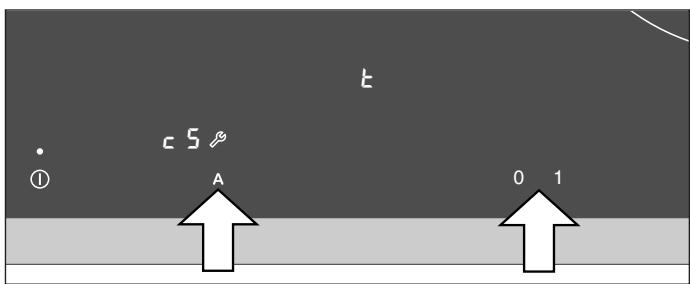
Selection time for cooking zones 5 seconds or unlimited:
if you select a cooking zone, you have to set the cooking level within the selection time. By setting the selection time to umlimited you can change the cooking level at any time without selecting the cooking zone again.
c5 selection time 5 seconds for cooking zones
c5 t. unlimited selection time for cooking zones
Note
To exit the options menu and store the settings: touch the A symbol and keep it pressed. A signal is sounded. Keep A pressed until a second signal is sounded. (Note: no signal is sounded if c2 - 0 . key tones off has been selected.)
If you exit the options menu by touching the ① main switch, the settings will not be stored.
Caution! Do not clean the cooktop using high pressure cleaners or steam jets.
Caution, risk of burns! Before cleaning, wait until the residual heat display has gone out.
Caution, risk of injury! The blade of the included glass scraper is very sharp. Replace damaged blades immediately.
Cleaning the glass ceramic
Clean the cooktop after every use. This prevents food from being burnt into the cooktop surface.
Use the blade scraper to remove food residues and grease splashes. Only use the blade on the glass ceramic cooktop. Do not use the blade casing as it may scratch the glass ceramic.
Use a glass ceramic cleaner and kitchen towel or a soft, moist cloth to clean the surface when it has cooled down.
Wipe the surface with a moist cloth and rub dry with a soft cloth.
Do not apply the cleaner if the cooktop is hot. It can become stained. Carefully remove any remaining cleaner before heating up the cooktop.
Water marks can also be removed using lemon juice or vinegar.
The glass ceramic cleaner will coat the glass ceramic surface with a gleaming, dirt repellent film. This will help to preserve the attractive appearance of your cooktop over a long period of time and make it easier to clean as well.
- Do not use scouring, abrasive or chemically aggressive cleaners (e.g. oven cleaner).
- Do not use cleaners which contain sand or chlorine.
- Do not use undiluted dishwashing or household detergent. Do not use abrasive sponges or brushes.
Food with a high sugar content (e.g. boiled-over milk, jam) can damage the surface of your cooktop. Immediately remove such food using the glass scraper.
Iridiscent discoloration can be caused by the use of unsuitable cleaning agents or abrasion from the bases of some pots. These do not interfere with the operation of the glass ceramic cooktop. Remove the discoloration with glass ceramic cleaner.
Always keep the touch keys clean and dry. Food residues and spills can impair the function of the control panels.
Cleaning the stainless steel frame
Use a soft cloth and light soapy liquid or a commercially available stainless steel cleaner to clean the cooktop frame. Only wipe in the direction of the brushed metal.
Do not use any aggressive or abrasive cleaners. Do not use the blade scraper, as it may scratch the cooktop frame.
Do not use lemon or vinegar to clean the cooktop frame. This could result in matt patches.
Useful hints
The temperature of the cooking zones is controlled by switching the heat on and off, this means that it is not always possible to see the red, glowing heat. If you select a low heat setting, the heat will switch off more often than at higher heat settings. Even at the highest setting the heat switches on and off.
There may be a gentle buzzing as the cooking zones heat up.
The heat may show differently on the individual cooking zones. Depending on the angle of vision, the heat may appear to spread beyond the marked boundary of the cooking zone. These are technical features and do not influence quality or function.
Maintenance
If the appliance does not function correctly, check the household fuses first. If the power supply is functioning correctly, please contact your dealer or the Gaggenau after-sales service.
Please quote the E number (product number) and the FD number (production number) of your appliance when contacting the after-sales service. The quality control slip bearing these numbers is included with this manual. This quality control slip should be kept, for guarantee reasons, together with your operating and assembly instructions.
Repairs may only be carried out by authorised technicians, in order to guarantee the safety of the appliance.

Caution! Incorrect repairs may result in serious injury to the user.
All poles of the appliance must be disconnected from the mains when being repaired.
Non compliance with these recommendations results in the warranty coverage becoming invalid.
Not every malfunction can be ascribed to a defect of your cooker. If your appliance should not function properly, search for the fault in the list below. If you are not successful in remedying the fault with the aid of the list below, then contact your Gaggenau after-sales service.
The cooktop does not work
Check that the household fuses for the appliance are OK. Check if there has been a power cut.
The cooktop cannot be switched on. The main switch flashes repeatedly when touched.
An object lies on one of the sensor keys (e.g. a dish cloth). Remove the object and switch on the cooktop as usual.
The cooktop functions but does not heat up. A spot lights constantly on the timer display.
The cooktop is on show room mode after installation. Disconnect the cooktop from the power supply for at least 10 seconds. Reconnect the cooktop and within 3 minutes carry out the following procedure:
1 Switch on cooktop at main switch ①. Timer must be off.
2 Touch the symbol + and keep the finger pressed down. Within 3 seconds touch and release the main switch ①. The cooktop switches off.
3 Remove your finger from the symbol ^+ . A signal will sound. The spot on the timer display goes off.
The cooktop has switched itself off
The main switch was touched accidentally. Switch the cooktop back on.
A cooking zone has been in constant operation for too long. The safety deactivation was activated. Switch off the cooking zone. It can be switched on again immediately.
display and numbers
If an Er and numbers appear on the display, there is a fault with the electronics. Switch the cooktop off and, after a few minutes, on again using the household fuse or the circuit breaker in the fuse box (reset). Disconnect the cooktop from the electricity and call the after-sales service if the display appears again.
Alternating H and display
A cooking zone which is set on level 8 or 9 is too hot. This cooking zone is reduced to level 7. When H disappears you can select a higher setting again.
H display
The cooktop is too hot and has switched itself off. Remove the pots from the cooking zones.
H disappears from the display when the cooking zones have cooled sufficiently.
Wait a few minutes until the cooking zones have cooled down slightly. If H appears again after the cooking zones are switched back on, the cooktop is still too hot. Switch off the cooking zones and allow to cool further.
F1 display
A cooking zone has faulty electronics.
Switch the cooktop off and, after a few minutes, on again using the household fuse or the circuit breaker in the fuse box (reset). Disconnect the cooktop from the electricity and call the after-sales service if the display appears again.
F4 display
The control panel is too hot and the cooktop has switched itself off. Check whether there is a hot pan on the control panel.
Remove the pan from the control panel. Wait a few minutes until the control panel has cooled down slightly. If F4 appears again after the cooking zones are switched back on, call the after-sales service.
- OPERATING FOR THE FIRST TIME 5
- CAUSES OF DAMAGE 5
- FEATURES OF YOUR NEW COOKTOP 6
- OPERATING PRINCIPLE 8
- OPERATION 9
- COOKING ZONE COMBINATION 12
- SETTINGS TABLE 13
- TIMER 14
- QUICK BOIL TIMER 16
- CHILD LOCK 17
- OPTIONS MENU 18
- CLEANING AND CARE 21
- USEFUL HINTS 22
- MAINTENANCE 22
- TROUBLE SHOOTING 23
- BEFORE USE
- SAFETY WHEN COOKING
- DAMAGE TO THE COOKTOP
- POTS AND PANS
- FOOD SPILLS
- SCRATCHES ON THE GLASS CERAMIC
- HARD AND POINTED OBJECTS
- COOKING ZONES CE 261
- COOKING ZONES CE 273
- SYMBOLS
- MAIN SWITCH
- TOUCH KEYS
- NOTE
- COOKING ZONE COMBINATION
- QUICK BOIL TIMER
- SWITCHING ON AND OFF
- SETTING THE COOKING LEVEL
- CHANGING THE COOKING LEVEL
- SWITCHING OFF A COOKING ZONE
- MAIN SWITCH WITH MEMORY FUNCTION
- RESIDUAL HEAT DISPLAY
- SAFETY DEACTIVATION
- TIPS ON SAVING ENERGY
- COMBINATION OF THE DUAL SIZE COOKING ZONE
- DEACTIVATING COMBINATION
- SETTING AN AUTOMATIC SWITCH-OFF TIME
- CHANGING A TIME VALUE
- ERASING A TIME VALUE
- TIMER
- SETTING THE TIMER
- SWITCHING ON THE QUICK BOIL TIMER
- SWITCHING OFF THE QUICK BOIL TIMER
- ACTIVATING THE CHILD LOCK
- DEACTIVATING THE CHILD LOCK
- ACCESSING THE OPTIONS MENU
- SETTINGS OF THE OPTIONS MENU
- CLEANING THE GLASS CERAMIC
- CLEANING THE STAINLESS STEEL FRAME
- USEFUL HINTS
- MAINTENANCE
- CAUTION! INCORRECT REPAIRS MAY RESULT IN SERIOUS INJURY TO THE USER
- THE COOKTOP DOES NOT WORK
- THE COOKTOP CANNOT BE SWITCHED ON. THE MAIN SWITCH FLASHES REPEATEDLY WHEN TOUCHED
- THE COOKTOP FUNCTIONS BUT DOES NOT HEAT UP. A SPOT LIGHTS CONSTANTLY ON THE TIMER DISPLAY
- THE COOKTOP HAS SWITCHED ITSELF OFF
- DISPLAY AND NUMBERS
- ALTERNATING H AND DISPLAY
- H DISPLAY
- F1 DISPLAY
- F4 DISPLAY
Brand : GAGGENAU
Model : CE273212
Category : Electric cooktop