
CK481110 - Electric cooktop GAGGENAU - Free user manual and instructions
Find the device manual for free CK481110 GAGGENAU in PDF.

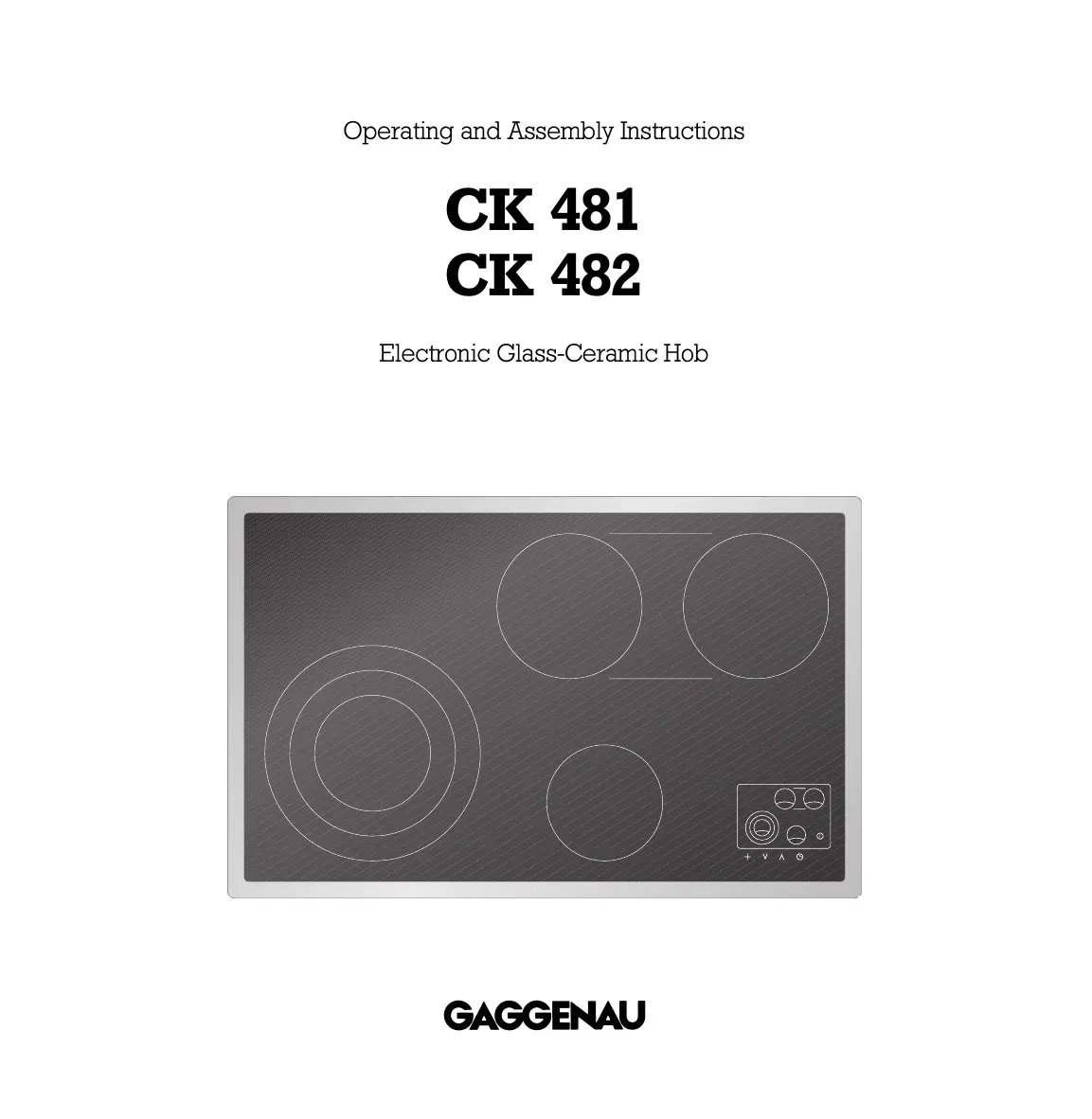

| Product type | Electric ceramic hob |
| Brand | GAGGENAU |
| Model | CK481110 |
| Category | Hob |
| Power supply | 230 V, 50/60 Hz |
| Total connected power | 8680 W |
| Number of cooking zones | 4 (with possible extension) |
| Zone diameters | Front left: 140/210/280 mm; Front right: 145 mm; Rear left: 180 mm; Rear right: 180 mm; Oval zone: 180 x 415 mm |
| Control type | Touch controls |
| Main functions | SuperQuick, zone extension, automatic boiling, timer, memory function, overheating protection, child lock, automatic shut-off after 4 h |
| Safety | Residual heat indicator, automatic shut-off, child lock, overheating protection |
| Dimensions (W x D x H) | Approx. 900 x 520 x 50 mm |
| Net weight | Approx. 12 kg |
| Material | Ceramic glass with stainless steel frame |
| Cleaning and maintenance | Use a ceramic hob cleaner (Gaggenau ref. 098690) and a scraper (ref. 087670) |
| Optional accessories | Non-stick roasting pan BT 481-000 with lid |
| Repairability | Have repairs carried out by an approved specialist |
| General information | Household use only; serial number on the quality control certificate |
Frequently Asked Questions - CK481110 GAGGENAU
User questions about CK481110 GAGGENAU
0 question about this device. Answer the ones you know or ask your own.
Ask a new question about this device
Download the instructions for your Electric cooktop in PDF format for free! Find your manual CK481110 - GAGGENAU and take your electronic device back in hand. On this page are published all the documents necessary for the use of your device. CK481110 by GAGGENAU.
USER MANUAL CK481110 GAGGENAU
Operating and Assembly Instructions
CK 481
CK 482
Electronic Glass-Ceramic Hob
| 1. Important notes | Page 3-4 |
| For your safety | Page 3 |
| Operating for the first time | Page 4 |
| About use | Page 4 |
| 2. Features | Page 5 |
| Features of the appliance | Page 5 |
| Control panel | Page 5 |
| Special accessories | Page 5 |
| 3. Operating principles | Page 6-7 |
| 4. Operation | Page 8-11 |
| Switching on and off | Page 8-9 |
| Residual heat display | Page 9 |
| Memory function | Page 10 |
| Energy saving tips | Page 10 |
| Settings table | Page 11 |
| 5. Additional functions | Page 12-17 |
| Cooking zone extension front left | Page 12 |
| Cooking zone extension rear | Page 13 |
| Automatic quick-boil function | Page 14 |
| Timer operation | Page 15-16 |
| Overheating protection | Page 17 |
| Holiday safeguard | Page 17 |
| Child lock | Page 17 |
| 6. Options menu | Page 18-21 |
| 7. Cleaning and care | Page 22 |
| 8. Maintenance | Page 23 |
| 9. Remedying slight malfunctions yourself | Page 24 |
| 10. Installation | Page 25-28 |
| Technical Data | Page 25 |
| Important notes on installation | Page 25 |
| Installation CK 481 | Page 26 |
| Installation CK 482 | Page 27-28 |
CK 481
CK 482
Cooking with your new glass-ceramic hob will be even more fun than before.
The appliance offers you the following advantages:
- A generous cooking area.
- Cooking zones for large pans and oval shaped roasters - the cooking zone size can be adjusted individually using the combination feature.
- Easy operation through sensor pads.
To ensure that you will be able to use this appliance in all its diversity, read through the operating and assembly instructions conscientiously before operating it for the first time. The instructions contain important notes on use, installation and maintenance of the appliance.
In the following pages you will find important notes on safety and operation. These will serve to ensure your personal safety and the lasting value of your appliance.
You will find notes on page 4 that you ought to observe before operating the appliance for the first time.
The chapters entitled "Features", "Operating principles" and "Operation" tell you all about what your appliance can do and how you operate it.
The chapter entitled "Cleaning and care" will make sure that your appliance will stay operable and beautiful for a long time.
And now we wish you lots of fun cooking.
1. Important notes
For your safety
You must not operate the appliance if it is damaged.
The appliance must only be connected by an authorised specialist, paying attention to the relevant regulations of the power supply companies and the regional construction regulations.
Observe the assembly instructions!
The appliance could be damaged if connected wrongly!
When connecting electrical appliances in the proximity of cooking surfaces and ovens, make sure that connecting cables do not become jammed under the hot oven door or come into contact with hot cooking surfaces.
Only ever operate the appliance under supervision. Observe caution with oils and fats. Overheated oils and fats can easily cause fires.
Caution: the appliance heats up during operation. Keep children away.
Do not operate the cooking positions without pots and pans placed on them.
To avoid jeopardising the electrical safety of the appliance, do not use high-pressure or steam jet cleaning devices.
Do not store any substances that are sensitive to high temperatures, or which pose a fire hazard (e.g. cleaning agents or spray cans), in drawers or cupboards under the appliance.
Operation of the appliance must be discontinued immediately if improper use produces cracks, breaks or flaws on the cooking surface, with the result that live parts can come into contact directly or indirectly with seeping liquid or if there is a risk of injury. Remove the mains plug or switch off the corresponding mains fuse. Call after-sales service!
Isolate the appliance from the mains during every maintenance operation. To do this, remove the mains plug or switch off the corresponding fuse.
Repairs must be carried out by authorised specialists, thus ensuring electrical safety.
As the user, you are responsible for maintenance and proper use in the household. No warranty claims can be lodged for any damage resulting from failure to observe these instructions.
Subject to technical change without notice.
Operating for the first time
Remove the packaging from the appliance and dispose of it according to local regulations. Be careful to remove all accessories from the packaging. Keep packaging elements and plastic bags away from children.
This appliance is labelled in accordance with the European Directive 2002/96/EG concerning used electrical and electronic appliances (waste electrical and electronic equipment - WEEE). The
guideline determines the framework for the return and recycling of used appliances as applicable.
Check the appliance for transport damage before installing it.
The appliance must be installed and connected by an authorised specialist before operation. Before operating the appliance for the first time, make sure that the mains connection is in proper working order.
The serial number of the appliance can be found on the quality control slip which is included with these instructions. This quality control slip should be kept, for guarantee reasons, together with your operating and assembly instructions.
Read through these instructions attentively before operating your appliance for the first time.
Thoroughly clean the appliance and accessories before using them for the first time. This will eliminate any 'newness' smells and soiling (see chapter "Cleaning and care").
About use
The appliance is intended solely for household use and must not be put to any other uses.
Use the appliance to prepare meals only. Do not use the appliance to heat up the room in which it is installed.
Do not use the cooking surface as space to store items. Do not place any hot pots on the display panel.
Place a cooking vessel on the corresponding cooking zone before operating it. Do not remove the cooking vessel until you have switched off the hotplate. The size of pots and pans should correspond to the size of the hotplate. This will save you energy and time.
Switch off the hob after use.
Iridiscent discoloration can be caused by the bases of some pots. These do not interfere with the operation of the glass ceramic hob.
Always keep the cooking area and control panel dry and clean. The surface can be scratched due to dirt (e.g. sand grains).
Never heat food in aluminium or plastic containers as the material can melt and damage your hob.
Built-in overheating protection prevents overheating of the appliance and of surrounding kitchen furniture.
If installed above a pyrolytic oven, the overheating protection may be triggered when the hob is operated during a pyrolytic cleaning cycle.
In the event of malfunction, first check your household fuses. If the power supply is in proper working order, but the appliance is still not functioning, please inform your specialist dealer or your nearest Gaggenau after-sales service.
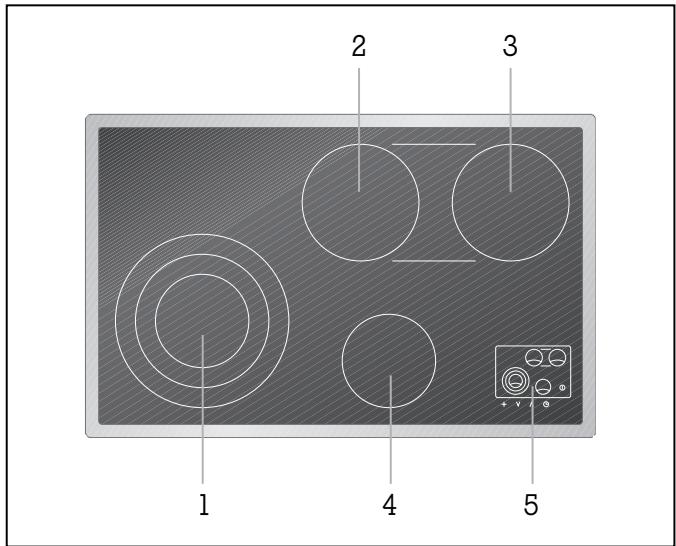
Features of the appliance
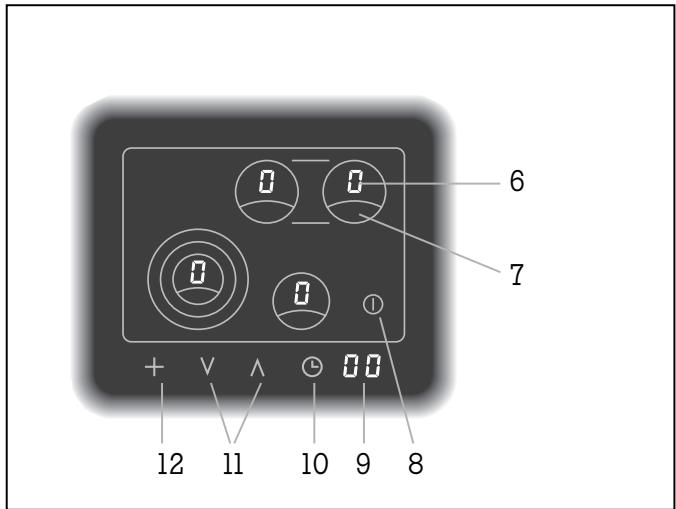
Control panel
Special accessories
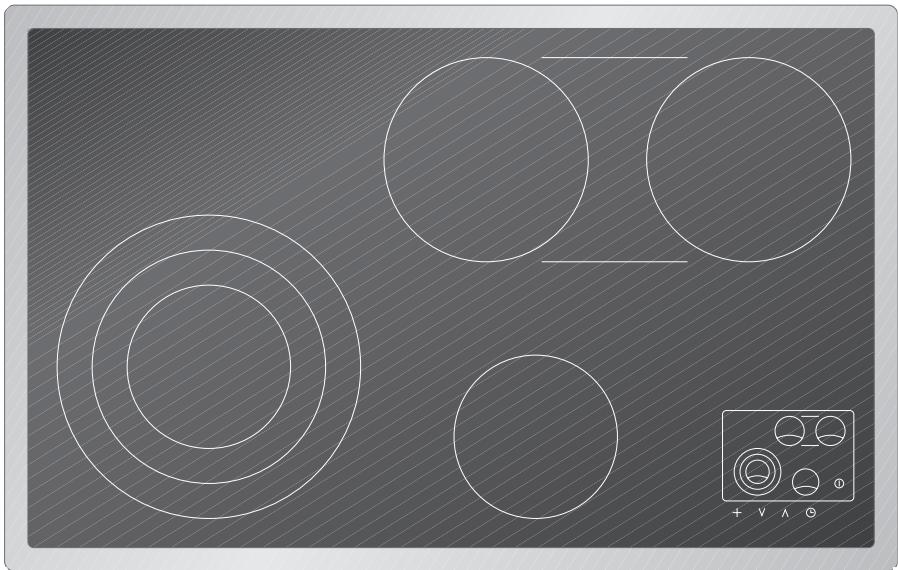
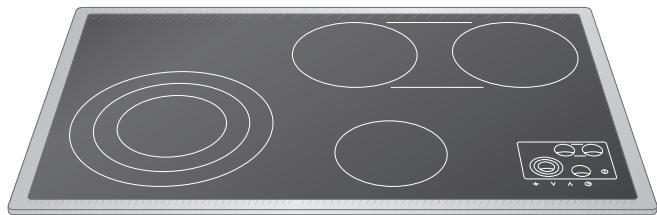
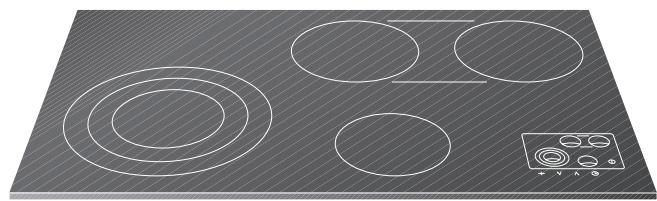
CK 481 is supplied with a stainless steel frame. CK 482 is suitable for flush mounting into stone or tiled worktops. The operation of both types is identical.
1 SuperQuick cooking zone 140 mm (1050 W), converts to 210 mm (2200 W) or to 280 mm (3080 W)
2 SuperQuick cooking zone 180 mm (1800W)
3 SuperQuick cooking zone 0 180 mm (1800 W) cooking zones 2 and 3 plus additional zone 800 W convert to oval roasting zone 180 × 415 mm (4400 W)
4 SuperQuick cooking zone 145mm (1200W)
5 Display panel
6 Cooking level display
7 Cooking zone selection
8 Main switch
9 Timer display
10 Timer switch
11 UP-/DOWN-symbols to select cooking level and timer
12 Cooking zone extension switch
You can order the following special accessory: BT 481-000 Non-stick coated roaster with lid, suitable for the roasting zone
3. Operating principles
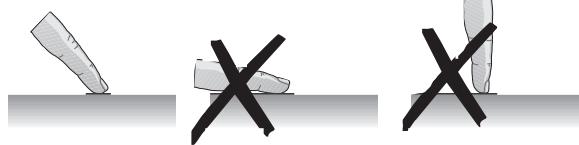
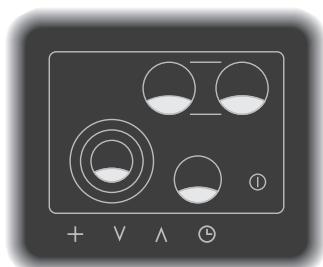
Sensor pads
Display
Residual heat display
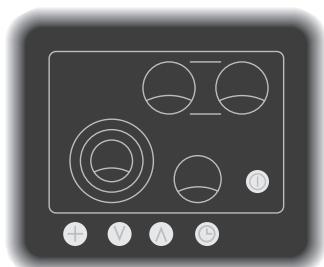
The cooking range is operated by touch control sensors. Touch the required sensor pad in the shaded area as shown in the picture. You only need to touch the pad with your finger, no pressure is required. Every accepted input is confirmed by an audible signal.
Always keep the control panel clean. Do not place hot cooking dishes on the control panel.
When you touch more than one sensor pad simultaneously or if any object (e.g. cooking spoon, dish cloth) lie on the sensor pads, the appliance registers this as an error. No input is registered and several short tones are sounded.
When the appliance is switched on, a spot lights up on the main switch symbol.
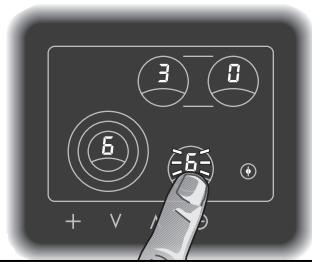
The given cooking level is shown on the display of each cooking zone.
A flashing display shows that a value has not yet been confirmed.
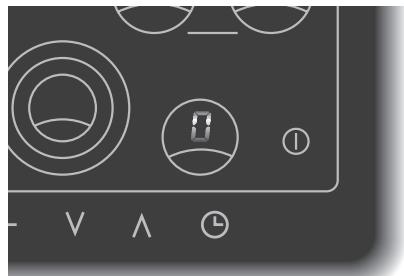
The residual heat display appears on the display of the relevant cooking zone after switching off.
The moving zero in the cooking level display indicates that, after switching off, a cooking zone has still not cooled down to such an extent that it can be safely touched.
Additional features
Cooking zone extension page 12-13
The front left cooking zone can be extended to a middle or large diameter.
Both rear cooking zones convert, together with an additional zone, to an oval cooking zone especially suitable for roasters.
Automatic quick-boil function page 14
The cooking range features an automatic quick-boil function. The feature is selected by touching the required cooking zone twice on the control panel. The cooking zone returns to the selected level after the quick-boil time has expired.
Memory function page 10
The cooking range stores all the set cooking levels and time values for 15 seconds after it has been switched off. You are therefore able to retrieve all the previous values should you switch it off accidentally.
Timer page 15-16
It is possible to program an automatic switch-off time for one or several of the cooking zones. It is also possible to use the timer independently.
Overheating protection page 17
The electronics of the cooking range are equipped with an overheating protection.
Holiday safeguard page 17
If you should ever forget to switch off a cooking zone after use, the appliance is set to automatically switch off a cooking zone 4 hours after the last operation.
Child lock page 17
It is possible to avoid switching on the appliance accidentally by using the child lock. The child lock function is de-activated when delivered and must be chosen in the options menu.
Options menu page 18-21
Using the options menu, the automatic quick-boil function, cooking zone extension and the child lock can be programmed to suit your individual needs.
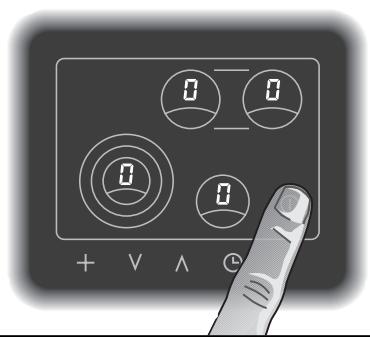
Switching the hob on and off
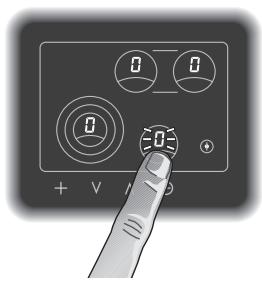
Switching on a cooking zone
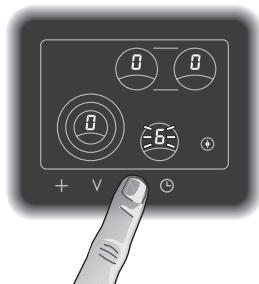
Switching the hob on and off
Touch the main switch symbol. An audible signal is sounded and a spot lights on the main switch symbol. All the cooking zone display show 0. The hob is now in operation.
If no further inputs are made within approx.
20 seconds the hob automatically switches off.
By touching the main switch symbol at any time the hob can be quickly switched off.
Switching on a cooking zone
The hob must be switched on by the main switch. The switching on and off for all cooking zones is identical.
- Touch the required cooking zone in the control panel. The zero on the display of the selected cooking zone flashes.
- Select the required cooking level within 5 seconds using the UP/DOWN symbols. (You can immediately select level 9, 8, etc. using the DOWN symbol.) The display of the cooking zone flashes the chosen level. Note: if no input is given within 5 seconds the cooking zone must be re-activated.
- The selected cooking level is confirmed after a few seconds by an audible signal and the display lights constantly. Alternatively you can confirm the values by again touching the cooking zone in the control panel.
- The cooking zones are electronically controlled and during use, in order to maintain a constant heat, the cooking zone switches on and off intermittently.
Changing the cooking level
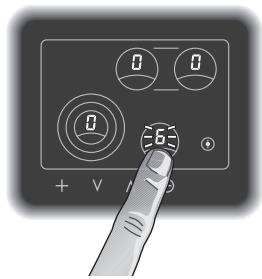
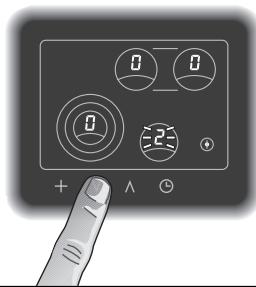
Switching off a cooking zone
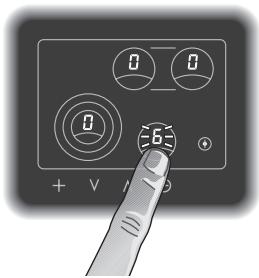
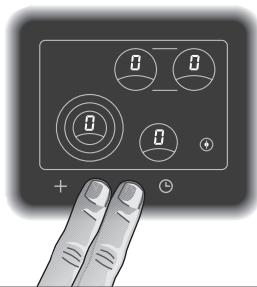
Residual heat display
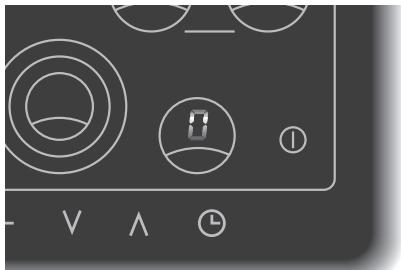
Changing the cooking level
- Touch the required cooking zone in the control panel. The display of the cooking zone flashes.
- Select the required cooking level using the UP/DOWN symbols. The display of the cooking zone shows the chosen level.
Switching off a cooking zone
- Touch the required cooking zone in the control panel. The display of the cooking zone flashes.
- Touch the UP/DOWN symbols simultaneously. Or: Touch the the DOWN symbol, until the display of the cooking zone shows a zero. The cooking zone is now switched off.
- The residual heat symbol lights in the display of the cooking zone.
Note: if you want to switch off the whole hob (i.e. when something is boiling over) then simply touch the main switch.
Residual heat display
Once you have switched off a cooking zone, residual heat is shown on the display as a moving zero. This indicates that the cooking zone is still giving off heat and has not cooled down sufficiently to be touched safely.
Memory function
The cooking range stores all the set cooking levels and time values for 15 seconds after it has been switched off. You are therefore able to retrieve all the previous values should you switch it off accidentally.
Proceed as follows:
- Touch the main switch. The previous values flash on the display panel.
- Should you wish to accept the stored values: tap the symbol timer within 5 seconds. You will hear a signal. The previous values are now accepted.
- Failure to follow the above procedure exactly results in the stored values being lost.
Energy saving tips
Pots and saucepans should always be covered by a matching lid. The cooking time is shortened and the energy use reduced.
Pay attention to the right size when choosing pots and pans. The diameters of pots and pans should correspond to that of the hotplate. When buying pots, pay attention to the fact that the manufacturer frequently specifies the top pot diameter, which is generally larger than the diameter of the base.
We recommend that you use high quality pots and pans with thick flat bases.
For longer cooking times, it is possible to switch off the cooking zone before the end of the cooking time to make use of the residual heat.
| Settings table | ||
| Cooking level | Cooking method | Examples |
| 9 | Boiling | Water |
| Searing | Meat | |
| Heating | Fat, liquids | |
| Boiling | Soup, sauce | |
| Blanching | Vegetables | |
| 8 - 6 | Roasting | Meat, fish, potatoes |
| 7 - 6 | Browning | Flour, onions |
| Roasting | Almonds, breadcrumbs | |
| Baking | Pancakes, egg dishes | |
| Boiling in open pot | Liquids | |
| 6 - 5 | Frying | Bacon |
| Reducing | Stocks, sauscs | |
| 5 - 4 | Simmering | Sweet sauces |
| Simmering in open pot | Dumplings, sausages, soup garnish, meat stock, poached eggs | |
| 4 - 3 | Boiling with closed lid | Pasta, soup, sauces |
| Steaming | Vegetables, potatoes, fish | |
| Stewing | Vegetables, fruit, fish | |
| Braising | Goulash, rolled beef steaks, roasts, vegetables | |
| Thawing | Frozen foods | |
| 3 - 1 | Slow cooking | Rice, pulses |
| Reheating / keeping warm | Soup, casserole, vegetables in a sauce | |
| Melting | Butter, chocolate | |
| Thickening | Egg dishes | |
Switch to the highest cooking level in order to reach the required temperature quickly. Then always switch back to the lower cooking level.
The cooking levels are identical for all cooking zones.
The values given above must be looked upon as recommended values. The heat required depends not only on the type and condition of the food, but also the size and contents of the pot.
5. Additional functions
Cooking zone extension front left
Activating extension, front left cooking zone
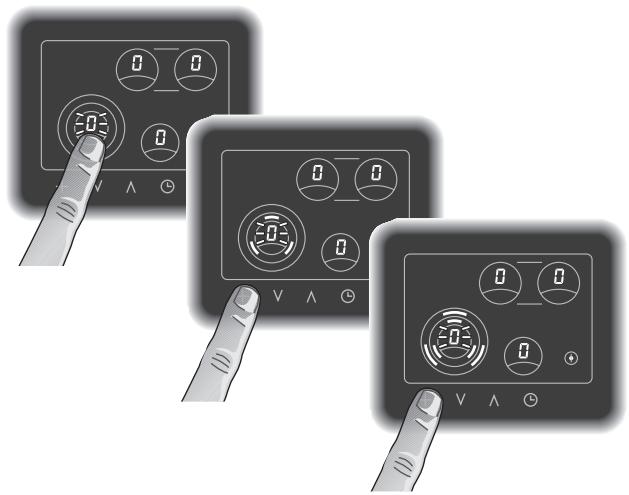
The front left cooking zone can be extended to a middle or large diameter. In the options menu it is possible to choose the larger diameters as the standard cooking zone.
Activating extension, front left cooking zone
The hob must be switched on by the main switch.
- Touch the front left cooking zone in the control panel. The zero on the display of the cooking zone flashes.
- Touch the ^+ symbol until the symbol for the required extension flashes on the display.
- Now select the required cooking level using the UP/DOWN symbols. The display of the cooking zone flashes the chosen level.
- The selected cooking level is confirmed after a few seconds by an audible signal and the display lights constantly. Alternatively you can confirm the values by again touching the cooking zone in the control panel.
De-activating extension, front left cooking zone
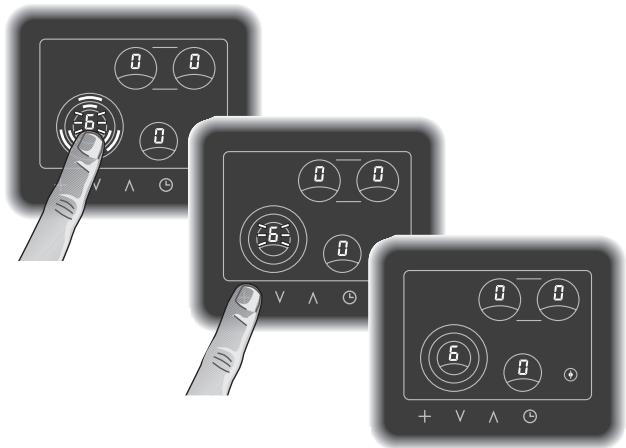
De-activating extension, front left cooking zone
- Touch the front left cooking zone in the control panel. The cooking level on the display of the cooking zone flashes.
- Touch the + symbol until the symbol for the required extension disappears from the display.
- The cooking zone will now continue to operate on the chosen level without the extension.
Cooking zone extension rear
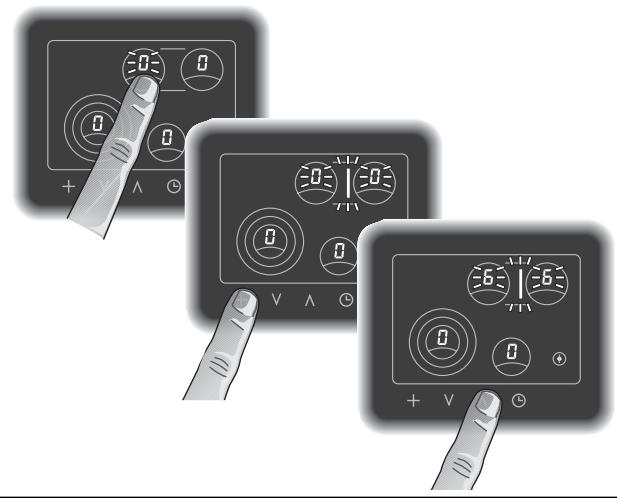
Activating extension, rear cooking zones
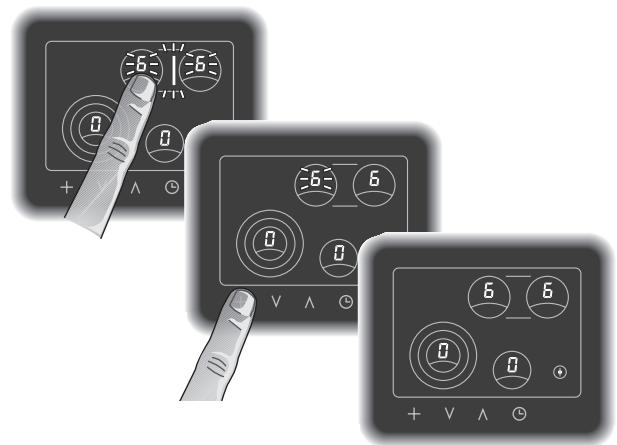
De-activating extension, rear cooking zones
Both rear cooking zones convert together with an additional zone, to create an oval cooking zone especially suitable for roasters. In the options menu it is possible to choose the oval cooking zone as the standard cooking zone.
Both rear cooking zones and the additional zone operate as one single cooking zone. Each input for one cooking zone will include both cooking zones and the additional zone.
Activating extension, rear cooking zones
The hob must be switched on by the main switch.
- Touch either of the rear cooking zones in the control panel. The zero on the display of the cooking zone flashes.
- Touch the + symbol. The extension symbol flashes on the display.
- Now select the required cooking level using the UP/DOWN symbols. The display of both cooking zones flashes the chosen level.
- The selected cooking level is confirmed after a few seconds by an audible signal and the display lights constantly. Alternatively you can confirm the values by again touching the cooking zone in the control panel.
De-activating extension, rear cooking zones
- Touch either of the rear cooking zones in the control panel. The cooking level on the displays of both cooking zones flashes.
- Touch the + symbol. The extension symbol disappears from the display.
- Both cooking zones will now continue to operate on the chosen level without the extension. Both cooking zones can now be adjusted and used separately.
Automatic quick-boil function
Switching on the automatic quick-boil function
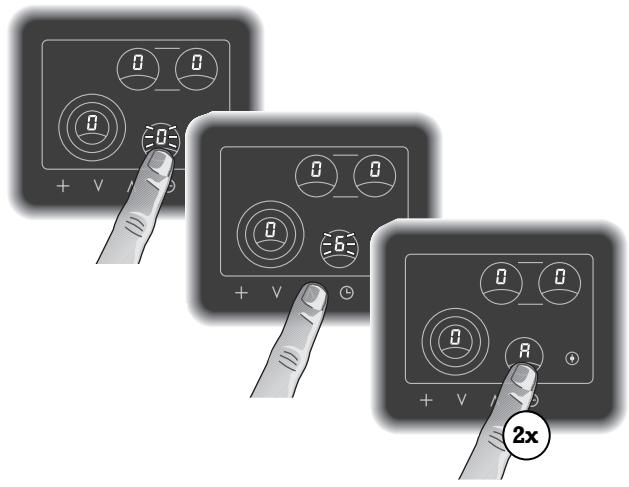
Switching off the automatic quick-boil function
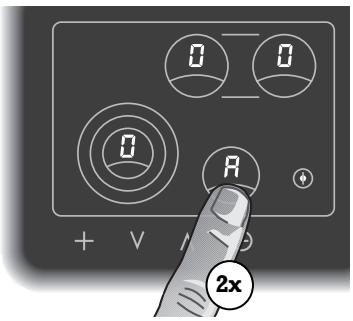
All cooking zones feature an automatic quick-boil function. When the automatic quick boil function is activated, the set cooking level is boosted for several minutes. This ensures that the continued cooking or simmering temperature of the food is reached faster. The length of the automatic quick-boil function can be changed in the options menu. The appliance is pre-set to a standard of four minutes on delivery. The appliance switches automatically to the set simmering or cooking level after the quick boil time has elapsed.
Note: the automatic quick boil function cannot be activated when using cooking level 9.
Switching on the automatic quick-boil function
The hob must be switched on by the main switch.
- Touch the required cooking zone in the control panel. The zero on the display of the selected cooking zone flashes.
- Now select the required cooking level using the UP/DOWN symbols. The display of the cooking zone flashes the chosen level.
- The selected cooking level is confirmed after a few seconds by an audible signal and the display lights constantly. Alternatively you can confirm the values by again touching the cooking zone in the control panel.
- Re-touch the cooking zone in the control panel twice. The display of the cooking zone flashes alternatively the chosen level and the symbol A for automatic quick-boil.
Switching off the automatic quick-boil function
It is possible to switch off the automatic quick boil function prematurely (e.g. because the food is boiling over).
- Touch the required cooking zone in the control panel twice. The symbol for automatic quick-boil disappears from the display. The cooking zone switches back to the set cooking level.
Timer operation
Programming a switch-off time
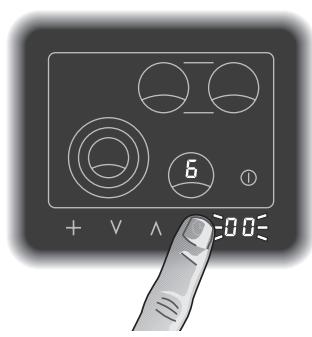
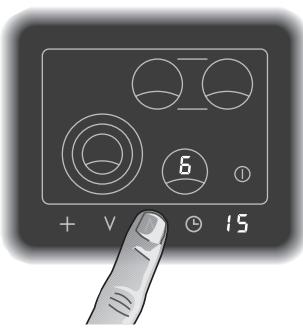
Note: only ever operate the appliance under supervision.
It is possible to program an automatic switch-off time for one or several of the cooking zones. Any value between 1 and 90 minutes can be entered on the timer.
It is also possible to use the timer independently. The timer can also be used when the hob is switched off.
Programming a switch-off time
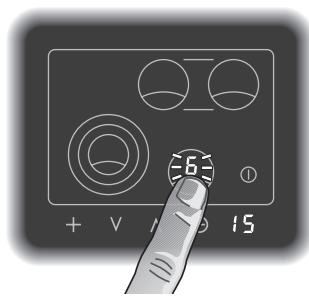
- Set the cooking zone which you want to time to the required cooking level.
- Touch the timer symbol. The timer display flashes 00. Select the required time using the UP-/DOWN-symbols.
- The value is confirmed a few seconds later by an audible signal and the timer starts. Alternatively you can confirm the values by again touching the timer symbol in the control panel.
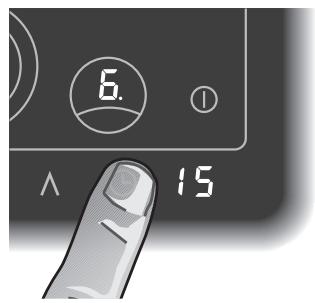
- Touch the cooking zone in the display panel which you would like to timer operate. The display flashes the selected cooking level. Touch the timer symbol.
- A spot appears next to the cooking level on the cooking zone display. The timer is now set for this cooking zone.
- After the elapse of the programmed time an audible signal is sounded. The selected cooking zone is switched off. Both the selected cooking value and the timer flash. By touching any symbol on the display the audible signal is switched off and the cooking zone display shows zero.
Timer operation
Programming the timer without cooking zone switch-off
Changing or erasing a given time value
- Touch the timer symbol.
- You can now change the programmed time using the UP-/DOWN-symbols. Touch the UP-/DOWN-symbols simultaneously or touch the DOWN-symbol, until 00 shows on the display. The spot on the cooking zone display disappears. The timer program is now switched off. The cooking zone remains on the selected cooking level without timer operation.
Programming the timer without cooking zone switch-off
It is also possible to use the timer independently from the cooking zones and without switch-off function.
Any value between 1 and 90 minutes can be entered on the timer.
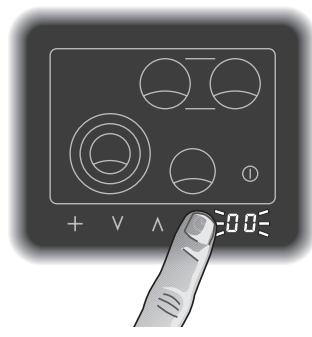
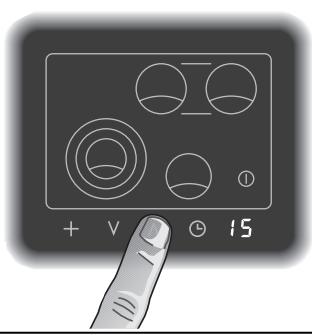
- Touch the timer symbol. The timer display flashes 00. Select the required time using the UP-/DOWN-symbols.
- The value is confirmed a few seconds later by an audible signal and the timer starts. Alternatively you can confirm the values by again touching the timer symbol in the control panel.
- The timer display shows the elapsed time.
- After the elapse of the programmed time an audible signal is sounded. The timer display flashes. By touching any symbol on the display the audible signal is switched off.
- The timer can be switched off at any time by touching the timer symbol and then the UP-/DOWN-symbols simultaneously.
Overheating protection
The hob's electronic circuitry features overheating protection. If the critical temperature is exceeded, the right front and back cooking zones are switched back to level 7 provided they are set to level 8 or 9.
H and 7 alternately appear in the relevant cooking level display areas.
When the temperature drops below the critical value, the letter H disappear from the display. The cooking zones remain on level 7 and can be turned up to level 8 or 9 again if required.
Holiday safeguard (Automatic switch-off)
The appliance is set to automatically switch off a cooking zone 4 hours after the last operation. The cooking zone can be switched on again as normal.
Child lock
It is possible to avoid switching on the appliance accidentally by using the child lock.
Note: the child lock function is de-activated when delivered and must be chosen in the options menu. (see page 21 options menu).
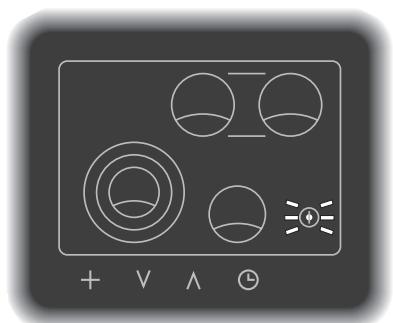
Child lock switched on
Switching on the child lock
The appliance must be switched on by the main switch and all cooking zones should be on 0.
- Touch the rear left cooking zone on the display panel and keep the finger pressed.
- Simultaneously touch the main switch. An audible signal is given. Remove the finger from the main switch first and then the finger from the cooking zone.
- The main switch symbol flashes. The hob can now not be switched on. The timer, however, is still operational.
Switching off the child lock
- Touch the rear left cooking zone on the display panel and keep the finger pressed.
- Simultaneously touch the main switch. An audible signal is given. Remove the finger from the main switch first and then the finger from the cooking zone.
6. Options menu
Using the options menu, the automatic quick-boil function, cooking zone extension and the child lock can be programmed to suit your individual needs.
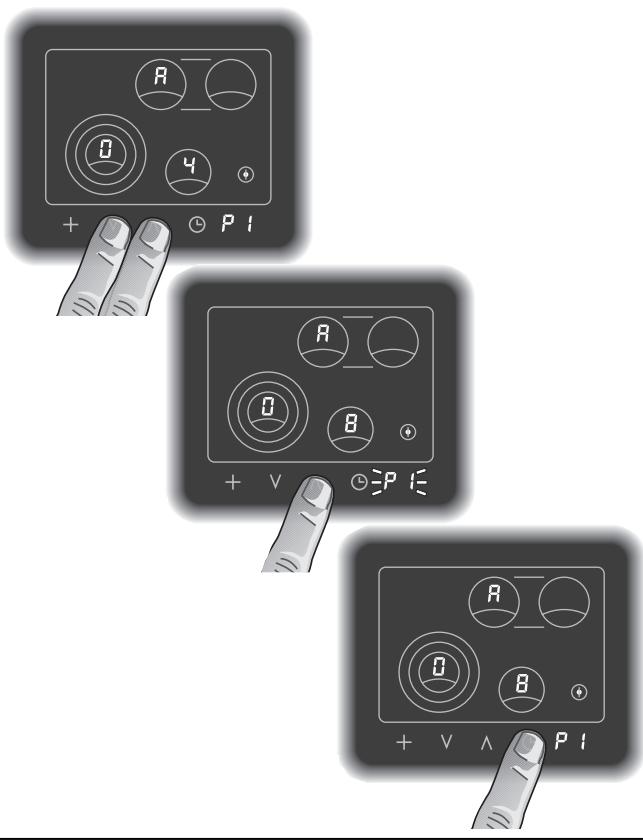
Options menu, setting the automatic quick-boil time
Use the symbols UP and DOWN to access the options menu and chose the required values.
Use the symbol timer to store the required value.
Use the symbol + to go through the options menu.
Use the main switch symbol to exit the options menu at any time. Values which have not been confirmed will not be stored.
Note: the options menu will automatically end without storing any values, should you stop operating it for more than 2 minutes.
Options menu, setting the automatic quick-boil time
Proceed as follows:
- Switch on the appliance by touching the main switch. (Note: the timer should not be activated and all cooking zones should be on 0.)
- Touch symbols UP and DOWN when the hob is switched on. You will hear a signal. Keep your fingers pressed down until a second signal sounds after a few seconds and P I lights on the timer display panel. Remove fingers immediately. RO4 appears on the cooking zone display panel, i.e. a quick boil time of 4 minutes is stored.
- You can now touch symbols UP or DOWN and select a quick boil time from 1 to 15 minutes. The selected quick boil time applies to all cooking zones. The selected time (R01 to R15) is shown on the cooking zone display panel and P1 flashes (requesting to store values).
- Store the required option by touching the timer symbol. You will hear a signal and Pi lights constantly.
In order to exit the options menu touch the main switch. Values which have not been confirmed will not be stored.
Should you require to program further functions, touch the symbol ^+
Options menu, setting the combination feature front left cooking zone
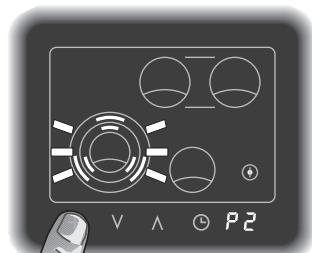
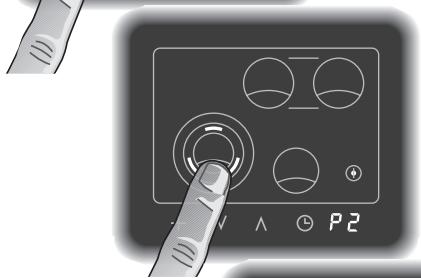
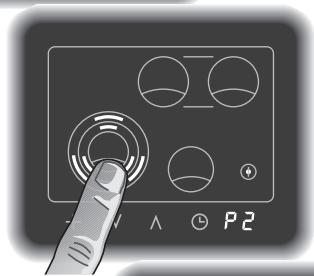
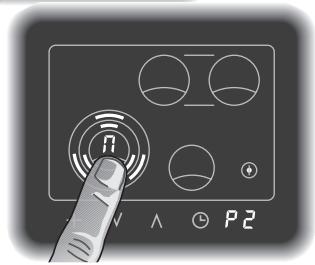
Options menu, setting the combination feature front left cooking zone
- P2 flashes on the timer display panel. The symbol for combination feature flashes on the display of the front left cooking zone.
By repeatedly touching the cooking zone in the display panel you can choose four options:
- the symbol for combination feature flashes: every time the cooking range is switched on the combination feature has to be activated if desired.
- the symbol for the middle combination feature lights:
every time the cooking range is switched on the middle combination feature is activated, however can be de-activated if desired.
- the symbol for the large combination feature lights:
every time the cooking range is switched on the large combination feature is activated, however can be de-activated if desired.
- the symbol for the large combination feature lights and π appears on the cooking zone display:
when the cooking range is switched on the previously used option is activated.
After choosing the required option P2 flashes (requesting to store values).
- Store the required option by touching the timer symbol. You will hear a signal and P lights constantly
In order to exit the options menu touch the main switch. Values which have not been confirmed will not be stored.
Should you require to program further functions, touch the symbol ^+
Options menu, setting the combination feature rear cooking zones
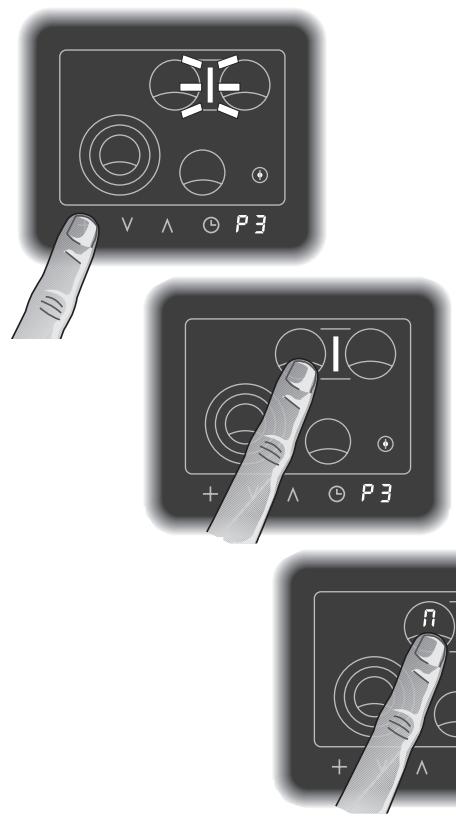
Options menu, setting the combination feature rear cooking zones
- P3 flashes on the timer display panel. The symbol for combination feature flashes on the display of the rear cooking zones.
By repeatedly touching one of the rear cooking zones in the display panel you can choose three options:
- the symbol for combination feature flashes: every time the cooking range is switched on the combination feature must be activated if desired.
- the symbol for the combination feature lights: every time the cooking range is switched on the combination feature is activated, however can be de-activated if desired.
- the symbol for the large combination feature lights and π appears on the cooking zone display: when the cooking range is switched on the previously used option is activated.
After choosing the required option P3 flashes (requesting to store values).
- Store the required option by touching the timer symbol. You will hear a signal and P3 lights constantly.
In order to exit the options menu touch the main switch. Values which have not been confirmed will not be stored.
Should you require to program further functions, touch the symbol ^+
Options menu, setting the child lock
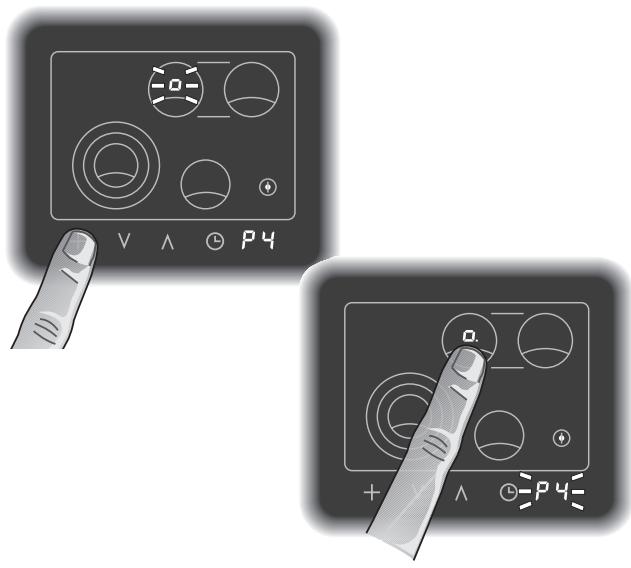
Options menu, setting the child lock
- P4 flashes on the timer display panel. The symbol for child lock flashes on the display of the rear left cooking zone. The child lock cannot be switched on with this setting.
- Touch the cooking zone rear left. A spot appears next to the child lock symbol. The child lock can be switched on with this setting if required. P4 flashes (requesting to store values).
- Store the required option by touching the timer symbol. You will hear a signal and P lights constantly.
In order to exit the options menu touch the main switch. Values that have not been confirmed will not be stored.
7. Cleaning and care
Note: to avoid jeopardising the electrical safety of the appliance, do not use high-pressure or steam jet cleaning devices - risk of short circuits!
Caution, risk of burns! Before cleaning, please wait until the hob has cooled to hand-warm.
Please thoroughly clean the appliance before operating it for the first time and after every use.
Immediately remove food remains and burnt-in residues with the blade scraper. The blade is very sharp. Risk of injury! Only use the blade on the glass-ceramic hob. Do not use the blade casing as it may scratch the glass-ceramic.
Clean the hob with a damp, soft cloth or kitchen paper and the Gaggenau glass ceramic cleaner or similar cleaner suitable for glass ceramic cooktops. Polish with a soft, dry cloth.
The Gaggenau glass ceramic cleaner will coat the glass ceramic hob with a gleaming, dirt repellent film. This will help to preserve the attractive appearance of your hob over a long period of time and make it easier to clean as well.
Do not apply the cleaner while the hob is still hot as this may cause stains. Do not use scouring agents, abrasives or chemically aggressive cleaners (for example oven cleaner)! Do not use any nitro polishing agents for cleaning! Do not use any abrasive sponges either.
Food with a high sugar content (e.g. boiled-over milk, jam) can damage the surface of your hob. Immediately remove such food using the glass scraper.
Iridiscent discoloration can be caused by the bases of some pots. These do not interfere with the operation of the glass ceramic hob.
Please refer to the enclosed brochure for further notes on cleaning.
You can order our blade scraper (Order No. 087670) and the Gaggenau glass ceramic cleaner (Order No. 098690) from your Gaggenau dealer.
The frame of the hob (only CK 481) should be cleaned using a soft, damp cloth and light soapy liquid or a commercially available stainless steel cleaner.
The appliance must always be disconnected from the mains when being repaired.
If the appliance does not function correctly, check the household fuses first.
If the power supply is functioning correctly, but your appliance still does not work, please contact your dealer or your local Gaggenau customer service agency. Specify the appliance type. The serial number and type of the appliance can be found on the quality control slip which is included with these instructions.
Repairs may only be carried out by authorised electricians, in order to guarantee the safety of the appliance.
Unauthorised tampering with the appliance will invalidate any warranty claims.
9. Remedying slight malfunctions yourself
Not every malfunction can be ascribed to a defect of your cooker. If your appliance should not function properly, search for the fault in the list below.
If you are not successful in remedying the fault with the aid of the list below, then contact your Gaggenau after-sales service.
| Fault | Possible cause | Remedy |
| The appliance cannot be switched on. | No electricity. Objects lie on the control panel. | Check the domestic fuse. Remove objects. |
| The appliance cannot be switched on, the main switch symbol blinks. | The child lock is switched on. | Switch off the child lock. |
| Both right cooking zones are switched back to level 7. H blinks on the cooking level display. | The overheating protection has been triggered. | It is possible to use the remaining cooking zones. After cooling down the complete hob can be used once again. |
| A cooking zone switches off after operating for a longer period of time. | The holiday safeguard is set to automatically switch off a cooking zone 4 hours after the last operation. | Switch the cooking zone on again as usual. |
| No reaction from the hob. | Extremely excessive voltage in the mains, e.g. caused by lightning. Control panel is soiled. The main switch was not touched long enough. | Isolate the appliance from the for 30 sec by switching off the domestic fuse. Clean control panel. Always keep the control panel clean. Touch the main switch again. |
| The display panel lights, a spot lights constantly on the timer display panel, however the cooking zone does not heat up. | The appliance is on show room mode. | Disconnect the appliance from the power supply. Reconnect the appliance and within 3 minutes carry out the following procedure: Touch the + symbol and keep the finger pressed down. Touch the main switch until you hear a signal. Immediately remove your finger from the main switch and then release the + symbol. |
Technical Data
Total connected load: 8680 W
Important notes on installation
Pay attention to the "Important notes" on page 3 and 4.
The appliance must only be connected by an authorised specialist, paying attention to the relevant regulations of the power supply companies and the regional construction regulations.
The installation technician is responsible for the correct functioning of the appliance at the place of installation. He must instruct the user on how to disconnect the appliance from electricity in an emergency.
If the range is not installed over a built-in cooker, protection against hazardous contact from below must be ensured after assembly, e.g. by installing an intermediate shelf that can only be detached using a tool. The distance between the intermediate shelf and the worktop in which the range is recessed must be at least 60 mm .
There must be a gap of at least 20mm at each side between the appliance and any flammable walls or furnishings.
If all poles of the appliances cannot be isolated from the mains by removing an accessible plug, an isolating device with a contact gap of at least 3mm must be installed (e.g. domestic fuse).
No warranty claims can be lodged for any damage resulting from failure to observe these instructions.
Subject to technical change without notice.
Electrical connection
The appliance must only be connected by an authorised specialist.
All corresponding regulations must be observed.
The mains connecting cable must at least correspond to type H 05 VV-F.
Note for single phase connection:
This device is intended for the connection to a power supply system with a maximum permissible system impedance Zmax of 0.46 Ohm at the interface point (power service box) of the user's supply. The user has to ensure that this device is connected only to a power supply system which fulfills the requirement above. If necessary, the user can the ask the public power supply company for the system impedance at the interface point.
Pay attention to the data on the rating plate. The appliance must be properly grounded. Connect the connecting cable to the mains.
When connecting electrical appliances in the proximity of cooking surfaces, make sure that connecting cables do not come into contact with hot cooking surfaces.
This appliance may be installed in kitchen combinations made of wood or similar combustible materials without taking additional measures.
The built-in furniture and worktop where the appliance is installed must be heat resistant up to temperatures of 200°F / 90°C .
Installation CK 481
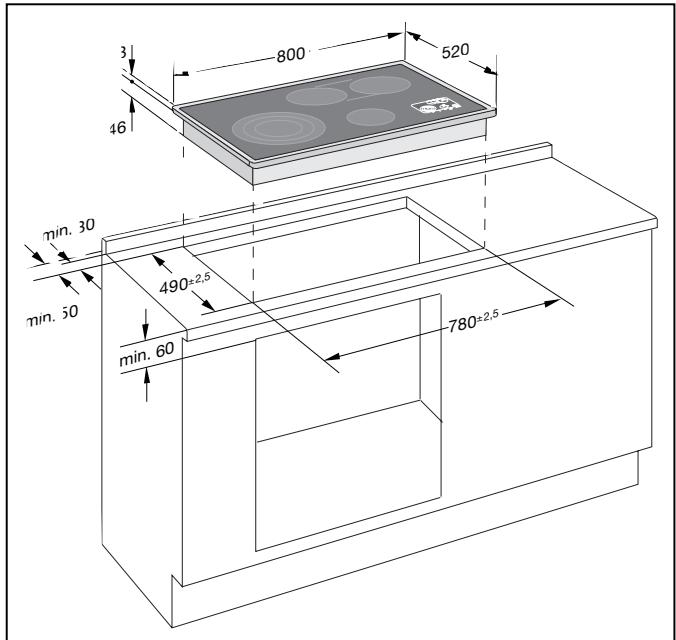
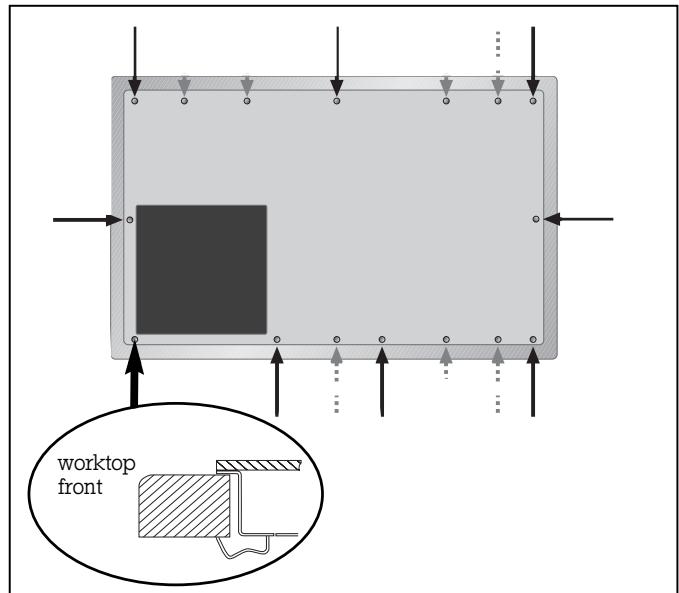
The appliance is installed in a base cabinet with a width of more than 900mm .
- Produce the recess for the hob in your worktop. Proceed as indicated on the installation sketch.
Note: the hob must not be stuck onto the worktop with silicone.
- Insert the hob with the control panel front right into the cut-out and align it.
- Secure the appliance on the worktop with the clamping screws included. Fasten the clamping screws as marked by the black arrows in the picture. The dotted arrows show alternative fixing points if required by the installation conditions.
Note:
During installation be careful that the front right clamping screw is fitted to the worktop front side, as fitting the clamping screw to the side can damage the appliance base. Do not tighten the clamping screws too tightly, as a uniform sealing gap should be left all round.
- Connect the appliance to the electricity. Check the appliance works correctly.
Removal of the hob
Disconnect the appliance from the electricity. Undo all the clamping screws. Carefully push out the appliance by the metal base from below.
Note:
Do not try to lever the hob out of the worktop cut out using a tool.
Installation CK 482
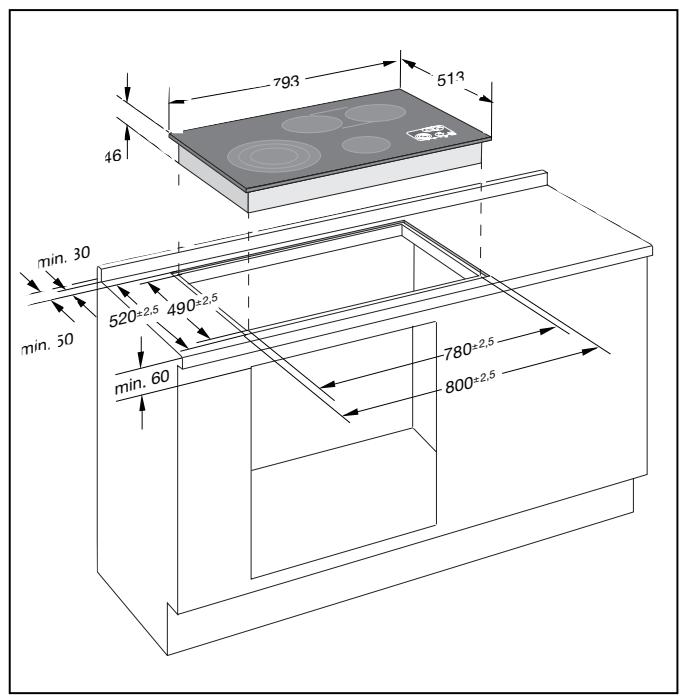
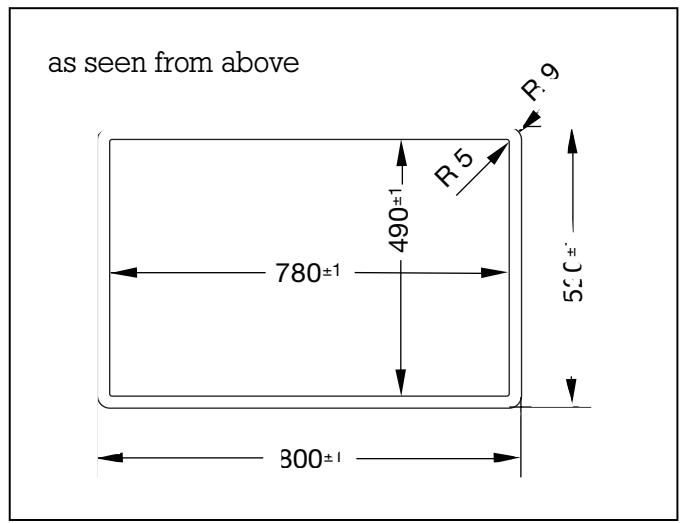
CK 482 is suitable for flush mounting into stone or tiled worktops.
Other worksurfaces (i.e. wood, plastic, Corian, etc.) are unsuitable.
The appliance is installed in a base cabinet with a width of more than 900mm . As the hob is fixed in place, it has to be easily accessible from below in case of repairs.
The surface of the installed hob should not be below the worktop surface.
Through dimensional tolerance of the glass ceramic plate and the worktop cut out, the width of the joint may vary.
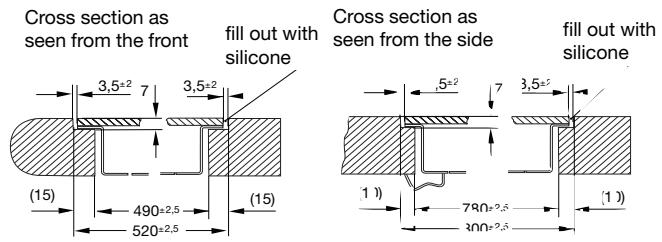
- Clean and degrease the edge of the cut-out, using a suitable cleaner (follow the instructions given by the silicone manufacturer).
- Insert the hob with the control panel front right into the cut-out and align it. Make sure to leave an even space all round.
-
Secure the appliance to the worktop with the clamping screws included. Make sure the appliance is flush with the worktop.
-
Connect the appliance to the electricity. Check the appliance is working correctly before sealing.
- Seal the space between the work surface and the hob with a suitable temperature resistant silicone (e.g. Novasil, Pactan) and smooth the joint with the suitable wetting agent recommended by the manufacturer. Follow the manufacturer's instructions.
Note:
Unsuitable silicone can permanently discolour natural stone work surfaces.
Do not use the appliance until the silicone is completely dry.
Removal of the hob
Disconnect the appliance from the electricity. Undo all the clamping screws. Using a sharp knife cut the silicone along the edge of the glass ceramic plate. From below push the hob carefully up, until it is free from the cut-out. You can now carefully remove the hob upwards.
- CK 481
- CK 482
- COOKING WITH YOUR NEW GLASS-CERAMIC HOB WILL BE EVEN MORE FUN THAN BEFORE
- IMPORTANT NOTES
- FOR YOUR SAFETY
- THE APPLIANCE COULD BE DAMAGED IF CONNECTED WRONGLY
- OPERATING FOR THE FIRST TIME
- ABOUT USE
- OPERATING PRINCIPLES
- SENSOR PADS
- DISPLAY
- RESIDUAL HEAT DISPLAY
- ADDITIONAL FEATURES
- COOKING ZONE EXTENSION PAGE 12-13
- AUTOMATIC QUICK-BOIL FUNCTION PAGE 14
- MEMORY FUNCTION PAGE 10
- TIMER PAGE 15-16
- OVERHEATING PROTECTION PAGE 17
- HOLIDAY SAFEGUARD PAGE 17
- CHILD LOCK PAGE 17
- OPTIONS MENU PAGE 18-21
- SWITCHING THE HOB ON AND OFF
- SWITCHING ON A COOKING ZONE
- CHANGING THE COOKING LEVEL
- SWITCHING OFF A COOKING ZONE
- MEMORY FUNCTION
- PROCEED AS FOLLOWS
- ENERGY SAVING TIPS
- ADDITIONAL FUNCTIONS
- COOKING ZONE EXTENSION FRONT LEFT
- ACTIVATING EXTENSION, FRONT LEFT COOKING ZONE
- DE-ACTIVATING EXTENSION, FRONT LEFT COOKING ZONE
- COOKING ZONE EXTENSION REAR
- ACTIVATING EXTENSION, REAR COOKING ZONES
- DE-ACTIVATING EXTENSION, REAR COOKING ZONES
- AUTOMATIC QUICK-BOIL FUNCTION
- SWITCHING ON THE AUTOMATIC QUICK-BOIL FUNCTION
- SWITCHING OFF THE AUTOMATIC QUICK-BOIL FUNCTION
- TIMER OPERATION
- PROGRAMMING A SWITCH-OFF TIME
- PROGRAMMING THE TIMER WITHOUT COOKING ZONE SWITCH-OFF
- CHANGING OR ERASING A GIVEN TIME VALUE
- OVERHEATING PROTECTION
- HOLIDAY SAFEGUARD (AUTOMATIC SWITCH-OFF)
- CHILD LOCK
- SWITCHING ON THE CHILD LOCK
- SWITCHING OFF THE CHILD LOCK
- OPTIONS MENU
- OPTIONS MENU, SETTING THE AUTOMATIC QUICK-BOIL TIME
- OPTIONS MENU, SETTING THE COMBINATION FEATURE FRONT LEFT COOKING ZONE
- OPTIONS MENU, SETTING THE COMBINATION FEATURE REAR COOKING ZONES
- OPTIONS MENU, SETTING THE CHILD LOCK
- CLEANING AND CARE
- CAUTION, RISK OF BURNS! BEFORE CLEANING, PLEASE WAIT UNTIL THE HOB HAS COOLED TO HAND-WARM
- REMEDYING SLIGHT MALFUNCTIONS YOURSELF
- TECHNICAL DATA
- IMPORTANT NOTES ON INSTALLATION
- PAY ATTENTION TO THE "IMPORTANT NOTES" ON PAGE 3 AND 4
- NO WARRANTY CLAIMS CAN BE LODGED FOR ANY DAMAGE RESULTING FROM FAILURE TO OBSERVE THESE INSTRUCTIONS
- ELECTRICAL CONNECTION
- NOTE FOR SINGLE PHASE CONNECTION
- INSTALLATION CK 481
- NOTE
- REMOVAL OF THE HOB
- INSTALLATION CK 482
- CK 482 IS SUITABLE FOR FLUSH MOUNTING INTO STONE OR TILED WORKTOPS
- OTHER WORKSURFACES (I.E. WOOD, PLASTIC, CORIAN, ETC.) ARE UNSUITABLE
Brand : GAGGENAU
Model : CK481110
Category : Electric cooktop