Valet Commercial – VCU - Vacuum Cleaner Truvox - Free user manual and instructions
Find the device manual for free Valet Commercial – VCU Truvox in PDF.


| Product type | Commercial upright single-motor vacuum cleaner |
| Brand | Truvox |
| Model | Valet Commercial (VCU) |
| Intended use | Cleaning indoor floors |
| Power supply | 230 V AC, 50 Hz (depending on model) |
| Electrical protection | Grounded plug required |
| Maximum extension cord | 30 m total (power cord plus extension cords) |
| Height adjustment | 3 positions (upright, mid, low) via foot pedal |
| Switch | On/off on the dust compartment |
| Bag change | Quick system with secondary bag support |
| Secondary filter | Regular maintenance required |
| Drive belt | Replaceable |
| Agitator brush | Replaceable assembly |
| Included accessories | Crevice tool, dusting brush, upholstery tool, telescopic wand, caddy |
| Transport and storage | Carrying handle and cord wrap hooks |
| Safety | Do not use outdoors, nor for liquids or flammable materials |
| Furniture protection | Protective bumper on the nozzle |
Frequently Asked Questions - Valet Commercial – VCU Truvox
User questions about Valet Commercial – VCU Truvox
0 question about this device. Answer the ones you know or ask your own.
Ask a new question about this device
Download the instructions for your Vacuum Cleaner in PDF format for free! Find your manual Valet Commercial – VCU - Truvox and take your electronic device back in hand. On this page are published all the documents necessary for the use of your device. Valet Commercial – VCU by Truvox.
USER MANUAL Valet Commercial – VCU Truvox
User instructions
Valet Commercial – VCU
Commercial single motor upright vacuum cleaner

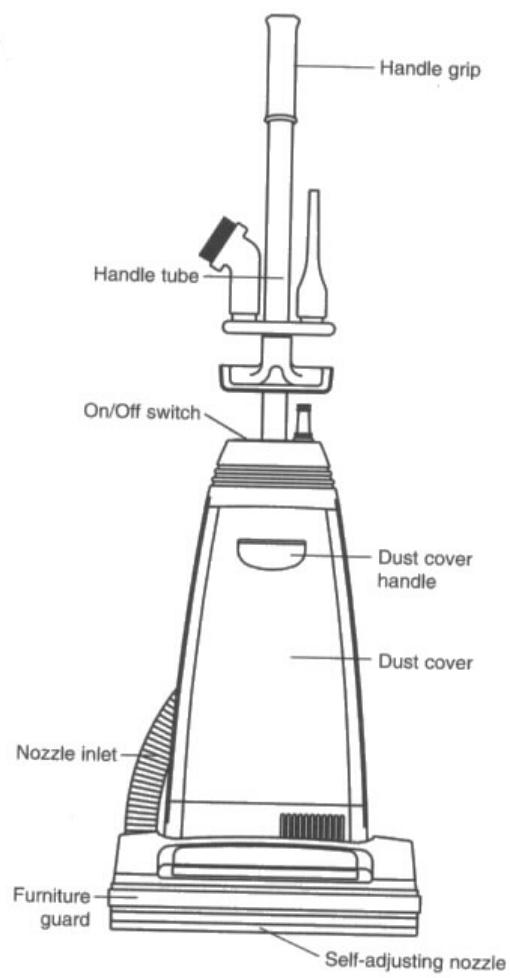

| Packing list | |||
| Item | Quantity | Item | Quantity |
| Valet Commercial machine | 1 | Tool caddy | 1 |
| Dust bag (in machine) | 1 | Dusting brush | 1 |
| Handle | 1 | Crevice tool | 1 |
| Vacuum hose | 1 | Upholstery tool | 1 |
| Telescopic wand | 1 | User instructions | 1 |
If any of the above items are missing please contact your supplier immediately
Contents
Parts identification.... Page Inside front cover
1 Product information 4
1.1 Important safety advice .... 4
1.2 Guidelines for the operator 4
1.3 Transporting the machine 4
2 Preparing for use 4
2.1 Electrical connection 4
2.2 How to assemble the vacuum.... 5
3 Controls 5
4 Operation 5
4.1 How to change the dust bag 5
4.2 Handle adjustment.... 5
5 Storage 5
6 Maintenance 6
6.1 Secondary filter 6
6.2 Replacing drive belt 6
6.3 Replacing agitator assembly.... 6
7 After sales service 7
8 Guarantee 7
9 Waste Electronic & Electrical Equipment 7
10 Technical specification 8
11 Accessories 8
12 Fault diagnosis 8
13 Declaration of conformity 9
IMPORTANT
READ THESE INSTRUCTIONS CAREFULLY AND RETAIN FOR FUTURE REFERENCE
1 Product information
These commercial upright vacuum cleaners are designed for the collection of dust in indoor areas. They should not be used in outdoor areas.
The following instructions contain important information about the machines and safety advice for the operator.
Equipment must be operated, serviced and maintained in accordance with the manufacturer's instructions.
If in doubt contact the supplier of your machine.
These instructions are valid for the following models.
Valet Commercial– VCU
1.1 Important Safety Advice
When using electrical equipment basic safety precautions should be followed including the following.
- Read all instructions carefully before use.
- Keep children and unauthorised persons away from the machine when in use.
- Do not leave the machine connected to the electricity supply when not in use, always remove the plug from the socket-outlet.
- Do not operate switches or touch the mains plug with wet hands as this may cause electric shock.
- Switch off the machine before removing the plug.
- When unplugging pull the plug, not the supply cord.
- Do not operate the machine with a damaged supply cord or plug, or after the machine malfunctions or is damaged in any way. Contact an authorised Service Agent for repair or adjustment.
- The plug of the power supply cord must be removed from the socket-outlet before commencing cleaning of the machine or undertaking maintenance operations.
- The power supply cord must be regularly inspected for signs of damage. If the power supply cord is damaged, it has to be replaced.
- Do not use to pick up moisture or any liquids.
-
Do not use where hazardous dust is present.
-
Do not use in an explosive atmosphere.
- Do not pick up oil or other flammable material.
- Take care when using a machine near the top of stairs to avoid overbalancing.
1.2 Guidelines for the operator
- Only use the machine on firm level surfaces.
- Operators must be fully trained in the use of the machine in accordance with these instructions, able to perform user maintenance and the correct selection of accessories, i.e. bags, filters, hoses etc.
• Do not leave machine running unattended - Operators should be physically capable to manoeuvre, transport and operate the machines.
- Operators should be able to recognise unusual operation of the machine and report any problems.
- Wear suitable footwear to avoid slipping.
- Wear suitable clothing to keep dry and warm.
- Where possible implement job rotation and adequate rest periods to avoid continuous use of the same muscles.
- Do not smoke when using the machine.
- CAUTION – This machine is for indoors use only and should not be used or stored outdoors or in wet conditions.
1.3 Transporting the machine
When transporting a machine ensure that all components, accessories and removable parts are securely fastened and that the supply cord and plug are not trailing.
Take extreme care when moving a machine up or down steps or stairs.
2 Preparing for use
2.1 Electrical connection
Before connecting the machine to the power supply, check that your supply voltage corresponds with that marked on the rating label on the rear of the machine.
The power supply cord plus any extension leads should not exceed 30m in total. The cross-section of any extension cable wiring must be at least 2,5 mm 4 .
UK only
The supply cord for 230v models is fitted with a plug containing a 13 amp fuse. Should the fuse require replacement it must only be replaced by a 13 amp fuse conforming to BS1362, and the fuse cover must be refitted. If the fuse cover is lost the plug must not be used until the correct replacement cover is fitted.
IMPORTANT - If the supply cord is damaged, it must only be replaced by a suitable cord available from the manufacturer or an authorised service agent.
WARNING – THIS APPLIANCE MUST BE EARTHED
2.2 How to assemble the vacuum
Attaching the handle
- First removing the handle screw, then insert handle into the hole on top of the vacuum cleaner.
- Line up the small hole on the handle with the small hole on the vacuum cleaner and insert the screw and tighten.
- Turn the upper cord storage hook to the upright position and wind the power cord around the cord storage hooks when storing the vacuum cleaner (Fig. 1).
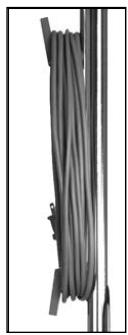
Fig 1.
Attaching the vacuum hose
- Push hose connector into rear of vacuum body.
- Push hose cuff into read of brush head.
Attaching the tool caddy
- Position caddy on front of handle and tighten bolt.
2 Push tools onto caddy
3 Controls
- To turn the vacuum on, push the switch located on the dust compartment to the (I) position.
- To turn the vacuum off, push the switch located on the dust compartment on the (0) position.
4 Operation
4.1 How to Change the Dust Bag
Always operate the vacuum cleaner with a dust bag installed.
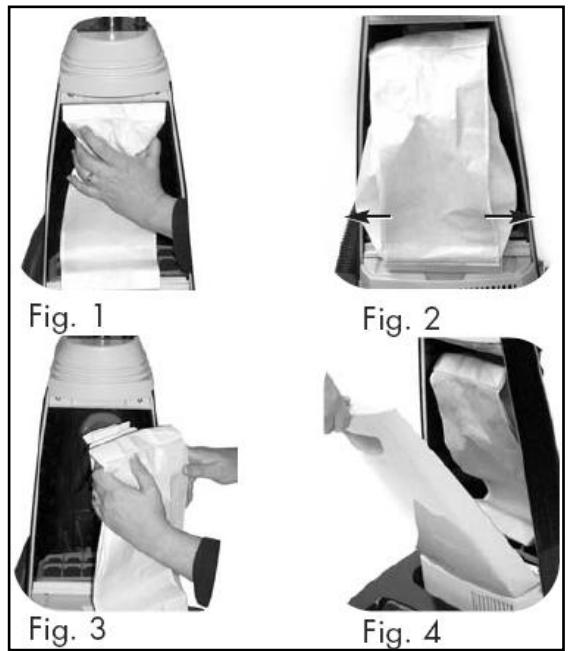
- Unplug the vacuum cleaner. Remove the used bag from the bag holder (Fig.1).
- Attach the new dust bag onto the bag holder (Fig. 2). To ensure proper cleaning and extended motor life, make sure the secondary bag support is always in place.
- Spread out the end of the new dust bag (Fig. 3).
- Reinsert the tab on the end of the dust cover into the groove on the dust compartment housing. Press it into place and fasten the dust cover tightly (Fig. 4).
4.2 Handle adjustment
The handle on this vacuum cleaner can be set to one of three positions – upright, middle, or low.
To release the handle, step on the pedal at the left rear corner of the vacuum cleaner
- Middle position – for normal cleaning
- Upright position – for when cleaning tools are used or for storage. Handle locks in this position.
- Low position – for cleaning under furniture.
4.3 Using the hose and tools
When using the hose and tools please ensure the handle is locked into the upright position and that the brush head is tilted upwards to prevent the brush running in place on the carpet.
4.3 How to Release the Power Cord
- The upper cord storage hook has a quick-release action. To release the cord, rotate the hook downward and the cord will drop off the handle for immediate use.
- Return the hook to the upright position before attempting to rewind the cord.
5 Storage
- After use check that the bag. If full, replace the bag.
- Wind supply cord around the cord storage hook ensuring that the plug is not trailing on the floor.
- Store the machine in a dry indoor area only.
6 Maintenance
WARNING - Before undertaking maintenance operations or adjustments switch off machine and unplug from the electricity supply.
The machine requires minimum maintenance apart from the following checks by the operator.
- Supply cord – Regularly inspect sheath, plug and cord anchorage for damage or loose connection.
- Body of the machine – Clean with a damp cloth.
6.1 Secondary Filter
Your Truvox vacuum cleaner is equipped with a secondary filter to capture fine dust particles and protect the motor from dirt. Accumulated dirt in the dust compartment will be collected on this filter and may restrict motor performance. It is important to change the secondary filter regularly — approximately every third filter bag change, or as needed.
To Change Secondary Filter:
- Unplug the vacuum cleaner. Remove filter bag.
- Remove bag support (Fig. 1).
-
Remove secondary filter and replace with a new filter (Fig. 2).
-
Reinsert bag support and new filter bag. NOTE: Secondary filters cannot be washed.


6.2 Changing the belt
Remove the Bottom Plate.
- Place vacuum cleaner in the low position by using the handle release pedal. Then, turn the vacuum cleaner over, exposing the underside.
- Remove the screws holding the lower plate in place.
- Remove the bottom plate.
Replacing the belt.
- Turn the unit over and remove the lower plate as described in the preceding section.
- Remove the agitator holder (Fig. 1). Take out the agitator assembly and remove belt guard from the agitator pulley and the motor drive shaft (Fig. 2 & 3).
- Loop the new belt around the agitator pulley and the motor drive shaft.
- Reinsert the agitator assembly back into housing (Fig 4). Turn the agitator assembly by hand, making sure the belt is not twisted and all rotating parts move smoothly (Fig. 5).
- Reinsert the agitator holder. Be sure that the agitator holder is in place before fastening the lower plate.
- Hook the front end of lower plate to the two ribs at the front end of the housing. Press the lower plate into place and replace screws to hold it.


NOTE: To ensure maximum cleaning efficiency, the belt should be checked regularly to be sure it is in good condition. Check to see if the belt is stretched, cracked, or if excessive slipping is occurring. Replace it if needed.
6.3 Replacing the agitator assembly
Brushes should be replaced when they are worn or when the bristle does not touch a card that is held across the nozzle. You should replace all four brushes at the same time in order to maintain good cleaning efficiency.
Remove E-clip first from agitator shaft by using screw driver. Then remove the end cap at right end by holding the agitator assembly. Pull out the agitator shaft from the left end.
NOTE: Take care not to deform the agitator shaft.
Now the brushes can be removed easily. After inserting the new brushes, re-install the agitator pulley and agitator holder, making sure they are completely and firmly inserted. Reinstall other parts following the steps in reverse.
Be sure the end caps and filters are in place before fitting the E-clip back into place. Reinstall the agitator assembly as described in preceding section.
6.4 Cleaning the nozzle hose
The nozzle hose, located on the back of the vacuum cleaner, carries the dirt from the nozzle to the filter bag. The hose also functions as the attachment cleaning hose.
If the hose should become clogged:
- Pull out and turn the lid of the hose attachment opening. Remove the clog or blockage (Fig. 1).
- If the above step is not enough, remove hose cuff from the nozzle inlet (Fig. 2). Turn the unit over and unscrew and remove the bottom plate (see "How To Remove Bottom Plate."). Check nozzle inlet tube for obstructions. Clear tube and reinstall the bottom plate.


IMPORTANT - Should the machine fail to operate contact Truvox Customer Service Department for rapid attention.
7 After sales service
Truvox machines are high quality machines that have been tested for safety by authorised technicians. It is always apparent that after longer working periods, electrical and mechanical components will show signs of wear and tear or ageing.
To maintain operational safety and reliability the following service interval has been defined: Every year or after 250 hours.
Under extreme or specialised conditions and/or insufficient maintenance, shorter maintenance intervals are necessary. Use only original Truvox spare parts. Use of other spare parts will invalidate all warranty and liability claims.
Should you require after sales service please contact the supplier from whom you purchased the machine, who will arrange service. Repairs and servicing of Truvox products should only be performed by trained staff. Improper repairs can cause considerable dangers to the user.
Enquire about the Truvox low cost and efficient Maintenance Contract.
8 Guarantee
Your product is guaranteed for one year from the date of original purchase, or hire purchase, against defects in materials or workmanship during manufacture. Within the guarantee period we undertake at our discretion, to repair or replace free of charge to the purchaser, any part found to be defective, subject to the following conditions.
CONDITIONS
- Claims made under the terms of the guarantee must be supported by the original invoice/bill of sale issued at the time of sale, or the machine Serial No.
- For claims under this guarantee contact the supplier from whom you purchased the product who will arrange the appropriate action. Do not initially return the product as this could result in transit damage.
- Neither Truvox nor its distributor shall be liable for any incidental or consequential loss.
- This guarantee is governed by the laws of England.
- This guarantee does not cover any of the following:
- Periodic maintenance, and repair or replacement of parts due to normal wear and tear.
- Damage caused by accident, misuse or neglect, or the fitting of other than genuine Truvox parts.
- Defects in other than genuine Truvox parts, or repairs, modifications or adjustments performed by other than a Truvox service engineer or authorised service agent.
- Costs and risks of transport relating directly or indirectly to the guarantee of this product.
- Consumable items such as, brushes, drive discs, filters and vacuum skirts.
This guarantee does not affect your statutory rights, or your rights against the supplier arising from their sales or purchase contract.
Truvox International Limited policy is one of continual product development and we reserve the right to alter specifications without prior notice
9 Waste Electrical & Electronic Equipment
Do not dispose of this device with unsorted waste. Improper disposal may be harmful to the environment and human health.
Please refer to your local waste authority for information on return and collection systems in your area.
10 Technical Specification
| Mode | Valet Commercial | |
| Ref No | VCU | |
| Tank material | ABS | |
| Voltage a.c. | V | 230 |
| Frequency | Hz | 50 / 60 |
| No. of motors | 1 | |
| Motor rating | W | 1200 |
| Capacity – dry | L | 3.6 |
| Construction class | II | |
| Protection | IP | IP20 |
| Airflow | l/sec | 42.5 |
| Vacuum | kPa | 15 |
| mm/wg | 112 | |
| Cable length | m | 15 |
| Size (l x w x h) | cm | 35x37x114 |
| Weight | kg | 7.6 |
| Noise Level (see note 1) | dB(A) | <80 |
1 - The sound pressure level under normal operating conditions is less than 80 dB(A).
11 Accessories
| Item | Part No. | Usage |
| Dust bags | AE2234000 | Pack of 10 dust bags for Valet Commercial |
| Tools | TU1AU00005 | Tool kit (round brush, crevice tool, upholstery tool) and bracket |
| Filter | TU1AU00001 | Secondary filter (pack of 5) |
IMPORTANT: Genuine accessories are only available from authorised Service Agents or Truvox Customer Service Dept.
12 Fault diagnosis
The following simple checks may be performed by the operator.
| Trouble | Reason | Remedy |
| Machine not working. | Lack of voltage/electrical supply. | Check fuse *, supply cord, plug and socket outlet. |
| Loss of suction | Bag full.Blocked hose or wand.Motor not working | Replace bagRemove obstructionContact supplier |
| Motor is not running | Broken switchDefective power cordDefective motor | Contact supplierContact supplierContact supplier |
* If the fuse blows several times, the machine should be checked by an authorised Service Agent.
13 Declaration of conformity
EC Declaration of conformity
We, Truvox International Ltd.
Of Third Avenue Millbrook Trading Estate Southampton SO15 0LE England
declare that the machinery
Make : Commercial upright single motor vacuum cleaners Type : Valet Commercial Model : VCU
Year of Construction: from 2006
has been manufactured using the following transposed harmonised European Standards and technical specifications. BS EN 61000-6-3, BS EN 60335-1 and BS EN 60335-2-69, and is in conformity with: the Machinery Directive 98/37/EC and subsequent amendments, the Low Voltage Directive 73/23/EEC and subsequent amendments, and the EMC Directive 89/336/EEC and subsequent amendments.
Signed in : SOUTHAMPTON, England
on the 1 st day of December 2006
Signature :

Name : Malcolm Eneas
Position : New Product Development Manager
Truvox International Limited
Third Avenue, Millbrook, Southampton, Hampshire SO15 0LE, England
Tel: +44 (0) 23 8070 2200 Fax: +44 (0) 23 8070 5001
e-mail: truvox@truvox.com Web: www.truvox.com

A Tacoy Company


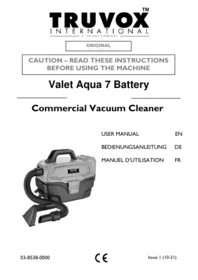

- USER INSTRUCTIONS
- VALET COMMERCIAL – VCU
- COMMERCIAL SINGLE MOTOR UPRIGHT VACUUM CLEANER
- CONTENTS
- IMPORTANT
- READ THESE INSTRUCTIONS CAREFULLY AND RETAIN FOR FUTURE REFERENCE
- PRODUCT INFORMATION
- IF IN DOUBT CONTACT THE SUPPLIER OF YOUR MACHINE
- IMPORTANT SAFETY ADVICE
- GUIDELINES FOR THE OPERATOR
- TRANSPORTING THE MACHINE
- PREPARING FOR USE
- ELECTRICAL CONNECTION
- UK ONLY
- WARNING – THIS APPLIANCE MUST BE EARTHED
- HOW TO ASSEMBLE THE VACUUM
- ATTACHING THE HANDLE
- ATTACHING THE VACUUM HOSE
- ATTACHING THE TOOL CADDY
- CONTROLS
- OPERATION
- HOW TO CHANGE THE DUST BAG
- ALWAYS OPERATE THE VACUUM CLEANER WITH A DUST BAG INSTALLED
- HANDLE ADJUSTMENT
- USING THE HOSE AND TOOLS
- HOW TO RELEASE THE POWER CORD
- STORAGE
- MAINTENANCE
- WARNING - BEFORE UNDERTAKING MAINTENANCE OPERATIONS OR ADJUSTMENTS SWITCH OFF MACHINE AND UNPLUG FROM THE ELECTRICITY SUPPLY
- SECONDARY FILTER
- TO CHANGE SECONDARY FILTER
- CHANGING THE BELT
- REMOVE THE BOTTOM PLATE
- REPLACING THE BELT
- REPLACING THE AGITATOR ASSEMBLY
- CLEANING THE NOZZLE HOSE
- AFTER SALES SERVICE
- GUARANTEE
- CONDITIONS
- WASTE ELECTRICAL & ELECTRONIC EQUIPMENT
- TECHNICAL SPECIFICATION
- ACCESSORIES
- FAULT DIAGNOSIS
- DECLARATION OF CONFORMITY
- EC DECLARATION OF CONFORMITY
Brand : Truvox
Model : Valet Commercial – VCU
Category : Vacuum Cleaner