
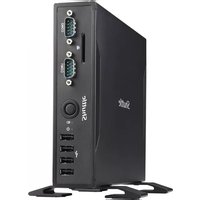
XS 3500BB V4 - Desktop computer Shuttle - Free user manual and instructions
Find the device manual for free XS 3500BB V4 Shuttle in PDF.


Pick your language and provide your email: we'll send you a specifically translated version.
| Product type | Desktop computer (mini PC barebone) |
| Brand | Shuttle |
| Model | XS 3500BB V4 |
| Form factor | Small form factor (SFF) |
| Dimensions (W×H×D) | 325 × 225 × 60 mm (12.8 × 8.9 × 2.4 in) |
| Weight | 2.5 kg (5.5 lb) |
| Power supply | External 90 W AC adapter |
| Chipset | Intel H61 Express |
| Supported processor | Intel Core i3/i5/i7 (LGA1155) |
| Memory type | 2× DDR3 SO-DIMM, max 16 GB |
| Storage bays | 2× 2.5-inch SATA (HDD/SSD) |
| Graphics outputs | HDMI, DVI-I |
| Audio | Realtek ALC662 5.1 channel HD audio |
| Network | Gigabit Ethernet (Intel 82579V) |
| USB ports | 4× USB 2.0, 2× USB 3.0 |
| Expansion slot | 1× PCIe x16 (low-profile) |
| Typical usage | Office, home theater, industrial automation |
| Cooling system | Low-noise ball bearing fan |
| Access | Tool-free removable side panel |
| Cleaning instructions | Use a dry microfiber cloth; avoid liquids |
| Security features | Kensington lock, chassis intrusion alert |
| Repairability | Standard components, easily replaceable parts |
| Energy efficiency | 80 PLUS certified power adapter |
| Warranty (est.) | 2 years |
Frequently Asked Questions - XS 3500BB V4 Shuttle
What type of processor does the Shuttle XS 3500BB V4 support?
The XS 3500BB V4 supports Intel Core i3, i5, and i7 processors with an LGA1155 socket. Make sure the CPU has a TDP of up to 65W for optimal thermal performance.
How do I install memory in the XS 3500BB V4?
Turn off the system, open the side panel, and locate the two DDR3 SO-DIMM slots. Insert each module at an angle and press down until the clips lock. Maximum capacity is 16 GB.
What storage drives are compatible?
You can install up to two 2.5-inch SATA drives (HDD or SSD). Mount them using the included screws and connect the SATA cables from the motherboard.
Can I use this computer for gaming?
The integrated graphics from the CPU is meant for basic tasks, but you can add a low-profile discrete GPU in the PCIe x16 slot for better performance in older or less demanding games.
How can I connect two monitors?
The back panel has HDMI and DVI-I ports. Connect one display to each port to use dual monitors with extended desktop support.
Which operating systems are compatible?
It works with Windows 7/8/10 (64-bit) and most Linux distributions. Download the latest drivers from Shuttle's support page after installation.
How do I clean the XS 3500BB V4?
Unplug the device, then use compressed air to remove dust from the fan and heatsink. For the casing, use a dry microfiber cloth. Avoid water and cleaning solvents.
Does it come with a power adapter?
Yes, the package includes an external 90 W AC power adapter. If you need a replacement, purchase one from Shuttle or an authorized distributor.
How to reset the BIOS password?
Open the case and find the CMOS clear jumper on the mainboard. Move the jumper to pins 2-3 for 10 seconds, then return to pins 1-2. Alternatively, remove the coin cell battery for one minute.
Are spare parts available?
Yes, Shuttle provides spare parts such as power supplies, fans, cables, and chassis components through its service partners and online stores.
User questions about XS 3500BB V4 Shuttle
0 question about this device. Answer the ones you know or ask your own.
Ask a new question about this device
No questions yet. Be the first to ask one.
Download the instructions for your Desktop computer in PDF format for free! Find your manual XS 3500BB V4 - Shuttle and take your electronic device back in hand. On this page are published all the documents necessary for the use of your device. XS 3500BB V4 by Shuttle.
USER MANUAL XS 3500BB V4 Shuttle

Manual assistant
Powered by Anthropic
Waiting for your message
Product information
Brand : Shuttle
Model : XS 3500BB V4
Category : Desktop computer