
Furano ADP6018 - Wristwatch ADIDAS - Free user manual and instructions
Find the device manual for free Furano ADP6018 ADIDAS in PDF.


Pick your language and provide your email: we'll send you a specifically translated version.
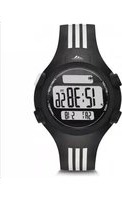
| Product Type | Wristwatch |
| Brand | Adidas |
| Model | Furano ADP6018 |
| Movement Type | Japanese quartz |
| Display Type | Analog-digital |
| Case Material | Resin |
| Band Material | Silicone |
| Case Diameter | 44 mm |
| Case Thickness | 12 mm |
| Weight | 80 g |
| Water Resistance | 5 ATM (50 meters) |
| Battery Type | CR2032 lithium |
| Battery Life | Approximately 2 years |
| Main Functions | Time, date, day, chronograph, alarm, backlight |
| Chronograph Range | 1/100 second for 59 minutes |
| Alarm | Daily alarm with snooze |
| Backlight | LED backlight |
| Calendar | Automatic calendar up to 2099 |
| Band Width | 22 mm |
| Clasp Type | Buckle |
| Care and Cleaning | Clean with a soft, dry cloth; avoid chemical cleaners |
| Safety Warnings | Keep away from magnets; avoid extreme temperatures; not for scuba diving |
| Spare Parts | Available through authorized Adidas service centers |
| Repairability | Repairable by professionals; battery replacement is simple |
| Manual Language | English, 6 pages |
Frequently Asked Questions - Furano ADP6018 ADIDAS
How do I set the time on my Adidas Furano ADP6018?
To set the time, press the Mode button to select the time display. Then hold the Set button until the seconds flash. Use the Start and Reset buttons to adjust hours and minutes. Press Set again to confirm.
Is the watch water-resistant?
Yes, the Adidas Furano ADP6018 has a water resistance rating of 5 ATM, meaning it can withstand splashes and brief immersion. It is not suitable for swimming or diving.
How do I change the battery?
The battery is a CR2032 lithium cell. To replace it, open the case back with a suitable tool, remove the old battery, insert a new one with the + side facing up, and close the back securely. We recommend having it done by a professional.
How do I use the chronograph?
Press the Mode button until the chronograph screen appears. Press Start to begin timing, Stop to pause, and Reset to zero. The chronograph measures up to 59 minutes with 1/100 second precision.
Can I wear it while swimming?
No, the watch is only splash-resistant (5 ATM). It is not designed for swimming, snorkeling, or any activity with prolonged water exposure.
How do I set the alarm?
Press Mode until the alarm screen shows. Hold Set to enter alarm time setting, then use Start/Reset to adjust hours and minutes. Press Set to save. The alarm has a snooze feature.
What is the backlight button?
The backlight button is the Light button on the side of the watch. Press it to activate the LED backlight for reading the display in low light conditions.
How do I clean the watch?
Clean the watch with a soft, dry cloth. For stubborn dirt, dampen the cloth slightly with water. Avoid using chemical cleaners or solvents, as they can damage the resin case and silicone band.
Are spare parts available for this watch?
Yes, spare parts such as straps, case backs, and crowns are available through authorized Adidas service centers. Contact a local center for availability and ordering.
How do I reset the watch to factory settings?
To reset, remove the battery, wait 30 seconds, and reinsert it. This will clear all settings and return the watch to its default time. Note that you will need to reset the time, date, and alarm afterward.
User questions about Furano ADP6018 ADIDAS
0 question about this device. Answer the ones you know or ask your own.
Ask a new question about this device
No questions yet. Be the first to ask one.
Download the instructions for your Wristwatch in PDF format for free! Find your manual Furano ADP6018 - ADIDAS and take your electronic device back in hand. On this page are published all the documents necessary for the use of your device. Furano ADP6018 by ADIDAS.
USER MANUAL Furano ADP6018 ADIDAS


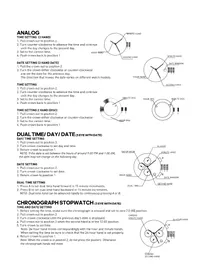
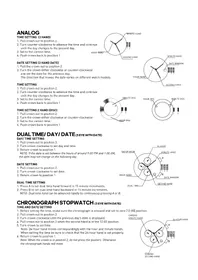
Manual assistant
Powered by Anthropic
Waiting for your message
Product information
Brand : ADIDAS
Model : Furano ADP6018
Category : Wristwatch