
COM-BE3600 - Wi-Fi repeater Steren - Free user manual and instructions
Find the device manual for free COM-BE3600 Steren in PDF.


Pick your language and provide your email: we'll send you a specifically translated version.
| Product Type | Wi-Fi Repeater / Range Extender |
| Brand | Steren |
| Model | COM-BE3600 |
| Wireless Standard | IEEE 802.11a/b/g/n/ac/ax (Wi-Fi 6) |
| Frequency Band | Dual Band (2.4 GHz + 5 GHz) |
| Maximum Data Speed | Up to 3600 Mbps combined |
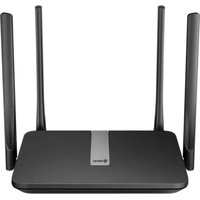
| Antenna Type | 4 external high-gain antennas |
| Ethernet Port | 1 x Gigabit Ethernet port |
| Power Input | AC 100-240V, 50/60 Hz |
| Buttons | WPS and Reset buttons |
| LED Indicators | Power, signal strength, WPS |
| Wireless Security | WEP, WPA, WPA2, WPA3 |
| Installation Method | WPS push button or web browser setup |
| Operating Temperature | 0°C to 40°C |
| Storage Temperature | -20°C to 60°C |
| Relative Humidity | 10% to 90% non-condensing |
| Dimensions (approximate) | 130 x 76 x 44 mm |
| Weight (approximate) | 210 g |
| Box Contents | Repeater, user manual, warranty card |
| Cleaning and Maintenance | Wipe with a soft dry cloth; avoid liquids |
Frequently Asked Questions - COM-BE3600 Steren
How do I set up the Steren COM-BE3600 Wi-Fi repeater?
Plug the repeater near your router, press the WPS button on both devices to connect. If your router does not support WPS, connect to the repeater's Wi-Fi network and use the web browser setup page. Complete the setup using the setup wizard.
How do I reset the device to factory defaults?
Use a paperclip to press and hold the Reset button for at least 5 seconds until the LED indicators flash. The device will restart and all settings will return to factory defaults.
Does it support Wi-Fi 6?
Yes, the COM-BE3600 supports the IEEE 802.11ax (Wi-Fi 6) standard and is backward compatible with older Wi-Fi technologies.
What is the maximum speed?
It provides combined speeds up to 3600 Mbps across both the 2.4 GHz and 5 GHz bands, ensuring smooth streaming and gaming.
Can I connect an Ethernet device to the repeater?
Yes, the repeater includes a Gigabit Ethernet port that allows you to connect wired devices like a smart TV, gaming console, or PC for a stable connection.
How do I change the wireless settings?
After setup, enter the repeater's web interface via its IP address using a browser. You can modify the network name (SSID), password, and configure advanced settings from the dashboard.
What if the LED signal light is weak or off?
The signal LED indicates the strength between the repeater and the main router. Place the repeater closer to the router and ensure there are no major obstructions. Relocate the device for the best signal strength.
Is it compatible with any router?
It works with most standard Wi-Fi routers from any brand, as long as they support 802.11a/b/g/n/ac/ax technologies.
How do I set the security encryption?
In the web interface, go to the Security settings and select WPA2/WPA3. Enter a strong passphrase and save the changes. Ensure your devices use the same encryption type.
What should I do if the repeater does not connect to my network?
Restart both the repeater and the router. Make sure you are within range and enter the correct Wi-Fi password. If problems persist, perform a factory reset and try again.
User questions about COM-BE3600 Steren
0 question about this device. Answer the ones you know or ask your own.
Ask a new question about this device
No questions yet. Be the first to ask one.
Download the instructions for your Wi-Fi repeater in PDF format for free! Find your manual COM-BE3600 - Steren and take your electronic device back in hand. On this page are published all the documents necessary for the use of your device. COM-BE3600 by Steren.
USER MANUAL COM-BE3600 Steren

Manual assistant
Powered by Anthropic
Waiting for your message
Product information
Brand : Steren
Model : COM-BE3600
Category : Wi-Fi repeater