
HUB - USB Hub LACIE - Free user manual and instructions
Find the device manual for free HUB LACIE in PDF.

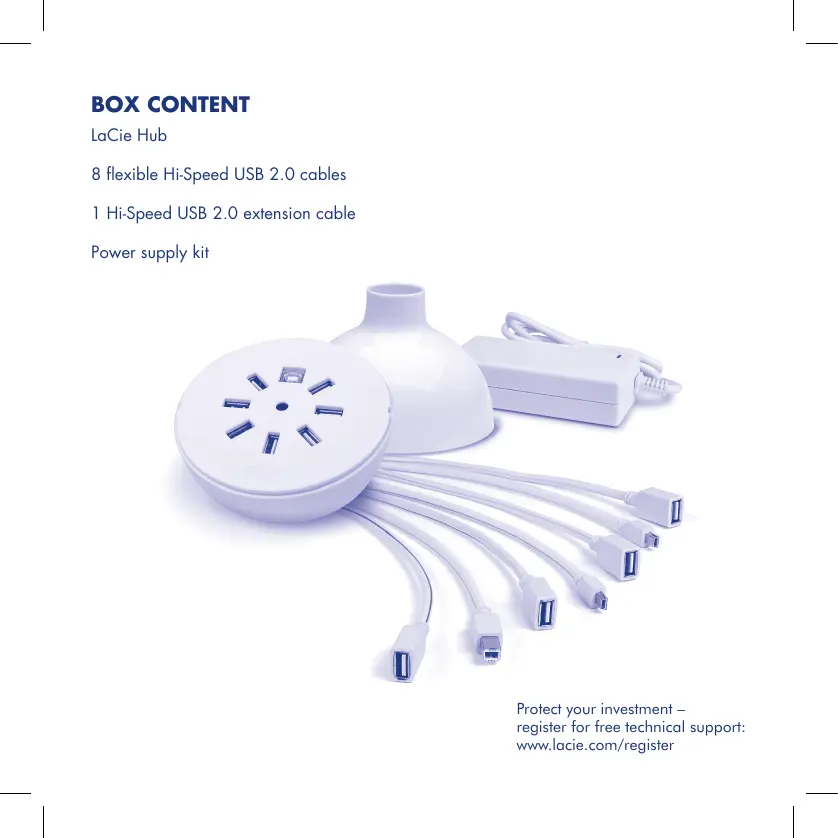

| Product Type | USB Hub |
| Brand | LACIE |
| Model | HUB |
| Connectivity | USB 2.0 Hi-Speed (compatible with USB 1.1) |
| Number of ports | 4 USB-A ports |
| Power supply | USB bus or external power adapter (included) |
| Power indicator | White LED |
| Dimensions (approx.) | 150 x 80 x 30 mm |
| Weight (approx.) | 200 g |
| Housing material | Plastic |
| Color | Black |
| Main functions | Extension of computer USB ports, cable management via removable cover |
| Maintenance and cleaning | Clean with a soft, dry cloth. Do not use liquid or abrasive products. |
| Safety | Do not expose to water or moisture. Unplug during storms. Do not overload the hub. |
| Spare parts and repairability | Not user-serviceable. Contact LACIE support for any issues. |
| General information | LACIE HUB USB 2.0 Hub, ideal for connecting peripherals and data transfers. |
Frequently Asked Questions - HUB LACIE
User questions about HUB LACIE
0 question about this device. Answer the ones you know or ask your own.
Ask a new question about this device
Download the instructions for your USB Hub in PDF format for free! Find your manual HUB - LACIE and take your electronic device back in hand. On this page are published all the documents necessary for the use of your device. HUB by LACIE.
USER MANUAL HUB LACIE
Protect your investment - register for free technical support: www.lacie.com/register
Quick Install Guide
- Make sure there is an available Hi-Speed USB 2.0 port on your computer and that the computer is turned on.
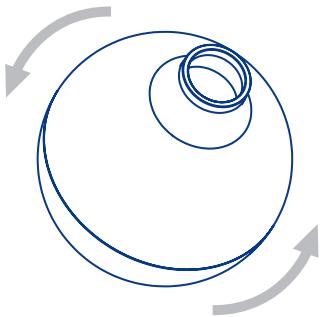
- Disengage your Hub's top cover by twisting it to the left. Remove the cover.
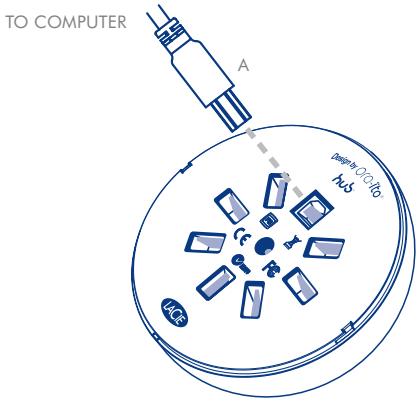
- Connect the USB uplink cable (A) to the Hub. Connect the other end of the uplink cable to your computer.
- When the Hub is properly connected, the power LED will come on (white LED).
-
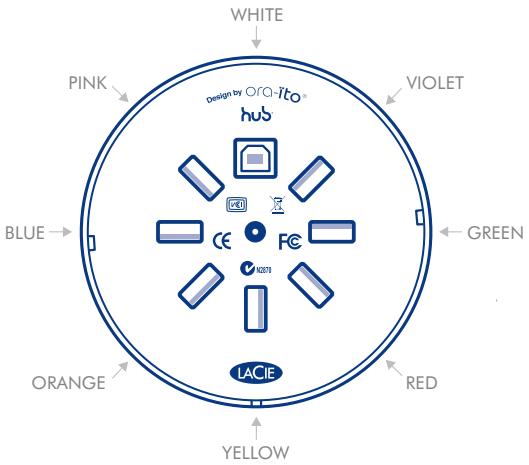
Connect the provided cables to your Hub, as needed, to connect your devices.
-
Feed the cables through the hole in the cover; place the cover on the Hub and twist the cover to the right to lock it in place.
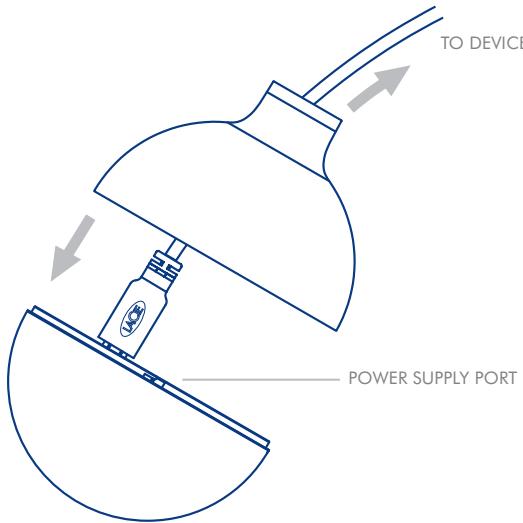
- Connect and use your USB devices.
Note: If you plug too many bus-powered devices into your Hub, it may not provide sufficient power to operate all of your devices. In this case, you will need to use the included external power supply.
FR LaCie Hub Design by OraIto USB 2.0 Hub
Contenu du coffret
LaCie Hub, 8 cables Hi-Speed USB 2.0 souples, 1 rallonge Hi-Speed USB 2.0, kit d'alimentation
IT LaCie Hub Design by OraIto USB 2.0 Hub
DE LaCie Hub Design by OraIto USB 2.0 Hub
Packungsinhalt
ES LaCie Hub Design by OraIto USB 2.0 Hub
NL LaCie Hub Design by OraIto USB 2.0 Hub
Inhoud verpakking
LaCie Hub, 8 flexibele Hi-Speed USB 2.0-kabels, 1 Hi-Speed USB 2.0-verlengkabel, netvoedingsset
PT LaCie Hub Design by OraIto USB 2.0 Hub
SV LaCie Hub Design by OraIto USB 2.0 Hub
DA LaCie Hub Design by OraIto USB 2.0 Hub
Pakkens indhold
LaCie Hub, 8 fleksible Hi-Speed USB 2.0-kabler, 1 Hi-Speed USB 2.0-forlaengerkabel, stromforsyningssaet
Fi LaCie Hub Design by OraIto USB 2.0 Hub
Pakkauksen sisältö
LaCie Hub, 8 joustavaa Hi-Speed USB 2.0 -kaepelia, 1 Hi-Speed USB 2.0 -jatkokaepeli, virtalahde
Pikaopas
PL LaCie Hub Design by OraIto USB 2.0 Hub
RU LaCie Hub Design by OraIto USB 2.0 Hub
KOMnJIeKT NOCTaBKN
KoHcHTpaTOp LaCie Hb, BoCeMb Ing6kNk Ka6eNeB BbICOKocOPOCTHO INTepeFeCa USB 2.0, OnduYdInHnTeB BbICOKocOPOCTHO INTepeFeCa USB 2.0, KOMIJIeKT NtOChNkoB PntAHnA.
KpaTkoe pyKOBoDCTBO NO yCTaHOBKe
- BkIIOHTe KOMbIOTep n y6eIITecB H aHINuIN CBO6OJHO r nopTa BBICOKOCKOPcTHORo INTEpEeca USB 2.0.
- Otkpytnte BepxHIOKpbIshky KOHcHTpaTopa, nobopaunBaee BneBO.CHMITE ee.
- PodknoiHTeK KOHNeHTPATOPY KAKCaHbIy Ka6eIb (A) c INTePfeEcOM USB. POKdKIOUHTe dpyroI KOHeIc KAKCaHOrO K6eJIa K KomblteOTepeI.
- 3aropntc6bIyHnDnKaTOp nTaHnA.
5.ДлnoДКПLOUeHnY yCtpoiCTB NOdKIIouHTe Ka6eN, BXOJaIeN B KOMPJIeKT NocTbKN, K KOHcTeHtpaTOpY. - Pnpocytntte kaeBnpe3 OTbepCTME B KpbIeK, NOMcTtne KpbIeKHa KOHcENTPatoP IN, NOBOPaHIBA BNPABO, 3AKPTYTE do y npora.
- Tenepb moKHO noDknIOuATb USB-ycTpoIcTBa n pa6OtaTb c HmM.
PImmuHHeHnIe. PIn pNkIIOUeHnIK KOHcEHTParOpy CINKOM 60NbIoo KOnIeCTBa UcTPOyCTB, NITAOuIXxCpe3 EHHy, dpaBoToY bex cCtPOyCTB MOKeT he XbaTbIb TnTAHnA. B TakOM cIyae IcNOpIb3yIte BHeuHN I nTOCHNHK PNTAHNIA, BXOdJIaN B KOMPiNEKT NOCTABKn.
EL LaCie Hub Design by OraIto USB 2.0 Hub
Pepiexoxeva ouokuaia
JP LaCie Hub Design by OraIto USB 2.0 Hub
八兑一内容
ZH LaCie Hub Design by OraIto USB 2.0 Hub
包装内容
LaCie Hub Design by Ora-Ito USB 2.0 Hub
内容
LaCie hbr,flexible Hi-Speed USB 2.0 kaii b8a,Hi-Speed USB 2.0 iksxtnien kaii b1a,ntin gngk
賊是誠哉到的
LaCie Hub Design by Ora-Ito USB 2.0 Hub
Paketin icindekiler
aal lal aal alal alal alal alal alal alal alal alal
Contact Us
LaCie USA
22985 NW Evergreen Pkwy
Hillsboro, OR 97124
sales@lacie.com
LaCie France
17, rue Ampère
91349 Massy Cedex
sales.fr@lacie.com
LaCie Asia (HK)
25/F Winsan Tower
98 Thomson Road
Wanchai, Hong-Kong
sales asia@lacie.com
LaCie Asia (Singapore)
Centennial Tower, Level 34
3 Temasek Avenue
Singapore 039190
sales asia@lacie.com
LaCie Australia
458 Gardeners Rd.
Alexandrio, NSW 2015
sales.au@lacie.com
LaCie Belgium
Vorstlaan 165/Bld
du Souverain 165
1160 Brussels
sales.benelux@lacie.com
Copyright © 2007, LaCie
711861 070906
LaCie Canada
235 Dufferin St.
Toronto, Ontario M6K 1Z5
sales.ca@lacie.com
LaCie Germany
Am Kesselhaus 5
D-79576 Weil Am Rhein
sales.de@lacie.com
LaCie Italy
(Sweden, Denmark, Norway,
Finland)
Sveavagen 90,5tr
11359 Stockholm,Sweden
sales.nordic@lacie.com
LaCie Spain
C/Nunez Morgado,3, 5^a pl.
28036 Madrid
sales.es@lacie.com
LaCie Switzerland
Davidsbodenstrasse 15 A
4004 Basel
sales.ch@lacie.com
LaCie United Kingdom and Ireland
LaCie LTD - Friendly House
52-58 Tabernacle Street
London, England EC2A 4NJ
UK: sales.uk@lacie.com
Ireland: sales.ie@lacie.com
LaCie Worldwide Export
17, rue Ampere
91349 Massy Cedex, France
sales.intl@lacie.com
support.intl@lacie.com
Visit www.lacie.com for more
information on LaCie products.
- Quick Install Guide
- FR LaCie Hub Design by OraIto USB 2.0 Hub
- Contenu du coffret
- IT LaCie Hub Design by OraIto USB 2.0 Hub
- DE LaCie Hub Design by OraIto USB 2.0 Hub
- Packungsinhalt
- ES LaCie Hub Design by OraIto USB 2.0 Hub
- NL LaCie Hub Design by OraIto USB 2.0 Hub
- Inhoud verpakking
- PT LaCie Hub Design by OraIto USB 2.0 Hub
- SV LaCie Hub Design by OraIto USB 2.0 Hub
- DA LaCie Hub Design by OraIto USB 2.0 Hub
- Pakkens indhold
- Fi LaCie Hub Design by OraIto USB 2.0 Hub
- Pakkauksen sisältö
- Pikaopas
- PL LaCie Hub Design by OraIto USB 2.0 Hub
- RU LaCie Hub Design by OraIto USB 2.0 Hub
- KOMnJIeKT NOCTaBKN
- KpaTkoe pyKOBoDCTBO NO yCTaHOBKe
- EL LaCie Hub Design by OraIto USB 2.0 Hub
- Pepiexoxeva ouokuaia
- JP LaCie Hub Design by OraIto USB 2.0 Hub
- 八兑一内容
- ZH LaCie Hub Design by OraIto USB 2.0 Hub
- 包装内容
- LaCie Hub Design by Ora-Ito USB 2.0 Hub
- 賊是誠哉到的
- Paketin icindekiler
- Contact Us
Brand : LACIE
Model : HUB
Category : USB Hub