
BOBOURG USB SPEAKERS - USB speakers LACIE - Free user manual and instructions
Find the device manual for free BOBOURG USB SPEAKERS LACIE in PDF.


| Product type | USB Speakers |
| Brand | LACIE |
| Model | BOBOURG USB SPEAKERS |
| Category | Speakers |
| Power source | USB port (5V) |
| Connectivity | USB |
| Volume control | Touch buttons (left/right) |
| Number of speakers | 2 (main and secondary) |
| Installation | Connect the secondary speaker cable to the main speaker, then plug the USB into the computer |
| System compatibility | Windows, Mac |
| Maintenance | Clean with a soft, dry cloth |
| Safety | Do not expose to moisture, extreme temperatures, or shocks |
| Spare parts | Not provided |
| Repairability | Not user serviceable |
| General information | User manual available online |
Frequently Asked Questions - BOBOURG USB SPEAKERS LACIE
User questions about BOBOURG USB SPEAKERS LACIE
0 question about this device. Answer the ones you know or ask your own.
Ask a new question about this device
Download the instructions for your USB speakers in PDF format for free! Find your manual BOBOURG USB SPEAKERS - LACIE and take your electronic device back in hand. On this page are published all the documents necessary for the use of your device. BOBOURG USB SPEAKERS by LACIE.
USER MANUAL BOBOURG USB SPEAKERS LACIE
LaCie Bobourg USB Speakers
Design by Neil Poulton
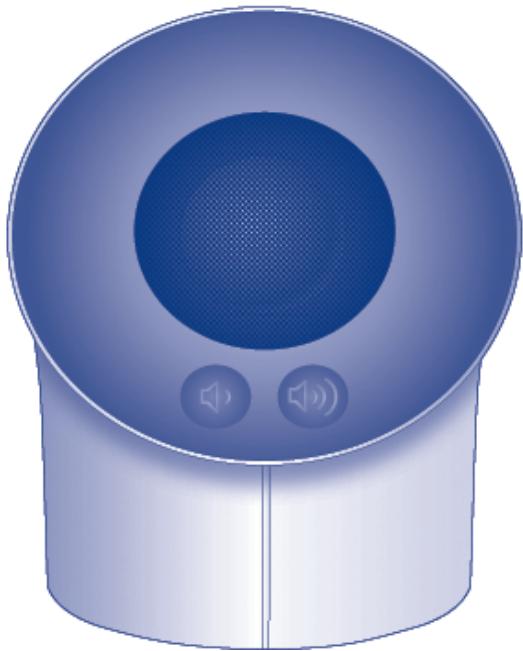
Quick Install Guide
Box Content
LaCie USB Speakers
- Quick Install Guide
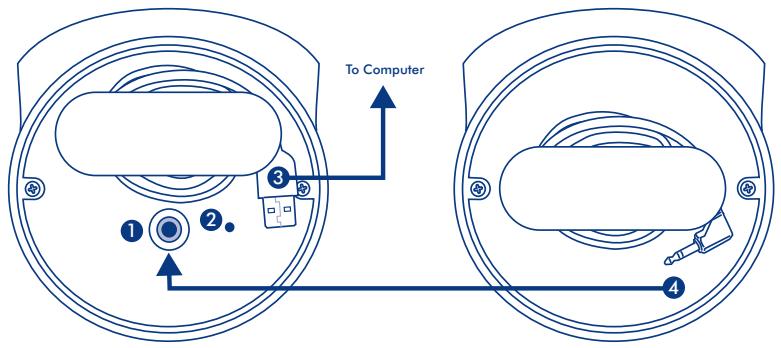
Main Speaker
Secondary Speaker
Bottom View
- Secondary Speaker Port
- Built-in USB Cable
- Power Light
- Secondary Speaker Cable
Setup Steps
Windows and Mac Users:
- Plug the secondary speaker cable into the main speaker.
- Connect the speakers to your computer with the USB cable.
Note: If you do not hear sound after connecting the LaCie Bobourg USB Speakers, you may need to select the speakers manually as your audio output device.
Windows Users: Control Panel>Sound>Playback>USB Audio Device Mac Users: System Preferences>Sound>Output>USB Audio Device
Volume Control
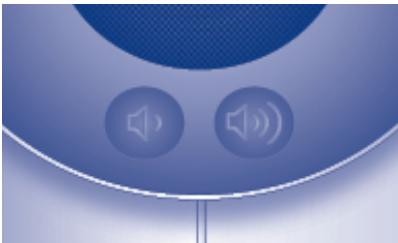
Your LaCie Bobourg USB Speakers feature convenient volume control buttons on the main speaker. Lightly touch the left button to lower the volume or the right button to raise the volume.
This device complies with Part 15 of the FCC Rules. Operation is subject to the following two conditions: (1) This device may not cause harmful interference, and (2) This device must accept any interference received, including interference that may cause undesired operation.
Warning: Changes or modifications to this unit not expressly approved by the party responsible for compliance could void the user's authority to operate the equipment.
NOTE: This equipment has been tested and found to comply with the limits for a Class B digital device, pursuant to Part 15 of the FCC Rules. These limits are designed to provide reasonable protection against harmful interference in a residential installation. This equipment generates, uses and can radiate radio frequency energy and, if not installed and used in accordance with the instructions, may cause harmful interference to radio communications. However, there is no guarantee that interference will not occur in a particular installation. If this equipment does cause harmful interference to radio or television reception, which can be determined by turning the equipment off and on, the user is encouraged to try to correct the interference by one or more of the following measures:
- Reorient or relocate the receiving antenna.
- Increase the separation between the equipment and receiver.
- Connect the equipment into an outlet on a circuit different from that to which the receiver is connected.
- Consult the dealer or an experienced radio/TV technician for help.
Alexandria, NSW 2015
info.au@lacie.com
LaCie Benelux
Vorstlaan / 165 Bld du Souverain
B-1160 Brussels, Belgium
info.benelux@lacie.com
LaCie Canada
235 Dufferin St.
Toronto, Ontario M6K 1Z5
info.ca@lacie.com
LaCie France
17, rue Ampere
91349 Massy Cedex
info.fr@lacie.com
LaCie Germany
Am Kesselhaus 5
D-79576 Weil Am Rhein
info.de@lacie.com
LaCie Italy
Milano Business Park
Edificio B1
(Sweden, Denmark, Norway, Finland)
Sveavagen 90,5tr
113 59 Stockholm, Sweden
info.nordic@lacie.com
LaCie Spain
C/NunezMorgado,3,5a pl.
28036 Madrid
info.es@lacie.com
LaCie Switzerland
Davidsbodenstrasse 15A
4004 Basel
info.ch@lacie.com
LaCie United Kingdom and Ireland
LaCie Ltd, Power Road Studios
114 Power Road
Chiswick, London, UK W4 5PY
UK: info.uk@lacie.com
Ireland: info.ie@lacie.com
LaCie USA
22985 NW Evergreen Pkwy
Hillsboro, OR 97124
sales@lacie.com
LaCie Worldwide Export
17, rue Ampere
91349 Massy Cedex, France
sales.intl@lacie.com
support.intl@lacie.com
Brand : LACIE
Model : BOBOURG USB SPEAKERS
Category : USB speakers