
ER1022 - Industrial safety switch OMRON - Free user manual and instructions
Find the device manual for free ER1022 OMRON in PDF.

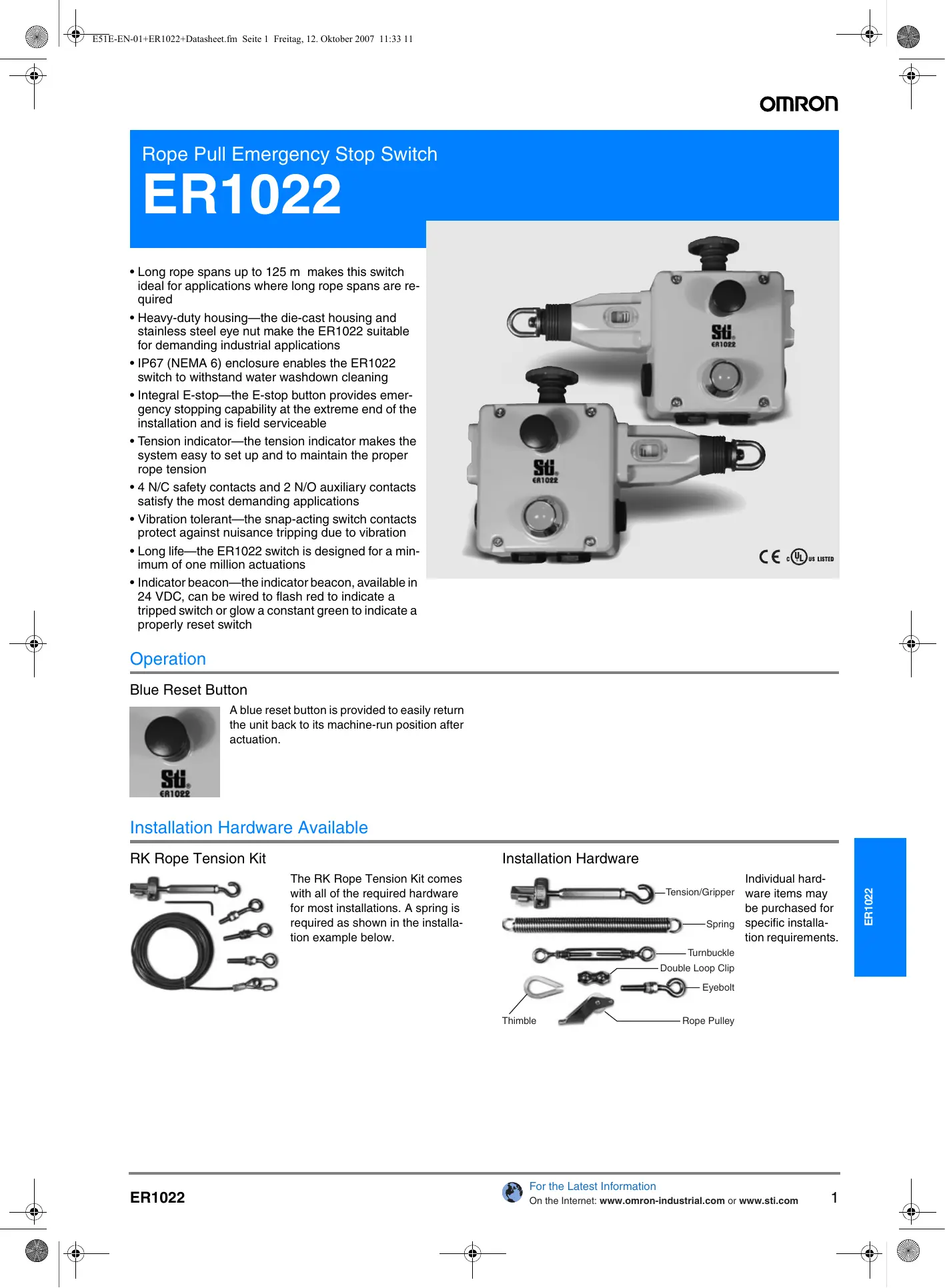

| Product Type | Industrial Safety Switch |
| Brand | OMRON |
| Model | ER1022 |
| Dimensions (approx.) | 240 x 100 x 110 mm |
| Weight | 1100 g |
| Housing Material | Die-cast aluminum alloy |
| Max. Cable Length | 125 m |
| Protection Rating | IP67 (NEMA 6) |
| Safety Contacts | 4 NC (normally closed) |
| Auxiliary Contacts | 2 NO (normally open) |
| Indicator Light | 24 VDC, flashing red (tripped) / steady green (reset) |
| Reset Button | Blue, manual reset |
| Operating Temperature | -25 to 80 °C |
| Mechanical Life | 1,000,000 cycles min. |
| Standards | IEC947-5-1, IEC947-5-5, EN418, UL508, BS5304 |
| Indicator Power Supply | 24 VDC (optional) |
| Trip Function | Cable pull (≤ 125 N) |
| Reset | Blue pushbutton, manual |
| Maintenance | Water washable; weekly and semi-annual inspection |
| Spare Parts Available | Cable kits, tensioner, eyelets, pulleys, etc. |
| Repairability | Do not attempt to repair; replace with original parts |
Frequently Asked Questions - ER1022 OMRON
User questions about ER1022 OMRON
0 question about this device. Answer the ones you know or ask your own.
Ask a new question about this device
Download the instructions for your Industrial safety switch in PDF format for free! Find your manual ER1022 - OMRON and take your electronic device back in hand. On this page are published all the documents necessary for the use of your device. ER1022 by OMRON.
USER MANUAL ER1022 OMRON
Rope Pull Emergency Stop Switch
ER1022
- Long rope spans up to 125 m makes this switch ideal for applications where long rope spans are required
- Heavy-duty housing—the die-cast housing and stainless steel eye nut make the ER1022 suitable for demanding industrial applications
- IP67 (NEMA 6) enclosure enables the ER1022 switch to withstand water washdown cleaning
- Integral E-stop—the E-stop button provides emergency stopping capability at the extreme end of the installation and is field serviceable
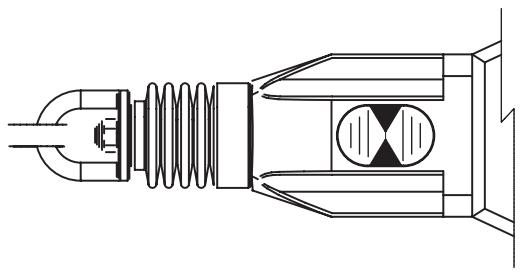
- Tension indicator—the tension indicator makes the system easy to set up and to maintain the proper rope tension
- 4 N/C safety contacts and 2 N/O auxiliary contacts satisfy the most demanding applications
- Vibration tolerant—the snap-acting switch contacts protect against nuisance tripping due to vibration
- Long life—the ER1022 switch is designed for a minimum of one million actuations
- Indicator beacon—the indicator beacon, available in 24 VDC, can be wired to flash red to indicate a tripped switch or glow a constant green to indicate a properly reset switch
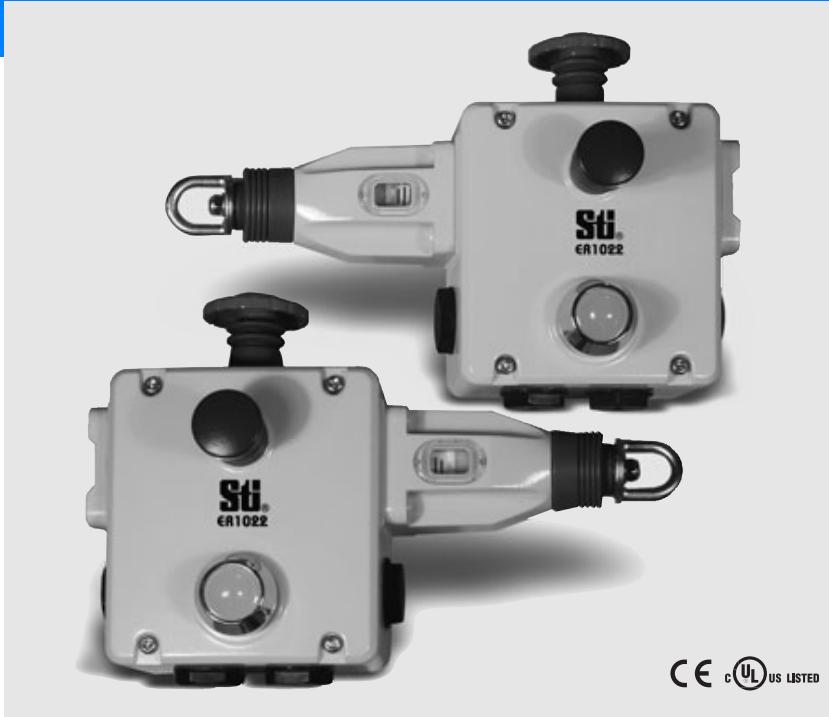
natural_image
Two Sti. €1022 industrial control devices with black buttons and a white housing, no visible text or symbols on the devices themselves.Operation
Blue Reset Button
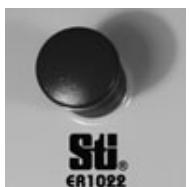
A blue reset button is provided to easily return the unit back to its machine-run position after actuation.
Installation Hardware Available
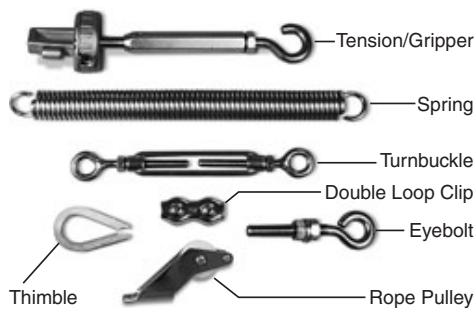
RK Rope Tension Kit
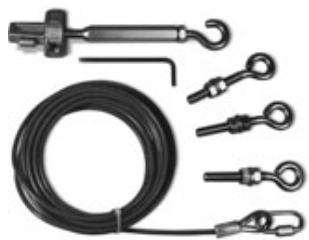
natural_image
Product photo of a black cable with multiple metal clips and a hook, no visible text or symbolsThe RK Rope Tension Kit comes with all of the required hardware for most installations. A spring is required as shown in the installation example below.
Installation Hardware
text_image
Tension/Gripper Spring Turnbuckle Double Loop Clip Eyebolt Thimble Rope PulleyIndividual hardware items may be purchased for specific installation requirements.
Contact Arrangements
| 4NC + 2NO | Rope Slack | Tension Range | Rope Pulled |
| 11/12 | |||
| 21/22 | |||
| 33/34 | |||
| 41/42 | |||
| 51/52 | |||
| 63/64 |
Mounting Specification
text_image
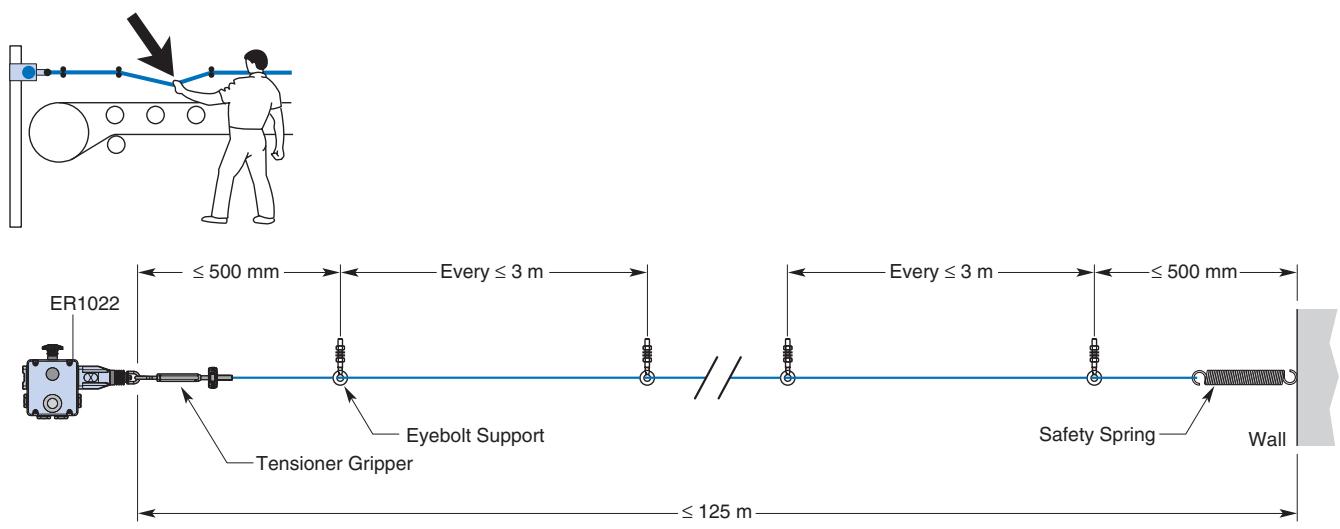
ER1022 ≤ 500 mm Every ≤ 3 m Every ≤ 3 m ≤ 500 mm Tensioner Gripper Eyebolt Support Safety Spring Wall ≤ 125 mNote: Some installations may require a ER1022 on each end.
Applications
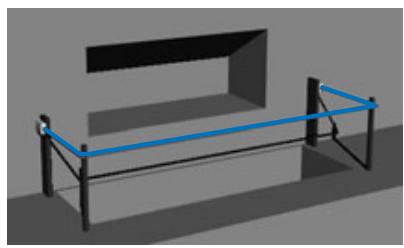
Typical applications are on conveyor systems and across rotating machinery, and around hazardous areas.
natural_image
3D rendering of a simple bench with black frame and blue horizontal bar (no text or symbols)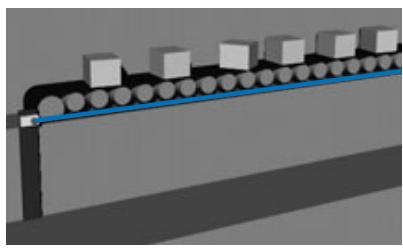
natural_image
3D illustration of a conveyor belt system with multiple cubes on both sides (no text or symbols)Ordering information
Rope Pull Emergency Stop Switch
| E-Stop | Indicator Beacon | Contacts | Wiring Entry | Model |
| Included | Included (24 VDC) | 4 N/C + 2 N/O | 4 x M20 | ER1022-042MELL |
| Included | Included (24 VDC) | 4 N/C + 2 N/O | 4 x M20 | ER1022-042MELR |
Accessories
| Item | Model |
| Replacement Lid/LED, 24 VDC | SM06-SL710 |
| Rope Kit, 5 m, Stainless Steel | RK5 |
| Rope Kit, 10 m, Stainless Steel | RK10 |
| Rope Kit, 20 m, Stainless Steel | RK20 |
| Rope Kit, 50 m, Stainless Steel | RK50 |
| Rope Only, 5 m | R5M |
| Rope Only, 10 m | R10M |
| Rope Only, 20 m | R20M |
| Rope Only, 50 m | R50M |
| Rope Only, 100 m | R100M |
| Rope Only, 126 m | R126M |
| Tensioner Gripper, Stainless Steel | SM06-TG00 |
| Eye Bolt, Stainless Steel, 8 per pack | SM06-EB10 |
| Double Loop Clip, Stainless Steel, 4 per pack | SM06-DL20 |
| Thimble, Stainless Steel, 4 per pack | SM06-THSS |
| Turnbuckle, Stainless Steel | SM06-TB30 |
| Spring, Stainless Steel | SM06-SP50 |
| Rope Pulley, Stainless Steel | SM06-RPSS |
| E-Stop Mechanism | SM06-ES60 |
Specifications
| Electrical | Contact Configurations | 4 N/C + 2 N/O |
| Safety Contacts | 4 N/C | |
| Switching Ability | AC: 240 V–3 A, 120 V–6 A, InductiveDC: 24 V–2.5 A, Inductive | |
| Auxiliary Contacts | 2 N/O | |
| Max Switching Current/Volt/Amp | 240 V/720 VA | |
| Minimum Current | 5 V, 5 mA DC | |
| Electrical Life | 1,000,000 minimum | |
| LED Indicator Beacon | 24 VDC | |
| Mechanical | Mounting | Any position |
| Mounting Hardware | 4 x M5 screws | |
| Actuator Travel for Positive Opening | See diagrams on previous page | |
| Max Rope Span | 125 m | |
| Operation Force | < 125 N | |
| Tensioning Force to Run Position | 130 N typical | |
| Case Material | Die-cast aluminum alloy | |
| Eye Nut Material | Stainless steel | |
| Wiring Entry | 4 x M20 | |
| Weight | 1100 g | |
| Color | Yellow | |
| Mechanical Life | 1,000,000 minimum | |
| Environmental | Protection | IP67 (NEMA 6) |
| Operating Temperature | -25 to 80°C | |
| Cleaning | Water washdown | |
| Compliance | Standards | IEC947-5-1, IEC947-5-5, EN418, UL508, BS5304 |
| Approvals/Listings | CE marked for all applicable directives, UL and C-UL |
Note: The safety contacts of the Omron STI switches are described as normally closed (N/C)—i.e., with the rope properly tensioned and the machine able to be started.
Dimensions
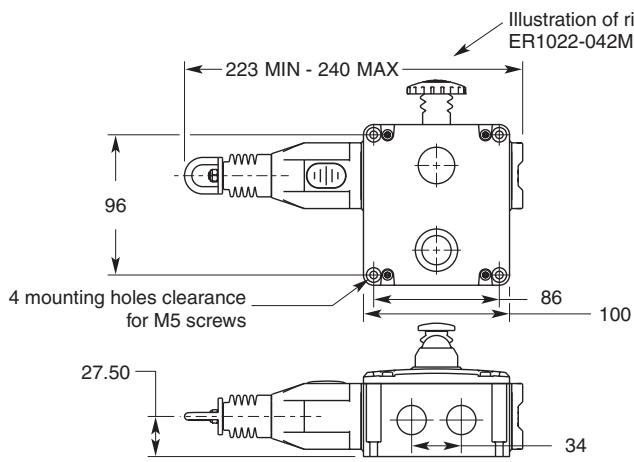
text_image
Illustration of right ER1022-042MI 223 MIN - 240 MAX 96 4 mounting holes clearance for M5 screws 86 100 27.50 34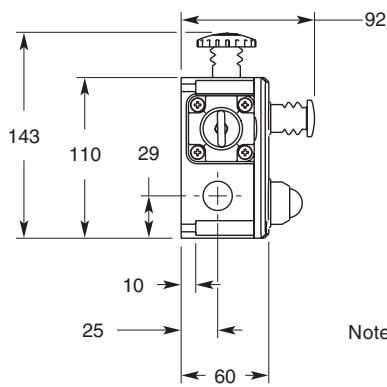
text_image
143 110 29 92 10 25 60 NoteNote: The designation of the ER1022 switch as left-sided or right-sided is based upon the mounted position of the switch, in the installation.
Operating instructions
Installation must be in accordance with the following steps and stated specifications and should be carried out by suitably competent personnel. Adherence to the recommended maintenance instructions forms part of the warranty.

WARNING
Do not defeat, tamper, remove or bypass this unit. Severe injury to personnel could result.
Optional 24 VDC Indicator Beacon
When +24VDC is applied to the red wire, the beacon will illuminate red and flash.
When +24 VDC is applied to the green wire, the beacon will illuminate green.
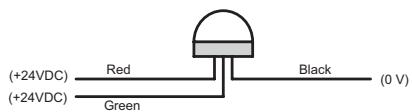
text_image
(+24VDC) Red Black (0 V) (+24VDC) GreenOptional 120 VAC Indicator Beacon
When +120VAC is applied to the red wire, the beacon will illuminate red and flash.
When +120 VAC is applied to the green wire, the beacon will illuminate green.
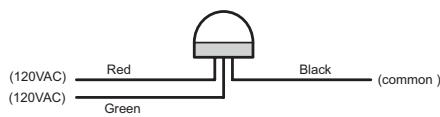
text_image
(120VAC) Red Black (common) (120VAC) GreenTension Indicator
Indicator shown with steel rope properly adjusted.
natural_image
Technical line drawing of a mechanical assembly with spring and housing (no text or symbols)
WARNING
- Installation of all Safety Rope Switch systems must be in accordance with a risk assessment for the individual application. Installation must only be carried out by competent personnel and in accordance with these instructions.
- Rope support eyebolts must be fitted at 2.5 m. min. to 3 m. max. intervals along all rope lengths between switches. The rope must be supported no more than 500 mm from the switch eyebolt or Safety Spring (if used). It is important that this first 500 mm is not used as part of the active protection coverage.
- M5 mounting bolts must be used to fix the switches. Tightening torque for mounting bolts to ensure reliable fixing is 4 Nm. Tightening torque for the lid screws, conduit entry plugs and cable glands must be 1.5 Nm to ensure IP seal. Only use correct sizing glands for conduit entry and cable outside diameter.
- Tensioning of rope is achieved by use of tensioner / gripper assemblies. Upon installation, tension to mid-position as indicated by the red arrows in the viewing window of each switch. Check operation for all switches and the control circuits by puling the rope at various locations along the active protection area and resetting each switch by depressing the Blue Reset button. Ensure each time that the switches latch off and require manual resetting by depressing the Blue Reset button. Increase the system tension further, if required, depending upon the checks along the active length of coverage. If fitted with a Mushroom type E-Stop button (Red) then test and reset each switch to ensure function of control circuits. Typical operational conditions for successful operation of system is less than 75 N. pulling force and less than 150 mm deflection of rope between eyebolt supports. If the optional LED is fitted but is not used, ensure that the conductors remain coiled and tied to the tie hole in the LED flange.
- Every week: Check correct operation of system at locations along all coverage length. Check for nominal tension setting, re-tension rope if necessary. Every 6 months: Isolate power and remove cover. Check screw terminal tightness and check for signs of moisture ingress. Never attempt to repair any switch.
ALL DIMENSIONS SHOWN ARE IN MILLIMETERS.
To convert millimeters into inches, multiply by 0.03937. To convert grams into ounces, multiply by 0.03527.
Cat. No. E51E-EN-01
In the interest of product improvement, specifications are subject to change without notice.