POPANW2000 - Element Point - Free user manual and instructions
Find the device manual for free POPANW2000 Point in PDF.
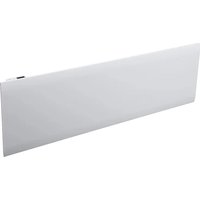


Pick your language and provide your email: we'll send you a specifically translated version.
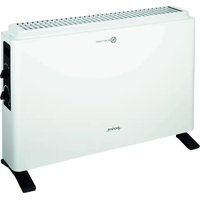
| Product Type | Electric Panel Heater |
| Brand | Point |
| Model | POPANW2000 |
| Series | Element |
| Power Output | 2000 W |
| Power Settings | 2 (1000 W / 2000 W) |
| Supply Voltage | 220-240 V ~ 50 Hz |
| Heating Principle | Convection |
| Thermostat | Mechanical, adjustable, frost protection |
| Mounting | Wall-mounted |
| Dimensions (W x H x D) | 1000 x 450 x 80 mm |
| Weight | 8 kg |
| Finish | White (RAL 9003) |
| Protection Rating | IP24 |
| Safety Features | Overheat protection, thermal cut-out |
| Mains Cable Length | 1.5 m |
| Suitable Room Size | Up to 20 m² (approx.) |
| Energy Efficiency Class | C |
| Certifications | CE, RoHS |
| Included Accessories | Wall brackets, screws, dowels |
Frequently Asked Questions - POPANW2000 Point
How do I install the Point POPANW2000 panel heater safely?
Install the heater on a solid wall at least 300 mm from the floor and 400 mm from any flammable materials. Use the provided wall brackets and ensure it is perfectly horizontal.
Can the POPANW2000 be used in a bathroom?
Yes, the heater has an IP24 protection rating, which means it is protected against splashing water. It must be installed in Zone 2 or beyond of the bathroom, keeping it at least 0.6 m from the shower or bath.
How does the adjustable thermostat work?
The thermostat is mechanical and uses a temperature dial. Turn it to the desired temperature setting. The heater will switch off when the room reaches the set temperature and switch on again when it drops, maintaining a comfortable ambient temperature.
What should I do if the heater does not turn on?
First, check the power supply and ensure the plug is fully inserted. Verify that the main power switch is on. If the problem persists, check the thermal cut-out - press the reset button if present. If none of these work, contact a qualified technician.
How do I clean the panel heater?
Always disconnect the heater from the power supply and allow it to cool down. Clean the surface with a soft, damp cloth. Do not use abrasive cleaners or immerse the unit in water.
Is it safe to leave the heater on overnight?
Yes, the heater is equipped with overheat protection and complies with safety standards. However, it is recommended to use the frost protection mode on the thermostat to save energy and maintain a minimum temperature.
Can I use an extension cable with this heater?
It is strongly advised not to use an extension cable because it can cause overheating and create a tripping hazard. Plug the heater directly into a properly earthed socket.
What is the recommended room size for this 2000W heater?
For an insulated room, this heater can cover up to approximately 20 m². The actual heating capacity depends on insulation, ceiling height and climate.
Does the heater come with a remote control?
No, the POPANW2000 is a simple mechanical model without remote control. You control it directly via the dial on the unit.
What is the warranty period for the Point Element POPANW2000?
The standard warranty is 2 years against manufacturing defects. It covers parts and labour under normal use. Keep your purchase receipt as proof.
User questions about POPANW2000 Point
0 question about this device. Answer the ones you know or ask your own.
Ask a new question about this device
No questions yet. Be the first to ask one.
Download the instructions for your Element in PDF format for free! Find your manual POPANW2000 - Point and take your electronic device back in hand. On this page are published all the documents necessary for the use of your device. POPANW2000 by Point.
USER MANUAL POPANW2000 Point
Manual assistant
Powered by Anthropic
Waiting for your message
Product information
Brand : Point
Model : POPANW2000
Category : Element