
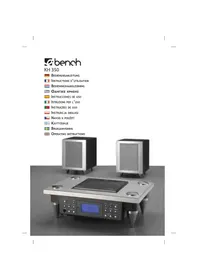
KH 2288 KITCHEN RADIO - Kitchen radio EBENCH - Free user manual and instructions
Find the device manual for free KH 2288 KITCHEN RADIO EBENCH in PDF.


| Product Type | Kitchen Radio |
| Brand | EBENCH |
| Model | KH 2288 |
| Rated Voltage | 230 V / 50 Hz |
| Power Consumption | 5 W |
| Backup Batteries | 2× 1.5 V type AAA (not included) |
| Frequency Range | 87.5 - 108.5 MHz (FM) |
| Main Functions | FM radio, alarm (2 alarms), kitchen timer, time and date display, SDA (special day alert), lock function, display dimming, RDS, AMS (automatic search and memory) |
| Number of Radio Presets | 10 stations (5 keys × 2 levels) |
| Antenna Type | Dipole antenna |
| Mounting | Undercabinet suspension (mounting plate included) or flat placement |
| Display | Digital screen with dimming function |
| Sound Output | Built-in speakers |
| Cleaning | Unplug the power cord, clean the exterior with a slightly damp cloth; do not use harsh chemicals |
| Safety | Do not expose to water, heat, or impacts; do not cover; minimum side and bottom clearance of 4 inches (10 cm) |
| Included Accessories | Mounting plate, 4 screws, user manual, warranty card |
| Reparability | In case of malfunction, have it checked by a specialist; do not open it yourself |
| Operating Temperature | Not specified in the manual; use in normal household environment |
| Country of Origin | Imported by KOMPERNASS GMBH (Germany) |
Frequently Asked Questions - KH 2288 KITCHEN RADIO EBENCH
User questions about KH 2288 KITCHEN RADIO EBENCH
0 question about this device. Answer the ones you know or ask your own.
Ask a new question about this device
Download the instructions for your Kitchen radio in PDF format for free! Find your manual KH 2288 KITCHEN RADIO - EBENCH and take your electronic device back in hand. On this page are published all the documents necessary for the use of your device. KH 2288 KITCHEN RADIO by EBENCH.
USER MANUAL KH 2288 KITCHEN RADIO EBENCH
Operating instructions
| Content | Page |
| Intended Usage | 4 |
| Delivery Contents | 4 |
| Technical Data | 4 |
| Safety information | 4 |
| Description of the appliance | 5 |
| Hanging up the kitchen radio | 5 |
| Setting-up the Kitchen Radio | 6 |
| Startup | 6 |
| Inserting the power failure batteries | 6 |
| Setting the time | 6 |
| Setting the date | 7 |
| Setting the SDA | 7 |
| Automatic Update (RDS) | 7 |
| Switching the dimmer on and off | 8 |
| Kitchen timer | 8 |
| Alarm feature (Alarm1 and Alarm2) | 9 |
| Radio operation | 9 |
| Adjusting the station | 9 |
| Station search function | 9 |
| Programming stations | 10 |
| AMS (Automatic Memory System) | 10 |
| Adjusting the volume | 10 |
| Lock function | 10 |
| Cleaning | 11 |
| Troubleshooting | 11 |
| Disposal | 11 |
| Warranty and Service | 11 |
| Importer | 11 |
Read the operating instructions carefully before using the appliance for the first time and preserve this booklet for later reference. Pass the manual on to whomsoever might acquire the appliance at a later date.
Kitchen radio KH 2288
Intended Usage
This kitchen radio is intended solely...
- for sub-structure assembly on cupboards,
- for setting-up as an electronic entertainment device,
for the reception of ultra-short wavelength/FM radio stations, - for private, non-commercial use.
Delivery Contents
Kitchen radio KH 2288
Mounting plate
4 screws
Operating instructions
Warranty card
Technical Data
Rated voltage: 230 V/50 Hz
Power failure batteries:2x 1.5 V
type AAA
(not included)
Frequency range: 87.5 - 108.5 MHz
Power consumption: 5 W
The technical features of the appliance enable an adjustable frequency range of 87.5 - 108.5 MHz.
Deviating national regulations may apply in various countries to the allocated radio frequency ranges. Please make sure not to use the information received outside the allocated radio frequency range, or pass it on to third parties or misuse or alienate it.
Safety information
Danger!
Do not hang up the kitchen radio...
- ...in locations subjected to direct sunlight! Otherwise the kitchen radio may overheat and be irreparably damaged.
...in the direct vicinity of water e.g. near the sink. Never subject the kitchen radio to splash water. There is a danger of electric shock!
...in the direct vicinity of heat sources. These include e.g. fan heaters, ovens and similar appliances as well as ventilation apertures and other electrical appliances. Do not hang up the kitchen radio above a cooker. The kitchen radio may be damaged. There is a danger of fire!
...in places subjected to intensive shocks or constant vibrations. Intensive shocks and constant vibrations can lead to temporary malfunctions or permanent damage. - Make sure that the power cord cannot become jammed or damaged by sharp edges.
- Make sure that the power plug is easily accessible. Then you will be able to immediately disconnect the kitchen radio in case of a malfunction.
Make sure that the kitchen radio has a minimum clearance from walls and objects at the sides and bottom of 4 inch. Do not cover the kitchen radio with objects or fabrics (e.g. curtains). There is a danger of fire!
- Regularly check the condition of the batteries. Leaking batteries can cause damage to the appliance.
- Always change all batteries at the same time and always use batteries of the same type.
- If you do not intend to use the appliance for an extended period, remove the batteries.
- In the event of the batteries leaking acids, wear protective gloves.
- Clean the battery compartment with a dry cloth.
This appliance is equipped with nonslip rubber feet. As surfaces can comprise of various materials and be treated with various cleaning agents, it cannot be completely excluded that some of these materials contain components that could attack and soften the rubber feet. If necessary place an anti-slip mat under the feet of the appliance.
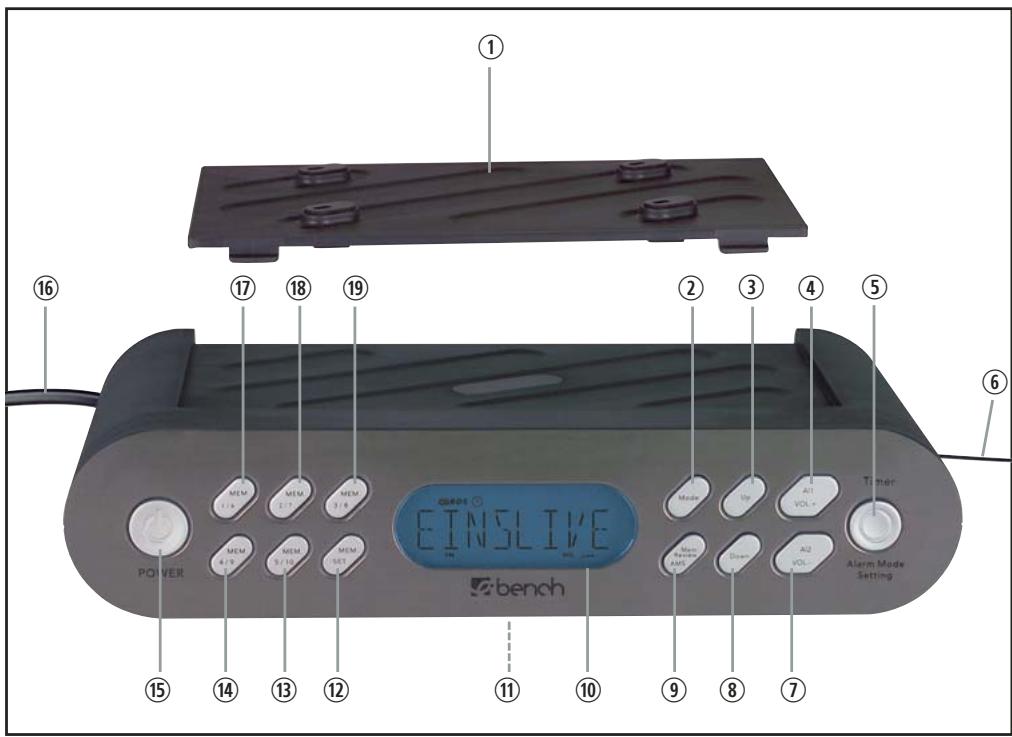
Description of the appliance
① Mounting plate
② Mode button
③ Button Up
④ Button AI1/VOL+
⑤ Button Timer/Alarm/Mode/Setting
⑥ Dipole antenna
⑦ Button AI2/VOL-
⑧ Button Down
⑨ Button Mem.Review/AMS
10 Display
① Battery compartment
⑫ Button MEM.SET
13 Button MEM. 5/10
14 Button MEM. 4/9
15 Button POWER
16 Mains cable
⑰ Button MEM. 1/6
18 Button MEM. 2/7
19 Button MEM. 3/8
Hanging up the kitchen radio
To hang up the kitchen radio with the enclosed mounting plate ①:
1 Find a suitable location for the kitchen radio.
2 Press the two retaining levers on the back of the appliance down. Push the mounting plate ① back and remove it.
3 Hold the mounting plate ① to the installation location. Allow 3 cm space at the front edges. This way the kitchen radio will later fit flush.
4 Mark the four points for the drillholes with a pencil.
5 Mark the drillhole with a mandril.
6 Screw down the mounting plate ①.
7 Place the kitchen radio diagonally with the two recesses in the retainer lugs of the mounting plate ① . Press the kitchen radio up until you hear it engage.
Fix the dipole antenna with a piece of adhesive tape such that it does not hang down.
Setting-up the Kitchen Radio
① Do not set-up the Kitchen Radio without assembly plate ①. Otherwise, the loudspeakers are blocked and the music is hardly audible.
To set-up the Kitchen Radio with the supplied assembly plate ①:
1 Simultaneously press downwards on the two retaining levers at the rear of the appliance. Pull the assembly plate ① to the rear and remove it.
2 Push the two holding lugs on assembly plate ① into the depressions on the rear underside of the Kitchen Radio.
3 Press the front part of assembly plate ① firmly down, until it audibly engages. You can now set-up the Kitchen Radio.
To disassemble assembly plate ① , grip below assembly plate ① with your thumbs and push it upwards and forwards until it disengages itself. You can then remove assembly plate ① .
Startup
Inserting the power failure batteries Due to the power failure batteries the time, date, alarm time and set SDAs (Special Day Alert) are not lost. For this, you require two 1.5V batteries type AAA. These are not included.
1 Open the lid of the battery compartment ⑪ on the underside of the kitchen radio.
2 Insert the batteries. Make sure the polarity is correct.
3 Close the lid of the battery compartment ⑪. The lid must audibly engage. Push the power plug into the wall socket. The kitchen radio starts in automatic mode. "12:00" appears on the display.
Setting the time
If no button is pressed within ten seconds, the kitchen radio switches back to automatic mode (the current time is displayed).
The radio must be off to set the time.
1 In automatic mode, press the Mode button ② once. The time flashes.
2 Press the button Up ③ or Down ⑧ , to set the time at minute intervals. Pressing and holding the buttons changes the time at ten-minute intervals.
Setting the date
1 In automatic mode, press the mode button ② twice. The display shows "01D01M2007y", the date display flashes.
2 Press the button Up ③ or Down ⑧ to set the date at daily intervals. Pressing and holding the buttons changes the date at 10-day intervals.
If no button is pressed within 10 seconds, the kitchen radio switches back to automatic mode.
Setting the SDA
By means of the SDA (Special Day Alert) mode it is possible to store certain days. You can activate up to 5 dates. The kitchen radio then reminds you at 8 a.m.of the set day.
1 In automatic mode, press the button Mode ②. On the display, "SDA 1" and "31D12M2006Y" flash.
2 Press the button Up ③ or Down ⑧ to set the date at daily intervals. Pressing and holding the buttons changes the date at intervals of 10 days.
3 Press the Timer button ⑤ , to deactivate the year.If you deactivate the year, the SDA alarm will respond on the set date every year.
4 Press buttons MEM 2/7 ⑧ to MEM 5/10 ⑬ , to program further SDA alarms.
If no button is pressed within 10 seconds, the kitchen radio automatically returns to automatic mode.
When the set date corresponds with the SDA alarm..
an acoustic signal is issued at 8 a.m. for ten minutes,
"SDA" flashes on the display,
the acoustic signal is repeated every hour until 11 p.m.
If you wish to stop the SDA alarm, press any button.
Automatic Update (RDS)
The RDS signal transfers additional information such as name of the station, time or song title to the radio. With the assistance of the automatic update function, the time of your kitchen radio is automatically updated upon reception of the RDS signal.
1 In automatic mode, press the mode button ② four times. "UPDATE" appears on the display.
2 Press the button Up ③ , to activate the automatic update function. A clock symbol flashes on the display above "Update". The time is now automatically updated upon each RDS signal.
3 Press the button Down ⑧ , to deactivate the automatic update function. The clock symbol no longer appears.
Switching the dimmer on and off
The dimmer function darkens the display, when no actions are being taken.
1 In automatic mode, press the Mode button ② five times. "DIM OFF" appears on the display.
2 Press the button Up ③ , to activate the dimmer function. "DIM ON" appears on the display.
3 Press the button Down ⑧ , to deactivate the dimmer function. "DIM OFF" appears on the display.
Kitchen timer
1 Press the button Timer ⑤.
2 Press the buttons Up ③ and Down ⑧ to set the desired time (a time between 1 minute and 23:59 h is possible).
3 Press the button Timer ⑤ again to start the kitchen timer. A clock symbol running in anti-clockwise direction appears on the display.
30 seconds before the time runs out, an acoustic signal is issued every 5 seconds, which sounds at shorter intervals the closer the function approaches the set time. When the time has expired a permanent signal is issued.
Press the button Timer ⑤ , to terminate the acoustic signal.
Interrupting the kitchen timer.
You can interrupt the kitchen timer by briefly pressing the button Timer ⑤. The time is stopped. The clock symbol no longer appears. Press the timer button ⑤ again. The time continues to run.
Terminating the kitchen timer
To terminate the kitchen timer, keep the button Timer ⑤ pressed. The kitchen radio displays the time.
Programming the kitchen timer
By means of the memory buttons MEM.1/6 ⑦ to MEM.5/10 ⑬ you can memorise kitchen timer times.
1 Press the button Timer ⑤.
2 Using the button Up ③ and Down ⑧ , set the desired time.
3 Press the button MEM. SET ⑫. "T" flashes on the display.
4 Press the button for the desired memory location. There are 5 memory locations at your disposal. MEM. 1/6 ⑦ to MEM. 5/10 ⑬ . The number of the memory location selected by you appears on the display.
5 Press the button MEM. SET ⑫ again. The time is now programmed.
6 To call up the programmed kitchen timer times, press the button Timer ⑤ and the button of the corresponding memory location (MEM.1/6 ⑦ to MEM.5/10 ⑬) in automatic mode.
7 Press the button Timer ⑤ again to start the kitchen timer. A clock symbol running in anti-clockwise direction appears on the display.
8 To return to automatic mode, press and hold the button Timer ⑤ for two seconds.
Alarm feature (Alarm1 and Alarm2)
You can program two alarm times with your kitchen radio.
| Alarm function | Symbol in the display |
| Acoustic signal | |
| Radio | |
| Off | no symbol |
- Press button AI1 (or AI2). The last set alarm time and the symbol for the type of alarm are shown on the display.
2 Press the buttons Up ③ and Down ⑧ to set the desired alarm time.
3 Press the button Al1 (or Al2) until the desired type of alarm appears on the display.
4 Press the button Alarm Mode ⑤ , to set the weekdays on which you require the alarm function: You can choose between workdays (Mo, Tu, We, Th, Fr), weekend (Su, Sa), weeks (Su, Mo, Tu, We, Th, Fr, Sa) or the current weekday. The selected setting is shown on the display.
5 Press the button Alarm mode ⑤ until the desired alarm days are set. Keep the Alarm mode button ⑤ pressed until a single day appears on the display.
6 Press the button Alarm mode ⑤ , to set the required weekday.
7 Press the Mode button ② to save the setting and return to automatic mode.
When the alarm signal sounds...
if the alarm function "Radio" is selected, the radio runs for one hour. To terminate, press button Al 1 ④ or Al 2 ⑦
if the alarm function "Acoustic signal" is selected, the acoustic signal sounds for ten minutes. To terminate, press button Al 1 ④ or Al 2 ⑦
Radio operation
Adjusting the station
1 Press the button POWER ⑮.
The current frequency is shown on the display.
Press the button Up ③ to increase the frequency.
Press the button Down ⑧ to reduce the frequency.
Station search function
You can search for stations. The kitchen radio searches the frequency range until it finds a station.
Press the button POWER ⑮.
Keep the button Up ③ pressed for two seconds: the kitchen radio searches for the station with the next-highest frequency.
Keep the button Down ⑧ pressed for two seconds: the kitchen radio searches for the station with the next-lowest frequency.
Repeat these steps until you have found a station you like.
Programming stations
You can program ten stations using the buttons
MEM 1/6 ⑦ ,MEM.2/7 ⑧ ,MEM.3/8 ⑨ MEM.4/9 ⑩ ,MEM.5/10 ⑬
1 Press the POWER ⑮ button.
2 Find a station as described in the section "Station search function".
3 Press the button MEM. SET ⑫."MEM" flashes on the display.
4 Press the button with the desired memory location:
MEM 1/6 ⑰, MEM. 2/7 ⑱,
MEM. 3/8 ⑲, MEM. 4/9 ⑳,
MEM. 5/10 ⑲.
Press the memory button once for the first memory location. Press the memory button twice for the second memory location.
5 Press the button MEM. SET ⑫ again. The station is programmed.
To adjust programmed stations press the corresponding memory button (MEM. 1/6 ⑰ to MEM. 5/10 ⑱) once or twice in radio mode.
AMS (Automatic Memory System)
By means of the AMS function, the radio automatically searches for stations with an RDS signal in storage locations MEM.1/6 ⑦ to MEM.5/10 ⑬
Switch on the radio using the button POWER ⑤.
Keep the button Mem. Review/AMS ⑨ pressed for two seconds. The kitchen radio automatically searches for the next station and stores it.
The station search function can be stopped by pressing the button AL1/VOL+ ④ or AL2/VOL- ⑦
If you wish to start the AMS function from a certain frequency, adjust the start frequency by pressing Up ③ or Down ⑧ .
Keep the button Mem.Review/AMS ⑨ pressed for two seconds.The kitchen radio now automatically searches for the next station, beginning at the starting frequency, and stores it.
If you wish to call up stored stations, press the button Mem.Review/AMS ⑨ during radio operation. The kitchen radio plays each station for five seconds.
Press the button POWER 15 or a memory button (MEM 1/6 17, MEM. 2/7 18, MEM. 3/8 19, MEM. 4/9 14, MEM. 5/10 13), to stop this function.
Adjusting the volume
Press the button VOL + ④ during radio operation to increase the volume.
Press the button VOL - ⑦ to reduce the volume.
Lock function
You can lock the kitchen radio so that settings cannot be altered by unauthorised people or children.
Keep the button MEM. SET ⑫ pressed. A key symbol appears on the display.
To disable the lock function, keep the button MEM. SET ⑫ pressed again until the key symbol goes out.
Cleaning
Danger of electric shock
Always disconnect the power plug from the wall socket before cleaning the kitchen radio. You must never immerse the appliance in water when cleaning or hold it under running water. Clean the outside of the kitchen radio with a slightly damp cloth. No aggressive cleaning agents must be used.
Troubleshooting
Symptom:
The kitchen radio is not working.
Possible cause and remedy:
The power plug is not properly connected to the wall socket. Check the power plug.
A household fuse is faulty.
Check the household fuses and replace if necessary.
The power socket is defective.
Try another wall socket.
The kitchen radio may be faulty. Check the power cord and the power plug for damage. Have the kitchen radio checked by a specialist.
Disposal

Do not dispose of the device in normal domestic waste.
Dispose of the device over a registered waste disposal firm or through your communal waste disposal facility.
Observe the currently valid regulations. In case of doubt, consult your waste disposal facility.
Battery disposal!
Batteries may not be disposed of with normal domestic waste. All consumers are statutorily obliged to dispose of batteries at the collection point in their community/district or with the original supplier.
The purpose of this obligation is to ensure that batteries can be disposed of in an environmentally-friendly manner. Only dispose of batteries when they are fully discharged.

Dispose of the packaging materials in an environmentally responsible manner.
Warranty and Service
The warranty conditions and the service address can be found on the warranty card.
Importer
KOMPERNASS GMBH
BURGSTRASSE 21
D-44867 BOCHUM
www.kompernass.com
- Kitchen radio KH 2288
- Intended Usage
- Delivery Contents
- Technical Data
- Safety information
- Danger!
- Description of the appliance
- Hanging up the kitchen radio
- Setting-up the Kitchen Radio
- Startup
- Setting the time
- Setting the date
- Setting the SDA
- Automatic Update (RDS)
- Switching the dimmer on and off
- Kitchen timer
- Interrupting the kitchen timer.
- Terminating the kitchen timer
- Programming the kitchen timer
- Alarm feature (Alarm1 and Alarm2)
- Radio operation
- Adjusting the station
- Station search function
- Programming stations
- AMS (Automatic Memory System)
- Adjusting the volume
- Lock function
- Cleaning
- Danger of electric shock
- Troubleshooting
- Symptom:
- Possible cause and remedy:
- Disposal
- Battery disposal!
- Warranty and Service
- Importer
Brand : EBENCH
Model : KH 2288 KITCHEN RADIO
Category : Kitchen radio