
KH 2270 - Alarm Clock EBENCH - Free user manual and instructions
Find the device manual for free KH 2270 EBENCH in PDF.


| Product type | Radio alarm clock |
| Brand | EBENCH |
| Model | KH 2270 |
| Mains power | 230 V / 50 Hz |
| Backup power | 9V battery (monobloc type) for clock memory |
| Radio reception | FM (UKW) and AM (MW) |
| Main functions | Radio, Alarm, Snooze (9 min), Sleep timer (59 min max) |
| Display | Digital LED (hours, minutes) |
| Time setting | TIME button + HOUR / MINUTE |
| Alarm setting | ALARM button + HOUR / MINUTE |
| Alarm stop | OFF switch or SNOOZE button |
| Sleep timer | SLEEP button, adjustable duration (up to 59 min) |
| Housing material | Plastic |
| Care and cleaning | Dry soft cloth only; no solvents or cleaning products |
| Safety | Do not open the housing; avoid moisture; disconnect before cleaning |
| Repairability | No user-serviceable parts; contact customer service for any replacement |
| Disposal | Used batteries: collection points; device: WEEE recycling |
| Operating temperature | Dry room, away from heat sources |
Frequently Asked Questions - KH 2270 EBENCH
User questions about KH 2270 EBENCH
0 question about this device. Answer the ones you know or ask your own.
Ask a new question about this device
Download the instructions for your Alarm Clock in PDF format for free! Find your manual KH 2270 - EBENCH and take your electronic device back in hand. On this page are published all the documents necessary for the use of your device. KH 2270 by EBENCH.
USER MANUAL KH 2270 EBENCH
Operating Instructions



1. Verwendungszweck
This appliance is intended for household use. It is not intended for commercial or industrial use.
2. Technical Data
Mains voltage 230 V / 50 Hz Time memory 9 V block battery
Frequency bands ....: VHF / MW
Alarm functions: Radio, alarm signal
3. Safety Instructions
a) To avoid the danger of electric shocks:
- Make sure that the power cord never becomes wet or damp during operation. Lay the cord so that it will not be pinched or otherwise damaged.
- If the power cord becomes damaged, obtain a replacement from customer service before continuing to use the appliance.
- Use the appliance only in dry rooms.
- Never allow fluids or other objects to get into the appliance.
b) To prevent the risk of burns or other injuries:
- Set up the appliance in an open and well-ventilated area, so that there are no heat pockets.
Never cover the ventilation openings!
- Protect the appliance from sources of heat, such as direct sunshine, heaters, and other appliances.
- Do not allow children or elderly persons to play with the appliance unsupervised, as they are not always able to assess the possible dangers correctly.
c) Electromagnetic fields
This appliance comes within the legal limits for electromagnetic pollution. However, if you still have doubts about installing it in the bedroom:
- You will be quite safe if you place the appliance about half a meter from the bed.
At this distance, there will be no effect even on persons sensitive to electromagnetic fields.
4. Connecting the appliance
Before oegrating the appliance, make sure that it is in perfect condition. Do not use it otherwise.
Open the battery compartment at the back or underneath, and insert a 9V battery pack.
Insert the power plug into the power socket. Choose a power socket that is accessible at any time, so that you can pull out the plug from the socket quickly if there is a fault.
5. Setting the clock
If you are setting up the appliance for the first time after inserting a new battery:
Press and hold the TIME button and:
Press the HOUR button to set the hour.
Press the MINUTE button to set the minutes.
6. Setting the alarm time
If the clock is set correctly, as described above:
Press and hold the ALARM button and:
Press the HOUR button to set the hour.
Press the MINUTE button to set the minutes.
7. Radio reception
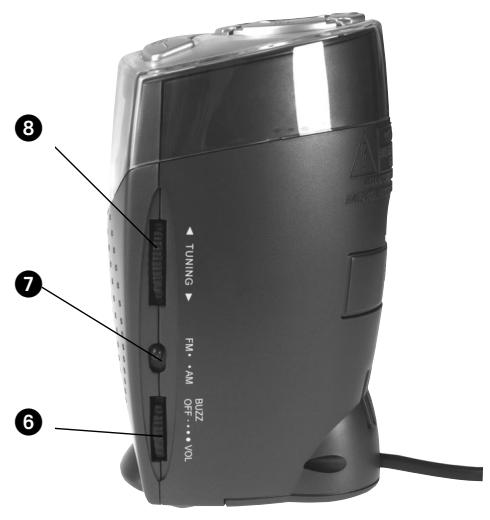
Move the sliding switch to the ON position.
Turn the volume control VOL to the centre position.
Select the frequency band with the AM / FM sliding switch.
Select the desired station with the TUNING control.
8. Switching on the alarm
If the clock and alarm time are set correctly, as described above:
Set the sliding switch to the AUTO position. The alarm is now switched on. This is confirmed by a dot at the bottom left of the display.
You will be awakened by the radio if ...
the volume control VOL is set to a level high enough to awaken you.
You will be awakened by the alarm signal if ...
the volume control VOL is turned quietly until it switches off with an audible click, and goes into the BUZZ setting.
9. Switching off the alarm
Press the SNOOZE button and the alarm will sound again after 9 minutes.
Move the sliding switch to the OFF positioin, to switch off the alarm altogether.
10. Sleep timer
If you would like to listen to the radio for a while before going to sleep and would like the radio to switch off by itself:
Move the sliding switch to the AUTO position, and ...
10 press the SLEEP button. The radio will remain on for 59 min.
You can shorten the time remaining till switch-off time by ...
10 pressing and holding the SLEEP button
3 then pressing the MINUTE button to set the remaining time.
11. Cleaning and Care
Warning: Danger of electric shock!
Before cleaning the appliance:
Disconnect the power plug from the power socket.
Never open the casing. There are no operating controls inside.
Clean the appliance using a clean dry cloth only.
Do not use cleaning agents or solvents. These can damage the plastic surfaces.
12. Disposal
Before disposing of the appliance,...
Take out the batteries, as described at point 4. Old batteries should not be disposed of with the household waste:
Return old batteries to your dealer, or take them to an appropriate disposal point.
Protect the environment! Take the appliance to a recycling point for electronic equipment.
Brand : EBENCH
Model : KH 2270
Category : Alarm Clock