
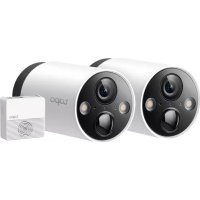
Tapo TD21 - Camera TP-LINK - Free user manual and instructions
Find the device manual for free Tapo TD21 TP-LINK in PDF.


Pick your language and provide your email: we'll send you a specifically translated version.
| Product Type | Smart Wi-Fi Security Camera |
| Brand | TP-Link |
| Model | Tapo TD21 |
| Resolution | 2K QHD (2560 × 1440) |
| Field of View | 360° horizontal, 114° vertical |
| Dimensions | 86.6 mm × 86.6 mm × 117.5 mm |
| Weight | 240 g |
| Power Supply | 9V DC adapter |
| Wireless Connectivity | Wi-Fi 2.4 GHz |
| Storage | MicroSD card up to 512 GB (not included) |
| Night Vision | Yes, up to 12 m |
| Detection | AI-based motion detection for people and pets |
| Audio | Two-way audio with built-in microphone and speaker |
| Main Functions | Pan/tilt, motion tracking, cloud and local storage |
| Maintenance and Cleaning | Wipe with a dry cloth; keep firmware updated |
| Security | Encrypted video, secure login, privacy mode |
| Spare Parts and Repairability | Not user-serviceable; contact TP-Link support |
| General Information | Requires Tapo app; works with Alexa and Google Assistant |
Frequently Asked Questions - Tapo TD21 TP-LINK
How do I set up the Tapo TD21?
To set up your Tapo TD21, download the Tapo app from the App Store or Google Play. Create a TP-Link ID, then tap the + icon to add a new device. Follow the in-app instructions to connect the camera to your 2.4 GHz Wi-Fi network. When the LED blinks amber and green, the camera is ready for setup.
Does the Tapo TD21 support 5 GHz Wi-Fi?
No, the Tapo TD21 supports only 2.4 GHz Wi-Fi networks. It does not connect to 5 GHz bands. Ensure your router broadcasts a 2.4 GHz signal for stable connectivity.
How can I store recordings?
The camera offers multiple storage options: insert a microSD card for continuous or event-based recording, or subscribe to Tapo Care for encrypted cloud storage. Cloud recordings are stored in your private account and can be accessed anywhere.
Can I use the camera without a microSD card?
Yes, you can still use the Tapo TD21 for live viewing and two-way audio without a microSD card. However, recording functions require a microSD card or a Tapo Care subscription for cloud storage.
What is the maximum night vision range?
The Tapo TD21 offers night vision up to 12 meters (about 40 feet) using built-in infrared LEDs. This allows clear black-and-white video even in complete darkness.
Does the camera work with Amazon Alexa or Google Assistant?
Yes, the Tapo TD21 is compatible with Amazon Alexa and Google Assistant. Use voice commands to show the live feed on compatible smart displays or set up routines with other smart home devices.
Is the video footage encrypted?
Video footage is secured with industry-standard encryption during transmission. For cloud storage, recordings are protected with your TP-Link account credentials. The camera also supports secure login to prevent unauthorized access.
Can I pan and tilt the camera remotely?
Yes, you can control the pan and tilt motor remotely via the Tapo app. The camera rotates 360° horizontally and 114° vertically, letting you monitor every corner of the room from your smartphone.
How do I clean the Tapo TD21?
To clean the camera, unplug it and gently wipe the exterior with a soft dry cloth. Do not use water, chemicals, or abrasive materials. Clean the lens with a lens-cleaning microfiber cloth to maintain video clarity.
How do I perform a factory reset?
Press and hold the RESET button on the bottom of the camera for about 5 seconds until the LED blinks amber and green. The camera will reboot and restore factory settings. You can then set it up again via the Tapo app.
User questions about Tapo TD21 TP-LINK
0 question about this device. Answer the ones you know or ask your own.
Ask a new question about this device
No questions yet. Be the first to ask one.
Download the instructions for your Camera in PDF format for free! Find your manual Tapo TD21 - TP-LINK and take your electronic device back in hand. On this page are published all the documents necessary for the use of your device. Tapo TD21 by TP-LINK.
USER MANUAL Tapo TD21 TP-LINK
Manual assistant
Powered by Anthropic
Waiting for your message
Product information
Brand : TP-LINK
Model : Tapo TD21
Category : Camera