
KH 2027 WORLD RECEIVER - Radio receiver EBENCH - Free user manual and instructions
Find the device manual for free KH 2027 WORLD RECEIVER EBENCH in PDF.



| Product type | Digital world radio receiver (World Receiver) |
| Brand | EBENCH |
| Model | KH 2027 (black) / KH 2028 (white) |
| Reception bands | FM, AM (Europe/USA), SW (short wave), LW (long wave) |
| Frequency ranges | FM 87.5 – 108.5 MHz AM Europe 522 – 1656 kHz, AM USA 520 – 1710 kHz SW 5.85 – 17.9 MHz LW 144 – 281 kHz |
| Number of memory stations | 250 (divided into blocks: 6 FM, 6 AM, 10 SW, 3 LW, each 10 positions) |
| Timer functions | 2 independent alarms, snooze 1‑59 min, sleep timer 10‑90 min, countdown, stopwatch, date alarm |
| Display | LCD with date, time, mode indicators (summer, lock, etc.) |
| Time zones | Preset of home city and a travel destination (table of 30 zones) |
| Power supply | Mains: AC 230 V / 50 Hz, DC 6 V / 400 mA adapter Batteries: 4 × 1.5 V type AA |
| Battery life | Not specified (estimate: several hours in standby, less during reception) |
| Dimensions (approx.) | Approximately 200 × 140 × 60 mm (portable) |
| Weight (approx.) | Approximately 500 g (with batteries) |
| Antenna | Telescopic for FM and SW; built-in ferrite for AM and LW |
| Headphone output | 3.5 mm stereo jack (cuts speaker) |
| Speaker | Built-in, power not specified |
| Safety | Avoid moisture, extreme temperatures (‑5 °C to +40 °C) and shocks. Do not open the housing. |
| Care and cleaning | Soft, dry cloth; do not use abrasive cleaners or solvents |
| Spare parts and repairability | Not user-serviceable; contact customer service (Kompernaß GmbH) |
| Included accessories | Mains adapter, carrying strap, user manual |
Frequently Asked Questions - KH 2027 WORLD RECEIVER EBENCH
User questions about KH 2027 WORLD RECEIVER EBENCH
0 question about this device. Answer the ones you know or ask your own.
Ask a new question about this device
Download the instructions for your Radio receiver in PDF format for free! Find your manual KH 2027 WORLD RECEIVER - EBENCH and take your electronic device back in hand. On this page are published all the documents necessary for the use of your device. KH 2027 WORLD RECEIVER by EBENCH.
USER MANUAL KH 2027 WORLD RECEIVER EBENCH
UK
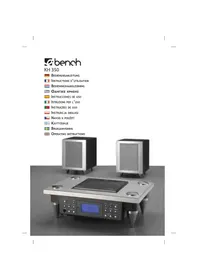
GB World Receiver KH 2027/2028 Operating Manual



KH 2028
Digital World Receiver
- Intended Use 5
- Technical Data 5
- Safety Instructions 6
- Power Supply 7
- Switching On / Off 8
- Receive Mode 9
- Memory 11
- Clock and Timer 14
- Miscellaneous 22
- Troubleshooting 23
- Cleaning 24
- Disposal 24
- Warranty and service 25
Keep this manual for future reference and pass it on with the device to any future owners!
KH 2027 KH 2028
Starting the Memory Scan (7d)
Saving radio stations automatically (7b)
Setting countdown (8j)
② Allocating memory positions (7a)
Calling-up memory positions (7c)
③ Saving radio stations (7a)
Locking keys (9)
④ Sensitivity on Short Wave (6f)
⑤ Searching for radio stations (6d)
Changing settings (6c, 6e, 8e, 8h, 8i, 8j)
Setting time, date (8a, 8b, 8d, 8g)
⑥ Selecting the reception band (6b)
⑦ Changing the style of time display (9) Radio station fine tuning (6e)
⑧ Setting the volume (6a)
Setting alarm times 1/2 (8g)
Resetting alarm (8h)
⑨ Switching on the device (5a)
Delayed switch-off (5c)
10 Setting the time and date (8a, 8b)
Selecting settings (6c)
⑪ Battery compartment (4a)
12 Loudspeaker
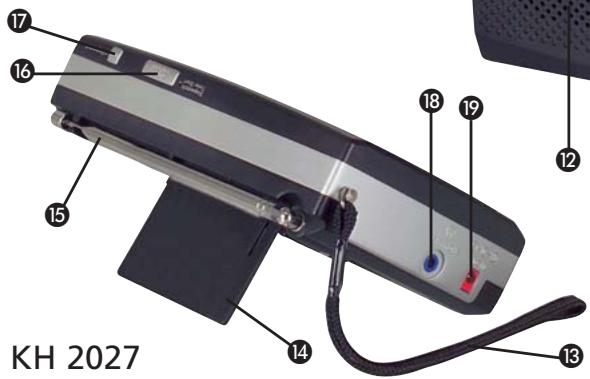
13 Carrying strap
14 Setting the device at an incline (9)
15 Telescopic antenna
16 Switching the device off (5b):
Switching daylight saving times on / off (8f)
- Resetting the alarm by 1-59 minutes (8h)
- Starting / stopping countdown (8j)
- Starting / stopping stopwatch (8k)
⑰ Selecting a memory block (7a, 7c)
Activating stop watch function (8k)
18 Connecting headphones (9)
19 External power supply (4b)
20 Daylight saving time (8f)
21 Batteries are almost empty – replace!
22 Station memory: Block PAGE and memory position MEM (7a)
The information in parentheses refers to the sections of this manual.
Digital World Receiver
1. Intended Use
This device is intended for receiving generally approved radio transmissions in all countries (World tuner) and only for household use.
It is not intended for the reception of stations that are not generally approved, for use as part of safety radio systems, such as on board sport boats, or for use in commercial or industrial environments. It is also not intended for climate zones outside of the ranges specified under Technical Data.
2. Technical Data
a) Environmental limits
Temperatures: -5 – +40 °C
Relative humidity: 20 – 80% RMH
b) Reception ranges
FM: 87.5 – 108.5 MHz
AM Europe: 522 – 1656 KHz
AM USA: 520 – 1710 KHz
SW: 5.85 – 17,9 MHz
LW: 144 – 281 KHz
This information only describes the technical possibilities of the device! Different countries can have deviating legal regulations regarding the freely receivable frequency range. Take note that you may not utilise, pass on to third parties or improperly misuse information that you might have received from outside of these assigned frequency ranges.
KH 2027 KH 2028
| Tuning range: | FM 100KHz/50KHz |
| AM Europe 9KHz/1KHz | |
| AM USA 10KHz/1KHz | |
| SW 5KHz/1KHz | |
| LW 1KHz | |
| Sensitivity: | SW 2 levels selectable |
c) Other
| Memory positions: 250 stations | |
| Timer: | 2 Alarm Times1-59 min. snooze timerDate-specific Timer90 min. Sleptimer |
| Output: | Connection for stereoheadphone 3.5 mm |
| Mains adapter | |
| Input voltage: | AC 230 V / 50 Hz |
| Output voltage: | DC 6 V / 400 mA |
| Batteries: | 4 x 1,5 V Typ “AA” |
3. Safety Instructions
Transportable world receivers are used in a wide range of climate zones. Particularly when outdoors, take note that ...
⚠ the environmental limits are not exceeded (see Section 2a).
Electronic devices can be damaged by moisture.
⚠️ Extremely dry air can cause static charges that can lead to faulty functions.
Excessive temperatures (e.g. direct sunlight) or very low temperatures (e.g. outdoors in winter) can permanently darken the liquid crystal display.
Transportable devices are particularly at risk of accidental damage. You can reduce this risk by paying attention to the following:
⚠️ Protect the device against heavy stresses, such as impacts and falls.
⚠️ Select a location in your travel luggage where it cannot be damaged or switched on by other hard objects.
When in areas with elevated security requirements (e.g. airplanes), it is best to transport the device without the batteries inserted because it cannot be completely switched off (clock, timer functions, ...).
4. Power Supply
Important: Make certain that the polarity is correct – both for the batteries as well as for the external power supply. If the polarity is reversed, the device will be damaged.
a) About the Batteries
11 Open the battery compartment on the rear side of the device and insert four batteries of type "1.5V AA" according to the labels in the battery compartment.
Note: Used batteries may not be disposed of in household waste. Return these to your retailer or to an appropriate collection site for disposal. Remove all batteries from the battery compartment if you are not planning to use the device for a longer period. The device can be irreparably damaged by leaking battery acids.
KH 2027 KH 2028
b) External Power Supply
19 Connect the power supply adapter DC 6.V / 400 mA to the power supply jack.
Note: The radio station memory described in section 7 will be deleted if the device is without power supply for more than approx. 30 seconds.
You should therefore keep the external power supply connected when changing the batteries – or complete the task within 30 seconds!
5. Switching On / Off
With this device, you can only switch the reception operation on and off. The clock for time and date as well as the timer continue to function for as long as the device is supplied with power.
a) Switching On
9 To switch on the device, briefly press the button RADIO ON / SLEEP once. In the display, "07" appears initially, followed by the selected frequency.
b) Switching Off Immediately
16 To switch off, press the key SNOOZE / Radio off, or ...
⑨ the button RADIO ON / SLEEP repeatedly until "OFF" appears in the display.
c) Switching Off with Time Delay
If you would like to listen to the radio for a while longer, for instance before falling asleep, but would like the device to switch off automatically after a certain amount of time (10...90 minutes), ...
⑨ press the button RADIO ON / SLEEP repeatedly until the desired number of minutes is shown in the display ("10 ... 90").
The countdown begins immediately with the first press of this button. If you do not change the remaining time, the display will switch back to the set frequency.
You can check the remaining time or reduce it by pressing the ...
⑨ button RADIO ON / SLEEP again.
6. Receive Mode
As soon as the device is switched on as described under 5., it is already in receive mode.
a) Setting the Volume
⑧ Press the buttons Volume Control, to adjust the volume.
b) Selecting the Reception Range (Band)
⑥ Select the desired reception range with the sliding switch:
- FM = Ultra short wave
- AM = Medium Wave
- SW = Short Wave
- LW = Long Wave
KH 2027 KH 2028
c) Changing the Medium Wave Range
The frequency range and tuning intervals of AM vary by region:
Region "Europe": (9KHz)
Region "USA": (10KHz)
When the device is switched off, and the date and time appear alternatively in the display:
10 Press the key MODE repeatedly until EU 9K appears in the display.
⑤ Press the lower key TUNING.
US 10K appears in the display.
⑤ press the upper key, TUNING. EU 9K appears again in the display.
The settings are adopted automatically after 10 seconds.
d) Searching for Stations
⑤ Press briefly on one of the two TUNING buttons to search upward or downward in steps.
⑤ Hold one of the two TUNING buttons pressed to start a scan. The device stops as soon as a sufficiently strong station is found. Pressing the button again will continue the scan.
e) Radio Station Fine Tuning
When scanning, the middle point of the individual radio station signal is used for tuning. As a rule, this is sufficient. Should this automatic tuning not lead to satisfactory reception, then for every reception range (Band) except the LW (Band), a fine tuning can be carried out.
⑦ Press the button Fine Set. In the display FINE appears.
5 Now press one of the two TUNING buttons, to raise or lower the frequency in small steps.
⑦ Press the button Fine Set again to deactivate the fine tuning. In the display, FIRE disappears.
f) Sensitivity on Short Wave SW
If the scan process frequently lasts too long, for instance because too many signals are received in the evening, the sensitivity can be reduced to short wave (local reception).
④ Set the sensitivity switch to
- LO for local reception
- DX for long-range reception.
g) Sensitivity and Antenna
Use the telescope antenna 15 for FM and short wave SW. You can alter the reception strength by adjusting the length, inclination and direction of the antenna.
A ferrite antenna is built into the device for medium wave (AM) and long wave (LW) reception. Turn the entire device to alter the reception strength.
7. Memory
A total of 250 memory positions are available - specifically - ...
- 6 blocks of 10 positions for FM
- 6 blocks of 10 positions for AM
- 10 blocks of 10 positions for SW
- 3 blocks of 10 positions for LW.
The blocks are also designated as "Pages"
KH 2027 KH 2028
This division into blocks is useful to allow the stations to be saved according to a meaningful organisation principle.
For instance ...
- by type: music, news, sports
- by location: local stations or frequently visited travel destinations
- by person: if multiple family members use the device
a) Saving radio stations (e. g. FM)
When you have found a station that you would like to save:
③ Press the button Memory Set.
22 Now two small windows appear in the display:
- PAGE containing the numbers 0...5
- MEM containing an empty field.
Make your selection within the next 10 seconds, otherwise this display disappears and you must restart the procedure.
⑰ Press the button PAGE repeatedly until you see, in the small window PAGE, the number for the block 0...5, in which you want to save the radio station.
Once you have selected the desired block (page), ...
② press one of the buttons M0/5 M1/6 M2/7 M3/8 M4/9, to select the memory position 0...9. The number associated with the memory position then appears in the small window MEM.
Note: These buttons each have two assignments. Each press on them switches between the two assignments (e.g. between 0 and 5).
When you have selected the desired memory position,
③ Press the button Memory Set again. The station is now saved.
b) AMS function
The device has an automatic transmission storage.
③ Press the button Memory Set.
① Press and hold the button Memory Preview for two seconds, to activate the AMS function.
The device now automatically stores in memory the radio stations with sufficient transmission strength. The storage places 0...9 in the selected blocks are occupied. The AMS function ends when all storage places in the block are occupied.
c) Calling-up the stored radio stations If you would like to call-up a saved station:
⑥ First of all select the reception range (Band), e. g. FM.
⑰ Press the button PAGE repeatedly until you see, in the small window PAGE, the number for the block 0...5 from which you want to call-up the radio station.
② Then press on one of the buttons M0/5 M1/6 M2/7 M3/8 M4/9, until, in the small second window of MEM the number of the storage space appears.
KH 2027 KH 2028
Note: These buttons each have two assignments. Each press switches between the two assignments (e.g between 0 and 5).
d) Memory scan mode
If you have saved multiple stations:
⑥ First of all select the Band (Reception range), e. g. FM.
⑰ Press the button PAGE repeatedly until you see, in the small window PAGE, the number for the block 0...5, in which you want to start the search mode.
① Press once briefly on the button Memory Preview. Now, all the storage places are called up in about 5 second steps.
If no station is saved at a memory position, only static is heard. Pressing any button (except for the volume buttons) ends the memory scan.
8. Clock and Timer
The device can be used as a radio alarm with two alarm times and one date alarm. An alarm tone is also available in place of the radio alarm function. If you do not press any buttons for a period of 10 seconds, the device automatically returns to standard default settings in the display. To prematurely exit the programming modus, switch the radio on with the button RADIO ON / SLEEP. The settings programmed in before this time remain unchanged.
a) Setting the clock
When the device is switched off, and the date and time appear alternatively in the display:
⑩ Press the button MODE. The time now blinks in the display.
⑤ Briefly press one of the TUNING buttons to set the time by minute.
⑤ Hold one of the TUNING buttons pressed to set the time in 10 minute steps.
b) Setting the date
10 Press the button MODE repeatedly until the date blinks in the display.
⑤ Briefly press one of the TUNING buttons to set the date by day.
⑤ Hold one of the TUNING buttons pressed to change the date in 10-day steps.
c) Accepting the Time / Date
Here, you do not need to do anything – the newly set time and/or date is/are adopted 10 seconds after it/they have been set.
d) Setting the Home Time Region
Set the time region here in which you typically reside:
10 Press the button MODE until LOCAL CITY appears in the display.
⑤ Use the TUNING buttons to select your home time region:
KH 2027 KH 2028
| Abbreviation | applies for the time zone | UTC difference |
| UTC: | Universal world time | 0 |
| LON: | London / England | 0 |
| MUN: | Munich / Germany | 1 |
| FRA: | Frankfurt / Germany | 1 |
| PAR: | Paris / France | 1 |
| ROM: | Rome / Italy | 1 |
| CAI: | Cairo / Egypt | 2 |
| IST: | Istanbul / Turkey | 2 |
| MOW: | Moskau / Russland | 3 |
| KWI: | Kuwait | 3 |
| DXB: | Dubai / Saudi-Arabia | 4 |
| KHI: | Karachi / Pakistan | 5 |
| DAC: | Dacca / Bangladesh | 6 |
| BKK: | Bangkok / Thailand | 7 |
| SIN: | Singapore | 8 |
| HKG: | Hongkong | 8 |
| PEK: | Peking / China | 8 |
| TYO: | Tokyo / Japan | 9 |
| SYD: | Sydney / Australia | 10 |
| NOU: | Noumea / New Caledonia | 11 |
| AKL: | Auckland / New Zealand | 12 |
| HNL: | Honolulu / USA | - 10 |
| ANC: | Anchorage / USA | - 9 |
| YVR: | Vancouver / Canada | - 8 |
| LAX: | Los Angeles | - 8 |
| DEN: | Denver | - 7 |
| CHI: | Chicago | - 6 |
| MEX: | Mexico | - 6 |
| NYC: | New York | - 5 |
| YYZ: | Toronto / Canada | - 5 |
| YUL: | Montreal / Canada | - 5 |
| CCS: | Caracas / Venezuela | - 4 |
| RIO: | Rio De Janeiro / Brazil | - 3 |
| BUE: | Buenos Aires / Argentina | - 3 |
e) Setting Travel Destination Time Regions Once you have selected a home time region as described under d):
10 Press the button MODE until only CITY appears in the display.
⑤ Use the TUNING buttons to select the travel destination from the same table, as used previously under d).
The device now shows the time difference between the travel destination region and your home time region. After approx. 10 seconds, the device returns to the normal time display.
Note: Section 9 describes how you can have the time difference configured here displayed in alternation with your home time region.
f) Setting Daylight Savings Time
Set this first for the normal clock display:
10 Press the button MODE until LOCAL CITY appears in the display along with the code for your home time region, as adjusted under d).
16 Then press the SNOOZE button to switch on the summer time and press once again to switch it off.
20 When the symbol for daylight saving time appears in the display, the time is displayed advanced by one hour.
Simply repeat this step for the configured travel destination regions if you want to apply the daylight savings time to those as well.
KH 2027 KH 2028
g) Setting Alarm Times 1 / 2
When the device is switched off, and the date and time alternatively or just the time appear in the display:
⑧ First select which of the two alarm times should be set. Press the button ...
- ALARM 1 for alarm time 1
- ALARM 2 for alarm time 2
Once the respectively selected alarm time blinks in the display:
⑤ Briefly press one of the TUNING buttons to set the alarm time by minute.
⑤ Hold one of the TUNING buttons pressed to change the alarm time in 10-minute steps.
Now specify whether the alarm function should function every day or whether the weekend should be excluded:
16 Press the SNOOZE button if you want to switch off the alarm function for weekends.
16 With every further press on this button, the display will switch between:
- all days of the week or
- only work days, in other words, without Saturday and Sunday.
- only Saturday and Sunday
16 Press and hold the SNOOZE button for ca. 3 secs. to programme the alarm function for individual working days. "Mo" appears in the display. With each further press on the SNOOZE button you can switch between the individual working days.
16 Through renewed pressing and holding of the SNOOZE button you can change over to the programming of all weekdays.
This is useful for working people who do not want to reset the alarm times after every weekend.
In conclusion, select the type of alarm:
⑧ Press the ALARM button for the selected alarm time until the display indicates ... - FLIT: This means that an alarm tone (beep) will sound for approx. 10 minutes.
- RAO: This means that the radio will be switched on at the alarm time for about 60 minutes.
- Both codes disappear: This means that the alarm function is deactivated.
If you would like to be woken by the radio, you should select the desired station and volume level before going to sleep. You can then simply switch off the device.
h) When the Alarm Goes Off
When the alarm tone or the activation of the radio function is triggered at the alarm time, you can ...
16 through pressing the SNOOZE button reset the alarm by the programmed snooze time (Automatic Repeat Alarm),
⑧ or press the respective ALARM button to reset the alarm to the next day.
KH 2027 KH 2028
The automatic repeat alarm is adjusted individually by 1-59 minutes. When the device is switched off, and the date and time alternatively or just the time appear in the display:
10 Press the MODE button until 5NO 10 or just the time appears in the display.
⑤ Press the TUNING button to set the repeat alarm time minute-wise.
10 Press the MODE button again. The repeat alarm time is now saved.
However, if you want to switch off the alarm function completely, that can only be done as described in section 8g.
Note: The set alarm and time are erased if the device is without power for more than 30 seconds, e.g. while changing batteries. Be sure to check all configured times afterward!
i) Date Alarm (SDA)
You can program a reminder alarm to go off on a specific date. On this day, an alarm will go off for about 10 minutes at every hour starting at 8:00 a.m. until you press any key. It can be programmed for up to 10 reminder alarms. The reminder alarms 1-10 can be selected via the button PAGE 17
When the device is switched off, and the date and time alternatively or just the time appear in the display:
10 Press the MODE button until the date blinks in alternation with SOR in the display.
⑤ Press one of the TUNING buttons briefly to set the SDA date by day.
⑤ Hold one of the TUNING buttons pressed to change the SDA date in 10-day steps.
17 Press the PAGE button to go to the next reminder alarm
Once an SDA alarm has been programmed, you can only deactivate it by repeating the configuration steps and programming in a date that is long past.
j) Countdown Timer
You can set and save different countdown times with the device. There are five storage spaces available. The radio mode must be switched off.
① Keep the Memory Preview button pressed for 2 seconds, until d 00.00 appears in the display.
5 Briefly press one of the two TUNING buttons repeatedly to raise the start time in steps. Keep the TUNING button pressed to set the start time quickly. The device stops as soon as the TUNING key is released.
③ Press the button Memory Set A small window now appears in the display: - MEM and an empty field in it
② Press on one of the buttons M0/5 M1/6 M2/7 M3/8 M4/9, to determine the storage space in 0...4. The appropriate number of the storage place appears in the small MEM window. The start value is now saved.
① Press the Memory Preview button again to exit the countdown setting. If you want to call-up the stored start value,...
① Press the Memory Preview button until d 00.00 appears in the display.
② Press on one of the buttons
M0/5 M1/6 M2/7 M3/8 M4/9,
to select one of the storage spaces 0 ... 4.
KH 2027 KH 2028
The previously stored value is displayed.
16 Press the SNOOZE button to start the countdown. Press the SNOOZE button again to pause the countdown. If the countdown is in the descending order, a signal tone rings for a minute.
① Press the Memory Preview button to switch off the signal tone.
k) Stop watch function
This device has a stop watch function. The maximum stop time is 39 minutes and 59 seconds. The radio mode must be switched off.
⑰ Keep the PAGE button pressed for 2 seconds, until 0.00.00 appears in the display.
16 Press the SNOOZE button again to start the stop watch.
16 Press the SNOOZE button again to stop the stop watch. If you keep the SNOOZE key pressed for 2 seconds, the stop watch is reset to 0.00.00.
⑰ Press the PAGE button to exit the stop watch function.
9. Miscellaneous
③ To lock the buttons against accidental operation, hold the button Key-Lock pressed for 3 seconds, until KEY LOCK appears in the display.
③ If you hold the key pressed down again, the lock is removed.
14 Fold out the prop to set the device at an incline.
When the device is switched off, and the date and time appear in the display in alternation:
⑦ Press the button Alt. Display repeatedly until the display shows ...
- The symbol 🔊 appears: When the device is switched off, only the time will be displayed.
- DATE and 🔒 appears: When the device is switched off, the time and date will be displayed in alternation.
- CITY and DATE and 🕒 appears: When the device is switched off, the time and date as well as the travel destination time region programmed under 8.e) will be displayed in alternation.
If desired, you can connect headphones to the radio with a 3.5 mm jack-plug.
Warning: To avoid hearing loss while using headphones, do not set the volume too high.
18 Insert the headphone jack-plug into the headphone socket on the radio.
⑧ Press the Volume Control button to set the volume.
The loudspeaker is muted while listening through the headphone.
10. Troubleshooting
Do not open the housing of the device – there are no service elements contained inside.
KH 2027 KH 2028
a) If something is not functioning
If it does not react as described in this manual, remove all batteries and unplug any external power supply connected to the device for 2-3 minutes. Then replace the batteries or reconnect the external power supply. It should now function properly again.
b) Additional problems?
If the device still does not function as described above, a defect may be present. In this case, contact the customer service.
11. Cleaning
Only clean the device with a soft, dry cloth. Do not use cleaning agents or abrasive materials that could leave scratches on the casing, and especially on the viewing glass.
12. Disposal

Do not dispose of the appliance in your normal domestic waste.
Dispose of the device over a registered waste disposal firm or your local community waste disposal facility. Observe the currently applicable regulations. In case of doubt, please contact your waste disposal centre. Remove the batteries if you want to dispose of the device. Used batteries may not be disposed of in household waste. Return these to your retailer or to an appropriate collection site for disposal.
KH 2027 KH 2028
13. Warranty and service
The warranty conditions and the service-address can be found in the enclosed document.
Kompernaß GmbH
Burgstrasse 21
D-44867 Bochum
www.kompernass.com
- DIGITAL WORLD RECEIVER
- KH 2027 KH 2028
- INTENDED USE
- TECHNICAL DATA
- ENVIRONMENTAL LIMITS
- RECEPTION RANGES
- SAFETY INSTRUCTIONS
- POWER SUPPLY
- ABOUT THE BATTERIES
- EXTERNAL POWER SUPPLY
- SWITCHING ON / OFF
- SWITCHING ON
- SWITCHING OFF IMMEDIATELY
- SWITCHING OFF WITH TIME DELAY
- RECEIVE MODE
- CHANGING THE MEDIUM WAVE RANGE
- SEARCHING FOR STATIONS
- RADIO STATION FINE TUNING
- SENSITIVITY ON SHORT WAVE SW
- SENSITIVITY AND ANTENNA
- MEMORY
- AMS FUNCTION
- MEMORY SCAN MODE
- CLOCK AND TIMER
- SETTING THE CLOCK
- SETTING ALARM TIMES 1 / 2
- WHEN THE ALARM GOES OFF
- DATE ALARM (SDA)
- COUNTDOWN TIMER
- STOP WATCH FUNCTION
- MISCELLANEOUS
- TROUBLESHOOTING
- IF SOMETHING IS NOT FUNCTIONING
- ADDITIONAL PROBLEMS
- CLEANING
- DISPOSAL
- WARRANTY AND SERVICE
Brand : EBENCH
Model : KH 2027 WORLD RECEIVER
Category : Radio receiver