
DCN210 - Uncategorized DEWALT - Free user manual and instructions
Find the device manual for free DCN210 DEWALT in PDF.


Pick your language and provide your email: we'll send you a specifically translated version.
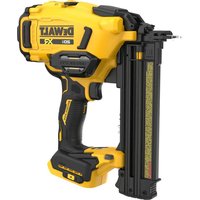
| Product type | Cordless pin nailer |
| Brand | DEWALT |
| Model | DCN210 |
| Power source | 20V MAX Li-Ion battery |
| Nail type | 18-gauge pins (18 GA) |
| Nail length | 16 to 50 mm |
| Magazine capacity | 100 pins |
| Weight | 2.6 kg (with battery) |
| Dimensions (L x W x H) | 28 x 8 x 28 cm |
| Depth adjustment | Tool-free adjustment |
| Trigger modes | Sequential and contact |
| Dry-fire lockout | Yes |
| Battery indicator | LED indicator |
| Handle | Rubberized non-slip |
| Maintenance and cleaning | Regular cleaning of the nozzle and chamber |
| Spare parts | Nails, batteries, and chargers available |
| Warranty | 3 years |
| Safety standards | CE, GS |
Frequently Asked Questions - DCN210 DEWALT
How to use the DCN210 nailer for the first time?
Make sure the battery is charged, insert the pins into the magazine, then press the trigger against the surface. For sequential firing, press once. For contact firing, hold the trigger and tap the surface. Read the manual before use.
Which nails are suitable for the DCN210?
Use 18-gauge pins (18 GA) with a length of 16 to 50 mm. Compatible brands include DEWALT, but not only; check compatibility. Do not use bent or damaged nails.
How to adjust the driving depth?
Use the adjustment wheel located near the nozzle. Turn it to drive deeper or shallower. Test on a piece of wood before starting.
How to charge the DCN210 battery?
Insert the battery into the compatible DEWALT charger. The indicator shows the charge level. Unplug once charging is complete. Use only original chargers.
What to do in case of a nail jam?
Disconnect the battery, open the magazine, remove the stuck nails with pliers. Clean the area. Reload the pins and reconnect.
How to maintain the nailer?
Regularly clean the nozzle and chamber with a dry cloth. Check that there is no dust. Apply a few drops of oil to the piston if necessary (according to the manual). Store in a dry place.
What safety precautions should be observed?
Wear safety glasses. Never aim at a person. Do not place your fingers in front of the nozzle. Disconnect the battery when cleaning. Follow the instructions in the manual.
How to switch between sequential/contact firing mode?
The mode selector is located on the side of the housing. Push it forward for contact mode, backward for sequential. Test on a scrap piece.
The battery indicator is blinking, what should I do?
A blinking indicates low voltage or an error. Recharge the battery. If the light stays red, the battery may be damaged. Contact customer service.
Where to buy spare parts?
Contact a DEWALT authorized service center or the official website. You can also find batteries and chargers online. Use original parts for safety.
User questions about DCN210 DEWALT
0 question about this device. Answer the ones you know or ask your own.
Ask a new question about this device
No questions yet. Be the first to ask one.
Download the instructions for your Uncategorized in PDF format for free! Find your manual DCN210 - DEWALT and take your electronic device back in hand. On this page are published all the documents necessary for the use of your device. DCN210 by DEWALT.
USER MANUAL DCN210 DEWALT

Manual assistant
Powered by Anthropic
Waiting for your message
Product information
Brand : DEWALT
Model : DCN210
Category : Uncategorized