NR 1602 - AV receiver MARANTZ - Free user manual and instructions
Find the device manual for free NR 1602 MARANTZ in PDF.


| Product Type | Audio-video receiver |
| Brand | Marantz |
| Model | NR 1602 |
| Channel Configuration | 7.1 channels |
| Dimensions (W x H x D) | 440 x 105 x 376 mm |
| Weight | 8.5 kg |
| Power Supply | 230 V AC, 50/60 Hz |
| Power Consumption | 200 W (operation), 0.5 W (standby) |
| Main Features | Dolby TrueHD, DTS-HD Master Audio decoder; 7 HDMI inputs (3D and 4K compatible); AirPlay support; USB port; FM/AM tuner; Audyssey automatic speaker calibration |
| Maintenance and Cleaning | Disconnect the device then clean with a soft, dry cloth. Do not use chemical or abrasive products. |
| Safety | Unplug the power cord to completely cut off power. Do not expose to humidity or heat sources. |
| Spare Parts and Repairability | Contact an authorized Marantz after-sales service for any repair or replacement of parts. |
| General Information | Compliant with European Low Voltage Directive (2006/95/EC), EMC (2004/108/EC) and ErP (2009/125/EC). Recyclable packaging materials. Product subject to the WEEE directive. |
Frequently Asked Questions - NR 1602 MARANTZ
User questions about NR 1602 MARANTZ
0 question about this device. Answer the ones you know or ask your own.
Ask a new question about this device
Download the instructions for your AV receiver in PDF format for free! Find your manual NR 1602 - MARANTZ and take your electronic device back in hand. On this page are published all the documents necessary for the use of your device. NR 1602 by MARANTZ.
USER MANUAL NR 1602 MARANTZ
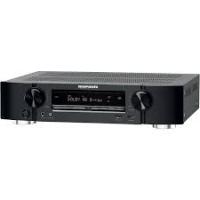
AV Surround Receiver NR1602

CD-ROM
Getting Started
Erste Schritte
Mise en route
Guida introductiva
Antes de empezar
Aandeslag
Att komma igang
Explains how to easily install, connect and setup a 7.1-channel home theater system.
The lightning flash with arrowhead symbol, within an equilateral triangle, is intended to alert the user to the presence of uninsulated "dangerous voltage" within the product's enclosure that may be of sufficient magnitude to constitute a risk of electric shock to persons.

The exclamation point within an equilateral triangle is intended to alert the user to the presence of important operating and maintenance (servicing) instructions in the literature accompanying the appliance.
WARNING:
TO REDUCE THE RISK OF FIRE OR ELECTRIC SHOCK, DO NOT EXPOSE THIS APPLIANCE TO RAIN OR MOISTURE.
IMPORTANT SAFETY INSTRUCTIONS
- Read these instructions.
- Keep these instructions.
- Heed all warnings.
- Follow all instructions.
- Do not use this apparatus near water.
- Clean only with dry cloth.
- Do not block any ventilation openings. Install in accordance with the manufacturer's instructions.
- Do not install near any heat sources such as radiators, heat registers, stoves, or other apparatus (including amplifiers) that produce heat.
- Protect the power cord from being walked on or pinched particularly at plugs, convenience receptacles, and the point where they exit from the apparatus.
- Only use attachments/accessories specified by the manufacturer
- Use only with the cart, stand, tripod, bracket, or table specified by the manufacturer, or sold with the apparatus. When a cart is used, use caution when moving the cart/ apparatus combination to avoid injury from tip-over.
- Unplug this apparatus during lightning storms or when unused for long periods of time.
- Refer all servicing to qualified service personnel. Servicing is required when the apparatus has been damaged in any way, such as power-supply cord or plug is damaged, liquid has been spilled or objects have fallen into the apparatus, the apparatus has been exposed to rain or moisture, does not operate normally, or has been dropped.
- Batteries shall not be exposed to excessive heat such as sunshine, fire or the like.
CAUTION:
To completely disconnect this product from the mains, disconnect the plug from the wall socket outlet.
The mains plug is used to completely interrupt the power supply to the unit and must be within easy access by the user.
VORSICHT:
- DECLARATION OF CONFORMITY
We declare under our sole responsibility that this product, to which this declaration relates, is in conformity with the following standards: EN60065, EN55013, EN55020, EN61000-3-2 and EN61000-3-3. Following the provisions of Low Voltage Directive 2006/95/EC and EMC Directive 2004/108/EC, the EC regulation 1275/2008 and its frame work Directive 2009/125/EC for Energy-related Products (ErP).
A division of D&M Europe B.V.
A NOTE ABOUT RECYCLING:
This product's packaging materials are recyclable and can be reused. Please dispose of any materials in accordance with the local recycling regulations.
When discarding the unit, comply with local rules or regulations.
Batteries should never be thrown away or incinerated but disposed of in accordance with the local regulations concerning battery disposal.
This product and the supplied accessories, excluding the batteries, constitute the applicable product according to the WEEE directive.
HINWEIS ZUM RECYCLING:
Kabackn-ky,Kabackn-cn,Kaharaba
2108569, JIHOHJ
D&M Holdings Inc.
D&M Building, 2-1 Nisshin-Cho
Kawasaki-Ku, Kawasaki-Shi, Kanagawa
2108569, Japan
Read before use
Thank you for purchasing this marantz product.
This manual explains the Setup Wizard that you will need to perform directly after removing the product from its packaging, before you start using the product.
The Setup Wizard displays easy to follow guidance on your television screen that shows you how to connect and configure speakers, various other devices, and network functions for full enjoyment of this unit.
Contents
Read before use
Accessories 1
About this manual 1
Cautions on handling 1
Preparing the Setup Wizard 2
Setup Wizard 4
Playback (Basic operation)
Important information 7
Selecting the input source 7
Adjusting the master volume 8
Turning off the sound temporarily 8
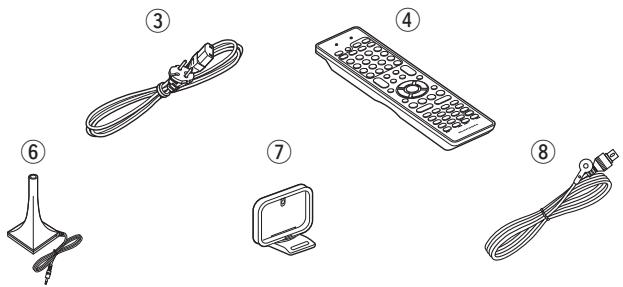
Accessories
Check that the following parts are supplied with the product.
① Getting Started 1
② CD-ROM (Owner's manual) 1
③ Power cord 1
④ Remote control unit (RC014SR)
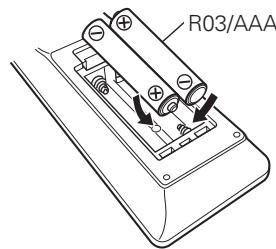
⑤ R03/AAA batteries. 2
⑥ Setup microphone (ACM1H) 1
⑦ AM loop antenna 1
⑧ FM indoor antenna 1
About this manual
Operation buttons
The operations described in this manual are based mainly on remote control operation.
Symbols
This symbol indicates a reference page on which related information is described.
This mark indicates the page of the owner's manual on the CD-ROM provided.
This symbol indicates a supplementary information and tips for operations.
NOTE This symbol indicates points to remember operations or function limitations.
□ Illustrations
Note that the illustrations in this manual is for explanation purposes and may differ from the actual unit.
About the CD-ROM
(Getting Started / Owner's manual)
You need to have Adobe Reader® installed on your computer to view the owner's manuals on the CD-ROM.
Click the Adobe Reader® banner in the CD-ROM menu to install the Adobe Reader® (for Windows).
Cautions on handling
Before turning the power on
Check once again that all connections are correct and that there are no problems with the connection cables.
- Power is supplied to some of the circuitry even when the unit is set to the standby mode. When going on vacation or leaving home for long periods of time, be sure to unplug the power cord from the power outlet.
- About condensation
If there is a major difference in temperature between the inside of the unit and the surroundings, condensation (dew) may form on the operating parts inside the unit, causing the unit not to operate properly.
If this happens, let the unit sit for an hour or two with the power turned off and wait until there is little difference in temperature before using the unit.
- Cautions on using mobile phones
Using a mobile phone near this unit may result in noise. If that occurs, move the mobile phone away from this unit when it is in use.
- Moving the unit
Turn off the power and unplug the power cord from the power outlet. Next, disconnect the connection cables to other system units before moving the unit.
- About care
- Wipe the cabinet and control panel clean with a soft cloth.
- Follow the instructions when using a chemical cleaner.
- Benzene, paint thinner or other organic solvents as well as insecticide may cause material changes and discoloration if brought into contact with the unit, and should therefore not be used.
Preparing the Setup Wizard
This section describes how to prepare the Setup Wizard before use.
- Do not plug the power plug of the main unit into the wall socket until these preparations are complete.
□ Speaker connections are performed using the Setup Wizard. Do not connect the speakers yet.
What you need for this step
| Speaker (sold separately) | Speaker cable (sold separately) |
| FL FR SL SR SBL SBR | ·Prepare enough for the number of speakers you will use. |
| Subwoofer (with built-in amplifier) (sold separately) | Audio cable (sold separately) |
| TV (sold separately) | HDMI cable (sold separately) |
| Remote control unit / R03/AAA batteries (supplied) | Setup microphone (supplied) |
| Power cord (supplied) | |
1 Place and layout speakers
Before installing the speakers, connect the speaker cables to the speakers. For details on how to connect the speaker cables, see the speaker instruction manual.
Connect the speaker cables to the main unit using the Setup Wizard.
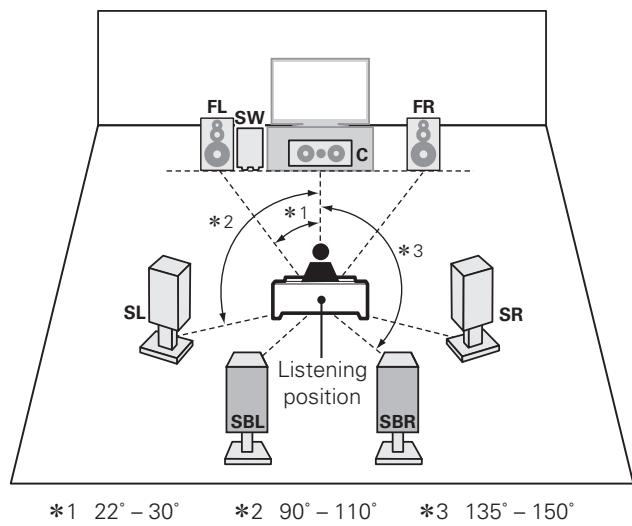
□ When 7.1-channel (Surround back speaker) installed
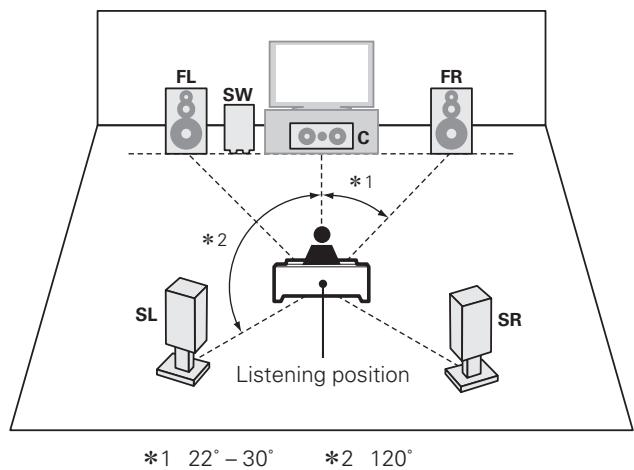
When 5.1-channel installed
FL Front speaker (L)
FR Front speaker (R)
C Center speaker
SW Subwoofer
SL Surround speaker (L)
SR Surround speaker (R)
SBL Surround back speaker (L)
SBR Surround back speaker (R)
- Install the surround speakers in a position 60 to 90 cm higher than ear level.
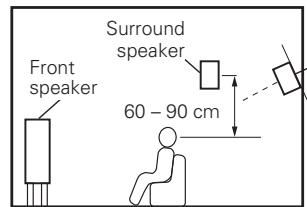
Surround back speaker
(When 7.1-channel installed)
- Point slightly downwards
2 Connect this unit to the television using an HDMI cable (sold separately)
NOTE
If this unit is connected using cables other than the HDMI cable, the Setup Wizard will not be displayed.
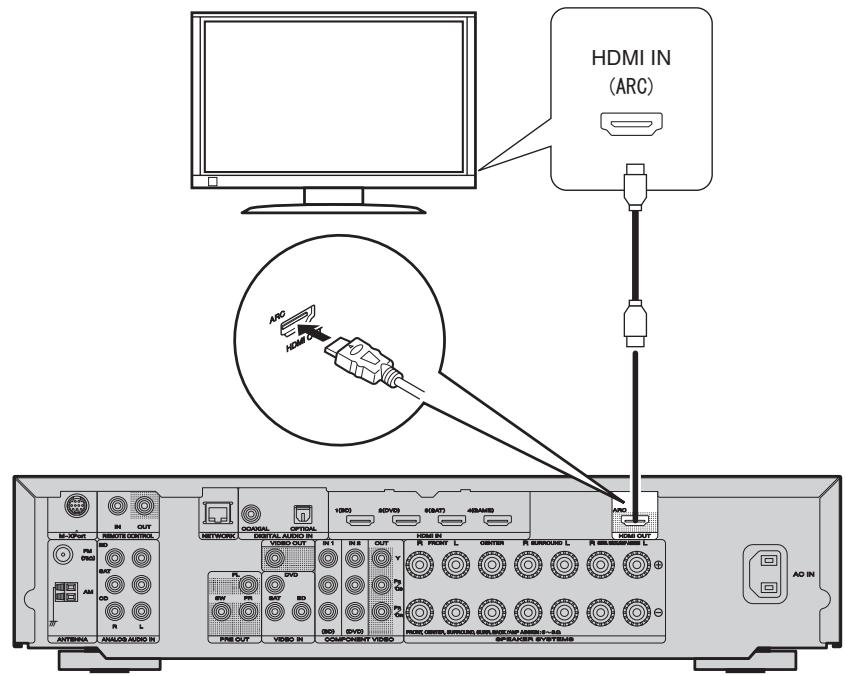
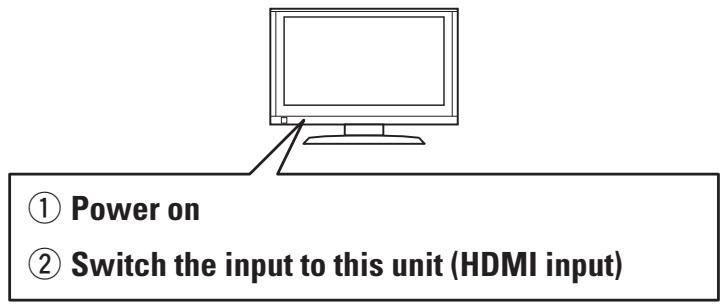
3 Turn the television power on, and switch the video input to this unit (HDMI input)
For details on how to operate the television, see the television instruction manual.
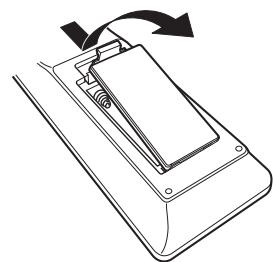
4 Insert the provided batteries into the remote control unit
① Remove the rear lid in the direction of the arrow and remove it.
② Load the two batteries properly as indicated by the marks in the battery compartment.
③ Put the rear cover back on.
Start Setup Wizard on next page
Setup Wizard
When preparations are complete, start the Setup Wizard.
Use the Setup Wizard to perform connections and settings as shown in the following steps. Perform the operations as described in the instructions on the screen. You can skip or cancel at each section if necessary.
1
Language Select
Set the language for the instructions on the television screen.

Language Select
Please select the
language for the on
screen menu.
End
Deutsch
Français

These settings can be changed in the following menu even after setting the Setup Wizard
page 98 "Language").
2
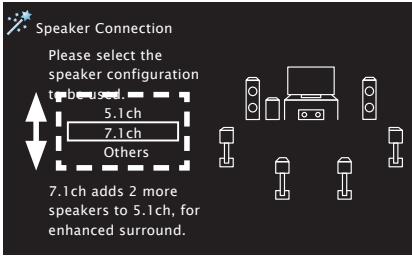
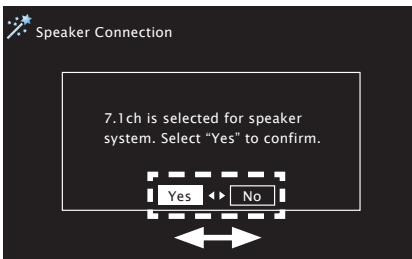
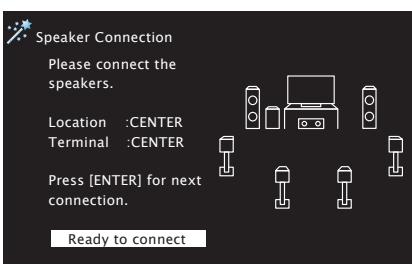
Speaker Connection
Connect the speakers for surround sound.
NOTE
Connections for speakers other than 7.1 channel or 5.1 channel speakers cannot be set using the Setup Wizard.

Speaker Connection
Please select the
speaker configuration
to be use

7.1ch
Others


7.1ch adds 2 more
speakers to 5.1ch, for
enhanced surround.
Select "Others", and then select "Skip" in "2. Speaker Connection" to proceed to "3. Speaker Calibration". (For details on the setting method, see ⑨ page 51 "Speaker installation/connection (Advanced connection)".)
3
Speaker Calibration
Configure the settings for your speakers, and for the optimum surround sound for your room.

Speaker Calibration
Detect & Measure (Main)
Please connect
microphone.
MultEQ


These settings can be changed in the following menu even after setting the Setup Wizard
page 15 "Set up speakers (Audyssey® Auto Setup)".
4
Source Setup
Set the connecting terminals for each device to be set, and connect to the terminals.

Source Setup
Please select device.

DVD
SAT
GAME
TV
CD

These settings can be changed in the following menu even after setting the Setup Wizard

page 101 "Input Assign").
5
Network Setup
Configure to playback audio files saved onto a computer or Internet radio.

Network Setup
Please connect LAN cable to ETHERNET port on rear panel of receiver, and other side of cable to network router.
When connection is complete, press [ENTER] to continue.

These settings can be changed in the following menu even after setting the Setup Wizard

page 92 "Network Setup").
This completes the Setup Wizard.
Basic operation of Setup Wizard
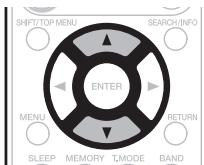
Move to the item that you want to configure using

Move to the item that you want to configure using
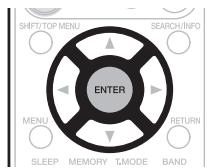
Enters the selection.
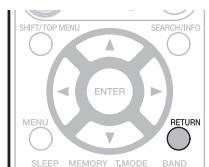
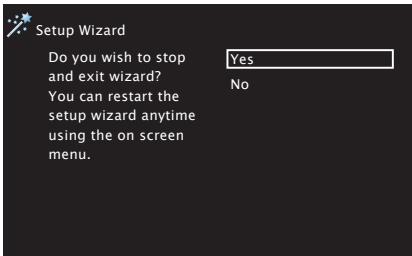
Returns to the start of each setting. or Cancelsthe Setup Wizard.
Getting Started
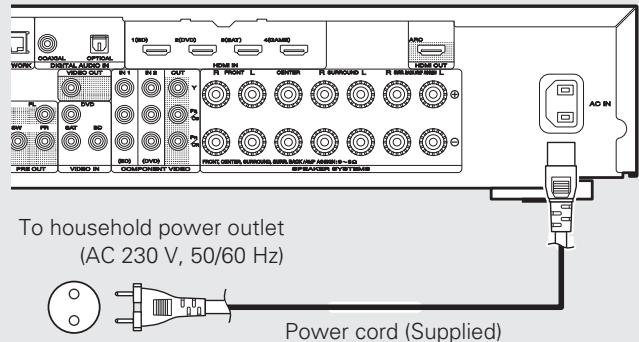
1 Insert the main unit power plug into the wall socket.
Press AMP to set the remote control unit to AMP-operation mode.
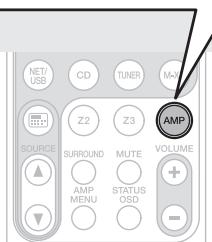
Switch the AMP-operation mode
- This remote control is a preset remote control that can be used to control connected devices.
When power is switched to standby
Press STANDBY (b).
[Power indicator status in standby mode]
- Normal standby : Red
- When "HDMI Control" (1234567890) is set to "ON": Orange
- When "Network Standby" ( page 94) is set to "ON": Orange
![MARANTZ NR 1602 - [Power indicator status in standby mode] - 1](/content/2019/11/166740/images/9c41699206d2581697ed035a4396555c415b921947c823330055094363344f7a.jpg)
NOTE
During power standby, a minimal amount of power is consumed. To totally cut off the power, remove the power cord from the power outlet.

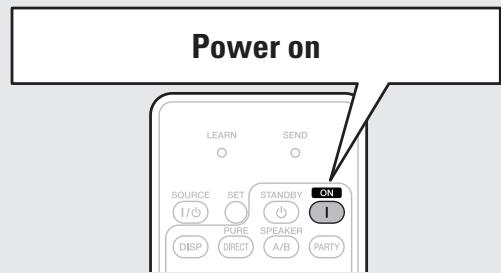
Press ON (I) on this unit.
The power switches on, and the Setup Wizard start screen is displayed on the television screen.

Setup Wizard
This wizard assists
connection and setup
of receiver step by
step using cursor,
enter or return keys
on remote.
Press [ENTER] to start.
Start
- Language Select
- Speaker Connection
- Speaker Calibration
- Source Setup
- Network Setup
Complete

Press ENTER.
Start the Setup Wizard.
Setup Wizard has started. Please follow the message on screen.

To start the Setup Wizard again after exiting it, select "Setup Wizard" in the menu (page 75 "Menu map").
□ Connecting the speakers
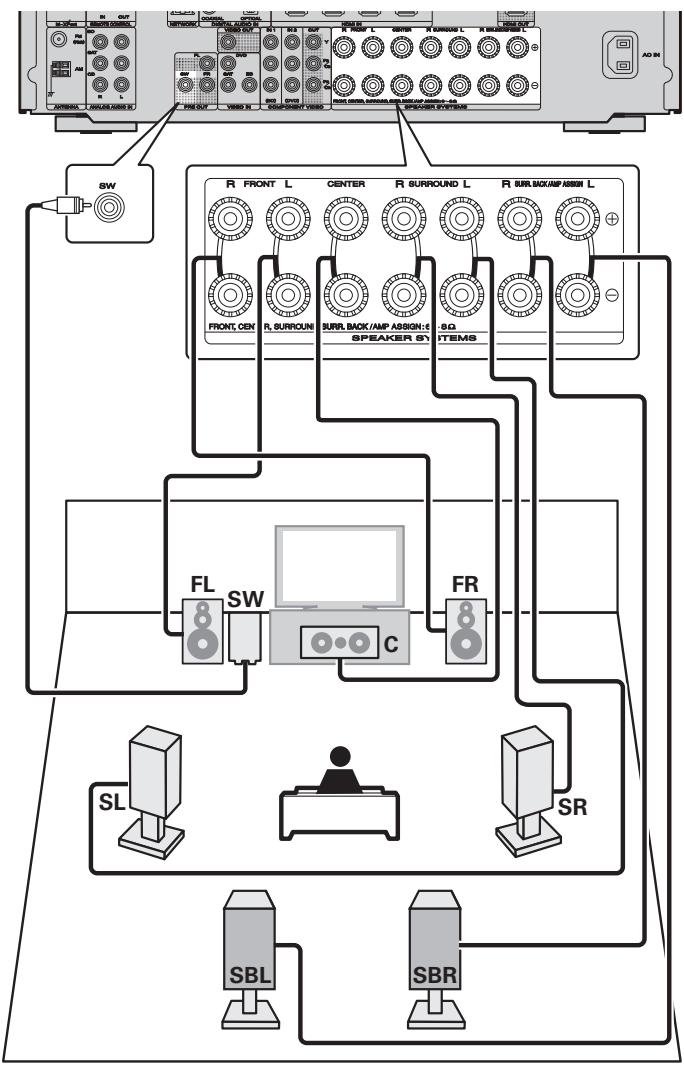
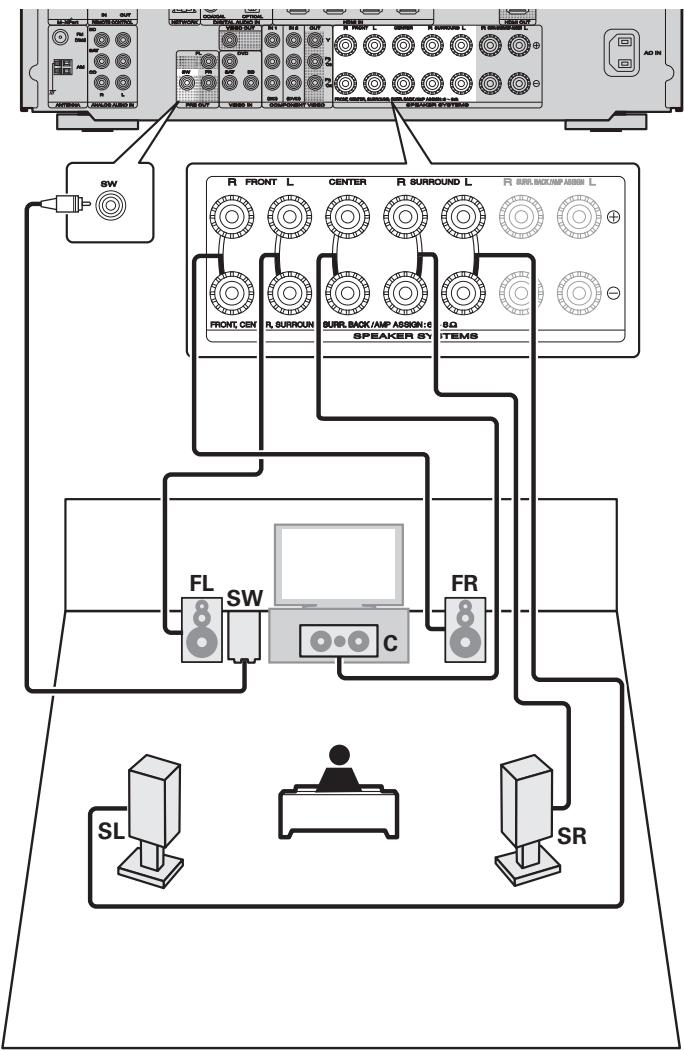
The speakers are connected in "2. Speaker Connection" of the Setup Wizard but if you did not use or cancelled the Setup Wizard, connect the speakers as shown below.
For details, see the included CD-ROM (Owner's manual).
Connect
Carefully check the left (L) and right (R) channels and + (red) and - (black) polarities on the speakers being connected to the this unit, and be sure to interconnect the channels and polarities correctly.
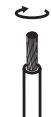
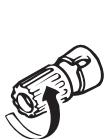
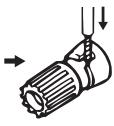
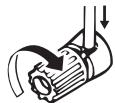
Connecting the speaker cables
Peel off about 10mm of sheathing from the tip of the speaker cable, then either twist the core wire tightly or terminate it.
→
NOTE
- Connect so that the speaker cable core wires do not protrude from the speaker terminal. The protection circuit may be activated if the core wires touch the rear panel or if the + and - sides touch each other (page 126 "Protection Circuit").
- Never touch the speaker terminals while the power supply is connected. Doing so could result in electric shock. (When the Setup Wizard is running, follow the instructions in the Setup Wizard screen for making connections.)
- Use speakers with the speaker impedances shown below.
| Speaker terminals | Speaker impedance |
| FRONT | 6-8Ω |
| CENTER | |
| SURROUND | |
| SURR. BACK / AMP ASSIGN |
7.1-channel
5.1-channel
Playback (Basic operation)
Here, we explain how to perform simple operations.
For details, see the included CD-ROM (Owner's manual).
Important information
Before starting playback, make the connections between the different devices and the settings on the unit.
NOTE
Also refer to the operating instructions of the connected devices when playing them.
Selecting the input source
Press the input source select button (BD, DVD, SAT, TV, NET/USB, CD, TUNER or M-XP) twice to be played back.
When an input source select button (BD, DVD, SAT, TV, CD, NET/USB, TUNER or M-XP) is pressed once, the unit switches to device selected by the operating mode of the remote control. If the input source select button is then pressed again twice, the input source for the unit is switched.
- When is pressed, the input source of this unit is switched to "NET/USB" and the connected iPod is automatically played (page 26 "iPod play function").

The input source "GAME" is selected to playback from a game device connected to GAME connector of HDMI IN.
Select the input source "GAME" using one of the following methods.
- "Source Select" menu
("Using the "Source Select" menu" provided on the right) - SOURCE button on the remote control unit
(Using the SOURCE button on the remote control unit provided on the right) - INPUT SELECTOR knob on the main unit
("Using the knob on the main unit" provided on the right)
You can also use the following operation to select an input source.
□ Using the "Source Select" menu
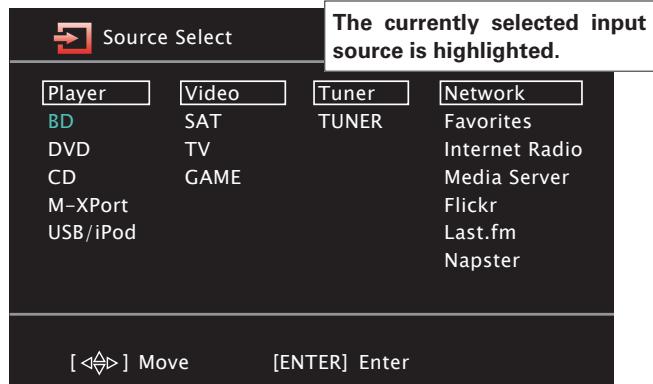
① Press
Display the "Source Select" menu.
② Use to select the input source, then press ENTER.
The input source is set and the source selection menu is turned off.
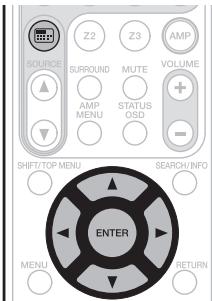
Selecting the input source
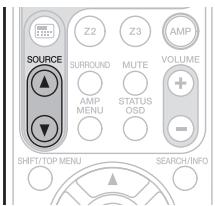
Using the SOURCE button on the remote control unit
Press SOURCE ▲ or SOURCE ▼
- Every time you press SOURCE ▲ or SOURCE▼, the input source switches in the following order.

Using the knob on the main unit
Turn INPUT SELECTOR.
- Every time you turn INPUT SELECTOR, the input source switches in the following order.


- When using with an iPod connected directly to the USB port of this unit, select "USB/iPod" for the input source.
- Input sources that are not going to be used can be set ahead of time. Make this setting at "Source Delete" (10 page 96).
- To turn off the source selection menu without selecting an input source, press again.
- When is pressed, the AMP-operation mode starts automatically (10 page 106).
Adjusting the master volume
Use VOLUME + - to adjust the volume.
When the "Volume Display" setting ( page 96) is "Relative" [Adjustable range]
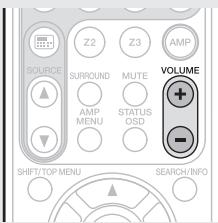
□ When the "Volume Display" setting ( page 96) is "Absolute" [Adjustable range] 0.0-99.0
- The variable range differs according to the input signal and channel level setting.

You can also operate via the main unit. In this case, perform the following operations.
Turn VOLUME to adjust the volume.
Turning off the sound temporarily
Press MUTE.
- "MUTE" indicator on the display lights.

appears on a TV screen.
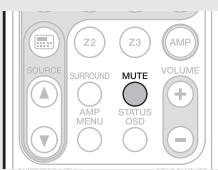

- The sound is reduced to the level set at "Mute Level" (10 page 96).
- To cancel, press MUTE again. Muting can also be canceled by adjusting the master volume.
Other operations
See the following items on the included CD-ROM (Owner's manual).
□ Playing a Blu-ray Disc player/DVD player
□ Playing a CD player
□ Playing an iPod®
□ Playing a USB memory device
Tuning in radio stations
□ Playing a network audio
□ Selecting a listening mode (Surround mode)
Convenient functions
Playback in ZONE2 (Separate room)
□ How to make detailed settings
□ Operating the connected devices by remote control unit

This completes the basic settings and operations.
For details on how to change settings or detailed explanations of operations, see the included CD-ROM (Owner's manual).


www.marantz.com
You can find your nearest authorized distributor or dealer on our website.
marantz® is a registered trademark.
- AV Surround Receiver NR1602
- CD-ROM
- WARNING:
- IMPORTANT SAFETY INSTRUCTIONS
- CAUTION:
- VORSICHT:
- - DECLARATION OF CONFORMITY
- A NOTE ABOUT RECYCLING:
- HINWEIS ZUM RECYCLING:
- Read before use
- Contents
- Accessories
- About this manual
- Operation buttons
- Symbols
- □ Illustrations
- About the CD-ROM
- (Getting Started / Owner's manual)
- Cautions on handling
- Before turning the power on
- - About condensation
- - Cautions on using mobile phones
- - Moving the unit
- - About care
- Preparing the Setup Wizard
- What you need for this step
- Place and layout speakers
- Connect this unit to the television using an HDMI cable (sold separately)
- NOTE
- Turn the television power on, and switch the video input to this unit (HDMI input)
- Insert the provided batteries into the remote control unit
- Setup Wizard
- Language Select
- Speaker Connection
- Speaker Calibration
- Source Setup
- Network Setup
- Basic operation of Setup Wizard
- Getting Started
- When power is switched to standby
- [Power indicator status in standby mode]
- Press ON (I) on this unit.
- Press ENTER.
- Setup Wizard has started. Please follow the message on screen.
- □ Connecting the speakers
- Connect
- Connecting the speaker cables
- 7.1-channel
- 5.1-channel
- Playback (Basic operation)
- Important information
- Selecting the input source
- Adjusting the master volume
- Turning off the sound temporarily
- Press MUTE.
- Other operations
- www.marantz.com
Brand : MARANTZ
Model : NR 1602
Category : AV receiver