
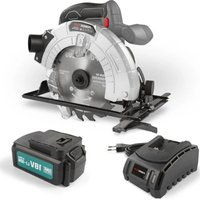
POWX0332 - Saw PowerPlus - Free user manual and instructions
Find the device manual for free POWX0332 PowerPlus in PDF.


Pick your language and provide your email: we'll send you a specifically translated version.
| Product type | Circular saw |
| Brand | PowerPlus |
| Model | POWX0332 |
| Power | 1200 W |
| Blade diameter | 185 mm |
| No-load speed | 5000 rpm |
| Cutting depth | 64 mm at 90° |
| Power supply | Mains 230-240 V / 50 Hz |
| Dimensions (L x W x H) | 345 x 235 x 275 mm |
| Weight | 4.2 kg |
| Main functions | Straight and angled cutting up to 45°, laser guide, dust extraction connection |
| Maintenance and cleaning | Dust off ventilation slots, clean the blade after use |
| Safety | Protective guard, safety switch, spindle lock |
| Spare parts and repairability | Replaceable carbon brushes, blade and accessories available |
| General information | Instruction manual 221 pages, available in multiple languages |
Frequently Asked Questions - POWX0332 PowerPlus
How do I change the blade on my PowerPlus POWX0332 circular saw?
To change the blade, first unplug the tool, then use the supplied wrench to lock the spindle. Loosen the central screw, remove the old blade, install the new one respecting the rotation direction, then firmly tighten the screw.
What is the maximum cutting depth I can achieve with this saw?
The maximum cutting depth at 90° is 64 mm. This value allows cutting thick boards or standard particle boards.
How do I adjust the bevel cutting angle?
Loosen the angle locking lever located at the front of the base plate, tilt the base plate to the desired angle using the graduated scale (up to 45°), then firmly tighten the lever before cutting.
Why does the blade jam during cutting?
Jamming can be caused by feeding too quickly, a dull blade, or pinching in the material. Reduce the feed rate, check the blade condition, and make sure the workpiece is properly secured.
How do I connect a vacuum cleaner to the saw?
The saw is equipped with a vacuum adapter. Remove the dust cover and directly connect the hose of your vacuum cleaner or a collection bag for efficient chip extraction.
What type of blade is compatible with the POWX0332 model?
Use blades of 185 mm diameter with a 20 mm bore. Choose a blade suited to the material: wood, panels, or non-ferrous metals.
How do I maintain the saw motor?
Keep the ventilation slots always clean and clear. After each use, blow off dust with compressed air or a brush. Replace the carbon brushes when worn to preserve the motor's lifespan.
What safety precautions should I follow?
Wear safety glasses, cut-resistant gloves, and a dust mask. Never remove the protective guard, keep your hands away from the cutting area, and unplug the tool before any adjustment.
Can I use this saw to cut metal?
Yes, provided you install a blade suitable for metal (carbide or HSS steel) and set a slower speed if your model has a variable speed control. Otherwise, use light passes to avoid overheating.
What should I do if the guide laser no longer lights up?
First check the batteries of the laser module (usually button batteries). If the problem persists, clean the lens. If the laser is still faulty, contact after-sales service for a replacement of the part.
User questions about POWX0332 PowerPlus
0 question about this device. Answer the ones you know or ask your own.
Ask a new question about this device
No questions yet. Be the first to ask one.
Download the instructions for your Saw in PDF format for free! Find your manual POWX0332 - PowerPlus and take your electronic device back in hand. On this page are published all the documents necessary for the use of your device. POWX0332 by PowerPlus.
USER MANUAL POWX0332 PowerPlus




Manual assistant
Powered by Anthropic
Waiting for your message
Product information
Brand : PowerPlus
Model : POWX0332
Category : Saw