
STOPSLEEP - Anti-snoring device SNOOPER - Free user manual and instructions
Find the device manual for free STOPSLEEP SNOOPER in PDF.


User questions about STOPSLEEP SNOOPER
0 question about this device. Answer the ones you know or ask your own.
Ask a new question about this device
Download the instructions for your Anti-snoring device in PDF format for free! Find your manual STOPSLEEP - SNOOPER and take your electronic device back in hand. On this page are published all the documents necessary for the use of your device. STOPSLEEP by SNOOPER.
USER MANUAL STOPSLEEP SNOOPER
Congratulations on purchasing StopSleep, the most effective Anti-sleep alarm on the market. Get the most out of StopSleep by taking a few minutes to read this guide.

Understanding StopSleep
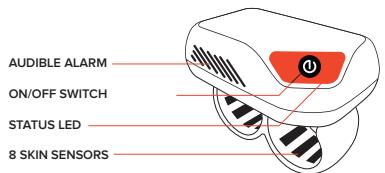
StopSleep is a two finger ring with 8 built-in cutaneous sensors which continually measure your skin's conductance and electrodermal activity. This electrodermal activity represents your brain activity and as soon as your concentration and awareness starts to drop, StopSleep will alert you immediately.
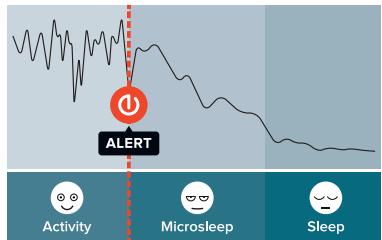
An example of Electrodermal activity as user moves from an 'active' state to 'microsleep' and then 'sleep.'
First time use
To familiarize yourself with the StopSleep alerts, we advise you to test it in an non-dangerous environment such as at home at night watching television, or even going to bed. This will allow you to differentiate between the two types of alerts: WARNING! and DANGER!
We guarantee you will be very quickly convinced of how amazingly effective StopSleep is!
Battery charge level and charging
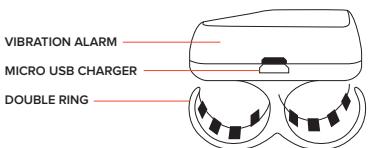
From time to time, it is recommended to fully charge/discharge the battery. This will improve the performance and the longevity of the battery, like any other Lithium battery powered device. StopSleep can be charged by its micro USB connection.
Switching StopSleep on
To switch the StopSleep on, press the ON/OFF button for 3 seconds. The unit will beep and flash green. A succession of sharp beeps will follow, depending on the battery level:
Battery charge level when switching the device on:
| No beeps | Battery fully charged |
| 1 Beep | Over 50 % battery charge left |
| 2 Beeps | Over 25 % battery charge left |
| 3 Beeps | About 2 hours of battery time left |
| 4 Beeps | About 1 hour of battery time left |
| 5 Beeps | Battery nearly flat, recharge before use |
Check that the battery is fully charged and put StopSleep on any two fingers of either your right or left hand. Whilst the StopSleep skin sensors are establishing contact with your skin, the LED will flash green every 3 seconds. Once contact has been completely established the LED will then flash green once every minute. You can check that the unit is on at any time by briefly pressing the on/off button. The LED will flash green to confirm that it is powered on and has sufficient charge or will flash red if the battery is nearly flat and needs recharging.
If you remove StopSleep at any time, the device will beep every 2 minutes. This indicates that it has lost contact with your skin and is no longer monitoring your electrodermal activity and providing any protection.
Understanding StopSleep alarms
If your brain activity drops under a certain level, StopSleep will alert you.
There are 2 levels of alerts:

WARNING!
Vibration
Your concentration has dropped slightly even though you may not necessarily have noticed.

DANGER!
Loud Beep + Vibration
Your concentration and awareness has dropped significantly. Take a break!
Please Note:
- StopSleep can alert even when you are not feeling obviously tired or drowsy. This could be due to a number of reasons.
- Your level of attention or concentration can drop imperceptibly without you necessarily noticing. If your brain activity remains constant for a long time StopSleep might alert you to check your reaction time (on a long drive for example);
- A big change in temperature can also trigger an alert (due to the sweat from your skin suddenly changing).
Turning Off and charging
Turn StopSleep off by pressing the on/off button for 3 seconds. The LED will flash green followed by a deep tone.
Connect either the home or vehicle charger supplied with StopSleep to the micro USB socket on the side of the unit. The LED will flash red every 5 seconds to confirm that it is charging correctly. The LED will turn from red to green once the battery is fully charged.
Please note:
StopSleep must be switched off when charging. If you attempt to charge StopSleep whilst powered on, it will beep every 2 minutes. If the battery has been completely discharged it is advisable to re-charge it using the AC adaptor. If the battery has been completely discharged, it could take up to 15 minutes before you see the red LED begin to flash indicating that it is charging correctly.
User Recommendations
StopSleep has been designed to alert in case of drowsiness and drops in concentration and awareness. StopSleep should not be used as substitute for driving with due care and attention. The user is responsible for paying full attention to road conditions and under no circumstances should StopSleep be used to attempt to keep the user awake when feeling over-tired or too tired to drive safely. When driving always take regular breaks and always take a break at the first signs of fatigue or a drop in concentration. If StopSleep alerts, stop driving immediately.
Online registration and warranty
StopSleep's algorithm could be subject to change. It is strongly recommended to register the unit online at www.StopSleep.co.uk in the "PRODUCT REGISTRATION" section in order to be kept informed of any changes and update your device if necessary.
StopSleep comes with a one year warranty. The warranty applies to a fair use of the StopSleep device. Problems arising from lack of care or misuse (falls, humidity, water exposure, tampering, etc...) would void the warranty. It is strongly recommended to keep it in its carry case when not use.
Technical support and After Sales Service
If you have any further question on how to use StopSleep, please visit www.StopSleep.co.uk com where you will find more detailed product information, "FREQUENTLY ASKED QUESTIONS" and technical support. You will also find information on the return policy and procedure should you encounter a problem with StopSleep.
Explanation of flashes and alerts
CAPTION
| Green LED | Beep | Vibration |
| Red LED | Melody |
SWITCHING ON
Press the ON/OFF button for 3 seconds.
| Start | |||
| Over 50 % battery charge left | |||
| Over 25 % battery charge left | |||
| About 2 hours of battery time left | |||
| About 1 hour of battery time left | |||
| Battery nearly flat, recharge before use | |||
| IN USE | |||
| 3 sec | 1 min | Everything is ok | |
| 2 sec | 2 min | Skin not detected / device removed | |
| ALERTES | |||
| WARNING! = Your concentration has started to drop. | |||
| DANGER! = Your attention has dropped significantly | |||
| Low battery, the device will need charging soon | |||
| Very low battery | |||
| Battery flat, device will switch off | |||
SWITCHING OFF
Press the ON/OFF button for 3 seconds.

Device switched off
CHARGING STOPSLEEP
StopSleep must be switched off while charging.

Charging

Charging completed
Note
If the battery has been completely discharged it is advisable to re-charge it using the AC adaptor. If the battery has been completely discharged, it could take up to 15 minutes before you see the red LED begin to flash indicating that it is charging correctly.
STOPSEU
ANTI-DROWSING DEVICE
| Groene led | 1 pieptoon | Trillingen |
| Rode led | Melodie |