
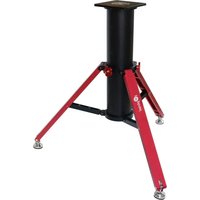
HAE29C - Tripod iOptron - Free user manual and instructions
Find the device manual for free HAE29C iOptron in PDF.


Pick your language and provide your email: we'll send you a specifically translated version.
| Product Type | Astrophotography Tripod |
| Brand | iOptron |
| Model | HAE29C |
| Intended Use | Support for equatorial mounts and telescopes |
| Material | Stainless steel legs with aluminum central column |
| Maximum Load Capacity | 30 kg (66 lbs) |
| Height Range | 65 cm to 115 cm (25.6 to 45.3 inches) |
| Leg Sections | 3 sections with quick-release locks |
| Leg Diameter | 32 mm |
| Mounting Thread | 3/8"-16 screw with 1/4"-20 adapter |
| Spreader | Pull-out spring-loaded spreader |
| Tripod Weight | 9.5 kg (21 lbs) |
| Folded Length | 78 cm (30.7 inches) |
| Included Accessories | Carrying bag, bracket for counterweight shaft |
| Maintenance | Clean with dry cloth; apply light grease to threads yearly |
| Safety Features | Non-slip rubber feet and locking safety pin |
| Repair and Parts | Replacement legs and locks available from iOptron service |
Frequently Asked Questions - HAE29C iOptron
What is the load capacity of the iOptron HAE29C tripod?
The iOptron HAE29C tripod can support up to 30 kg (66 lbs), making it suitable for heavy equatorial mounts and telescopes.
How do I set up the tripod for stable observation?
Extend the legs fully, spread them to the desired width, and push down the spring-loaded spreader to lock the position. Then adjust the center column for leveling.
Is the tripod compatible with my equatorial mount?
The tripod features a 3/8"-16 mounting screw and includes a 1/4"-20 adapter, so it can fit most standard equatorial mounts and camera heads.
How do I clean and maintain the tripod?
Wipe the tripod with a dry soft cloth after each use. Apply a small amount of light grease to the leg threads and locks annually to keep them smooth.
Can I replace the tripod feet or leg locks?
Yes, the legs, locks, and rubber feet are available as spare parts from iOptron customer service, and they can be replaced with basic tools.
What is the height adjustment range?
The tripod height ranges from 65 cm to 115 cm (25.6 to 45.3 inches), allowing you to find a comfortable viewing position.
Does the tripod come with a carrying bag?
Yes, the package includes a custom carrying bag for convenient transport and storage.
How do I adjust the center column?
Loosen the center column lock, slide the column to the desired height, and tighten the lock securely before mounting equipment.
Are there any safety precautions to follow?
Always ensure the tripod is on stable ground and never exceed the maximum load capacity. Use the locking safety pin when the center column is extended.
Can I use this tripod for astrophotography?
Absolutely, the sturdy design and high load capacity make it ideal for astrophotography with telescopes and tracking mounts, providing a stable platform for long exposures.
User questions about HAE29C iOptron
0 question about this device. Answer the ones you know or ask your own.
Ask a new question about this device
No questions yet. Be the first to ask one.
Download the instructions for your Tripod in PDF format for free! Find your manual HAE29C - iOptron and take your electronic device back in hand. On this page are published all the documents necessary for the use of your device. HAE29C by iOptron.
USER MANUAL HAE29C iOptron


Manual assistant
Powered by Anthropic
Waiting for your message
Product information
Brand : iOptron
Model : HAE29C
Category : Tripod