
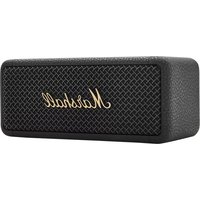
Stockwell III - Loudspeaker MARSHALL - Free user manual and instructions
Find the device manual for free Stockwell III MARSHALL in PDF.

View the manual :
 FR
FR
 BG
BG
 CS
CS
 DA
DA
 DE
DE
 EL
EL
 EN
EN
 ES
ES
 ET
ET
 FI
FI
 HE
HE
 HU
HU
 ID
ID
 IT
IT
 JA
JA
 KO
KO
 LT
LT
 LV
LV
 NL
NL
 NO
NO
 PL
PL
 PT
PT
 RO
RO
 RU
RU
 SK
SK
 SL
SL
 SV
SV
 TR
TR
 UK
UK
 VI
VI
 ZH
ZH
FR
BG
CS
DA
DE
EL
EN
ES
ET
FI
HE
HU
ID
IT
JA
KO
LT
LV
NL
NO
PL
PT
RO
RU
SK
SL
SV
TR
UK
VI
ZH
Pick your language and provide your email: we'll send you a specifically translated version.
| Product type | Portable Bluetooth speaker |
| Brand | Marshall |
| Model | Stockwell III |
| Category | Portable speaker |
| Wireless connectivity | Bluetooth 5.1 |
| Bluetooth range | About 10 meters |
| Battery life | Up to 20 hours of playback |
| Charging time | About 4.5 hours |
| Power source | Rechargeable lithium-ion battery, charges via USB-C |
| Output power | 20 W RMS |
| Dimensions | 160 × 200 × 126 mm |
| Weight | About 1.48 kg |
| Care and cleaning | Wipe with a soft, dry cloth; avoid abrasive products |
| Safety | Do not expose to water, excessive heat, or humidity |
| Spare parts and repairability | Contact Marshall customer service for any repair or part |
| General information | User manual available in multiple languages |
Frequently Asked Questions - Stockwell III MARSHALL
What is the battery life of the Marshall Stockwell III speaker?
The Marshall Stockwell III speaker offers up to 20 hours of playback on a single charge, depending on volume and audio content.
How do I connect my smartphone via Bluetooth?
Turn on the speaker by turning the Power knob. Press the Bluetooth button to activate pairing mode, then select Stockwell III in your device's Bluetooth settings.
Is the Stockwell III water-resistant?
The Marshall Stockwell III has a splash-resistant design, but it is not designed to be submerged. Avoid exposing it directly to rain or water.
How do I charge the speaker and how long does it take?
Use the included USB-C cable to connect the speaker to a power source. The charging time is about 4.5 hours for a full charge.
Can I use the Stockwell III on the go?
Yes, thanks to its compact size and weight of 1.48 kg, the Stockwell III is easy to carry. Its built-in wrist strap makes it easy to carry by hand.
How do I adjust the bass and treble?
Use the Bass and Treble controls located on the top of the speaker to adjust the sound to your preferences.
Does the Stockwell III have a microphone for calls?
The Stockwell III model does not have a built-in microphone. It is designed mainly for wireless audio streaming.
What should I do if the speaker won't turn on?
Check that the battery is sufficiently charged. Plug it into a power source via the USB-C cable and wait a few minutes before turning it back on.
Can I connect two devices at the same time?
The Marshall Stockwell III supports multipoint connection. You can pair two devices and easily switch between them.
How do I clean my Stockwell III speaker?
Use a soft, dry cloth to clean the surfaces. Never use chemicals or solvents and avoid getting moisture into the openings.
User questions about Stockwell III MARSHALL
0 question about this device. Answer the ones you know or ask your own.
Ask a new question about this device
No questions yet. Be the first to ask one.
Download the instructions for your Loudspeaker in PDF format for free! Find your manual Stockwell III - MARSHALL and take your electronic device back in hand. On this page are published all the documents necessary for the use of your device. Stockwell III by MARSHALL.
USER MANUAL Stockwell III MARSHALL

Manual assistant
Powered by Anthropic
Waiting for your message
Product information
Brand : MARSHALL
Model : Stockwell III
Category : Loudspeaker