
Aruba Instant On AP11 - Access Point HP - Free user manual and instructions
Find the device manual for free Aruba Instant On AP11 HP in PDF.


Pick your language and provide your email: we'll send you a specifically translated version.
| Type of product | Wireless access point |
| Brand | HP (Aruba Instant On) |
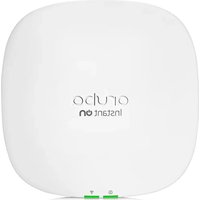
| Model | Aruba Instant On AP11 |
| Category | Access Point |
| Wireless standard | IEEE 802.11ac Wave 2 |
| Frequency bands | Dual-band: 2.4 GHz and 5 GHz |
| Maximum data rate | 867 Mbps on 5 GHz, 300 Mbps on 2.4 GHz |
| Ethernet ports | 1 x Gigabit Ethernet (10/100/1000) with PoE PD |
| Power supply | 802.3af PoE or optional 12V DC adapter |
| Power consumption | 9.5W (typical) |
| Antennas | 2 internal dual-band omnidirectional antennas |
| Security | WPA2, WPA3, 802.1X, firewall |
| Management | Aruba Instant On mobile app and cloud portal |
| Mounting | Ceiling or wall mountable (kit included) |
| Dimensions | 165 x 165 x 30 mm (approx.) |
| Weight | 280 g (approx.) |
| Operating temperature | 0°C to 40°C |
| Humidity | 10% to 90% non-condensing |
| LED indicators | Status LED (system, network) |
| Warranty | 3 years |
Frequently Asked Questions - Aruba Instant On AP11 HP
What is the HP Aruba Instant On AP11?
The HP Aruba Instant On AP11 is a dual-band wireless access point designed for small and medium businesses. It delivers reliable Wi-Fi 5 (802.11ac Wave 2) performance and is managed through the Aruba Instant On mobile app.
How do I set up the AP11?
To set up the AP11, connect it to your network via PoE or a DC adapter, then download the Aruba Instant On app. The app guides you through creating a network, scanning the QR code on the device, and configuring SSIDs. The entire process takes less than 10 minutes.
Does the AP11 support Power over Ethernet (PoE)?
Yes, the AP11 supports 802.3af PoE. You can power the device directly from a PoE switch or an injector, simplifying installation and eliminating the need for a separate power outlet.
What Wi-Fi standard does the AP11 use?
The AP11 uses IEEE 802.11ac Wave 2 (also known as Wi-Fi 5). It provides dual-band connectivity with maximum data rates of 867 Mbps on 5 GHz and 300 Mbps on 2.4 GHz.
Can the AP11 be used with existing routers?
Yes, the AP11 can work as a standalone access point with any router or gateway. Connect its Ethernet port to your router, configure it using the Aruba Instant On app, and it will broadcast your wireless network.
How many devices can the AP11 support?
The AP11 supports up to 256 connected devices. Its MU-MIMO technology ensures efficient data transmission for multiple devices simultaneously, making it suitable for busy small offices.
What security protocols are supported?
The AP11 supports WPA2 and WPA3 encryption, along with 802.1X for enterprise authentication. It also includes a built-in firewall and guest network options to keep your network secure.
How do I reset the AP11 to factory defaults?
To reset the AP11, insert a paperclip into the reset pinhole on the bottom of the device and hold it for about 5 seconds. The status LED blinks to confirm the reset. This restores all settings to their original values.
Can the AP11 be mounted on a wall or ceiling?
Yes, the AP11 comes with a mounting kit that includes brackets for ceiling and wall installation. The compact, low-profile design fits seamlessly into any environment, and the device can also be placed on a desk.
What is the coverage range of the AP11?
The AP11 covers approximately 150 square meters (1,600 square feet) in an open office environment. Actual range depends on obstacles, interference, and the construction materials of your building.
User questions about Aruba Instant On AP11 HP
0 question about this device. Answer the ones you know or ask your own.
Ask a new question about this device
No questions yet. Be the first to ask one.
Download the instructions for your Access Point in PDF format for free! Find your manual Aruba Instant On AP11 - HP and take your electronic device back in hand. On this page are published all the documents necessary for the use of your device. Aruba Instant On AP11 by HP.
USER MANUAL Aruba Instant On AP11 HP


Manual assistant
Powered by Anthropic
Waiting for your message
Product information
Brand : HP
Model : Aruba Instant On AP11
Category : Access Point